Pycapacity
Pycapacity: a real-time task-space capacity calculation package for robotics and biomechanics - Published in JOSS (2023)
Science Score: 100.0%
This score indicates how likely this project is to be science-related based on various indicators:
-
✓CITATION.cff file
Found CITATION.cff file -
✓codemeta.json file
Found codemeta.json file -
✓.zenodo.json file
Found .zenodo.json file -
✓DOI references
Found 5 DOI reference(s) in README and JOSS metadata -
✓Academic publication links
Links to: arxiv.org, joss.theoj.org -
✓Committers with academic emails
1 of 6 committers (16.7%) from academic institutions -
○Institutional organization owner
-
✓JOSS paper metadata
Published in Journal of Open Source Software
Keywords
Scientific Fields
Repository
An efficient task-space capacity calculation package for robotics and biomechanics
Basic Info
- Host: GitHub
- Owner: auctus-team
- License: mit
- Language: Python
- Default Branch: master
- Homepage: https://auctus-team.github.io/pycapacity/
- Size: 90.4 MB
Statistics
- Stars: 33
- Watchers: 2
- Forks: 4
- Open Issues: 0
- Releases: 9
Topics
Metadata Files
README.md
An efficient task-space capacity calculation package for robotics and biomechanics
📢 New version of the pycapacity package is out - version v2.1.7! - see full changelog
About





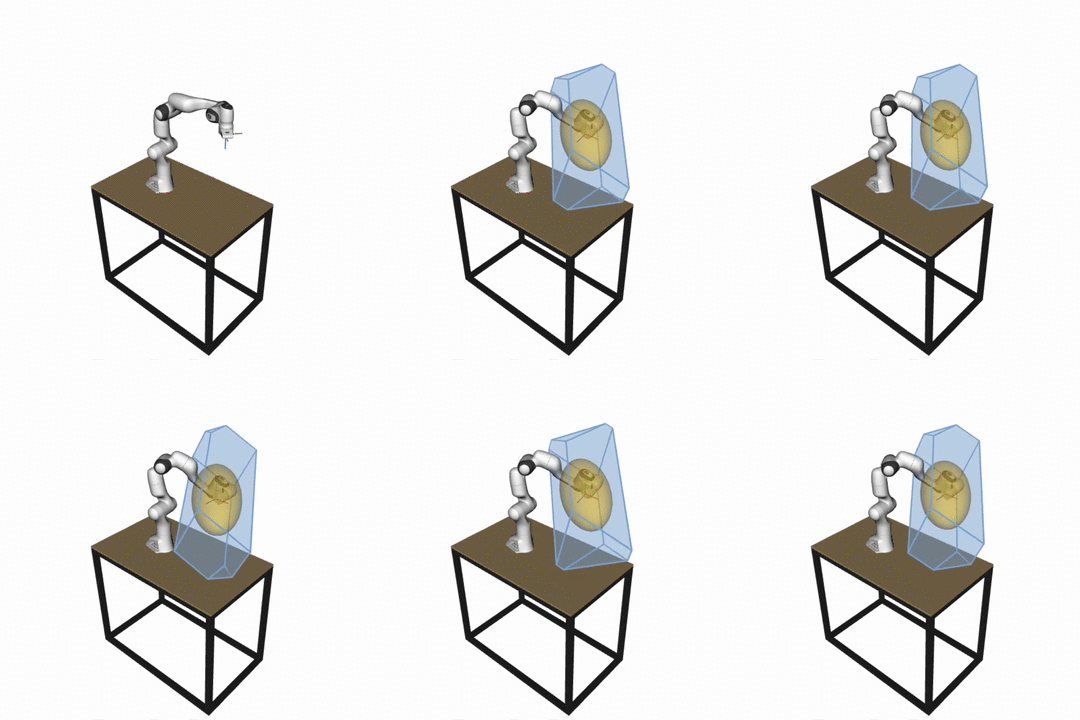


What is pycapacity?
Python package pycapacity provides a set of tools for evaluating task space physical ability metrics for humans and robots, based on polytopes and ellipsoids.
The aim of pycapacity is to provide a set of efficient tools for their evaluation in an easy to use framework that can be easily integrated with standard robotics
and biomechanics libraries. The package implements several state of the art algorithms for polytope evaluation that bring many of the
polytope metrics to the few milliseconds evaluation time, making it possible to use them in online and interactive applications.
The package can be easily interfaced with standard libraries for robotic manipulator rigid body simulation such as robotic-toolbox, pinocchio and mujoco, as well as human musculoskeletal model biomechanics
softwares opensim and biorbd. The package can also be used with the Robot Operating System (ROS).
The package additionally implements a set of visualization tools for polytopes and ellipsoids based on the
Python package matplotlib intended for fast prototyping and quick and interactive visualization.
Compatible libraries
Library | Example --- | --- OpenSim |Tutorial pyomeca biorbd | Tutorial pinocchio | Tutorial Robotics toolbox | Tutorial Robot Operating System (ROS) | Tutorial Mujoco | Tutorial
See full API documentation and docs.
Robotic manipulator capacity metrics
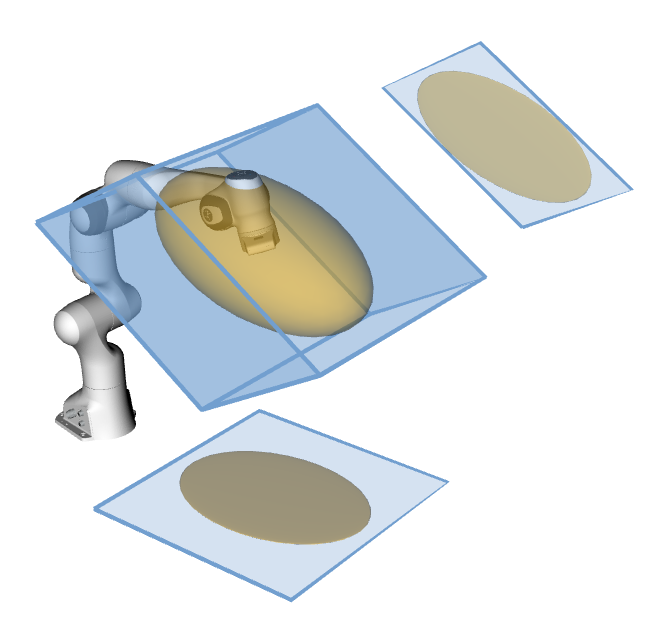
For the robotic manipulators the package integrates several velocity, force and acceleration capacity calculation functions based on ellipsoids:
- Velocity (manipulability) ellipsoid
E_vel = {dx | dx = J.dq, ||dq||<1 }
- Acceleration (dynamic manipulability) ellipsoid
E_acc = {ddx | ddx = J.M^(-1).t, ||t||<1 }
- Force ellipsoid
E_for = {f | J^T.f = t, ||t||<1 }
And polytopes:
- Velocity polytope
P_vel = {dx | dx = J.dq, dq_min < dq < dq_max}
- Acceleration polytope
P_acc = {ddx | ddx = J.M^(-1).t, t_min < t < t_max}
- Force polytope
P_for = {f | J^T.f = t, t_min < t < t_max}
- Reachable space of the robot with a horizon T
P_x = {x | x = JM(-1)tT^2/2, t_min < t < t_max, dq_min < M^(-1)tT < dq_max, q_min < M^(-1)tT^2/2 < q_max}
- Force polytopes Minkowski sum and intersection
- NEW 📢: Sampling-based reachable space approximation with a horizon T
C_x = {x | x = f(q0 + dq*T), q_min < q0 + dq*T < q_max, dq_min < dq < dq_max}
Where J is the robot jacobian matrix, f is the vector of cartesian forces,dx and ddx are vectors fo cartesian velocities and accretions, dq is the vector of the joint velocities and t is the vector of joint torques.
Reachable space polytope approximation is based on this paper:
Approximating robot reachable space using convex polytopes
by Skuric, Antun, Vincent Padois, and David Daney.
In: Human-Friendly Robotics 2022: HFR: 15th International Workshop on Human-Friendly Robotics. Cham: Springer International Publishing, 2023.
The force polytope functions have been implemented according to the paper:
On-line force capability evaluation based on efficient polytope vertex search
by A.Skuric, V.Padois and D.Daney
Published on ICRA2021
The force polytope functions have been implemented according to the paper:
On-line force capability evaluation based on efficient polytope vertex search
by A.Skuric, V.Padois and D.Daney
Published on ICRA2021
And the velocity and acceleration polytopes are resolved using the Hyper-plane shifting method:
Characterization of Parallel Manipulator Available Wrench Set Facets
by Gouttefarde M., Krut S.
In: Lenarcic J., Stanisic M. (eds) Advances in Robot Kinematics: Motion in Man and Machine. Springer, Dordrecht (2010)
Human musculoskeletal models capacity metrics
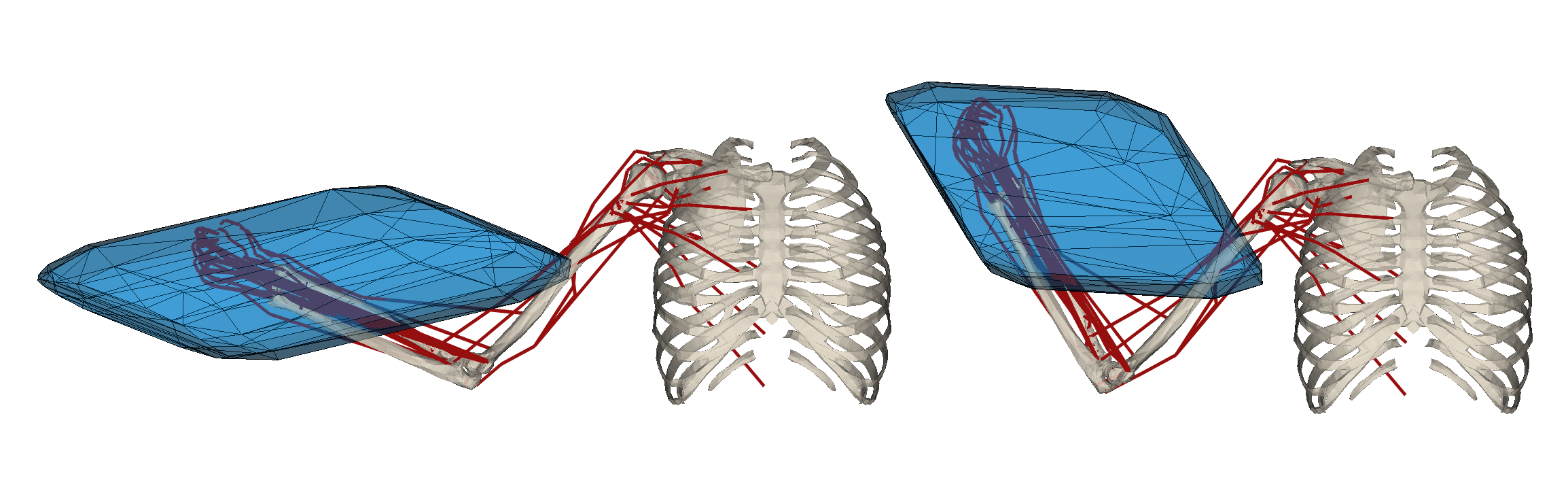
For the human musculoskeletal models this package implements the ellipsoid and polytope evaluation functions. The implemented ellipsoids are:
- Velocity (manipulability) ellipsoid
E_vel = {dx | dx = J.dq, dl = L.dq, ||dl||<1 }
- Acceleration (dynamic manipulability) ellipsoid
E_acc = {ddx | ddx = J.M^(-1).N.F, ||F||<1 }
- Force ellipsoid
E_for = {f | J^T.f = N.F, ||F||<1 }
And polytopes:
- Velocity polytope
P_vel = {dx | dx = J.dq, dl = L.dq dl_min < dl < dl_max}
- Acceleration polytope
P_acc = {ddx | ddx = J.M^(-1).N.F, F_min < F < F_max}
- Force polytope
P_for = {f | J^T.f = N.F, F_min < F < F_max}
Where J is the model's jacobian matrix, L si the muscle length jacobian matrix, N= -L^T is the moment arm matrix, f is the vector of cartesian forces,dx and ddx are vectors fo cartesian velocities and accretions, dq is the vector of the joint velocities, t is the vector of joint torques, dl is the vector of the muscle stretching velocities and F is the vector of muscular forces.
The force and velocity polytope functions have been implemented according to the paper:
On-line feasible wrench polytope evaluation based on human musculoskeletal models: an iterative convex hull method
by A.Skuric, V.Padois, N.Rezzoug and D.Daney
Submitted to RAL & ICRA2022
And the acceleration polytopes are resolved using the Hyper-plane shifting method:
Characterization of Parallel Manipulator Available Wrench Set Facets
by Gouttefarde M., Krut S.
In: Lenarcic J., Stanisic M. (eds) Advances in Robot Kinematics: Motion in Man and Machine. Springer, Dordrecht (2010)
Polytope evaluation algorithms
There are three methods implemented in this paper to resolve all the polytope calculations: - Hyper-plane shifting method (HPSM) - Iterative convex hull method (ICHM) - Vertex enumeration algorithm (VEPOLI2)
All of the methods are implemented in the module pycapacity.algorithms and can be used as standalone functions. See in docs for more info.
Hyper-plane shifting method (HPSM)
Characterization of Parallel Manipulator Available Wrench Set Facets
by Gouttefarde M., Krut S.
In: Lenarcic J., Stanisic M. (eds) Advances in Robot Kinematics: Motion in Man and Machine. Springer, Dordrecht (2010)
This method finds the half-space representation of the polytope of a class:
P = {x | x = By, y_min <= y <= y_max }
To find the vertices of the polytope after finding the half-space representation Hx <= d an convex-hull algorithm is used.
The method is a part of the pycapacity.algorithms module hyper_plane_shift_method, See in docs for more info.
Iterative convex-hull method (ICHM)
On-line feasible wrench polytope evaluation based on human musculoskeletal models: an iterative convex hull method
by A.Skuric, V.Padois, N.Rezzoug and D.Daney
Submitted to RAL & ICRA2022
This method finds both vertex and half-space representation of the class of polytopes:
P = {x | Ax = By, y_min <= y <= y_max }
And it can be additionally extended to the case where there is an additional projection matrix P making a class of problems:
P = {x | x= Pz, Az = By, y_min <= y <= y_max }
The method is a part of the pycapacity.algorithms module iterative_convex_hull_method. See the docs for more info
Vertex enumeration algorithm (VEPOLI2)
On-line force capability evaluation based on efficient polytope vertex search
by A.Skuric, V.Padois and D.Daney
Published on ICRA2021
This method finds vertex representation of the class of polytopes:
P = {x | Ax = y, y_min <= y <= y_max }
To find the half-space representation (faces) of the polytope after finding the vertex representation an convex-hull algorithm is used.
The method is a part of the pycapacity.algorithms module vertex_enumeration_vepoli2. See the docs for more info
Installation
All you need to do to install it is:
pip install pycapacity
And include it to your python project
```python
import pycapacity.robot
and/or
import pycapacity.human
and/or
import pycapacity.algorithms
and/or
import pycapacity.visual
and/or
import pycapacity.objects ```
Other way to install the code is by installing it directly from the git repo:
pip install git+https://github.com/auctus-team/pycapacity.git
Package API docs
See full docs at the link
Contributing and discussions
For all the questions regarding the potential implementation, applications, supported hardware and similar please don't hesitate to leave an issue or start a discussion
It is always helpful to hear the stories/problems/suggestions of people implementing the code!
Github Issues & Pull requests
Please do not hesitate to leave an issue if you have problems/advices/suggestions regarding the code!
If you'd like to contribute to this project but you are not very familiar with github, don't worry, let us know either by starting the discussion or posting a github issue.
Citing pycapacity in scientific publications
We are very happy that pycapacity has been used as a component of several research project and has made its way to several scientific papers. We are hoping that this trend is going to continue as the project matures and becomes more robust!
A short resume paper about pycapacity has been published in the Journal of Open Source Software:
pycapacity: a real-time task-space capacity calculation package for robotics and biomechanics
A. Skuric, V. Padois and D. Daney
Journal of Open Source Software, 8(89), 5670, https://doi.org/10.21105/joss.05670
If you are interested in citing pycapacity in your research, we suggest you to cite our paper:
bib
@article{Skuric2023pycapacity,
    author = {Skuric, Antun and Padois, Vincent and Daney, David},
    doi = {10.21105/joss.05670},
    journal = {Journal of Open Source Software},
    month = sep,
    number = {89},
    pages = {5670},
    title = {{Pycapacity: a real-time task-space capacity calculation package for robotics and biomechanics}},
    url = {https://joss.theoj.org/papers/10.21105/joss.05670},
    volume = {8},
    year = {2023}
}
Code examples
See more examples in the tutorials
An example code with robotics toolbox and swift visualisation
This code snippet shows how to calculate the force polytope of the Franka Emika Panda robot and visualise it in the Swift visualisation tool.
Click to see the code
```python import roboticstoolbox as rp import numpy as np panda = rp.models.DH.Panda() # random initial pose q_min = np.array([-2.7437, -1.7837, -2.9007, -3.0421, -2.8065, 0.5445, -3.0159]) q_max = np.array([2.7437, 1.7837, 2.9007, -0.1518, 2.8065, 4.5169, 3.0159]) q= np.random.uniform(q_min,q_max) panda.q = q # joint torque limits t_max = np.array([87, 87, 87, 87, 20, 20, 20]) t_min = -t_max # polytope python module import pycapacity.robot as pyc # robot matrices Jac = panda.jacob0(q)[:3,:] # gravity torque gravity = panda.gravload(q).reshape((-1,1)) # calculate for the polytope f_poly = pyc.force_polytope(Jac, t_max, t_min, gravity) # calculate the face representation of the polytope f_poly.find_faces() # visualise panda panda = rp.models.Panda() import swift.Swift as Swift panda.q = q env = Swift() env.launch() env.add(panda) # polytope visualisation import trimesh # save polytope as mesh file scaling = 500 # create the mesh mesh = trimesh.Trimesh(vertices=(f_poly.vertices.T/scaling + panda.fkine(q).t), faces=f_poly.face_indices, use_embree=True, validate=True) # absolute path to the temporary polytope file saved # in the stl format import os file_path = os.path.join(os.getcwd(),'tmp_polytope_file.stl') f = open(file_path, "wb") f.write(trimesh.exchange.stl.export_stl(mesh)) f.close() # robot visualisation from spatialgeometry import Mesh poly_mesh = Mesh(file_path) poly_mesh.color = (0.9,0.6,0.0,0.5) env.add(poly_mesh) ```
See more examples in the tutorials
An example with pinocchio library and meshcat visualisation
This example shows how to calculate the velocity polytope and ellipsoid of the Franka Emika Panda robot and visualise it in the Meshcat visualisation tool.
Click to see the code
```python import pinocchio as pin import numpy as np import time from example_robot_data import load # import pycapacity import pycapacity as pycap # get panda robot usinf example_robot_data robot = load('panda') # get joint position ranges q_max = robot.model.upperPositionLimit.T q_min = robot.model.lowerPositionLimit.T # get max velocity dq_max = robot.model.velocityLimit dq_min = -dq_max # Use robot configuration. # q0 = np.random.uniform(q_min,q_max) q0 = (q_min+q_max)/2 # calculate the jacobian data = robot.model.createData() pin.framesForwardKinematics(robot.model,data,q0) pin.computeJointJacobians(robot.model,data, q0) J = pin.getFrameJacobian(robot.model, data, robot.model.getFrameId(robot.model.frames[-1].name), pin.LOCAL_WORLD_ALIGNED) # use only position jacobian J = J[:3,:] # end-effector pose Xee = data.oMf[robot.model.getFrameId(robot.model.frames[-1].name)] ## visualise the robot from pinocchio.visualize import MeshcatVisualizer viz = MeshcatVisualizer(robot.model, robot.collision_model, robot.visual_model) # Start a new MeshCat server and client. viz.initViewer(open=True) # Load the robot in the viewer. viz.loadViewerModel() viz.display(q0) # small time window for loading the model # if meshcat does not visualise the robot properly, augment the time # it can be removed in most cases time.sleep(0.2) ## visualise the polytope and the ellipsoid import meshcat.geometry as g # calculate the polytope opt = {'calculate_faces':True} # calculate the polytope vel_poly = pycap.robot.velocity_polytope(J, dq_min, dq_max,options=opt) # meshcat triangulated mesh poly = g.TriangularMeshGeometry(vertices=vel_poly.vertices.T/10 + Xee.translation, faces=vel_poly.face_indices) viz.viewer['poly'].set_object(poly, g.MeshBasicMaterial(color=0x0022ff, wireframe=True, linewidth=3, opacity=0.2)) # calculate the ellipsoid vel_ellipsoid = pycap.robot.velocity_ellipsoid(J, dq_max) # meshcat ellipsoid ellipsoid = g.Ellipsoid(radii=vel_ellipsoid.radii/10) viz.viewer['ellipse'].set_object(ellipsoid, g.MeshBasicMaterial(color=0xff5500, transparent=True, opacity=0.2)) viz.viewer['ellipse'].set_transform(pin.SE3(vel_ellipsoid.rotation, Xee.translation).homogeneous) ```
See more examples in the tutorials
An example with OpenSim
This example shows how to calculate the force polytope of the MoBL-ARMS Upper Extremity Model and visualise it in the OpenSim visualisation tool.
Click to see the code
```python # include the pyosim module from utils import getStationJacobian, getMomentArmMatrix, getQIndicesOfClampedCoord, getMuscleTensions, getBodyPosition, setCoordinateValues # include opensim package import opensim as osim # pycappacity for polytope calculationreate from pycapacity.human import force_polytope # some utils import numpy as np import time ## Constructor of the OsimModel class. model = osim.Model("opensim_models/upper_body/unimanual/MoBL-ARMS Upper Extremity Model/MOBL_ARMS_fixed_41.osim") endEffectorBody = 'hand' state = model.initSystem() joint_pos = [0,0.5,0,1.3,0,1.0,0] setCoordinateValues(model,state,joint_pos) start = time.time() coordNames, coordIds = getQIndicesOfClampedCoord(model, state) model.equilibrateMuscles(state) J = getStationJacobian(model, state, endEffectorBody, osim.Vec3(0), coordIds) N = getMomentArmMatrix(model, state, coordNames=coordNames) F_min, F_max = getMuscleTensions(model, state) print("time", time.time() - start) # polytope calculation start = time.time() f_poly = force_polytope(J, N, F_min, F_max, 0.01) print("time", time.time() - start) # create the polytope import trimesh # find hand position hand_orientation, hand_position = getBodyPosition(model,state, endEffectorBody) # save the mesh to disk mesh = trimesh.Trimesh(vertices=(f_poly.vertices.T/2000 + hand_position.reshape((3,))) , faces=f_poly.face_indices, use_embree=True, validate=True) # save polytope as stl file f = open("polytope.stl", "wb") f.write(trimesh.exchange.stl.export_stl(mesh)) f.close() # adding polytope faces mesh = osim.Mesh("./polytope.stl") model.get_ground().attachGeometry(mesh) mesh.setColor(osim.Vec3(0.1,0.1,1)) mesh.setOpacity(0.3) # adding polytope vireframe mesh = osim.Mesh("./polytope.stl") model.get_ground().attachGeometry(mesh) mesh.setColor(osim.Vec3(0.1,0.1,1)) mesh.setRepresentation(2) # visualise the model and polytope model.setUseVisualizer(True) state = model.initSystem() mviz = model.getVisualizer() setCoordinateValues(model,state,joint_pos) mviz.show(state) ```
See more examples in the tutorials
An example with Mujoco
This is an interactive example that shows how to calculate the force polytope of the different robots in the Mujoco simulator and visualise it in the Mujoco visualisation tool.
Click to see the code
```python import mujoco import mujoco.viewer import numpy as np from robot_descriptions.loaders.mujoco import load_robot_description # Loading a variant of the model, e.g. panda without a gripper. # model = load_robot_description("xarm7_mj_description", variant="xarm7_nohand"); frame_name = "link7" # model = load_robot_description("iiwa14_mj_description"); frame_name = "link7" # model = load_robot_description("gen3_mj_description"); frame_name = "forearm_link" model = load_robot_description("panda_mj_description", variant="panda_nohand"); frame_name = "link7" # model = load_robot_description("ur10e_mj_description"); frame_name = "wrist_3_link" # model = load_robot_description("ur5e_mj_description"); frame_name = "wrist_3_link" # model = load_robot_description("fr3_mj_description"); frame_name = "fr3_link6" # Create a data structure to hold the state of the robot data = mujoco.MjData(model) # force polytope calculation function from pycapacity.robot import force_polytope # visualisation utils from pycapacity package import pycapacity.visual as pyviz # get max and min joint torques tau_max = model.actuator_forcerange[:,1] if np.any(tau_max <= 0): print("Warning: Negative or zero torque limits detected, using default value of 10 Nm") tau_max = np.ones_like(tau_max)*10 tau_min = -tau_max # Launch viewer with mujoco.viewer.launch_passive(model, data) as viewer: while viewer.is_running(): mujoco.mj_step(model, data) viewer.opt.flags[mujoco.mjtVisFlag.mjVIS_TEXTURE] = 0 # Disable textures # Compute the Jacobian of the end-effector J_pos = np.zeros((3, model.nv)) # Linear Jacobian (3xnq) J_rot = np.zeros((3, model.nv)) # Rotational Jacobian (3xnq) mujoco.mj_jacBodyCom(model, data, J_pos, J_rot, model.body(frame_name).id) J = J_pos # Use only the linear Jacobian # Compute the force polytope poly = force_polytope(J, tau_min, tau_max) # Shift polytope to the current end-effector position # and scale it for easier visualization poly.vertices = poly.vertices / 500 + data.site_xpos[0][:,None] # Draw force polytope pyviz.mj_draw_polytope(viewer, poly, edges=True, faces=True) # Update the viewer viewer.sync() ```
See more examples in the tutorials
JOSS Publication
Pycapacity: a real-time task-space capacity calculation package for robotics and biomechanics
Authors

INRIA, Bordeaux, France
INRIA, Bordeaux, France
INRIA, Bordeaux, France
Editor
Dana Solav
Tags
robotics kinematics polytope algebraCitation (CITATION.cff)
cff-version: "1.2.0"
authors:
- family-names: Skuric
  given-names: Antun
  orcid: "https://orcid.org/0000-0002-3323-4482"
- family-names: Padois
  given-names: Vincent
- family-names: Daney
  given-names: David
contact:
- family-names: Skuric
  given-names: Antun
  orcid: "https://orcid.org/0000-0002-3323-4482"
doi: 10.5281/zenodo.8333929
message: If you use this software, please cite our article in the
  Journal of Open Source Software.
preferred-citation:
  authors:
  - family-names: Skuric
    given-names: Antun
    orcid: "https://orcid.org/0000-0002-3323-4482"
  - family-names: Padois
    given-names: Vincent
  - family-names: Daney
    given-names: David
  date-published: 2023-09-12
  doi: 10.21105/joss.05670
  issn: 2475-9066
  issue: 89
  journal: Journal of Open Source Software
  publisher:
    name: Open Journals
  start: 5670
  title: "Pycapacity: a real-time task-space capacity calculation
    package for robotics and biomechanics"
  type: article
  url: "https://joss.theoj.org/papers/10.21105/joss.05670"
  volume: 8
title: "Pycapacity: a real-time task-space capacity calculation package
  for robotics and biomechanics"
GitHub Events
Total
- Create event: 5
- Release event: 4
- Issues event: 1
- Watch event: 6
- Push event: 63
- Pull request event: 1
- Fork event: 2
Last Year
- Create event: 5
- Release event: 4
- Issues event: 1
- Watch event: 6
- Push event: 63
- Pull request event: 1
- Fork event: 2
Committers
Last synced: 11 months ago
Top Committers
| Name | Commits | |
|---|---|---|
| SKURIC Antun | a****c@i****r | 253 |
| askuric | y****u@e****m | 75 |
| nakami | n****i | 1 |
| Sebastian Castro | s****o@g****m | 1 |
| Kevin Mattheus Moerman | K****n | 1 |
| Gautier Laisné | 4****r | 1 |
Committer Domains (Top 20 + Academic)
Issues and Pull Requests
Last synced: 11 months ago
All Time
- Total issues: 6
- Total pull requests: 5
- Average time to close issues: about 2 months
- Average time to close pull requests: about 6 hours
- Total issue authors: 3
- Total pull request authors: 5
- Average comments per issue: 3.0
- Average comments per pull request: 0.8
- Merged pull requests: 5
- Bot issues: 0
- Bot pull requests: 0
Past Year
- Issues: 0
- Pull requests: 1
- Average time to close issues: N/A
- Average time to close pull requests: 3 minutes
- Issue authors: 0
- Pull request authors: 1
- Average comments per issue: 0
- Average comments per pull request: 0.0
- Merged pull requests: 1
- Bot issues: 0
- Bot pull requests: 0
Top Authors
Issue Authors
- sea-bass (3)
- JHartzer (1)
- askuric (1)
Pull Request Authors
- sea-bass (1)
- laisnegautier (1)
- askuric (1)
- Kevin-Mattheus-Moerman (1)
- nakami (1)
Top Labels
Issue Labels
Pull Request Labels
Packages
- Total packages: 1
-
Total downloads:
- pypi 275 last-month
- Total dependent packages: 0
- Total dependent repositories: 1
- Total versions: 33
- Total maintainers: 1
pypi.org: pycapacity
A real-time task space capacity calculation module for robotic manipulators and human musculoskeletal models
- Homepage: https://github.com/auctus-team/pycapacity
- Documentation: https://pycapacity.readthedocs.io/
- License: MIT
-
Latest release: 2.1.7
published over 1 year ago
Rankings
Maintainers (1)
Dependencies
- Sphinx >=1.8.6
- recommonmark *
- sphinx-rtd-theme *
- cvxopt >=1.2.6
- matplotlib *
- numpy *
- scipy *
- actions/checkout v3 composite
- actions/setup-python v3 composite
- peaceiris/actions-gh-pages v3 composite
- actions/checkout v3 composite
- actions/upload-artifact v1 composite
- openjournals/openjournals-draft-action master composite
- actions/checkout v3 composite
- actions/setup-python v3 composite