https://github.com/alexanderfabisch/paz
Hierarchical perception library in Python for pose estimation, object detection, instance segmentation, keypoint estimation, face recognition, etc.
Science Score: 23.0%
This score indicates how likely this project is to be science-related based on various indicators:
-
○CITATION.cff file
-
○codemeta.json file
-
○.zenodo.json file
-
✓DOI references
Found 1 DOI reference(s) in README -
✓Academic publication links
Links to: arxiv.org, springer.com -
○Academic email domains
-
○Institutional organization owner
-
○JOSS paper metadata
-
○Scientific vocabulary similarity
Low similarity (6.4%) to scientific vocabulary
Last synced: 6 months ago
·
JSON representation
Repository
Hierarchical perception library in Python for pose estimation, object detection, instance segmentation, keypoint estimation, face recognition, etc.
Basic Info
- Host: GitHub
- Owner: AlexanderFabisch
- License: mit
- Default Branch: master
- Homepage: https://oarriaga.github.io/paz/
- Size: 2.53 MB
Statistics
- Stars: 0
- Watchers: 0
- Forks: 0
- Open Issues: 0
- Releases: 0
Fork of oarriaga/paz
Created about 3 years ago
· Last pushed about 3 years ago
https://github.com/AlexanderFabisch/paz/blob/master/
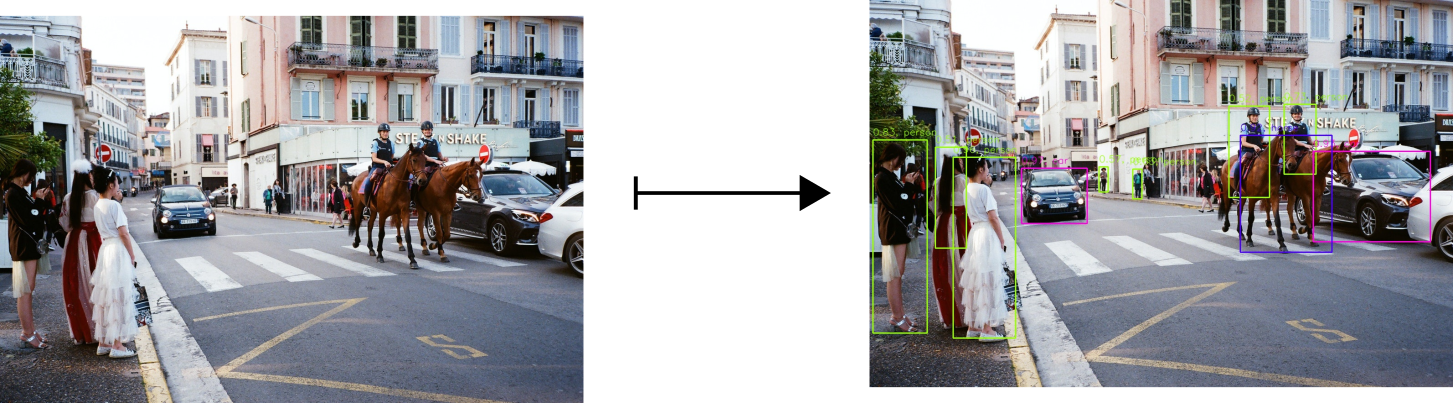
# (PAZ) Perception for Autonomous Systems [](https://github.com/oarriaga/paz/actions/workflows/python-package.yml) [](https://github.com/oarriaga/paz/actions/workflows/python-publish.yml) [](https://github.com/oarriaga/paz/actions/workflows/publish-website.yml) [](https://pepy.tech/project/pypaz) Hierarchical perception library in Python. ## Selected examples: PAZ is used in the following examples (links to **real-time demos** and training scripts): | [Probabilistic 2D keypoints](https://github.com/oarriaga/paz/tree/master/examples/probabilistic_keypoint_estimation)| [6D head-pose estimation](https://github.com/oarriaga/paz/tree/master/examples/pose_estimation) | [Object detection](https://github.com/oarriaga/paz/tree/master/examples/object_detection)| |---------------------------|--------------------------| ------------------| ||
|
| | [Emotion classifier](https://github.com/oarriaga/paz/tree/master/examples/face_classification) | [2D keypoint estimation](https://github.com/oarriaga/paz/tree/master/examples/keypoint_estimation) | [Mask-RCNN (in-progress)](https://github.com/oarriaga/paz/tree/mask_rcnn/examples/mask_rcnn) | |---------------------------|--------------------------| -----------------------| |
|
|
| |[Semantic segmentation](https://github.com/oarriaga/paz/tree/master/examples/semantic_segmentation) | [Hand pose estimation](https://github.com/oarriaga/paz/tree/master/examples/hand_pose_estimation) | [Human pose estimation](https://github.com/oarriaga/paz/tree/master/examples/human_pose_estimation_2D) | |---------------------------|-----------------------|-----------------| |
|
|
| | [3D keypoint discovery](https://github.com/oarriaga/paz/tree/master/examples/discovery_of_latent_keypoints) | [Hand closure detection](https://github.com/oarriaga/paz/tree/master/examples/hand_pose_estimation) | [6D pose estimation](https://github.com/oarriaga/paz/tree/master/examples/pix2pose) | |---------------------------|-----------------------| --------------------------| |
|
|
| | [Implicit orientation](https://github.com/oarriaga/paz/tree/master/examples/implicit_orientation_learning) | [Attention (STNs)](https://github.com/oarriaga/paz/tree/master/examples/spatial_transfomer_networks) | [Haar Cascade detector](https://github.com/oarriaga/paz/tree/master/examples/haar_cascade_detectors) | |---------------------------|-----------------------|-----------------| |
|
|
| | [Eigenfaces](https://github.com/oarriaga/paz/blob/master/examples/eigenfaces) | | | |---------------------------|-----------------------|-----------------| |
|
|
All models can be re-trained with your own data (except for Mask-RCNN, we are working on it [here](https://github.com/oarriaga/paz/tree/mask_rcnn)). ## Table of Contents * [Examples](#selected-examples) * [Installation](#installation) * [Documentation](#documentation) * [Hierarchical APIs](#hierarchical-apis) * [High-level](#high-level) | [Mid-level](#mid-level) | [Low-level](#low-level) * [Additional functionality](#additional-functionality) * [Implemented models](#models) * [Motivation](#motivation) * [Citation](#citation) * [Funding](#funding) ## Installation PAZ has only **three** dependencies: [Tensorflow2.0](https://www.tensorflow.org/), [OpenCV](https://opencv.org/) and [NumPy](https://numpy.org/). To install PAZ with pypi run: ``` pip install pypaz --user ``` ## Documentation Full documentation can be found [https://oarriaga.github.io/paz/](https://oarriaga.github.io/paz/). ## Hierarchical APIs PAZ can be used with three different API levels which are there to be helpful for the user's specific application. ## High-level Easy out-of-the-box prediction. For example, for detecting objects we can call the following pipeline: ``` python from paz.applications import SSD512COCO detect = SSD512COCO() # apply directly to an image (numpy-array) inferences = detect(image) ```
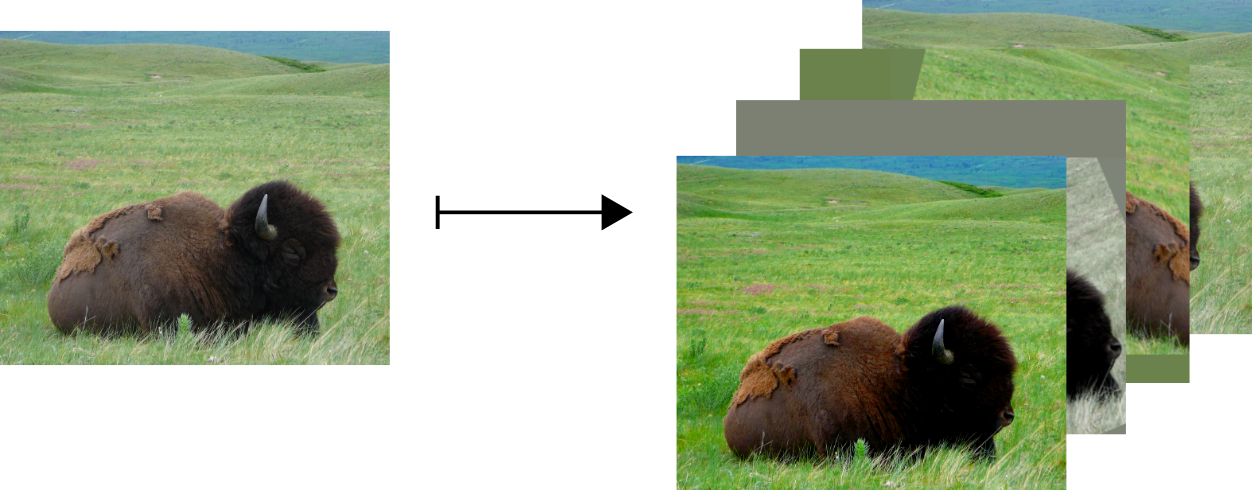
There are multiple high-level functions a.k.a. ``pipelines`` already implemented in PAZ [here](https://github.com/oarriaga/paz/tree/master/paz/pipelines). Those functions are build using our mid-level API described now below. ## Mid-level While the high-level API is useful for quick applications, it might not be flexible enough for your specific purpose. Therefore, in PAZ we can build high-level functions using our a mid-level API. ### Mid-level: Sequential If your function is sequential you can construct a sequential function using ``SequentialProcessor``. In the example below we create a data-augmentation pipeline: ``` python from paz.abstract import SequentialProcessor from paz import processors as pr augment = SequentialProcessor() augment.add(pr.RandomContrast()) augment.add(pr.RandomBrightness()) augment.add(pr.RandomSaturation()) augment.add(pr.RandomHue()) # you can now use this now as a normal function image = augment(image) ```
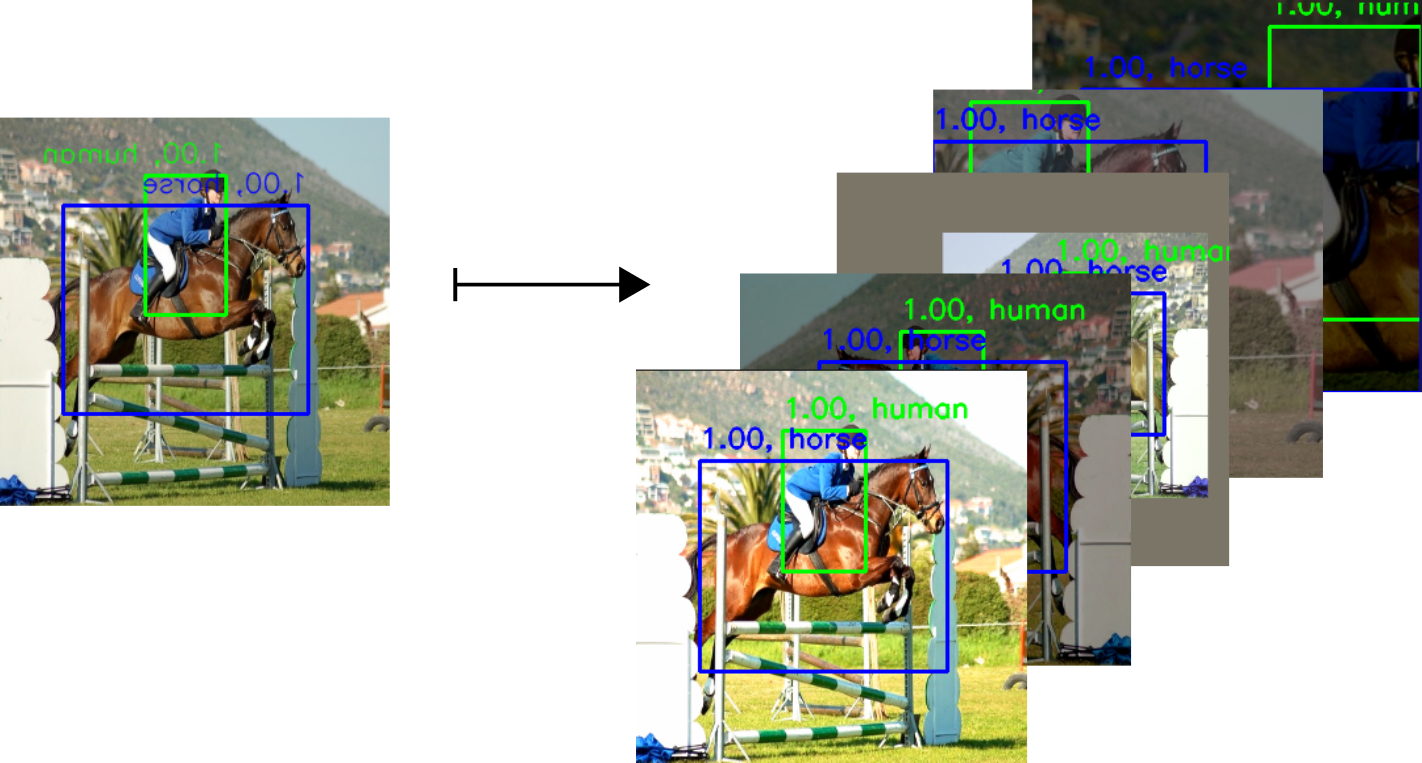
You can also add **any function** not only those found in ``processors``. For example we can pass a numpy function to our original data-augmentation pipeline: ``` python augment.add(np.mean) ``` There are multiple functions a.k.a. ``Processors`` already implemented in PAZ [here](https://github.com/oarriaga/paz/tree/master/paz/processors). Using these processors we can build more complex pipelines e.g. **data augmentation for object detection**: [``pr.AugmentDetection``](https://github.com/oarriaga/paz/blob/master/paz/pipelines/detection.py#L46)
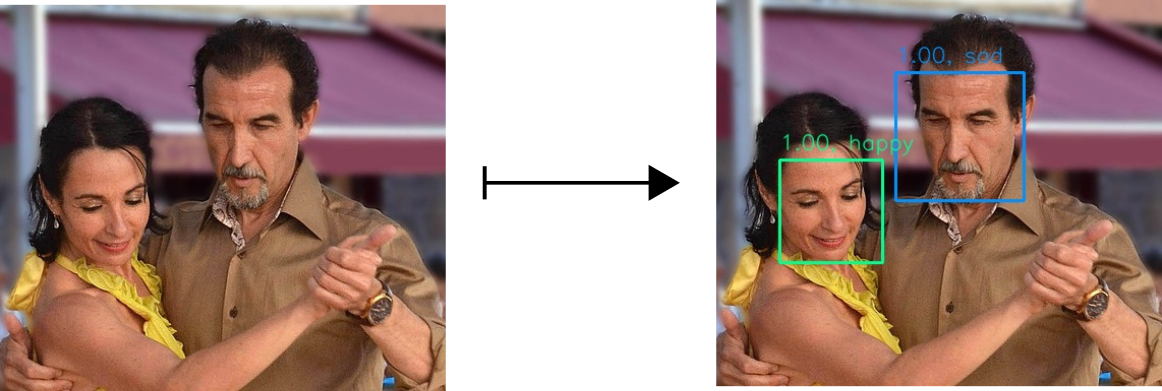
### Mid-level: Explicit Non-sequential pipelines can be also build by abstracting ``Processor``. In the example below we build a emotion classifier from **scratch** using our high-level and mid-level functions. ``` python from paz.applications import HaarCascadeFrontalFace, MiniXceptionFER import paz.processors as pr class EmotionDetector(pr.Processor): def __init__(self): super(EmotionDetector, self).__init__() self.detect = HaarCascadeFrontalFace(draw=False) self.crop = pr.CropBoxes2D() self.classify = MiniXceptionFER() self.draw = pr.DrawBoxes2D(self.classify.class_names) def call(self, image): boxes2D = self.detect(image)['boxes2D'] cropped_images = self.crop(image, boxes2D) for cropped_image, box2D in zip(cropped_images, boxes2D): box2D.class_name = self.classify(cropped_image)['class_name'] return self.draw(image, boxes2D) detect = EmotionDetector() # you can now apply it to an image (numpy array) predictions = detect(image) ```
``Processors`` allow us to easily compose, compress and extract away parameters of functions. However, most processors are build using our low-level API (backend) shown next. ## Low-level Mid-level processors are mostly built from small backend functions found in: [boxes](https://github.com/oarriaga/paz/blob/master/paz/backend/boxes.py), [cameras](https://github.com/oarriaga/paz/blob/master/paz/backend/camera.py), [images](https://github.com/oarriaga/paz/tree/master/paz/backend/image), [keypoints](https://github.com/oarriaga/paz/blob/master/paz/backend/keypoints.py) and [quaternions](https://github.com/oarriaga/paz/blob/master/paz/backend/quaternion.py). These functions can found in ``paz.backend``: ``` python from paz.backend import boxes, camera, image, keypoints, quaternion ``` For example, you can use them in your scripts to load or show images: ``` python from paz.backend.image import load_image, show_image image = load_image('my_image.png') show_image(image) ``` ## Additional functionality * PAZ has [built-in messages](https://github.com/oarriaga/paz/blob/master/paz/abstract/messages.py) e.g. ``Pose6D`` for an easier data exchange with other frameworks such as [ROS](https://www.ros.org/). * There are custom [callbacks](https://github.com/oarriaga/paz/blob/master/paz/optimization/callbacks.py) e.g. MAP evaluation for object detectors while training. * PAZ comes with [data loaders](https://github.com/oarriaga/paz/tree/master/paz/datasets) for the multiple datasets: [OpenImages](https://github.com/oarriaga/paz/blob/master/paz/datasets/open_images.py), [VOC](https://github.com/oarriaga/paz/blob/master/paz/datasets/voc.py), [YCB-Video](https://github.com/oarriaga/paz/blob/master/examples/object_detection/datasets/ycb_video.py), [FAT](https://github.com/oarriaga/paz/blob/master/paz/datasets/fat.py), [FERPlus](https://github.com/oarriaga/paz/blob/master/paz/datasets/ferplus.py), [FER2013](https://github.com/oarriaga/paz/blob/master/paz/datasets/fer.py), [CityScapes](https://github.com/oarriaga/paz/blob/master/paz/datasets/cityscapes.py). * We have an automatic [batch creation and dispatching wrappers](https://github.com/oarriaga/paz/blob/master/paz/abstract/sequence.py) for an easy connection between you ``pipelines`` and tensorflow generators. Please look at the [tutorials](https://github.com/oarriaga/paz/tree/master/examples/tutorials) for more information. ### Models The following models are implemented in PAZ and they can be trained with your own data: | Task (link to implementation) |Model (link to paper) | |---------------------------:|-----------------------| |[Object detection](https://github.com/oarriaga/paz/blob/master/paz/models/detection/ssd300.py)|[SSD-300](https://arxiv.org/abs/1512.02325)| |[Object detection](https://github.com/oarriaga/paz/blob/master/paz/models/detection/ssd512.py)|[SSD-512](https://arxiv.org/abs/1512.02325)| |[Probabilistic keypoint est.](https://github.com/oarriaga/paz/blob/master/examples/probabilistic_keypoint_estimation/model.py) |[Gaussian Mixture CNN](https://www.robots.ox.ac.uk/~vgg/publications/2018/Neumann18a/) | |[Detection and Segmentation](https://github.com/oarriaga/paz/tree/mask_rcnn/examples/mask_rcnn) |[MaskRCNN (in progress)](https://arxiv.org/abs/1703.06870) | |[Keypoint estimation](https://github.com/oarriaga/paz/blob/master/paz/models/keypoint/hrnet.py)|[HRNet](https://arxiv.org/abs/1908.07919)| |[Semantic segmentation](https://github.com/oarriaga/paz/blob/master/paz/models/segmentation/unet.py)|[U-NET](https://arxiv.org/abs/1505.04597)| |[6D Pose estimation](https://github.com/oarriaga/paz/blob/master/paz/models/keypoint/keypointnet.py) |[Pix2Pose](https://arxiv.org/abs/1908.07433) | |[Implicit orientation](https://github.com/oarriaga/paz/blob/master/examples/implicit_orientation_learning/model.py) |[AutoEncoder](https://arxiv.org/abs/1902.01275) | |[Emotion classification](https://github.com/oarriaga/paz/blob/master/paz/models/classification/xception.py) |[MiniXception](https://arxiv.org/abs/1710.07557) | |[Discovery of Keypoints](https://github.com/oarriaga/paz/blob/master/paz/models/keypoint/keypointnet.py) |[KeypointNet](https://arxiv.org/abs/1807.03146) | |[Keypoint estimation](https://github.com/oarriaga/paz/blob/master/paz/models/keypoint/keypointnet.py) |[KeypointNet2D](https://arxiv.org/abs/1807.03146)| |[Attention](https://github.com/oarriaga/paz/blob/master/examples/spatial_transfomer_networks/STN.py) |[Spatial Transformers](https://arxiv.org/abs/1506.02025) | |[Object detection](https://github.com/oarriaga/paz/blob/master/paz/models/detection/haar_cascade.py) |[HaarCascades](https://link.springer.com/article/10.1023/B:VISI.0000013087.49260.fb) | |[Human pose estimation](https://github.com/oarriaga/paz/blob/master/paz/models/pose_estimation/higher_hrnet.py) |[HigherHRNet](https://arxiv.org/abs/1908.10357) | |[Hand pose estimation](https://github.com/oarriaga/paz/blob/master/paz/models/keypoint/detnet.py) |[DetNet](https://vcai.mpi-inf.mpg.de/projects/2020-cvpr-hands/) | |[Hand closure classification](https://github.com/oarriaga/paz/blob/master/paz/models/keypoint/iknet.py) |[IKNet](https://vcai.mpi-inf.mpg.de/projects/2020-cvpr-hands/) | |[Hand detection](https://github.com/oarriaga/paz/blob/master/paz/models/detection/ssd512.py) |[SSD512](https://arxiv.org/abs/1512.02325)| ## Motivation Even though there are multiple high-level computer vision libraries in different deep learning frameworks, I felt there was not a consolidated deep learning library for robot-perception in my framework of choice (Keras). As a final remark, I would like to mention, that I feel that we might tend to forget the great effort and emotional status behind every (open-source) project. I feel it's easy to blurry a company name with the individuals behind their work, and we forget that there is someone feeling our criticism and our praise. Therefore, whatever good code you can find here, is all dedicated to the software-engineers and contributors of open-source projects like Pytorch, Tensorflow and Keras. You put your craft out there for all of us to use and appreciate, and we ought first to give you our thankful consideration. ## Why the name **PAZ**? * The name PAZ satisfies it's theoretical definition by having it as an acronym for **Perception for Autonomous Systems** where the letter S is replaced for Z in order to indicate that for "System" we mean almost anything i.e. Z being a classical algebraic variable to indicate an unknown element. ## Tests and coverage Continuous integration is managed trough [github actions](https://github.com/features/actions) using [pytest](https://docs.pytest.org/en/stable/). You can then check for the tests by running: ``` pytest tests ``` Test coverage can be checked using [coverage](https://coverage.readthedocs.io/en/coverage-5.2.1/). You can install coverage by calling: `pip install coverage --user` You can then check for the test coverage by running: ``` coverage run -m pytest tests/ coverage report -m ``` ## Citation If you use PAZ please consider citating it. You can also find our paper here [https://arxiv.org/abs/2010.14541](https://arxiv.org/abs/2010.14541). ```BibTeX @misc{arriaga2020perception, title={Perception for Autonomous Systems (PAZ)}, author={Octavio Arriaga and Matias Valdenegro-Toro and Mohandass Muthuraja and Sushma Devaramani and Frank Kirchner}, year={2020}, eprint={2010.14541}, archivePrefix={arXiv}, primaryClass={cs.CV} } ``` ## Funding PAZ is currently developed in the [Robotics Group](https://robotik.dfki-bremen.de/de/ueber-uns/universitaet-bremen-arbeitsgruppe-robotik.html) of the [University of Bremen](https://www.uni-bremen.de/), together with the [Robotics Innovation Center](https://robotik.dfki-bremen.de/en/startpage.html) of the **German Research Center for Artificial Intelligence** (DFKI) in **Bremen**. PAZ has been funded by the German Federal Ministry for Economic Affairs and Energy and the [German Aerospace Center](https://www.dlr.de/DE/Home/home_node.html) (DLR). PAZ been used and/or developed in the projects [TransFIT](https://robotik.dfki-bremen.de/en/research/projects/transfit.html) and [KiMMI-SF](https://robotik.dfki-bremen.de/en/research/projects/kimmi-sf/).

Owner
- Name: Alexander Fabisch
- Login: AlexanderFabisch
- Kind: user
- Location: Bremen
- Company: German Research Center for Artificial Intelligence (DFKI GmbH, @dfki), Robotics Innovation Center (@dfki-ric)
- Website: https://alexanderfabisch.github.io/
- Repositories: 62
- Profile: https://github.com/AlexanderFabisch
researcher, software developer, in robotics and machine learning