https://github.com/alexdaniel654/fsl_to_philips_dti
A tool for making FSL spherical DTI vector files for Philips MRI scanners.
Science Score: 10.0%
This score indicates how likely this project is to be science-related based on various indicators:
-
○CITATION.cff file
-
○codemeta.json file
-
○.zenodo.json file
-
○DOI references
-
✓Academic publication links
Links to: zenodo.org -
○Academic email domains
-
○Institutional organization owner
-
○JOSS paper metadata
-
○Scientific vocabulary similarity
Low similarity (9.9%) to scientific vocabulary
Last synced: 10 months ago
·
JSON representation
Repository
A tool for making FSL spherical DTI vector files for Philips MRI scanners.
Basic Info
- Host: GitHub
- Owner: alexdaniel654
- License: mit
- Language: Python
- Default Branch: master
- Size: 687 KB
Statistics
- Stars: 0
- Watchers: 0
- Forks: 0
- Open Issues: 0
- Releases: 0
Created over 7 years ago
· Last pushed almost 6 years ago
https://github.com/alexdaniel654/FSL_to_Philips_DTI/blob/master/
# FSL to Philips DTI [](https://zenodo.org/badge/latestdoi/171647493) A utility that allows you to generate spherical DTI vectors that can be read into a Philips MRI scanner. The advantages of collecting DTI data sampling a whole sphere rather than the traditional hemisphere are outlined [here](https://fsl.fmrib.ox.ac.uk/fsl/fslwiki/eddy). [FSL](https://fsl.fmrib.ox.ac.uk/fsl/fslwiki/FSL) provides a useful tool for generating these spherical vectors however this isn't ideal as a. the output from this function can't be read by a Philips MRI scanner as it's in the wrong orientation and doesn't include a b-value and b. FSL can't be run on the scanner meaning you need to pre-plan your scanning sessions and can't change the number of directions on the fly. To solve these issues this command line utility is designed to sit in the `E:\ftp\export` directory on the scanner. When executed it asks the user how many directions they want and what b-value, it then asks if you would like to overwrite the existing `dti_vectors_input.txt` file. This may be desired as this is the file that the scanner reads new vectors in from or may be undesired if you want to keep the files for easier switching in the future. If the user decides not to overwrite the file then the file name will be unique to the number of vectors and b-value e.g. `dti_vectors_input-fsl_128_directions_bval_800.txt`. To make keeping track of potentially overwritten files, a log file is produced in the same directory to keep track of the date, time, number of directions and b-values that were generated. Once the desired vectors are in `dti_vectors_input.txt` simply `read new file` from the directions resolution drop-down in the Philips software. 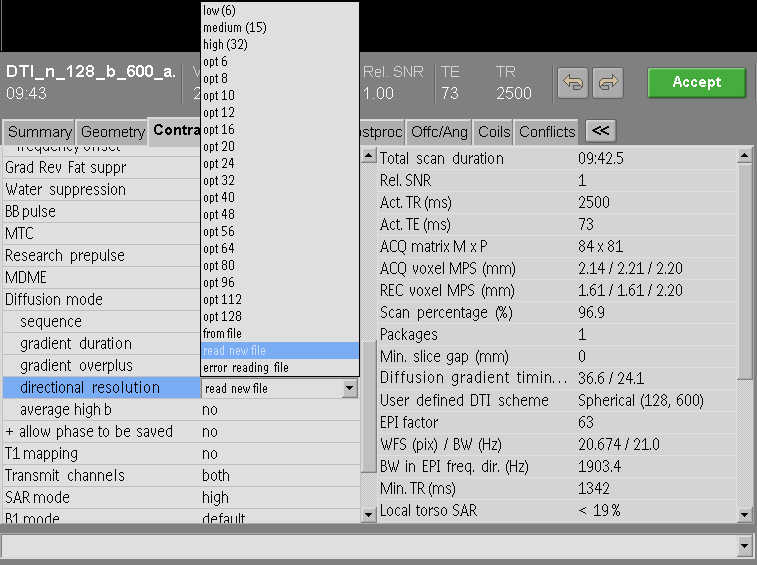 A `.exe` file that can be run on the scanner can be downloaded from the [latest realase page](https://github.com/alexdaniel654/FSL_to_Philips_DTI/releases/latest).
Owner
- Name: Alex Daniel
- Login: alexdaniel654
- Kind: user
- Location: Nottingham
- Company: The University of Nottingham @SPMIC-UoN
- Website: alexdaniel.info
- Repositories: 21
- Profile: https://github.com/alexdaniel654
Computational physicist working on renal MRI at The University of Nottingham.