https://github.com/alexdesiqueira/aroeira-linux
Science Score: 26.0%
This score indicates how likely this project is to be science-related based on various indicators:
-
○CITATION.cff file
-
✓codemeta.json file
Found codemeta.json file -
✓.zenodo.json file
Found .zenodo.json file -
○DOI references
-
○Academic publication links
-
○Committers with academic emails
-
○Institutional organization owner
-
○JOSS paper metadata
-
○Scientific vocabulary similarity
Low similarity (11.8%) to scientific vocabulary
Repository
Basic Info
- Host: GitHub
- Owner: alexdesiqueira
- License: apache-2.0
- Language: Just
- Default Branch: main
- Size: 96.7 KB
Statistics
- Stars: 0
- Watchers: 0
- Forks: 0
- Open Issues: 0
- Releases: 0
Metadata Files
README.md
image-template
Purpose
This repository is meant to be a template for building your own custom bootc image. This template is the recommended way to make customizations to any image published by the Universal Blue Project: - Products: Aurora, Bazzite, Bluefin, uCore - Base images: main - the product images build on these and may be a better starting point depending on what you want.
or any other base image if you want to start from scratch:
- Fedora:
quay.io/fedora/fedora-bootc:41 - CentOS Stream 10:
quay.io/centos-bootc/centos-bootc:stream10
This template includes a Containerfile and a Github workflow for building the container image, signing, and proper metadata to be listed on artifacthub. As soon as the workflow is enabled in your repository, it will build the container image and push it to the Github Container Registry.
Prerequisites
Working knowledge in the following topics:
- Containers
- https://www.youtube.com/watch?v=SnSH8Ht3MIc
- https://www.mankier.com/5/Containerfile
- bootc
- https://bootc-dev.github.io/bootc/
- Fedora Silverblue (and other Fedora Atomic variants)
- https://docs.fedoraproject.org/en-US/fedora-silverblue/
- Github Workflows
- https://docs.github.com/en/actions/using-workflows
Video Tutorial
TesterTech has made a tutorial video, check it out:

How to Use
Template
Select Use this Template and create a new repository from it. To enable the workflows, you may need to go the Actions tab of the new repository and click to enable workflows.
Containerfile
This file defines the operations used to customize the selected image. It contains examples of possible modifications, including how to: - change the upstream from which the custom image is derived - add additional RPM packages - add binaries as a layer from other images
Building disk images
This template provides an out of the box workflow for creating ISO and other disk images for your custom OCI image which can be used to directly install onto your machines.
This template provides a way to upload the disk images that is generated from the workflow to a S3 bucket or it will be available as an artifact from the job. To upload to S3 we use a tool called rclone which is able to use many S3 providers. For more details on how to configure this see the details below.
Workflows
build.yml
This workflow creates your custom OCI image and publishes it to the Github Container Registry (GHCR). By default, the image name will match the Github repository name.
build-disk.yml
This workflow creates a disk images from your OCI image by utilizing the bootc-image-builder. In order to use this workflow you must complete the following steps:
- Modify
disk_config/iso.tomlto point to your custom container image before generating an ISO image. - If you changed your image name from the default in
build.ymlthen in thebuild-disk.ymlfile edit theIMAGE_REGISTRY,IMAGE_NAMEandDEFAULT_TAGenvironment variables with the correct values. If you did not make changes, skip this step. - Finally, if you want to upload your disk images to S3 then you will need to add your S3 configuration to the repository's Action secrets. This can be found by going to your repository settings, under
Secrets and Variables->Actions. You will need to add the followingS3_PROVIDER- Must match one of the values from the supported listS3_BUCKET_NAME- Your unique bucket nameS3_ACCESS_KEY_ID- It is recommended that you make a separate key just for this workflowS3_SECRET_ACCESS_KEY- See above.S3_REGION- The region your bucket lives in. If you do not know then set this value toauto.S3_ENDPOINT- This value will be specific to the bucket as well.
Once the workflow is done, you'll find the disk images either in your S3 bucket or as part of the summary under Artifacts after the workflow is completed.
Container Signing
Container signing is important for end-user security and is enabled on all Universal Blue images. It is recommended you set this up, and by default the image builds will fail if you don't.
This provides users a method of verifying the image.
Install the cosign CLI tool
Run inside your repo folder:
bash
cosign generate-key-pair
- Do NOT put in a password when it asks you to, just press enter. The signing key will be used in GitHub Actions and will not work if it is encrypted.
[!WARNING] Be careful to never accidentally commit
cosign.keyinto your git repo.
- Add the private key to GitHub
- This can also be done manually. Go to your repository settings, under `Secrets and Variables` -> `Actions`
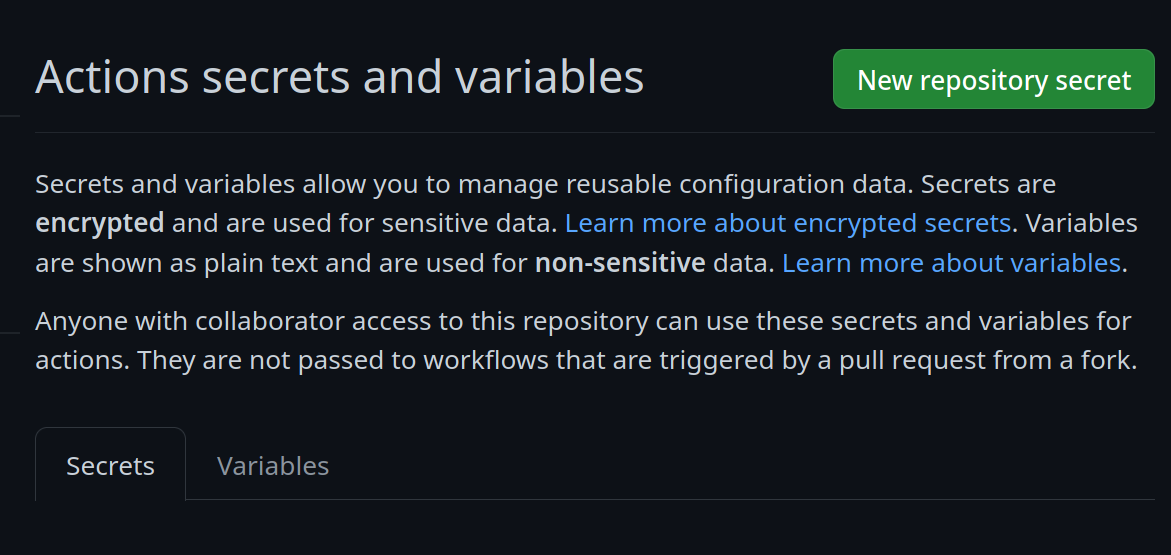
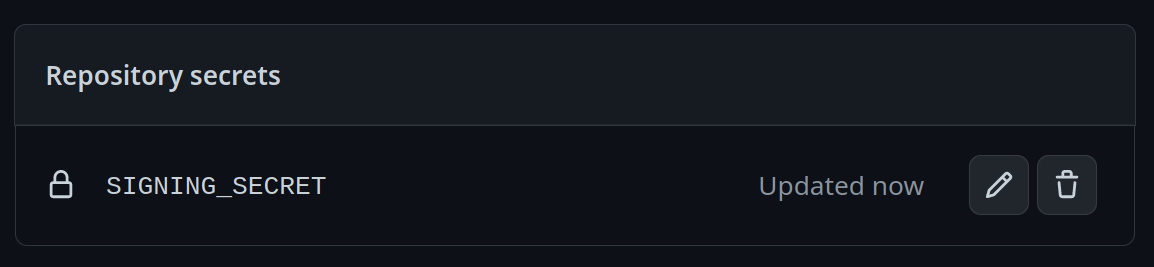
Add a new secret and name it `SIGNING_SECRET`, then paste the contents of `cosign.key` into the secret and save it. Make sure it's the .key file and not the .pub file. Once done, it should look like this:
- (CLI instructions) If you have the `github-cli` installed, run:
```bash
gh secret set SIGNING_SECRET < cosign.key
```
- Commit the
cosign.pubfile to the root of your git repository.
Community
- bootc discussion forums - Nothing in this template is ublue specific, the upstream bootc project has a discussions forum where custom image builders can hang out and ask questions.
Artifacthub
This template comes with the necessary tooling to index your image on artifacthub.io, use the artifacthub-repo.yml file at the root to verify yourself as the publisher. This is important to you for a few reasons:
- The value of artifacthub is it's one place for people to index their custom images, and since we depend on each other to learn, it helps grow the community.
- You get to see your pet project listed with the other cool projects in Cloud Native.
- Since the site puts your README front and center, it's a good way to learn how to write a good README, learn some marketing, finding your audience, etc.
Justfile Documentation
This Justfile contains various commands and configurations for building and managing container images and virtual machine images using Podman and other utilities.
Environment Variables
image_name: The name of the image (default: "image-template").default_tag: The default tag for the image (default: "latest").bib_image: The Bootc Image Builder (BIB) image (default: "quay.io/centos-bootc/bootc-image-builder:latest").
Aliases
build-vm: Alias forbuild-qcow2.rebuild-vm: Alias forrebuild-qcow2.run-vm: Alias forrun-vm-qcow2.
Commands
check
Checks the syntax of all .just files and the Justfile.
fix
Fixes the syntax of all .just files and the Justfile.
clean
Cleans the repository by removing build artifacts.
Build Commands
build
Builds a container image using Podman.
bash
just build $target_image $tag
Arguments:
- $target_image: The tag you want to apply to the image (default: $image_name).
- $tag: The tag for the image (default: $default_tag).
Building Virtual Machines and ISOs
build-qcow2
Builds a QCOW2 virtual machine image.
bash
just build-qcow2 $target_image $tag
build-raw
Builds a RAW virtual machine image.
bash
just build-raw $target_image $tag
build-iso
Builds an ISO virtual machine image.
bash
just build-iso $target_image $tag
rebuild-qcow2
Rebuilds a QCOW2 virtual machine image.
bash
just rebuild-qcow2 $target_image $tag
rebuild-raw
Rebuilds a RAW virtual machine image.
bash
just rebuild-raw $target_image $tag
rebuild-iso
Rebuilds an ISO virtual machine image.
bash
just rebuild-iso $target_image $tag
Run Virtual Machines
run-vm-qcow2
Runs a virtual machine from a QCOW2 image.
bash
just run-vm-qcow2 $target_image $tag
run-vm-raw
Runs a virtual machine from a RAW image.
bash
just run-vm-raw $target_image $tag
run-vm-iso
Runs a virtual machine from an ISO.
bash
just run-vm-iso $target_image $tag
spawn-vm
Runs a virtual machine using systemd-vmspawn.
bash
just spawn-vm rebuild="0" type="qcow2" ram="6G"
Lint and Format
lint
Runs shell check on all Bash scripts.
format
Runs shfmt on all Bash scripts.
Community Examples
Owner
- Name: Alexandre de Siqueira
- Login: alexdesiqueira
- Kind: user
- Location: Brazil
- Company: @tucanalabs
- Twitter: alexdesiqueira
- Repositories: 95
- Profile: https://github.com/alexdesiqueira
Advocate for all things open.
GitHub Events
Total
- Delete event: 3
- Push event: 143
- Pull request event: 10
- Create event: 2
Last Year
- Delete event: 3
- Push event: 143
- Pull request event: 10
- Create event: 2
Committers
Last synced: 11 months ago
Top Committers
| Name | Commits | |
|---|---|---|
| Alexandre de Siqueira | 5****a | 16 |
Issues and Pull Requests
Last synced: 11 months ago
All Time
- Total issues: 0
- Total pull requests: 2
- Average time to close issues: N/A
- Average time to close pull requests: 9 days
- Total issue authors: 0
- Total pull request authors: 1
- Average comments per issue: 0
- Average comments per pull request: 0.0
- Merged pull requests: 2
- Bot issues: 0
- Bot pull requests: 2
Past Year
- Issues: 0
- Pull requests: 2
- Average time to close issues: N/A
- Average time to close pull requests: 9 days
- Issue authors: 0
- Pull request authors: 1
- Average comments per issue: 0
- Average comments per pull request: 0.0
- Merged pull requests: 2
- Bot issues: 0
- Bot pull requests: 2
Top Authors
Issue Authors
Pull Request Authors
- dependabot[bot] (6)
Top Labels
Issue Labels
Pull Request Labels
Dependencies
- actions/checkout 11bd71901bbe5b1630ceea73d27597364c9af683 composite
- actions/upload-artifact ea165f8d65b6e75b540449e92b4886f43607fa02 composite
- osbuild/bootc-image-builder-action main composite
- ublue-os/remove-unwanted-software cc0becac701cf642c8f0a6613bbdaf5dc36b259e composite
- actions/checkout 11bd71901bbe5b1630ceea73d27597364c9af683 composite
- docker/login-action 74a5d142397b4f367a81961eba4e8cd7edddf772 composite
- docker/metadata-action 902fa8ec7d6ecbf8d84d538b9b233a880e428804 composite
- redhat-actions/buildah-build 7a95fa7ee0f02d552a32753e7414641a04307056 composite
- redhat-actions/push-to-registry 5ed88d269cf581ea9ef6dd6806d01562096bee9c composite
- sigstore/cosign-installer 398d4b0eeef1380460a10c8013a76f728fb906ac composite
- ublue-os/container-storage-action main composite