gwaihir
Repository regarding the Gwaihir GUI used for Bragg Coherent Coherent Diffraction (BCDI) data analysis
Science Score: 57.0%
This score indicates how likely this project is to be science-related based on various indicators:
-
✓CITATION.cff file
Found CITATION.cff file -
✓codemeta.json file
Found codemeta.json file -
✓.zenodo.json file
Found .zenodo.json file -
✓DOI references
Found 1 DOI reference(s) in README -
○Academic publication links
-
○Committers with academic emails
-
○Institutional organization owner
-
○JOSS paper metadata
-
○Scientific vocabulary similarity
Low similarity (11.2%) to scientific vocabulary
Repository
Repository regarding the Gwaihir GUI used for Bragg Coherent Coherent Diffraction (BCDI) data analysis
Basic Info
- Host: GitHub
- Owner: DSimonne
- License: gpl-3.0
- Language: Python
- Default Branch: main
- Size: 1.09 MB
Statistics
- Stars: 9
- Watchers: 4
- Forks: 4
- Open Issues: 12
- Releases: 2
Metadata Files
README.md
Welcome
You can install the latest version of the package by cloning the repository and via the setup.py script (pip install .)
The version 0.7 ships a version of the package with only the phase retrieval and poltting tabs, since cdiutils is no longer supported. It is however very helpful to interact with the reconstruction process in Jupyter Notebooks.
- You can install gwaihir by typing
pip install -U gwaihirin your command line. A stable version from the master branch uploaded to pypi.org will be used (https://pypi.org/project/gwaihir/) - Otherwise, you can install the latest commit of the package by cloning this repository and typing
pip install .in the terminal (you must be in the same directory as thesetup.pyscript), this will allow you to have the latest updates.
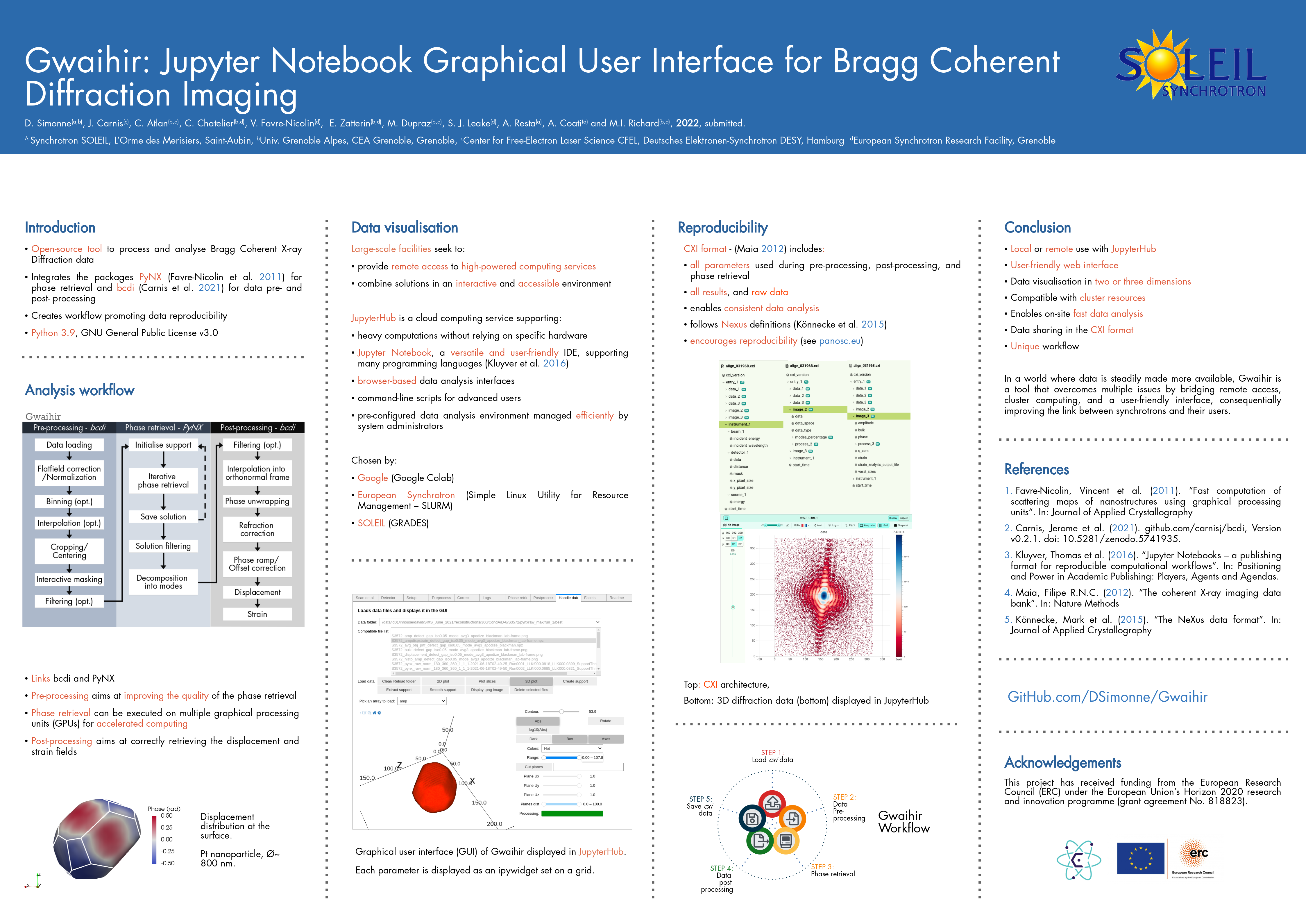
Here is a link to a poster that presents Gwaihir: Poster_Gwaihir.pdf
Important code snippets
To increase the width of the cells in Jupyter Notebook:
python
from IPython.core.display import display, HTML
display(HTML("<style>.container { width:75% !important; }</style>"))
To avoid automatic cell scrolling:
javascript
%%javascript
IPython.OutputArea.prototype._should_scroll = function(lines) {
    return false;
}
To open the GUI:
python
from gwaihir.gui import Interface
GUI = Interface()
GUI Preview:
Pre-processing data
https://user-images.githubusercontent.com/51970962/154160601-f3e7878a-d2c6-4560-95e5-adf7087f59ab.mp4
Phase retrieval
https://user-images.githubusercontent.com/51970962/154160830-f3c6460b-14e5-4bcc-99f5-e8691278a4e9.mp4
Data plotting
https://user-images.githubusercontent.com/51970962/154160549-c5caea1b-afa0-4a29-a5a8-aff8a1a5158b.mp4
Post-processing
https://user-images.githubusercontent.com/51970962/154236802-24643473-1ee9-4d01-823c-beca07ea1c58.mp4
An example file can be downloaded at: https://www.dsimonne.eu/Attachments/align_031968.cxi
Known bog
The first time you install gwaihir, it is possible that when you open the Interface, you only see some text printed, or the content of the readme tab, but you cannot interact with anything. This is solved by restarting your computer.
Bog with printed text:

Bog with README tab:

Clusters at ESRF
Gwaihir only works with the p9 partition at the ESRF, optimized for phase retrieval.
If you want to use it for data analysis, you can install gwaihir and bcdi on rnice.
Jupyter-slurm
How to access:
* Web browser: https://jupyter-slurm.esrf.fr/hub/spawn
* Terminal (for advanced users) :
* ssh -X <login>@slurm-nice-devel
* Ask for a GPU: srun -N 1 --partition=p9gpu --gres=gpu:1 --time=06:00:00 --pty bash
Available environements
/usr/bin/python3: your personal environemnt- p9.dev : optimised for BCDI, gwaihir and PyNX, development version,
source /data/id01/inhouse/david/p9.dev/bin/activate - p9.stable : optimised for BCDI, gwaihir and PyNX, stable version,
source /data/id01/inhouse/david/p9.stable/bin/activate - p9.pynx-devel : pynx only, frequently updated :
source /sware/exp/pynx/devel.p9/bin/activate
You are not allowed to modify these environments but you can link a kernel if you wish to use them in jupyter.
To do so:
* Source the environment; e.g. source /data/id01/inhouse/david/p9.dev/bin/activate
* Make sure that:
* you are on slurm
* you requested a GPU
* Create the kernel:
* python3 -m ipykernel install --user --name p9.stable
* Documentation
Once you feel confident, you should create your own environment, to avoid sudden updates that may impact your work!
To list the kernels you have installed: jupyter kernelspec list
And to remove them: jupyter kernelspec uninstall <kernelname>
Make sure that you are using the right kernel on your Jupyter Notebook !
Set up ssh connection without using password (mandatory for batch jobs)
- Login into slurm (make sure that you asked for a GPU)
- Open a terminal (new -> terminal)
Enter the following commands (replace <username> with your username, for me it is simonne)
* cd
* ssh-keygen -t rsa (press enter when prompted, ~ 3 times)
* ssh <username>@slurm-nice-devel mkdir -p .ssh
* cat .ssh/id_rsa.pub | ssh <username>@slurm-nice-devel 'cat >> .ssh/authorized_keys'
You should not need a password anymore when login into slurm, make sure it is the case by typing
* ssh <username>@slurm-nice-devel
CLuster at SOLEIL
GRADES
To analyse data recorded at SOLEIL from your personal computer, you can use Jupyter Notebook via GRADES. The documentation is here (accessible on- site via the SOLEIL wifi or with the SOLEIL VPN) : http://confluence.synchrotron-soleil.fr/display/EG/Service%3A+Jupyter+Notebook
- Use this link to open Jupyter Notebook : http://grades-01.synchrotron-soleil.fr/notebook/
- Launch a Terminal (command line) from the upper-right 'New' menu. The system is a Debian 10, so you can enter linux commands there.
PyNX is already installed on GRADES, a version that is out of my control. So you 'just' have to download the bcdi and gwaihir packages by typing pip3 install --proxy=http://195.221.0.35:8080 -U gwaihir bcdi
If you encounter an error with gwaihir or bcdi, it is possible that the pip packages are not up to date. Then you should follow the procedure described below and manually download the packages. Just replace pip install by pip3 install --proxy=http://195.221.0.35:8080, the proxy IP can be 195.221.0.34:8080 or 195.221.0.35:8080 on the ReS (offices and VPN), and 195.221.10.6:8080 or 195.221.10.7:8080 on the REL (beam-lines, RAS).
You can also directly use a virtual machine provided by GRADES
* Go to https://re-grades-01.exp.synchrotron-soleil.fr/qemu-web-desktop/
* Use the SUNset/LDAP id.
* Click on Create then on Connect (after 10 sec).
* Once the desktop is available, search "gwaihir" in the bottom left menu and execute the program.
* You are now connected to the ruche with an environment that has all the necessary packages, you just need to open a notebook.
SixS
A GPU is installed on sixs3, a computer available on the beamline, for phase retrieval.
Please respect the following steps:
* Make sure that you are logged in as com-sixs
* Activate the environment source_py3.9 or source /home/experiences/sixs/simonne/Documents/py39-env/bin/activate, this environment is protected and you cannot modify it.
* Launch jupyter notebook
* Go to the test_data folder and then choose the beamline you want to test
* Follow the instructions in the notebook
Cristal
A GPU is installed on cristal4, a computer available on the beamline, for phase retrieval.
Please respect the following steps:
* Make sure that you are logged in as com-cristal
* Activate the environment source_gwaihir or source /home/experiences/crystal/com-cristal/PackagesGwaihir/py-gwaihir/bin/activate, this environment is protected and you cannot modify it.
* Launch jupyter notebook
* Go to the test_data folder and then choose the beamline you want to test
* Follow the instructions in the notebook
Installing different packages yourself
- First, I advise you to create a
/Packagesdirectory to keep these. - Secondly, I advise you to create a virtual environment to help with debogging, and so that once everything works, you don't update a package by mistake. To do so please follow the following steps:
Create a virtual environment
mkdir py38-envcd py38-env/python3.8 -m venv .source bin/activate# To activate the environment- Make sure
wheelandsetuptoolsare installed:pip install wheel setuptools pip --upgrade
Then you should create an alias such as: alias source_p9="source /home/user/py38-env/bin/activate"
Specific instructions for the p.9 cluster
- If
vtkdoes not install (on the p9 cluster at the ESRF for example), you can type :pip install --trusted-host www.silx.org --find-links http://www.silx.org/pub/wheelhouse vtk, you may also need to remove the version requirements inbcdi/setup.py - If
PyQt5does not install (also on the p9 cluster at the ESRF), you can install it by activating your environment from the rnice cluster.
1) Install PyNX
- Use the latest version
cd /Packagesmkdir PyNX_installcd PyNX_install/curl -O http://ftp.esrf.fr/pub/scisoft/PyNX/pynx-devel-nightly.tar.bz2# Installation details within install-pynx-venv.shsource_p9pip install pynx-devel-nightly.tar.bz2[cuda,gui,mpi]# Install with extras cuda, mpi, cdi- cite
PyNX: high-performance computing toolkit for coherent X-ray imaging based on operators is out: J. Appl. Cryst. 53 (2020), 1404, also available asarXiv:2008.11511
2) Install gwaihir
cd /Packagesgit clone https://github.com/DSimonne/gwaihir.gitcd gwaihirsource_p9pip install .- cite
Simonne, D., Carnis, J., Atlan, C., Chatelier, C., Favre-Nicolin, V., Dupraz, M., Leake, S. J., Zatterin, E., Resta, A., Coati, A. & Richard, M. I. (2022). J. Appl. Cryst. 55, 1045-1054.
3) Install bcdi
- Latest version tested : v0.2.8
cd /Packagesgit clone https://github.com/carnisj/bcdi.gitcd bcdisource_p9pip install .- cite
DOI: 10.5281/zenodo.3257616
4) Install facet-analyser (Debian 11 only)
- Send a thank you email to Fred Picca =D
cd /Packagesgit clone https://salsa.debian.org/science-team/facet-analyser.gitcd facet-analysergit checkoutsudo mk-build-deps -i- Make sure that you have qt installed, for me I had to install
libqt5opengl5-dev(debian-testing) debuild -b- if the package creation fail, try to ignore the test in /debian/rules (line 19)
sudo debi- The package is now installed. You can check the locations of its files with the command
dpkg -L facet-analyser - You should see a file named
/usr/lib/x86_64-linux-gnu/paraview-5.9/plugins/FacetAnalyser/FacetAnalyser.so - Now launch
/usr/bin/paraview(if not installed yet, good luck, refer tohttps://www.paraview.org/Wiki/ParaView:Build_And_Install#Installing) - In paraview, go to Tools > Manage Plugins > Load New
- Here type the path to the plugin that was printed with the
dpkg -L facet-analysercommand. - Feel free to add it to
/usr/bin/pluginso that it is loaded automatically. - cite
Grothausmann, R. (2015). Facet Analyser : ParaView plugin for automated facet detection and measurement of interplanar angles of tomographic objects. March.
To go further ...
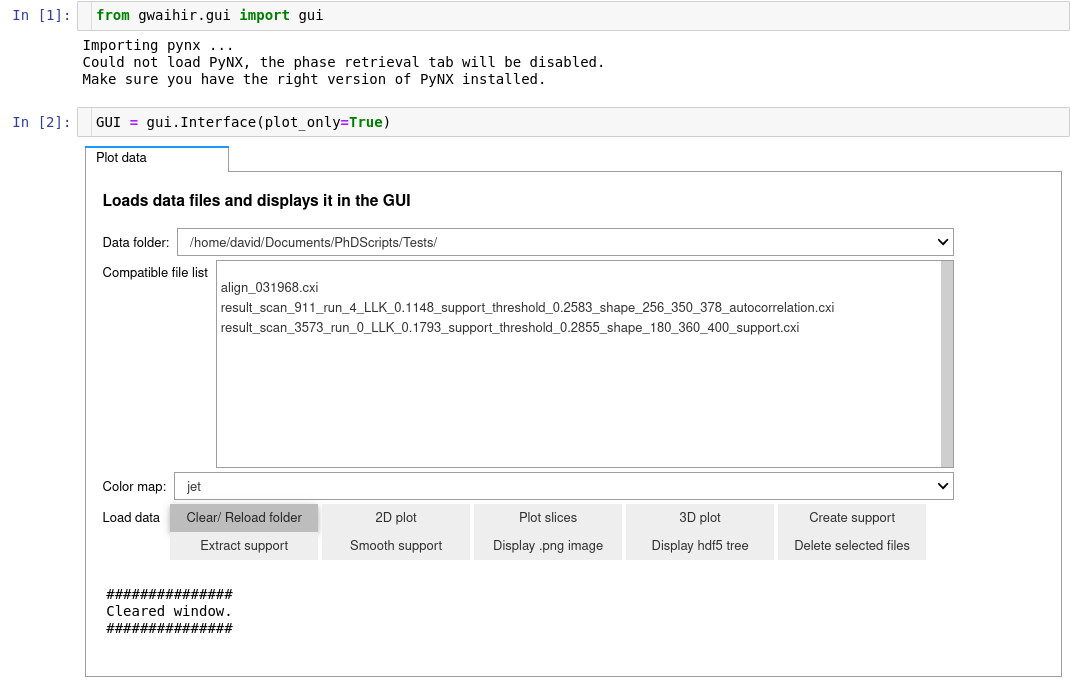
Using Gwaihir only as a plotting tool in Jupyter Notebook
To do :
- cxi viewer
- superpose mask and data or support and object in plot
Owner
- Name: David Simonne
- Login: DSimonne
- Kind: user
- Location: Cambridge
- Company: MIT
- Website: dsimonne.eu/CV
- Repositories: 16
- Profile: https://github.com/DSimonne
PhD in Physics (Université paris-Saclay). Specialized in methods for x-ray data analysis.
Citation (CITATION.cff)
cff-version: 1.2.0
message: "If you use this software, please cite it as below."
authors:
  - family-names: Simonne
    given-names: David
    orcid: https://orcid.org/0000-0002-0639-6742
title: "Gwaihir"
version: 0.0.6
doi: https://doi.org/10.1107/s1600576722005854
date-released: 2022-08-15
url: "https://github.com/DSimonne/gwaihir"
GitHub Events
Total
- Push event: 20
- Pull request event: 2
- Fork event: 1
- Create event: 2
Last Year
- Push event: 20
- Pull request event: 2
- Fork event: 1
- Create event: 2
Committers
Last synced: over 3 years ago
All Time
- Total Commits: 399
- Total Committers: 7
- Avg Commits per committer: 57.0
- Development Distribution Score (DDS): 0.393
Top Committers
| Name | Commits | |
|---|---|---|
| Ravenne | 5****e@u****m | 242 |
| Ravenne Linux | d****e@g****m | 87 |
| NoMachineESRF | d****e@s****r | 39 |
| deepsource-autofix[bot] | 6****]@u****m | 19 |
| DeepSource Bot | b****t@d****o | 7 |
| PcFixe | d****e@u****m | 4 |
| SIMONNE David | s****e@s****r | 1 |
Committer Domains (Top 20 + Academic)
Issues and Pull Requests
Last synced: 10 months ago
All Time
- Total issues: 15
- Total pull requests: 54
- Average time to close issues: 4 months
- Average time to close pull requests: about 23 hours
- Total issue authors: 1
- Total pull request authors: 2
- Average comments per issue: 1.2
- Average comments per pull request: 0.0
- Merged pull requests: 18
- Bot issues: 0
- Bot pull requests: 53
Past Year
- Issues: 0
- Pull requests: 2
- Average time to close issues: N/A
- Average time to close pull requests: N/A
- Issue authors: 0
- Pull request authors: 1
- Average comments per issue: 0
- Average comments per pull request: 0.0
- Merged pull requests: 0
- Bot issues: 0
- Bot pull requests: 2
Top Authors
Issue Authors
- DSimonne (15)
Pull Request Authors
- deepsource-autofix[bot] (55)
- Spratiher9 (1)
Top Labels
Issue Labels
Pull Request Labels
Packages
- Total packages: 1
-
Total downloads:
- pypi 4 last-month
- Total dependent packages: 0
- Total dependent repositories: 1
- Total versions: 6
- Total maintainers: 1
pypi.org: gwaihir
Python package for BCDI data analysis
- Homepage: https://github.com/DSimonne/gwaihir/tree/master
- Documentation: https://gwaihir.readthedocs.io/
- License: GNU General Public License v3 (GPLv3)
-
Latest release: 0.0.6
published over 3 years ago
Rankings
Maintainers (1)
Dependencies
- actions/first-interaction v1 composite
- actions/checkout v2 composite
- actions/setup-python v2 composite
- actions/checkout v2 composite
- actions/setup-python v2 composite
- actions/checkout v2 composite
- actions/setup-python v2 composite
- pypa/gh-action-pypi-publish 27b31702a0e7fc50959f5ad993c78deac1bdfc29 composite
- Pillow ==8.3.2
- PyQt5 ==5.15.4
- PyYAML ==6.0
- asteval ==0.9.25
- autopep8 ==1.6.0
- bcdi ==0.1.7
- black ==21.9b0
- cryptography ==3.4.8
- doit ==0.33.1
- fabio ==0.12.0
- h5py ==3.1.0
- hdf5plugin ==3.1.1
- imageio ==2.9.0
- ipyfilechooser ==0.6.0
- ipython ==7.27.0
- ipyvolume ==0.5.2
- ipywidgets ==7.6.5
- jupyter ==1.0.0
- jupyterlab ==3.2.1
- lmfit ==1.0.2
- matplotlib ==3.4.3
- moviepy ==1.0.3
- notebook ==6.4.4
- numexpr ==2.7.3
- numpy ==1.19.5
- pandas ==1.3.3
- pyaml ==21.10.1
- scikit-image ==0.18.3
- scipy ==1.7.1
- silx ==0.15.2
- tables ==3.6.1
- tqdm ==4.62.2
- traitlets ==5.1.0
- traits ==6.2.0
- vtk ==9.0.3
- xrayutilities ==1.7.1
- PyQt5 *
- argparse *
- bokeh *
- datetime *
- h5glance *
- h5py *
- ipyfilechooser *
- ipython *
- ipyvolume *
- ipywidgets *
- jupyter *
- matplotlib *
- numpy *
- pandas *
- panel *
- scipy *
- tables *
- xrayutilities *
- hdf5plugin *