https://github.com/alixunxing/coupled-iterative-refinement
Science Score: 10.0%
This score indicates how likely this project is to be science-related based on various indicators:
-
○CITATION.cff file
-
○codemeta.json file
-
○.zenodo.json file
-
○DOI references
-
✓Academic publication links
Links to: arxiv.org -
○Academic email domains
-
○Institutional organization owner
-
○JOSS paper metadata
-
○Scientific vocabulary similarity
Low similarity (11.8%) to scientific vocabulary
Last synced: 10 months ago
·
JSON representation
Repository
Basic Info
- Host: GitHub
- Owner: alixunxing
- License: mit
- Default Branch: main
- Size: 103 KB
Statistics
- Stars: 0
- Watchers: 1
- Forks: 0
- Open Issues: 0
- Releases: 0
Fork of princeton-vl/Coupled-Iterative-Refinement
Created about 4 years ago
· Last pushed about 4 years ago
https://github.com/alixunxing/Coupled-Iterative-Refinement/blob/main/
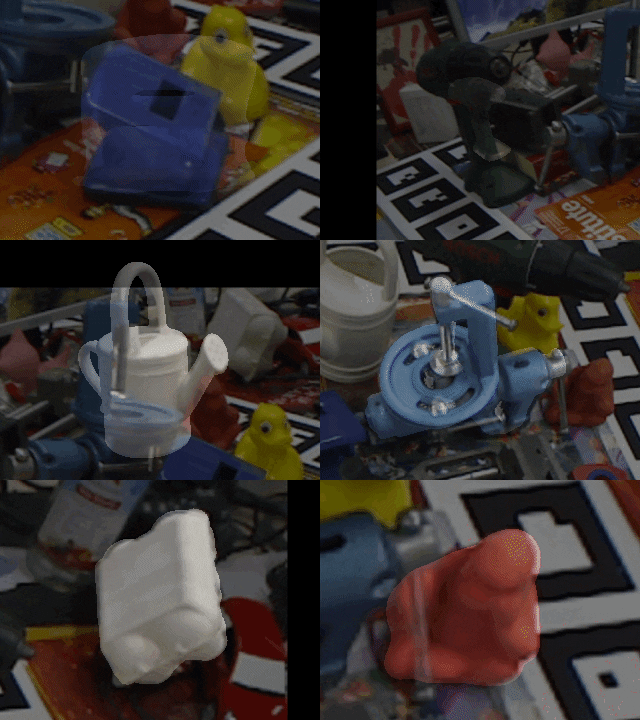
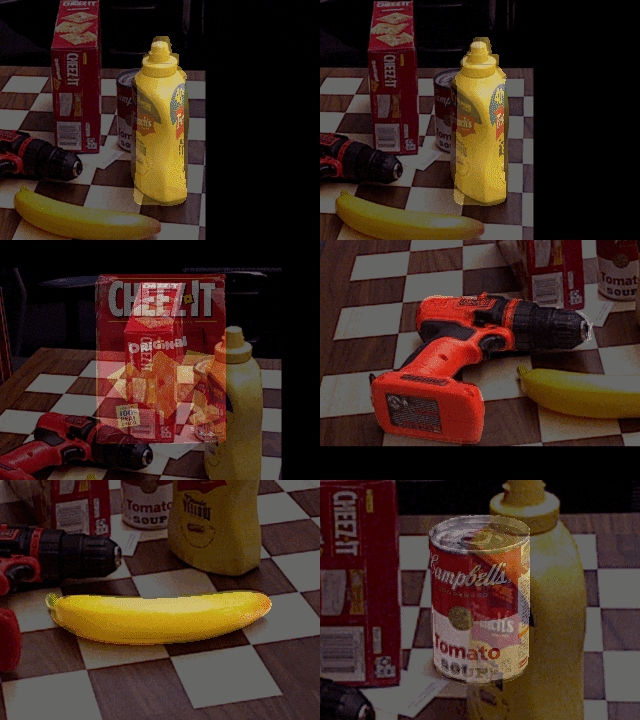
# Coupled Iterative Refinement for 6D Multi-Object Pose Estimation This repository contains the source code for our paper: [Coupled Iterative Refinement for 6D Multi-Object Pose Estimation](https://arxiv.org/abs/2204.12516)
CVPR 2022
Lahav Lipson, Zachary Teed, Ankit Goyal and Jia Deng
[Poster](https://www.lahavlipson.com/files/cir_poster.pdf) / [Video](https://www.youtube.com/watch?v=o5NeMns3tcA) ``` @inproceedings{lipson2022coupled, title={Coupled Iterative Refinement for 6D Multi-Object Pose Estimation}, author={Lipson, Lahav and Teed, Zachary and Goyal, Ankit and Deng, Jia}, booktitle={Proceedings of the IEEE/CVF Conference on Computer Vision and Pattern Recognition (CVPR)}, year={2022}, } ```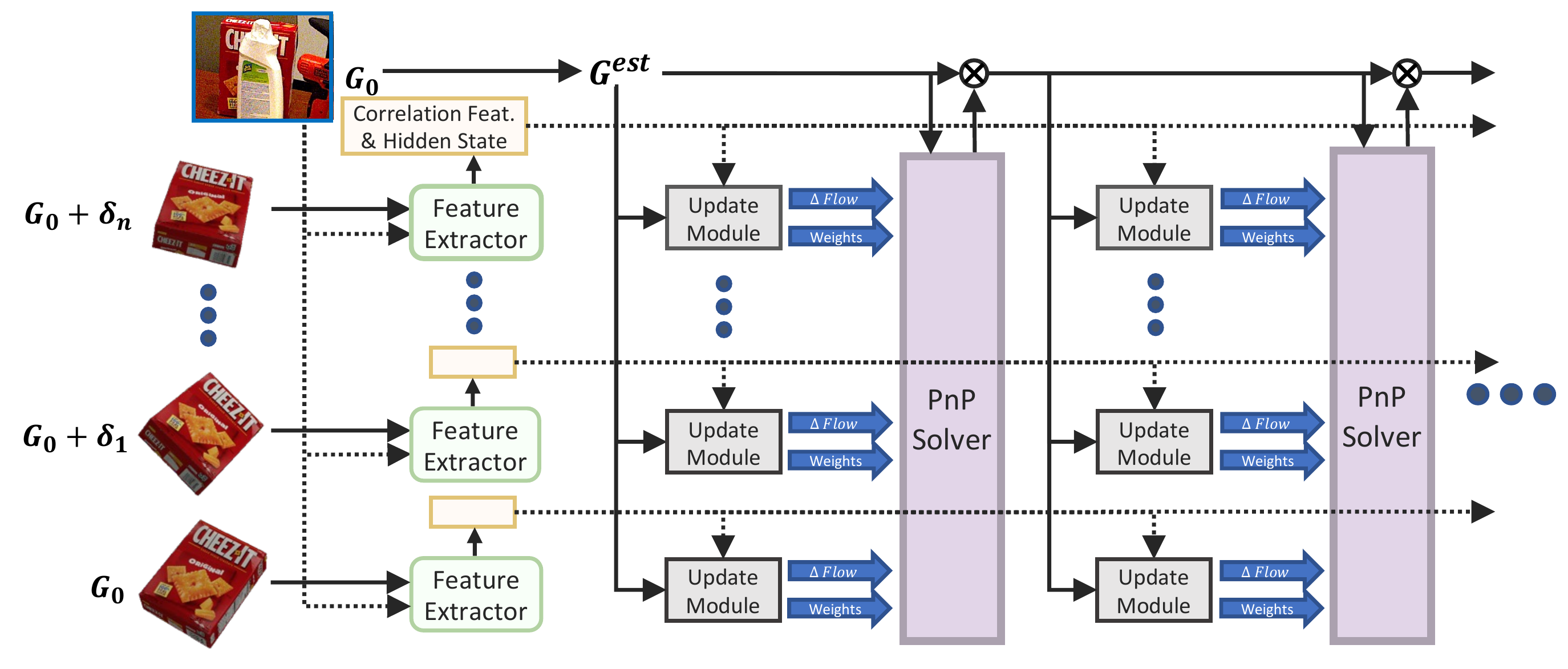
## Getting Started 1. Clone the repo using the `--recursive` flag ``` git clone --recursive https://github.com/princeton-vl/coupled-iterative-refinement.git cd coupled-iterative-refinement ``` 2. Create a new anaconda environment using the provided .yaml file (requires an NVidia GPU) ``` conda env create -f environment.yaml conda activate cir ``` ## Demos To download a sample of YCB-V, T-LESS and LM-O (513Mb), run ``` chmod ug+x download_sample.sh && ./download_sample.sh ``` Download pretrained model weights (2.4Gb) by running ``` chmod ug+x download_model_weights.sh && ./download_model_weights.sh ``` or downloaded from [google drive](https://drive.google.com/drive/folders/125zNrPFRstkq8pTIaztJc6JmBU7kSNhp?usp=sharing) To demo a trained model on any the bop datasets, run ``` python demo.py --obj_models ycbv --scene_dir sample_ycbv --load_weights model_weights/refiner/ycbv_rgbd.pth ``` Replace `ycbv` with `tless` or `lmo` in the above arguments to use a different dataset. `sample_ycbv` can be downloaded using `./download_sample.sh` or replaced with the path to a BOP scene directory. The refiner forward pass take ~1.12s using the default settings. The demo saves images of the pose refinement to `qualitative_output/`, which can be flipped through using any image viewer. To demo our RGB-only method, use `--rgb_only` and replace `_rgbd.pth` with `_rgb.pth` ## Full Datasets (for training and/or evaluation) To evaluate/train Coupled Iterative Refinement, you will need to download at least one of the core BOP datasets: - [LM (Linemod)](https://bop.felk.cvut.cz/datasets/#:~:text=Unpacks%20to%20%22lm%22.-,LM%20(Linemod),-Hinterstoisser%20et%20al) - [LM-O (Linemod-Occluded)](https://bop.felk.cvut.cz/datasets/#:~:text=LM%2DO%20(Linemod%2DOccluded)) - [T-LESS](https://bop.felk.cvut.cz/datasets/#:~:text=20%20test%20images-,T%2DLESS,-Hodan%20et%20al) - [MVTec ITODD](https://bop.felk.cvut.cz/datasets/#:~:text=20%20test%20images-,ITODD%20(MVTec%20ITODD),-Drost%20et%20al) - [HB (HomebrewedDB)](https://bop.felk.cvut.cz/datasets/#:~:text=20%20test%20images-,HB%20(HomebrewedDB),-Kaskman%20et%20al) - [YCB-V (YCB-Video)](https://bop.felk.cvut.cz/datasets/#:~:text=20%20test%20images-,YCB%2DV%20(YCB%2DVideo),-Xiang%20et%20al) - [IC-BIN (Doumanoglou et al.)](https://bop.felk.cvut.cz/datasets/#:~:text=IC%2DBIN%20(Doumanoglou%20et%20al.)) - [TUD-L (TUD Light)](https://bop.felk.cvut.cz/datasets/#:~:text=20%20test%20images-,TUD%2DL%20(TUD%20Light),-Hodan%2C%20Michel%20et) To download and unzip any of the core BOP datasets, we provide a script: ``` python additional_scripts/download_datasets.py --bop_dataset ycbv --models ycbv ``` To download the Pascal VOC dataset used for background data-augmentation, run ``` python additional_scripts/download_datasets.py --augmentation_textures # Downloads VOC2012 ``` By default `bop.py` will search for the datasets in these locations. ```Shell local_data VOCdevkit VOC2012 bop_datasets hb icbin itodd lm lmo tless tudl ycbv ``` ## Training Our method is trained separately for each of the BOP datasets. To train the YCB-V refinement model, run ``` python train.py --dataset ycbv --batch_size 12 --num_inner_loops 10 --num_solver_steps 3 ``` To train a refinement model on other BOP datasets, replace `ycbv` with one of the following: `tless`, `lmo`, `hb`, `tudl`, `icbin`, `itodd` The above command runs on two NVIDIA RTX 3090s (48Gb GPU Memory). To use less memory, decrease `batch_size`, `num_inner_loops` or `num_solver_steps`. ## Evaluation To run our end-to-end pipeline to reproduce our results, run ``` python test.py --save_dir my_evaluation --dataset ycbv --load_weights model_weights/refiner/ycbv_rgbd.pth ``` This will deposit a .tar file in `my_evaluation/`. The evaluation is slow, but can be run in parallel for different portions of the test set using `--start_index` and `--num_images`, with each run depositing a separate .tar file in `my_evaluation/`. If using a slurm array job to distribute testing, these arguments will be automatically set. To evaluate the predictions, run ``` python additional_scripts/run_bop20_eval.py --dataset ycbv --tar_dir my_evaluation ``` You can also evaluate a refiner model using random perturbations from the ground-truth pose (i.e. the validation setting) by using `--evaluate` ``` python train.py --dataset ycbv --evaluate --batch_size 2 --load_weights model_weights/refiner/ycbv_rgbd.pth ``` ## RGB-Only Variant To use the RGB-Only models, use `--rgb_only` when running `python train.py`, `python test.py` or `python demo.py` We provide trained RGB-only refiners for [YCB-V](https://drive.google.com/file/d/1NPDe9PHZWgffczF2eLkSf-7YfA340IOc/view?usp=sharing), [T-LESS](https://drive.google.com/file/d/1QPvmA5WLx1kbNV-ZGFLJ4AlKN_TzZKdE/view?usp=sharing) and [Linemod (Occluded)](https://drive.google.com/file/d/1uHCw2zKk-Q_-lBUds8ch_pcf3DHNcZ9y/view?usp=sharing) which can be loaded using `--load_weights` ## Trained Refiner Models | BOP Submission | Input type | Training split | model | |---------|------------|-----------------|--------------------------------------| | YCB-V (YCB-Video) | RGB-D | train_real x 1 + train_synt x 3 | [ycbv_rgbd.pth](https://drive.google.com/file/d/1PylPkqqg36GlNzhLW7aDInUhXcy1YSAj/view?usp=sharing)| | T-LESS | RGB-D | train_pbr x 4 + train_primesense x 1 | [tless_rgbd.pth](https://drive.google.com/file/d/1FKdnvnUyAjz8dJwQv165g4I_9zCdOm2b/view?usp=sharing)| | LM-O (Linemod-Occluded) | RGB-D | train_pbr (Linemod) | [lmo_rgbd.pth](https://drive.google.com/file/d/1KKNqufFfWLIwDp_geHmTAPcIQx1JiNj2/view?usp=sharing)| | HB (HomebrewedDB) | RGB-D | train_pbr | [hb_rgbd.pth](https://drive.google.com/file/d/1uuEPfWMw5VZfZPOfVz8yNmMB1-vL2ps8/view?usp=sharing)| | IC-BIN (Doumanoglou et al.) | RGB-D | train_pbr | [icbin_rgbd.pth](https://drive.google.com/file/d/1LoV88JoPdUdsEtJURAiNTqkwMzWqIOjK/view?usp=sharing) | | ITODD (MVTec ITODD) | RGB-D | train_pbr | [itodd_rgbd.pth](https://drive.google.com/file/d/1ttZNQrkKnioXnGuXukwSNQTPPIoOUQgk/view?usp=sharing)| | TUD-L (TUD Light) | RGB-D | train_pbr x 3 + train_real x 4 | [tudl_rgbd.pth](https://drive.google.com/file/d/1iQq2q36d_8c9Mk5QcMrKAQigtYFnj3Fi/view?usp=sharing)| | | | | | | YCB-V (YCB-Video) | RGB | train_real x 1 + train_synt x 3 | [ycbv_rgb.pth](https://drive.google.com/file/d/1NPDe9PHZWgffczF2eLkSf-7YfA340IOc/view?usp=sharing)| | T-LESS | RGB | train_pbr x 4 + train_primesense x 1 | [tless_rgb.pth](https://drive.google.com/file/d/1QPvmA5WLx1kbNV-ZGFLJ4AlKN_TzZKdE/view?usp=sharing)| | LM-O (Linemod-Occluded) | RGB | train_pbr (Linemod) | [lmo_rgb.pth](https://drive.google.com/file/d/1uHCw2zKk-Q_-lBUds8ch_pcf3DHNcZ9y/view?usp=sharing)| | | | | | The code for training the detectors and coarse models is available in the [Cosypose](https://github.com/ylabbe/cosypose#training-details) Github. The training procedure is outlined at the bottom of Appendix A in [their paper](https://arxiv.org/pdf/2008.08465.pdf). ## (Optional) Faster Implementation We provide a faster CUDA implementation of the correlation sampler. The code will default to this implementation if it is compiled (requires an NVidia GPU to compile, takes ~3 min). ``` cd pose_models/modules && pip install . && cd - # Compiles corr_sampler ``` ## Acknowledgement This repository makes extensive use of code from the [Cosypose](https://github.com/ylabbe/cosypose) Github repository. We thank the authors for open sourcing their implementation.
Owner
- Login: alixunxing
- Kind: user
- Repositories: 18
- Profile: https://github.com/alixunxing