https://github.com/amir22010/planercnn
PlaneRCNN detects and reconstructs piece-wise planar surfaces from a single RGB image
Science Score: 10.0%
This score indicates how likely this project is to be science-related based on various indicators:
-
○CITATION.cff file
-
○codemeta.json file
-
○.zenodo.json file
-
○DOI references
-
✓Academic publication links
Links to: arxiv.org -
○Academic email domains
-
○Institutional organization owner
-
○JOSS paper metadata
-
○Scientific vocabulary similarity
Low similarity (11.5%) to scientific vocabulary
Last synced: 10 months ago
·
JSON representation
Repository
PlaneRCNN detects and reconstructs piece-wise planar surfaces from a single RGB image
Basic Info
Statistics
- Stars: 0
- Watchers: 2
- Forks: 0
- Open Issues: 0
- Releases: 0
Fork of NVlabs/planercnn
Created about 7 years ago
· Last pushed about 7 years ago
https://github.com/Amir22010/planercnn/blob/master/
[](https://creativecommons.org/licenses/by-nc-sa/4.0/legalcode)  # PlaneRCNN: 3D Plane Detection and Reconstruction from a Single Image 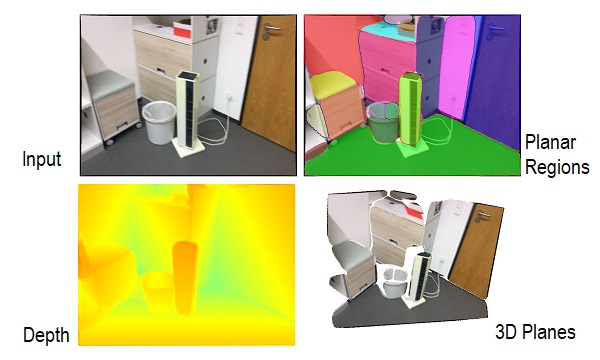 By Chen Liu, Kihwan Kim, Jinwei Gu, Yasutaka Furukawa, and Jan Kautz This paper will be presented (Oral) in IEEE CVPR 2019. ## Introduction This paper proposes a deep neural architecture, PlaneR-CNN, that detects arbitrary number of planes, and reconstructs piecewise planar surfaces from a single RGB image. For more details, please refer to our [paper](https://arxiv.org/pdf/1812.04072.pdf) and [video](https://www.youtube.com/watch?v=d9XfMvVXGwM), or visit [project website](https://research.nvidia.com/publication/2019-06_PlaneRCNN). The code is implemented using PyTorch. ### Project members ### * [Chen Liu](http://art-programmer.github.io), Washington University in St. Louis * [Kihwan Kim](https://research.nvidia.com/person/kihwan-kim), NVIDIA * [Jinwei Gu](http://www.gujinwei.org/), SenseTime * [Yasutaka Furukawa](http://www.cs.sfu.ca/~furukawa/), Simon Fraser University * [Jan Kautz](https://research.nvidia.com/person/jan-kautz), NVIDIA ### License ### Copyright (c) 2018 NVIDIA Corp. All Rights Reserved. This work is licensed under the [Creative Commons Attribution NonCommercial ShareAlike 4.0 License](https://creativecommons.org/licenses/by-nc-sa/4.0/legalcode). ## Getting Started Clone repository: ``` git clone https://github.com/NVlabs/planercnn.git ``` Create an [Anaconda](https://www.anaconda.com/distribution/) environment and install the dependencies: ``` conda create --name planercnn conda activate planercnn conda install -y pytorch=0.4.1 conda install pip pip install -r requirements.txt ``` Equivalently, you can use Python virtual environment to manage the dependencies: ``` pip install virtualenv python -m virtualenv planercnn source planercnn/bin/activate pip install -r requirements.txt ``` Now, we compile nms and roialign as explained in the installation section of [pytorch-mask-rcnn](https://github.com/multimodallearning/pytorch-mask-rcnn). To be specific, you can build these two functions using the following commands with the right `--arch` option: | GPU | arch | |-------------------------|-------| | TitanX | sm_52 | | GTX 960M | sm_50 | | GTX 1070 | sm_61 | | GTX 1080 (Ti), Titan XP | sm_61 | More details of the compute capability are shown in [NVIDIA](https://developer.nvidia.com/cuda-gpus) ```bash cd nms/src/cuda/ nvcc -c -o nms_kernel.cu.o nms_kernel.cu -x cu -Xcompiler -fPIC -arch=[arch] cd ../../ python build.py cd ../ cd roialign/roi_align/src/cuda/ nvcc -c -o crop_and_resize_kernel.cu.o crop_and_resize_kernel.cu -x cu -Xcompiler -fPIC -arch=[arch] cd ../../ python build.py cd ../../ ``` ## Models Models are saved under *checkpoint/*. You can download our trained model from [here](https://www.dropbox.com/s/yjcg6s57n581sk0/checkpoint.zip?dl=0), and put it under *checkpoint/* if you want to fine-tune it or run inferences. ## Run the inference code with an example ```bash python evaluate.py --methods=f --suffix=warping_refine --dataset=inference --customDataFolder=example_images ``` Results are saved under "test/inference/". Besides visualizations, plane parameters (#planes x 3) are saved in "\*_plane_parameters_0.npy" and plane masks (#planes x 480 x 640) are saved in "\*_plane_masks_0.npy". ## Using custom data Please put your images (*.png* or *.jpg* files), and camera intrinsics under a folder ($YOUR_IMAGE_FOLDER). The camera parameters should be put under a *.txt* file with 6 values (fx, fy, cx, cy, image_width, image_height) separately by a space. If the camera intrinsics is the same for all images, please put these parameters in *camera.txt*. Otherwise, please add a separate intrinsics file for each image, and name it the same with the image (changing the file extension to *.txt*). And then run: ```bash python evaluate.py --methods=f --suffix=warping_refine --dataset=inference --customDataFolder=$YOUR_IMAGE_FOLDER ``` ## Training ### Training data preparation Please first download the ScanNet dataset (v2), unzip it to "$ROOT_FOLDER/scans/", and extract image frames from the *.sens* file using the official [reader](https://github.com/ScanNet/ScanNet/blob/master/SensReader/python/reader.py). Then download our plane annotation from [here](https://www.dropbox.com/s/u2wl4ji700u4shq/ScanNet_planes.zip?dl=0), and merge the "scans/" folder with "$ROOT_FOLDER/scans/". (If you prefer other locations, please change the paths in *datasets/scannet_scene.py*.) After the above steps, ground truth plane annotations are stored under "$ROOT_FOLDER/scans/scene*/annotation/". Among the annotations, *planes.npy* stores the plane parameters which are represented in the global frame. Plane segmentation for each image view is stored under *segmentation/*. To generate such training data from the original 3D models on your own, please refer to *data_pred/parse.py*. Besides scene-specific annotation under each scene folder, please download global metadata from [here](https://www.dropbox.com/s/v7qb7hwas1j766r/metadata.zip?dl=0), and unzip it to "$ROOT_FOLDER". Metadata includes the normal anchors (anchor_planes_N.py) and invalid image indices caused by tracking issues (invalid_indices_*.txt). ### Training script ```bash python train_planercnn.py --restore=2 --suffix=warping_refine ``` options: ```bash --restore: - 0: training from scratch (not tested) - 1 (default): resume training from saved checkpoint - 2: training from pre-trained mask-rcnn model --suffix (the below arguments can be concatenated): - '': training the basic version - 'warping': with the warping loss - 'refine': with the refinement network - 'refine_only': train only the refinement work - 'warping_refine_after': add the warping loss after the refinement network instead of appending both independently --anchorType: - 'normal' (default): regress normal using 7 anchors - 'normal[k]' (e.g., normal5): regress normal using k anchors, normal0 will regress normal directly without anchors - 'joint': regress final plane parameters directly instead of predicting normals and depthmap separately ``` Temporary results are written under *test/* for debugging purposes. ## Evaluation To evaluate the performance against existing methods, please run: ```bash python evaluate.py --methods=f --suffix=warping_refine ``` Options: ```bash --methods: - f: evaluate PlaneRCNN (use --suffix and --anchorType to specify configuration as explained above) - p: evaluate PlaneNet - e: evaluate PlaneRecover - t: evaluate MWS (--suffix=gt for MWS-G) ``` Statistics are printed in terminal and saved in *logs/global.txt* for later analysis. Note that [PlaneNet](https://github.com/art-programmer/PlaneNet/blob/master/LICENSE) and [PlaneRecover](https://github.com/fuy34/planerecover/blob/master/LICENSE) are under the MIT license. ## Contact If you have any questions, please contact the primary author [Chen Liu <chenliu@wustl.edu>](mailto:chenliu@wustl.edu), or [Kihwan Kim <kihwank@nvidia.com>](mailto:kihwank@nvidia.com). ## Acknowledgement Our implementation uses the nms/roialign from the Mask R-CNN implementation from [pytorch-mask-rcnn](https://github.com/multimodallearning/pytorch-mask-rcnn), which is licensed under [MIT License](https://github.com/multimodallearning/pytorch-mask-rcnn/blob/master/LICENSE)
Owner
- Name: Amir Khan
- Login: Amir22010
- Kind: user
- Location: India
- Repositories: 3
- Profile: https://github.com/Amir22010
working on developing a state of art AI solutions mainly in computer vision, chat bots and nlp domain. building an awesome AI as a professional developer 😍.