syblars
SyBLaRS: Systems Biology Layout & Rendering Service
Science Score: 65.0%
This score indicates how likely this project is to be science-related based on various indicators:
-
✓CITATION.cff file
Found CITATION.cff file -
✓codemeta.json file
Found codemeta.json file -
✓.zenodo.json file
Found .zenodo.json file -
✓DOI references
Found 2 DOI reference(s) in README -
○Academic publication links
-
○Academic email domains
-
✓Institutional organization owner
Organization ivis-at-bilkent has institutional domain (www.cs.bilkent.edu.tr) -
○JOSS paper metadata
-
○Scientific vocabulary similarity
Low similarity (18.6%) to scientific vocabulary
Keywords
Repository
SyBLaRS: Systems Biology Layout & Rendering Service
Basic Info
Statistics
- Stars: 12
- Watchers: 3
- Forks: 2
- Open Issues: 3
- Releases: 3
Topics
Metadata Files
README.md
SyBLaRS
Systems Biology Layout & Rendering Service (SyBLaRS) is a web service to lay out graphs in SBGNML, SBML, GraphML and JSON formats and/or produce corresponding images (in JPG, PNG or SVG formats) of the layouts with an option to highlight results from various graph queries in the backend.

Main capabilities of SyBLaRS include: - creating an image of the provided map, which already has layout information, with an option to highlight a specific query result - laying out the provided map in specified layout style (among many available ones) and returning the map with layout information in JSON format, and - both laying out the provided map in specified layout style and creating an image of it again with an option to highlight a specific query result (and returning both the map with layout information and the image).
Backed by these capabilities, SyBLaRS can be used: - to produce images from a dataset with large amount of graphs (e.g. BioModels) in an automated way (see test branch) - as the layout service of a network visualization tool, and - to generate image of an SBGN/SBML model for a publication (e.g. journal/conference article).
SyBLaRS is distributed under the MIT License. Here is a sample server deployment along with a simple client-side demo:

Please cite the following when you use this service:
H. Balci, U. Dogrusoz, Y.Z. Ozgul and P. Atayev, "SyBLaRS: A web service for laying out, rendering and mining biological maps in SBGN, SBML and more", PLOS Computational Biology, 18(11), pp. 1-12, 2022.
Setup of a service
In order to deploy and run a local instance of the service, please follow the steps below:
Installation
git clone https://github.com/iVis-at-Bilkent/syblars.git
cd syblars
npm install   // this may take a while
Starting server
The default port is 3000, you can change it by setting 'PORT' environment variable.
npm run start
Note #1: We recommend the use of Node.js version 14.x and npm version 6.x. We used Node.js v14.18.0 and npm v6.14.8 during development.
Note #2: This service uses Puppeteer to generate the output. Please refer to the Puppeteer documentation to ensure that your machine is configured properly to run Chrome headlessly.
Docker
Alternatively, you can use Dockerfile provided in the root directory. Please note that Dockerfile currently works in Linux and Windows environments and does not work in macOS because of Puppeteer related issues. To run the Dockerfile (below commands may require sudo in Linux environment):
First, cd into the folder where Dockerfile is located.
Then, build a Docker image with name syblars (this may take a while).
docker build -t syblars .
Lastly, run the image from port 3000. If you want to use another port, please change the first port number in below command.
docker run -p 3000:3000 syblars
Supported formats
SyBLaRS supports the following input formats for graphs: SBGNML, SBML, GraphML, and JSON.
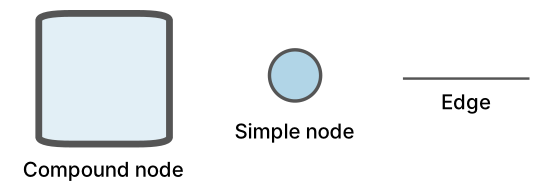
The notations used for these formats:
SBGNML Stylesheet | SBML Stylesheet | GraphML & JSON
-------------------------|-------------------------|-------------------------
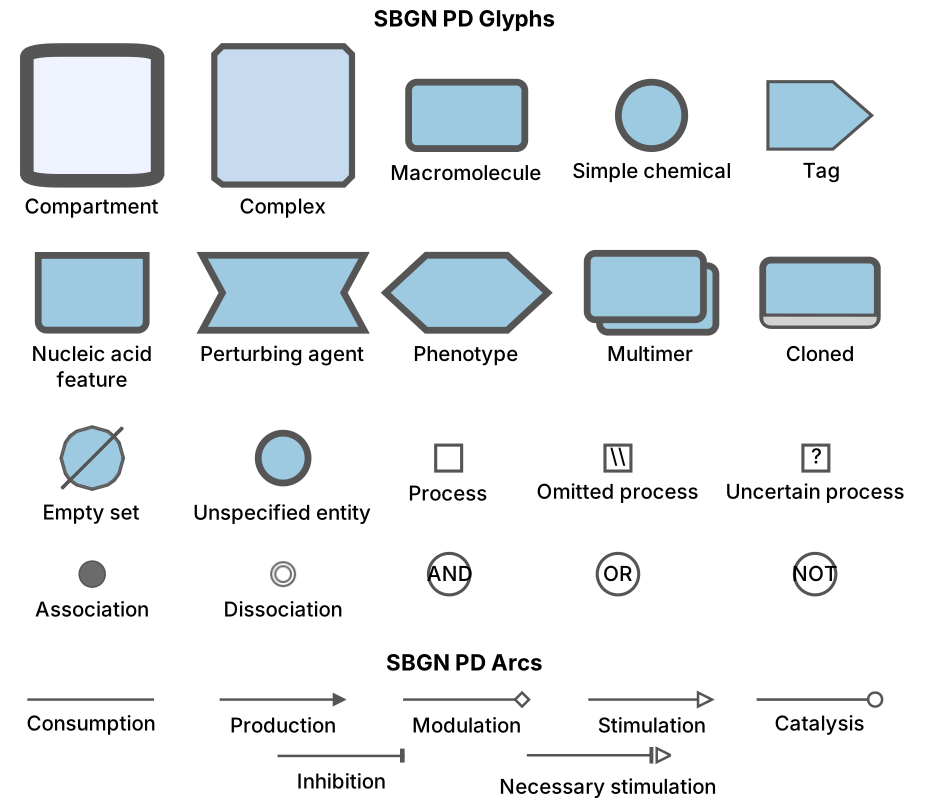 |
| 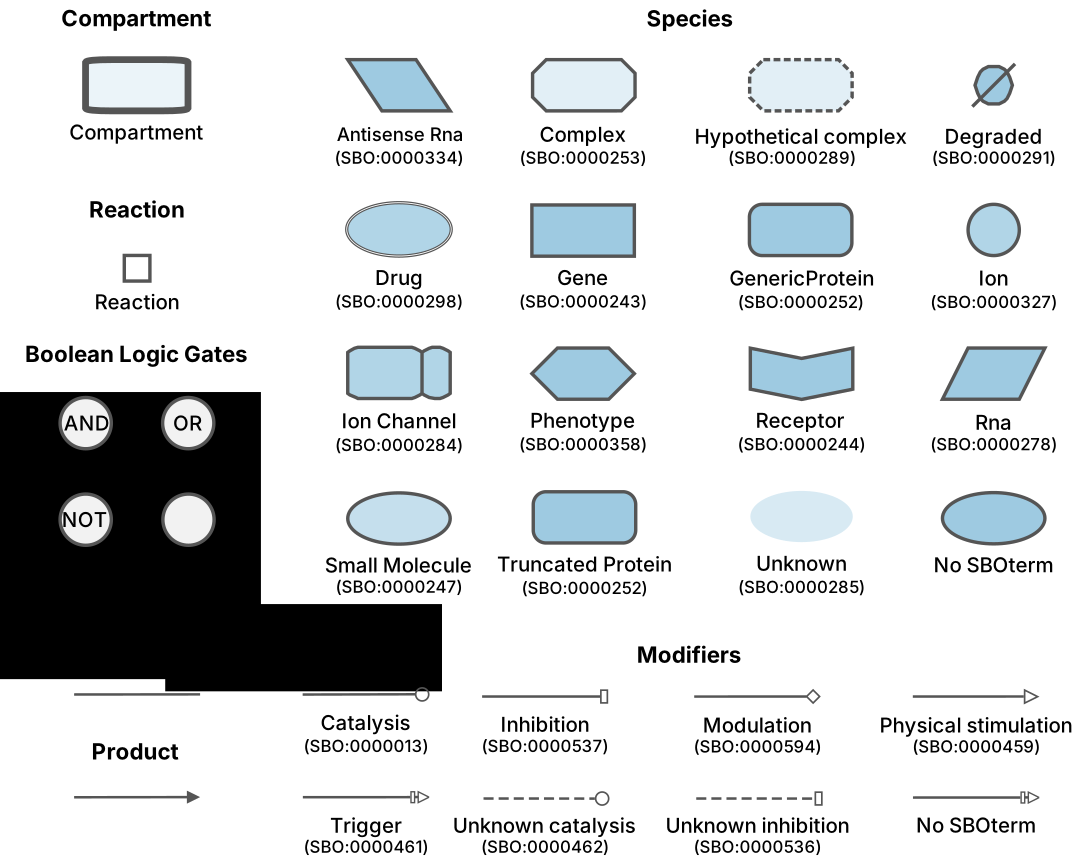 |
| 
Supported layouts
The supported graph layout algorithms are: fCoSE, CoLa, CiSE, Dagre, Klay, Avsdf and are among Cytoscape.js layout extensions as listed here.
Each layout style has a varying number of options for customization of the layout. The demo provided only exposes some of the popular options; please refer to the corresponding GitHub repository for an exhaustive list of such options. Among these options some that we think will be commonly used are listed below:
- padding: Padding around the map drawing
- idealEdgeLength: Ideal length of an edge (layout will try to get every edge this long within constraints)
- randomize: Use random node positions at the beginning of layout (false means an incremental layout)
- packComponents: Whether or not to pack disconnected components after separate layout
- tile: Enable tiling of disconnected nodes together for a compact representation
- nodeDimensionsIncludeLabels: Whether or not to include labels in node dimensions during layout
Supported graph queries
The supported graph queries are: - Degree Centrality: The normalized degree centrality of the nodes in the graph - Closeness Centrality: The normalized closeness centrality of the nodes in the graph - Betweenness Centrality: The normalized betweenness centrality of the nodes in the graph - Page Rank: The rank of the nodes in the graph - Shortest Path: The shortest path from a single source to a single target in the graph - k-Neighborhood: The neighbors of the specified source nodes within a certain distance k - Common Stream: The set of common nodes that are in the upstream/downstream/bothstream of all specified source nodes with a path length limit k - Paths Between: The subgraph that consists of the paths of length at most k between any two nodes of the specified source nodes - Paths From To: All shortest paths between specified source nodes and target nodes with a maximum length limit k and a further distance d
For more details about these queries, please refer to centrality section of Cytoscape.js and cytoscape.js-graph-algos GitHub repository.
Usage
Sending request to the local deployment via curl:
curl -X POST -H "Content-Type: text/plain" --data "request_body" http://localhost:3000/file_format
and via Fetch API
``` let settings = { method: 'POST', headers: { Accept: 'application/json', 'Content-Type': 'text/plain' }, body: request_body };
let result = await fetch("http://localhost:3000/file_format", settings) .then(response => response.json()) .then(res => { return res; }) .catch(e => { return e; }); ```
where file_format is one of the sbgnml, sbml, graphml and json.
request_body needs to be formed in the following way:
If the file content is in JSON format:
JSON.stringfy([JSON.parse(file_content), options])
If the file content is in other formats:
file_content + JSON.stringfy(options)
where options is an object consisting of layoutOptions, imageOptions and queryOptions. Example:
options = {
  layoutOptions: {
    name: 'fcose',
    nodeDimensionsIncludeLabels: true,
    ...
  },
  imageOptions: {
    format: 'png',              // output format
    background: 'transparent',  // background color
    width: 1280,                // desired width
    height: 720,                // desired height
    color: '#9ecae1'            // node color
  },
  queryOptions: {
    query: 'kNeighborhood',           // query type
    sourceNodes: [nodeID1, nodeID2],  // source nodes
    limit: 2,                         // path length limit
    direction: 'BOTHSTREAM',          // direction of the search
    sourceColor: '#00ff00',           // highlight color for source nodes
    pathColor: '#ffff00',             // highlight color for result elements
    highlightWidth: 10,               // underlay padding used to highlight elements
    cropToResult: false,              // whether to crop the image to the query result
  }
}
Note: While sending the requests via curl, any " in the request_body should be replaced with \" and all newline characters should be removed.
For supported layout options, please check the documentation of the associated layout algorithm. Image options support three output formats: png, jpg and svg. background attribute should be a hex color code or transparent. color attribute should be a hex color code for SBML, GraphML and JSON formats, and one of the following predefined color schemes for the SBGNML format: bluescale, greyscale, red_blue, green_brown, purple_brown, purple_green, grey_red, and black_white.
The query options change depending on the query type:
Degree Centrality:
  queryOptions: {
    query: 'degreeCentrality',  // query type
    direction: 'DIRECTED',      // direction of the search
    highlight: true,            // whether to highlight nodes based on the resulting values
    highlightColor: '#00ff00'   // highlight color (valid only if highlight option is true)
  }
Closeness Centrality:
  queryOptions: {
    query: 'closenessCentrality',  // query type
    direction: 'DIRECTED',         // direction of the search
    highlight: true,               // whether to highlight nodes based on the resulting values
    highlightColor: '#00ff00'      // highlight color (valid only if highlight option is true)
  }
Betweenness Centrality:
  queryOptions: {
    query: 'betweennessCentrality',  // query type
    direction: 'DIRECTED',           // direction of the search
    highlight: true,                 // whether to highlight nodes based on the resulting values
    highlightColor: '#00ff00'        // highlight color (valid only if highlight option is true)
  }
Page Rank:
  queryOptions: {
    query: 'pageRank',          // query type
    highlight: true,            // whether to highlight nodes based on the resulting values
    highlightColor: '#00ff00'   // highlight color (valid only if highlight option is true)
  }
Shortest Path:
  queryOptions: {
    query: 'shortestPath',   // query type
    sourceNodes: [nodeID1],  // source node - only one node id
    targetNodes: [nodeID2],  // target node - only one node id
    direction: 'DIRECTED',   // direction of the search
    sourceColor: '#00ff00',  // highlight color for source node
    targetColor: '#ff0000',  // highlight color for target node
    pathColor: '#ffff00',    // highlight color for resulting elements
    highlightWidth: 10,      // underlay padding used to highlight elements
    cropToResult: false      // whether to crop the image to the query result
  }
k-Neighborhood:
  queryOptions: {
    query: 'kNeighborhood',                // query type
    sourceNodes: [nodeID1, nodeID2, ...],  // source nodes
    limit: 1,                              // path length limit
    direction: 'BOTHSTREAM',               // direction of the search
    sourceColor: '#00ff00',                // highlight color for source nodes
    pathColor: '#ffff00',                  // highlight color for resulting elements
    highlightWidth: 10,                    // underlay padding used to highlight elements
    cropToResult: false                    // whether to crop the image to the query result
  }
Common Stream:
  queryOptions: {
    query: 'commonStream',                 // query type
    sourceNodes: [nodeID1, nodeID2, ...],  // source nodes
    limit: 1,                              // path length limit
    direction: 'BOTHSTREAM',               // direction of the search
    sourceColor: '#00ff00',                // highlight color for source nodes
    targetColor: '#ff0000',                // highlight color for common nodes in stream
    pathColor: '#ffff00',                  // highlight color for resulting elements
    highlightWidth: 10,                    // underlay padding used to highlight elements
    cropToResult: false                    // whether to crop the image to the query result
  }
Paths Between:
  queryOptions: {
    query: 'pathsBetween',                 // query type
    sourceNodes: [nodeID1, nodeID2, ...],  // source nodes
    limit: 1,                              // path length limit
    direction: 'DIRECTED',                 // direction of the search
    sourceColor: '#00ff00',                // highlight color for source nodes
    pathColor: '#ffff00',                  // highlight color for resulting elements
    highlightWidth: 10,                    // underlay padding used to highlight elements
    cropToResult: false                    // whether to crop the image to the query result
  }
Paths From To:
  queryOptions: {
    query: 'pathsFromTo',                  // query type
    sourceNodes: [nodeID1, nodeID2, ...],  // source nodes
    targetNodes: [nodeID1, nodeID2, ...],  // target nodes
    limit: 1,                              // path length limit
    furtherDistance: 1,                    // parameter for "relaxing" the path length limit
    direction: 'DIRECTED',                 // direction of the search
    sourceColor: '#00ff00',                // highlight color for source nodes
    targetColor: '#ff0000',                // highlight color for target nodes
    pathColor: '#ffff00',                  // highlight color for resulting elements
    highlightWidth: 10,                    // underlay padding used to highlight elements
    cropToResult: false                    // whether to crop the image to the query result
  }
where direction is one of UPSTREAM, DOWNSTREAM or BOTHSTREAM for kNeighborhood and commonStream queries and one of DIRECTED or UNDIRECTED for degreeCentrality, closenessCentrality, betweennessCentrality, shortestPath, pathsBetween and pathsFromTo queries.
In case you do not need layout applied, you should either not provide layoutOptions or provide preset the layout style. If you do not provide imageOptions, default ones will be used. To disable image output (in case you only need the output JSON file back with layout information), you should set image option to false in your request URL, which is true by default:
http://localhost:3000/file_format?image=false
After the request is sent, the server will lay out the given graph and return the layout information in JSON format that will contain node IDs along with their corresponding positions (x, y) and dimensions (width, height), and image information (in base64uri encoding for png and jpg formats and in xml for the svg format). If you want the edges to be returned as well in layout information, you should set edges option to the request URL, which is false by default:
http://localhost:3000/file_format?edges=true
If an error occurs, the response of the server will consist of an error message.
For instance, a sample SBGNML file can be laid out with fCoSE layout and a corresponding PNG image can be generated by making a query to the sample deployment of SyBLaRS web service via curl in the following way:
curl -X POST -H "Content-Type: text/plain" --data "<?xml version='1.0' encoding='UTF-8'?><sbgn xmlns='http://sbgn.org/libsbgn/0.3'> <map version='http://identifiers.org/combine.specifications/sbgn.pd.level-1.version-1.3' id='map1'> <glyph class='simple chemical' id='glyph1'> <label text='DHA-P'/> <bbox x='30' y='20' w='60' h='60'/> </glyph> <glyph class='simple chemical' id='glyph2'> <label text='GA-3P' /> <bbox x='30' y='220' w='60' h='60'/> </glyph> <glyph class='macromolecule' id='glyph3'> <label text='Triose-P
Isomerase' /> <bbox x='150' y='120' w='120' h='60'/> </glyph> <glyph class='process' orientation='vertical' id='pn1'> <bbox x='50' y='140' w='20' h='20'/> <port x='60' y='130' id='pn1.1'/> <port x='60' y='170' id='pn1.2'/> </glyph> <arc class='production' source='pn1.1' target='glyph1' id='a1'> <start x='60' y='130' /> <end x='60' y='80' /> </arc> <arc class='production' source='pn1.2' target='glyph2' id='a2'> <start x='60' y='170' /> <end x='60' y='220' /> </arc> <arc class='catalysis' source='glyph3' target='pn1' id='a3'> <start x='150' y='150' /> <end x='70' y='150' /> </arc> </map></sbgn>{\"layoutOptions\":{\"name\":\"fcose\",\"randomize\":true,\"padding\":30},\"imageOptions\":{\"format\":\"png\",\"background\":\"transparent\", \"width\": 1280, \"height\": 1280, \"color\":\"bluescale\"}}" http://syblars.cs.bilkent.edu.tr/sbgnml?edges=true
and the corresponding response with image and layout information will be as follows:
{"image":"data:image/png;base64,iVBORw0KGgoAAAANSUhE...""layout":{"pn1":{"position":{"x":167.44176266064383,"y":152.28835944241527},"data":{"width":25,"height":25}},...}}}}
The same query can be done via Fetch API in the following way:
```
let settings = {
method: 'POST',
headers: {
Accept: 'application/json',
'Content-Type': 'text/plain'
},
body: <?xml version='1.0' encoding='UTF-8'?>
let result = await fetch("http://syblars.cs.bilkent.edu.tr/sbgnml?edges=true", settings) .then(response => response.json()) .then(res => { return res; }) .catch(e => { return e; });
let imageInfo = result["image"]; // data:image/png;base64,iVBORw0KGgoAAAANSUhE... (in base64uri for png and jpg and in xml for svg)
let layoutInfo = result["layout"]; // {"00ac7e0a-288f-42e0-b252-9bcb59027572":{"position":{"x":97.42656942899578,"y":-128.0473968715957},"data":{"width":25,"height":25,"parent":"23d436e2-6633-42f2-98d0-00dbb962ac3d"}},...}}}} (in JSON format)
```
See also here for sample Python codes that call SyBLaRS to lay out and render SBGNML files by Augustin Luna.
Remarks
SyBLaRS regards any node position information. This is especially useful if you want to create an image of the map, which is already laid out. This is also useful in cases where you do have a partially decent layout but you would like to apply an incremental layout respecting the current positions in your map. This information should be provided via
bboxof each glyph in SBGNML files, via the layout extension in SBML files, viaxandydata attributes andpositionattribute of each node in GraphML and JSON files, respectively (see the sample files).SyBLaRS also takes any node dimensions into account for layout in SBML, GraphML and JSON file formats. This information should be provided via the layout extension in SBML files, and via
widthandheightdata attributes of each node in GraphML and JSON files (see the sample files). Any dimension data is ignored for the SBGNML file format, however, as the third-party stylesheet used for rendering SBGNML maps has fixed/pre-defined dimensions for each node type.Compound/nested graph structures are supported in all file formats. We recommend that you use the fCoSE layout style for best results on graphs with compound structures.
Performing a layout emphasizing the clustering/grouping of nodes is supported only with GraphML and JSON formats. The cluster each node belongs to should be defined via the
clusterIDdata attribute of each node (see the corresponding sample files). CiSE layout style should be used for layout to explicitly show the clustering available in the graph.The
xandycoordinates of a node in the resulting layout information indicate the 'center' coordinates of the node.jpgoutput format does not support transparent background; thus, we return a white background whentransparentoption is chosen.The layout options presented in the client demo are not exhaustive and may not include all options of the corresponding layout style. Please refer to the webpage of each layout extension for the detailed list of available options.
Credits
SyBLaRS uses the Express framework for handling HTTP requests. Actual operations are performed using Cytoscape.js and its extensions (see the package.json file for a complete listing). Among these extensions, Cytosnap is particularly needed for creating a headless Chrome instance, on which graph creation, rendering, layout and image creation of the input graphs are performed.
Icons in the client demo are made by Freepik and Flaticon licensed with Creative Commons BY 3.0.
Third-party libraries used in web service: sbgnml-to-cytoscape, cytoscape-sbgn-stylesheet, cytosnap, libsbmljs, express, cors, jQuery, jsdom, nodemon, jest, super-test
Third-party libraries used in demo client: Semantic UI, underscore.js, backbone.js, FileSaver.js
Team
Hasan Balci, Ugur Dogrusoz, Yusuf Ziya Özgül and Perman Atayev of i-Vis at Bilkent University
Owner
- Name: i-Vis at Bilkent
- Login: iVis-at-Bilkent
- Kind: organization
- Website: http://www.cs.bilkent.edu.tr/~ivis/
- Twitter: iVisAtBilkent
- Repositories: 50
- Profile: https://github.com/iVis-at-Bilkent
i-Vis Research Lab at Bilkent University
Citation (CITATION.cff)
cff-version: 1.2.0
message: "If you use this service, please cite it as below."
authors:
- family-names: "Balci"
  given-names: "Hasan"
  orcid: "https://orcid.org/0000-0001-8319-7758"
- family-names: "Dogrusoz"
  given-names: "Ugur"
  orcid: "https://orcid.org/0000-0002-7153-0784"
- family-names: "Ozgul"
  given-names: "Yusuf Ziya"
- family-names: "Atayev"
  given-names: "Perman"
title: "syblars"
version: 1.0.2
date-released: 2021-09-09
url: "https://github.com/iVis-at-Bilkent/syblars"
preferred-citation:
  type: article
  authors:
  - family-names: "Balci"
    given-names: "Hasan"
    orcid: "https://orcid.org/0000-0001-8319-7758"
  - family-names: "Dogrusoz"
    given-names: "Ugur"
    orcid: "https://orcid.org/0000-0002-7153-0784"
  - family-names: "Ozgul"
    given-names: "Yusuf Ziya"
  - family-names: "Atayev"
    given-names: "Perman"
  doi: "10.1371/journal.pcbi.1010635"
  journal: "PLOS Computational Biology"
  title: "SyBLaRS: A web service for laying out, rendering and mining biological maps in SBGN, SBML and more"
  issue: 11
  volume: 18
  start: 1 # First page number
  end: 12 # Last page number
  month: 11
  year: 2022
GitHub Events
Total
- Push event: 1
- Pull request event: 1
- Fork event: 1
Last Year
- Push event: 1
- Pull request event: 1
- Fork event: 1
Dependencies
- node 14.18.0 build
- 981 dependencies
- env-cmd ^9.0.3 development
- jest ^24.9.0 development
- supertest ^4.0.2 development
- cors ^2.8.5
- cytoscape ^3.18.2
- cytoscape-avsdf ^1.0.0
- cytoscape-cise github:iVis-at-Bilkent/cytoscape.js-cise#develop
- cytoscape-cola ^2.4.0
- cytoscape-dagre ^2.3.2
- cytoscape-fcose github:iVis-at-Bilkent/cytoscape.js-fcose#unstable
- cytoscape-graph-algos github:iVis-at-Bilkent/cytoscape.js-graph-algos#3b64a7f8275ca0c3b3f32c4869c63c0647c7772c
- cytoscape-graphml ^1.0.6
- cytoscape-klay ^3.1.4
- cytoscape-layout-utilities ^1.0.2
- cytoscape-sbgn-stylesheet github:iVis-at-Bilkent/cytoscape-sbgn-stylesheet#master
- cytoscape-svg ^0.3.1
- cytosnap github:iVis-at-Bilkent/cytosnap#master
- express ^4.17.1
- jquery ^3.6.0
- jsdom ^16.5.3
- libsbmljs_stable 5.17.0-beta1
- nodemon ^2.0.7
- sbgnml-to-cytoscape ^4.0.4