LaMa
LaMa: a thematic labelling web application - Published in JOSS (2023)
Science Score: 95.0%
This score indicates how likely this project is to be science-related based on various indicators:
-
○CITATION.cff file
-
✓codemeta.json file
Found codemeta.json file -
✓.zenodo.json file
Found .zenodo.json file -
✓DOI references
Found 4 DOI reference(s) in README and JOSS metadata -
✓Academic publication links
Links to: joss.theoj.org -
✓Committers with academic emails
6 of 15 committers (40.0%) from academic institutions -
○Institutional organization owner
-
✓JOSS paper metadata
Published in Journal of Open Source Software
Keywords
Scientific Fields
Repository
LaMa, short for Labelling Machine, is an web application developed for aiding in thematic analysis of qualitative data.
Basic Info
Statistics
- Stars: 17
- Watchers: 1
- Forks: 2
- Open Issues: 6
- Releases: 1
Topics
Metadata Files
README.md

LaMa (Labelling Machine)

LaMa is a Thematic Labelling web application that can facilitate easier analysis of texts by allowing to add labels to these text artifacts and group the created labels into themes. This tool was developed by a team of nine students for the Final Bachelor Project at the Eindhoven University of Technology.
The tool was created to facilitate collaboration and peer feedback on labelled artifacts. LaMa allows for the user to label text in order to find patterns in qualitative data. Using this tool will allow for an easier, faster, and more structured way for one or more people to label a given text and resolve any conflicts that arise between labels. Additionally, it provides an free and open-source alternative for the commercial tools, such as Atlas.ti and maxQDA.
This project builds upon the already existing Labeling Machine tool by extending it and adding new functionalities, which include but are not limited to a new API and remaking the User Interface (UI).
Table of Content
Dependencies
For deployment using docker:
For development these are the dependencies/tools without which LaMa may not work:
- NodeJS ≥ 16.15
- AngularCLI ≥ 13.3.10
- Python ≥ 3.10
- pip ≥ 22.1.2
- Docker ≥ 20.10 (with compose plugin)
- IDE (optional, but recommended for easier development. We recommend PyCharm for Backend and VSCode for Frontend)
Installation
Assuming that you have all the necessary dependencies installed.
- Clone repository
- Navigate to the repository in a terminal
To start the application run:
docker compose --env-file .env -f Docker/docker-compose.yml up --build -dTo shut down the application run:
docker compose --env-file .env -f Docker/docker-compose.yml down
You should now have LaMa running in your browser. By default, the frontend server runs on localhost and default login credentials are admin as username & password as password.
Setup for development
Database:
1. Open a terminal in the root directory of the repository
2. Start the database with:
docker compose --env-file .env -f Docker/docker-compose-db.yml up --build -d
3. Shut down the database with:
docker compose --env-file .env -f Docker/docker-compose-db.yml down
Frontend:
1. Open a terminal in the frontend directory
2. Run npm i
3. Create the environment variables, npx tsx .\src\setenv.ts
4. Run ng serve
5. The frontend server will run on localhost:4200
Backend:
1. Set the FLASK_ENV environment variable to development
2. Open a terminal in the backend directory
3. On your first time create a virtual environment with python -m venv venv
4. Activate your virtual environment, .\venv\Scripts\activate on Windows or source venv/bin/activate on Linux
5. Run pip install -r requirements.txt
6. Run the following commands:
flask db-safe init
flask db migrate
flask db upgrade
flask db-safe add-super-admin
flask run --host=0.0.0.0
7. On teardown do not forget to revert the FLASK_ENV environment variable to production, and run deactivate to deactivate the virtual environment
Environment variables
The Environment variables can be found in the .env file in the root of the repository. Here all of the default values for the necessary variables are set. If one wants to change any of these variables they should change the values in this file.
The file is divided into sections:
1) Database - these are all the variables that have anything to do with the database, such as the database port, database login details etc. 2) PhPMyadmin - this is where the port for the phpmyadmin is defined 3) LaMa Config - these variables defines the superadmin username and password. Please, note that a superadmin is created by default who has access of all the projects and their contents. The AUTO_APPROVAL variable determines whether new accounts are approved by default, or must be approved by super admins, it should parse as a boolean. 4) Flask Server - these are the variables needed to run the flask server. 5) Frontend Server - these are two variables for the urls to the backend server. The frontend uses these variables to interact with the apis provided by the backend.
Sample Database
With the database running do the following:
1) Go the PMA, which runs on localhost:81 by default.
2) In the lama database, check all tables and drop them. You will lose all your data.
3) Go to the import tab, choose the sample.sql file found in the root of the repository, and press Go.
The sample database contains one project on the topic of restaurant reviews, and this project already has some labelled artifacts. The three main criteria for reviews are the food, service, and decor. There are two users with the following login details:
- Username: admin Password: password
- Username: John Doe Password: Testing123
User Manual
Participating in project
Projects are the fundamental building block of the tool, functionalities are on a per project basis. There are 2 ways to participate in a project:
- Create your own project
- Join an existing project
Creating a project can be done through the Create project button at the top right of the screen, this opens a menu in which settings of the project can be configured.

To join an existing project the project admin of that project needs to add your account through the project setting menu of the project. The project settings menu can be opened through the setting (gear icon) in the menu bar on the left after opening the project.

Uploading artifacts
After participating in a project, for any functionality first artifacts have to be added. Artifacts can be added by navigating to the Artifact management page, from the navigation menu on the left after opening the project. On the artifact management page click the Add artifact button at the top right, and upload a .txt file containing the artifact(s).

Labelling an artifact
After having uploaded artifacts it is possible to start labelling them. Navigate using the navigation menu on the left to the labelling page. An artifact will be shown here. To label an artifact, select labels from the dropdown menu below the artifact text.
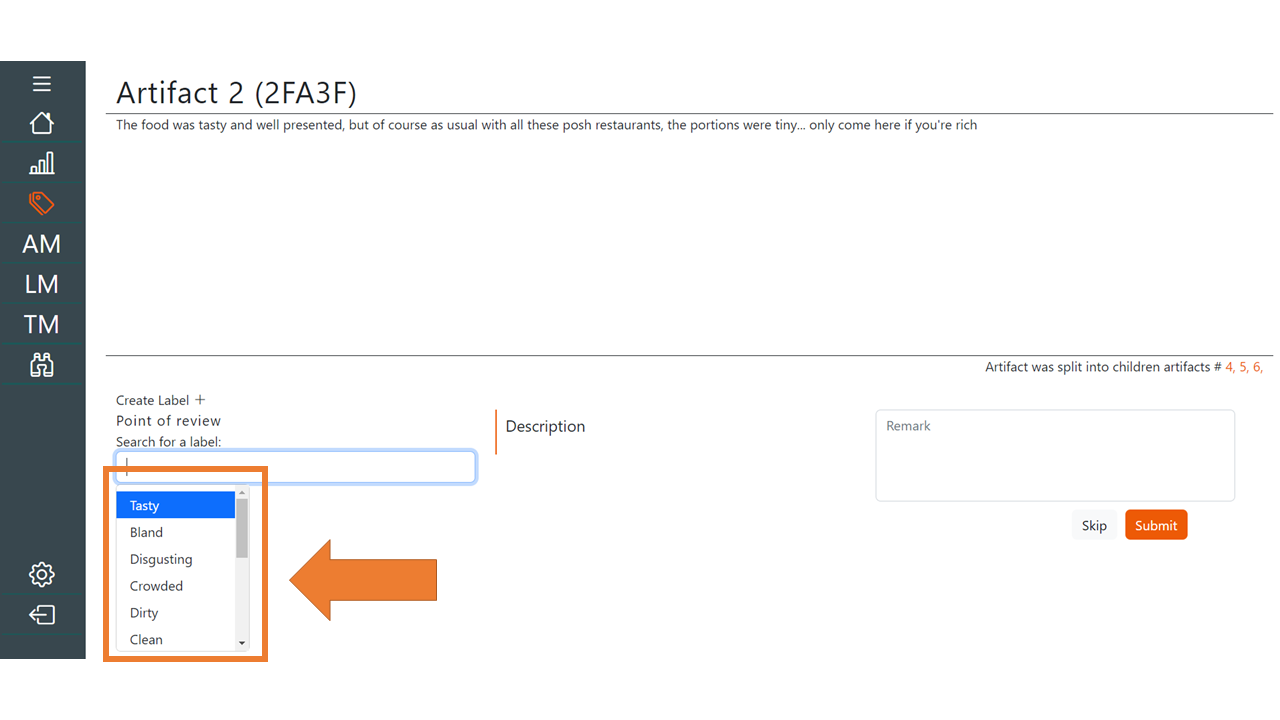
New labels can be created using the add label button above the dropdown menu. The remark text-field can be used to add comments on why a certain label was selected.

Note: Labels have a label type, this is a way grouping of labels. To label an artifact the user should select a label from each label type. Label types are specified during the project creation, and are not adjustable afterwards.
Conflict resolution
After different users have labelled an artifact there could be conflict between the labels that have been assigned. Artifacts with different labels appear in the conflict resolution page. Here users can modify the labelling given to ensure that there is conformity between the assigned labels.

Clicking the resolve conflict button will resolve the conflict if the labels are consistent.

Advanced features
For a full list of features we refer the reader to the Software User Manual (SUM), below we will briefly describe some of the more important advanced features for common use cases.
- Artifacts can be viewed on the artifact management page. Additional info about labels given to artifacts can be seen by clicking on an artifact.
- Segments from an artifact can be transformed into a new artifact, this operation is referred to as "split". Splitting of artifacts is done by highlighting the portion of the artifact to be split on the labelling page, and then clicking the scissor icon in the top right.
- The label management page displays all labels in a project, changes can be made to labels, such as editing names, merging labels.
- Themes can be created to provide a logical grouping of labels, allowing for better analysis. Themes are created on the theme management page. Labels are assigned to themes on the label management page, or the theme management page.
- Themes can be logically grouped with other themes to create a hierarchical view of the elements within a project.
- Artifacts, labels and themes store change history. This can be inspected by clicking the clock icon when viewing the aforementioned elements.
- Various project statistics can be viewed on the statistics page. The user can navigate to the statistics page using the navigation menu on the left side of the screen.
- The hierarchy and status of labels and themes can be visualized by clicking the Theme hierarchy button on the theme management page. A visualization will be displayed showing how the different elements are related to another, and their current status.
Testing
Frontend testing
- Navigate to the frontend folder on the terminal
- To install the required libraries run the command:
npm install - After this command has executed succesfully, run the front-end test cases using the command:
ng test
Backend testing
- Navigate to the backend folder on the terminal
- To install the required dependencies run the command:
pip install -r requirements.txt - After this command has executed succesfully, run the back-end test cases using the command:
pytest -rA(if pytest has not been added to your path, instead run: python -m pytest -rA)
Citing this work
Please use the following Bibtex for citing this work.
@article{lama2023,
  author = {Victoria Bogachenkova and Eduardo Costa Martins and Jarl Jansen and Ana-Maria Olteniceanu and Bartjan Henkemans and Chinno Lavin and Linh Nguyen and Thea Bradley and Veerle Fürst and Hossain Muhammad Muctadir and Mark van den Brand and Loek Cleophas and Alexander Serebrenik},
  title = {LaMa: a thematic labelling web application},
  journal = {Journal of Open Source Software},
  doi = {10.21105/joss.05135},
  url = {https://doi.org/10.21105/joss.05135},
  year = {2023},
  publisher = {The Open Journal},
  volume = {8},
  number = {85},
  pages = {5135}
}
Acknowledgements
LaMa was developed based on a web application called Labeling Machine, which is forked from an earlier version of the Labeling Machine. Development of LaMa was partially funded by NWO (the Dutch national research council) under the NWO AES Perspective program (Digital Twin), project code P18-03 P3. We acknowledge the contribution of the nine bachelor students from Eindhoven University of Technology, the Netherlands V. Bogachenkova, T. Bradley, E.J. Costa Martins, V. Fürst, B. Henkemans, J.L.O. Jansen, L.C. Lavin, L.V. Nguyen, and A. Olteniceanu, who contributed to this project significantly as part of their final project of the bachelors program in computer science.
Owner
- Name: Hossain Muhammad Muctadir
- Login: muctadir
- Kind: user
- Location: Eindhoven, Netherlands
- Website: muctadir.github.io
- Twitter: HossainMuctadir
- Repositories: 2
- Profile: https://github.com/muctadir
PhD candidate at TU Eindhoven
JOSS Publication
LaMa: a thematic labelling web application
Authors
Software Engineering and Technology cluster, Eindhoven University of Technology, Eindhoven, The Netherlands
Software Engineering and Technology cluster, Eindhoven University of Technology, Eindhoven, The Netherlands
Software Engineering and Technology cluster, Eindhoven University of Technology, Eindhoven, The Netherlands
Software Engineering and Technology cluster, Eindhoven University of Technology, Eindhoven, The Netherlands
Software Engineering and Technology cluster, Eindhoven University of Technology, Eindhoven, The Netherlands
Software Engineering and Technology cluster, Eindhoven University of Technology, Eindhoven, The Netherlands
McGill University, Montreal, Canada
Software Engineering and Technology cluster, Eindhoven University of Technology, Eindhoven, The Netherlands
Software Engineering and Technology cluster, Eindhoven University of Technology, Eindhoven, The Netherlands

Software Engineering and Technology cluster, Eindhoven University of Technology, Eindhoven, The Netherlands
Software Engineering and Technology cluster, Eindhoven University of Technology, Eindhoven, The Netherlands
Software Engineering and Technology cluster, Eindhoven University of Technology, Eindhoven, The Netherlands
Software Engineering and Technology cluster, Eindhoven University of Technology, Eindhoven, The Netherlands
Editor
Frederick Boehm
Tags
Labelling Qualitative data analysis Thematic analysisGitHub Events
Total
- Watch event: 5
- Fork event: 1
Last Year
- Watch event: 5
- Fork event: 1
Committers
Last synced: 11 months ago
Top Committers
| Name | Commits | |
|---|---|---|
| eduardo-devintage | 6****e | 214 |
| TheVeerloes | v****t@g****m | 203 |
| JarlJansen123 | j****3@g****m | 182 |
| Bartjan Henkemans | b****s@s****l | 164 |
| Ana-Maria-O | a****u@g****m | 146 |
| Victoria | v****a@g****m | 137 |
| Olteniceanu, Ana-Maria | a****u@s****l | 91 |
| corvusumbra | c****n@g****m | 65 |
| VietLinh-2111 | l****n@s****l | 41 |
| hughjarc | 6****c | 36 |
| Hossain Muctadir | h****r@t****l | 13 |
| ave-ottens | 5****s | 9 |
| Fürst, Veerle | v****t@s****l | 3 |
| Bruno P. Kinoshita | k****w | 1 |
| DeepSource Bot | b****t@d****o | 1 |
Committer Domains (Top 20 + Academic)
Issues and Pull Requests
Last synced: 11 months ago
All Time
- Total issues: 14
- Total pull requests: 8
- Average time to close issues: 15 days
- Average time to close pull requests: 25 days
- Total issue authors: 2
- Total pull request authors: 5
- Average comments per issue: 2.71
- Average comments per pull request: 0.0
- Merged pull requests: 7
- Bot issues: 0
- Bot pull requests: 0
Past Year
- Issues: 0
- Pull requests: 0
- Average time to close issues: N/A
- Average time to close pull requests: N/A
- Issue authors: 0
- Pull request authors: 0
- Average comments per issue: 0
- Average comments per pull request: 0
- Merged pull requests: 0
- Bot issues: 0
- Bot pull requests: 0
Top Authors
Issue Authors
- luxaritas (9)
- kinow (5)
Pull Request Authors
- muctadir (3)
- JarlJansen123 (2)
- vicbog11 (1)
- eduardo-devintage (1)
- kinow (1)
Top Labels
Issue Labels
Pull Request Labels
Dependencies
- actions/checkout v2 composite
- actions/upload-artifact v1 composite
- openjournals/openjournals-draft-action master composite
- mysql 8-oracle
- phpmyadmin/phpmyadmin 5.1.3
- ubuntu 22.04 build
- nginx 1.21.6-alpine build
- node 16.15-alpine3.15 build
- 928 dependencies
- @angular-devkit/build-angular ~13.3.6 development
- @angular/cli ~13.3.6 development
- @angular/compiler-cli ~13.3.9 development
- @types/jasmine ~3.10.0 development
- @types/node ^12.11.1 development
- jasmine-core ~4.0.0 development
- karma ~6.3.0 development
- karma-chrome-launcher ~3.1.0 development
- karma-coverage ~2.1.0 development
- karma-jasmine ~4.0.0 development
- karma-jasmine-html-reporter ~1.7.0 development
- moxios ^0.4.0 development
- tslib ^2.4.0 development
- typescript ~4.6.2 development
- @angular/animations ~13.3.9
- @angular/common ~13.3.9
- @angular/compiler ~13.3.9
- @angular/core ~13.3.9
- @angular/forms ~13.3.9
- @angular/localize ~13.3.9
- @angular/platform-browser ~13.3.9
- @angular/platform-browser-dynamic ~13.3.9
- @angular/router ~13.3.9
- @ng-bootstrap/ng-bootstrap ^12.1.2
- @popperjs/core ^2.10.2
- @types/d3 ^7.4.0
- axios ^0.27.2
- bootstrap ^5.1.3
- bootstrap-icons ^1.8.2
- d3 ^7.4.4
- lorem-ipsum ^2.0.4
- rxjs ~7.5.0
- rxjs-compat ^6.6.7
- url ^0.11.0
- zone.js ~0.11.4
- Flask ==2.1.2
- Flask-Cors ==3.0.10
- Flask-Migrate ==3.1.0
- Flask-SQLAlchemy ==2.5.1
- Jinja2 ==3.1.2
- Mako ==1.2.1
- MarkupSafe ==2.1.1
- PyJWT ==2.4.0
- SQLAlchemy ==1.4.39
- Werkzeug ==2.1.2
- alembic ==1.8.0
- attrs ==21.4.0
- click ==8.1.3
- coverage ==6.4.1
- flask-marshmallow ==0.14.0
- greenlet ==1.1.2
- iniconfig ==1.1.1
- itsdangerous ==2.1.2
- marshmallow ==3.17.0
- marshmallow-sqlalchemy ==0.28.0
- mysqlclient ==2.1.1
- numpy ==1.23.0
- packaging ==21.3
- pluggy ==1.0.0
- py ==1.11.0
- pyparsing ==3.0.9
- pytest ==7.1.2
- python-dotenv ==0.20.0
- six ==1.16.0
- tomli ==2.0.1
- mysql 8-oracle
- phpmyadmin/phpmyadmin 5.1.3