https://github.com/antarctica/web-map-inventory
Inventory of geospatial layers and web maps provided by the BAS Mapping and Geographic Information Centre (MAGIC), visualised in Airtable.
Science Score: 10.0%
This score indicates how likely this project is to be science-related based on various indicators:
-
○CITATION.cff file
-
○codemeta.json file
-
○.zenodo.json file
-
○DOI references
-
○Academic publication links
-
✓Committers with academic emails
1 of 1 committers (100.0%) from academic institutions -
○Institutional organization owner
-
○JOSS paper metadata
-
○Scientific vocabulary similarity
Low similarity (10.1%) to scientific vocabulary
Keywords
Repository
Inventory of geospatial layers and web maps provided by the BAS Mapping and Geographic Information Centre (MAGIC), visualised in Airtable.
Basic Info
- Host: GitHub
- Owner: antarctica
- License: other
- Language: Python
- Default Branch: master
- Homepage: https://pypi.org/project/bas-web-map-inventory/
- Size: 771 KB
Statistics
- Stars: 0
- Watchers: 3
- Forks: 1
- Open Issues: 8
- Releases: 0
Topics
Metadata Files
README.md
MAGIC Web Map Inventory
Retired inventory of geospatial layers and web maps provided by the BAS Mapping and Geographic Information Centre (MAGIC) visualised in Airtable.
Note: This project was designed for internal use within MAGIC, but is offered to anyone with similar needs.
Status
This project has been retired. It has been kept as a record of things that been tried in the past. See https://gitlab.data.bas.ac.uk/MAGIC/web-map-inventory/-/issues/80 for more details.
Usage
This project runs in a container. See the Setup section for setup instructions.
If running on the BAS central workstations:
shell
$ ssh geoweb@bslws01.nerc-bas.ac.uk
$ web-map-inventory [task]
Configuration, logs and data output are stored in /users/geoweb/.config/web-map-inventory/.
If any errors occur they will be reported to Sentry and relevant individials alerted by email.
Commands
version
Reports the current application version.
data fetch
Fetches information about servers, namespaces, repositories, styles, layers and layer groups from servers defined in a data sources file. Fetched information is saved to an output data file.
Options:
-s,--data-sources-file-path:- path to a data sources file
- default:
data/sources.json
-d,--data-output-file-path:- path to a data sources file
- default:
data/data.json
Note: Currently this task results in new IDs being generated for each resource, even if it already exists. This will lead to resources being removed and re-added unnecessarily but will always remain internally consistent.
data validate
Validates protocols offered by servers defined in a data sources file (by default data/sources.json).
Options:
-s,--data-sources-file-path:- path to a data sources file
- default:
data/sources.json
-i,--data-source-identifier:- identifier of a server in the data sources file
- use special value
allto select all data sources
-p,--validation-protocol:- protocol to validate
- default:
wms
Note: Currently this task is limited to the WMS (OGC Web Map Service) protocol.
airtable status
Checks local items against Airtable to check whether they are up-to-date (current), outdated, missing or orphaned.
airtable sync
Creates, updates or removes items in Airtable to match local items.
airtable reset
Removes all data from Airtable.
Managing data sources
Each data source is represented as an object in the server list in data/sources.json [1]. The structure of each
source depends on its type. For more general information, see the Data sources section.
[1] This file is either in the runtime path created during Setup or ~/.config/web-map-inventory/ on the BAS
central servers).
Adding new data sources
Note: See Supported data sources for currently supported data sources.
Once added use the data fetch task.
Adding a GeoServer data source
| Property | Required | Data Type | Allowed Values | Example Value | Description | Notes |
| ---------- | -------- | --------- | ------------------------------------------------------------------- | ---------------------------- | ------------------------------------ | ----------------------------- |
| id | Yes | String | A ULID (Universally Unique Lexicographically Sortable Identifier) | 01DRS53XAJNH0TNBW5161B6EWJ | Unique identifier for server/source | See below for how to generate |
| label | Yes | String | Any combination of a-Z, A-Z, 0-9, -, _ | a-1_A | Using a short, well-known identifier | - |
| hostname | Yes | String | Any valid hostname | example.com | - | - |
| type | Yes | String | geoserver | See allowed value | - | - |
| port | Yes | String | Any valid port number | 8080 | - | Usually 80 or 8080 |
| api-path | Yes | String | /geoserver/rest | See allowed value | Defined by GeoServer | - |
| wms-path | Yes | String | /geoserver/ows?service=wms&version=1.3.0&request=GetCapabilities | See allowed value | Defined by GeoServer | - |
| wfs-path | Yes | String | /geoserver/ows?service=wfs&version=2.0.0&request=GetCapabilities | See allowed value | Defined by GeoServer | - |
| username | Yes | String | Any valid GeoServer username | admin | Usually the GeoServer admin user | - |
| password | Yes | String | Password for GeoServer user | password | Usually the GeoServer admin user | - |
Note: Use ulidgenerator.com to generate ULIDs manually.
Example:
json
{
  "id": "xxx",
  "label": "example",
  "hostname": "example.com",
  "type": "geoserver",
  "port": "80",
  "api-path": "/geoserver/rest",
  "wms-path": "/geoserver/ows?service=wms&version=1.3.0&request=GetCapabilities",
  "wfs-path": "/geoserver/ows?service=wfs&version=2.0.0&request=GetCapabilities",
  "username": "admin",
  "password": "password"
}
Note: Make sure to include a comma between each source (but don't include a trailing comma) - e.g.:
json
{
    "servers": [
        {
            "id": "xxx",
            "label": "existing-server"
            ...
        },
        {
            "id": "xxx",
            "label": "new-server"
            ...
        }
    ]
}
Implementation
Flask application using the airtable-python-wrapper library to interact with the Airtable API.
Airtable
Data is synced to the MAGIC Maps and Layers Inventory Base in the BAS MAGIC Workspace.
Data model
This project, an inventory, consists of information held in geospatial services. The data model is intended to be generic to support different data sources and technologies.
This data model consists of:
- Servers: Represent a source of geospatial information, such as an instance of a technology or a whole platform
- Namespaces: Represent a logical grouping of resources within a server/endpoint
- Repositories: Represent a data source that backs one or more layers
- Styles: Represent a definition for how data in a layer should be represented/presented
- Layers: Represent a logical unit of geospatial information
- Layer Groups: Represent a logical grouping of one or more layers that should be treated as a single, indivisible unit
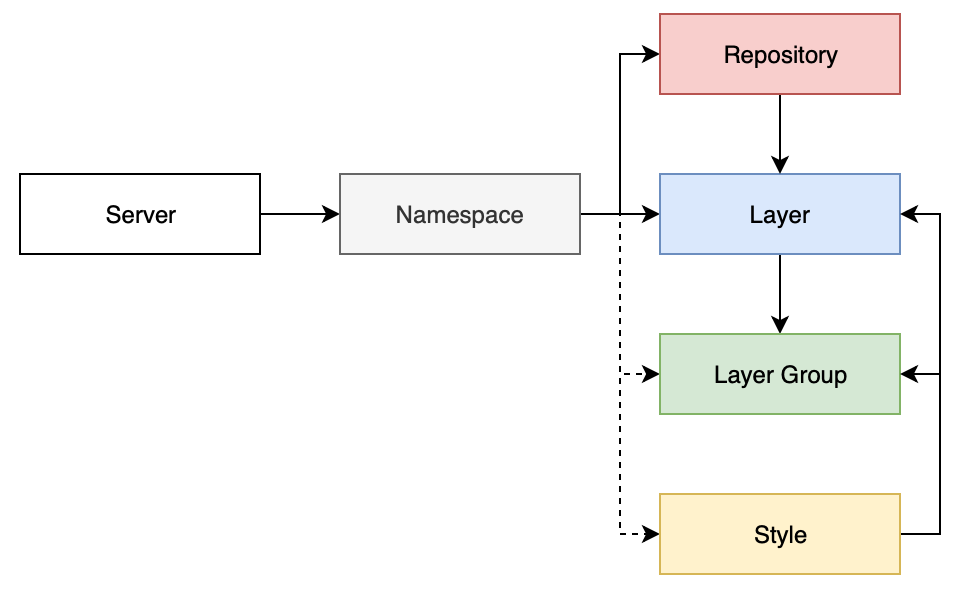
A JSON Schema describes this schema. It is used internally for validating data prior to use but is also published for use by others if needed as: data-schema-v1.json.
Data sources
Data sources are servers in the project Data model and define connection details for APIs and services each server type provides for fetching information about components they contain (e.g. listing layers).
A data sources file, data/sources.json, is used for recording these details. An example is available in
data/sources.example.json. See the Adding a data source section for more information.
A JSON Schema, bas_web_map_inventory/resources/json_schemas/data-sources-schema.json, validates this file.
Supported data sources
- GeoServer
- Using a combination of its admin API and WMS/WFS OGC endpoints
Configuration
Configuration options are set within bas_web_map_inventory/config.py.
All Options are defined in a Config base class, with per-environment sub-classes overriding
and extending these options as needed. The active configuration is set using the FLASK_ENV environment variable.
Most options can be Set using environment variables or files.
Configuration options
| Option | Required | Environments | Data Type (Cast) | Source | Allowed Values | Default Value | Example Value | Description | Notes |
| ------------------------- | -------- | ------------ | ---------------- | ----------- | ------------------------------------------------------------------------------------------------------------------- | -------------------------------------------------------------------------- | ------------------------------------------------------------ | --------------------------------------------------------------------------------------------------------------- | -------------------------- |
| FLASK_APP | Yes | All | String | .flaskenv | Valid FLASK_APP value | manage.py | See default value | See Flask documentation | - |
| APP_ENABLE_SENTRY | No | All | Boolean | .flaskenv | True/False | False (for development/testing), True (for staging/production) | True | Feature flag for Error reporting | - |
| APP_ENABLE_FILE_LOGGING | No | All | Boolean | .flaskenv | True/False | False | False | Feature flag for writing Application Logs to a file in addition to standard out | - |
| SENTEY_DSN | Yes | Yes | String | .flaskenv | Sentry DSN for this project | https://c69a62ee2262460f9bc79c4048ba764f@sentry.io/1832548 | See default value | Sentry Data Source Name | This value is not a secret |
| APP_LOG_FILE_PATH | No | All | String | .flaskenv | Valid file path | /var/log/app/app.log | /var/log/app/app.log | Path to application log file, if enabled | - |
| AIRTABLE_API_KEY | Yes | All | String | .env | Valid AirTable API key | - | keyxxxxxxxxxxxxxx | AirTable API Key | - |
| AIRTABLE_BASE_ID | Yes | All | String | .env | Valid AirTable Base ID | - | appxxxxxxxxxxxxxx | ID of the AirTable Base to populate/use | - |
Options are set as strings and then cast to the data type listed above. See Environment variables for information about an options 'Source'.
Flask also has a number of builtin configuration options.
Setting configuration options
Variable configuration options can be set using environment variables or environment files:
| Source | Priority | Purpose | Notes |
| ------------------------ | -------- | --------------------------- | --------------------------------------- |
| OS environment variables | 1st | General/Runtime | - |
| .env | 2nd | Secret/private variables | Generate by copying .env.example |
| .flaskenv | 3rd | Non-secret/public variables | Generate by copying .flaskenv.example |
Note: these sources are a Flask convention.
Error tracking
Errors in this service are tracked with Sentry:
Error tracking will be enabled or disabled depending on the environment. It can be manually controlled by setting the
APP_ENABLE_SENTRY variable in .flaskenv.
Logging
Logs for this service are written to stdout and a log file, /var/log/app/app.py, depending on the environment.
File based logging can be manually controlled by setting the APP_ENABLE_FILE_LOGGING and APP_LOG_FILE_PATH
variables in .flaskenv.
Note: If APP_LOG_FILE_PATH is changed, the user the container runs as must be granted suitable write permissions.
XML Catalogue
An XML Catalog is used to cache XML files locally (typically XSD's for schemas). This drastically speeds up XML parsing and removes a dependency on remote endpoints.
XML files in the catalogue are typically stored in bas_web_map_inventory/resources/xml_schemas/.
Different catalogue files are used for different container variants due to differences in the applications location:
:latest:./support/xml-schemas/catalogue.xml/deploy:provisioning/docker/catalog.xml
In either case, the catalogue is available within the container at the conventional path, /etc/xml/catalog, and will
be used automatically by most XML libraries and tools (such as lxml and xmllint).
Setup
The application for this project runs as a Docker container.
Once setup, see the Data sources and Usage sections for how to use and run the application.
Note: This project can run locally or on the BAS central workstations using Podman. You will need
access to the private BAS Docker Registry (part of gitlab.data.bas.ac.uk) and for IT to enable Podman in your user account. Unless noted, docker commands listed here can be replaced with podman.
shell
$ docker login docker-registry.data.bas.ac.uk
$ docker pull docker-registry.data.bas.ac.uk/magic/web-map-inventory/deploy:stable
Note: Other image tags are available if you want to run pre-release versions, or a specific, previous, version.
Before you can run the container, you will need to create a runtime directory that will live outside of the container. You will need to create the required Configuration files. Any generated output will also be saved here.
shell
$ mkdir -p ~/.config/web-map-inventory
Optional wrapper script
If using podman, a wrapper script, support/container-wrapper/podman-wrapper.sh, is available to make running the
container easier.
To use, copy this script and enable it to be executed:
```shell $ mkdir ~/bin
copy support/container-wrapper/podman-wrapper.sh as ~/bin/web-map-inventory
$ chmod +x ~/bin/web-map-inventory ```
Then ensure ~/bin is part of the user's path (use echo $PATH to check), if it isn't edit the user's shell to include
it (these instructions assume the bash shell and the absolute path to the user's home directory is /home/foo):
```shell $ vi ~/.bash_rc
add `export PATH="/home/foo/bin:$PATH" then save the file and reload the user's shell
```
You should now be able to run web-map-inventory to run the container.
Terraform
Terraform is used to provision resources required to allow JSON Schemas for data resources and data sources to be accessed externally.
Access to the BAS AWS account is needed to provisioning these resources.
Note: This provisioning should have already been performed (and applies globally). If changes are made to this provisioning it only needs to be applied once.
```shell
start terraform inside a docker container
$ cd provisioning/terraform $ docker-compose run terraform
setup terraform
$ terraform init
apply changes
$ terraform validate $ terraform fmt $ terraform apply
exit container
$ exit $ docker-compose down ```
Terraform remote state
State information for this project is stored remotely using a Backend.
Specifically the AWS S3 backend as part of the BAS Terraform Remote State project.
Remote state storage will be automatically initialised when running terraform init. Any changes to remote state will
be automatically saved to the remote backend, there is no need to push or pull changes.
Remote state authentication
Permission to read and/or write remote state information for this project is restricted to authorised users. Contact the BAS Web & Applications Team to request access.
See the BAS Terraform Remote State project for how these permissions to remote state are enforced.
Development
shell
$ git clone https://gitlab.data.bas.ac.uk/MAGIC/web-map-inventory
$ cd map-layer-index
Development environment
The :latest container image is used for developing this project. It can run locally using Docker and Docker Compose:
shell
$ docker login docker-registry.data.bas.ac.uk
$ docker-compose pull app
Then create/configure required Configuration files:
shell
$ cp .env.example .env
$ cp .flaskenv.example .flaskenv
$ cp data/sources.example.json data/sources.json
To run/test application commands:
shell
$ docker-compose run app flask [task]
[1] You will need access to the private BAS Docker Registry (part of gitlab.data.bas.ac.uk) to pull this image. If you don't, you can build the relevant image/tag locally instead.
Code Style
PEP-8 style and formatting guidelines must be used for this project, with the exception of the 80 character line limit.
Black is used to ensure compliance, configured in pyproject.toml.
Black can be integrated with a range of editors, such as PyCharm, to perform formatting automatically.
To apply formatting manually:
shell
$ docker-compose run app black bas_web_map_inventory/
To check compliance manually:
shell
$ docker-compose run app black --check bas_web_map_inventory/
Checks are ran automatically in Continuous Integration.
Python version
When upgrading to a new version of Python, ensure the following are also checked and updated where needed:
Dockerfile:- base stage image (e.g.
FROM python:3.X-alpine as basetoFROM python:3.Y-alpine as base) - pre-compiled wheels (e.g.
https://.../linux_x86_64/cp3Xm/lxml-4.5.0-cp3X-cp3X-linux_x86_64.whltohttp://.../linux_x86_64/cp3Ym/lxml-4.5.0-cp3Y-cp3Y-linux_x86_64.whl)
- base stage image (e.g.
provisioning/docker/Dockerfile:- base stage image (e.g.
FROM python:3.X-alpine as basetoFROM python:3.Y-alpine as base) - pre-compiled wheels (e.g.
http://.../linux_x86_64/cp3Xm/lxml-4.5.0-cp3X-cp3X-linux_x86_64.whltohttp://.../linux_x86_64/cp3Ym/lxml-4.5.0-cp3Y-cp3Y-linux_x86_64.whl)
- base stage image (e.g.
provisioning/docker/catalog.xml:- update the path to the Python package (e.g.
file://.../lib/python3.X/site-packages/...tofile://.../lib/python3.Y/site-packages/...)
- update the path to the Python package (e.g.
pyproject.toml[tool.poetry.dependencies]python(e.g.python = "^3.X"topython = "^3.Y")
[tool.black]target-version(e.g.target-version = ['py3X']totarget-version = ['py3Y'])
Dependencies
Python dependencies for this project are managed with Poetry in pyproject.toml.
The development container image installs both runtime and development dependencies. Deployment images only install runtime dependencies.
Non-code files, such as static files, can also be included in the Python package using the
include key in pyproject.toml.
To add a new (development) dependency:
shell
$ docker-compose run app ash
$ poetry add [dependency] (--dev)
Then rebuild the development container and push to GitLab (GitLab will rebuild other images automatically as needed):
shell
$ docker-compose build app
$ docker-compose push app
Static security scanning
To ensure the security of this API, source code is checked against Bandit for issues
such as not sanitising user inputs or using weak cryptography. Bandit is configured in .bandit.
Warning: Bandit is a static analysis tool and can't check for issues that are only be detectable when running the application. As with all security tools, Bandit is an aid for spotting common mistakes, not a guarantee of secure code.
To run checks manually:
shell
$ docker-compose run app bandit -r .
Checks are ran automatically in Continuous Integration.
Logging
Use the Flask default logger. For example:
python
app.logger.info('Log message')
When outside of a route/command use current_app:
```python from flask import current_app
current_app.logger.info('Log message') ```
File paths
Use Python's pathlib library for managing file paths.
Where displaying a file path to the user ensure it is always absolute to aid in debugging:
```python from pathlib import Path
foopath = Path("foo.txt") print(f"foopath is: {str(foo_path.absolute())}") ```
JSON Schemas
JSON Schema's can be developed using jsonschemavalidator.net.
XML Catalogue additions
If new functionality is added that depends on XML files, such as XSDs, it is strongly recommended to add them to the XML catalogue, especially where they are used in tests.
Once added, you will need to rebuild and push the project Docker image (see the Dependencies section for more information).
Editor support
PyCharm
A run/debug configuration, App, is included in the project.
Testing
All code in the bas_web_map_inventory module must be covered by tests, defined in tests/. This project uses
PyTest which should be ran in a random order using
pytest-random-order.
To run tests manually from the command line:
shell
$ docker-compose run app -e FLASK_ENV=testing app pytest --random-order
To run tests manually using PyCharm, use the included App (Integration) run/debug configuration.
Tests are ran automatically in Continuous Integration.
Test coverage
pytest-cov is used to measure test coverage.
To prevent noise, .coveragerc is used to omit empty __init__.py files from reports.
To measure coverage manually:
shell
$ docker-compose run -e FLASK_ENV=testing app pytest --cov=bas_web_map_inventory --cov-fail-under=100 --cov-report=html .
Continuous Integration will check coverage automatically and fail if less than 100%.
Continuous Integration
All commits will trigger a Continuous Integration process using GitLab's CI/CD platform, configured in .gitlab-ci.yml.
Deployment
Python package
This project is distributed as a Python package, hosted in PyPi.
Source and binary packages are built and published automatically using Poetry in Continuous Delivery.
Package versions are determined automatically using the support/python-packaging/parse_version.py script.
Docker image
The project Python package is available as a Docker/OCI image, hosted in the private BAS Docker Registry (part of gitlab.data.bas.ac.uk).
Continuous Delivery will automatically:
- build a
/deploy:latestimage for commits to the master branch - build a
/deploy:release-stableand/deploy:release-[release]image for tags - deploy new images to the BAS central workstations (by running
podman pull [image]from the workstations)
Continuous Deployment
All commits will trigger a Continuous Deployment process using GitLab's CI/CD platform, configured in .gitlab-ci.yml.
Release procedure
For all releases:
- create a release branch
- close release in
CHANGELOG.md - push changes, merge the release branch into
masterand tag with version
Feedback
The maintainer of this project is the BAS Mapping and Geographic Information Centre (MAGIC), they can be contacted at: servicedesk@bas.ac.uk.
Issue tracking
This project uses issue tracking, see the Issue tracker for more information.
Note: Read & write access to this issue tracker is restricted. Contact the project maintainer to request access.
License
© UK Research and Innovation (UKRI), 2019 - 2022, British Antarctic Survey.
You may use and re-use this software and associated documentation files free of charge in any format or medium, under the terms of the Open Government Licence v3.0.
You may obtain a copy of the Open Government Licence at http://www.nationalarchives.gov.uk/doc/open-government-licence/
Owner
- Name: British Antarctic Survey
- Login: antarctica
- Kind: organization
- Email: info@bas.ac.uk
- Location: Cambridge, UK
- Website: https://www.bas.ac.uk/
- Twitter: BAS_News
- Repositories: 118
- Profile: https://github.com/antarctica
British Antarctic Survey (BAS) delivers world-leading interdisciplinary research in the Polar Regions
GitHub Events
Total
Last Year
Committers
Last synced: about 3 years ago
All Time
- Total Commits: 127
- Total Committers: 1
- Avg Commits per committer: 127.0
- Development Distribution Score (DDS): 0.0
Top Committers
| Name | Commits | |
|---|---|---|
| Felix Fennell | f****e@b****k | 127 |
Committer Domains (Top 20 + Academic)
Issues and Pull Requests
Last synced: 9 months ago
All Time
- Total issues: 0
- Total pull requests: 9
- Average time to close issues: N/A
- Average time to close pull requests: about 2 months
- Total issue authors: 0
- Total pull request authors: 1
- Average comments per issue: 0
- Average comments per pull request: 0.11
- Merged pull requests: 0
- Bot issues: 0
- Bot pull requests: 9
Past Year
- Issues: 0
- Pull requests: 0
- Average time to close issues: N/A
- Average time to close pull requests: N/A
- Issue authors: 0
- Pull request authors: 0
- Average comments per issue: 0
- Average comments per pull request: 0
- Merged pull requests: 0
- Bot issues: 0
- Bot pull requests: 0
Top Authors
Issue Authors
Pull Request Authors
- dependabot[bot] (9)
Top Labels
Issue Labels
Pull Request Labels
Packages
- Total packages: 1
-
Total downloads:
- pypi 54 last-month
- Total dependent packages: 0
- Total dependent repositories: 0
- Total versions: 8
- Total maintainers: 1
pypi.org: bas-web-map-inventory
Inventory of geospatial layers and web maps provided by the BAS Mapping and Geographic Information Centre (MAGIC), visualised in Airtable.
- Homepage: https://github.com/antarctica/web-map-inventory
- Documentation: https://bas-web-map-inventory.readthedocs.io/
- License: Other/Proprietary License
-
Latest release: 0.4.0
published almost 6 years ago
Rankings
Maintainers (1)
Dependencies
- appdirs 1.4.3 develop
- atomicwrites 1.3.0 develop
- bandit 1.6.2 develop
- black 19.10b0 develop
- colorama 0.4.3 develop
- coverage 5.1 develop
- gitdb 4.0.4 develop
- gitpython 3.1.1 develop
- more-itertools 8.2.0 develop
- packaging 20.3 develop
- pathspec 0.8.0 develop
- pbr 5.4.5 develop
- pluggy 0.13.1 develop
- py 1.8.1 develop
- pyparsing 2.4.7 develop
- pytest 5.4.1 develop
- pytest-cov 2.8.1 develop
- pytest-flask 0.15.1 develop
- pytest-random-order 1.0.4 develop
- regex 2020.4.4 develop
- smmap 3.0.2 develop
- stevedore 1.32.0 develop
- toml 0.10.0 develop
- tomlkit 0.5.11 develop
- typed-ast 1.4.1 develop
- wcwidth 0.1.9 develop
- airtable-python-wrapper 0.12.0
- attrs 19.3.0
- blessings 1.7
- blinker 1.4
- certifi 2020.4.5.1
- chardet 3.0.4
- click 7.1.1
- flask 1.1.2
- future 0.18.2
- geoserver-restconfig 1.0.2
- gisdata 0.5.4
- idna 2.9
- inquirer 2.6.3
- itsdangerous 1.1.0
- jinja2 2.11.2
- jsonschema 3.2.0
- lxml 4.5.0
- markupsafe 1.1.1
- owslib 0.19.2
- pyproj 2.6.0
- pyrsistent 0.16.0
- python-dateutil 2.8.1
- python-dotenv 0.10.5
- python-editor 1.0.4
- pytz 2019.3
- pyyaml 5.3.1
- readchar 2.0.1
- requests 2.23.0
- sentry-sdk 0.13.5
- six 1.14.0
- str2bool 1.1
- ulid-py 0.0.12
- urllib3 1.25.9
- werkzeug 1.0.1
- bandit ^1.6.2 develop
- black ^19.10b0 develop
- pytest ^5.3.2 develop
- pytest-cov ^2.8.1 develop
- pytest-flask ^0.15.0 develop
- pytest-random-order ^1.0.4 develop
- tomlkit ^0.5.8 develop
- Flask ^1.1.1
- OWSlib ^0.19.0
- airtable-python-wrapper ^0.12.0
- geoserver-restconfig 1.0.2
- inquirer ^2.6.3
- jsonschema ^3.2.0
- lxml 4.5.0
- pyproj 2.6.0
- python ^3.8
- python-dotenv ^0.10.3
- sentry-sdk ^0.13.5
- str2bool ^1.1
- ulid-py ^0.0.12
- base latest build
- python 3.8-alpine build
- docker-registry.data.bas.ac.uk/magic/web-map-inventory latest
- base latest build
- python 3.8-alpine build
- hashicorp/terraform 0.11.8