https://github.com/apachecn-archive/smsboom
Science Score: 13.0%
This score indicates how likely this project is to be science-related based on various indicators:
-
○CITATION.cff file
-
✓codemeta.json file
Found codemeta.json file -
○.zenodo.json file
-
○DOI references
-
○Academic publication links
-
○Academic email domains
-
○Institutional organization owner
-
○JOSS paper metadata
-
○Scientific vocabulary similarity
Low similarity (14.5%) to scientific vocabulary
Repository
Basic Info
- Host: GitHub
- Owner: apachecn-archive
- License: apache-2.0
- Language: Python
- Default Branch: master
- Size: 17.3 MB
Statistics
- Stars: 1
- Watchers: 1
- Forks: 0
- Open Issues: 0
- Releases: 0
Metadata Files
README-en.md


Disclaimer
- This program is developed by a high school art student ( 15-year-old minor ), if the user abuses this project, I do not need to bear any legal responsibility.
- This program is for entertainment only, the source code is all open source, abuse is prohibited and secondary selling profit. It is prohibited to use for commercial purposes.
- I have a history of depression, if I suffer any form of cyber violence (including but not limited to sending obscene/obscene/bloody pictures, greeting my family), and extreme behavior, everything will be It's my fault and it has nothing to do with everyone.
Features
- Define the interface by customizing
api.json. - Support keyword replacement. Timestamp
[timestamp]Phone number[phone] - Multi-threaded/asynchronous request.
- Provide web page testing/adding interface through Flask.
- Friendly command line parameter support.
- Use convenient pipenv package management.
- Call SMS interface through proxy, support http, socks4, socks5 proxy.
- Use random User-Agent.
- The number of bombings and the interval between bombings can be specified.
Quick Start
For Xiaobai
✨This project has been packaged into an EXE executable file using pyinstaller! Eliminate the trouble of deploying the Python environment, suitable for Xiaobaibai.
🔨The author's packaging environment is: Windows 10 x64 Python3.8 If the Windows system is not a Windows 10 64-bit version, may fail to run! If there is an abnormal error, please take a screenshot and send an Issue.
- Download the EXE executable Please go to the project's release page to download
If you cannot download in the domestic network environment, please refer to https://github.do/ and other accelerated mirrors.
Run
- Create a new folder in any drive (except C drive) and move the program to it. e.g.
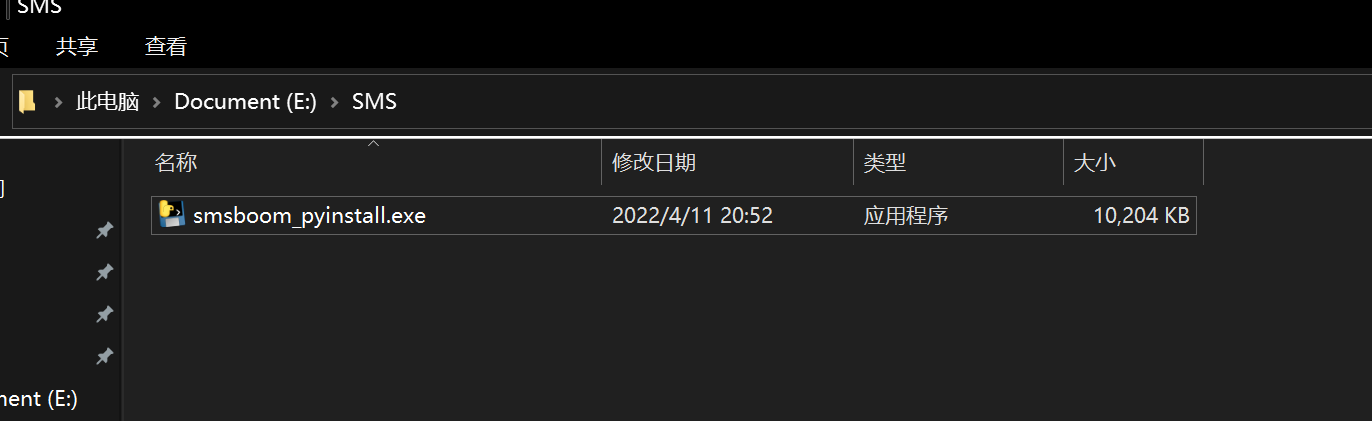
Win+Rto open cmd. Enter the drive letter. For example:E:Then cd to the folder, for examplecd SMS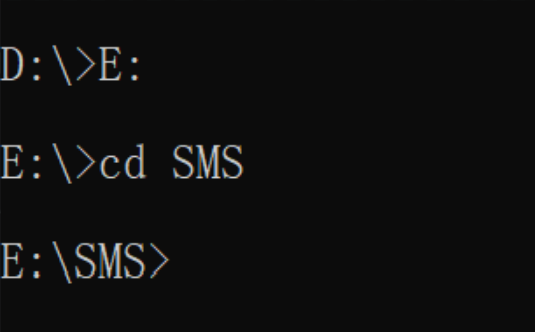
- After confirming that the cmd path is the path where the EXE is located, enter cmd:
smsboom_pyinstall.exe, if a command prompt appears, the script is running normally.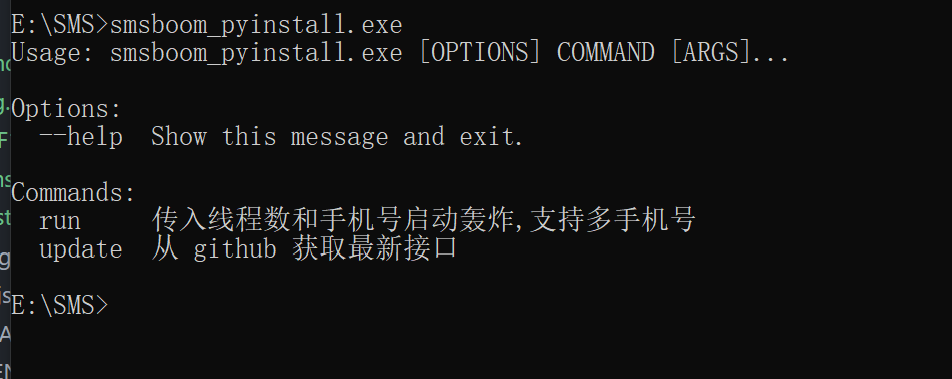
- The latest interface must be updated before use
shell
smsboom_pyinstall.exe update
> If there is an errorssl_` in the update interface, please refer to issue Close the agent software and then update. - Description of proxy settings, Xiaobai Can not watch for now
- Pass parameters, command example:
- Create a new folder in any drive (except C drive) and move the program to it. e.g.
Start 64 threads, Boom//Bomb a person's mobile phone number (198xxxxxxxx), only Boom//Bomb once.
shell
   smsboom_pyinstall.exe run -t 64 -p 198xxxxxxxxx
`
Start 64 threads, bomb // bomb a person's mobile phone number (19xxxxxxx), start a loop bomb // bomb, take turns bomb // bomb 60 times
shell
   smsboom_pyinstall.exe run -t 64 -p 198xxxxxxxxx -f 60
`
Start 64 threads, bomb // bomb a person's mobile phone number (19xxxxxxx), start a loop bomb // bomb, take turns bomb // bomb 60 times, each time interval 30 seconds
shell
   smsboom_pyinstall.exe run -t 64 -p 198xxxxxxxxx -f 60 -i 30
`
Start 64 threads, bomb//bomb a person's mobile phone number (19xxxxxxx), start a cycle of bombing//bombing, take turns bombing//bombing 60 times, every 30 seconds, open the proxy list for bombing
shell
   smsboom_pyinstall.exe run -t 64 -p 198xxxxxxxxx -f 60 -i 30 -e
`
Start 64 threads, bomb//bomb multiple people's mobile phone numbers (138xxx, 139xxxx), start a loop bomb//bomb, take turns bombing 60 times, every 30 seconds, open the proxy list for bombing
shell
   smsboom_pyinstall.exe run -t 64 -p 138xxxxxxxx -p 139xxxxxxxx -f 60 -i 30 -e
`
For Big Guys
Download project
- Method 1: Using Git:
shell
git clone https://github.com/AdminWhaleFall/SMSBoom.git/
`
Wall country acceleration
shell
git clone https://github.do/https://github.com/AdminWhaleFall/SMSBoom.git
`
- Method 2: Click to download project zip package and unzip it.
Configuration Environment
Prerequisites: Please ensure that your computer has a python3.x environment, it is recommended to use 3.8 and above!
Solution 1: If you have a Python3.8 environment, you can use the pipenv tool.
Install the pipenv package management tool.
shell pip install pipenv`Build a virtual environment for the project.
shell pipenv install # only use bomb// bomb function pipenv install --dev # Use the webui debug interface function.`Try running smsboom.py
shell
pipenv shell # activate the virtual environment
python smsboom.py # linux
`
If no error is reported and help information is output, the environment has been installed correctly. If an error is reported, please use option 2
Option 2: Only the Python3.X environment needs to use the native pip tool.
Install the required libraries
shell pip install -r requirements.txt # only use bomb // bomb pip install -r requirements-dev.txt # use webui`Try running smsboom.py
shell
python smsboom.py
`
If no error is reported and help information is output, the environment has been installed correctly.
Running with Docker
Prerequisites: Please make sure the current environment has Docker.
- Build the image
shell
docker build -t whalefell/smsboom .
`
- Try to run
```shell docker run --rm whalefell/smsboom:latest --help
Usage: smsboom.py [OPTIONS] COMMAND [ARGS]...
Options: --help Show this message and exit.
Commands: asyncrun requests the interface in the fastest way (true asynchronous million concurrency) onerun single thread (for testing) run incoming thread number and mobile phone number to start bombing, support multiple mobile phone numbers update Get the latest interface from github ````
run
If using a virtual environment, please activate it first. pipenv shell
```shell
output help information
python smsboom.py --help
Usage: smsboom.py [OPTIONS] COMMAND [ARGS]... Options: --help Show this message and exit. Commands: run incoming thread number and mobile phone number to start bombing//exploding, support multiple mobile phone numbers update Get the latest interface from github ```` - start bombing//exploding
help information: ```shell python smsboom.py run --help
Usage: smsboom.py run [OPTIONS]
Incoming the number of threads and mobile phone number to start bombing//exploding, support for multiple mobile phone numbers
Options: -t, --thread INTEGER number of threads (default 64) -p, --phone TEXT phone number, you can pass in multiple and then use -p to pass [required] -f, --frequency INTEGER execution times (default 1) -i, --interval INTEGER interval time (default 60s) -e, --enable_proxy BOOLEAN enable proxy (default disabled) --help Show this message and exit. ````
Using a proxy
This project cannot automatically obtain a proxy through the API. You can manually obtain a proxy from the free proxy website below, or choose to use your own proxy, or not use a proxy.
Add the proxy to the three files http_proxy.txt socks4_proxy.txt socks5_proxy.txt, add -e to the command parameter to execute.
Command example
Start 64 threads, bomb//bomb a person's mobile phone number (198xxxxxxxx), and only bomb//bomb one wave.
shell
python smsboom.py run -t 64 -p 198xxxxxxxx
Start 64 threads, bomb // bomb a person's mobile phone number (198xxxxxxxx), start a loop bomb // bomb, take turns bomb // bomb 60 times
shell
python smsboom.py run -t 64 -p 198xxxxxxxx -f 60
Start 64 threads, bomb // bomb a person's mobile phone number (198xxxxxxxx), start a loop bomb // bomb, take turns bomb // bomb 60 times, each time interval 30 seconds
shell
python smsboom.py run -t 64 -p 198xxxxxxxx -f 60 -i 30
Start 64 threads, bomb//bomb a person's mobile phone number (198xxxxxxxx), start a loop of bomb//bomb, take turns to bomb//bomb 60 times, every 30 seconds, open the proxy list to bomb
shell
python smsboom.py run -t 64 -p 198xxxxxxxx -f 60 -i 30 -e
Start 64 threads, bomb//bomb multiple people's mobile phone numbers (198xxxxxxxx, 199xxxxxxxx), start a loop bomb//bomb, take turns bombing 60 times, every 30 seconds, open the proxy list for bombing
shell
python smsboom.py run -t 64 -p 198xxxxxxxx -p 199xxxxxxxx -f 60 -i 30 -e
Development
The program provides interface debugging tools, but it is not perfect at present. Front-end big guys are welcome to PR.
The debugging tool uses Flask as the backend and vue as the frontend to realize the separation of front and back ends.
At present, there is only a test interface, adding the function of the interface.
Flask front-end debugging
The premise is that the pipenv environment has been installed according to the previous Quick Start method
shell
pipenv shell # Activate the virtual environment
python run_flask_app.py start -p 9090 # Listen on port 9090
run help: ```shell Usage: runflaskapp.py [OPTIONS] COMMAND [ARGS]...
Options: --help Show this message and exit.
Commands: init Initialize the database json2sqlite Convert json data to sqlite database sqlite2json Convert sqlite data to json start start flask app ```
```shell Usage: runflaskapp.py start [OPTIONS]
start up flask app
Options: -h, --host TEXT listen address -p, --port INTEGER listening port --help Show this message and exit. ``` The default monitoring 0.0.0.0:9090 address, the browser access http://127.0.0.1:9090/admin/ If there is no accident, the front end can appear Debug interface.


Sponsor
The sponsored amount will be used for my monthly treatment of depression/depression. Thank you all for your support and encouragement! Biaxin

~~Ugly Selfie )Escape~~
Star ♥ Trend
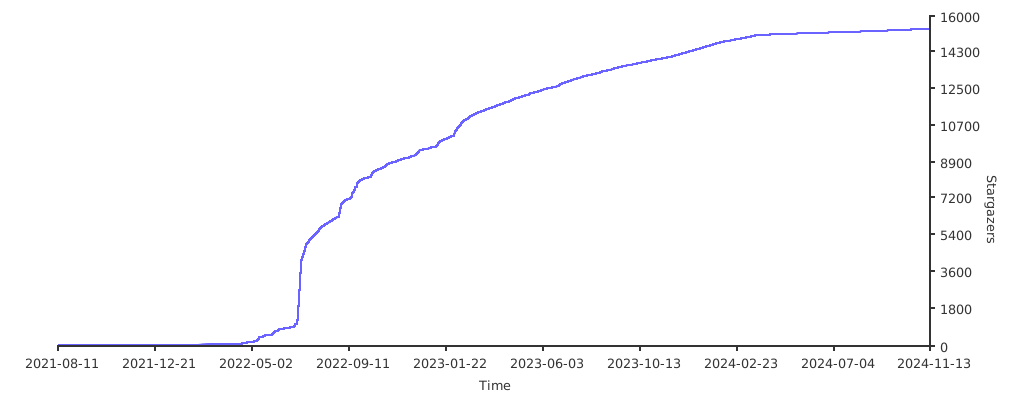
✨Discussion
Feel free to join the discussion and ask questions and suggestions about the project! ! ! mua!
Penguin 🐧 Group
The penguin group is not allowed to discuss related sensitive information! Violators get on the plane ticket✈

Telegram Channel (TG group)
For topics related to sensitive/sensitive information, politics/politics, democracy/democracy movement, please go to TG group chat
Owner
- Name: ApacheCN 归档
- Login: apachecn-archive
- Kind: organization
- Email: wizard.z@qq.com
- Repositories: 180
- Profile: https://github.com/apachecn-archive
防止重要项目丢失而设立的归档