Recent Releases of https://github.com/arklumpus/vectsharp
https://github.com/arklumpus/vectsharp - Version 2.6.1
New features
VectSharp.MuPDFUtils
- New methods in the
PDFParserclass from VectSharp.MuPDFUtils can be used to import PDF documents (and other formats supported by MuPDF).PDFParser.FromFilecan be used to import an entire document or a single page from a file.PDFParser.FromStreamcan be used to import an entire document or a single page from a document in aStream.- Overloads of these methods with an
out Dictionary<string, string> linkDestinationsparameter can be used to enable internal and external links within the document when it is later exported.
The way this is achieved is a bit roundabout, but seems to work mostly fine: first the document is converted to SVG using MuPDFCore, and then the SVG file is imported using VectSharp.SVG.
VectSharp.Markdown
- The
MarkdownRendererclass now has rendering events that are invoked at various steps and can be used to customise the appearance of the document (#69).
VectSharp.SVG
- The
SaveAsSVGmethod now has a public overload that returns anXmlDocument.
VectSharp.PDF
- There are some new public properties that can be used to manually customise PDF documents:
PDFPage.CropBox,PDFPage.TrimBox,PDFPage.BleedBox,PDFPage.ArtBox(in addition toPDFPage.MediaBox) to set the various bounding boxes.PDFCatalog.OpenActionto set which page should be shown when opening the document.- A new
PDFOptionalContentPropertiesconstructor supporting alternative configurations.
Bugfixes
VectSharp.SVG
- Improved SVG animation compatibility and performance (#68).
VectSharp.Plots
- Axis labels are now correctly positioned when the axis is inverted (#74).
- Stacked and clustered bar charts with a single bar now work correctly (#75).
- C#
Published by arklumpus over 1 year ago

https://github.com/arklumpus/vectsharp - Version 2.6.0
New features
- Added support drawing text with spacing (#64)
- Added support for complex dash patterns (#67)
VectSharp.Markdown
- Added support for emojis (#63)
VectSharp.Plots
- Added swarm plots.
Bugfixes
- Fixed bug with animated gif frame disposal.
VectSharp.PDF
- Ensure that alpha values 0 and 1 are always included in the document.
- Use code generation instead of reflection to enumerate dictionary properties. This restores support for trimmed and AOT publication.
VectSharp.SVG
- Fixed issue with importing filled ellipses in SVG documents.
VectSharp.Plots
- Fixed issues with the coordinate system when the resolutions on the X axis and the Y axis are different.
- C#
Published by arklumpus almost 2 years ago
https://github.com/arklumpus/vectsharp - Version 2.5.1
New features
- The
[Pure]attribute has been added to methods whose return value should not be ignored (#60). Note that this does not necessarily imply that the method is actually pure - just that you probably do not want to ignore its return value.
VectSharp.PDF
- Complete rewrite of the PDF generation engine, including new features:
- Options to specify the appearance of link annotations.
- Optional content groups, also known as layers (#38)
- Document metadata, i.e. title, author, etc.
- Document outline, also known as table of contents or bookmarks (#39).
VectSharp.Raster
- Added JPEG output support to VectSharp.Raster (using MuPDF).
- C#
Published by arklumpus about 2 years ago
https://github.com/arklumpus/vectsharp - Version 2.5.0
New features
- New
TrueTypeFile.GetNamesmethods to get the font name(s) defined in a TrueType file. - New
FolderFontLibraryclass (to parse fonts from a folder) andMultiFontLibraryclass (to parse fonts using multiple font libraries). - New
+,-, and*operators for thePointclass. - New methods to monotonise segments and to flatten paths and segments.
- New
Reversemethod to reverse aGraphicsPath. - New
GraphicsPath.GetStrokemethod to get the stroke of a path. - New
GraphicsPath.ContainsPointmethod to check whether a path contains a point. - New overload of the
Graphics.FillPathmethod, accepting aFillRuleargument that determines the fill rule (non-zero winding number, or even/odd number of contours).
VectSharp.Canvas
- Support for Avalonia 11.
VectSharp.Plots
- Added property to specify the maximum number of bins for violin plots.
VectSharp.Raster.ImageSharp and VectSharp.ImageSharpUtils
- Two new versions of these packages, one with ImageSharp.Drawing updated to 1.0.0 and the other to 2.0.1.
- Versions using ImageSharp.Drawing 1.0.0 target netstandard2.0, while the latest versions target net6.0 (like ImageSharp).
Bugfixes
- Attempting to draw a null or empty string should not throw an exception anymore.
VectSharp.SVG
- SVG documents containing text that uses font families that are included in the default font library now work properly.
- Font style attributes are now propagated properly when parsing SVG documents.
- Clipping paths defined by
rectobjects now work properly. - Improved text positioning.
- Units other than
pxare now allowed when parsing SVG documents. - Fixed issue that occurred when multiple path data point coordinates < 1 were specified using only the
.as a separator. - Gradients with relative units are now supported when parsing SVG documents.
text-anchoris now supported.- Entities defined outside of a
defstag are now supported. - Fixed issues with SVG animations on Chrome and Firefox.
VectSharp.Plots
- Fixed issue with label centering.
- C#
Published by arklumpus over 2 years ago
https://github.com/arklumpus/vectsharp - Version 2.4.2
New features
- The
Graphicsclass now has aUseUniqueTagsproperty. If this istrue(the default), all plot actions called with atagparameter attempt to create unique tags. Otherwise, they use the tag as is (e.g., using the same tag for multiple sub-elements), which was the previous behaviour until v2.4.0. - Added an extension method
GetTextonIEnumerable<FormattedText>. - There are now a number of standard gradients in the
VectSharp.Gradientsstatic class. - Added an implicit conversion operator between
GradientStopsandFunc<double, Colour>. - New option for text when exporting SVG images. The
ConvertIntoPathsUsingGlyphsoption converts the font in paths, but only stores each glyph once and reuses it. Compared toConvertIntoPaths, this produces smaller files, while still being independent of the original font file. VectSharp.Pointnow implementsIReadOnlyList<double>and has a number of conversion methods to and from tuples and arrays.- New VectSharp.Plots package to draw many kinds of plots (e.g., scatter plots, line charts, bar charts, box plots, function plots, and more).
Bugfixes
- Fixed issues with some symbols in PDF documents (#43).
- C#
Published by arklumpus about 3 years ago
https://github.com/arklumpus/vectsharp - Version 2.4.0
New features
- Added the
GetFiguresmethod to theGraphicsPathclass, to extract figures (contours) from a path. - Added an optional
tagparameter to a number of graphics actions that were missing it (crop, transforms, filters, clipping paths). - Individual text components now have their own tags (e.g., underlines, individual glyphs when drawing text on a path, or individual text spans when drawing an
IEnumerable<FormattedText>. - Added the
GetColourAtmethod to theGradientStopsclass, to get the colour at a certain position in a gradient. - Added a new
Cropmethod to theGraphicsclass, which removes graphics actions that fall completely outside of the crop region. TheCropmethod of thePageclass now has an optional parameter that determines whether this kind of "hard" cropping should be performed or not. - VectSharp.Raster now has a new method
SaveAsRawBytesto render aPageto raw pixel data. - The
GraphicsPath.Linearisemethod now uses multiple threads to speed up execution. - The
Rectanglestruct now has aCentreproperty that returns the centre of the rectangle. - Added the
GetTagsmethod to theGraphicsclass to get all the tags that have been defined in theGraphics. - Animations! VectSharp can now be used to create animated GIFs, SVGs and PNGs. See the documentation website for more details. The demo project also has some more example code.
Bugfixes
- In PDF documents with semi-transparent gradients, the gradient alpha mask now does not persist after the gradient has been applied.
- Boundaries are now computed correctly for paths containing arcs with negative angles.
- The correct scale is now applied when rasterising filters in VectSharp.Raster.
- Fixed an issue in the SVG parser when parsing paths with symmetrical Bezier control points.

- C#
Published by arklumpus over 3 years ago
https://github.com/arklumpus/vectsharp - Version 2.3.2
New features
- Added new methods to the
Rectanglestruct (Rectangle.IsNaNandRectangle.Intersection). - Added the
QuadraticBezierTomethod to theGraphicsPathclass, which makes it possible to draw quadratic Bézier curves (these are internally elevated to cubic Béziers). - VectSharp.Markdown now renders equations using CSharpMath instead of using a remote GitHub server.
Bugfixes
- Clipping paths are now properly taken in consideration when determining the bounds of a plot.
- Bounding boxes for radial gradients are now computed properly in VectSharp.PDF.
- VectSharp.SVG now attempts to skip XML declarations (
<?xml ... ?>) when parsing SVG files.
- C#
Published by arklumpus almost 4 years ago
https://github.com/arklumpus/vectsharp - Version 2.3.1
New features
- Added an overload of the
DrawGraphicsmethod that accepts atagparameter. - Updated ImageSharp.Drawing version in VectSharp.Raster.ImageSharp to 1.0.0-beta14.16 - this introduced an API change, and requires the ImageSharp MyGet source to be enabled to download the latest version of ImageSharp.Drawing.
Bugfixes
- Prevent out of memory exception in ImageSharp when drawing lines with a stroke width of 0 (#32).
- Line joints are now drawn correctly when using VectSharp.Raster.ImageSharp.
- When loading an SVG with VectSharp.SVG, object ids are now preserved and transformed into tags.
- When loading an SVG with VectSharp.SVG, non-breaking spaces are now converted back into regular spaces.
- In VectSharp.Markdown, data URIs containing SVG images are now parsed directly as SVG images, rather than being embedded within another SVG image.
- When creating a PDF file, the standard font family names should now be used correctly.
- Avoid exception in ImageSharp by not drawing a raster image if it does not overlap the target image at all (#33).
- C#
Published by arklumpus about 4 years ago
https://github.com/arklumpus/vectsharp - Version 2.3.0
New features
- Added option to use CSS style classes for presentation attributes (#24).
- Added
Discretisemethod toGraphicsPath. This is similar toLinearise, but it additionally ensures that each segment does not exceed the specified length (if necessary, by breaking long line segments into smaller segments). - Added
AddPathmethod toGraphicsPath. This makes it possible to add a figure represented by an existingGraphicsPathto anotherGraphicsPath. - Updated dependencies.
Bugfixes
- Return null instead of throwing exception when trying to parse an invalid CSS colour string starting with
#. - Fixed kerning-related exception in some fonts.
- Fixed bug causing some standard fonts not to be displayed correctly in PDF documents.
- C#
Published by arklumpus about 4 years ago
https://github.com/arklumpus/vectsharp - Version 2.2.1
New features
- Updated the documentation website with much more detailed tutorials and interactive WebAssembly examples.
- Added a parameterless overload to the
Page.Cropmethod, that crops the page based on the bounds of its contents. - Added the
FontFamily.FamilyNameproperty to get the full name of a font family. - Added an overload of the
Graphics.Transformmethod that reduces the maximum length of line segments (useful for non-projective transformations).
Bugfixes
- Out-of-range correction of the radii for elliptical arcs is now performed correctly.
- Béziers that are actually straight lines are now handled properly when determining the intersections for text underlines.
- SVG text with kerning information is now imported correctly.
- Normalisation and bias are now actually applied in the
ConvolutionFilter. - Cropping a
Pagemore than once now works as expected. - Embedding multiple fonts in the same family in a PDF document now works as expected.
- C#
Published by arklumpus over 4 years ago
https://github.com/arklumpus/vectsharp - Version 2.2.0
New features
Graphics.GetBoundsandGraphicsPath.GetBoundsmethods to compute bounding boxes.- If
VectSharp.RasterorVectSharp.Raster.ImageSharpare installed,Graphics.TryRasterisemethod can be used to rasterise a region of aGraphicsobject (otherwise, it will returnfalsewithout throwing an exception). A custom implementation forGraphics.RasterisationMethodcan be provided. Added support for filters through the
IFilterinterface and its implementations.This make it possible to create e.g. drop shadows:

When a filter is supported by the output format (e.g. a Gaussian blur filter in SVG), the filter is rendered appropriately (e.g. by using a
SVG element). When a filter is not supported by the output format (e.g. in PDF), the filtered image is rasterised while exporting the file. This requires either
VectSharp.RasterorVectSharp.Raster.ImageSharpto be available; alternatively, a custom implementation forGraphics.RasterisationMethodcan be provided.
Bugfixes
- Fixed a few bugs involving gradients in VectSharp.PDF (especially gradients with transparent colours).
- C#
Published by arklumpus over 4 years ago
https://github.com/arklumpus/vectsharp - Version 2.1.0
New features
Added support for text kerning (using kerning information defined in the
kernfeature of theGPOStable of the font file).Added options to draw underlined text.
- The
Fontconstructor now has an overload taking an additionalboolparameter, which determines whether text is underlined or not. - The style of the underline can be fine-tuned by changing the properties of the
Font.Underlineobject.
- The
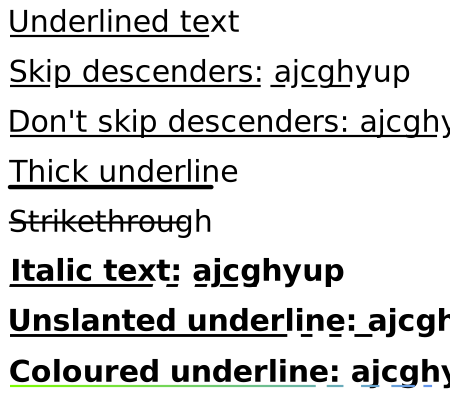
```CSharp // Font with underline enabled Font underlinedFont = new Font(FontFamily.ResolveFontFamily(FontFamily.StandardFontFamilies.Helvetica), 30, true);
graphics.FillText(10, 10, "Underlined text", underlinedFont, Colours.Black);
// By default, the underline avoids intersecting glyphs that fall below the baseline. graphics.FillText(10, 60, "Skip descenders: ajcghyup", underlinedFont, Colours.Black);
// It is also possible to draw the underline over the descenders. Font underlinedFontNoSkip = new Font(FontFamily.ResolveFontFamily(FontFamily.StandardFontFamilies.Helvetica), 30, true); underlinedFontNoSkip.Underline.SkipDescenders = false;
graphics.FillText(10, 110, "Don't skip descenders: ajcghyup", underlinedFontNoSkip, Colours.Black);
// You can also change the thickness and line cap of the underline. Font thickUnderlineFont = new Font(FontFamily.ResolveFontFamily(FontFamily.StandardFontFamilies.Helvetica), 30, true); thickUnderlineFont.Underline.Thickness *= 2; thickUnderlineFont.Underline.LineCap = LineCaps.Round;
graphics.FillText(10, 160, "Thick underline", thickUnderlineFont, Colours.Black);
// You can also change the position of the underline. This lets you obtain a sort of strike-through effect. Font strikeThroughFont = new Font(FontFamily.ResolveFontFamily(FontFamily.StandardFontFamilies.Helvetica), 30, true); strikeThroughFont.Underline.SkipDescenders = false; strikeThroughFont.Underline.LineCap = LineCaps.Square; strikeThroughFont.Underline.Position -= 0.45;
graphics.FillText(10, 210, "Strikethrough", strikeThroughFont, Colours.Black);
// If the font is italic, the sides of the underline will follow its slant. Font italicFont = new Font(FontFamily.ResolveFontFamily(FontFamily.StandardFontFamilies.TimesBoldItalic), 30, true);
graphics.FillText(10, 260, "Italic text: ajcghyup", italicFont, Colours.Black);
// You can also force the underline to have straight vertical. Font italicFontNoSlant = new Font(FontFamily.ResolveFontFamily(FontFamily.StandardFontFamilies.TimesBoldItalic), 30, true); italicFontNoSlant.Underline.FollowItalicAngle = false;
graphics.FillText(10, 310, "Unslanted underline: ajcghyup", italicFontNoSlant, Colours.Black);
// You can draw separately the text and the underline; this lets you create an underline with a different colour. string text = "Coloured underline: ajcghyup";
// Font to draw the text without the underline. Font fontNoUnderline = new Font(FontFamily.ResolveFontFamily(FontFamily.StandardFontFamilies.HelveticaBold), 30);
// Underlined font to draw the underline. Font fontWithUnderline = new Font(FontFamily.ResolveFontFamily(FontFamily.StandardFontFamilies.HelveticaBold), 30, true);
// Brush for the underline. LinearGradientBrush underlineBrush = new LinearGradientBrush(new Point(10, 360), new Point(10 + fontNoUnderline.MeasureText(text).Width, 360), new GradientStop(Colours.LawnGreen, 0), new GradientStop(Colours.CornflowerBlue, 1));
// Fill the text without underline. graphics.FillText(10, 360, text, fontNoUnderline, Colours.Black);
// Fill the underline without text. graphics.FillTextUnderline(10, 360, text, fontWithUnderline, underlineBrush); ```
- C#
Published by arklumpus over 4 years ago
https://github.com/arklumpus/vectsharp - Version 2.0.0
Breaking changes
- New
IFontLibraryAPI. TheFontFamily(string)andFontFamily(FontFamily.StandardFontFamilies)constructors are now deprecated, use theFontFamily.ResolveFontFamilymethod instead.
New features
- Changed license to LGPLv3 (except for VectSharp.Raster and VectSharp.MuPDFUtils, which remain under AGPLv3 for now).
- The embedded fonts have been changed.
- The VectSharp.Fonts.Nimbus package can be used to restore the fonts from previous versions (under a GPLv3 license).
Bugfixes
- Fixed a bug causing small vertical alignment problems for text in VectSharp.Canvas on Windows.
- C#
Published by arklumpus over 4 years ago
https://github.com/arklumpus/vectsharp - Version 1.8.0
New features: - Gradients - Formatted text
- C#
Published by arklumpus almost 5 years ago
https://github.com/arklumpus/vectsharp - Version 1.5.1
- C#
Published by arklumpus almost 6 years ago
https://github.com/arklumpus/vectsharp - Version 1.5.0
- C#
Published by arklumpus almost 6 years ago
https://github.com/arklumpus/vectsharp - Version 1.4.2
- C#
Published by arklumpus almost 6 years ago
https://github.com/arklumpus/vectsharp - Version 1.4.0
- C#
Published by arklumpus almost 6 years ago
https://github.com/arklumpus/vectsharp - Version 1.3.1
- C#
Published by arklumpus about 6 years ago
https://github.com/arklumpus/vectsharp - Version 1.3.0
- C#
Published by arklumpus about 6 years ago
https://github.com/arklumpus/vectsharp - Version 1.2.1
- C#
Published by arklumpus about 6 years ago
https://github.com/arklumpus/vectsharp - Version 1.2.0
- C#
Published by arklumpus about 6 years ago
https://github.com/arklumpus/vectsharp - Version 1.0.2
Fixed a bug with the advertised length of compressed embedded fonts.
- C#
Published by arklumpus over 6 years ago