Science Score: 26.0%
This score indicates how likely this project is to be science-related based on various indicators:
-
○CITATION.cff file
-
✓codemeta.json file
Found codemeta.json file -
✓.zenodo.json file
Found .zenodo.json file -
○DOI references
-
○Academic publication links
-
○Committers with academic emails
-
○Institutional organization owner
-
○JOSS paper metadata
-
○Scientific vocabulary similarity
Low similarity (10.4%) to scientific vocabulary
Keywords from Contributors
Repository
Runnable
Basic Info
Statistics
- Stars: 41
- Watchers: 1
- Forks: 4
- Open Issues: 10
- Releases: 85
Metadata Files
README.md






Please check here for complete documentation
Example
The below data science flavored code is a well-known iris example from scikit-learn.
```python """ Example of Logistic regression using scikit-learn https://scikit-learn.org/stable/autoexamples/linearmodel/plotirislogistic.html """
import matplotlib.pyplot as plt import numpy as np from sklearn import datasets from sklearn.inspection import DecisionBoundaryDisplay from sklearn.linear_model import LogisticRegression
def loaddata(): # import some data to play with iris = datasets.loadiris() X = iris.data[:, :2] # we only take the first two features. Y = iris.target
return X, Y
def model_fit(X: np.ndarray, Y: np.ndarray, C: float = 1e5): logreg = LogisticRegression(C=C) logreg.fit(X, Y)
return logreg
def generateplots(X: np.ndarray, Y: np.ndarray, logreg: LogisticRegression): _, ax = plt.subplots(figsize=(4, 3)) DecisionBoundaryDisplay.fromestimator( logreg, X, cmap=plt.cm.Paired, ax=ax, responsemethod="predict", plotmethod="pcolormesh", shading="auto", xlabel="Sepal length", ylabel="Sepal width", eps=0.5, )
# Plot also the training points
plt.scatter(X[:, 0], X[:, 1], c=Y, edgecolors="k", cmap=plt.cm.Paired)

plt.xticks(())
plt.yticks(())

plt.savefig("iris_logistic.png")

# TODO: What is the right value?
return 0.6
Without any orchestration
def main(): X, Y = loaddata() logreg = modelfit(X, Y, C=1.0) generate_plots(X, Y, logreg)
With runnable orchestration
def runnable_pipeline(): # The below code can be anywhere from runnable import Catalog, Pipeline, PythonTask, metric, pickled
# X, Y = load_data()
load_data_task = PythonTask(
    function=load_data,
    name="load_data",
    returns=[pickled("X"), pickled("Y")],  # (1)
)

# logreg = model_fit(X, Y, C=1.0)
model_fit_task = PythonTask(
    function=model_fit,
    name="model_fit",
    returns=[pickled("logreg")],
)

# generate_plots(X, Y, logreg)
generate_plots_task = PythonTask(
    function=generate_plots,
    name="generate_plots",
    terminate_with_success=True,
    catalog=Catalog(put=["iris_logistic.png"]),  # (2)
    returns=[metric("score")],
)

pipeline = Pipeline(
    steps=[load_data_task, model_fit_task, generate_plots_task],
)  # (4)

pipeline.execute()

return pipeline
if name == "main": # main() runnable_pipeline()
```
- Return two serialized objects X and Y.
- Store the file
iris_logistic.pngfor future reference. - Define the sequence of tasks.
- Define a pipeline with the tasks
The difference between native driver and runnable orchestration:
!!! tip inline end "Notebooks and Shell scripts"
You can execute notebooks and shell scripts too!!

They can be written just as you would want them, *plain old notebooks and scripts*.
- [x]
Domaincode remains completely independent ofdrivercode. - [x] The
driverfunction has an equivalent and intuitive runnable expression - [x] Reproducible by default, runnable stores metadata about code/data/config for every execution.
- [x] The pipeline is
runnablein any environment.
Documentation
More details about the project and how to use it available here.
Installation
The minimum python version that runnable supports is 3.8
shell
pip install runnable
Please look at the installation guide for more information.
Pipelines can be:
Linear
A simple linear pipeline with tasks either python functions, notebooks, or shell scripts

Parallel branches
Execute branches in parallel

loops or map
Execute a pipeline over an iterable parameter.
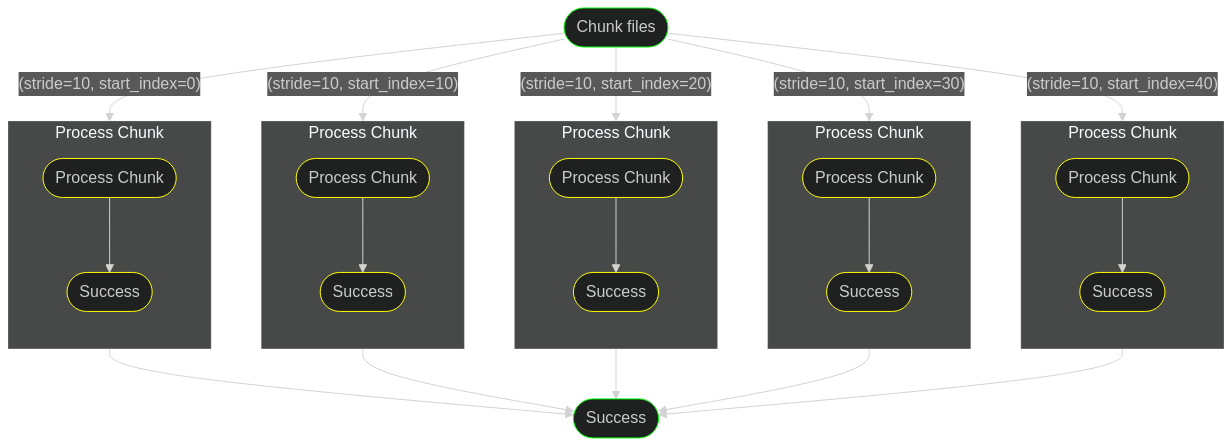
Arbitrary nesting
Any nesting of parallel within map and so on.
Owner
- Name: AstraZeneca
- Login: AstraZeneca
- Kind: organization
- Location: Global
- Website: https://www.astrazeneca.com/
- Repositories: 33
- Profile: https://github.com/AstraZeneca
Data and AI: Unlocking new science insights
GitHub Events
Total
- Create event: 101
- Release event: 45
- Issues event: 33
- Watch event: 3
- Delete event: 54
- Issue comment event: 17
- Push event: 142
- Pull request event: 95
Last Year
- Create event: 101
- Release event: 45
- Issues event: 33
- Watch event: 3
- Delete event: 54
- Issue comment event: 17
- Push event: 142
- Pull request event: 95
Committers
Last synced: about 2 years ago
Top Committers
| Name | Commits | |
|---|---|---|
| Vijay Vammi | v****i@a****m | 130 |
| dependabot[bot] | 4****] | 6 |
| Eduardo Blancas | e****s@g****m | 1 |
| Vijay Vammi | m****u@g****m | 1 |
| semantic-release | s****e | 1 |
Committer Domains (Top 20 + Academic)
Dependencies
- astroid 2.9.0 develop
- atomicwrites 1.4.0 develop
- autopep8 1.6.0 develop
- cfgv 3.3.1 develop
- coverage 6.2 develop
- distlib 0.3.4 develop
- filelock 3.4.1 develop
- ghp-import 2.0.2 develop
- identify 2.4.4 develop
- iniconfig 1.1.1 develop
- isort 5.10.1 develop
- jinja2 3.0.3 develop
- lazy-object-proxy 1.7.1 develop
- markdown 3.3.6 develop
- markupsafe 2.0.1 develop
- mccabe 0.6.1 develop
- mergedeep 1.3.4 develop
- mkdocs 1.2.3 develop
- mkdocs-material 8.2.1 develop
- mkdocs-material-extensions 1.0.3 develop
- mypy 0.931 develop
- mypy-extensions 0.4.3 develop
- nodeenv 1.6.0 develop
- packaging 21.3 develop
- platformdirs 2.4.0 develop
- pluggy 1.0.0 develop
- pre-commit 2.17.0 develop
- pycodestyle 2.8.0 develop
- pygments 2.11.2 develop
- pylint 2.12.0 develop
- pymdown-extensions 9.1 develop
- pyparsing 3.0.7 develop
- pytest 7.0.1 develop
- pytest-cov 3.0.0 develop
- pytest-mock 3.6.1 develop
- pyyaml-env-tag 0.1 develop
- toml 0.10.2 develop
- tomli 1.2.3 develop
- tox 3.24.5 develop
- typed-ast 1.5.2 develop
- virtualenv 20.13.1 develop
- watchdog 2.1.6 develop
- wrapt 1.13.3 develop
- ansiwrap 0.8.4
- async-generator 1.10
- attrs 21.4.0
- certifi 2021.10.8
- cffi 1.15.0
- charset-normalizer 2.0.12
- click 8.0.4
- click-plugins 1.1.1
- colorama 0.4.4
- dataclasses 0.8
- decorator 5.1.1
- docker 5.0.3
- entrypoints 0.4
- idna 3.3
- importlib-metadata 4.8.3
- importlib-resources 5.2.3
- ipython-genutils 0.2.0
- jsonschema 4.0.0
- jupyter-client 7.1.2
- jupyter-core 4.9.2
- nbclient 0.5.9
- nbformat 5.1.3
- nest-asyncio 1.5.4
- papermill 2.3.4
- pbr 5.8.1
- py 1.11.0
- pycparser 2.21
- pydantic 1.9.0
- pyrsistent 0.18.0
- python-dateutil 2.8.2
- pywin32 227
- pyyaml 6.0
- pyzmq 22.3.0
- requests 2.27.1
- ruamel.yaml 0.17.21
- ruamel.yaml.clib 0.2.6
- six 1.16.0
- stevedore 3.5.0
- tenacity 8.0.1
- textwrap3 0.9.2
- tornado 6.1
- tqdm 4.62.3
- traitlets 4.3.3
- typing-extensions 4.1.1
- urllib3 1.26.8
- websocket-client 1.2.3
- yachalk 0.1.5
- zipp 3.6.0
- autopep8 * develop
- mkdocs * develop
- mkdocs-material * develop
- mypy ^0.931 develop
- pre-commit * develop
- pylint * develop
- pytest * develop
- pytest-cov * develop
- pytest-mock * develop
- tox ^3.24.5 develop
- click *
- click-plugins ^1.1.1
- docker *
- papermill *
- pydantic ^1.9.0
- python ^3.6.1
- ruamel.yaml *
- ruamel.yaml.clib *
- stevedore ^3.5.0
- yachalk *
- actions/checkout v2 composite
- actions/setup-python v2 composite
- actions/checkout v3 composite
- actions/setup-python v4 composite
- actions/checkout v3 composite
- actions/github-script v6 composite
- actions/setup-python v4 composite
- python 3.8-slim build