https://github.com/astroherodvaipayan/prompt-engg-el
blah blah
Science Score: 13.0%
This score indicates how likely this project is to be science-related based on various indicators:
-
○CITATION.cff file
-
✓codemeta.json file
Found codemeta.json file -
○.zenodo.json file
-
○DOI references
-
○Academic publication links
-
○Academic email domains
-
○Institutional organization owner
-
○JOSS paper metadata
-
○Scientific vocabulary similarity
Low similarity (12.4%) to scientific vocabulary
Repository
blah blah
Basic Info
- Host: GitHub
- Owner: Astroherodvaipayan
- License: mit
- Language: TypeScript
- Default Branch: main
- Homepage: https://googlehack-v1.vercel.app
- Size: 416 KB
Statistics
- Stars: 0
- Watchers: 1
- Forks: 0
- Open Issues: 0
- Releases: 0
Metadata Files
README.md
(VED AI)
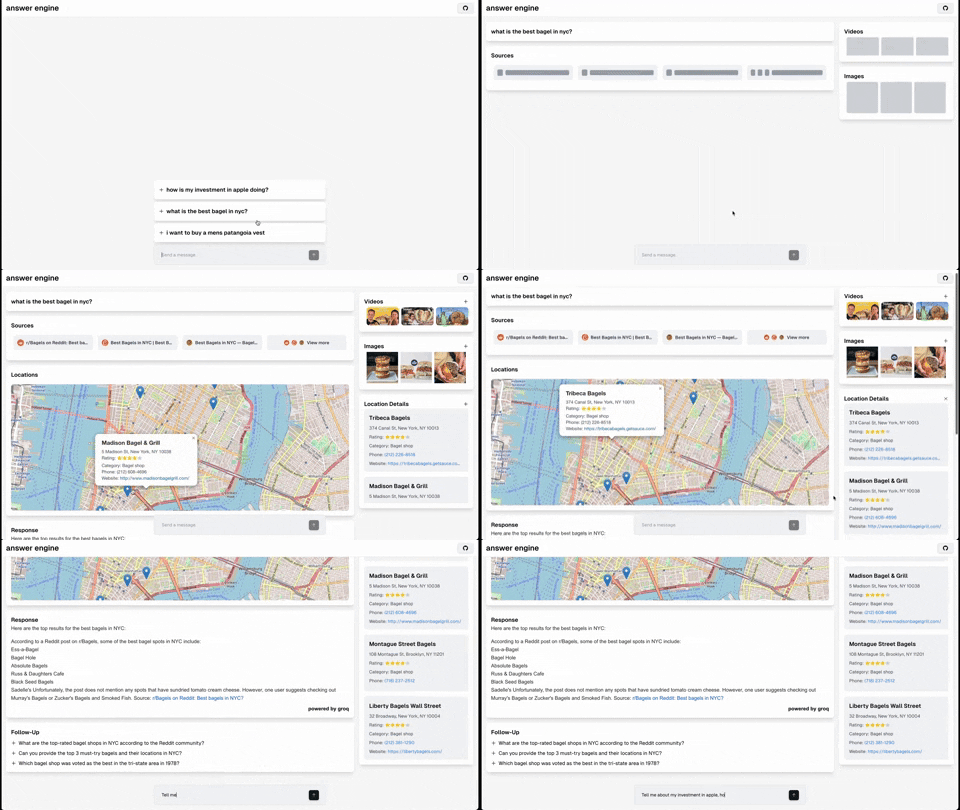
this is part of el project for prompt engg: ai based personalized second brain assist
krishna dvaipayan akshat a gada praneet kedilaya m varun ar
This repository contains the code and instructions needed to build a sophisticated answer engine that leverages the capabilities of Groq, Mistral AI's Mixtral, Langchain.JS, Brave Search, Serper API, and OpenAI. Designed to efficiently return sources, answers, images, videos, and follow-up questions based on user queries, this project is an ideal starting point for developers interested in natural language processing and search technologies.
Technologies Used
- Next.js: A React framework for building server-side rendered and static web applications.
- Tailwind CSS: A utility-first CSS framework for rapidly building custom user interfaces.
- Vercel AI SDK: The Vercel AI SDK is a library for building AI-powered streaming text and chat UIs.
- Groq & Mixtral: Technologies for processing and understanding user queries.
- Langchain.JS: A JavaScript library focused on text operations, such as text splitting and embeddings.
- Brave Search: A privacy-focused search engine used for sourcing relevant content and images.
- Serper API: Used for fetching relevant video and image results based on the user's query.
- OpenAI Embeddings: Used for creating vector representations of text chunks.
- Cheerio: Utilized for HTML parsing, allowing the extraction of content from web pages.
- Ollama (Optional): Used for streaming inference and embeddings.
- Upstash Redis Rate Limiting (Optional): Used for setting up rate limiting for the application.
- Upstash Semantic Cache (Optional): Used for caching data for faster response times.
Getting Started
Prerequisites
- Ensure Node.js and npm are installed on your machine.
- Obtain API keys from OpenAI, Groq, Brave Search, and Serper.
Obtaining API Keys
- OpenAI API Key: Generate your OpenAI API key here.
- Groq API Key: Get your Groq API key here.
- Brave Search API Key: Obtain your Brave Search API key here.
- Serper API Key: Get your Serper API key here.
Installation
- Clone the repository:
git clone https://github.com/developersdigest/llm-answer-engine.git - Install the required dependencies:
npm installorbun install - Create a
.envfile in the root of your project and add your API keys:OPENAI_API_KEY=your_openai_api_key GROQ_API_KEY=your_groq_api_key BRAVE_SEARCH_API_KEY=your_brave_search_api_key SERPER_API=your_serper_api_key
Running the Server
To start the server, execute:
npm run dev
or
bun run dev
the server will be listening on the specified port.
Editing the Configuration
The configuration file is located in the app/config.tsx file. You can modify the following values
- useOllamaInference: false,
- useOllamaEmbeddings: false,
- inferenceModel: 'mixtral-8x7b-32768',
- inferenceAPIKey: process.env.GROQAPIKEY,
- embeddingsModel: 'text-embedding-3-small',
- textChunkSize: 800,
- textChunkOverlap: 200,
- numberOfSimilarityResults: 2,
- numberOfPagesToScan: 10,
- nonOllamaBaseURL: 'https://api.groq.com/openai/v1'
- useFunctionCalling: true
- useRateLimiting: false
- useSemanticCache: false
- usePortkey: false
Function Calling Support (Beta)
Currently, function calling is supported with the following capabilities:
- Maps and Locations (Serper Locations API)
- Shopping (Serper Shopping API)
- TradingView Stock Data (Free Widget)
- Spotify (Free API)
- Any functionality that you would like to see here, please open an issue or submit a PR.
- To enable function calling and conditional streaming UI (currently in beta), ensure useFunctionCalling is set to true in the config file.
Ollama Support (Partially supported)
Currently, streaming text responses are supported for Ollama, but follow-up questions are not yet supported.
Embeddings are supported, however, time-to-first-token can be quite long when using both a local embedding model as well as a local model for the streaming inference. I recommended decreasing a number of the RAG values specified in the app/config.tsx file to decrease the time-to-first-token when using Ollama.
To get started, make sure you have the Ollama running model on your local machine and set within the config the model you would like to use and set use OllamaInference and/or useOllamaEmbeddings to true.
Note: When 'useOllamaInference' is set to true, the model will be used for both text generation, but it will skip the follow-up questions inference step when using Ollama.
More info: https://ollama.com/blog/openai-compatibility
Roadmap
- [] Add document upload + RAG for document search/retrieval
- [] Add a settings component to allow users to select the model, embeddings model, and other parameters from the UI
- [] Add support for follow-up questions when using Ollama
- [Complete] Add support diffusion models (Fal.AI SD3 to start), accessible via '@ mention'
- [Complete] Add AI Gateway to support multiple models and embeddings. (OpenAI, Azure OpenAI, Anyscale, Google Gemini & Palm, Anthropic, Cohere, Together AI, Perplexity, Mistral, Nomic, AI21, Stability AI, DeepInfra, Ollama, etc)
https://github.com/Portkey-AI/gateway - [Complete] Add support for semantic caching to improve response times
- [Complete] Add support for dynamic and conditionally rendered UI components based on the user's query
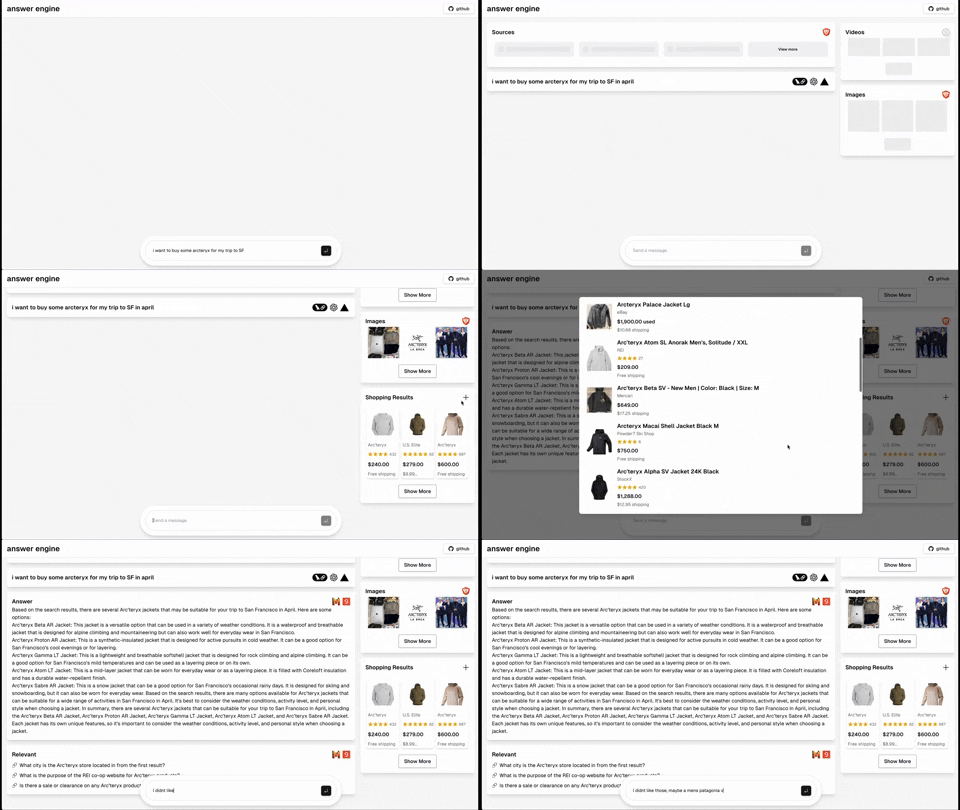
- [Completed] Add dark mode support based on the user's system preference
can easily set limits on the number of requests per user, IP address, or other criteria. This can help prevent abuse and ensure that your application is not overwhelmed with requests.
Owner
- Name: Krishna Dvaipayan
- Login: Astroherodvaipayan
- Kind: user
- Company: @bobdao5
- Repositories: 26
- Profile: https://github.com/Astroherodvaipayan
I'm an engineer passionate about solving problems in non-conventional ways. i enjoy development and built projects which win.
GitHub Events
Total
- Push event: 1
Last Year
- Push event: 1