https://github.com/av/harbor
Effortlessly run LLM backends, APIs, frontends, and services with one command.
Science Score: 26.0%
This score indicates how likely this project is to be science-related based on various indicators:
-
○CITATION.cff file
-
✓codemeta.json file
Found codemeta.json file -
✓.zenodo.json file
Found .zenodo.json file -
○DOI references
-
○Academic publication links
-
○Committers with academic emails
-
○Institutional organization owner
-
○JOSS paper metadata
-
○Scientific vocabulary similarity
Low similarity (13.9%) to scientific vocabulary
Keywords
Keywords from Contributors
Repository
Effortlessly run LLM backends, APIs, frontends, and services with one command.
Basic Info
- Host: GitHub
- Owner: av
- License: apache-2.0
- Language: Python
- Default Branch: main
- Homepage: https://github.com/av/harbor
- Size: 28.1 MB
Statistics
- Stars: 2,031
- Watchers: 17
- Forks: 139
- Open Issues: 52
- Releases: 101
Topics
Metadata Files
README.md







Setup your local LLM stack effortlessly.
```bash
Starts fully configured Open WebUI and Ollama
harbor up
Now, Open WebUI can do Web RAG and TTS/STT
harbor up searxng speaches ```
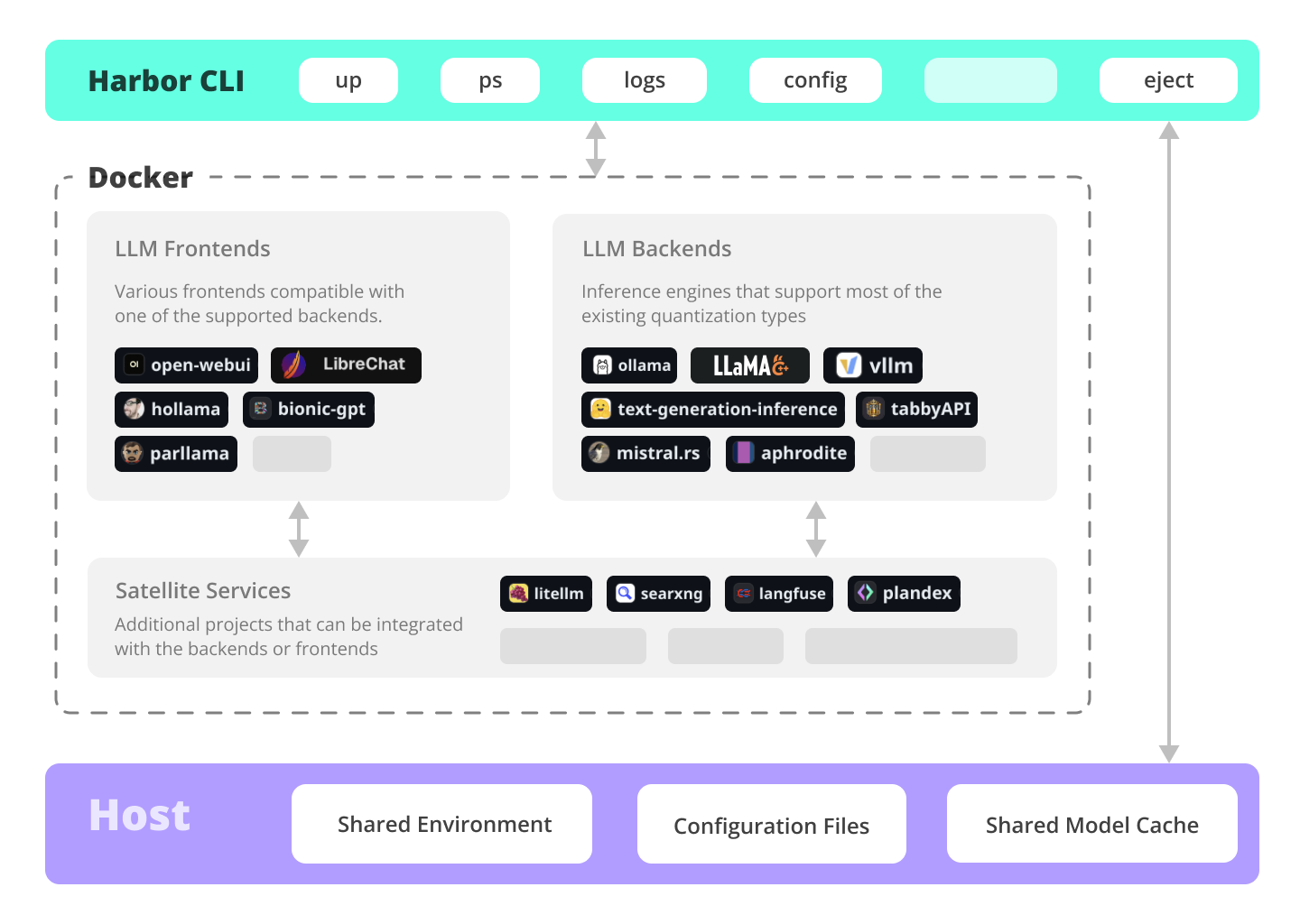
Harbor is a containerized LLM toolkit that allows you to run LLM backends, frontends and related useful services. It consists of a CLI and a companion App.

Documentation
- Installing Harbor
Guides to install Harbor CLI and App - Harbor User Guide
High-level overview of working with Harbor - Harbor App
Overview and manual for the Harbor companion application - Harbor Services
Catalog of services available in Harbor - Harbor CLI Reference
Read more about Harbor CLI commands and options. Read about supported services and the ways to configure them. - Join our Discord
Get help, share your experience, and contribute to the project.
What can Harbor do?
✦ Local LLMs
Run LLMs and related services locally, with no or minimal configuration, typically in a single command or click.
```bash
All backends are pre-connected to Open WebUI
harbor up ollama harbor up llamacpp harbor up vllm
Set and remember args for llama.cpp
harbor llamacpp args -ngl 32 ```
Cutting Edge Inference
Harbor supports most of the major inference engines as well as a few of the lesser-known ones.
```bash
We sincerely hope you'll never try to run all of them at once
harbor up vllm llamacpp tgi litellm tabbyapi aphrodite sglang ktransformers mistralrs airllm ```
Tool Use
Enjoy the benefits of MCP ecosystem, extend it to your use-cases.
```bash
Manage MCPs with a convenient Web UI
harbor up metamcp
Connect MCPs to Open WebUI
harbor up metamcp mcpo ```
Generate Images
Harbor includes ComfyUI + Flux + Open WebUI integration.
```bash
Use FLUX in Open WebUI in one command
harbor up comfyui ```
Local Web RAG / Deep Research
Harbor includes SearXNG that is pre-connected to a lot of services out of the box: Perplexica, ChatUI, Morphic, Local Deep Research and more.
```bash
SearXNG is pre-connected to Open WebUI
harbor up searxng
And to many other services
harbor up searxng chatui harbor up searxng morphic harbor up searxng perplexica harbor up searxng ldr ```
LLM Workflows
Harbor includes multiple services for build LLM-based data and chat workflows: Dify, LitLytics, n8n, Open WebUI Pipelines, FloWise, LangFlow
```bash
Use Dify in Open WebUI
harbor up dify ```
Talk to your LLM
Setup voice chats with your LLM in a single command. Open WebUI + Speaches
```bash
Speaches includes OpenAI-compatible SST and TTS
and connected to Open WebUI out of the box
harbor up speaches ```
Chat from the phone
You can access Harbor services from your phone with a QR code. Easily get links for local, LAN or Docker access.
```bash
Print a QR code to open the service on your phone
harbor qr
Print a link to open the service on your phone
harbor url webui ```
Chat from anywhere
Harbor includes a built-in tunneling service to expose your Harbor to the internet.
[!WARN] Be careful exposing your computer to the Internet, it's not safe.
```bash
Expose default UI to the internet
harbor tunnel
Expose a specific service to the internet
⚠️ Ensure to configure authentication for the service
harbor tunnel vllm
Harbor comes with traefik built-in and pre-configured
for all included services
harbor up traefik ```
LLM Scripting
Harbor Boost allows you to easily script workflows and interactions with downstream LLMs.
```bash
Use Harbor Boost to script LLM workflows
harbor up boost ```
Config Profiles
Save and manage configuration profiles for different scenarios. For example - save llama.cpp args for different models and contexts and switch between them easily.
```bash
Save and use config profiles
harbor profile save llama4 harbor profile use default ```
Command History
Harbor keeps a local-only history of recent commands. Look up and re-run easily, standalone from the system shell history.
```bash
Lookup recently used harbor commands
harbor history ```
Eject
Ready to move to your own setup? Harbor will give you a docker-compose file replicating your setup.
```bash
Eject from Harbor into a standalone Docker Compose setup
Will export related services and variables into a standalone file.
harbor eject searxng llamacpp > docker-compose.harbor.yml ```
Services
UIs
Open WebUI ⦁︎ ComfyUI ⦁︎ LibreChat ⦁︎ HuggingFace ChatUI ⦁︎ Lobe Chat ⦁︎ Hollama ⦁︎ parllama ⦁︎ BionicGPT ⦁︎ AnythingLLM ⦁︎ Chat Nio ⦁︎ mikupad ⦁︎ oterm
Backends
Ollama ⦁︎ llama.cpp ⦁︎ vLLM ⦁︎ TabbyAPI ⦁︎ Aphrodite Engine ⦁︎ mistral.rs ⦁︎ openedai-speech ⦁︎ Speaches ⦁︎ Parler ⦁︎ text-generation-inference ⦁︎ LMDeploy ⦁︎ AirLLM ⦁︎ SGLang ⦁︎ KTransformers ⦁︎ Nexa SDK ⦁︎ KoboldCpp
Satellites
Harbor Bench ⦁︎ Harbor Boost ⦁︎ SearXNG ⦁︎ Perplexica ⦁︎ Dify ⦁︎ Plandex ⦁︎ LiteLLM ⦁︎ LangFuse ⦁︎ Open Interpreter ⦁ ︎cloudflared ⦁︎ cmdh ⦁︎ fabric ⦁︎ txtai RAG ⦁︎ TextGrad ⦁︎ Aider ⦁︎ aichat ⦁︎ omnichain ⦁︎ lm-evaluation-harness ⦁︎ JupyterLab ⦁︎ ol1 ⦁︎ OpenHands ⦁︎ LitLytics ⦁︎ Repopack ⦁︎ n8n ⦁︎ Bolt.new ⦁︎ Open WebUI Pipelines ⦁︎ Qdrant ⦁︎ K6 ⦁︎ Promptfoo ⦁︎ Webtop ⦁︎ OmniParser ⦁︎ Flowise ⦁︎ Langflow ⦁︎ OptiLLM ⦁︎ Morphic ⦁︎ SQL Chat ⦁︎ gptme ⦁︎ traefik ⦁︎ Latent Scope ⦁︎ RAGLite ⦁︎ llama-swap ⦁︎ LibreTranslate ⦁︎ MetaMCP ⦁︎ mcpo ⦁︎ SuperGateway ⦁︎ Local Deep Research ⦁︎ LocalAI ⦁︎ AgentZero
See services documentation for a brief overview of each.
CLI Tour
```bash
Run Harbor with default services:
Open WebUI and Ollama
harbor up
Run Harbor with additional services
Running SearXNG automatically enables Web RAG in Open WebUI
harbor up searxng
Speaches includes OpenAI-compatible SST and TTS
and connected to Open WebUI out of the box
harbor up speaches
Run additional/alternative LLM Inference backends
Open Webui is automatically connected to them.
harbor up llamacpp tgi litellm vllm tabbyapi aphrodite sglang ktransformers
Run different Frontends
harbor up librechat chatui bionicgpt hollama
Get a free quality boost with
built-in optimizing proxy
harbor up boost
Use FLUX in Open WebUI in one command
harbor up comfyui
Use custom models for supported backends
harbor llamacpp model https://huggingface.co/user/repo/model.gguf
Access service CLIs without installing them
Caches are shared between services where possible
harbor hf scan-cache harbor hf download google/gemma-2-2b-it harbor ollama list
Shortcut to HF Hub to find the models
harbor hf find gguf gemma-2
Use HFDownloader and official HF CLI to download models
harbor hf dl -m google/gemma-2-2b-it -c 10 -s ./hf harbor hf download google/gemma-2-2b-it
Where possible, cache is shared between the services
harbor tgi model google/gemma-2-2b-it harbor vllm model google/gemma-2-2b-it harbor aphrodite model google/gemma-2-2b-it harbor tabbyapi model google/gemma-2-2b-it-exl2 harbor mistralrs model google/gemma-2-2b-it harbor opint model google/gemma-2-2b-it harbor sglang model google/gemma-2-2b-it
Convenience tools for docker setup
harbor logs llamacpp harbor exec llamacpp ./scripts/llama-bench --help harbor shell vllm
Tell your shell exactly what you think about it
harbor opint harbor aider harbor aichat harbor cmdh
Use fabric to LLM-ify your linux pipes
cat ./file.md | harbor fabric --pattern extractextraordinaryclaims | grep "LK99"
Open services from the CLI
harbor open webui harbor open llamacpp
Print yourself a QR to quickly open the
service on your phone
harbor qr
Feeling adventurous? Expose your Harbor
to the internet
harbor tunnel
Config management
harbor config list harbor config set webui.host.port 8080
Create and manage config profiles
harbor profile save l370b harbor profile use default
Lookup recently used harbor commands
harbor history
Eject from Harbor into a standalone Docker Compose setup
Will export related services and variables into a standalone file.
harbor eject searxng llamacpp > docker-compose.harbor.yml
Run a built-in LLM benchmark with
your own tasks
harbor bench run
Gimmick/Fun Area
Argument scrambling, below commands are all the same as above
Harbor doesn't care if it's "vllm model" or "model vllm", it'll
figure it out.
harbor model vllm harbor vllm model
harbor config get webui.name harbor get config webui_name
harbor tabbyapi shell harbor shell tabbyapi
50% gimmick, 50% useful
Ask harbor about itself
harbor how to ping ollama container from the webui? ```
Harbor App Demo
https://github.com/user-attachments/assets/a5cd2ef1-3208-400a-8866-7abd85808503
In the demo, Harbor App is used to launch a default stack with Ollama and Open WebUI services. Later, SearXNG is also started, and WebUI can connect to it for the Web RAG right out of the box. After that, Harbor Boost is also started and connected to the WebUI automatically to induce more creative outputs. As a final step, Harbor config is adjusted in the App for the klmbr module in the Harbor Boost, which makes the output unparsable for the LLM (yet still undetstandable for humans).
Why?
- If you're comfortable with Docker and Linux administration - you likely don't need Harbor to manage your local LLM environment. However, while growing it - you're also likely to eventually arrive to a similar solution. I know this for a fact, since that's exactly how Harbor came to be.
- Harbor is not designed as a deployment solution, but rather as a helper for the local LLM development environment. It's a good starting point for experimenting with LLMs and related services.
- Workflow/setup centralisation - you can be sure where to find a specific config or service, logs, data and configuration files.
- Convenience factor - single CLI with a lot of services and features, accessible from anywhere on your host.
Supporters
Owner
- Name: Ivan Charapanau
- Login: av
- Kind: user
- Location: Warszawa
- Website: av.codes
- Repositories: 39
- Profile: https://github.com/av
GitHub Events
Total
- Create event: 37
- Release event: 33
- Issues event: 148
- Watch event: 1,386
- Issue comment event: 339
- Push event: 216
- Pull request review comment event: 8
- Pull request review event: 16
- Gollum event: 93
- Pull request event: 39
- Fork event: 101
Last Year
- Create event: 37
- Release event: 33
- Issues event: 148
- Watch event: 1,386
- Issue comment event: 339
- Push event: 216
- Pull request review comment event: 8
- Pull request review event: 16
- Gollum event: 93
- Pull request event: 39
- Fork event: 101
Committers
Last synced: about 1 year ago
Top Committers
| Name | Commits | |
|---|---|---|
| Ivan Charapanau | m****l@a****s | 505 |
| Icy | 1****c | 8 |
| Zachary Kehl | z****l@g****m | 2 |
| Heron de Souza Marques | h****s@g****m | 2 |
| FrantaNautilus | 1****s | 2 |
| ZacharyKehlGEAppliances | z****l@g****m | 1 |
| Shane Holloman | s****n@g****m | 1 |
| Kian-Meng Ang | k****g@c****g | 1 |
| Ikko Eltociear Ashimine | e****r@g****m | 1 |
| ColumbusAI | 7****I | 1 |
| Chris Edstrom | c****m@o****m | 1 |
| Ben Jackson | b****n@b****m | 1 |
| Nick Gnat | n****t@g****m | 1 |
| SimonBlancoE | s****o@p****e | 1 |
Committer Domains (Top 20 + Academic)
Issues and Pull Requests
Last synced: 10 months ago
All Time
- Total issues: 145
- Total pull requests: 42
- Average time to close issues: 25 days
- Average time to close pull requests: 4 days
- Total issue authors: 65
- Total pull request authors: 21
- Average comments per issue: 2.47
- Average comments per pull request: 1.31
- Merged pull requests: 23
- Bot issues: 0
- Bot pull requests: 0
Past Year
- Issues: 136
- Pull requests: 41
- Average time to close issues: 27 days
- Average time to close pull requests: 4 days
- Issue authors: 64
- Pull request authors: 20
- Average comments per issue: 2.21
- Average comments per pull request: 1.34
- Merged pull requests: 22
- Bot issues: 0
- Bot pull requests: 0
Top Authors
Issue Authors
- FrantaNautilus (10)
- alsoasnerd (9)
- ColumbusAI (8)
- av (8)
- PieBru (6)
- nullnuller (6)
- bannert1337 (5)
- ZacharyKehlGEAppliances (5)
- ahundt (5)
- bhupesh-sf (5)
- lee-b (5)
- shenhai-ran (5)
- maeyounes (4)
- jschmdt (4)
- bjj (3)
Pull Request Authors
- ic4l4s9c (10)
- ahundt (4)
- cedstrom (4)
- kundeng (3)
- SimonBlancoE (2)
- FrantaNautilus (2)
- lwsinclair (2)
- eltociear (2)
- heronsouzamarques (2)
- av (2)
- bjj (2)
- ColumbusAI (2)
- kianmeng (2)
- clduab11 (2)
- Tien-Cheng (2)
Top Labels
Issue Labels
Pull Request Labels
Packages
- Total packages: 3
-
Total downloads:
- pypi 121 last-month
- npm 70 last-month
-
Total dependent packages: 0
(may contain duplicates) -
Total dependent repositories: 0
(may contain duplicates) - Total versions: 158
- Total maintainers: 1
proxy.golang.org: github.com/av/harbor
- Documentation: https://pkg.go.dev/github.com/av/harbor#section-documentation
- License: apache-2.0
-
Latest release: v0.3.19
published 12 months ago
Rankings
npmjs.org: @avcodes/harbor
Effortlessly run LLM backends, APIs, frontends, and services with one command.
- Homepage: https://github.com/av/harbor
- License: Apache-2.0
-
Latest release: 0.3.19
published 12 months ago
Rankings
Maintainers (1)
pypi.org: llm-harbor
Effortlessly run LLM backends, APIs, frontends, and services with one command.
- Homepage: https://github.com/av/harbor
- Documentation: https://github.com/av/harbor/wiki
- License: Apache-2.0
-
Latest release: 0.3.19
published 12 months ago
Rankings
Maintainers (1)
Dependencies
- ubuntu 22.04 build
- pkgxdev/pkgx latest build
- pkgxdev/pkgx latest build
- python 3.11 build
- denoland/deno 1.46.3 build
- node lts build
- pytorch/pytorch 2.3.0-cuda12.1-cudnn8-runtime build
- pkgxdev/pkgx latest build
- pkgxdev/pkgx latest build
- pkgxdev/pkgx latest build
- pkgxdev/pkgx latest build
- python 3.11 build
- pkgxdev/pkgx latest build
- pytorch/pytorch 2.3.0-cuda12.1-cudnn8-runtime build
- body-parser ^1.20.2
- dotenv ^16.3.1
- express ^4.18.2
- node-fetch ^3.3.2