https://github.com/awslabs/agent-squad
Flexible and powerful framework for managing multiple AI agents and handling complex conversations
Science Score: 36.0%
This score indicates how likely this project is to be science-related based on various indicators:
-
○CITATION.cff file
-
✓codemeta.json file
Found codemeta.json file -
✓.zenodo.json file
Found .zenodo.json file -
○DOI references
-
○Academic publication links
-
✓Committers with academic emails
1 of 26 committers (3.8%) from academic institutions -
○Institutional organization owner
-
○JOSS paper metadata
-
○Scientific vocabulary similarity
Low similarity (13.2%) to scientific vocabulary
Keywords
Keywords from Contributors
Repository
Flexible and powerful framework for managing multiple AI agents and handling complex conversations
Basic Info
- Host: GitHub
- Owner: awslabs
- License: apache-2.0
- Language: Python
- Default Branch: main
- Homepage: https://awslabs.github.io/agent-squad/
- Size: 63.5 MB
Statistics
- Stars: 6,456
- Watchers: 51
- Forks: 568
- Open Issues: 74
- Releases: 17
Topics
Metadata Files
README.md
Agent Squad
Flexible, lightweight open-source framework for orchestrating multiple AI agents to handle complex conversations.
📢 New Name Alert: Multi-Agent Orchestrator is now Agent Squad! 🎉
Same powerful functionalities, new catchy name. Embrace the squad!






🔖 Features
- 🧠 Intelligent intent classification — Dynamically route queries to the most suitable agent based on context and content.
- 🔤 Dual language support — Fully implemented in both Python and TypeScript.
- 🌊 Flexible agent responses — Support for both streaming and non-streaming responses from different agents.
- 📚 Context management — Maintain and utilize conversation context across multiple agents for coherent interactions.
- 🔧 Extensible architecture — Easily integrate new agents or customize existing ones to fit your specific needs.
- 🌐 Universal deployment — Run anywhere - from AWS Lambda to your local environment or any cloud platform.
- 📦 Pre-built agents and classifiers — A variety of ready-to-use agents and multiple classifier implementations available.
What's the Agent Squad ❓
The Agent Squad is a flexible framework for managing multiple AI agents and handling complex conversations. It intelligently routes queries and maintains context across interactions.
The system offers pre-built components for quick deployment, while also allowing easy integration of custom agents and conversation messages storage solutions.
This adaptability makes it suitable for a wide range of applications, from simple chatbots to sophisticated AI systems, accommodating diverse requirements and scaling efficiently.
🏗️ High-level architecture flow diagram
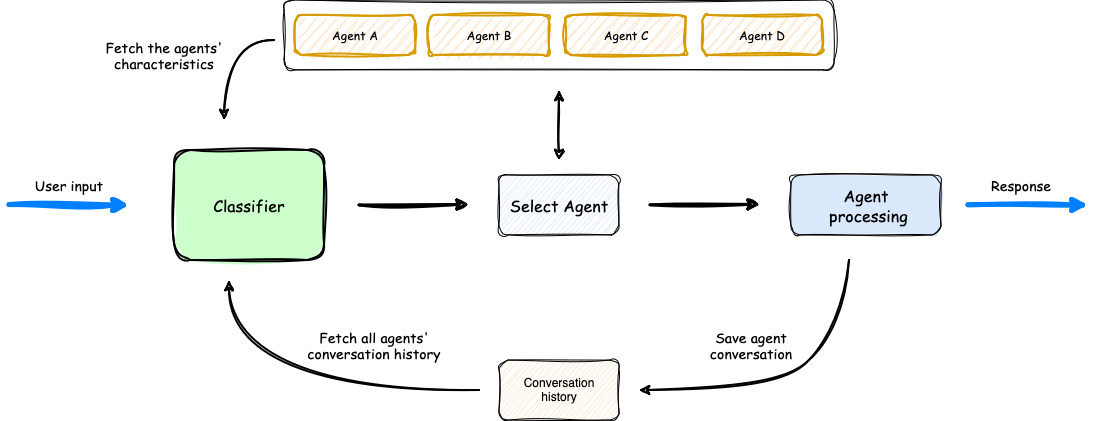
- The process begins with user input, which is analyzed by a Classifier.
- The Classifier leverages both Agents' Characteristics and Agents' Conversation history to select the most appropriate agent for the task.
- Once an agent is selected, it processes the user input.
- The orchestrator then saves the conversation, updating the Agents' Conversation history, before delivering the response back to the user.
 Introducing SupervisorAgent: Agents Coordination
The Agent Squad now includes a powerful new SupervisorAgent that enables sophisticated team coordination between multiple specialized agents. This new component implements a "agent-as-tools" architecture, allowing a lead agent to coordinate a team of specialized agents in parallel, maintaining context and delivering coherent responses.
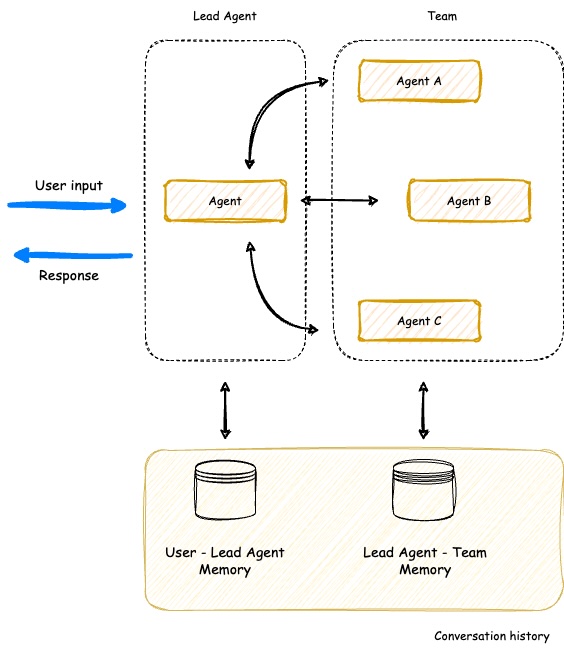
Key capabilities: - 🤝 Team Coordination - Coordinate multiple specialized agents working together on complex tasks - ⚡ Parallel Processing - Execute multiple agent queries simultaneously - 🧠 Smart Context Management - Maintain conversation history across all team members - 🔄 Dynamic Delegation - Intelligently distribute subtasks to appropriate team members - 🤖 Agent Compatibility - Works with all agent types (Bedrock, Anthropic, Lex, etc.)
The SupervisorAgent can be used in two powerful ways: 1. Direct Usage - Call it directly when you need dedicated team coordination for specific tasks 2. Classifier Integration - Add it as an agent within the classifier to build complex hierarchical systems with multiple specialized teams
Here are just a few examples where this agent can be used: - Customer Support Teams with specialized sub-teams - AI Movie Production Studios - Travel Planning Services - Product Development Teams - Healthcare Coordination Systems
Learn more about SupervisorAgent →
💬 Demo App
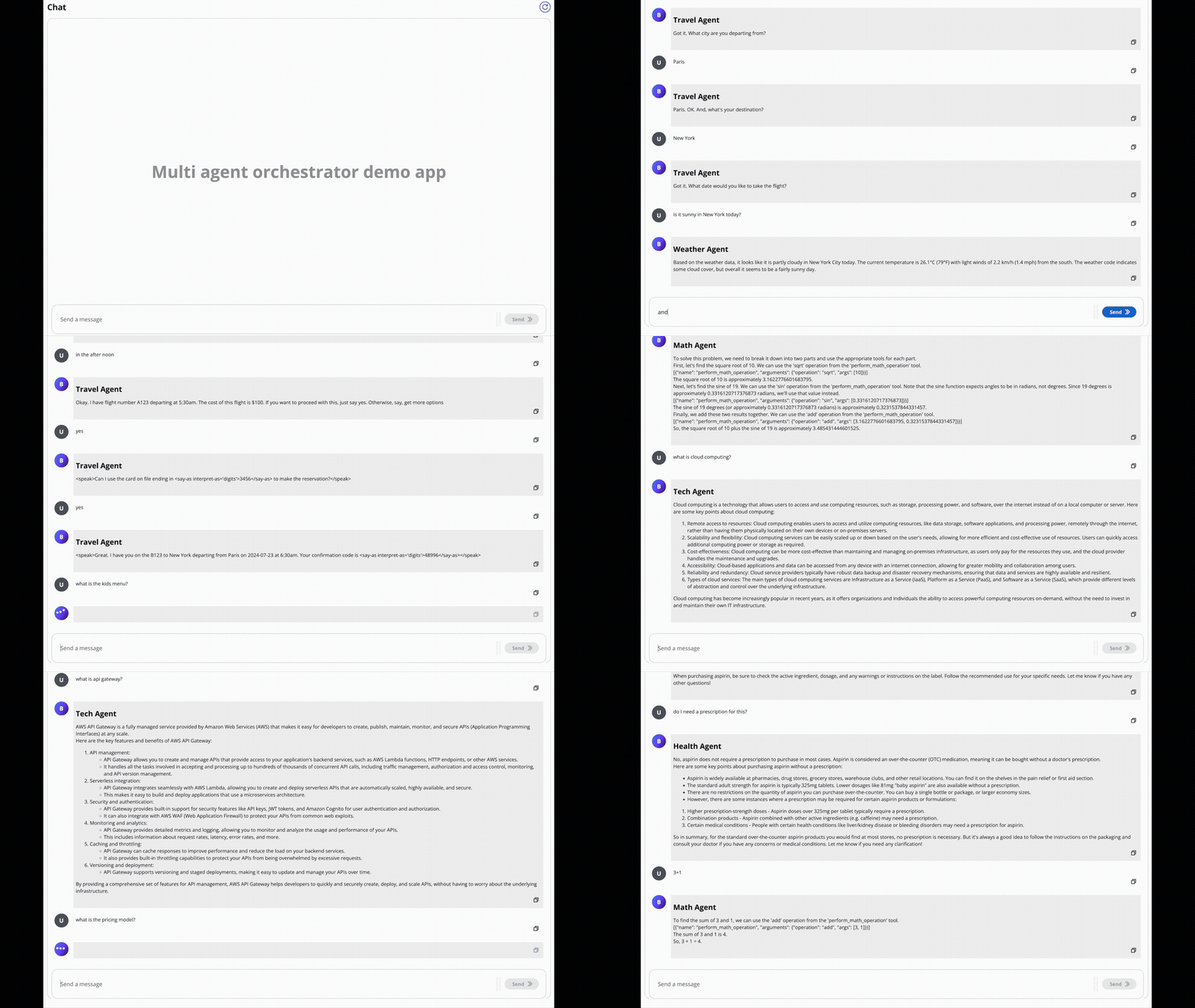
In the screen recording below, we demonstrate an extended version of the demo app that uses 6 specialized agents: - Travel Agent: Powered by an Amazon Lex Bot - Weather Agent: Utilizes a Bedrock LLM Agent with a tool to query the open-meteo API - Restaurant Agent: Implemented as an Amazon Bedrock Agent - Math Agent: Utilizes a Bedrock LLM Agent with two tools for executing mathematical operations - Tech Agent: A Bedrock LLM Agent designed to answer questions on technical topics - Health Agent: A Bedrock LLM Agent focused on addressing health-related queries
Watch as the system seamlessly switches context between diverse topics, from booking flights to checking weather, solving math problems, and providing health information. Notice how the appropriate agent is selected for each query, maintaining coherence even with brief follow-up inputs.
The demo highlights the system's ability to handle complex, multi-turn conversations while preserving context and leveraging specialized agents across various domains.
🎯 Examples & Quick Start
Get hands-on experience with the Agent Squad through our diverse set of examples:
- Demo Applications:
- Streamlit Global Demo: A single Streamlit application showcasing multiple demos, including:
- AI Movie Production Studio
- AI Travel Planner
- Chat Demo App:
- Explore multiple specialized agents handling various domains like travel, weather, math, and health
- E-commerce Support Simulator: Experience AI-powered customer support with:
- Automated response generation for common queries
- Intelligent routing of complex issues to human support
- Real-time chat and email-style communication
- Human-in-the-loop interactions for complex cases
- Sample Projects: Explore our example implementations in the
examplesfolder:chat-demo-app: Web-based chat interface with multiple specialized agentsecommerce-support-simulator: AI-powered customer support systemchat-chainlit-app: Chat application built with Chainlitfast-api-streaming: FastAPI implementation with streaming supporttext-2-structured-output: Natural Language to Structured Databedrock-inline-agents: Bedrock Inline Agents samplebedrock-prompt-routing: Bedrock Prompt Routing sample code
Examples are available in both Python and TypeScript. Check out our documentation for comprehensive guides on setting up and using the Agent Squad framework!
📚 Deep Dives: Stories, Blogs & Podcasts
Discover creative implementations and diverse applications of the Agent Squad:
This article demonstrates how to build a multilingual chatbot using the Agent Squad framework. The article explains how to use an Amazon Lex bot as an agent, along with 2 other new agents to make it work in many languages with just a few lines of code.
This article demonstrates how to build an AI-driven multi-agent system for automated e-commerce customer email support. It covers the architecture and setup of specialized AI agents using the Agent Squad framework, integrating automated processing with human-in-the-loop oversight. The guide explores email ingestion, intelligent routing, automated response generation, and human verification, providing a comprehensive approach to balancing AI efficiency with human expertise in customer support.
This article demonstrates how to build an AI customer call center. It covers the architecture and setup of specialized AI agents using the Agent Squad framework interacting with voice via Amazon Connect and Amazon Lex.
Learn how to scale Amazon Bedrock Agents beyond knowledge base limitations using the Agent Squad framework and InvokeInlineAgent API. This article demonstrates dynamic agent creation and knowledge base selection for enterprise-scale AI applications.
Learn how to enhance Amazon Bedrock Flows with conversation memory and multi-flow orchestration using the Agent Squad framework. This guide shows how to overcome Bedrock Flows' limitations to build more sophisticated AI workflows with persistent memory and intelligent routing between flows.
🎙️ Podcast Discussions
🇫🇷 Podcast (French): L'orchestrateur multi-agents : Un orchestrateur open source pour vos agents IA
- Platforms:
- Apple Podcasts
- Spotify
🇬🇧 Podcast (English): An Orchestrator for Your AI Agents
- Platforms:
- Apple Podcasts
- Spotify
TypeScript Version
Installation
🔄
multi-agent-orchestratorbecomesagent-squad
bash
npm install agent-squad
Usage
The following example demonstrates how to use the Agent Squad with two different types of agents: a Bedrock LLM Agent with Converse API support and a Lex Bot Agent. This showcases the flexibility of the system in integrating various AI services.
```typescript import { AgentSquad, BedrockLLMAgent, LexBotAgent } from "agent-squad";
const orchestrator = new AgentSquad();
// Add a Bedrock LLM Agent with Converse API support orchestrator.addAgent( new BedrockLLMAgent({ name: "Tech Agent", description: "Specializes in technology areas including software development, hardware, AI, cybersecurity, blockchain, cloud computing, emerging tech innovations, and pricing/costs related to technology products and services.", streaming: true }) );
// Add a Lex Bot Agent for handling travel-related queries orchestrator.addAgent( new LexBotAgent({ name: "Travel Agent", description: "Helps users book and manage their flight reservations", botId: process.env.LEXBOTID, botAliasId: process.env.LEXBOTALIASID, localeId: "enUS", }) );
// Example usage const response = await orchestrator.routeRequest( "I want to book a flight", 'user123', 'session456' );
// Handle the response (streaming or non-streaming)
if (response.streaming == true) {
console.log("\n** RESPONSE STREAMING ** \n");
// Send metadata immediately
console.log(> Agent ID: ${response.metadata.agentId});
console.log(> Agent Name: ${response.metadata.agentName});
console.log(> User Input: ${response.metadata.userInput});
console.log(> User ID: ${response.metadata.userId});
console.log(> Session ID: ${response.metadata.sessionId});
console.log(
> Additional Parameters:,
response.metadata.additionalParams
);
console.log(\n> Response:);
// Stream the content
for await (const chunk of response.output) {
  if (typeof chunk === "string") {
    process.stdout.write(chunk);
  } else {
    console.error("Received unexpected chunk type:", typeof chunk);
  }
}
} else {
// Handle non-streaming response (AgentProcessingResult)
console.log("\n** RESPONSE ** \n");
console.log(> Agent ID: ${response.metadata.agentId});
console.log(> Agent Name: ${response.metadata.agentName});
console.log(> User Input: ${response.metadata.userInput});
console.log(> User ID: ${response.metadata.userId});
console.log(> Session ID: ${response.metadata.sessionId});
console.log(
> Additional Parameters:,
response.metadata.additionalParams
);
console.log(\n> Response: ${response.output});
}
```
Python Version
🔄
multi-agent-orchestratorbecomesagent-squad
```bash
Optional: Set up a virtual environment
python -m venv venv
source venv/bin/activate # On Windows use venv\Scripts\activate
pip install agent-squad[aws]
```
Default Usage
Here's an equivalent Python example demonstrating the use of the Agent Squad with a Bedrock LLM Agent and a Lex Bot Agent:
```python import sys import asyncio from agentsquad.orchestrator import AgentSquad from agentsquad.agents import BedrockLLMAgent, BedrockLLMAgentOptions, AgentStreamResponse
orchestrator = AgentSquad()
techagent = BedrockLLMAgent(BedrockLLMAgentOptions( name="Tech Agent", streaming=True, description="Specializes in technology areas including software development, hardware, AI, \ cybersecurity, blockchain, cloud computing, emerging tech innovations, and pricing/costs \ related to technology products and services.", modelid="anthropic.claude-3-sonnet-20240229-v1:0", )) orchestrator.addagent(techagent)
healthagent = BedrockLLMAgent(BedrockLLMAgentOptions( name="Health Agent", streaming=True, description="Specializes in health and well being", )) orchestrator.addagent(health_agent)
async def main(): # Example usage response = await orchestrator.route_request( "What is AWS Lambda?", 'user123', 'session456', {}, True )
# Handle the response (streaming or non-streaming)
if response.streaming:
    print("\n** RESPONSE STREAMING ** \n")
    # Send metadata immediately
    print(f"> Agent ID: {response.metadata.agent_id}")
    print(f"> Agent Name: {response.metadata.agent_name}")
    print(f"> User Input: {response.metadata.user_input}")
    print(f"> User ID: {response.metadata.user_id}")
    print(f"> Session ID: {response.metadata.session_id}")
    print(f"> Additional Parameters: {response.metadata.additional_params}")
    print("\n> Response: ")

    # Stream the content
    async for chunk in response.output:
        async for chunk in response.output:
          if isinstance(chunk, AgentStreamResponse):
              print(chunk.text, end='', flush=True)
          else:
              print(f"Received unexpected chunk type: {type(chunk)}", file=sys.stderr)

else:
    # Handle non-streaming response (AgentProcessingResult)
    print("\n** RESPONSE ** \n")
    print(f"> Agent ID: {response.metadata.agent_id}")
    print(f"> Agent Name: {response.metadata.agent_name}")
    print(f"> User Input: {response.metadata.user_input}")
    print(f"> User ID: {response.metadata.user_id}")
    print(f"> Session ID: {response.metadata.session_id}")
    print(f"> Additional Parameters: {response.metadata.additional_params}")
    print(f"\n> Response: {response.output.content}")
if name == "main": asyncio.run(main()) ```
These examples showcase: 1. The use of a Bedrock LLM Agent with Converse API support, allowing for multi-turn conversations. 2. Integration of a Lex Bot Agent for specialized tasks (in this case, travel-related queries). 3. The orchestrator's ability to route requests to the most appropriate agent based on the input. 4. Handling of both streaming and non-streaming responses from different types of agents.
Modular Installation Options
The Agent Squad is designed with a modular architecture, allowing you to install only the components you need while ensuring you always get the core functionality.
Installation Options
1. AWS Integration:
bash
   pip install "agent-squad[aws]"
Includes core orchestration functionality with comprehensive AWS service integrations (BedrockLLMAgent, AmazonBedrockAgent, LambdaAgent, etc.)
2. Anthropic Integration:
bash
pip install "agent-squad[anthropic]"
3. OpenAI Integration:
bash
pip install "agent-squad[openai]"
Adds OpenAI's GPT models for agents and classification, along with core packages.
4. Full Installation:
bash
pip install "agent-squad[all]"
Includes all optional dependencies for maximum flexibility.
🙌 We Want to Hear From You!
Have something to share, discuss, or brainstorm? We’d love to connect with you and hear about your journey with the Agent Squad framework. Here’s how you can get involved:
🙌 Show & Tell: Got a success story, cool project, or creative implementation? Share it with us in the Show and Tell section. Your work might inspire the entire community! 🎉
💬 General Discussion: Have questions, feedback, or suggestions? Join the conversation in our General Discussions section. It’s the perfect place to connect with other users and contributors.
💡 Ideas: Thinking of a new feature or improvement? Share your thoughts in the Ideas section. We’re always open to exploring innovative ways to make the orchestrator even better!
Let’s collaborate, learn from each other, and build something incredible together! 🚀
📝 Pull Request Guidelines
Issue-First Policy
This repository follows an Issue-First policy:
- Every pull request must be linked to an existing issue
- If there isn't an issue for the changes you want to make, please create one first
- Use the issue to discuss proposed changes before investing time in implementation
How to Link Pull Requests to Issues
When creating a pull request, you must link it to an issue using one of these methods:
Include a reference in the PR description using keywords:
Fixes #123Resolves #123Closes #123
Manually link the PR to an issue through GitHub's UI:
- On the right sidebar of your PR, click "Development" and then "Link an issue"
Automated Enforcement
We use GitHub Actions to automatically verify that each PR is linked to an issue. PRs without linked issues will not pass required checks and cannot be merged.
This policy helps us: - Maintain clear documentation of changes and their purposes - Ensure community discussion before implementation - Keep a structured development process - Make project history more traceable and understandable
🤝 Contributing
⚠️ Note: Our project has been renamed from Multi-Agent Orchestrator to Agent Squad. Please use the new name in your contributions and discussions.
⚠️ We value your contributions! Before submitting changes, please start a discussion by opening an issue to share your proposal.
Once your proposal is approved, here are the next steps:
- 📚 Review our Contributing Guide
- 💡 Create a GitHub Issue
- 🔨 Submit a pull request
✅ Follow existing project structure and include documentation for new features.
🌟 Stay Updated: Star the repository to be notified about new features, improvements, and exciting developments in the Agent Squad framework!
Authors
👥 Contributors
Big shout out to our awesome contributors! Thank you for making this project better! 🌟 ⭐ 🚀
Please see our contributing guide for guidelines on how to propose bugfixes and improvements.
📄 LICENSE
This project is licensed under the Apache 2.0 licence - see the LICENSE file for details.
📄 Font License
This project uses the JetBrainsMono NF font, licensed under the SIL Open Font License 1.1. For full license details, see FONT-LICENSE.md.
Owner
- Name: Amazon Web Services - Labs
- Login: awslabs
- Kind: organization
- Location: Seattle, WA
- Website: http://amazon.com/aws/
- Repositories: 914
- Profile: https://github.com/awslabs
AWS Labs
Committers
Last synced: about 1 year ago
Top Committers
| Name | Commits | |
|---|---|---|
| Anthony Bernabeu | 6****s | 445 |
| Corneliu CROITORU | c****u@g****m | 251 |
| dependabot[bot] | 4****] | 64 |
| Corneliu Croitoru | c****o@a****r | 30 |
| Rajaniraiyn R | r****n@g****m | 15 |
| Leandro Damascena | l****a@a****t | 8 |
| Ashish Patel | s****l@g****m | 5 |
| RanaElwaseef | r****1@g****m | 3 |
| anthony.bernabeu | a****u@c****m | 2 |
| Hamza Ghandri | h****i@g****m | 2 |
| Ikko Eltociear Ashimine | e****r@g****m | 2 |
| John Veldboom | j****m@w****m | 2 |
| Robert Allaway | a****y | 2 |
| Bharathvaj | 1****n | 1 |
| Bill Cai | b****i@a****u | 1 |
| Fabian Rami | f****i@a****m | 1 |
| FamousMai | 9****5@q****m | 1 |
| Filippo Pedrazzini | f****i@j****o | 1 |
| Florian Clanet | f****t@a****r | 1 |
| PPraneesh | p****8@g****m | 1 |
| Rupesh Kumar Singh | 5****h | 1 |
| Sachdeva, Kapil | k****7@g****m | 1 |
| Sean | s****n@g****m | 1 |
| Suresh Veeragoni | s****e@a****m | 1 |
| Sin-Woo Bang | s****g@g****m | 1 |
| zach.fry | z****h@a****i | 1 |
Committer Domains (Top 20 + Academic)
Issues and Pull Requests
Last synced: 11 months ago
All Time
- Total issues: 24
- Total pull requests: 33
- Average time to close issues: 4 days
- Average time to close pull requests: 13 days
- Total issue authors: 17
- Total pull request authors: 15
- Average comments per issue: 0.38
- Average comments per pull request: 0.27
- Merged pull requests: 17
- Bot issues: 0
- Bot pull requests: 8
Past Year
- Issues: 24
- Pull requests: 33
- Average time to close issues: 4 days
- Average time to close pull requests: 13 days
- Issue authors: 17
- Pull request authors: 15
- Average comments per issue: 0.38
- Average comments per pull request: 0.27
- Merged pull requests: 17
- Bot issues: 0
- Bot pull requests: 8
Top Authors
Issue Authors
- pierrehanne (2)
- wakeupmh (2)
- brnaba-aws (2)
- Sancho869 (2)
- ycysuk (2)
- SeanGallen (2)
- rjesh-git (1)
- vittoriohalfon (1)
- sirrupesh (1)
- obinopaul (1)
- tracy-french (1)
- jeffchuber (1)
- felipebpl (1)
- yilinglu (1)
- brianantonelli (1)
Pull Request Authors
- dependabot[bot] (14)
- brianantonelli (6)
- SeanGallen (4)
- galoisgroupcn (4)
- pierrehanne (4)
- PPraneesh (3)
- cornelcroi (3)
- vittoriohalfon (2)
- ailunc (2)
- tracy-french (2)
- sirrupesh (2)
- ashishpatel26 (2)
- filopedraz (2)
- brnaba-aws (2)
- rjesh-git (2)
Top Labels
Issue Labels
Pull Request Labels
Packages
- Total packages: 3
-
Total downloads:
- npm 490 last-month
- pypi 5,427 last-month
-
Total dependent packages: 0
(may contain duplicates) -
Total dependent repositories: 0
(may contain duplicates) - Total versions: 8
- Total maintainers: 3
npmjs.org: agent-squad
Agent Squad framework
- Homepage: https://github.com/awslabs/agent-squad
- License: Apache-2.0
-
Latest release: 1.0.1
published about 1 year ago
Rankings
Maintainers (1)
npmjs.org: @dragon0/agent-squad
Agent Squad framework
- Homepage: https://github.com/awslabs/agent-squad
- License: Apache-2.0
-
Latest release: 1.0.1-streaming-fix.1
published 12 months ago
Rankings
Maintainers (1)
pypi.org: agent-squad
Agent Squad framework
- Homepage: https://github.com/awslabs/agent-squad
- Documentation: https://agent-squad.readthedocs.io/
- License: Apache License 2.0
-
Latest release: 1.0.2
published about 1 year ago
Rankings
Maintainers (1)
Dependencies
- actions/checkout 6ccd57f4c5d15bdc2fef309bd9fb6cc9db2ef1c6 composite
- actions/setup-node 60edb5dd545a775178f52524783378180af0d1f8 composite
- actions/checkout b4ffde65f46336ab88eb53be808477a3936bae11 composite
- actions/deploy-pages 7a9bd943aa5e5175aeb8502edcc6c1c02d398e10 composite
- actions/upload-pages-artifact 027b0ddc3de8dbe7e5a699814c4508ca8ecefc5f composite
- withastro/action 9a7959a16949e620a22e74f81c10cb7ce3b76924 composite
- actions/github-script 1f16022c7518aad314c43abcd029895291be0f52 composite
- actions/checkout b4ffde65f46336ab88eb53be808477a3936bae11 composite
- zgosalvez/github-actions-ensure-sha-pinned-actions f32435541e24cd6a4700a7f52bb2ec59e80603b1 composite
- 572 dependencies
- rimraf ^5.0.7 development
- @astrojs/starlight ^0.23.2
- astro ^4.9.2
- sharp ^0.33.4
- shiki ^1.10.3
- asynckit 0.4.0
- axios 1.6.8
- combined-stream 1.0.8
- delayed-stream 1.0.0
- follow-redirects 1.15.6
- form-data 4.0.0
- jose 5.2.3
- mime-db 1.52.0
- mime-types 2.1.35
- proxy-from-env 1.1.0
- axios ^1.6.0
- jose 5.2.3
- 754 dependencies
- @aws-lambda-powertools/parameters ^2.3.0 development
- @types/jest ^29.5.12 development
- @types/node 20.14.2 development
- aws-cdk 2.147.3 development
- jest ^29.7.0 development
- ts-jest ^29.1.4 development
- ts-node ^10.9.2 development
- typescript ~5.4.5 development
- @aws-cdk/aws-cognito-identitypool-alpha ^2.148.0-alpha.0
- @aws-cdk/aws-lambda-python-alpha ^2.148.0-alpha.0
- @aws-lambda-powertools/logger ^2.3.0
- @aws-sdk/client-bedrock-runtime ^3.609.0
- @aws/multi-agent-orchestrator file:../../aws-multi-agent-orchestrator-0.0.16.tgz
- @cdklabs/generative-ai-cdk-constructs ^0.1.205
- aws-cdk-lib ^2.147.3
- aws-lambda ^1.0.7
- constructs ^10.0.0
- i ^0.3.7
- natural ^7.1.0
- npm ^10.8.1
- source-map-support ^0.5.21
- stopword ^3.0.1
- xml2js ^0.6.2
- 630 dependencies
- @types/react ^18.2.55 development
- @types/react-dom ^18.2.19 development
- @typescript-eslint/eslint-plugin ^6.21.0 development
- @typescript-eslint/parser ^6.21.0 development
- @vitejs/plugin-react ^4.2.1 development
- autoprefixer ^10.4.17 development
- eslint ^8.56.0 development
- eslint-plugin-react-hooks ^4.6.0 development
- eslint-plugin-react-refresh ^0.4.5 development
- postcss ^8.4.35 development
- sass ^1.70.0 development
- typescript ^5.2.2 development
- vite ^5.2.9 development
- @aws-amplify/ui-react ^6.1.3
- @cloudscape-design/components ^3.0.611
- @cloudscape-design/design-tokens ^3.0.35
- @cloudscape-design/global-styles ^1.0.27
- aws-amplify ^6.0.15
- react ^18.2.0
- react-dom ^18.2.0
- react-markdown ^9.0.1
- react-router-dom ^6.22.0
- react-textarea-autosize ^8.5.3
- remark-gfm ^4.0.0
- dotenv 16.4.5
- dotenv ^16.4.5
- 622 dependencies
- @types/jest ^29.5.12 development
- @typescript-eslint/eslint-plugin ^7.17.0 development
- @typescript-eslint/parser ^7.17.0 development
- aws-sdk-client-mock ^4.0.1 development
- aws-sdk-client-mock-jest ^4.0.1 development
- eslint ^8.57.0 development
- jest ^29.7.0 development
- ts-jest ^29.2.3 development
- ts-node ^10.9.2 development
- typescript ^5.5.3 development
- @anthropic-ai/sdk ^0.24.3
- @aws-sdk/client-bedrock-agent-runtime ^3.609.0
- @aws-sdk/client-bedrock-runtime ^3.609.0
- @aws-sdk/client-dynamodb ^3.609.0
- @aws-sdk/client-lambda ^3.614.0
- @aws-sdk/client-lex-runtime-v2 ^3.609.0
- @aws-sdk/lib-dynamodb ^3.610.0
- @aws-sdk/util-dynamodb ^3.609.0
- axios ^1.7.2
- eslint-config-prettier ^9.1.0
- natural ^7.0.7
- openai ^4.52.7
- prettier ^3.3.3
- stopword ^3.0.1
- actions/checkout 9a9194f87191a7e9055e3e9b95b8cfb13023bb08 composite
- actions/setup-python 2bd53f9a4d1dd1cd21eaffcc01a7b91a8e73ea4c composite
- actions/checkout 9a9194f87191a7e9055e3e9b95b8cfb13023bb08 composite
- actions/setup-python 2bd53f9a4d1dd1cd21eaffcc01a7b91a8e73ea4c composite
- actions/checkout 9a9194f87191a7e9055e3e9b95b8cfb13023bb08 composite
- lycheeverse/lychee-action c053181aa0c3d17606addfe97a9075a32723548a composite
- actions/checkout 9a9194f87191a7e9055e3e9b95b8cfb13023bb08 composite
- gitleaks/gitleaks-action 4df650038e2eb9f7329218df929c2780866e61a3 composite
- actions/checkout 9a9194f87191a7e9055e3e9b95b8cfb13023bb08 composite
- lycheeverse/lychee-action c053181aa0c3d17606addfe97a9075a32723548a composite
- anthropic * test
- boto3 * test
- coverage * test
- moto * test
- pytest * test
- pytest-asyncio * test
- pytest-mock * test