OpenTTDLab
OpenTTDLab: A Python framework for reproducible experiments using OpenTTD - Published in JOSS (2025)
Science Score: 98.0%
This score indicates how likely this project is to be science-related based on various indicators:
-
✓CITATION.cff file
Found CITATION.cff file -
✓codemeta.json file
Found codemeta.json file -
✓.zenodo.json file
Found .zenodo.json file -
✓DOI references
Found 9 DOI reference(s) in README and JOSS metadata -
✓Academic publication links
Links to: acm.org -
○Academic email domains
-
○Institutional organization owner
-
✓JOSS paper metadata
Published in Journal of Open Source Software
Keywords
Scientific Fields
Repository
A Python framework for running reproducible experiments using OpenTTD
Basic Info
Statistics
- Stars: 42
- Watchers: 2
- Forks: 3
- Open Issues: 3
- Releases: 75
Topics
Metadata Files
README.md
OpenTTDLab - Run reproducible experiments using OpenTTD




OpenTTDLab is a Python framework for using OpenTTD to run reproducible experiments and extracting results from them, with as few manual steps as possible. OpenTTDLab can also be used to help run regression tests of OpenTTD AIs, parse OpenTTD savegame files, and download content from BaNaNaS.
OpenTTDLab is based on Patric Stout's OpenTTD Savegame Reader.
[!CAUTION] OpenTTDLab does not support running experiments using OpenTTD 14.* - see Compatibility for more details.
Contents
- About
- Features
- Installation
- Running experiments
- Plotting results
- Examples
- API
- Tips for repeatability, reproducibility, and replicability
- Compatibility
- How to report an issue
- How to get help
- How to contribute
- How to cite OpenTTDLab
- Licenses and attributions
About
OpenTTD is a business simulation game where typically one or more human players each build a company through constructing and using a transportation network to transport passengers and goods. OpenTTD can be extended by allowing custom AI players to compete against the human players through its AI API.
By only allowing such AI players, making it possible to run ranges of simulations from Python code using different AIs or differently configured AIs, and providing access to metrics from the simulations, OpenTTDLab turns OpenTTD from a game into a system for researching algorithms and their effects, especially on supply chains.
Features
- Allows you to easily run OpenTTD in a headless mode (i.e. without a graphical interface) over a variety of configurations.
- And allows you to do this from Python code - for example from a Jupyter Notebook.
- As is typical from Python code, it is cross platform - allowing to share code snippets between macOS, Windows, and Linux, even though details like how to install and start OpenTTD are different on each platform.
- Downloads (and caches) OpenTTD, OpenGFX, AIs, and AI libraries - no need to download these separately or through OpenTTD's built-in content browser.
- Transparently parallelises runs of OpenTTD, by default up to the number of CPUs. (Although with fairly poor scaling properties.)
- Results are extracted from OpenTTD savegames as plain Python dictionaries and lists - reasonably convenient for importing into tools such as pandas for analysis or visualisation.
Installation
OpenTTDLab is distributed via PyPI, and so can usually be installed using pip.
shell
python -m pip install OpenTTDLab
When run on macOS, OpenTTDLab has a dependency that pip does not install: 7-zip. To install 7-zip, first install Homebrew, and then use Homebrew to install the p7zip package that contains 7-zip.
shell
brew install p7zip
You do not need to separately download or install OpenTTD (or OpenGFX) in order to use OpenTTDLab. OpenTTDLab itself handles downloading them.
Running experiments
The core function of OpenTTD is the run_experiments function.
```python from openttdlab import runexperiments, bananasai
Run experiments...
results = runexperiments( openttdversion='13.4', # ... for a specific versions of OpenTTD opengfxversion='7.1', # ... and a specific versions of OpenGFX experiments=( { # ... for random seeds 'seed': seed, # ... running specific AIs. In this case a single AI, with no # parameters, fetching it from https://bananas.openttd.org/package/ai 'ais': ( bananasai('54524149', 'trAIns', ai_params=()), ), # ... each for a number of (in game) days 'days': 365 * 4 + 1, } for seed in range(0, 10) ), ) ```
Plotting results
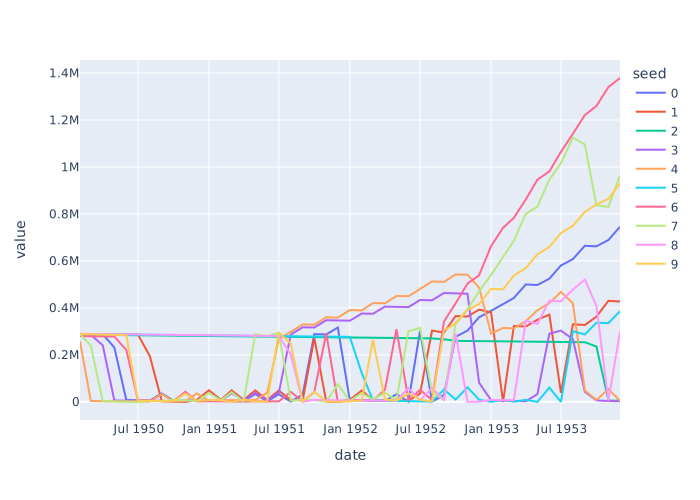
OpenTTD does not require any particular library for plotting results. However, pandas and Plotly Express are common options for plotting from Python. For example if you have a results object from run_experiments as in the above example, the following code
```python import pandas as pd import plotly.express as px
df = pd.DataFrame( { 'seed': row['experiment']['seed'], 'date': row['date'], 'money': row['chunks']['PLYR']['0']['money'], } for row in results ) df = df.pivot(index='date', columns='seed', values='money') fig = px.line(df) fig.show() ```
should output a plot much like this one.
Examples
A few examples are available:
- A Jupyter notebook of the above example, briefly exploring the performance of trAIns
- A Jupyter notebook showing how the performance of OpenTTDLab scales with the number of workers
- A pytest .py file using OpenTTDLab as a test harness for an OpenTTD AI, run automatically using a GitHub action workflow
API
Core function
run_experiments(...)
The core function of OpenTTDLab is the run_experiments function, used to run an experiment and return results extracted from the savegame files that OpenTTD produces. It has the following parameters and defaults.
experiments=()
An iterable of the experiments to run. Each experiment should be a dictionary with the (string) keys:
'ais'The list of AIs to run in this experiment. See the Fetching AIs section for details on this parameter.
'seed'The integer seed of the random number generator for this experiment.
'days'The integer number of in-game days that this experiment will run for.
openttd_config=''OpenTTD config to run each experiment under. This must be in the openttd.cfg format. This is added to by OpenTTDLab before being passed to OpenTTD.
ais_libraries=()
The list of AI libraries to have available to AI code. See the Fetching AI libraries section for details on this parameter.
result_processor=lambda r: (r,)
A function that takes a single result row, which is a parsed save game file from an experiment, alongside other metadata describing the experiment, and returns it processed in some way. The function should return an iterable of zero or more rows that will appear in the the return value of run_experiments.
This is typically used to reduce memory usage with high numbers of experiments where only a small amount of data is needed for analysis.
final_screenshot_directory=None
The directory to save a PNG screenshot of the entire map at the end of each run. Each is named in the format <seed>.png, where <seed> is the experiment's seed of the random number generator. If None, then no screenshots are saved.
For technical reasons, a window will briefly appear while each screenshot is being saved. This can be avoided when running on Linux if xvfb-run is installed and available in the path.
max_workers=None
The maximum number of workers to use to run OpenTTD in parallel. IfNone, then os.cpu_count() defined how many workers run.
openttd_version=None
opengfx_version=None
The version of OpenTTD or OpenGFX to download and use. For both of these:
If
None, the latest release version available atopenttd_cdn_urlis downloaded and used.If starting with 8 digits followed by a dash, it is assumed this is a date and so a nightly version, for example
'20230323-master-g83eb73a9b2'.Otherwise a release version is assumed, for example
'13.4'.
Caution OpenTTDLab currently does not work with OpenTTD 14.0 or later. The latest version of OpenTTD known to work is 13.4.
openttd_cdn_url='https://cdn.openttd.org/
The URL of the OpenTTD CDN, from which the OpenTTD and OpenGFX binaries are fetched.
get_http_client=lambda: httpx.Client(transport=httpx.HTTPTransport(retries=3)
The HTTP client used to make HTTP requests when fetching OpenTTD, OpenGFX, or AIs. Note that the bananas_ai function uses a raw TCP connection in addition to HTTP requests, and so not all outgoing connections use the client specified by this.
Configuring AIs
The value of the ais key of each dictionary in the experiments parameter configures which AIs will run, how their code will be located, their names, and what parameters will be passed to each of them when they start. In more detail, the ais parameter must be an iterable of the return value of any of the the following 4 functions.
[!IMPORTANT] The
ai_nameargument passed to each of the following functions must exactly match the name of the corresponding AI as published. If it does not match, the AI will not be started.[!IMPORTANT] The return value of each of the following is opaque: it should not be used in client code, other than by passing into
run_experimentsas part of theaisparameter.
bananas_ai(unique_id, ai_name, ai_params=(), md5=None)
Defines an AI by the unique_id and ai_name of an AI published through OpenTTD's content service at https://bananas.openttd.org/package/ai. This allows you to quickly run OpenTTDLab with a published AI. The ai_params parameter is an optional parameter of an iterable of (key, value) parameters passed to the AI on startup.
The unique_id is sometimes surfaced as the "Content Id", but it should not include its ai/ prefix.
If you pass the full MD5 hex string of a specific version of AI as md5, for example previously returned from the download_from_bananas function, the corresponding version will be used. Otherwise, the latest version will be used.
local_folder(folder_path, ai_name, ai_params=()))
Defines an AI by the folder_path to a local folder that contains the AI code of an AI with name ai_name. The ai_params parameter is an optional parameter of an iterable of (key, value) parameters passed to the AI on startup.
local_file(path, ai_name, ai_params=())
Defines an AI by the local path to a .tar AI file that contains the AI code. The ai_params parameter is an optional parameter of an iterable of (key, value) parameters passed to the AI on startup.
remote_file(url, ai_name, ai_params=())
Fetches the AI by the URL of a tar.gz file that contains the AI code. For example, a specific GitHub tag of a repository that contains its code. The ai_params parameter is an optional parameter of an iterable of (key, value) parameters passed to the AI on startup.
Configuring AI libraries
The ai_libraries parameter of run_experiments ensures that AI libraries are available to the AIs running. In more detail, the ais_libraries parameter must be an iterable, where each item the the return value of the bananas_ai_library function described below.
Note that for AIs specified by bananas_ai OpenTTDLab automatically downloads all of their AI library dependencies without them having to be specified through the ai_libraries parameter. This includes all transitive AI library dependencies - AI libraries needed by AI libraries needed by AIs, and so on.
Similarly for AI libraries specified by bananas_ai_library - OpenTTDLab automatically downloads of their AI library dependencies.
bananas_ai_library(unique_id, ai_library_name, md5=None)
Fetches the AI library defined by unique_id and ai_name of a library published through OpenTTD's content service at https://bananas.openttd.org/package/ai-library.
The unique_id is sometimes surfaced as the "Content Id", but it should not include its ai-library/ prefix.
If you pass the full MD5 string of a specific version of AI library as md5, for example previously returned from the download_from_bananas function, this will fetch this corresponding version from BaNaNaS. Otherwise, the latest version is fetched.
Parsing savegame files
parse_savegame(chunks: Iterable[bytes])
Under the hood the run_experiments handles the generation and parsing of savegame files, but if you have your own savegame files generated separately, the parse_savegame function is exposed that can extract data from them.
It takes an iterable of bytes instances of a savegame file, and returns a nested dictionary of parsed data.
```python from openttdlab import parse_savegame
with open('my.sav') as f: parsedsavegame = parsesavegame(iter(lambda: f.read(65536), b'')) ```
Downloading from BaNaNaS
[!IMPORTANT] Please do not use this to try to download all content from BaNaNaS. See this discussion about writing a client for BaNaNaS for more details.
[!IMPORTANT] Please note the license of each piece of content you download, and adhere to its rules. As examples, licenses may require you to attribute the author, they can restrict you from distributing any modifications you make, they can restrict you from using the content for commercial purposes, or they can require you to make the source available if you distribute a compiled version.
download_from_bananas(content_id: str, md5: Optional[str]=None)
This function is a Python BaNaNaS client for downloading the content from BaNaNaS. Given a content id, it returns an iterable of that content and all of its direct and transitive dependencies.
```python from openttdlab import downloadfrombananas
with downloadfrombananas('ai/41444d4c') as files: for contentid, filename, license, partialorfullmd5, getdata in files: with getdata() as chunks: with open(filename, 'wb') as f: for chunk in chunks: f.write(chunk) ```
Each chunks iterable are the binary chunks of the non-compressed .tar file of the content. Also, under the hood download_from_bananas transparently caches content where possible. This is the main reason for using context managers as in the above example - they allow for robust cleanup of resources and caching of data once the data has been iterated over.
If you don't pass md5, download_from_bananas will return details for the latest version of the content. And if the content has a known and acceptable license, partial_or_full_md5 will contain the full MD5 for the content, which can then be subsequently passed back into download_from_bananas to download the same version later. If the file does not have a known license, download_from_bananas will contain the only the first 8 characters of the MD5. This means that download_from_bananas is deterministic only for content that has an acceptable license, and if you pass an MD5 previously retrieved from a call to download_from_bananas.
Note that the function run_experiments that uses bananas_ai or bananas_ai_library will handle automatically downloading from BaNaNaS, so this function is usually only useful if you would like to run experiments without using the bananas_* functions, or report on the filename (which includes the version of each piece of content) or the MD5 sum of the file.
Tips for repeatability, reproducibility, and replicability
OpenTTDLab should be able to help with all the 3Rs of repeatability, reproducibility and (although to a lesser degree) replicability of simulations. Definitions of the 3Rs are taken from the Association for Computing Machinery (ACM) https://www.acm.org/publications/policies/artifact-review-and-badging-current.
Repeatability
"For computational experiments, this means that a researcher can reliably repeat her own computation."
The run_experiments function is the primary way OpenTTLab supports repeatability - with a single function call you can run a range of experiments. But to make sure you get the same results on each invocation:
- Pin to a specific OpenTTD and OpenGFX version.
- If fetching AIs and AI libraries from BaNaNaS, use the MD5 to ensure the same versions are used (at the moment the only way of discovering these is to initially separately call the downloadfrombananas_function).
- If fetching AIs and AI libraries from another remote source, make sure that source is immutable.
- For all your own code store in version control, e.g. git, and make sure to note version/commit IDs used to generate results.
- Use a virtual environment to pin Python version and all dependencies (most importantly of OpenTTDLab).
- Use fixed random seeds.
- (Out of paranoia mostly, note the OS and its version, and CPU type.)
Reproducibility
"For computational experiments, this means that an independent group can obtain the same result using the author’s own artifacts."
To help others reproduce your results:
- Take all the repeatability steps above, and make sure to communicate all the noted details, e.g. what versions where pinned, along with any results.
- Make any artifacts that you have created available alongide the results / linked from the results. This can include the source of AIs you have used or created, the Python code to run OpenTTDLab, and the Python code to analyse the results.
In general, bitwise identical results are not required in order to meet ACM's definition of reproducibility; but with the same configuration, and specifically with the same fixed random seeds, OpenTTDLab should give bitwise identical results each run.
Replicability
"For computational experiments, this means that an independent group can obtain the same result using artifacts which they develop completely independently."
This is arguably the most difficult of the 3Rs to plan for, and for other researchers to achieve. To help others replicate your results:
- Take all the repeatability and reproducibility steps above.
- Note and communicate the high level algorithms involved, so others can create their own implementations of them. For example, if you have written an AI, then precisely communicate the algorithm that AI takes so others can implement it, and then run it with OpenTTDLab.
For full replicability, it could be argued that OpenTTD itself, or something equivalent, would also have to be implemented. While this sounds unfeasbile, depending on what the AIs involve and what you argue the results are, it might be feasible. However, for this level of replicability OpenTTDLab is unlikely to be helpful.
Compatibility
- OpenTTD versions 12.*, 13.*, 15.* and (presumably) later are supported. OpenTTD 14.* is not supported; see this discussion on the changes in OpenTTD 14.0.
- Linux (tested on Ubuntu 20.04), Windows (tested on Windows Server 2019), or macOS (tested on macOS 13)
- Python >= 3.8.2 (tested on 3.8.2 and 3.12.0)
How to report an issue
To report an report an issue with OpenTTDLab, please use GitHub issues.
How to get help
If you would like help using OpenTTDLab, please ask a question in GitHub discussions.
How to contribute
Contributions to OpenTTDLab are welcome - see GitHub's guide on how to contribute to projects through pull requests.
However, if there is no existing issue that you're addressing with your contribution, in most cases it's better to start a discussion before raising a pull request. However, this is not a requirement, and probably unnecessary for small or no-brainer improvements.
How to cite OpenTTDLab
If you use OpenTTDLab in a scientific publication, a citation to its corresponding peer-reviewed paper, OpenTTDLab: A Python framework for reproducible experiments using OpenTTD, is appreciated.
Following is a suggested BibTeX-style entry; feel free to modify it for your needs.
@article{
    Charemza2025,
    doi       = {10.21105/joss.08014},
    url       = {https://doi.org/10.21105/joss.08014},
    year      = {2025},
    publisher = {The Open Journal},
    volume    = {10},
    number    = {110},
    pages     = {8014},
    author    = {Michal Charemza},
    title     = {OpenTTDLab: A Python framework for reproducible experiments using OpenTTD},
    journal   = {Journal of Open Source Software}
}
Licenses and attributions
TL;DR
OpenTTDLab is licensed under the GNU General Public License version 2.0.
In more detail
OpenTTDLab is based on Patric Stout's OpenTTD Savegame Reader, licensed under the GNU General Public License version 2.0.
The OpenTTDLab logo is a modified version of the OpenTTD logo, authored by the OpenTTD team, converted to SVG by Stannered, and then modified to become the logo for OpenTTDLab by Michal Charemza. The OpenTTD logo is also licensed under the GNU General Public License version 2.0.


The .gitignore file is based on GitHub's Python .gitignore file. This was originally supplied under CC0 1.0 Universal. However, as part of OpenTTDLab it is licensed under GNU General Public License version 2.0.
trAIns, included in fixtures/, is authored by Luis Henrique O. Rios, and licensed under the GNU General Public License version 2.0.
OpenTTD and OpenGFX are authored by the OpenTTD team. Both are licensed under the GNU General Public License version 2.0.
Owner
- Name: Michal Charemza
- Login: michalc
- Kind: user
- Location: London, UK
- Website: http://charemza.name/
- Repositories: 79
- Profile: https://github.com/michalc
JOSS Publication
OpenTTDLab: A Python framework for reproducible experiments using OpenTTD
Authors

University of Edinburgh, United Kingdom
Editor
Sehrish Kanwal
Citation (CITATION.cff)
cff-version: "1.2.0"
authors:
- family-names: Charemza
  given-names: Michal
  orcid: "https://orcid.org/0009-0009-1002-1036"
doi: 10.5281/zenodo.15305719
message: If you use this software, please cite our article in the Journal of Open Source Software.
preferred-citation:
  authors:
  - family-names: Charemza
    given-names: Michal
    orcid: "https://orcid.org/0009-0009-1002-1036"
  date-published: 2025-06-04
  doi: 10.21105/joss.08014
  issn: 2475-9066
  issue: 110
  journal: Journal of Open Source Software
  publisher:
    name: Open Journals
  start: 8014
  title: "OpenTTDLab: A Python framework for reproducible experiments using OpenTTD"
  type: article
  url: "https://joss.theoj.org/papers/10.21105/joss.08014"
  volume: 10
title: "OpenTTDLab: A Python framework for reproducible experiments
  using OpenTTD"
GitHub Events
Total
- Create event: 52
- Issues event: 6
- Release event: 2
- Watch event: 22
- Delete event: 53
- Push event: 230
- Pull request event: 97
- Fork event: 2
Last Year
- Create event: 52
- Issues event: 6
- Release event: 2
- Watch event: 22
- Delete event: 53
- Push event: 230
- Pull request event: 97
- Fork event: 2
Issues and Pull Requests
Last synced: 11 months ago
All Time
- Total issues: 6
- Total pull requests: 329
- Average time to close issues: 9 days
- Average time to close pull requests: about 2 hours
- Total issue authors: 1
- Total pull request authors: 2
- Average comments per issue: 0.0
- Average comments per pull request: 0.0
- Merged pull requests: 315
- Bot issues: 0
- Bot pull requests: 0
Past Year
- Issues: 4
- Pull requests: 91
- Average time to close issues: 27 days
- Average time to close pull requests: about 4 hours
- Issue authors: 1
- Pull request authors: 1
- Average comments per issue: 0.0
- Average comments per pull request: 0.0
- Merged pull requests: 89
- Bot issues: 0
- Bot pull requests: 0
Top Authors
Issue Authors
- michalc (6)
Pull Request Authors
- michalc (328)
- BasicBeluga (1)
Top Labels
Issue Labels
Pull Request Labels
Packages
- Total packages: 1
-
Total downloads:
- pypi 78 last-month
- Total dependent packages: 0
- Total dependent repositories: 0
- Total versions: 75
- Total maintainers: 1
pypi.org: openttdlab
Python framework for running reproducible experiments using OpenTTD
- Documentation: https://openttdlab.readthedocs.io/
- License: GNU General Public License v2 (GPLv2)
-
Latest release: 0.0.75
published over 1 year ago