modle
High-performance stochastic modeling of DNA loop extrusion interactions
Science Score: 67.0%
This score indicates how likely this project is to be science-related based on various indicators:
-
✓CITATION.cff file
Found CITATION.cff file -
✓codemeta.json file
Found codemeta.json file -
✓.zenodo.json file
Found .zenodo.json file -
✓DOI references
Found 21 DOI reference(s) in README -
✓Academic publication links
Links to: springer.com, nature.com, zenodo.org -
○Academic email domains
-
○Institutional organization owner
-
○JOSS paper metadata
-
○Scientific vocabulary similarity
Low similarity (14.1%) to scientific vocabulary
Keywords
Repository
High-performance stochastic modeling of DNA loop extrusion interactions
Basic Info
- Host: GitHub
- Owner: paulsengroup
- License: other
- Language: C++
- Default Branch: main
- Homepage: https://doi.org/10.1186/s13059-022-02815-7
- Size: 65.2 MB
Statistics
- Stars: 17
- Watchers: 2
- Forks: 2
- Open Issues: 4
- Releases: 10
Topics
Metadata Files
README.md
MoDLE





-blue)

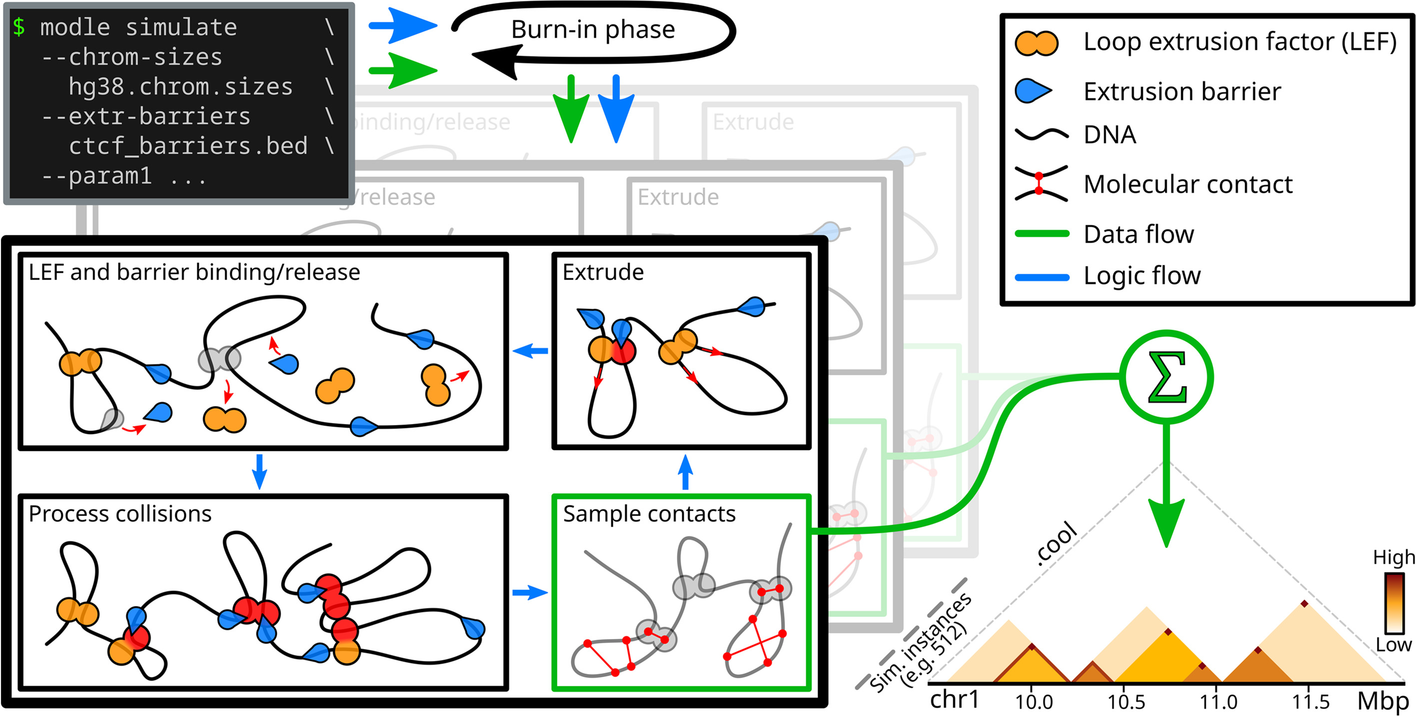
MoDLE is a computational tool for fast, stochastic modeling of molecular contacts from DNA loop extrusion capable of simulating realistic contact patterns genome wide in a few minutes.
Using MoDLE
MoDLE is developed on Linux and tested on Linux and MacOS. Running MoDLE on Windows is only possible using Docker containers (see below).
MoDLE can be installed or compiled with one of the following methods.
Docker or Singularity/Apptainer
First, make sure you follow the instructions on how to install Docker or Singularity/Apptainer on your OS.
Installing Docker
The following instructions assume you have root/admin permissions. - [Linux](https://docs.docker.com/desktop/install/linux-install/#generic-installation-steps/) - [MacOS](https://docs.docker.com/desktop/install/mac-install/) - [Windows](https://docs.docker.com/desktop/install/windows-install/) On some Linux distributions just installing Docker is not enough. You also need to start (and optionally enable) the appropriate service(s). This is usually done with one of the following: ```bash sudo systemctl start docker sudo systemctl start docker.service ``` Refer to [Docker](https://docs.docker.com/engine/install/) or your distribution documentation for more details.Installing Singularity/Apptainer
The following instructions assume you have root/admin permissions. Apptainer can be easily installed using your system package manager. [Here](https://apptainer.org/docs/admin/main/installation.html#install-from-pre-built-packages) you can find instructions for common Linux distributions such as Ubuntu. Even if your distribution is not listed in the above documentation, your system package manager likely includes a package for Singularity or Apptainer. If this is not the case, then you must install Apptainer from source (instructions available [here](https://github.com/apptainer/apptainer/blob/release-1.1/INSTALL.md)).Pulling MoDLE Docker image
MoDLE Docker images are available on ghcr.io and dockerhub.
Downloading and running the latest stable release can be done as follows:
```console
Using Docker, may require sudo
user@dev:/tmp$ docker run ghcr.io/paulsengroup/modle:1.1.0 --help
Using Singularity/Apptainer
user@dev:/tmp$ singularity run ghcr.io/paulsengroup/modle:1.1.0 --help
High-performance stochastic modeling of DNA loop extrusion interactions. Usage: /usr/local/bin/modle [OPTIONS] SUBCOMMAND
Options: -h,--help Print this help message and exit -V,--version Display program version information and exit --config Path to MoDLE's config file (optional).
Subcommands: simulate, sim Simulate loop extrusion and write resulting molecular contacts in a .cool file. ```
The above will print MoDLE's help message, and is equivalent to running modle --help on the command line (assuming MoDLE is available on your machine).
Troubleshooting
**Errors regarding missing input file(s)** Assuming you have placed the required input files inside a folder named `mydata` ```console user@dev:/tmp$ ls -lah mydata total 248K drwx------ 2 user group 80 Jan 5 12:00 . drwxrwxrwt 20 user group 540 Jan 5 12.00 .. -rw------- 1 user group 365 Jan 5 12:00 grch38.chrom.sizes -rw------- 1 user group 241K Jan 5 12:00 grch38_h1_extrusion_barriers.bed.xz ``` Running MoDLE using Docker as shown below fails due to missing input file(s) ```bash docker run ghcr.io/paulsengroup/modle:1.1.0 simulate \ --chrom-sizes mydata/grch38.chrom.sizes \ --extrusion-barrier-file mydata/grch38_h1_extrusion_barriers.bed.xz \ --output-prefix mydata/output # Error message # --chrom-sizes: File does not exist: mydata/grch38.chrom.sizes # Run with --help for more information. ``` This issue is caused by Docker not mounting/binding the host filesystem (e.g. the filesystem where `mydata/` resides) inside the container. To make `mydata/` accessible from inside the container, use one of the following methods ```bash # Method 1: mydata/ folder on the host is mapped to /mydata (notice the /) inside the container docker run -v "$(pwd -P)/mydata/:/data/" \ ghcr.io/paulsengroup/modle:1.1.0 simulate \ --chrom-sizes /data/grch38.chrom.sizes \ --extrusion-barrier-file /data/grch38_h1_extrusion_barriers.bed.xz \ --output-prefix /data/output # Method 2: use two different folders for input/output. Input folder is mounted in read-only mode docker run -v "$(pwd -P)/mydata/:/input_data/:ro" \ -v "$(pwd -P)/output/:/output_data/" \ ghcr.io/paulsengroup/modle:1.1.0 simulate \ --chrom-sizes /input_data/grch38.chrom.sizes \ --extrusion-barrier-file /input_data/grch38_h1_extrusion_barriers.bed.xz \ --output-prefix /output_data/output # Methods for Singularity/Apptainer (note that manually mounting paths is usually not required when using Singularity/Apptainer) singularity run -B "$(pwd -P)/mydata/:/data/" \ docker://ghcr.io/paulsengroup/modle:1.1.0 simulate \ --chrom-sizes /data/grch38.chrom.sizes \ --extrusion-barrier-file /data/grch38_h1_extrusion_barriers.bed.xz \ --output-prefix /data/output singularity run -B "$(pwd -P)/mydata/:/input_data/:ro" \ -B "$(pwd -P)/output/:/output_data/" \ docker://ghcr.io/paulsengroup/modle:1.1.0 simulate \ --chrom-sizes /input_data/grch38.chrom.sizes \ --extrusion-barrier-file /input_data/grch38_h1_extrusion_barriers.bed.xz \ --output-prefix /output_data/output ``` Output produced by Method 1: ```console user@dev:/tmp$ ls -lah mydata total 57M drwx------ 2 user group 140 Jan 5 12:20 . drwxrwxrwt 20 user group 560 Jan 5 12:20 .. -rw------- 1 user group 365 Jan 5 12:00 grch38.chrom.sizes -rw------- 1 user group 241K Jan 5 12:00 grch38_h1_extrusion_barriers.bed.xz -rw-r--r-- 1 root root 3.7K Jan 5 12:00 output_config.toml -rw-r--r-- 1 root root 2.4M Jan 5 12:05 output_lef_1d_occupancy.bw -rw-r--r-- 1 root root 57M Jan 5 12:05 output.cool -rw-r--r-- 1 root root 14K Jan 5 12:05 output.log ``` Output produced by Method 2: ```console user@dev:/tmp$ ls -lah mydata/ total 57M drwx------ 2 user group 140 Jan 5 12:20 . drwxrwxrwt 20 user group 560 Jan 5 12:20 .. -rw------- 1 user group 365 Jan 5 12:00 grch38.chrom.sizes -rw------- 1 user group 241K Jan 5 12:00 grch38_h1_extrusion_barriers.bed.xz user@dev:/tmp$ ls -lah output/ drwx------ 2 user group 140 Jan 5 12:20 . drwxrwxrwt 20 user group 560 Jan 5 12:20 .. -rw-r--r-- 1 root root 3.7K Jan 5 12:00 output_config.toml -rw-r--r-- 1 root root 2.4M Jan 5 12:05 output_lef_1d_occupancy.bw -rw-r--r-- 1 root root 57M Jan 5 12:05 output.cool -rw-r--r-- 1 root root 14K Jan 5 12:05 output.log ``` **Troubleshooting problems inside the container is a bit tedious. Any tips?** Yes! For troubleshooting we recommend using an interactive shell running inside the container. ```bash docker run -v "$(pwd -P)/mydata/:/input_data/:ro" \ -v "$(pwd -P)/output/:/output_data/" \ -it --rm --entrypoint=/bin/bash \ ghcr.io/paulsengroup/modle:1.1.0 ``` This will drop you in an interactive bash shell. Press `Ctrl+C`, `Ctrl+D` or type `exit` to leave the shell and stop the container. ```console root@25e8efe74294:/data# ls -lah total 4.0K drwxr-xr-x 2 root root 2 Jan 5 12:00 . drwxr-xr-x 20 root root 27 Jan 5 12:00 .. root@25e8efe74294:/data# cd /input_data/ root@25e8efe74294:/input_data# ls -lah total 250K drwx------ 2 1000 1000 80 Jan 5 12:00 . drwxr-xr-x 20 root root 27 Jan 5 12:00 .. -rw------- 1 1000 1000 365 Jan 5 12:00 grch38.chrom.sizes -rw------- 1 1000 1000 241K Jan 5 12:00 grch38_h1_extrusion_barriers.bed.xz root@25e8efe74294:/input_data# touch foo touch: cannot touch 'foo': Read-only file system root@25e8efe74294:/input_data# cd /output_data/ root@25e8efe74294:/output_data# ls -lah total 2.0K drwxr-xr-x 2 1000 1000 40 Jan 5 12:00 . drwxr-xr-x 20 root root 27 Jan 5 12:00 .. root@25e8efe74294:/output_data# touch foo root@25e8efe74294:/output_data# ls -lah total 2.0K drwxr-xr-x 2 1000 1000 60 Jan 5 12:00 . drwxr-xr-x 20 root root 27 Jan 5 12:00 .. -rw-r--r-- 1 root root 0 Jan 5 12:01 foo root@25e8efe74294:/output_data# whereis modle modle: /usr/local/bin/modle root@25e8efe74294:/output_data# modle --help High-performance stochastic modeling of DNA loop extrusion interactions. Usage: modle [OPTIONS] SUBCOMMAND Options: -h,--help Print this help message and exit -V,--version Display program version information and exit --config Path to MoDLE's config file (optional). Subcommands: simulate, sim Simulate loop extrusion and write resulting molecular contacts in a .cool file. root@25e8efe74294:/output_data# exit exit ``` For Singularity/Apptainer this is even easier: ```bash singularity shell docker://ghcr.io/paulsengroup/modle:1.1.0 ```Conda (bioconda)
MoDLE package for Linux and MacOS is available on bioconda and can be installed as follows:
```console user@dev:/tmp$ conda create -n modle -c conda-forge -c bioconda modle
(modle) user@dev:/tmp$ conda activate modle
(modle) user@dev:/tmp$ whereis modle modle: /home/user/.miniconda3/envs/modle/bin/modle
(modle) user@dev:/tmp$ modle --version MoDLE-v1.1.0-bioconda ```
Pre-built Linux binaries (not recommended)
Download file modle-1.1.0-x86_64-linux.tar.xz from the latest release.
Extract the archive and copy modle and/or modle_tools to a location in your PATH
click to expand
```console user@dev:/tmp$ curl -LO 'https://github.com/paulsengroup/modle/releases/download/v1.1.0/modle-1.1.0-x86_64-linux.tar.xz' user@dev:/tmp$ tar -xvf modle-1.1.0-x86_64-linux.tar.xz modle-1.1.0-x86_64-linux/ modle-1.1.0-x86_64-linux/share/ modle-1.1.0-x86_64-linux/share/licenses/ modle-1.1.0-x86_64-linux/share/licenses/modle_tools/ modle-1.1.0-x86_64-linux/share/licenses/modle_tools/LICENSE modle-1.1.0-x86_64-linux/share/licenses/modle/ modle-1.1.0-x86_64-linux/share/licenses/modle/LICENSE modle-1.1.0-x86_64-linux/bin/ modle-1.1.0-x86_64-linux/bin/modle_tools modle-1.1.0-x86_64-linux/bin/modle user@dev:/tmp modle-1.1.0-x86_64-linux/bin/modle --version MoDLE-v1.1.0 # Optional: add modle and modle_tools to your PATH (please ensure $HOME/.local/bin/ is in your PATH) user@dev:/tmp$ install -Dm0755 modle-1.1.0-x86_64-linux/bin/modle "$HOME/.local/bin/" user@dev:/tmp$ install -Dm0755 modle-1.1.0-x86_64-linux/bin/modle_tools "$HOME/.local/bin/" user@dev:/tmp$ whereis modle modle: /home/user/.local/bin/modle user@dev:/tmp$ modle --version MoDLE-v1.1.0 ```Installing from source
MoDLE can be compiled on most UNIX-like systems, including many Linux distributions and MacOS (10.15+).
Running MoDLE
Here we assume MoDLE was correctly installed and is available in your PATH (i.e. running whereis modle prints something like modle: /usr/local/bin/modle).
If you are using Docker or Singularity/Apptainer, please make sure input files can be reached from within the container (see troubleshooting steps from Using MoDLE with Docker or Singularity/Apptainer.
Folder examples/data/ from this repository contains the input files used throughout this section.
Data provenance
- `examples/data/hg38.chrom.sizes` was generated from the [hg38.chrom.sizes](https://hgdownload.soe.ucsc.edu/goldenPath/hg38/bigZips/hg38.chrom.sizes) released by UCSC. Chromosmes were filtered and sorted using `grep -E 'chr[0-9XY]+[[:space:]]' hg38.chrom.sizes | sort -V` - `examples/data/hg38_extrusion_barriers.bed.xz` was generated as described the Methods of MoDLE's [paper](https://genomebiology.biomedcentral.com/articles/10.1186/s13059-022-02815-7) (third paragraph of section "MoDLE simulations"). Refer to code hosted on [github.com/paulsengroup/2021-modle-paper-001-data-analysis](https://github.com/paulsengroup/2021-modle-paper-001-data-analysis) for more details (useful links: [link1](https://github.com/paulsengroup/2021-modle-paper-001-data-analysis/blob/main/workflows/preprocess_data.nf#L41-L100), [link2](https://github.com/paulsengroup/2021-modle-paper-001-data-analysis/blob/main/configs/preprocess_data.config), [link3](https://github.com/paulsengroup/2021-modle-paper-001-data-analysis/blob/main/data/download_list.txt), [link4](https://github.com/paulsengroup/2021-modle-paper-001-data-analysis/blob/main/scripts/convert_chip_signal_to_occupancy.py). Feel free to get in touch if you are struggling to navigate code hosted in the data analysis repository).Required input files
Running a simulation with default settings only requires two input files:
- A chrom.sizes file with the list of chromosomes to be simulated
- A BED file with the list of extrusion barriers to include as part of the simulation
Input files using common compression formats (namely Bzip2, Gzip, LZ4, xz/LZMA and zstd) are supported.
The extrusion barrier BED file should have at least the first 6 columns defined (i.e. chrom, start, end, name, score and strand. See bedtools docs for more details).
Some remarks:
- chrom should contain the name of one of the chromosome defined in the
.chrom.sizes - The start and end fields are used to position barriers along chromosomes. MoDLE models extrusion barriers as 1bp entities. Thus, when $end - start \gt 1$ the extrusion barrier will be placed in the middle of interval $[start, end)$.
- The name field is required but ignored, and can be safely set to
. - score is required and should be set to a number between 0 and 1. This number expresses the average occupancy of the extrusion barrier site defined by the current line. Occupancies between 0.7-0.9 can be used as a starting point.
Check out this tutorial to learn how barrier occupancy can be inferred from CTCF/RAD21 ChIP-Seq data. More information regarding how extrusion barriers are modeled canm be found in MoDLE's paper and suppl. text.
- strand is required and is used to define the extrusion barrier direction (should be one of
-,+or.). As of MoDLE v1.1.0, extrusion barriers are modeled after CTCF barriers. Thus, the strand field should be populated with the direction of the CTCF binding site that is being defined. Barriers without strand information (i.e. with strand.) are ignored.
Running a simulation with default settings
```console user@dev:/tmp/modle$ modle simulate \ --chrom-sizes examples/data/hg38.chrom.sizes \ --extrusion-barrier-file examples/data/hg38extrusionbarriers.bed.xz \ --output-prefix examples/out/hg38_default
[2023-05-11 11:47:15.718] [info]: running MoDLE v1.1.0 [2023-05-11 11:47:15.718] [info]: complete log will be written to file "examples/out/hg38default.log" [2023-05-11 11:47:15.718] [info]: writing simulation parameters to config file "examples/out/hg38defaultconfig.toml" [2023-05-11 11:47:15.718] [info]: command: modle simulate --chrom-sizes examples/data/hg38.chrom.sizes --extrusion-barrier-file examples/data/hg38extrusionbarriers.bed.xz --output-prefix examples/out/hg38default [2023-05-11 11:47:15.719] [info]: simulation will use up to 16 out of 16 available CPU cores. [2023-05-11 11:47:15.719] [info]: using --target-contact-density=1.00 as stopping criterion. [2023-05-11 11:47:15.719] [info]: contact sampling strategy: tad-plus-loop-with-noise. [2023-05-11 11:47:15.719] [info]: contact matrix resolution: 5000bp [2023-05-11 11:47:15.719] [info]: importing chromosomes from "examples/data/hg38.chrom.sizes"... [2023-05-11 11:47:15.719] [info]: imported 24 chromosomes in 239.985us. [2023-05-11 11:47:15.719] [info]: importing extrusion barriers from "examples/data/hg38extrusionbarriers.bed.xz"... [2023-05-11 11:47:15.761] [info]: imported 38815 barriers from "examples/data/hg38extrusionbarriers.bed.xz" in 41.776052ms. [2023-05-11 11:47:15.762] [info]: spawning worker thread W0... [2023-05-11 11:47:15.762] [info]: spawning worker thread W1... [2023-05-11 11:47:15.762] [info]: spawning worker thread W3... ... [2023-05-11 11:47:15.764] [info]: begin processing chr1:0-248956422: simulating ~37485 epochs across 512 cells using 4979 LEFs and 3518 barriers (~73 epochs per cell)... [2023-05-11 11:47:37.627] [info]: begin processing chr2:0-242193529: simulating ~37501 epochs across 512 cells using 4844 LEFs and 2974 barriers (~73 epochs per cell)... [2023-05-11 11:47:43.592] [info]: [io] writing contacts for chr1:0-248956422 to file "examples/out/hg38default.cool"... [2023-05-11 11:47:46.182] [info]: [io]: written 29875200 contacts for chr1:0-248956422 to file "examples/out/hg38default.cool" in 2.590415163s (3.47M nnz out of 29.88M pixels). [2023-05-11 11:47:46.186] [info]: [io]: writing 1D LEF occupancy profile for chr1:0-248956422 to file "examples/out/hg38defaultlef1doccupancy.bw"... [2023-05-11 11:47:46.196] [info]: [io]: writing 1D LEF occupancy profile for chr1:0-248956422 to file "examples/out/hg38defaultlef1doccupancy.bw" took 9.964882ms [2023-05-11 11:47:57.200] [info]: begin processing chr3:0-198295559: simulating ~37474 epochs across 512 cells using 3966 LEFs and 2469 barriers (~73 epochs per cell)... ... [2023-05-11 11:51:49.400] [info]: [io] writing contacts for chrY:0-57227415 to file "examples/out/hg38default.cool"... [2023-05-11 11:51:49.744] [info]: [io]: written 6867600 contacts for chrY:0-57227415 to file "examples/out/hg38default.cool" in 344.473166ms (0.92M nnz out of 6.87M pixels). [2023-05-11 11:51:49.744] [info]: [io]: writing 1D LEF occupancy profile for chrY:0-57227415 to file "examples/out/hg38defaultlef1doccupancy.bw"... [2023-05-11 11:51:49.746] [info]: [io]: writing 1D LEF occupancy profile for chrY:0-57227415 to file "examples/out/hg38defaultlef1doccupancy.bw" took 1.565303ms [2023-05-11 11:51:51.925] [info]: simulation terminated without errors in 4m36.206746164s!
Bye. ```
The above command will create folder examples/out/ (if it doesn't already exist), and write the following files inside it:
tree
examples/out
├── hg38_default_config.toml
├── hg38_default.cool
├── hg38_default_lef_1d_occupancy.bw
└── hg38_default.log
Output files produced by the above command are available here. <!-- markdownlint-disable-line MD059 -->
Simulated interactions are written to file hg38_default.cool. More information about the .cool format is available at open2c/cooler.
In case any of the output files already exist, MoDLE will refuse to run and print an error message listing the file name collisions.
Passing the --force flag overrides this behavior and will cause MoDLE to overwrite existing files.
To visualize .cool files we recommend using cooler show or higlass
(more specifically higlass-docker or higlass-manage).
Tips for visualization
##### Quickly visualizing interactions with Cooler ```bash cooler show examples/out/hg38_default.cool chr1:5000000-8000000 ```  ##### Visualizing interactions with HiGlass Before visualizing heatmaps with HiGlass, the single-resolution `.cool` file produced by MoDLE needs to be converted to a multi-resolution Cooler (`.mcool`) file. This is easily done with `cooler zoomify`: ```console user@dev:/tmp/modle$ cooler zoomify examples/out/hg38_default.cool INFO:cooler.cli.zoomify:Recursively aggregating "examples/out/hg38_default.cool" INFO:cooler.cli.zoomify:Writing to "examples/out/hg38_default.mcool" INFO:cooler.reduce:Copying base matrices and producing 12 new zoom levels. INFO:cooler.reduce:Bin size: 5000 INFO:cooler.reduce:Aggregating from 5000 to 10000. INFO:cooler.create:Creating cooler at "examples/out/hg38_default.mcool::/resolutions/10000" INFO:cooler.create:Writing chroms INFO:cooler.create:Writing bins INFO:cooler.create:Writing pixels INFO:cooler.reduce:0 10000066 INFO:cooler.reduce:10000066 20000079 INFO:cooler.reduce:20000079 30000056 INFO:cooler.reduce:30000056 40000018 INFO:cooler.reduce:40000018 43586992 INFO:cooler.create:Writing indexes INFO:cooler.create:Writing info INFO:cooler.reduce:Aggregating from 10000 to 20000. ... ``` Next, you need to start HiGlass server. If you are using `higlass-manage`, you may have to prefix commands with `sudo` or `sudo -E`. ```console # Using higlass-docker user@dev:/tmp/modle$ sudo docker pull higlass/higlass-docker Using default tag: latest latest: Pulling from higlass/higlass-docker Digest: sha256:44086069ee7d4d3f6f3f0012569789ec138f42b84aa44357826c0b6753eb28de Status: Image is up to date for higlass/higlass-docker:latest docker.io/higlass/higlass-docker:latest user@dev:/tmp/modle$ sudo docker run \ --detach \ --publish 8989:80 \ --volume ~/hg-data:/data \ --volume ~/hg-tmp:/tmp \ --name higlass-modle \ higlass/higlass-docker eb3fe07ea23b57eb844a590e7f1e939cf82a11e5d25db87c4b25024a41c9a546 # Using higlass-manage user@dev:/tmp/modle$ sudo higlass-manage start --use-redis --no-public-data Stopping previously running container Attempting to remove existing Docker network instance Stopping previously running Redis container Pulling redis:5.0.3-alpine done Pulling latest image... done Data directory: /home/user/hg-data Temp directory: () Starting... default 8989 Docker started: higlass-manage-container-default sending request 1 Waiting to start (tilesets)... sending request 2 ... public_data: False ret: b'{"uid": "default_local"}' ret: ExecResult(exit_code=0, output=b'') Replaced js file Started ``` Now if you visit [localhost:8989/app](http://localhost:8989/app) with your browser you should see an empty HiGlass page like the following:  Next, we need to ingest our `.mcool` into HiGlass: ```console user@dev:/tmp/modle$ mkdir ~/hg-data/media/modle user@dev:/tmp/modle$ cp examples/out/hg38_default.mcool ~/hg-data/media/modle # With higlass-docker user@dev:/tmp/modle$ sudo docker exec higlass-modle \ python higlass-server/manage.py ingest_tileset \ --project-name "modle" \ --filename modle/hg38_default.mcool \ --filetype cooler \ --datatype matrix \ --no-upload # With higlass-manage user@dev:/tmp/modle$ sudo higlass-manage ingest --project-name=modle modle/hg38_default.mcool --no-upload state True Inferred filetype: cooler Inferred datatype: matrix state True name_text: hg_name: default command: python higlass-server/manage.py ingest_tileset --filename modle/hg38_default.mcool --filetype cooler --datatype matrix --project-name "modle" --no-upload --uid emFfbA9tTCiBTt6b5vTG8Q ``` Finally, after refreshing page [localhost:8989/app](http://localhost:8989/app) you should be able to add tileset `hg38_default.mcool` to the center panel:  In case you are struggling to visualize MoDLE's output feel free to reach out by starting a new [discussion](https://github.com/paulsengroup/modle/discussions).Tips for programmatic access to Cooler files
Programmatic access to contacts stored in Cooler files is possible using the `cooler` [CLI interface](https://cooler.readthedocs.io/en/latest/cli.html) or Python [API](https://cooler.readthedocs.io/en/latest/api.html). ##### CLI interface ```console # Dumping interactions in BEDPE format user@dev:/tmp/modle$ cooler dump --table pixels --join examples/out/hg38_default.cool | head chr1 0 5000 chr1 0 5000 9 chr1 0 5000 chr1 5000 10000 5 chr1 0 5000 chr1 10000 15000 2 chr1 0 5000 chr1 15000 20000 2 chr1 0 5000 chr1 20000 25000 1 chr1 0 5000 chr1 25000 30000 2 chr1 0 5000 chr1 30000 35000 3 chr1 0 5000 chr1 35000 40000 1 chr1 0 5000 chr1 40000 45000 2 chr1 0 5000 chr1 45000 50000 1 user@dev:/tmp/modle$ cooler dump --table pixels --join examples/out/hg38_default.mcool::/resolutions/200000 | head chr1 0 20000 chr1 0 20000 114 chr1 0 20000 chr1 20000 40000 120 chr1 0 20000 chr1 40000 60000 69 chr1 0 20000 chr1 60000 80000 59 chr1 0 20000 chr1 80000 100000 34 chr1 0 20000 chr1 100000 120000 28 chr1 0 20000 chr1 120000 140000 25 chr1 0 20000 chr1 140000 160000 18 chr1 0 20000 chr1 160000 180000 20 chr1 0 20000 chr1 180000 200000 12 ``` ##### Python API ```python-console In [1]: import cooler In [2]: c = cooler.Cooler("examples/out/hg38_default.cool") In [3]: selector = c.matrix(balance=False) In [4]: selector.fetch("chr1:0-50000") Out[4]: array([[ 9, 5, 2, 2, 1, 2, 3, 1, 2, 1], [ 5, 9, 9, 15, 3, 3, 8, 1, 8, 1], [ 2, 9, 12, 26, 11, 7, 3, 8, 5, 2], [ 2, 15, 26, 25, 27, 16, 12, 14, 10, 7], [ 1, 3, 11, 27, 20, 42, 30, 17, 15, 10], [ 2, 3, 7, 16, 42, 21, 27, 17, 15, 12], [ 3, 8, 3, 12, 30, 27, 26, 27, 26, 17], [ 1, 1, 8, 14, 17, 17, 27, 23, 44, 23], [ 2, 8, 5, 10, 15, 15, 26, 44, 31, 35], [ 1, 1, 2, 7, 10, 12, 17, 23, 35, 23]], dtype=int32) In [5]: selector = c.matrix(balance=False, as_pixels=True, join=True) In [6]: selector.fetch("chr1:0-50000") Out[6]: chrom1 start1 end1 chrom2 start2 end2 count 0 chr1 0 5000 chr1 0 5000 9 1 chr1 0 5000 chr1 5000 10000 5 2 chr1 0 5000 chr1 10000 15000 2 3 chr1 0 5000 chr1 15000 20000 2 4 chr1 0 5000 chr1 20000 25000 1 5 chr1 0 5000 chr1 25000 30000 2 6 chr1 0 5000 chr1 30000 35000 3 7 chr1 0 5000 chr1 35000 40000 1 8 chr1 0 5000 chr1 40000 45000 2 9 chr1 0 5000 chr1 45000 50000 1 ... ``` Refer to Cooler [documentation](https://cooler.readthedocs.io/en/latest/quickstart.html) for more details.Running a simulation using config files
The hg38_default_config.toml file produced by MoDLE in the previous section
is a config file that can be used to repeat simulations using the same set of parameters and input files.
Information found in config files is also embedded in the .cool file as a JSON string, and can be extracted using cooler info:
console
user@dev:/tmp/modle$ cooler info --metadata examples/out/hg38_default.cool
{
    "simulate": {
        "avg-lef-processivity": 300000,
        "burnin-extr-speed-coefficient": 1,
        "burnin-history-length": 100,
        "burnin-smoothing-window-size": 5,
        "burnin-target-epochs-for-lef-activation": 320,
        "chrom-sizes": "examples/data/hg38.chrom.sizes",
...
The following will run a simulation with the same settings as the simulation from the previous example
bash
modle simulate --config examples/out/hg38_default_config.toml --force
Parameters read from a config file have lower priority than parameter specified through the CLI, meaning that CLI options can be used to override parameters read from the config file.
This can be useful when running a batch of simulations using a large number of optional parameters, and where only a handful of parameters need to change across simulation runs.
The following command will run a simulation using parameters from the previous example as starting point, but using a different number of cells and target contact density.
bash
modle simulate \
    --config examples/out/hg38_default_config.toml \
    --ncells 16 \
    --target-contact-density 10 \
    --output-prefix examples/out/hg38_deep
Output files produced by the above command are available here. <!-- markdownlint-disable-line MD059 -->

MoDLE's config files are in TOML format.
Adding a line like my-option=my_value to the config file has the same effect as passing --my-option=my_value on the CLI.
For an up-to-date list of supported CLI options, please refer to MoDLE's help message:
```console user@dev:/tmp/modle$ modle simulate --help
Simulate loop extrusion and write resulting molecular contacts in a .cool file. Usage: modle simulate [OPTIONS]
Options: -h,--help Print this help message and exit [Option Group: IO] Options controlling MoDLE input, output and logs. Options: -c,--chrom-sizes REQUIRED Path to file with chromosome sizes in chrom.sizes format. -b,--extrusion-barrier-file REQUIRED Path to a file in BED6+ format with the genomic coordinates of extrusion barriers to be simulated. The score field in a BED record should be a number between 0 and 1 and is interpreted as the extrusion barrier occupancy for the extrusion barrier described by the record. Barriers mapping on chromosomes not listed in the chrom.sizes file passed through the --chrom-sizes option are ignored. -g,--genomic-intervals Path to BED3+ file with the genomic regions to be simulated. Intervals listed in this file should be a subset of the chromosomes defined in the .chrom.sizes files. Intervals referring to chromosomes not listed in the .chrom.sizes file are ignored. -f,--force Overwrite existing files (if any). -o,--output-prefix REQUIRED Output prefix. Can be an absolute or relative path including the file name but without the extension. Example: running modle sim -o /tmp/mysimulation ... yields the following files: - /tmp/mysimulation.cool - /tmp/mysimulation.log - /tmp/mysimulationconfig.toml - /tmp/mysimulationlef1d_occupancy.bw --assembly-name=unknown Name of the genome assembly to be simulated. This is only used to populate the "assembly" attribute in the output .cool file. ... ```
Citing
If you use MoDLE in your research, please cite the following paper:
Rossini, R., Kumar, V., Mathelier, A. et al. MoDLE: high-performance stochastic modeling of DNA loop extrusion interactions. Genome Biol 23, 247 (2022). https://doi.org/10.1186/s13059-022-02815-7
BibTex
```bibtex @article{rossini_2022, author = {Rossini, Roberto and Kumar, Vipin and Mathelier, Anthony and Rognes, Torbjørn and Paulsen, Jonas}, doi = {10.1186/s13059-022-02815-7}, journal = {Genome Biology}, month = {11}, title = {{MoDLE: high-performance stochastic modeling of DNA loop extrusion interactions}}, url = {https://doi.org/10.1186/s13059-022-02815-7}, volume = {23}, year = {2022} } ```In addition to the above reference, you can also cite specific version(s) of MoDLE using one of the DOIs from Zenodo: 10.5281/zenodo.6424697
Owner
- Name: paulsengroup
- Login: paulsengroup
- Kind: organization
- Repositories: 3
- Profile: https://github.com/paulsengroup
Citation (CITATION.cff)
# Copyright (C) 2022 Roberto Rossini <roberros@uio.no>
#
# SPDX-License-Identifier: MIT

cff-version: 1.2.0
message: 'If you use this software, please cite it using the metadata from this file.'
authors:
  - given-names: Roberto
    family-names: Rossini
    orcid: 'https://orcid.org/0000-0003-3096-1470'
    email: roberros@uio.no
    affiliation: 'Department of Biosciences, University of Oslo'
title: MoDLE
abstract: 'High-performance stochastic modeling of DNA loop extrusion interactions.'
doi: '10.5281/zenodo.6424697'
url: 'https://github.com/paulsengroup/modle'
repository-code: 'https://github.com/paulsengroup/modle'
type: software
license: MIT
preferred-citation:
  type: article
  authors:
  - given-names: Roberto
    family-names: Rossini
    orcid: 'https://orcid.org/0000-0003-3096-1470'
    email: roberros@uio.no
    affiliation: 'Department of Biosciences, University of Oslo'
  - given-names: Vipin
    family-names: Kumar
    email: vipin.kumar@ncmm.uio.no
    affiliation: 'Centre for Molecular Medicine Norway (NCMM), Nordic EMBL Partnership, University of Oslo'
  - given-names: Anthony
    family-names: Mathelier
    orcid: 'https://orcid.org/0000-0001-5127-5459'
    email: anthony.mathelier@ncmm.uio.no
    affiliation: 'Centre for Molecular Medicine Norway (NCMM), Nordic EMBL Partnership, University of Oslo'
  - given-names: Torbjørn
    family-names: Rognes
    orcid: 'https://orcid.org/0000-0002-9329-9974'
    email: torognes@ifi.uio.no
    affiliation: 'Centre for Bioinformatics, Department of Informatics, University of Oslo'
  - given-names: Jonas
    family-names: Paulsen
    orcid: 'https://orcid.org/0000-0002-7918-5495'
    email: jonas.paulsen@ibv.uio.no
    affiliation: 'Department of Biosciences, University of Oslo'
  doi: '10.1186/s13059-022-02815-7'
  url: 'https://doi.org/10.1186/s13059-022-02815-7'
  journal: 'Genome Biology'
  year: 2022
  month: 11
  volume: 23
  number: 1
  pages: 247
  issn: '1474-760X'
  title: 'MoDLE: high-performance stochastic modeling of DNA loop extrusion interactions'
  abstract: 'DNA loop extrusion emerges as a key process establishing genome structure and function. We introduce MoDLE, a computational tool for fast, stochastic modeling of molecular contacts from DNA loop extrusion capable of simulating realistic contact patterns genome wide in a few minutes. MoDLE accurately simulates contact maps in concordance with existing molecular dynamics approaches and with Micro-C data and does so orders of magnitude faster than existing approaches. MoDLE runs efficiently on machines ranging from laptops to high performance computing clusters and opens up for exploratory and predictive modeling of 3D genome structure in a wide range of settings.'
GitHub Events
Total
- Issues event: 2
- Watch event: 1
- Delete event: 6
- Issue comment event: 12
- Push event: 47
- Pull request event: 11
- Create event: 7
Last Year
- Issues event: 2
- Watch event: 1
- Delete event: 6
- Issue comment event: 12
- Push event: 47
- Pull request event: 11
- Create event: 7
Dependencies
- actions/checkout v3 composite
- actions/download-artifact v3 composite
- docker/build-push-action v4 composite
- docker/login-action v2 composite
- docker/metadata-action v4 composite
- docker/setup-buildx-action v2 composite
- actions/cache v3 composite
- actions/checkout v3 composite
- actions/download-artifact v3 composite
- actions/upload-artifact v3 composite
- actions/cache v3 composite
- actions/checkout v3 composite
- actions/upload-artifact v3 composite
- actions/cache v3 composite
- actions/checkout v3 composite
- actions/download-artifact v3 composite
- actions/setup-python v4 composite
- actions/cache v3 composite
- actions/checkout v3 composite
- actions/download-artifact v3 composite
- actions/github-script v6 composite
- actions/upload-artifact v3 composite
- "$BUILD_BASE_IMAGE" latest build
- "$TEST_BASE_IMAGE" latest build
- "${FINAL_BASE_IMAGE}@${FINAL_BASE_IMAGE_DIGEST}" latest build
- mambaorg/micromamba 1.1.0 build