https://github.com/baggepinnen/augmentor.jl
A fast image augmentation library in Julia for machine learning.
Science Score: 10.0%
This score indicates how likely this project is to be science-related based on various indicators:
-
○CITATION.cff file
-
○codemeta.json file
-
○.zenodo.json file
-
○DOI references
-
✓Academic publication links
Links to: arxiv.org -
○Academic email domains
-
○Institutional organization owner
-
○JOSS paper metadata
-
○Scientific vocabulary similarity
Low similarity (16.6%) to scientific vocabulary
Last synced: 9 months ago
·
JSON representation
Repository
A fast image augmentation library in Julia for machine learning.
Basic Info
- Host: GitHub
- Owner: baggepinnen
- License: other
- Language: Julia
- Default Branch: master
- Homepage: https://evizero.github.io/Augmentor.jl/
- Size: 6.77 MB
Statistics
- Stars: 0
- Watchers: 2
- Forks: 0
- Open Issues: 1
- Releases: 0
Fork of merl-dev/Augmentor.jl
Created over 6 years ago
· Last pushed over 5 years ago
https://github.com/baggepinnen/Augmentor.jl/blob/master/
[](https://evizero.github.io/Augmentor.jl/)
A **fast** Julia library for increasing the number of training
images by applying various transformations.
| **Package Status** | **Build Status** |
|:------------------:|:-----------------:|
| [](LICENSE.md) [](https://evizero.github.io/Augmentor.jl/) | [](https://travis-ci.org/baggepinnen/Augmentor.jl) [](https://coveralls.io/github/baggepinnen/Augmentor.jl?branch=master) |
Augmentor is a real-time image augmentation library designed to
render the process of artificial dataset enlargement more
convenient, less error prone, and easier to reproduce. It offers
the user the ability to build a *stochastic image-processing
pipeline* -- which we will also refer to as *augmentation
pipeline* -- using image operations as building blocks. For our
purposes, an augmentation pipeline can be understood as a
sequence of operations for which the parameters can (but need
not) be random variables.
```julia
julia> pipeline = FlipX(0.5) |> Rotate([-5,-3,0,3,5]) |> CropSize(64,64) |> Zoom(1:0.1:1.2)
# 4-step Augmentor.ImmutablePipeline:
# 1.) Either: (50%) Flip the X axis. (50%) No operation.
# 2.) Rotate by [-5, -3, 0, 3, 5] degree
# 3.) Crop a 6464 window around the center
# 4.) Zoom by I {1.01.0, 1.11.1, 1.21.2}
```
The Julia version of Augmentor is engineered specifically for
high performance applications. It makes use of multiple
heuristics to generate efficient tailor-made code for the
concrete user-specified augmentation pipeline. In particular
Augmentor tries to avoid the need for any intermediate images,
but instead aims to compute the output image directly from the
input in one single pass.
**Augmentor.jl** is the [Julia](http://julialang.org)
implementation for Augmentor. The Python version of the same name
is available [here](https://github.com/mdbloice/Augmentor).
## Introduction
The following code snippet shows how an augmentation pipeline can
be specified using simple building blocks that we call
"operations". In order to give the example some meaning, we will
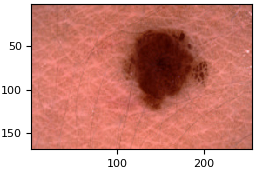
use a real medical image from the publicly available [ISIC
archive](https://isic-archive.com/) as input. The concrete image
can be downloaded
[here](https://isic-archive.com/api/v1/image/5592ac599fc3c13155a57a85/thumbnail)
using their [Web API](https://isic-archive.com/api/v1).
```julia
julia> using Augmentor, ISICArchive
julia> img = get(ImageThumbnailRequest(id = "5592ac599fc3c13155a57a85"))
# 169256 Array{RGB{N0f8},2}:
# [...]
julia> pl = Either(1=>FlipX(), 1=>FlipY(), 2=>NoOp()) |>
Rotate(0:360) |>
ShearX(-5:5) * ShearY(-5:5) |>
CropSize(165, 165) |>
Zoom(1:0.05:1.2) |>
Resize(64, 64)
# 6-step Augmentor.ImmutablePipeline:
# 1.) Either: (25%) Flip the X axis. (25%) Flip the Y axis. (50%) No operation.
# 2.) Rotate by 0:360 degree
# 3.) Either: (50%) ShearX by -5:5 degree. (50%) ShearY by -5:5 degree.
# 4.) Crop a 165165 window around the center
# 5.) Zoom by I {1.01.0, 1.051.05, 1.11.1, 1.151.15, 1.21.2}
# 6.) Resize to 6464
julia> img_new = augment(img, pl)
# 6464 Array{RGB{N0f8},2}:
# [...]
```
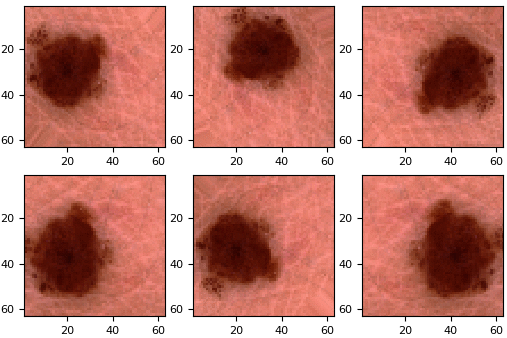
The function `augment` will generate a single augmented image
from the given input image and pipeline. To visualize the effect
we compiled a few resulting output images into a GIF using the
plotting library
[Plots.jl](https://github.com/JuliaPlots/Plots.jl) with the
[PyPlot.jl](https://github.com/JuliaPy/PyPlot.jl) back-end. The
code that generated the two figures below can be found
[here](https://github.com/JuliaML/FileStorage/blob/master/Augmentor/readme_isic.jl).
Input (`img`) | | Output (`img_new`)
:----------------------------------:|:-:|:------------------------------:
 | | 
## Performance Aspects
While we just used a small preview image in the above example
(note the term "thumbnail" in the code), it is already possible
to observe Augmentor's behaviour when comparing the memory
footprint of `augment` to a simple `copy` of the original.
```julia
julia> using BenchmarkTools
julia> @btime augment($img, $pl);
312.121 s (150 allocations: 22.47 KiB)
julia> @btime copy($img);
5.866 s (2 allocations: 126.83 KiB)
```
Note how the *whole* process for producing an augmented version
of `img` allocates less memory than a simple unaltered `copy` of
the original. The reason for this is that the output image
`img_new` is smaller than the input image `img`. Augmentor tries
to compose all operations of the pipeline into one single
function, which it then queries for each individual pixel in the
*output* image. In general this means that the memory footprint
and the runtime depends on the size of the output image.
To take the output-dependent behaviour to its extreme, consider
the full sized version of the above thumbnail, which is about 80
MiB in uncompressed size. We will modify our pipeline slightly and
insert a `Scale` operation as the *fourth* step. Doing this will
cause `augment` to produce a similar looking output as in our
original example.
```julia
julia> img_big = get(ImageDownloadRequest(id = "5592ac599fc3c13155a57a85"))
# 43996628 Array{RGB{N0f8},2}:
# [...]
julia> pl_big = Either(1=>FlipX(), 1=>FlipY(), 2=>NoOp()) |>
Rotate(0:360) |>
ShearX(-5:5) * ShearY(-5:5) |>
Scale(0.05) |> # NEW
CropSize(165, 165) |>
Zoom(1:0.05:1.2) |>
Resize(64, 64);
julia> img_new = augment(img_big, pl_big)
# 6464 Array{RGB{N0f8},2}:
# [...]
julia> @btime augment($img_big, $pl_big);
333.493 s (152 allocations: 22.64 KiB)
```
As we can see the allocated memory did not change notably.
Furthermore, it is worth pointing out explicitly how we added the
`Scale` operation as the fourth step in the pipeline and not the
first. This highlights how the operations aren't just applied
naively one after the other, but instead combined intelligently
before ever computing a single pixel.
Aside from the memory requirement we can also measure how the
execution time remains approximately constant, even though the
image is significantly larger and we added an additional
operation to the pipeline.
```julia
julia> @btime augment($img, $pl); # small image
312.610 s (150 allocations: 22.47 KiB)
julia> @btime augment($img_big, $pl_big); # big image
335.518 s (152 allocations: 22.64 KiB)
julia> @btime copy($img_big); # simple memory copy
18.304 ms (2 allocations: 83.42 MiB)
```
To be fair, the way we aggressively downscaled the large image in
this example was rather untypical, because doing it this way
would cause aliasing effects that may not be tolerable (although
for this particular image these weren't that bad). The point of
this example was to convey an intuition of how Augmentor works.
```
shell> date
Thu Jun 22 11:31:24 CEST 2017
shell> git show --oneline -s
6086196 drop 0.5 support
julia> versioninfo()
Julia Version 0.6.1-pre.0
Commit dcf39a1 (2017-06-19 13:06 UTC)
Platform Info:
OS: Linux (x86_64-linux-gnu)
CPU: Intel(R) Xeon(R) CPU E5-1650 v3 @ 3.50GHz
WORD_SIZE: 64
BLAS: libopenblas (USE64BITINT DYNAMIC_ARCH NO_AFFINITY Haswell)
LAPACK: libopenblas64_
LIBM: libopenlibm
LLVM: libLLVM-3.9.1 (ORCJIT, haswell)
```
## Package Overview
Images are a special class of data that have some interesting
properties in respect to their structure. For example do the
dimensions of an image (i.e. the pixel) exhibit a spatial
relationship to each other. As such, a lot of commonly used
augmentation strategies for image data revolve around affine
transformations, such as translations or rotations.
Augmentor ships with a number of predefined operations that
should be sufficient to describe some of the most commonly used
augmentation strategies. Each operation is a represented as its
own unique type (see table below for a concise overview). For a
more detailed description of all the predefined operations take a
look at the corresponding section of the
[documentation](https://evizero.github.io/Augmentor.jl/operations/).
| Category | Operation | Preview | Description
|--------------:|:--------------------|:-------:|:-----------------------------------------------------------------
| *Mirroring:* | [`FlipX`](https://evizero.github.io/Augmentor.jl/operations/flipx) |  | Reverse the order of each pixel row.
| | [`FlipY`](https://evizero.github.io/Augmentor.jl/operations/flipy) |  | Reverse the order of each pixel column.
| *Rotating:* | [`Rotate90`](https://evizero.github.io/Augmentor.jl/operations/rotate90) |  | Rotate upwards 90 degree.
| | [`Rotate270`](https://evizero.github.io/Augmentor.jl/operations/rotate270) |  | Rotate downwards 90 degree.
| | [`Rotate180`](https://evizero.github.io/Augmentor.jl/operations/rotate180) |  | Rotate 180 degree.
| | [`Rotate`](https://evizero.github.io/Augmentor.jl/operations/rotate) |  | Rotate for any arbitrary angle(s).
| *Shearing:* | [`ShearX`](https://evizero.github.io/Augmentor.jl/operations/shearx) |  | Shear horizontally for the given degree(s).
| | [`ShearY`](https://evizero.github.io/Augmentor.jl/operations/sheary) |  | Shear vertically for the given degree(s).
| *Resizing:* | [`Scale`](https://evizero.github.io/Augmentor.jl/operations/scale) |  | Scale X and Y axis by some (random) factor(s).
| | [`Zoom`](https://evizero.github.io/Augmentor.jl/operations/zoom) |  | Scale X and Y axis while preserving image size.
| | [`Resize`](https://evizero.github.io/Augmentor.jl/operations/resize) |  | Resize image to the specified pixel dimensions.
| *Distorting:* | [`ElasticDistortion`](https://evizero.github.io/Augmentor.jl/operations/elasticdistortion) |  | Displace image with a smoothed random vector field.
| *Cropping:* | [`Crop`](https://evizero.github.io/Augmentor.jl/operations/crop) |  | Crop specific region of the image.
| | [`CropNative`](https://evizero.github.io/Augmentor.jl/operations/cropnative) |  | Crop specific region of the image in relative space.
| | [`CropSize`](https://evizero.github.io/Augmentor.jl/operations/cropsize) |  | Crop area around the center with specified size.
| | [`CropRatio`](https://evizero.github.io/Augmentor.jl/operations/cropratio) |  | Crop to specified aspect ratio.
| | [`RCropRatio`](https://evizero.github.io/Augmentor.jl/operations/rcropratio) |  | Crop random window of specified aspect ratio.
| *Conversion:* | [`ConvertEltype`](https://evizero.github.io/Augmentor.jl/operations/converteltype) |  | Convert the array elements to the given type.
| *Mapping:* | [`MapFun`](https://evizero.github.io/Augmentor.jl/operations/mapfun) | - | Map custom function over image
| | [`AggregateThenMapFun`](https://evizero.github.io/Augmentor.jl/operations/aggmapfun) | - | Map aggregated value over image
| *Layout:* | [`SplitChannels`](https://evizero.github.io/Augmentor.jl/operations/splitchannels) | - | Separate the color channels into a dedicated array dimension.
| | [`CombineChannels`](https://evizero.github.io/Augmentor.jl/operations/combinechannels) | - | Collapse the first dimension into a specific colorant.
| | [`PermuteDims`](https://evizero.github.io/Augmentor.jl/operations/permutedims) | - | Reorganize the array dimensions into a specific order.
| | [`Reshape`](https://evizero.github.io/Augmentor.jl/operations/reshape) | - | Change or reinterpret the shape of the array.
| *Utilities:* | [`NoOp`](https://evizero.github.io/Augmentor.jl/operations/noop) |  | Identity function. Pass image along unchanged.
| | [`CacheImage`](https://evizero.github.io/Augmentor.jl/operations/cacheimage) | - | Buffer the current image into (preallocated) memory.
| | [`Either`](https://evizero.github.io/Augmentor.jl/operations/either) | - | Apply one of the given operations at random.
The purpose of an operation is to simply serve as a "dumb
placeholder" to specify the intent and parameters of the desired
transformation. What that means is that a pipeline of operations
can be thought of as a list of instructions (a cookbook of
sorts), that Augmentor uses internally to construct the required
code that implements the desired behaviour in the most efficient
way it can.
The way an operation is implemented depends on the rest of the
specified pipeline. For example, Augmentor knows three different
ways to implement the behaviour of the operation `Rotate90` and
will choose the one that best coincides with the other operations
of the pipeline and their concrete order.
1. Call the function `rotl90` of Julia's base library, which
makes use of the fact that a 90 degree rotation can be
implemented very efficiently. While by itself this is the
fastest way to compute the result, this function is "eager"
and will allocate a new array. If `Rotate90` is followed by
another operation this may not be the best choice, since it
will cause a temporary image that is later discarded.
3. Create a `SubArray` of a `PermutedDimsArray`. This is more or
less a lazy version of `rotl90` that makes use of the fact
that a 90 degree rotation can be described 1-to-1 using just
the original pixels. By itself this strategy is slower than
`rotl90`, but if it is followed by an operation such as `Crop`
or `CropSize` it can be significantly faster. The reason for
this is that it avoids the computation of unused pixels and
also any allocation of temporary memory. The computation
overhead per output pixel, while small, grows linearly with
the number of chained operations.
2. Create an `AffineMap` using a rotation matrix that describes a
90 degree rotation around the center of the image. This will
result in a lazy transformation of the original image that is
further compose-able with other `AffineMap`. This is the
slowest available strategy, unless multiple affine operations
are chained together. If that is the case, then chaining the
operations can be reduced to composing the tiny affine maps
instead. This effectively fuses multiple operations into a
single operation for which the computation overhead per output
pixel remains approximately constant in respect to the number
of chained operations.
## Documentation
For a more detailed treatment check out the **[latest
documentation](https://evizero.github.io/Augmentor.jl/)**.
Additionally, you can make use of Julia's native docsystem.
The following example shows how to get additional information
on `augment` within Julia's REPL:
```julia
?augment
```
## Installation
To install this fork of `Augmentor.jl`, start up Julia and type the following
code snipped into the REPL. It makes use of the native Julia
package manager. Once installed the Augmentor package can be
imported just as any other Julia package.
```julia
import Pkg
Pkg.add("https://github.com/baggepinnen/Augmentor.jl")
using Augmentor
```
## License
This code is free to use under the terms of the MIT license.
## Citing Augmentor
If you use Augmentor for academic research and wish to cite it,
please use the following paper.
Marcus D. Bloice, Christof Stocker, and Andreas Holzinger,
*Augmentor: An Image Augmentation Library for Machine Learning*,
arXiv preprint **arXiv:1708.04680**,
, 2017.
## Acknowledgments
This package makes heavy use of the following packages in order
to provide it's main functionality. To see at full list of
utilized packages, please take a look at the [REQUIRE](./REQUIRE)
file.
- [FugroRoames/CoordinateTransformations.jl](https://github.com/FugroRoames/CoordinateTransformations.jl)
- [JuliaImages/ImageTransformations.jl](https://github.com/JuliaImages/ImageTransformations.jl)
- [JuliaMath/Interpolations.jl](https://github.com/JuliaMath/Interpolations.jl)
- [JuliaArrays/IdentityRanges.jl](https://github.com/JuliaArrays/IdentityRanges.jl)
Owner
- Name: Fredrik Bagge Carlson
- Login: baggepinnen
- Kind: user
- Location: Lund, Sweden
- Website: baggepinnen.github.io
- Twitter: baggepinnen
- Repositories: 59
- Profile: https://github.com/baggepinnen
Control systems, system identification, signal processing and machine learning