Recent Releases of https://github.com/banesullivan/localtileserver
https://github.com/banesullivan/localtileserver - v0.10.0rc2: Switch to rio-tiler
What's Changed
- Release 0.10.0: migration to rio-tiler by @banesullivan in https://github.com/banesullivan/localtileserver/pull/183
This release marks a significant re-implementation of localtileserver. The backing tiler has been changed from large-image to rio-tiler. The overall result is improved performance, simplified dependencies, improved compatibility with the rasterio ecosystem, and many bug/quirk fixes like #172, #159, #147
This release unfortunately has many breaking changes and some loss of features. The breaking changes are mostly around API renaming and some methods changing to properties. Otherwise, I stripped out features that are just better handled upstream or not needed here.
This may be a painful upgrade considering how much has changed. Highlights:
bandis nowindexesto follow rio-tiler's implementation (deprecation warning is issued in parts of the API)cmapis nowcolormap(deprecation warning is issued in parts of the API)paletteis nowcolormap- Custom colormaps are no longer supported
- No more region of interest extraction
- Access to underlying
rasteriodataset is now via the.datasetproperty - COG validation no longer raises errors, but returns a True/False
metadata()method is now ametadataproperty- No more support for remote servers (niche feature)
- Some return values of things like bounds, metadata, etc may have changed now that they are fetched from rio-tiler
For those looking for more details, I recommend checking out the diff specifically for the test directory to see what has changed in #183
- Python
Published by banesullivan over 2 years ago

https://github.com/banesullivan/localtileserver - 0.7.0 Switch to rasterio
This release significantly changes in the dependencies of localtileserver (switching from GDAL to rasterio), focuses on geospatial applications by dropping non-geo support, includes optimizations to TileClient to avoid REST operations, and majorly refactors the internal code for future development.
What's Changed
- Switch to rasterio by @banesullivan in https://github.com/banesullivan/localtileserver/pull/154
- Internal refactoring by @banesullivan in https://github.com/banesullivan/localtileserver/pull/155
- An improved TileClient that avoids the REST interface where possible by @banesullivan in https://github.com/banesullivan/localtileserver/pull/156
Full Changelog: https://github.com/banesullivan/localtileserver/compare/0.6.4...0.7.0
- Python
Published by banesullivan about 3 years ago
https://github.com/banesullivan/localtileserver - Validate COGs, pixel-space tile serving, niceties, & maintenance
New features:
- Add COG validate helper (see #80)
- Enable * CORS by user choice
- Add is_geospatial property to TileClient
- Add default_zoom property to TileClient to determine starting zoom on map
- Handle tile serving in pixel coordinates for non-geospatial images
Niceties:
- Handle large_image source as input to TileClient
- Add _ipython_display_ to TileClient to quickly display a map in Jupyter
- Add _repr_png_ to TileClient to quickly show a thumbnail in Qt IPython
- Add URL form field to web app
Maintenance:
- Maintenance of Docker images
- Internal refactoring to utilize new server-thread package (see #79)
- Documentation and examples improvements
- Python
Published by banesullivan over 4 years ago
https://github.com/banesullivan/localtileserver - Rasterio support, styling, & more
- Style parameters can now be included as a JSON blob in the request body following the format specified by large-image or as a
dictin thesyleparameter in the Python client. cmapalias forpalettein Python client (see #71)- Better error handling
- Handle Dropbox URLs
- New
save_new_rasterhelper method - Bug fixes, cleanup, and other internal maintenance (see diff)
This release adds support for rasterio datasets so that users can easily visualize their data when working with rasterio:
```py import rasterio from ipyleaflet import Map from localtileserver import TileClient, getleaflettile_layer
Open raster with rasterio
src = rasterio.open('path/to/geo.tif')
Pass rasterio source to localtileserver
client = TileClient(src)
t = getleaflettile_layer(client)
m = Map(center=client.center(), zoom=8) m.add_layer(t) m ```
- Python
Published by banesullivan over 4 years ago
https://github.com/banesullivan/localtileserver - Jupyter in Remote Environments
This release adds support for using localtileserver in remote Jupyter environments (e.g., MyBinder or JupyterHub) through jupyter-server-proxy. Included in this release is a new Docker image on GitHub's package registry for using localtileserver in Jupyter.
py
docker pull ghcr.io/banesullivan/localtileserver-jupyter:latest
docker run -p 8888:8888 ghcr.io/banesullivan/localtileserver-jupyter:latest
To configure this in your own set up, you must set the following environment variables
LOCALTILESERVER_CLIENT_PREFIX='proxy/{port}'- Same for everyone usingjupyter-server-proxy- Optional:
LOCALTILESERVER_CLIENT_HOST=127.0.0.1- The host on which you launch Jupyter (the URL/domain of the Jupyter instance if using MyBinder or JupyterHub)LOCALTILESERVER_CLIENT_PORT=8888- The port on which you launch Jupyter (leave blank if using MyBinder or JupyterHub)
There is a demo in https://github.com/banesullivan/localtileserver-demo that shows how this will work on MyBinder by setting the following at run-time:
```py
Set host forwarding for MyBinder
import os os.environ['LOCALTILESERVERCLIENTPREFIX'] = f"{os.environ['JUPYTERHUBSERVICEPREFIX'].lstrip('/')}/proxy/{{port}}" ```
Resolves #29, #66, and https://github.com/banesullivan/localtileserver-demo/issues/1
- Python
Published by banesullivan over 4 years ago
https://github.com/banesullivan/localtileserver - Standalone Docker Image and Cesium Split View
This release has one breaking change (breaking for a small minority of users) where the API endpoints were renamed to have the api/ prefix where applicable (see #51). Other notes:
- Document style parameters for Thumbnail endpoint (see 7e27db045b7798ba191f0b4350928eda17625c15)
- Support custom, user-defined palettes (see #54)
- Cesium Split Viewer (see #47 and https://github.com/banesullivan/localtileserver/discussions/53)
- Cesium terrain model is now disabled by default (see fe1c2103aa13cbdc49eb5ec2e785e3a35b8907b8)
Standalone Docker Image - #57
Now you can easily pull a docker image for the latest release or for a specific Pull Request in the repository. Check out the tags for https://github.com/banesullivan/localtileserver/pkgs/container/localtileserver
This is particularly useful if you do not want to install GDAL on your system or want a dedicated service for tile serving.
To use the docker image:
bash
docker pull ghcr.io/banesullivan/localtileserver:latest
docker run -p 8000:8000 ghcr.io/banesullivan/localtileserver:latest
Then visit http://0.0.0.0:8000 in your browser. You can pass the ?filename= argument in the URL params to access any URL/S3 file.
Note that you can mount your file system to access files locally. For example, I mount my Desktop by:
bash
docker run -p 8000:8000 -v /Users/bane/Desktop/:/data/ ghcr.io/banesullivan/localtileserver:latest
Then I can add the ?filename= parameter to the URL to access the file TC_NG_SFBay_US_Geo.tif file on my desktop. Since this is mounted under /data/ in the container, you must build the path as /data/TC_NG_SFBay_US_Geo.tif, such that the URL would be http://0.0.0.0:8000/?filename=/data/TCNGSFBayUSGeo.tif (or http://0.0.0.0:8000/?filename=%2Fdata%2FTCNGSFBayUSGeo.tif)
- Python
Published by banesullivan over 4 years ago
https://github.com/banesullivan/localtileserver - Drop Python 3.6 and improve ipyleaflet tile layer
Bye-bye, Python 3.6! 👋🏻
This release introduces an override to ipyleaflet.TileLayer that constrains the region of requested tiles, per jupyter-widgets/ipyleaflet#888. This significantly reduces the load on the tile server when viewing tiles in an ipyleaflet.Map
This change required dropping Python 3.6 and was good timing since Python 3.6's Security Support ended Dec 23, 2021 (4 days ago) (ref https://endoflife.date/python). Since conda-forge hasn't been building on Python 3.6 for some time, I'm hoping there is minimal impact here
- Python
Published by banesullivan over 4 years ago
https://github.com/banesullivan/localtileserver - Features Galore, Swagger Docs, and Docker Image
The last few tags have been full of useful/nice to have features and clean up. The follow is a recap
- Multi-band support: create composite images from selected bands
- Automatically opens web browser when launching from command line
- Under the hood improvements and abstraction of the underlying flask app to a Blueprint
- Major UI improvements with color mapping options
- Support user provided CesiumIon tokens
- Support memcached
- Better handle bad filenames/URLs with 404 page
- Improvements to CesiumJS and GeoJS tile viewers
- Google Analytics support
- New pixel endpoint
- New Histogram endpoint
- New tile sources endpoint
- New colormaps listing endpoint
Swagger API Docs
There is now an /swagger/ view with full API documentation:
| List | Tiles |
|---|---|
|  |
|  |
|
This introduced a new flask-restx dependency.
Docker Image
You can now pull a pre-built docker image from the packages of this repository
docker pull ghcr.io/banesullivan/localtileserver/localtileserver:latest
To run:
bash
docker run --rm -it -p 8000:8000 ghcr.io/banesullivan/localtileserver/localtileserver
If you want to serve/visualize tiles from files on your local system, simply mount the directory:
bash
docker run --rm -it -p 8000:8000 -v /path/to/mount/:/data ghcr.io/banesullivan/localtileserver/localtileserver
Then be sure to put the ?filename=/data/... in the URL params
- Python
Published by banesullivan over 4 years ago
https://github.com/banesullivan/localtileserver - RGB band selection, Matplotlib colormaps, and thumbnails
This release adds support for three new features:
- Choose which bands to use for RGB channels when tile serving
- Generate thumbnails with the same styling parameters as tile serving
- Use any Matplotlib colormap as a
palettechoice
Example
There is a new example in the README to demonstrate RGB channel selection:
```py from localtileserver import getleaflettile_layer, TileClient from ipyleaflet import Map, ScaleControl, FullScreenControl, SplitMapControl
First, create a tile server from local raster file
tile_client = TileClient('landsat.tif')
Create 2 tile layers from same raster viewing different bands
l = getleaflettilelayer(tileclient, band=[7, 5, 4]) r = getleaflettilelayer(tileclient, band=[5, 3, 2])
Make the ipyleaflet map
m = Map(center=tileclient.center(), zoom=12) control = SplitMapControl(leftlayer=l, rightlayer=r) m.addcontrol(control) m.addcontrol(ScaleControl(position='bottomleft')) m.addcontrol(FullScreenControl()) m ```

Thumbnails
and you can also generate styled thumbnails with
py
tile_client.thumbnail(band=[5, 3, 2], output_path='thumbnail_styled.png')
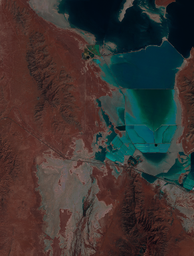
as opposed to the default channels:
py
tile_client.thumbnail(output_path='thumbnail_default.png')
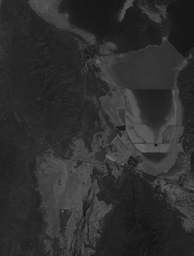
Matplotlib Colormaps
and you can plot any single band with a matplotlib colormap by:
```py l = getleaflettilelayer(tileclient, band=7, palette='rainbow')
m = Map(center=tileclient.center(), zoom=10)
m.addlayer(l)
m
```

- Python
Published by banesullivan over 4 years ago
https://github.com/banesullivan/localtileserver - Support URL Rasters and Performance Improvements
This adds support for serving tiles from remote raster files through GDAL's Virtual Storage Interface. Simply pass your http<s>:// or s3:// URL to the TileClient. This will work quite well for pre-tiled Cloud Optimized GeoTiffs, but I do not recommend doing this with non-tiled raster formats.
Further, this release contains a few internal changes that dramatically improve the performance of the underlying tile server. Users can control whether the server is run in a multi-threaded or multi-process manner.
```py from localtileserver import getfoliumtile_layer from localtileserver import TileClient from folium import Map
This is a ~3GiB image
url = 'https://opendata.digitalglobe.com/events/california-fire-2020/pre-event/2018-02-16/pine-gulch-fire20/1030010076004E00.tif'
First, create a tile server from local raster file
tile_client = TileClient(url)
Create folium tile layer from that server
t = getfoliumtilelayer(tileclient)
m = Map(location=tileclient.center())
m.addchild(t)
m
```

- Python
Published by banesullivan over 4 years ago
https://github.com/banesullivan/localtileserver - Folium Tile Layers
Now you can easily create tile layers for viewing with Folium!
```py from localtileserver import getfoliumtile_layer from localtileserver import TileClient from folium import Map
First, create a tile server from local raster file
tileclient = TileClient('~/Desktop/TCNGSFBayUS_Geo.tif')
Create folium tile layer from that server
t = getfoliumtilelayer(tileclient)
m = Map(location=tileclient.center()) m.addchild(t) m ```
https://user-images.githubusercontent.com/22067021/143659402-f1ee453c-4c56-4908-a7d7-1e34c83a3edf.mov
- Python
Published by banesullivan over 4 years ago
https://github.com/banesullivan/localtileserver - Renamed to localtileserver
I decided to rename the package to localtileserver to simplify installation and have a name consistent with the scope of package.
- Python
Published by banesullivan over 4 years ago
https://github.com/banesullivan/localtileserver - ipyleaflet ROI extraction
Now included are some prebaked UI controls for ipyleaflet that let you easily extract ROIs. Take a look at the example in the README.
https://user-images.githubusercontent.com/22067021/143311931-e19647d0-74bc-490a-821c-8046fc9c5dfa.mov
- Python
Published by banesullivan over 4 years ago
https://github.com/banesullivan/localtileserver - CesiumJS Web Viewer
The default viewer in the included web app now uses CesiumJS!
https://user-images.githubusercontent.com/22067021/143178656-12e6e0fa-b601-4746-aae9-726d6f109fee.mov
- Python
Published by banesullivan over 4 years ago