Science Score: 49.0%
This score indicates how likely this project is to be science-related based on various indicators:
-
○CITATION.cff file
-
✓codemeta.json file
Found codemeta.json file -
✓.zenodo.json file
Found .zenodo.json file -
✓DOI references
Found 5 DOI reference(s) in README -
✓Academic publication links
Links to: zenodo.org -
○Academic email domains
-
○Institutional organization owner
-
○JOSS paper metadata
-
○Scientific vocabulary similarity
Low similarity (13.5%) to scientific vocabulary
Keywords
Repository
KROWN 👑: A Benchmark for RDF Graph Materialization
Basic Info
- Host: GitHub
- Owner: kg-construct
- License: mit
- Language: Scala
- Default Branch: main
- Homepage: https://w3id.org/kg-construct/KROWN/
- Size: 214 MB
Statistics
- Stars: 4
- Watchers: 4
- Forks: 3
- Open Issues: 4
- Releases: 1
Topics
Metadata Files
README.md
KROWN : A Benchmark for RDF Graph Materialization





KROWN is a benchmark for materialization systems to construct Knowledge Graphs from (semi-)heterogeneous data sources using declarative mappings such as RML.
Many benchmarks already exist for virtualization systems e.g. GTFS-Madrid-Bench, NPD, BSBM which focus on complex queries with a single declarative mapping. However, materialization systems are unaffected by complex queries since their input is the dataset and the mappings to generate a Knowledge Graph. Some specialized datasets exist to benchmark specific limitations of materialization systems such as duplicated or empty values in datasets e.g. GENOMICS, but they do not cover all aspects of materialization systems. Therefore, it is hard to compare materialization systems among each other in general which is where KROWN comes in!

Data generator
KROWN provides a data generator to scale the different benchmark scenarios with multiple scaling parameters, configurable through a set of JSON configuration files. This way, any combination can be used of scaling parameters and their values are stored to easily reproduce the generation in the future.
KROWN 's data generator is available inside the data-generator folder consisting of scenarios under data-generator/config and unittests to verify the output of the generator (data-generator/tests]. More information can be found in the README.
Installation
KROWN 's data generator requires Numpy and Pandas which are listed
in the requirements.txt file of the data-generator directory:
cd data-generator
pip3 install --user -r requirements.txt
pandas: data manipulation functions for generating synthetic datanumpy: needed by Pandas
Example usage
cd data-generator
./exgentool generate --scenario=/path/to/config.json
Samples
We provide samples of the generated scenarios by KROWN's data generator which use a small data size to visualise the impact of changing the parameter in each scenario, you can find them in the samples folder.
Execution framework
KROWN provides also an execution framework to reproducible execute benchmark scenarios as a pipeline of Docker containers while measuring metrics e.g. execution time, CPU time, memory consumption, storage usage, etc.
KROWN 's execution framework is available inside the execution-framework folder and unittests to verify the execution of Docker-based pipelines and collection of metrics by KROWN's execution framework (execution-framework/tests]. More information can be found in the README.
Installation
KROWN 's execution framework requires several dependencies which are listed
in the requirements.txt file of the execution-framework directory:
cd execution-framework
sudo apt install zlib1g zlib1g-dev libpq-dev libjpeg-dev python3-pip docker.io
pip3 install --user -r requirements.txt
psycopg2-binary: PostgreSQL database accesspymysql: MySQL database accessjsonschema: validation of pipeline description inmetadata.jsonpsutil: measurement of CPU and RAM usagerequests: checking if a resource is online or posting a SPARQL query to a triplestorerdflib: performing operations on RDF filestimeout-decorator: enforcing the timeout on each resource
Example usage
cd execution-framework
./exectool --runs=5 --root=/path/to/scenarios run
The execution framework of KROWN has been used in the Knowledge Graph Construction Workshop Challenges at ESWC 2023 and 2024. It was also used in benchmarking incremental mappings with IncRML (under review).
Sustainability plan and limitations
A full list of Issues can be found here. Their status is followed up in a GitHub Project by the Knowledge Graph Construction community.
KROWN's data generator and execution framework was created to support newer editions of the Knowledge Graph Construction Workshop Challenge because each edition the community has to add more generators to expand each edition with new challenges. Currently, the community is adding the test cases of the new RML modules to the data generator of the Challenge. After this edition (2024) ends, the generator for the test cases will be added to KROWN's data generator. The community will keep developing KROWN's data generator and execution framework to ease the introduction of new scenarios for newer editions of the Knowledge Graph Construction Workshop Challenge.
See the READMEs of data-generator and execution-framework for more details.
Results
The results of our experiments are available on Zenodo. Below, the figures we created from these results are shown and we explain in detail how these experiments can be reproduced.
Figures
In our paper, we used 2 figures which we include here as well with their corresponding description. First figure shows the results of scaling the number of named graphs via Graph Maps. Second figure how the systems are affected by the different join scenarios.
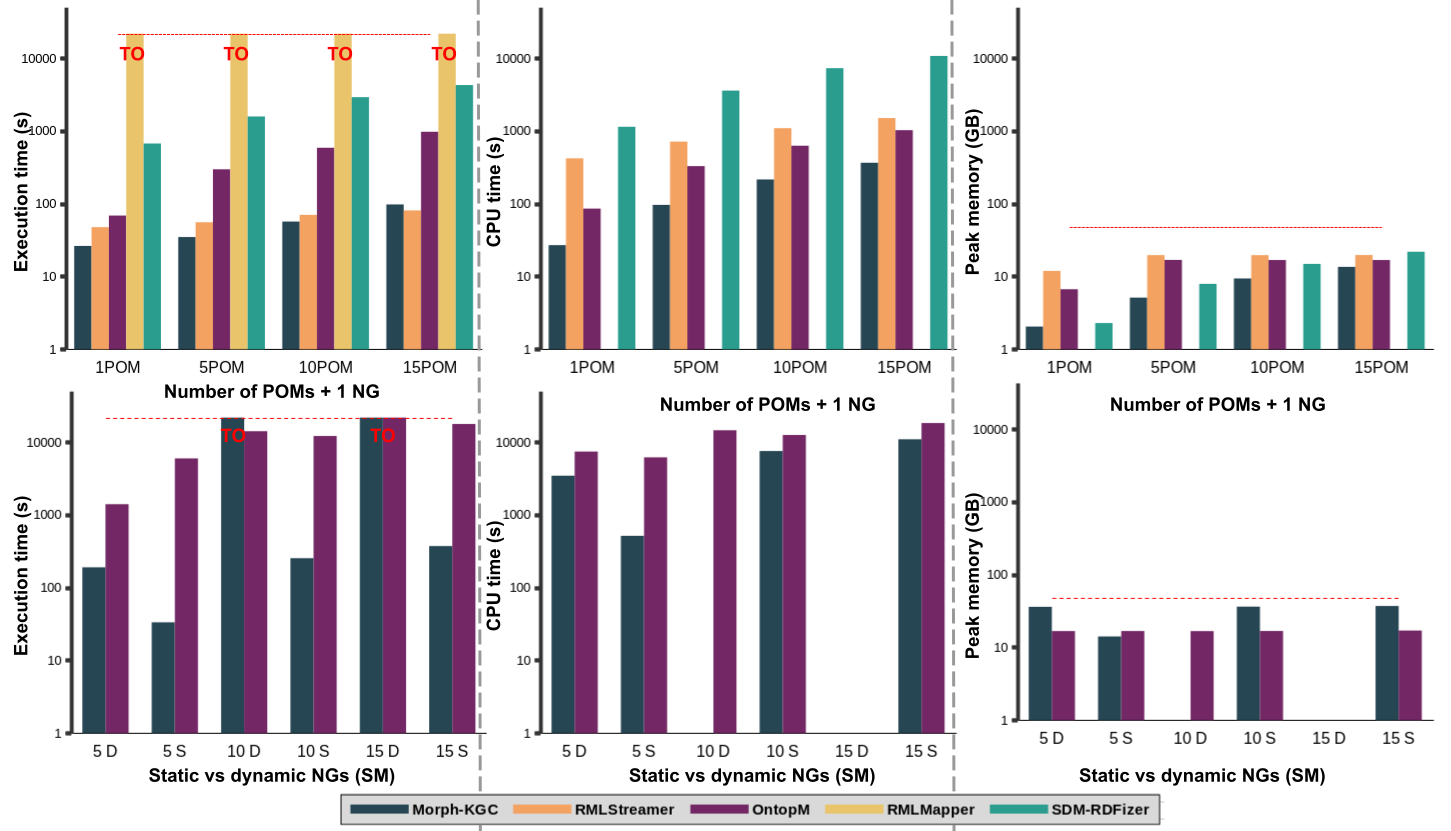
Results for the Graph Maps subscenarios: scaling the number of POMs with 1 Named Graph (NG) (top) and scaling the number of NGs from 5 to 15 Statically (S) and Dynamically (D) in a Subject Map (bottom). RMLMapper always times out, RMLStreamer does not support multiple GMs. SDM-RDFizer fails the multiple GMs with an error. All systems fail or time out the 15NG dynamic case.
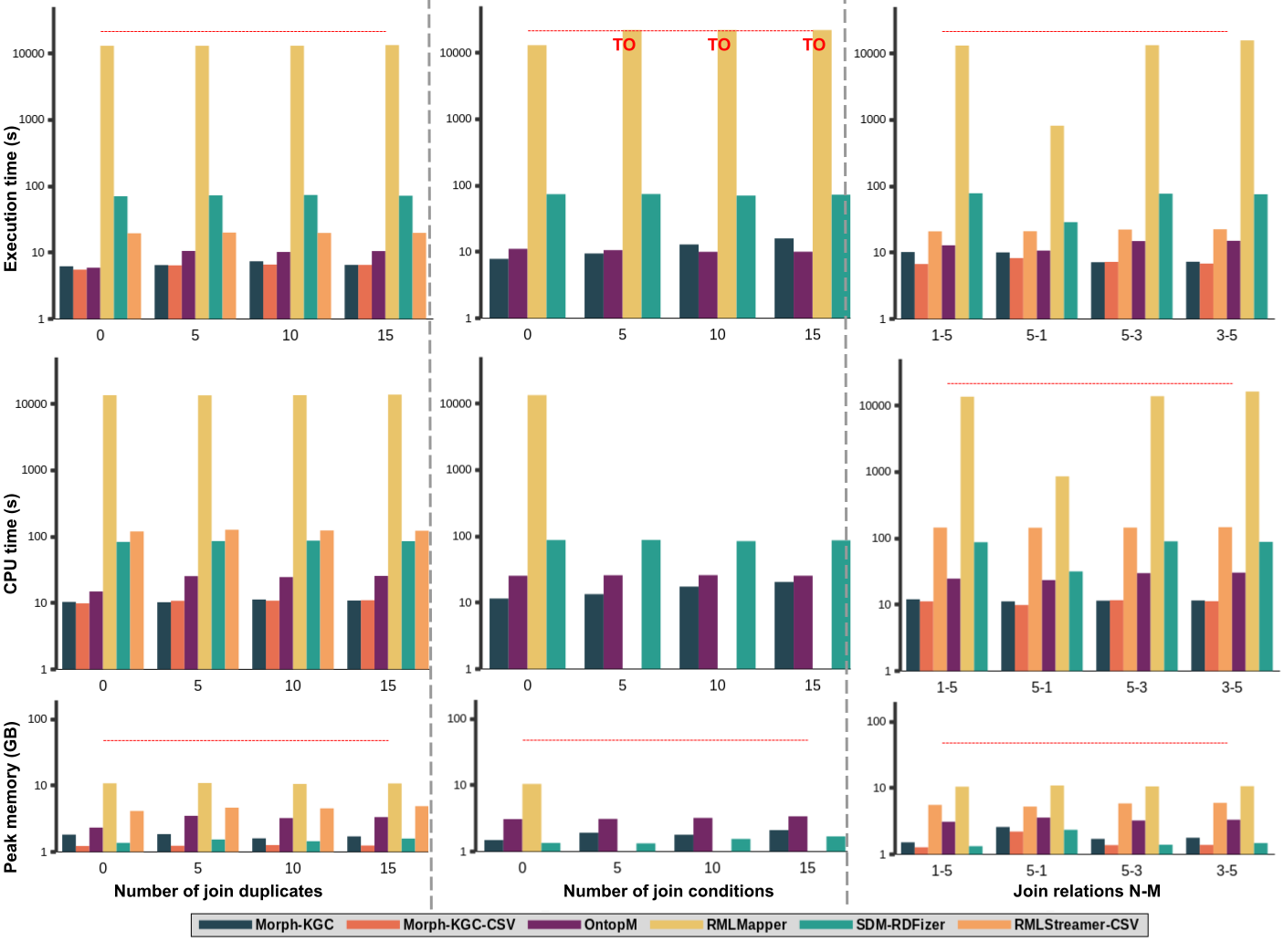
Results for join scenarios: number of join duplicates (left), number of join conditions (middle), and join relations N-M (right). RMLStreamer-CSV is excluded from number of join conditions because it does not support multiple join conditions. RMLMapper times out (TO) for 5,10, 15 join conditions.
Reproducing results of ISWC 2024 Resource Track
In this section we discuss our evaluation setup, the materialization systems we evaluated, and the list of scenarios we generated and used to analyze the materialization systems using KROWN. In the Instructions subsection, we explain each step needed to reproduce the experiments.
Evaluation setup
We generated several scenarios using KROWN's data generator and executed them 5 times with KROWN's execution framework. All experiments were performed on Ubuntu 22.04 LTS machines (Linux 5.15.0, x86_64) with each Intel(R) Xeon(R) CPU E5-2650 v2 @ 2.60GHz, 48 GB RAM memory, and 2 GB swap memory. The output of each materialization system was set to N-Triples.
Materialization systems
We selected the most popular maintained materialization systems for constructing RDF graphs for performing our experiments with KROWN:
- RMLMapper
- RMLStreamer
- Morph-KGC
- SDM-RDFizer
- OntopM (Ontop in materialization mode)
Note: KROWN is flexible and allows adding any other materialization system, see KROWNs execution framework documentation for more information.
Scenarios
We consider the following scenarios:
- Raw data: number of rows, columns and cell size
- Duplicates & empty values: percentage of the data containing duplicates or empty values
- Mappings: Triples Maps (TM), Predicate Object Maps (POM), Named Graph Maps (NG).
- Joins: relations (1-N, N-1, N-M), conditions, and duplicates during joins
Note: KROWN is flexible and allows adding any other scenario, see KROWN's data generator documentation for more information.
In the table below we list all parameter values we used to configure our scenarios:
| Scenario | Parameter values | | ------------------------ | -------------------------- | | Raw data: rows | 10K, 100K, 1M, 10M | | Raw data: columns | 1, 10, 20, 30 | | Raw data: cell size | 500, 1K, 5K, 10K | | Duplicates: percentage | 0%, 25%, 50%, 75%, 100% | | Empty values: percentage | 0%, 25%, 50%, 75%, 100% | | Mappings: TMs + 5POMs | 1, 10, 20, 30 TMs | | Mappings: 20TMs + POMs | 1, 3, 5, 10 POMs | | Mappings: NG in SM | 1, 5, 10, 15 NGs | | Mappings: NG in POM | 1, 5, 10, 15 NGs | | Mappings: NG in SM/POM | 1/1, 5/5, 10/10, 15/15 NGs | | Joins: 1-N relations | 1-1, 1-5, 1-10, 1-15 | | Joins: N-1 relations | 1-1, 5-1, 10-1, 15-1 | | Joins: N-M relations | 3-3, 3-5, 5-3, 10-5, 5-10 | | Joins: join conditions | 1, 5, 10, 15 | | Joins: join duplicates | 0, 5, 10, 15 |
Instructions
These instructions assume you are running Ubuntu 22.04 LTS. Other Linux distributions can be used as well, but some commands may differ such as the ones for installing packages.
- Clone this repository using
git
git clone https://github.com/kg-construct/KROWN`
- Enter the
data-generatordirectory
cd data-generator
- Install dependencies
pip3 install --user -r requirements.txt`
- Generate the scenarios using the
exgentool, the configurations are available in theconfigfolder
In this example, we only generate the Mappings scenario for RMLStreamer (benchmark-mappings-rmlstreamer.json).
If you want to generate them all, you need to repeat this command with a different
scenario configuration file for each scenario, seeconfigfolder.
./exgentool --scenario=config/benchmark-mappings-rmlstreamer.json generate
Generating scenario's instances:
     1TM + 5POM
     10TM + 5POM
     20TM + 5POM
     30TM + 5POM
     20TM + 1POM
     20TM + 3POM
     20TM + 10POM
`
The generated scenarios are stored in RMLStreamer folder:
RMLStreamer/
 csv
     mappings_10_5
      data
       shared
           data.csv
           mapping.rml.ttl
      metadata.json
     mappings_1_5
      data
       shared
           data.csv
           mapping.rml.ttl
      metadata.json
     mappings_20_1
      data
       shared
           data.csv
           mapping.rml.ttl
      metadata.json
     mappings_20_10
      data
       shared
           data.csv
           mapping.rml.ttl
      metadata.json
     mappings_20_3
      data
       shared
           data.csv
           mapping.rml.ttl
      metadata.json
     mappings_20_5
      data
       shared
           data.csv
           mapping.rml.ttl
      metadata.json
     mappings_30_5
         data
          shared
              data.csv
              mapping.rml.ttl
         metadata.json
If you use other engines, the name of the folder will change. For example:
MorphKGC as engine will have a folder MorphKGC with the same structure as
above. The scenarios are now ready to be executed by the execution framework!
- Enter the
execution-framework
cd ..
cd execution-framework
- Install dependencies
sudo apt install zlib1g zlib1g-dev libpq-dev libjpeg-dev python3-pip docker.io
pip install --user -r requirements.txt
- Allow access to Docker without being root
```
Add user to docker group
sudo groupadd docker sudo usermod -aG docker $USER ``` Do not forget to logout so the user groups are properly updated!
- Execute the scenarios with the
exectool
./exectool --root=../data-generator/RMLStreamer --runs=5 run
The --runs argument specifies that we want to repeat the experiment 5 times.
The execution framework will now perform the experiment by running the pipelines
defined in the metadata.json files of each scenario (see data generator output).
- Generate the statistics
Execution framework allows you to immediately calculate the necessary statistics
on the measurements such as average, median, min/max. You can perform this by
using the
statscommand instead ofrun:
./exectool --root=../data-generator/RMLStreamer --runs=5 stats
This will generate a summary.csv, aggregated.csv, and stats.csv file.
stats.csv: the raw data measurements for each run.aggregated.csv: aggregates the stats among all runs, only the measurements for each step.summary.csv: aggregated stats among all runs by step. Only consumed resources and the execution time are provided for each step, not the intermediate measurements, those are inaggregated.csv.
You are mostly interested in summary.csv as these values can be immediately
used to make graphs and report findings. However, all intermediate measurements
are also available for provenance reasons.
Citation
@software{Van_Assche_KROWN_A_Benchmark_2024,
  author = {Van Assche, Dylan and Chaves-Fraga, David and Dimou, Anastasia},
  doi = {10.5281/zenodo.10979322},
  license = {MIT},
  month = apr,
  title = {{KROWN: A Benchmark for RDF Graph Materialization}},
  url = {https://w3id.org/kg-construct/KROWN},
  version = {1.0.0},
  year = {2024}
}
License
Licensed under the MIT license.
Owner
- Name: Knowledge Graph Construction W3C Community Group
- Login: kg-construct
- Kind: organization
- Email: public-kg-construct@w3.org
- Website: https://www.w3.org/community/kg-construct/
- Repositories: 24
- Profile: https://github.com/kg-construct
GitHub Events
Total
- Watch event: 3
- Delete event: 2
- Issue comment event: 2
- Push event: 3
- Pull request review comment event: 1
- Pull request review event: 2
- Pull request event: 6
- Fork event: 1
- Create event: 2
Last Year
- Watch event: 3
- Delete event: 2
- Issue comment event: 2
- Push event: 3
- Pull request review comment event: 1
- Pull request review event: 2
- Pull request event: 6
- Fork event: 1
- Create event: 2
Packages
- Total packages: 1
- Total downloads: unknown
- Total dependent packages: 0
- Total dependent repositories: 0
- Total versions: 1
proxy.golang.org: github.com/kg-construct/krown
- Documentation: https://pkg.go.dev/github.com/kg-construct/krown#section-documentation
- License: mit
-
Latest release: v1.0.0
published over 2 years ago