https://github.com/bccw2021/crlfnet
Camera-Radar-Lidar Fusion detection net based on ROS, YOLOv4, OpenPCDet integration.
Science Score: 10.0%
This score indicates how likely this project is to be science-related based on various indicators:
-
○CITATION.cff file
-
○codemeta.json file
-
○.zenodo.json file
-
○DOI references
-
✓Academic publication links
Links to: zenodo.org -
○Academic email domains
-
○Institutional organization owner
-
○JOSS paper metadata
-
○Scientific vocabulary similarity
Low similarity (14.3%) to scientific vocabulary
Last synced: 9 months ago
·
JSON representation
Repository
Camera-Radar-Lidar Fusion detection net based on ROS, YOLOv4, OpenPCDet integration.
Basic Info
- Host: GitHub
- Owner: bccw2021
- License: mit
- Default Branch: master
- Homepage: https://crlf-net.vercel.app
- Size: 1.52 GB
Statistics
- Stars: 0
- Watchers: 0
- Forks: 0
- Open Issues: 0
- Releases: 0
Fork of OrangeSodahub/CRLFnet
Created about 3 years ago
· Last pushed about 3 years ago
https://github.com/bccw2021/CRLFnet/blob/master/
# CRLFnet
[](http://github.com/badges/stability-badges)



[](https://zenodo.org/badge/latestdoi/477069057)
The source code of the CRLFnet.
## INSTALL & BUILD
**Env:** Ubuntu20.04 + ROS(Noetic) + Python3.x
- If using Google-colab, there is a recommanded environment: **CUDA10.2+PyTorch1.6**.
- Refer to [INSTALL.md](https://github.com/open-mmlab/OpenPCDet/blob/master/docs/INSTALL.md) for the installation of `OpenPCDet`.
- Install `ros_numpy` package mannually: [[Source code]](https://github.com/eric-wieser/ros_numpy)[[Install]](https://blog.csdn.net/mywxm/article/details/121945880)
Absolute paths may need your mind:
| file path | Line(s) |
|----------------------------------|---------------------------------------|
| src/camera_info/get_cam_info.cpp | 26,64,102,140,178,216,254,292,330,368,|
| src/LidCamFusion/OpenPCDet/tools/cfgs/custom_models/pointrcnn.yaml|4,5 |
| src/LidCamFusion/OpenPCDet/tools/cfgs/custom_models/pv_rcnn.yaml|5,6 |
### Docker
Build project from `Dockerfile`:
```
docker build -t [name]:tag /docker/
```
or pull image directly:
```
docker pull gzzyyxy/crlfnet:yxy
```
## Launch the Site
This needs ROS to be installed.
```bash
cd /ROOT
# launch the site
roslaunch site_model spwan.launch
# launch the vehicles (optional)
woslaunch pkg racecar.launch
```
## Rad-Cam Fusion
This part integrates the Kalman-Filter to real-time radar data.
### Necessary Configurations on GPU and model data
- Set `use_cuda` to `True` in `src/site_model/config/config.yaml` to use GPU.
- Download `yolo_weights.pth` from [jbox](https://jbox.sjtu.edu.cn/l/d1vV1d), and move to `src/site_model/src/utils/yolo/model_data`.
### Run The Rad-Cam Fusion Model
The steps to run the radar-camera fusion is listed as follows.
For the last command, an optional parameter `--save` or `-s` is available if you need to save the track of vehicles as images. The `--mode` or `-m` parameter has three options, which are `normal`, `off-yolo` and `from-save`. The `off-yolo` and `from-save` modes enable the user to run YOLO seprately to simulate a higher FPS.
```bash
#--- AFTER THE SITE LAUNCHED ---#
# run the radar message filter
rosrun site_model radar_listener.py
# run the rad-cam fusion program
cd src/site_model
python -m src.RadCamFusion.fusion [-m MODE] [-s]
```
### Camera Calibration
The calibration parameters are needed in related camera-data transformation. Once the physical models are modified, update the camera calibration parameters:
```bash
#--- AFTER THE SITE LAUNCHED ---#
# get physical parameters of cameras
rosrun site_model get_cam_info
# generate calibration formula according to parameters of cameras
python src/site_model/src/utils/generate_calib.py
```
## Lid-Cam Fusion
This part integrates `OpenPCDet` to real-time lidar object detection, refer to [CustomDataset.md](https://github.com/OrangeSodahub/CRLFnet/blob/master/src/site_model/src/LidCamFusion/OpenPCDet/pcdet/datasets/custom/README.md) to find how to proceed with self-product dataset using only raw lidar data.
### Config Files
Configurations for model and dataset need to be specified:
- **Model Configs** `tools/cfgs/custom_models/XXX.yaml`
- **Dataset Configs** `tools/cfgs/dataset_configs/custom_dataset.yaml`
Now `pointrcnn.yaml` and `pv_rcnn.yaml` are supported.
### Datasets
Create dataset infos before training:
```bash
cd OpenPCDet/
python -m pcdet.datasets.custom.custom_dataset create_custom_infos tools/cfgs/dataset_configs/custom_dataset.yaml
```
File `custom_infos_train.pkl`, `custom_dbinfos_train.pkl` and `custom_infos_test.pkl` will be saved to `data/custom`.
### Train
Specify the model using YAML files defined above.
```bash
cd tools/
python train.py --cfg_file path/to/config/file/
```
For example, if using `PV_RCNN` for training:
```bash
cd tools/
python train.py --cfg_file cfgs/custom_models/pv_rcnn.yaml --batch_size 2 --workers 4 --epochs 80
```
### Pretrained Model
Download pretrained model through these links:
|model |time cost |URL |
|--------------|----------------|----------------------------------------------------------------------------------|
|PointRCNN |~3h |[Google drive](https://drive.google.com/file/d/11gTjqraBqWP3-ocsRMxfXu2R7HsM0-qm/view?usp=sharing) / [Jbox](https://jbox.sjtu.edu.cn/l/y14fwb)|
|PV_RCNN |~6h |[Google drive](https://drive.google.com/file/d/11gTjqraBqWP3-ocsRMxfXu2R7HsM0-qm/view?usp=sharing) / [Jbox](https://jbox.sjtu.edu.cn/l/x1mhco)|
### Predict (Local)
Prediction on local dataset help to check the result of trainin. Prepare the input properly.
```bash
python pred.py --cfg_file path/to/config/file/ --ckpt path/to/checkpoint/ --data_path path/to/dataset/
```
For example:
```bash
python pred.py --cfg_file cfgs/custom_models/pv_rcnn.yaml --ckpt ../output/custom_models/pv_rcnn/default/ckpt/checkpoint_epoch_80.pth --data_path ../data/custom/testing/velodyne/
```
Visualize the results in rviz, white boxes represents the vehicles.

### Lid-Cam Fusion
Follow these steps for only lidar-camera fusion. Some of them need different bash terminals. For the last command, additional parameter `--save_result` is required if need to save the results of fusion in the form of image.
```bash
#--- AFTER THE SITE LAUNCHED --#
# cameras around lidars start working
python src/site_model/src/LidCamFusion/camera_listener.py
# lidars start working
python src/site_model/src/LidCamFusion/pointcloud_listener.py
# combine all the point clouds and fix their coords
rosrun site_model pointcloud_combiner
# start camera-lidar fusion
cd src/site_model/
python -m src.LidCamFusion.fusion [--config] [--eval] [--re] [--disp] [--printl] [--printm]
```
### TODO...
# Issues
Some problems may occurred during debugging.
- Confused: set the batch_size=1 and still out of memory: https://github.com/open-mmlab/OpenPCDet/issues/140
- () when run dem.py: https://github.com/open-mmlab/OpenPCDet/issues/846
- N > 0 assert faild. CUDA kernel launch blocks must be positive, but got N= 0 when training: https://github.com/open-mmlab/OpenPCDet/issues/945
- raise NotImplementedError, NaN or Inf found in input tensor when training: https://github.com/open-mmlab/OpenPCDet/issues/280
- fix recall calculation bug for empty scene: https://github.com/open-mmlab/OpenPCDet/pull/908
- installation Error " fatal error: THC/THC.h: No such file or directory #include ": https://github.com/open-mmlab/OpenPCDet/issues/1014
- ...
- Welcome to report more issues!
Star History
## Star History
[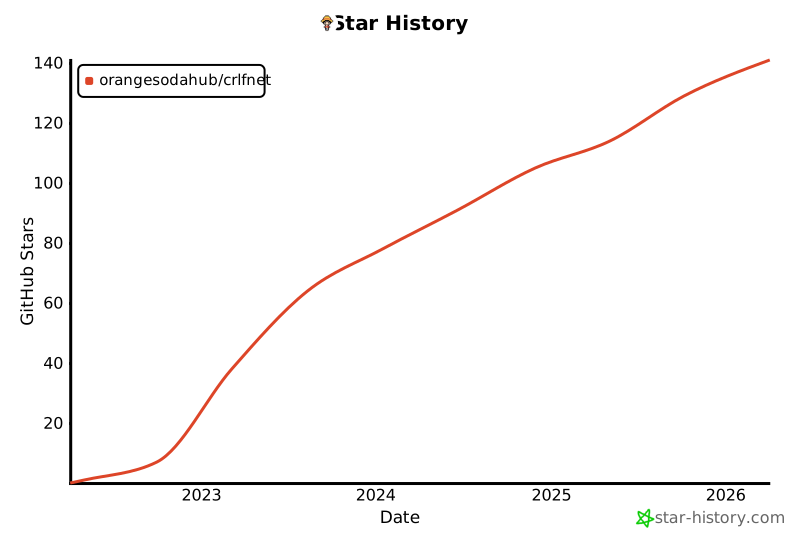](https://star-history.com/#OrangeSodahub/CRLFnet&Date)
Owner
- Login: bccw2021
- Kind: user
- Repositories: 1
- Profile: https://github.com/bccw2021