https://github.com/benjamin-lee/pandoc-scholar
Create beautiful and semantically meaningful articles with pandoc.
Science Score: 10.0%
This score indicates how likely this project is to be science-related based on various indicators:
-
○CITATION.cff file
-
○codemeta.json file
-
○.zenodo.json file
-
○DOI references
-
✓Academic publication links
Links to: zenodo.org -
○Academic email domains
-
○Institutional organization owner
-
○JOSS paper metadata
-
○Scientific vocabulary similarity
Low similarity (15.1%) to scientific vocabulary
Last synced: 9 months ago
·
JSON representation
Repository
Create beautiful and semantically meaningful articles with pandoc.
Basic Info
- Host: GitHub
- Owner: Benjamin-Lee
- License: gpl-2.0
- Language: Lua
- Default Branch: master
- Homepage: https://pandoc-scholar.github.io
- Size: 311 KB
Statistics
- Stars: 0
- Watchers: 1
- Forks: 0
- Open Issues: 0
- Releases: 0
Fork of pandoc-scholar/pandoc-scholar
Created over 7 years ago
· Last pushed over 7 years ago
https://github.com/Benjamin-Lee/pandoc-scholar/blob/master/
Pandoc Scholar
==============
[![release shield]](https://github.com/pandoc-scholar/pandoc-scholar/releases)
[![DOI]](https://zenodo.org/badge/latestdoi/82204858)
[![license shield]](./LICENSE)
[![build status]](https://travis-ci.org/pandoc-scholar/pandoc-scholar)
Create beautiful, semantically enriched articles with pandoc. This
package provides utilities to make publishing of scientific articles as
simple and pleasant as possible. It simplifies setting authors' metadata
in YAML blocks, allows to add semantic annotation to citations, and only
requires the programs pandoc and make.
[release shield]: https://img.shields.io/github/release/pandoc-scholar/pandoc-scholar.svg
[license shield]: https://img.shields.io/github/license/pandoc-scholar/pandoc-scholar.svg
[build status]: https://img.shields.io/travis/pandoc-scholar/pandoc-scholar/master.svg
[DOI]: https://zenodo.org/badge/82204858.svg
[paper]: https://peerj.com/articles/cs-112/
Overview
--------
Plain pandoc is already excellent at document conversion, but it lacks
in metadata handling. Pandoc scholar offers simple ways to include
metadata on authors, affiliations, contact details, and citations. The
data is included into the final output as document headers. Additionally
all entries can be exported as [JSON-LD], a standardized format for the
semantic web.
The background leading to the development of pandoc scholar is described
in the [paper] published in PeerJ Computer Science.
Note that since version 2.0, most of the functionality of pandoc Scholar
is now provided via [pandoc Lua filters]. If you prefer to mix-and-match
selected functionalities provided by pandoc scholar, you can now use the
respective Lua filters directly. Integration with tools like RMarkdown
is possible this way.
[JSON-LD]: https://en.wikipedia.org/wiki/JSON-LD
[pandoc Lua filters]: https://github.com/pandoc/lua-filters
### Demo
An example document plus bibliography is provided in the *example*
folder. Running `make` in the project's root folder will process the
example article, generating output like below:
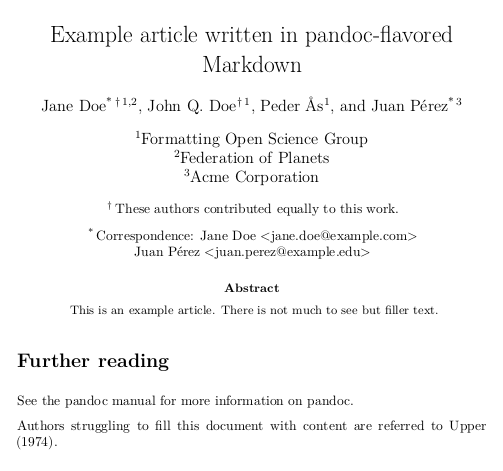
Get the full output as [pdf], [docx], or [epub], or take a look at the
metadata in [JSON-LD] format.
[pdf]: https://pandoc-scholar.github.io/example/example.pdf
[docx]: https://pandoc-scholar.github.io/example/example.docx
[epub]: https://pandoc-scholar.github.io/example/example.epub
[JSON-LD]: https://pandoc-scholar.github.io/example/example.jsonld
Prerequisites
-------------
This package builds on [pandoc](http://pandoc.org/), the universal
document converter, version 2.1 or later. See the pandoc website for
[installation instructions](http://pandoc.org/installing.html) and
suggestions for LaTeX packages, which we use for PDF generation.
Installation
------------
Archives containing all required files are provided for each release.
Use the *release* button above (or directly go to the [latest release])
and download a `pandoc-scholar` archive; both archive files, `.zip` and
`.tar.gz`, contain the same files. Choose the filetype that is the
easiest to unpack on you system.
A `pandoc-scholar` folder will be created on unpacking. The folder
contains all required scripts and templates.
[latest release]: https://github.com/pandoc-scholar/pandoc-scholar/releases/latest
Usage
-----
### Quickstart
Run `make` to convert the example article into all supported output formats. The
markdown file used to create the output files can be configured via the
`ARTICLE_FILE` variable, either directly in the Makefile or by specifying the
value on the command line.
make ARTICLE_FILE=your-file.md
### Includable Makefile
The *Makefile*, which does most of the work, is written in a style that makes it
simple to include it from within other Makefiles. This method allows to keep
`pandoc-scholar` installed in a central location and to use the same instance
for multiple projects. The `ARTICLE_FILE` and `PANDOC_SCHOLAR_PATH` variables
must be defined in the including Makefile:
``` Makefile
ARTICLE_FILE = your-file.md
PANDOC_SCHOLAR_PATH = ../path-to-pandoc-scholar-folder
include $(PANDOC_SCHOLAR_PATH)/Makefile
```
Calling `make` as usual will create all configured output formats. Per default,
this creates *pdf*, *latex*, *docx*, *odt*, *epub*, *html*, and *jats* output.
The set of output files can be reduced by setting the `DEFAULT_EXTENSIONS`
variable to a subset of the aforementioned formats.
Alternative template files can be set using `TEMPLATE_FILE_` variables,
where `` is one of *HTML*, *EPUB*, *JATS*, or *LATEX*. The reference
files for ODT and DOCX output can be changed using `ODT_REFERENCE_FILE` and
`DOCX_REFERENCE_FILE`, respectively.
Additional pandoc options can be given on a per-format basis using
`PANDOC__OPTIONS` variables. The following uses an actual Makefile as an
example to demonstrate usage of those options.
``` Makefile
ARTICLE_FILE = open-science-formatting.md
PANDOC_LATEX_OPTIONS = --latex-engine=xelatex
PANDOC_LATEX_OPTIONS += --csl=peerj.csl
PANDOC_LATEX_OPTIONS += --filter=pandoc-citeproc
PANDOC_LATEX_OPTIONS += -M fontsize=10pt
PANDOC_LATEX_OPTIONS += -M classoption=fleqn
PANDOC_HTML_OPTIONS = --toc
PANDOC_EPUB_OPTIONS = --toc
DOCX_REFERENCE_FILE = pandoc-manuscript.docx
ODT_REFERENCE_FILE = pandoc-manuscript.odt
TEMPLATE_FILE_LATEX = pandoc-peerj.latex
PANDOC_SCHOLAR_PATH = pandoc-scholar
include $(PANDOC_SCHOLAR_PATH)/Makefile
```
Metadata Features
-----------------
Pandoc scholar supports additional functionality via metadata fields. Most
notably, the augmentation of articles with author and affiliation data, which is
essential for academic publishing, is greatly simplified when using pandoc
scholar.
### Authors and affiliations
Most metadata should be specified in the YAML block at the top of the article.
Author data and affiliations are taken from the *author* and *institute* field,
respectively. Institutes can be given via user-defined abbreviations, saving
unnecessary repetitions while preserving readability.
Example:
``` yaml
author:
- James Dewey Watson:
institute: cavendish
- Francis Harry Compton Crick:
institute: cavendish
institute:
- cavendish: Cavendish Laboratory, Cambridge
```
Authors are given in the order in which they are listed, while institute order
follows from author order.
The separate institute field may add unwanted complexity in some cases. It is
hence possible to omit it and to give the affiliations name directly in the
author entry:
``` yaml
author:
- John MacFarlane:
institute: University of California, Berkeley
```
### Institute address
Often it is not enough to give just a name for institutes. It is hence possible
to add arbitrary fields. The name must then explicitly be set via the *name*
field of the institute entry:
``` yaml
author:
- Robert Winkler:
institute: cinvestav
institute:
- cinvestav:
name: 'CINVESTAV Unidad Irapuato, Department of Biochemistry and Biotechnology'
address: 'Km. 9.6 Libramiento Norte Carr. Irapuato-Len, 36821 Irapuato Gto. Mxico'
phone: +52 (462) 623 9635
```
Currently only the institute's address is used in the default template, but
future extensions will be based on this convention.
### Semantic citations
Understanding the reason a citations is included in scholarly articles usually
requires natural language processing of the article. However, navigating the
current literature landscape can be improved and by having that information
accesible and in a machine-readable form. Pandoc scholar supports the CiTO
ontology, allowing authors to specify important meta-information on the citation
directly while writing the text. The property is simply prepended to the
citation key, separated by a colon: `@:citationKey`.
The following table contains all supported keywords and the respective
CiTO properties. Authors are free to use the short-form, the full-length
property, or any of the alternatives listed below (i.e., all word in a
row denote the property and have the same effect).
CiTO property | Keyword | alternatives
------------------------------ | ------------------- | ---------------------
agrees\_with | agrees\_with | agree\_with
citation | |
cites | |
cites\_as\_authority | authority | as\_authority
cites\_as\_data\_source | data\_source | as\_data_source
cites\_as\_evidence | evidence | as\_evidence
cites\_as\_metadata\_document | metadata | as\_metadata_document
cites\_as\_recommended_reading | recommended_reading | as\_recommended\_reading
disputes | |
documents | |
extends | |
includes\_excerpt\_from | excerpt | excerpt\_from
includes\_quotation\_from | quotation | quotation\_from
obtaines\_background\_from | background | background\_from
refutes | |
replies\_to | |
updates | |
uses\_data\_from | data\_from | data
uses\_method\_in | method | method\_in
Example:
DNA strands form a double-helix [@evidence:watson_crick_1953].
License
-------
Copyright 20162018 Albert Krewinkel and Robert Winkler except for the
following components:
- HTML template: 2016 Andrew G. York and Diana Mounter
- dkjson: 2010-2013 David Heiko Kolf
- lua-filters: 2017-2018 John MacFarlane, Albert Krewinkel, Jesse Rosenthal,
and Greg Tucker-Kellogg
This program is free software; you can redistribute it and/or modify it under
the terms of the GNU General Public License as published by the Free Software
Foundation; either version 2 of the License, or (at your option) any later
version.
This program is distributed in the hope that it will be useful, but WITHOUT ANY
WARRANTY; without even the implied warranty of MERCHANTABILITY or FITNESS FOR A
PARTICULAR PURPOSE. See the GNU General Public License for more details.
You should have received a copy of the GNU General Public License along with
this program; if not, write to the Free Software Foundation, Inc., 51 Franklin
Street, Fifth Floor, Boston, MA 02110-1301 USA.
Owner
- Name: Benjamin Lee
- Login: Benjamin-Lee
- Kind: user
- Location: Tysons, VA
- Website: benjamindlee.com/about
- Repositories: 10
- Profile: https://github.com/Benjamin-Lee
NIH-OxCam scholar at @ncbi & DPhil student at Oxford. Previously @Harvard CS '20 and @IQTLabs