Science Score: 44.0%
This score indicates how likely this project is to be science-related based on various indicators:
-
✓CITATION.cff file
Found CITATION.cff file -
✓codemeta.json file
Found codemeta.json file -
✓.zenodo.json file
Found .zenodo.json file -
○DOI references
-
○Academic publication links
-
○Academic email domains
-
○Institutional organization owner
-
○JOSS paper metadata
-
○Scientific vocabulary similarity
Low similarity (8.8%) to scientific vocabulary
Repository
A Unity Project
Basic Info
- Host: GitHub
- Owner: kefkajr
- License: lgpl-3.0
- Language: C#
- Default Branch: develop
- Size: 46.7 MB
Statistics
- Stars: 0
- Watchers: 2
- Forks: 1
- Open Issues: 0
- Releases: 0
Metadata Files
README.md
MagicPals
This is where change summaries, work intentions, and related planning will be written.
11/11/23
Turn order control has changed. All units have a counter (CTR) stat. When CTR is the right value (5), their turn activates. Each command has a different turn cost: 3 for actions, 2 for moving, 2 for waiting after perofrming another command (or 3 for ONLY waiting). When the turn is over, the next "activated" unit goes, and the remaning units have their CTR increase by 1 each turn until another unit is activated. - Right now, ties are broken by whoever has the higher starting initiative. And right now, that initiative is given to each unit manually per encounter, in whichever way seems most interesting for that encounter. This could change. - Move actions can be performed up to twice. Back-to-back move actions can be undone. Right now, awareness changes that happen during the move sequence (the enemy spotting the player) can't be undone, and no other actions can be undone. That would require logging a history of every change that occurs at each step of a turn at the data level. It's unclear yet what level of "undo" we want to keep yet.
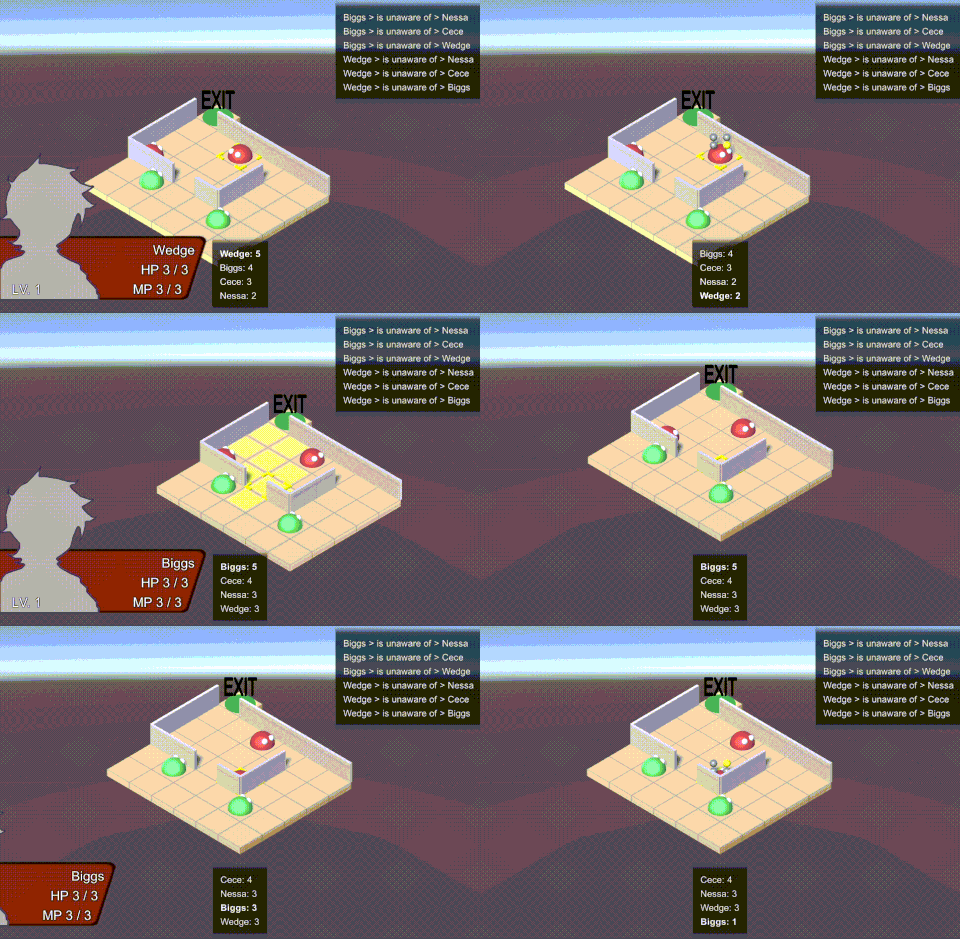
Enemies have patrol routes now. This includes just looking left and right. They can be roused to chase the player or investigate noises. When they lose track of the player, they return to the nearest node on the closest available patrol route.
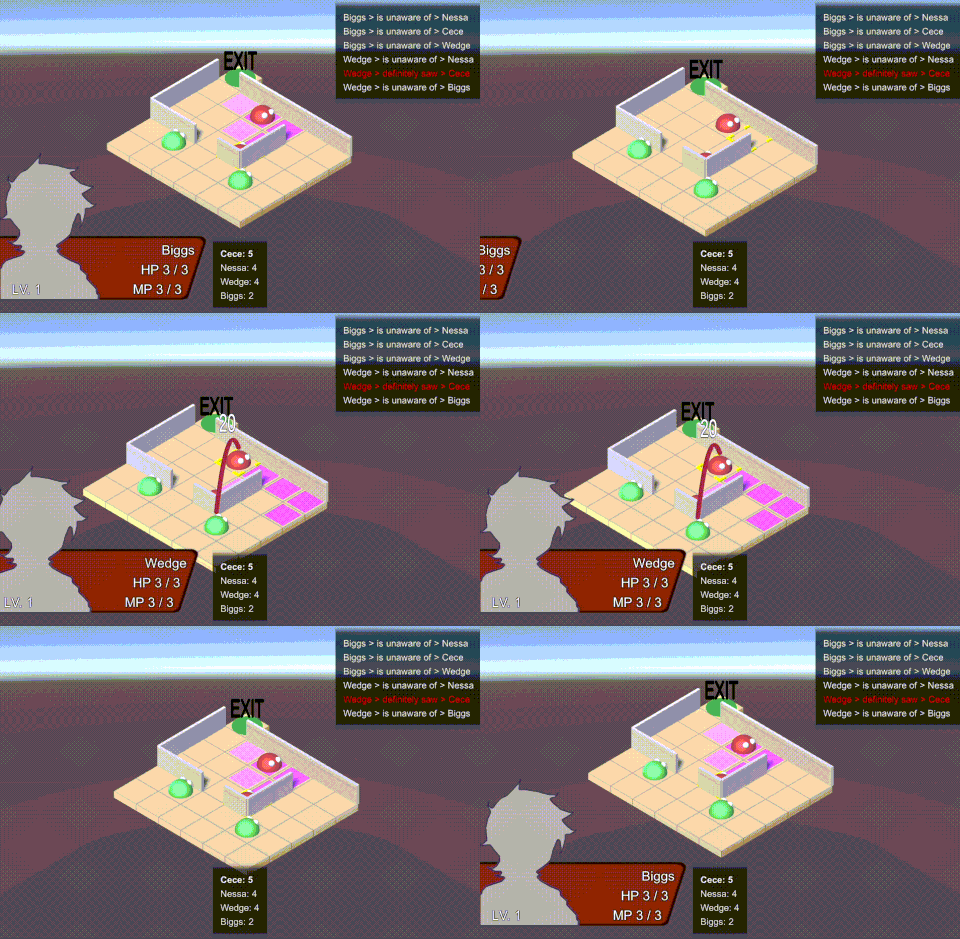
An enemy's perception is displayed when they are selected. Their visible range is shown as highlighted tiles, and any awarenesses (knowledge of the player's location) are represented as lines.
Next:
- If the enemy is investigating a tile and they find a hero, they should be able to attack right away.
- Right now, the enemy’s entire plan of attack is made at the beginning of the turn. When they move with no attack option, they just see the player and then end their turn. Instead of ending their turn (presumably going to the EndFacingState), they should request the ComputerPlayer class to come up with new options.
- How should the enemy react when damaged by a hero? They could look in the hero’s direction or at least create a point of interest where the hero is standing.
- Keep running an escape to come up with different improvements
- Create the inventory window
3/18/23
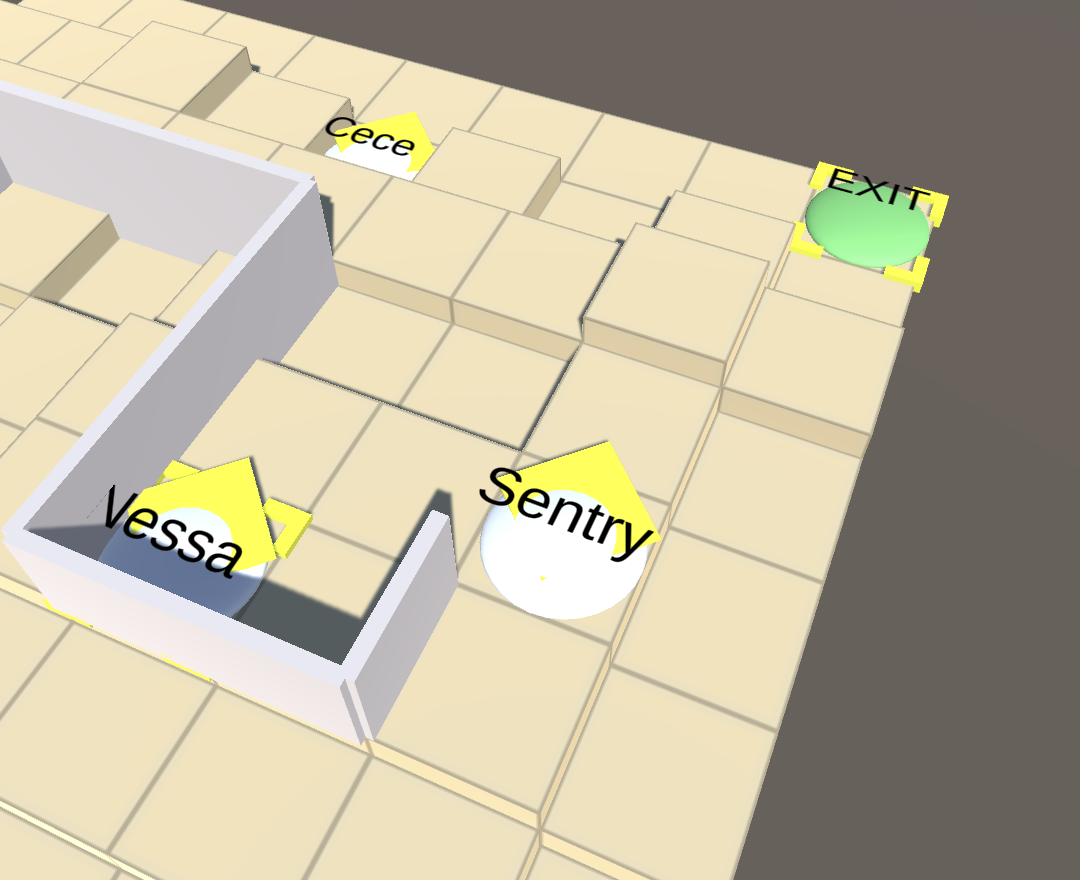
The Ability Picker now makes use of Ability Picker Criteria to decide which action to take in battle. Now enemies can shout and shoot more effectively. There isn't any reasoning around the way they select movement options, but they're not bad for now.
The Board Creator can now make spawn points and exits. In battle, if all player controlled units reach the exit and choose to Escape, the battle ends.
Moving toward a prototype: - Simplify unit stats. Make it so everone has, like, 5 HP, and getting struck by riflefire removes a specific number of HP. - This may require reworking the Stats component altogether. At least we should start by just making all of the numbers smaller and removing randomization.
General Improvements - Formally visualize the following in the game, rather than only while debugging: - Viewing Range (faint color wash on tile at all times) - Have this appear 1) during a unit's turn and 2) when the unit it highlighted during the player's turn. - Noisy Range (distinct color wash on tile while confirming ability) - Known Awarenesses (floating lines above unit's heads at all times) - Use a line renderer. Point to a Seen target, or else point to the "point of interest" of a target being investigated. - Should also visualize HP changes and status effects, even just as text above the target's head. - Start including mouse input. - The menu item with the mouse over it should be the selected. - The tile selection indicator should move with the mouse when possbile. - New inputs might call for a new Input System from Unity. - While we're at it, how about utilizing the new Event System and getting rid of the old Notification Center?
2/13/23
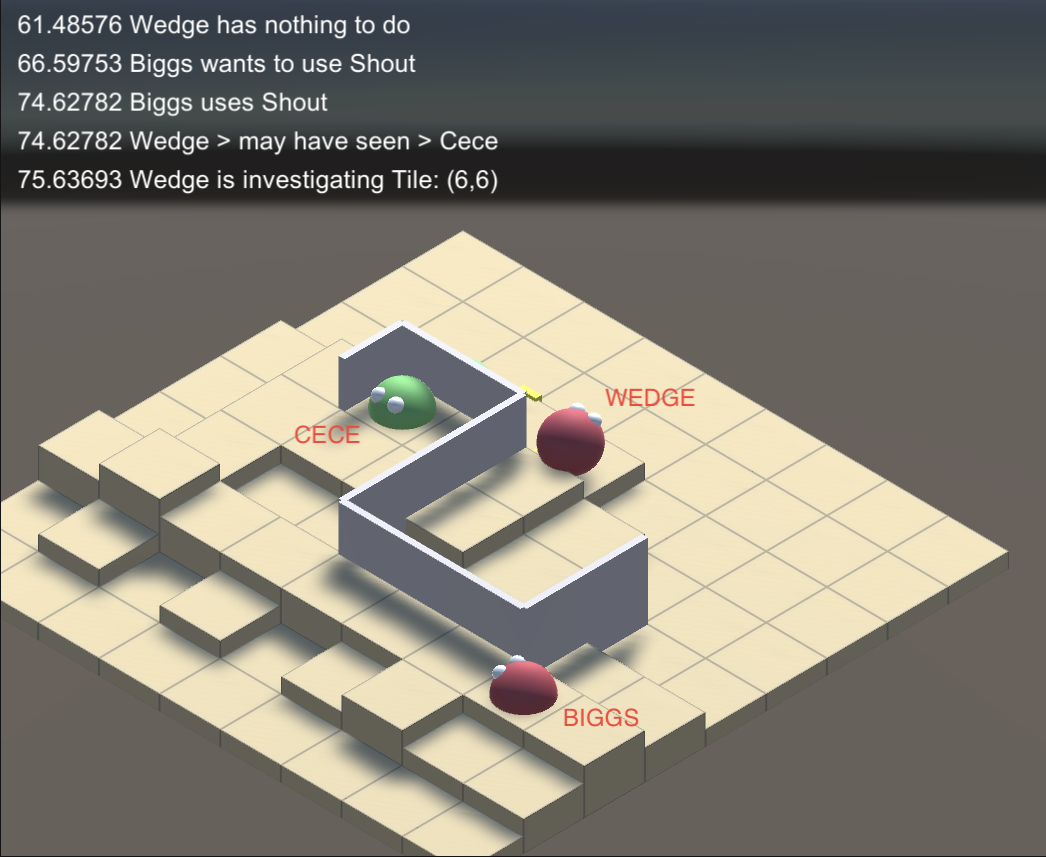
The Shout ability has been created. One unit can make any ally aware of any other units.
Specifically, if the Shouting unit has SEEN a foe, any allies in range of the Shout has their awareness of that foe updated to MAY HAVE SEEN. This results in their investigating the relevant point of interest related to that foe.
A nice bonus that comes as a result of our existing awareness system: all units will perceive others units through their visible range on every step taken during a movement sequence. On each step, the perceiving unit's awareness is updated with a new point of interest (that is, the perceived unit's position during that step). This means that, as Cece moves behind a wall to point {6, 8}, Biggs is only aware that she was last seen at point {6, 6}, before she was hidden behind the wall. Thus, when Biggs Shouts at Wedge, Wedge does not know that Cece is currently at {6, 8}, only that Biggs may have seen Cece at {6, 6}. Thus, he is heading for {6, 6} to investigate.
Moving toward a prototype: - Improve how the AI uses the Shout ablity - Prioritization. Right now the "Ability Picker" system provides a simple method of letting the AI perform abilities. It will either go down a sequential list of abilities to perform, or it will pick randomly from a list. It's time to implement something more like the FF12 Gambit system. The AI should be able to check if a set of criteria is satisfied before deciding on a particular ability. Fortunately we have a "Target Type" system that could work well with gambit-style criteria, in that we can identify if a necessary target such as an "ally" or "foe" is present. - Specifically, an AI unit should only use Shout if there is any ally in walking distance that is unaware of any foes. There may be other criteria we could consider, but that's a good place to start. - Rather then making something brand new, let's update the existing Ability Picker classes to include something like Picker Criteria. - Targeting. While the AI is confirming their choice of the Shout ability, the target cursor wanders off into a random direction before the ability is applied. To better indicate the epicenter of the Shout, the cursor should actually stay on the Shouting unit. - Movement. The AI also walks to a random position to Shout. It's likely because their plan of attack indicates that it doesn't matter specifically where they stand, so long as they hit a target (their allies), so it's not completely random. This is probably fine for now, but it's weird. This could be a great opportunity to exercise a "personality" system. That is: a cautious personality would prioritize moving the shortest distance to alert at least 1 ally over maintaining a visual on the foe. A brash personality would prioritize seeing the foe over alerting the most allies. A tattletale personality would run full tilt away from the foe to alert as many other allies as possible. - There should be an exit. Reaching it with both character should result in a win. One enemy should be guarding it. - The map editor should include "spawn" and "exit" tiles. - Test the Riflefire ability.
12/18
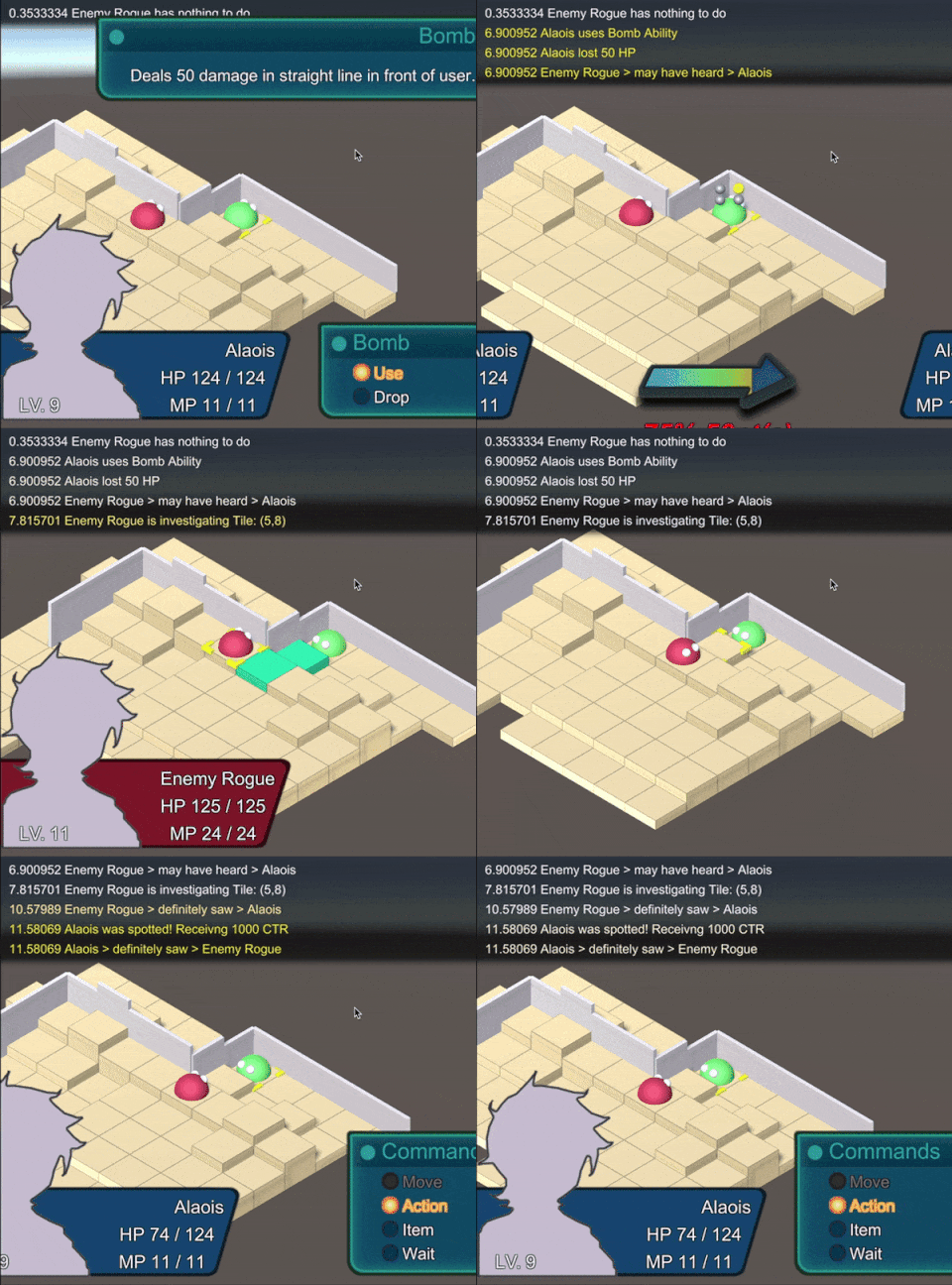
I've implemented an "emergency turn" feature. When a player character is spotted by the enemy, they can take a turn with their remaining actions – if you moved last turn but didn't act, you won't be able to move during the emergency turn, but you can act.
It's certainly too soon for this feature, considering there's nothing very special to do during a turn. But it was a nice opportunity to figure out event handling, passing data and controlling flow between the MoveSequenceState, WalkMovement, and AwarenessController. It also helped to reinforce that I don't like passing around a bunch of disembodied functions when just passing a whole object will do.
If we're going to be prototyping, we need to start having a game, with a win state and a fail state. - Create two player characters, Nessa and Cici. - They should be very weak, like 5 HP and no means of attack. - Create two enemies. - They should have two abilities. - Firing a rifle in a straight line at a single target. It would be cool to make the rifle a piece of a equipment that grants the ability to fire it. - Shouting to alert allies as to the location of a target. That is, A should be able to select a Seen foe and make B aware of that foe, giving them a "may have heard" Awareness of the foe that can allow them to investigate. - Eventually, the guards should have a sentry routine that involves pacing back and forth. - There should be an exit. Reaching it with both character should result in a win. One enemy should be guarding it. - The map editor should include "spawn" and "exit" tiles.
12/14
The ComputerPlayer is now more legible, with branching behavior for fighting a known foe, searching for a potential foe, and sentry duty - although sentry duty is just a placeholder.
The ComputerPlayer can also Look when they choose their facing direction at the end of their turn.
I think if we're going to persist in improving and playing with stealth, it may make more sense to finally make an AwarenessManager. So many disparate parts of the game (or at least ComputerPlayer and all the various battle states) need to know which unit is aware of which unit. - Make an AwarenessManager. Give it an a property like awarenessMap. It should probably be a dictionary of Units with a dictionary of Units and awarenesses. ([Unit: [Unit: Awareness]]). All methods in the AwarenessManager should concern adding, remove, updating, and searching this map. - Perception and Stealth should simply contain criteria. Perception should be dumbed down, and its logic should be moved to the AwarenessManager. - Awareness should be dumbed down, as well. Things like awareness level decay should be controled by the AwarenessManager when the turn ends.
Stealth AI Improvements - There should be a "you've been spotted!" handler that allows the spotted unit to take an impromptu turn at that moment. That also necessitates that we start making adjustments to the game's 1) turn economy and 2) character stats. Then we can start playing around with the enemy. - This will involve manipulating what is currently called CTR (counter) in a Unit's Stats. Maybe if we visualize this somehow during the game (even via debugging) it would help find a fair rhythm for that impromptu turn.
General Improvements - Formally visualize the following in the game, rather than only while debugging: - Viewing Range (faint color wash on tile at all times) - Noisy Range (distinct color wash on tile while confirming ability) - Known Awarenesses (floating lines above unit's heads at all times) - Should also visualize HP changes and status effects, even just as text above the target's head. - Start including mouse input, if at least for moving the tile selection indicator. - It may be worth figuring out how any units that share an alliance (good guys vs bad guys) may be able to automatically be aware of each other. - Maybe try adding a new AwarenessType called SameAlliance that cannot decay. - At the start of the battle, units from each Alliance should be grouped, and then added to each other's perceived Awarenesses (but not their own Awareness)
11/26
Awareness.pointOfInterest has been created. Enemy units will now investigate the Tile at which they were made aware of a unit. In the case of Looking, it's where the unit was standing. In the case of Listening, it's Tile upon which a Noisy Ability as performed.
PlanOfAttack's Point-based properties were replaced with Tiles, so they can be nullable and avoid the problem of a default Point with coordinates of (0, 0). It's the first step of cleaning up the general plan-making flow of ComputerPlayer. It works well enough now, but will likely get more strained as different methods set more new properties willy-nilly.
11/17
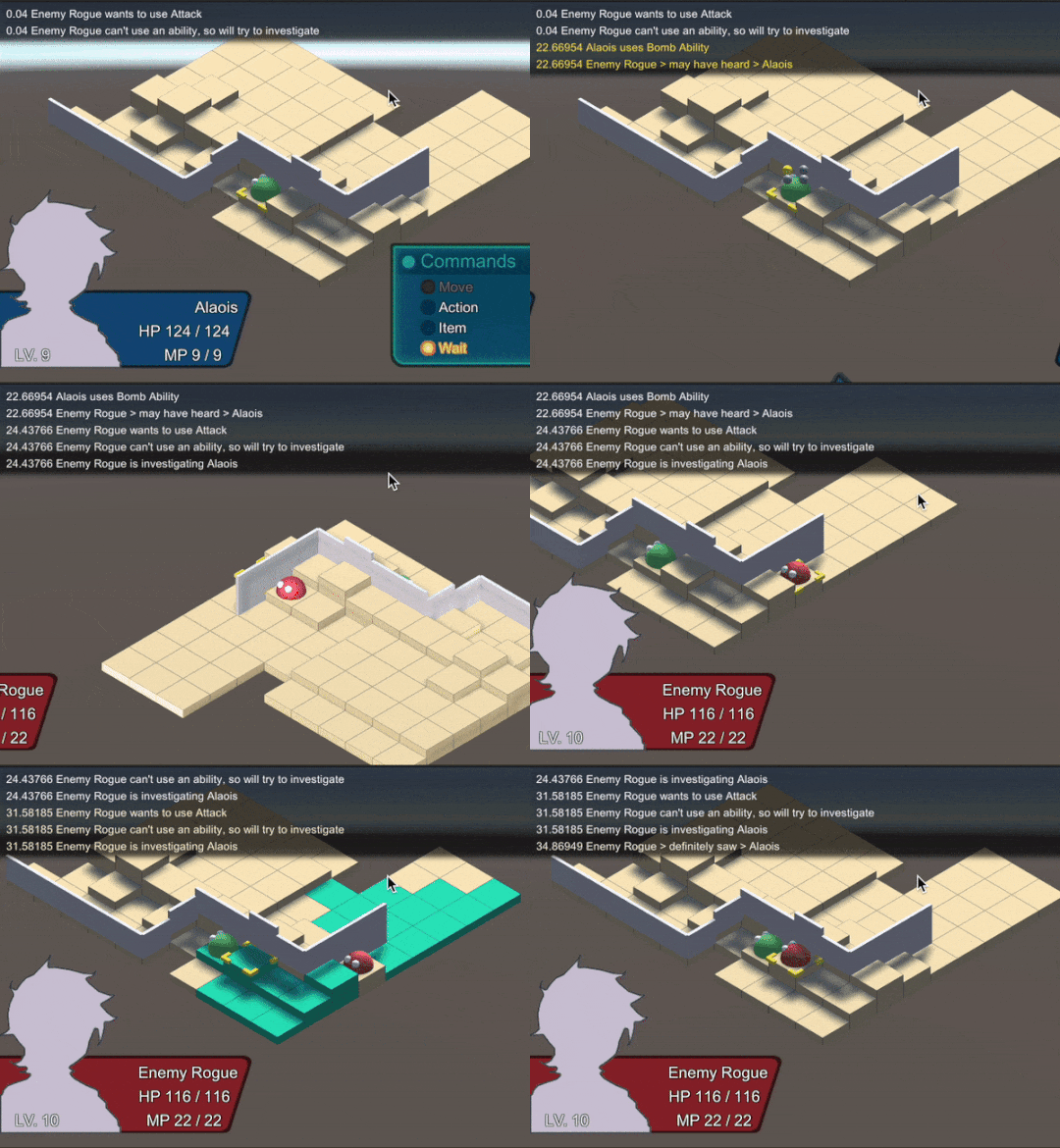
On hearing the player perform a noisy ability, the enemy goes around the wall to investigate.
Pathfinding for enemies has been introduced. The ComputerPlayer searches the Unit's awarenesses for the top unit of interest, finds the location of the unit, and asks the Board for a path to that will take it as close as possible to the target in a single turn.
This is big, and soon we can start playing with how to influence enemy awareness in ways that are fun and clever.
10/28
It seems computer controlled units have a set of orders they go through and then run through an algorithm to see how best (or if) it can be performed. If the AI unit can't find a foe to move toward, it just stays in place.
We should make it so that, instead of staying in place, they should use a method that moves it toward a tile that contains a point of interest (that is, where a unit may have been seen or heard). This might require a new pointOfInterest Perception property.
If there isn't a point of interest, it should fall back onto some "default" sentry behavior. For now, it can move to the end of its movement range in a random direction.
10/21
Tried to limit attack options by updating ComputerPlayer.FindNearestFoe. It seems to be more complicated than that.
When a PlanOfAttack is created, an Ability is already chosen and then the AI tries to find the best way to use that ability. I think we need to answer these questions. - How does the AI decide what options are available to it? - It's based entirely on the AttackPattern attached. It just iterates through a list of AbilityPickers, and then attempts to find a particilar target for that specific ability. - How does the AI decide which option is best? - An AttackOption for every tile the unit can move to is generated. - The option is "rated" by the number of marks (units that can be hit) vs the number of matches (units that match the Target type required by the AbilityPicker). - A score is given to each AttackOption based on those factors, as well as the placment of the unit using the ability. - Does the AI prepare for the possibility that the Ability cannot be used if there's no appropriate target? - It seems that if there is no best option, the Ability is cleared out and the AI tries to look for the nearest foe. - What happens when the AI looks for the nearest foe? Does it find one? - No. If their plan of attack doesn't work out and there is no nearest foe, they stand in place and face in a random direction.
10/20
The project has been updated to a newer (but not very new) version of Unity Editor.
Also, at the start of battle, all units Look so they perceive all other units in their viewing range.
Next up: - Introduce an enemy AI and see how it works with the latest changes (walls, ranges, traps, picking up items). - Try to limit AI targets only to those whose Stealths they are aware of.
9/2
There is now a Noisy component that is added to certain Abilities. When the Ability is used, noise is generated and all units can now Listen to it. If there is overlap between the noisy range and the hearing range, the unit who used the ability can now be heard.
Perception now has a Look and Listen methods. They repeat some logic that is related to creating new Awarenesses and updating existing Awarenesses. This should be followed up with a refactor in which both Look and Listen make use a Perceive method that contains the shared logic.
7/29
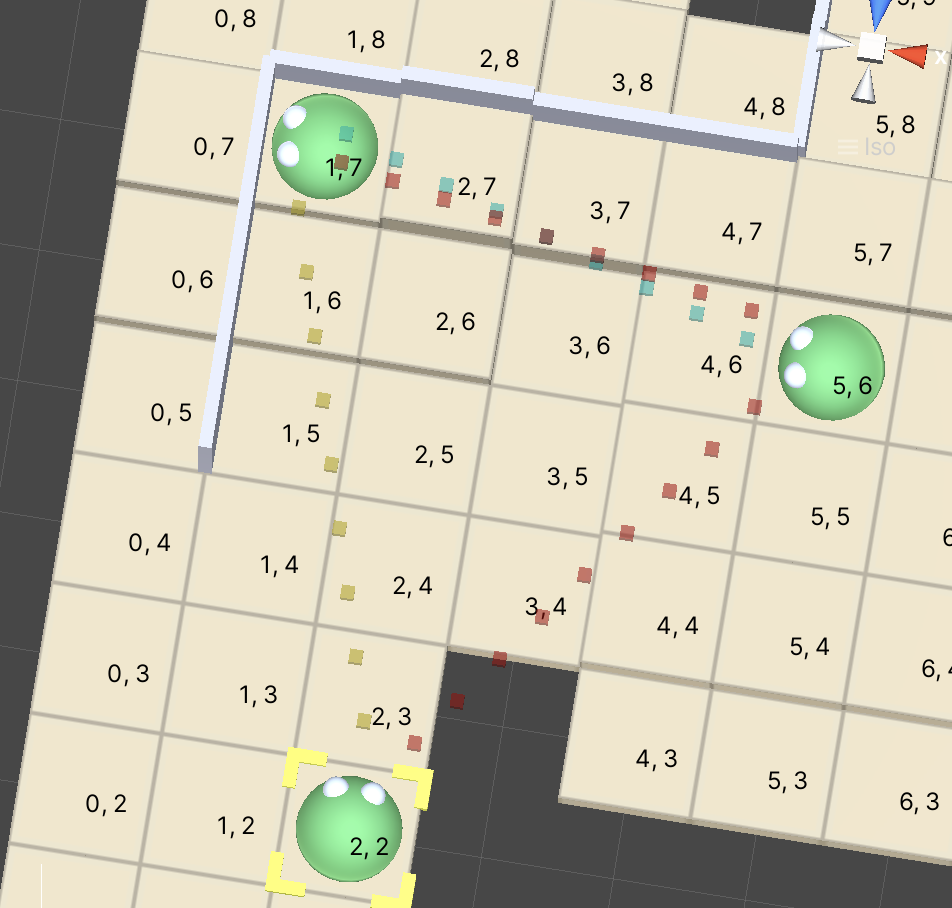
Red indicates a target is seen. Yellow indicates the target is at the edge of the visible range, and should be investigated. Blue indicates that the target has not been visible for a while and may be lost if not pursued.
Perception now contains a set of Awareness objects. An Awareness contains the perceived unit's Stealth, an AwarenessType (which currently includes LostTrack, MayHaveHeard, MayHaveSeen, and Seen) and a "level" that starts at some number - let's say 5.
When one unit sees another, a new Awareness is created, either Seen if the target is firmly in the perceiver's scope or MayHaveSeen if the target lies at the edge of the scope (this "edge" will be tweaked with testing).
When a unit turn ends, each Awareness level decays. If the AwarenessType is Seen and and its level decays to 0, the AwarenessType changes to LostTrack. This is to simulate the idea that the perceiving unit knows the perceived unit is somewhere, but does not know where.
If the level decays to 0 while the AwarenessType is LostTrack (or the "unconfirmed" states of MayHaveHeard or MayHaveSeen), the Awareness is removed from the Perception and the perceived is considered to no longer have knowledge of its target.
Currently, Awareness objects are only updated when a unit moves. Next, we should find away to make unit perception constant. It will be hard to tell the best way to do this, but it may be that any time a unit moves, every single unit should run a percpetion check. We can worry about efficiency later.
After that, - Introduce a noise radius property to Ability. On the action state, check for units in that radius and alert them. - Introduce an enemy AI and see how it works with the latest changes (walls, ranges, traps, picking up items). - Try to limit AI targets only to those whose Stealths they are aware of.
7/25
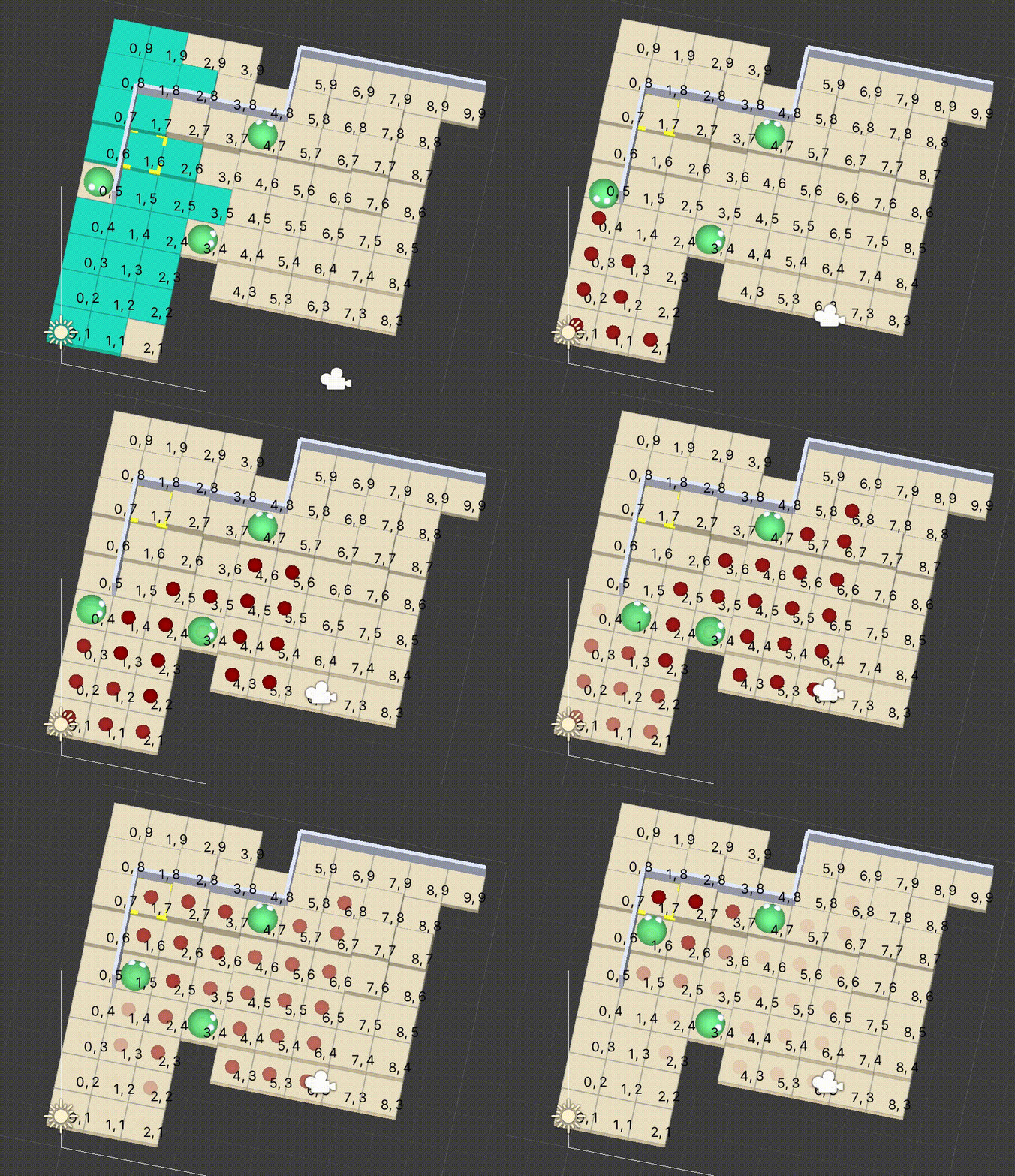
A unit's perception can now be manifested as a visibile scope! Several "sightlines" are drawn from the unit to the distance, overlapped to create a familiar cone. If any line hits a wall, it stops and nothing beyond that point is seen (unless it overlaps with another sightline).
The movement sequence state reacts by simply printing "PERCEIVER NAME spotted PERCEIVED NAME."
Here are possible directions to go next,
- Create an Awareness class that includes a Stealth and an Awareness type enum (MayHaveSeen, MayHaveHeard, Seen, JustSaw). These might get converted to separated Awareness states later, with Enter and Exit phases
- Change Perception.perceivedStealths to Perception.awarenesses.
- Start making use of Perception.awarenesses so individual units can track each other.
- Introduce an enemy AI and see how it works with the latest changes (walls, ranges, traps, picking up items).
- Try to limit AI targets only to those whose Stealths they are aware of.
- Introduce a noise radius property to Ability. One the action state, check for units in that radius and alert them.
6/17
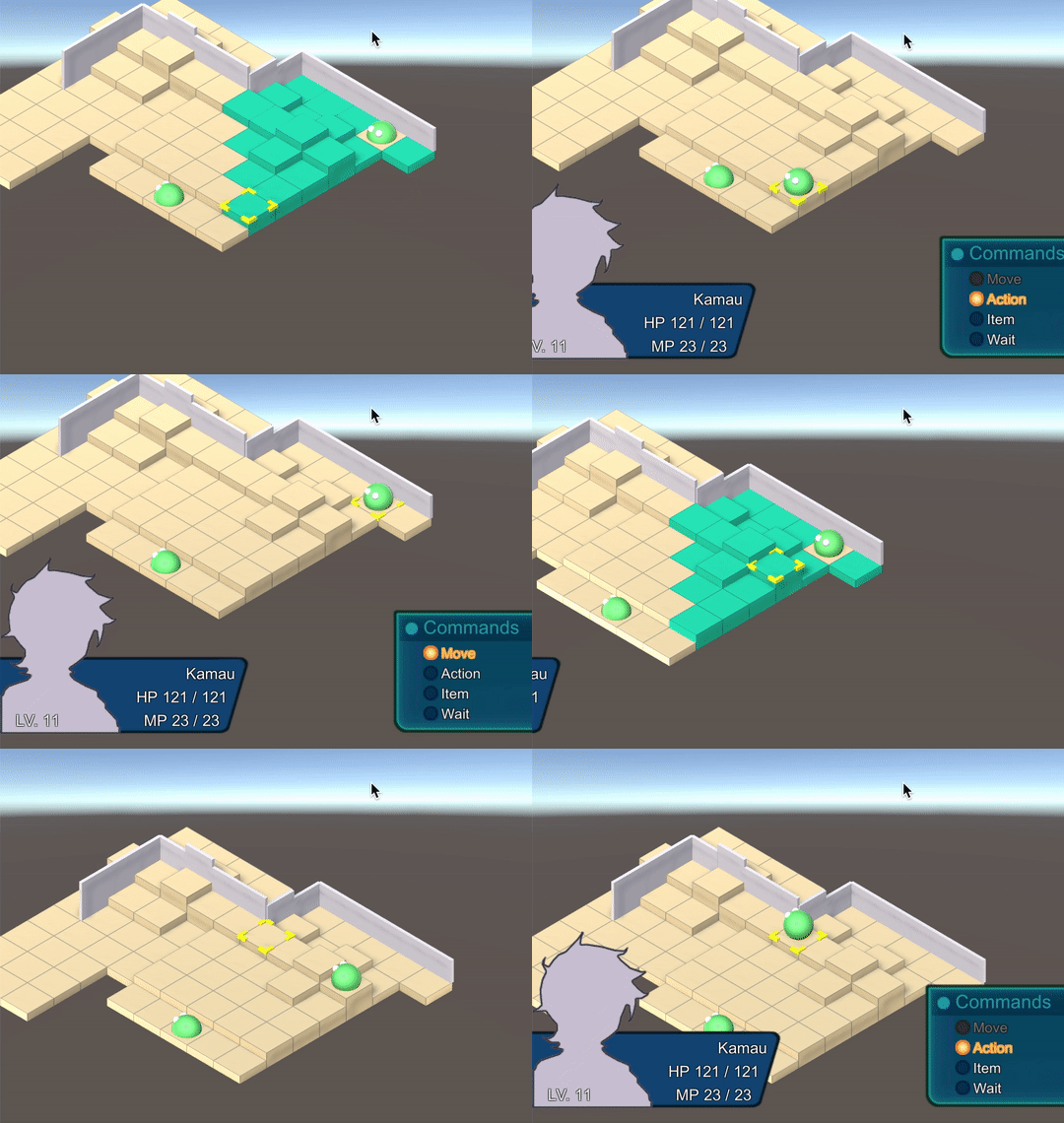
The walking animation can now be fast forwarded. This has the effect of sometimes permanently freezing a character mid-jump forever after, but for now it's funny. The "hop" animation will change eventually.
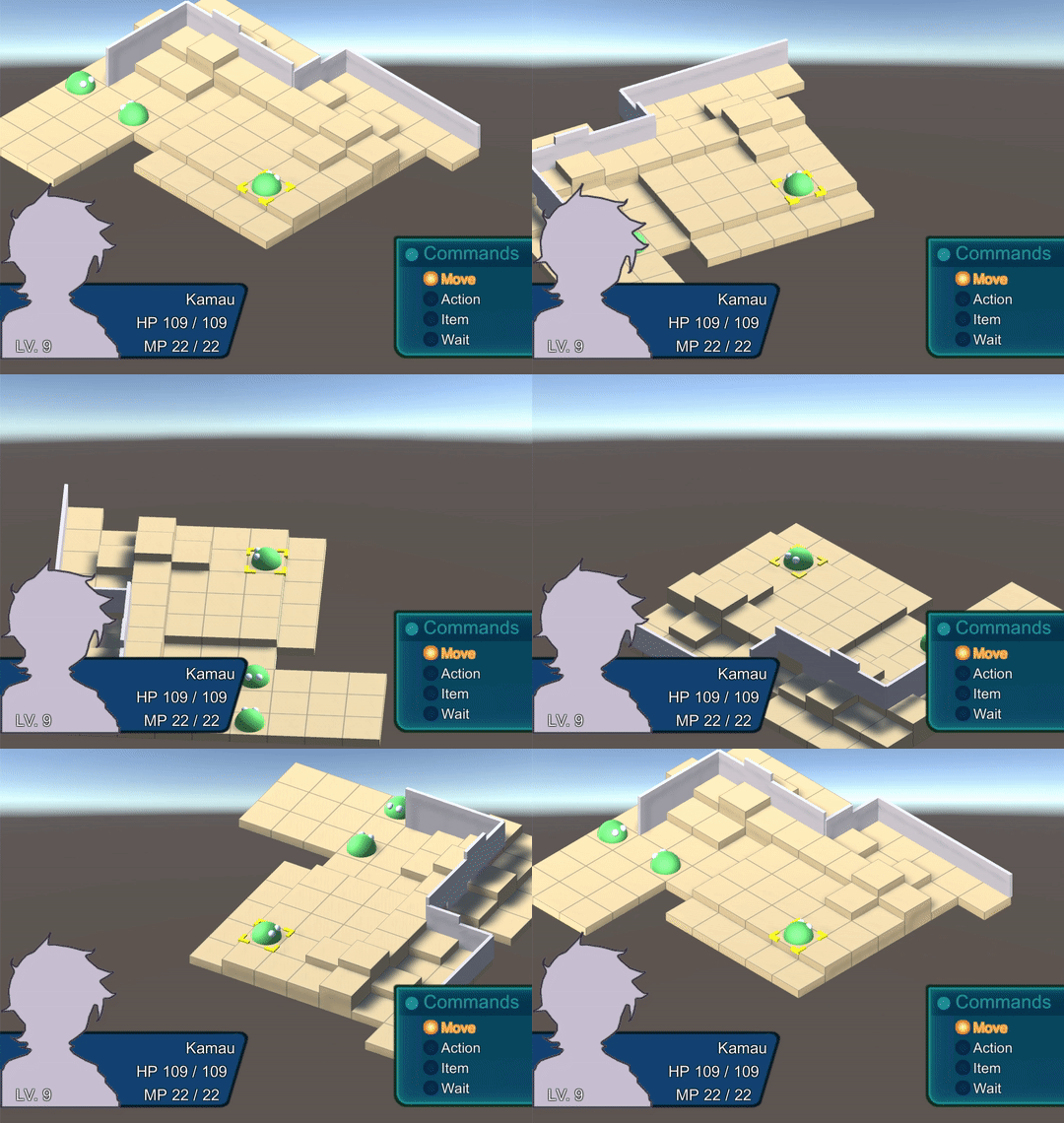
The camera can also be rotated at 90 degree increments and tilted like in Final Fantasy Tactics. Not only that, but the arrow keys respond appropriately, meaning "Up" is different for each camera orientation.
There are some possible next steps to take.
- Update the starting units to have only two allies and one enemy.
- Test how enemy AI works with the latest changes (walls, ranges, traps, picking up items).
- Start introducing stealth.
- Create a Stealth component that contains an Alliance and flags like crouching and invisible.
- Create a Perception component that contains a viewing range (a Vector2 to represent the distance and height of a cone), hearing range (a float to represent the radius of a circle), an "is alert" flag, and a set for perceived Stealth components.
- On every move a unit makes in the Traverse routine, use the unit's Perception to search for any other units within range. Run a comparison between the Perception and the Stealth to see if the target unit is noticed. If so, add that Stealth component to the Perception's set of perceived Stealth components. Print a line saying "PERCEIVER NAME spotted PERCEIVED NAME."
- This "perception check" can start by just checking if one unit is in viewing range of the other. Then check if there is a wall between the two units (using "expand search" in the same way that walls can block a unit's movement). Eventually it may make sense to perform a raycast between the two objects.
- A similar check should probably be done to see when a unit is no longer perceives another unit. "PERCEIVER NAME no longer sees PERCEIVED NAME."
5/10
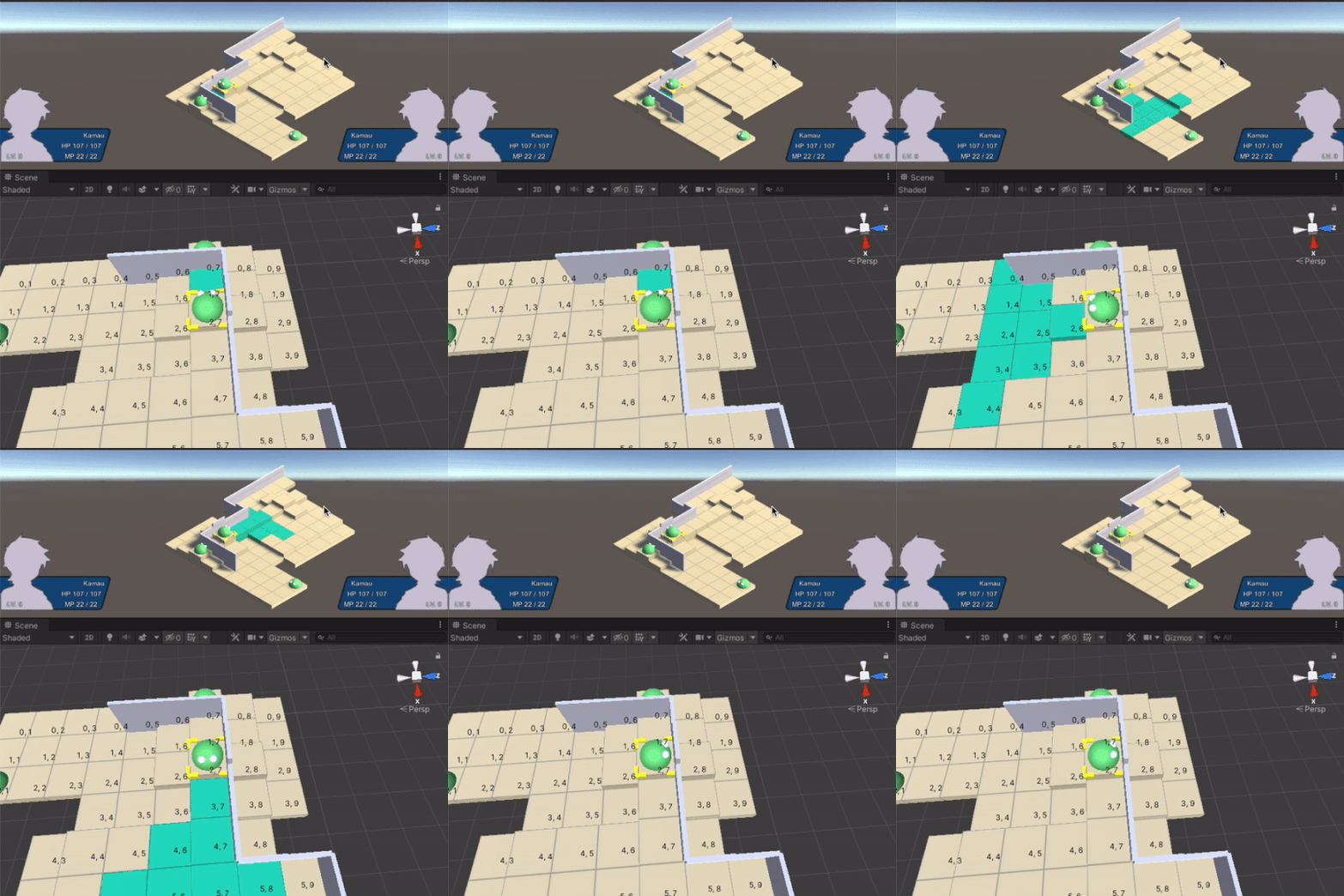
Walking movement and several ability ranges now take walls into account!
Deciding a logic for cone range was quite difficult. Take note of the range when the unit is facing downward. The ability range is able to reach around a corner, but the "wing" against the wall does not extend as far as the wing without a wall. It may be more fair to disallow the range from going around corners at all. Playtesting will tell if that feels fair or not.
A few more ranges need to be adjusted to deal with walls. Additionally, it may be time for some quality of life additions: skipping the walking animation on a button press, and being able to move the camera (while keeping directional control input consistent).
5/10
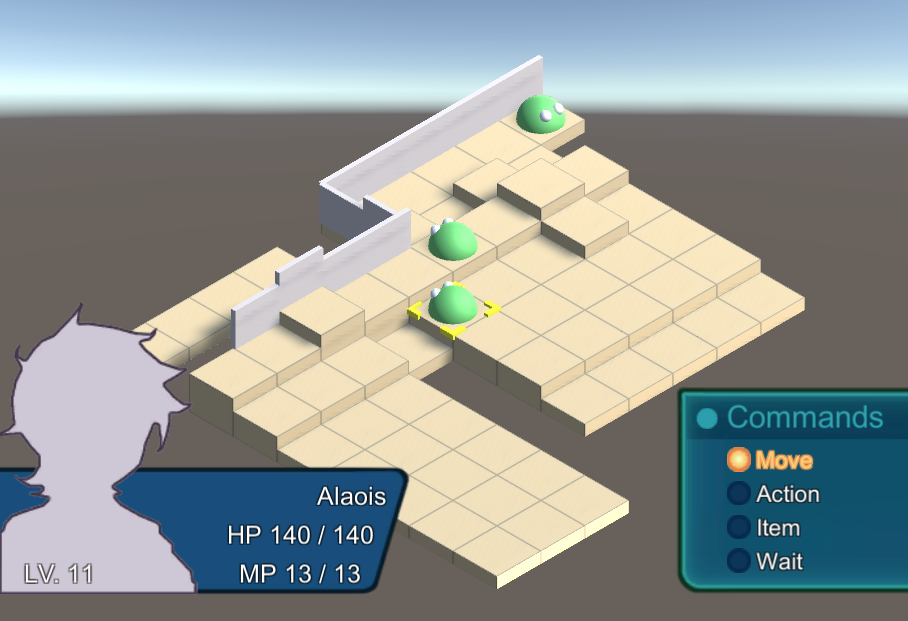
LevelData now contains a list of TileData, which in turn contains a list of WallData. These can be saved, loaded, and displayed when the game runs!
However, they don't do anything yet. Before we even begin introducing the stealth element (the idea that enemies can't see units blocked by walls), we should start with updating the current targeting methods.
When calculating navigable paths for walking movement, walls should block the path and units should walk around them.
When selecting a target for a physical attack, a target should not be accessible if a wall divides them and the attacker. Start with the physical attack.
Should there be some exceptions? Some magical attacks should be able to target units on the other side of a wall. But the wall should block the area of effect, too. That is, a fireball dropped on the opposite side of a wall should not be able to burn back through the wall and cause damage on the near side of the wall.
5/2
The Board Creator scene has been updated place to Walls on top of tiles, changing their height, thickness, and relative origin from the tile. Cool!!
The next goal would be to save and load these Walls within map data.
4/6
I created the TrapSetState to place a Trap on the "current" tile, and updated the MovementSequenceState to halt the unit if a trap is found, find the Ability on the trap, and perform it at that moment. Currently, an ability being "performed" instantly calculates the result and changes the state of the targeted units with no animation – this was true before, as well. MovementSequenceState does at least print the name of the Trap, though.
I'm surprised that simply keeping a reference to a component on an object (Trap) is enough to get another component from that same object (Ability), even though the object itself is not tracked in these states. I suppose simply because the unit using the trap HAS that ability object in its hierarchy, Unity is able to keep it as a reference via the Trap component. It will be good to be aware of how this changes after any refactors that alter the hierarchies of our prefabs.
Next question is: How would you put walls at the edges of tiles?
This is an exciting question for sure. I think the steps might involve:
- Creating a Wall class like the Tile class.
- Give it several int properties: origin (0 is the border of the tile, less is inside, more is outside), thickness, height.
- Give the Tile class a dictionary property that stores a Wall instance for each direction.
- Create a Wall prefab, probably just the Tile standing on its side.
- Use the tile map editor again. See what updates can be made to include the creations of Walls
- In particular, see how a Tile's properties are used to buid and visualize each Tile when the board is constructed
3/31
I created the Trap component and updated the MovementSequenceState to do something when a trap is found.
However, no Traps can be placed on Tiles yet. A Mine ability prefab exists that has the Trap component, but it's not treated differently than other abilities yet.
It's worth testing how the AbilityTargetState and ConfirmAbilityTargetState behave with this ablity. At the very least, the PerformAbilityState will need to updated to place the Trap Ability on the tile rather than activating the ability at that moment.
3/25
Items can now be picked up from the board. Also, a description appears when items are selected in the pick up menu. It would be awesome if there were also descriptions for abilities!
Change ItemDescriptionPanelController to DescriptionPanelController.
Create a Describable script and attach it to items and abilities alike.
Update ItemOptionState, ItemPickupState, and ActionSelectionState to search for a Describable object on each selection, and display the ItemDescriptionPanel for each.
UPDATE: All the above has been done. There was some trouble getting the DescriptionPanel to start in the right position, since it was using a "preferred" size that was not certain by the first frame. I used a neat trick by calling Canvas.ForceUpdateCanvases() to get the size. Seems great, I wonder what the downside is?
Next question is: How would you create an ability to put a landmine onto a tile?
Try adding a trap property to Tile. Update the Traverse coroutine to accept a "trap check" method action. Pass the method through MoveSequenceState. In the Traverse coroutine, on each tile, check for the presence of traps. If there is a trap, call the trap check method from the Traverse coroutine and then exit the coroutine. The passed method should start a TrapTriggeredState that outputs a Debug line that says "trapped!!"
3/20
BoardInventory now exists to track items by point, and to associate item indicators with their items.
There is also a method to remove them, but there isn't a battle command to pick items up yet.
Add a new "Pick up" command contingent upon items being present at the point, then create a "item pick up state" to list those items, then move them to the unit inventory when selected.
3/19
How would you place an item on a tile that can be picked up by moving onto it? I gave the Tile class an Items property which would store any number of items. When a character drops an item in the ItemOptionState class, the Tile class can move the item from their Inventory to the tile’s items list, as well as reparent the item from the Inventory to the tile. If the tile has any items on it, an item indicator is visible. How about picking the item up again?
Try making an Inventory object for the board itself. Subclass Inventory and have it Add and Remove items in a different way, using an object pool to show and hide item indicators.
Prior
This prototype is being built off of the Tactics RPG tutorial by Liquid Fire.
Owner
- Login: kefkajr
- Kind: user
- Repositories: 1
- Profile: https://github.com/kefkajr
Citation (CITATION.cff)
cff-version: 0.1.0
message: "If you use this software, please cite it as below."
authors:
  - family-names: Torres
    given-names: Terry
title: "MagicPals"
version: 2.0.4
date-released: 2021-08-11
references:
  - authors:
    - family-names: Parham
      given-names: Jon
    title: "Tactics RPG"
GitHub Events
Total
Last Year
Dependencies
- actions/checkout v4 composite