https://github.com/bertsky/alphashape
Toolbox for constructing alpha shapes.
Science Score: 10.0%
This score indicates how likely this project is to be science-related based on various indicators:
-
○CITATION.cff file
-
○codemeta.json file
-
○.zenodo.json file
-
○DOI references
-
✓Academic publication links
Links to: zenodo.org -
○Academic email domains
-
○Institutional organization owner
-
○JOSS paper metadata
-
○Scientific vocabulary similarity
Low similarity (11.9%) to scientific vocabulary
Repository
Toolbox for constructing alpha shapes.
Basic Info
- Host: GitHub
- Owner: bertsky
- License: mit
- Default Branch: master
- Size: 46.4 MB
Statistics
- Stars: 0
- Watchers: 0
- Forks: 0
- Open Issues: 0
- Releases: 0
Metadata Files
README.md
Alpha Shape Toolbox









Toolbox for generating n-dimensional alpha shapes.
Alpha shapes are often used to generalize bounding polygons containing sets of points. The alpha parameter is defined as the value a, such that an edge of a disk of radius 1/a can be drawn between any two edge members of a set of points and still contain all the points. The convex hull, a shape resembling what you would see if you wrapped a rubber band around pegs at all the data points, is an alpha shape where the alpha parameter is equal to zero. In this toolbox we will be generating alpha complexes, which are closely related to alpha shapes, but which consist of straight lines between the edge points instead of arcs of circles.
https://en.wikipedia.org/wiki/Alpha_shape
https://en.wikipedia.org/wiki/Convex_hull
Creating alpha shapes around sets of points usually requires a visually interactive step where the alpha parameter for a concave hull is determined by iterating over or bisecting values to approach a best fit. The alpha shape toolbox provides workflows to shorten the development loop on this manual process, or to bypass it completely by solving for an alpha shape with particular characteristics. A python API is provided to aid in the scripted generation of alpha shapes. A console application is also provided as an example usage of the alpha shape toolbox, and to facilitate generation of alpha shapes from the command line.
- Free software: MIT license
- Documentation: https://alphashape.readthedocs.io.
Features
Import Dependencies
python
import os
import sys
import pandas as pd
import numpy as np
from descartes import PolygonPatch
import matplotlib.pyplot as plt
sys.path.insert(0, os.path.dirname(os.getcwd()))
import alphashape
2 Dimensional Example
Define a set of points
python
points_2d = [(0., 0.), (0., 1.), (1., 1.), (1., 0.),
          (0.5, 0.25), (0.5, 0.75), (0.25, 0.5), (0.75, 0.5)]
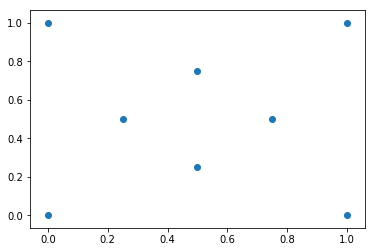
Visualize Test Coordinates
python
fig, ax = plt.subplots()
ax.scatter(*zip(*points_2d))
plt.show()
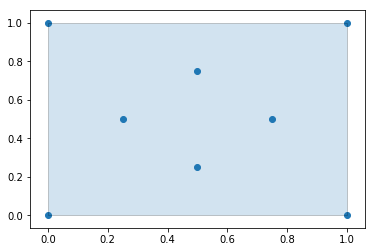
Generate an Alpha Shape ($\alpha=0.0$) (Convex Hull)
Every convex hull is an alpha shape, but not every alpha shape is a convex hull. When the alphashape function is called with an alpha parameter of 0, a convex hull will always be returned.
Create the alpha shape
You can visualize the shape within Jupyter notebooks using the built-in shapely renderer as shown below.
python
alpha_shape = alphashape.alphashape(points_2d, 0.)
alpha_shape

Plotting the alpha shape over the input data with Matplotlib
python
fig, ax = plt.subplots()
ax.scatter(*zip(*points_2d))
ax.add_patch(PolygonPatch(alpha_shape, alpha=0.2))
plt.show()
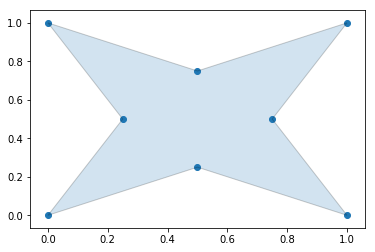
Generate an Alpha Shape ($\alpha=2.0$) (Concave Hull)
As we increase the alpha parameter value, the bounding shape will begin to fit the sample data with a more tightly fitting bounding box.
Create the alpha shape
python
alpha_shape = alphashape.alphashape(points_2d, 2.0)
alpha_shape

Plotting the alpha shape over the input data with Matplotlib
python
fig, ax = plt.subplots()
ax.scatter(*zip(*points_2d))
ax.add_patch(PolygonPatch(alpha_shape, alpha=0.2))
plt.show()
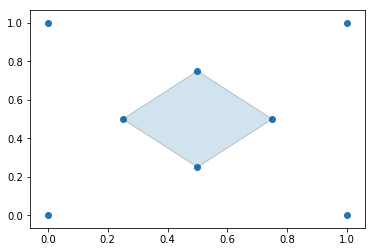
Generate an Alpha Shape ($\alpha=3.5$)
If you go too high on the alpha parameter, you will start to lose points from the original data set.
Create the alpha shape
python
alpha_shape = alphashape.alphashape(points_2d, 3.5)
alpha_shape

Plotting the alpha shape over the input data with Matplotlib
python
fig, ax = plt.subplots()
ax.scatter(*zip(*points_2d))
ax.add_patch(PolygonPatch(alpha_shape, alpha=0.2))
plt.show()
Generate an Alpha Shape (Alpha=5.0)
If you go too far, you will lose everything.
python
alpha_shape = alphashape.alphashape(points_2d, 5.0)
print(alpha_shape)
GEOMETRYCOLLECTION EMPTY
Using a varying Alpha Parameter
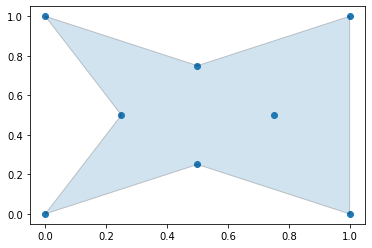
The alpha parameter can be defined locally within a region of points by supplying a callback that will return what alpha parameter to use. This can be utilized to create tighter fitting alpha shapes where point densitities are different in different regions of a data set. In the following example, the alpha parameter is changed based off of the value of the x-coordinate of the points.
python
alpha_shape = alphashape.alphashape(
    points_2d,
    lambda ind, r: 1.0 + any(np.array(points_2d)[ind][:,0] == 0.0))
alpha_shape

Plotting the alpha shape over the input data with Matplotlib
python
fig, ax = plt.subplots()
ax.scatter(*zip(*points_2d))
ax.add_patch(PolygonPatch(alpha_shape, alpha=0.2))
plt.show()
Generate an Alpha Shape by Solving for an Optimal Alpha Value
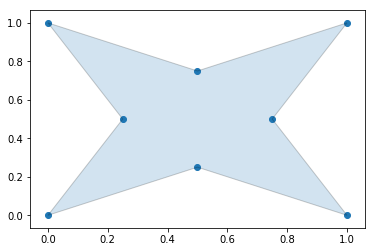
The alpha parameter can be solved for if it is not provided as an argument, but with large datasets this can take a long time to calculate.
Create the alpha shape
python
alpha_shape = alphashape.alphashape(points_2d)
alpha_shape
Plotting the alpha shape over the input data
python
fig, ax = plt.subplots()
ax.scatter(*zip(*points_2d))
ax.add_patch(PolygonPatch(alpha_shape, alpha=0.2))
plt.show()
3 Dimensional Example
Define a set of points
python
points_3d = [
    (0., 0., 0.), (0., 0., 1.), (0., 1., 0.),
    (1., 0., 0.), (1., 1., 0.), (1., 0., 1.),
    (0., 1., 1.), (1., 1., 1.), (.25, .5, .5),
    (.5, .25, .5), (.5, .5, .25), (.75, .5, .5),
    (.5, .75, .5), (.5, .5, .75)
]
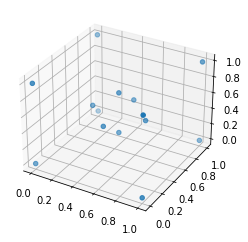
Visualize Test Coordinates
python
fig = plt.figure()
ax = plt.axes(projection='3d')
ax.scatter(df_3d['x'], df_3d['y'], df_3d['z'])
plt.show()
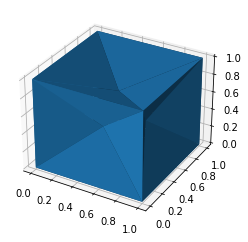
Alphashape with Static Alpha Parameter
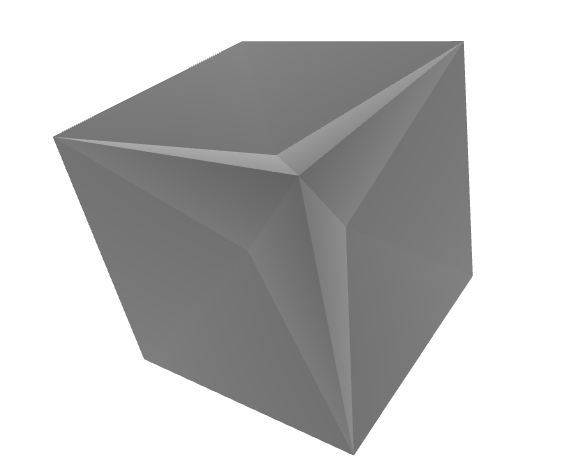
You can visualize the shape within Jupyter notebooks using the built-in trimesh renderer by calling the .show() method as shown below.
python
alpha_shape = alphashape.alphashape(points_3d, 1.1)
alpha_shape.show()
python
fig = plt.figure()
ax = plt.axes(projection='3d')
ax.plot_trisurf(*zip(*alpha_shape.vertices), triangles=alpha_shape.faces)
plt.show()
Alphashape with Dymanic Alpha Parameter
python
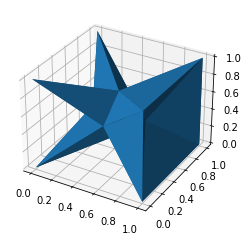
alpha_shape = alphashape.alphashape(points_3d, lambda ind, r: 1.0 + any(
    np.array(points_3d)[ind][:,0] == 0.0))
alpha_shape.show()

python
fig = plt.figure()
ax = plt.axes(projection='3d')
ax.plot_trisurf(*zip(*alpha_shape.vertices), triangles=alpha_shape.faces)
plt.show()
Alphashape found by solving for the Alpha Parameter
python
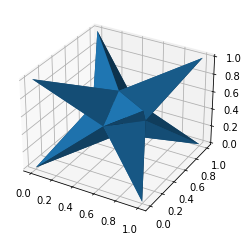
alpha_shape = alphashape.alphashape(points_3d)
alpha_shape.show()

python
fig = plt.figure()
ax = plt.axes(projection='3d')
ax.plot_trisurf(*zip(*alpha_shape.vertices), triangles=alpha_shape.faces)
plt.show()
4 Dimensional Example
Define a set of points
python
points_4d = [
    (0., 0., 0., 0.), (0., 0., 0., 1.), (0., 0., 1., 0.),
    (0., 1., 0., 0.), (0., 1., 1., 0.), (0., 1., 0., 1.),
    (0., 0., 1., 1.), (0., 1., 1., 1.), (1., 0., 0., 0.),
    (1., 0., 0., 1.), (1., 0., 1., 0.), (1., 1., 0., 0.),
    (1., 1., 1., 0.), (1., 1., 0., 1.), (1., 0., 1., 1.),
    (1., 1., 1., 1.), (.25, .5, .5, .5), (.5, .25, .5, .5),
    (.5, .5, .25, .5), (.5, .5, .5, .25), (.75, .5, .5, .5),
    (.5, .75, .5, .5), (.5, .5, .75, .5), (.5, .5, .5, .75)
]
df_4d = pd.DataFrame(points_4d, columns=['x', 'y', 'z', 'r'])
Visualize Test Coordinates
python
fig = plt.figure()
ax = plt.axes(projection='3d')
ax.scatter(df_4d['x'], df_4d['y'], df_4d['z'], c=df_4d['r'])
plt.show()

The Edges of a 4 Dimensional Alpha Shape are Tetrahedrons Defined by the Following Coordinates (No Visualizations)
python
alphashape.alphashape(points_4d, 1.0)
python
{(16, 1, 2, 0),
 (16, 1, 3, 0),
 (16, 2, 3, 0),
 (16, 4, 2, 3),
 (16, 4, 7, 2),
 (16, 4, 7, 3),
 (16, 5, 1, 3),
 (16, 5, 7, 1),
 (16, 5, 7, 3),
 (16, 6, 1, 2),
 (16, 6, 7, 1),
 (16, 6, 7, 2),
 (17, 1, 2, 0),
 (17, 1, 8, 0),
 (17, 2, 8, 0),
 (17, 6, 1, 2),
 (17, 6, 14, 1),
 (17, 6, 14, 2),
 (17, 9, 1, 8),
 (17, 9, 14, 1),
 (17, 9, 14, 8),
 (17, 10, 2, 8),
 (17, 10, 14, 2),
 (17, 10, 14, 8),
 (18, 1, 3, 0),
 (18, 1, 8, 0),
 (18, 3, 8, 0),
 (18, 5, 1, 3),
 (18, 5, 13, 1),
 (18, 5, 13, 3),
 (18, 9, 1, 8),
 (18, 9, 13, 1),
 (18, 9, 13, 8),
 (18, 11, 3, 8),
 (18, 11, 13, 3),
 (18, 11, 13, 8),
 (19, 2, 3, 0),
 (19, 2, 8, 0),
 (19, 3, 8, 0),
 (19, 4, 2, 3),
 (19, 4, 12, 2),
 (19, 4, 12, 3),
 (19, 10, 2, 8),
 (19, 10, 12, 2),
 (19, 10, 12, 8),
 (19, 11, 3, 8),
 (19, 11, 12, 3),
 (19, 11, 12, 8),
 (20, 9, 13, 8),
 (20, 9, 14, 8),
 (20, 9, 14, 13),
 (20, 10, 12, 8),
 (20, 10, 14, 8),
 (20, 10, 14, 12),
 (20, 11, 12, 8),
 (20, 11, 13, 8),
 (20, 11, 13, 12),
 (20, 13, 12, 15),
 (20, 14, 12, 15),
 (20, 14, 13, 15),
 (21, 4, 7, 3),
 (21, 4, 7, 12),
 (21, 4, 12, 3),
 (21, 5, 7, 3),
 (21, 5, 7, 13),
 (21, 5, 13, 3),
 (21, 7, 12, 15),
 (21, 7, 13, 15),
 (21, 11, 12, 3),
 (21, 11, 13, 3),
 (21, 11, 13, 12),
 (21, 13, 12, 15),
 (22, 4, 7, 2),
 (22, 4, 7, 12),
 (22, 4, 12, 2),
 (22, 6, 7, 2),
 (22, 6, 7, 14),
 (22, 6, 14, 2),
 (22, 7, 12, 15),
 (22, 7, 14, 15),
 (22, 10, 12, 2),
 (22, 10, 14, 2),
 (22, 10, 14, 12),
 (22, 14, 12, 15),
 (23, 5, 7, 1),
 (23, 5, 7, 13),
 (23, 5, 13, 1),
 (23, 6, 7, 1),
 (23, 6, 7, 14),
 (23, 6, 14, 1),
 (23, 7, 13, 15),
 (23, 7, 14, 15),
 (23, 9, 13, 1),
 (23, 9, 14, 1),
 (23, 9, 14, 13),
 (23, 14, 13, 15)}
Alpha Shapes with GeoPandas
Sample Data
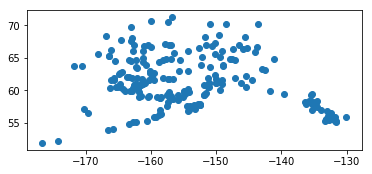
The data used in this notebook can be obtained from the Alaska Department of Transportation and Public Facilities website at the link below. It consists of a point collection for each of the public airports in Alaska.
http://www.dot.alaska.gov/stwdplng/mapping/shapefiles.shtml
Load the Shapefile
python
import os
import geopandas
data = os.path.join(os.getcwd(), 'data', 'Public_Airports_March2018.shp')
gdf = geopandas.read_file(data)
python
%matplotlib inline
gdf.plot()
python
gdf.crs
{'init': 'epsg:4269'}
Generate Alpha Shape
The alpha shape will be generated in the coordinate frame the geodataframe is in. In this example, we will project into an Albers Equal Area projection, construct our alpha shape in that coordinate system, and then convert back to the source projection.
Project to Albers Equal Area Spatial Reference
python
import cartopy.crs as ccrs
gdf_proj = gdf.to_crs(ccrs.AlbersEqualArea().proj4_init)
gdf_proj.plot()
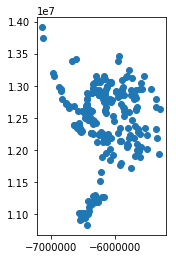
Determine the Alpha Shape
python
import alphashape
alpha_shape = alphashape.alphashape(gdf_proj)
alpha_shape.plot()
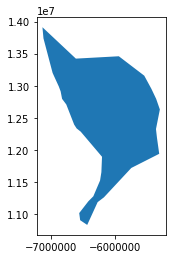
Plotting the Alpha Shape over the Data Points
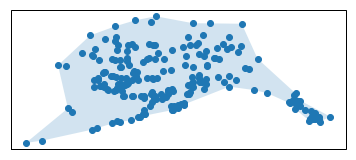
Plate Carree Projection
python
import matplotlib.pyplot as plt
ax = plt.axes(projection=ccrs.PlateCarree())
ax.scatter([p.x for p in gdf_proj['geometry']],
           [p.y for p in gdf_proj['geometry']],
           transform=ccrs.AlbersEqualArea())
ax.add_geometries(
    alpha_shape['geometry'],
    crs=ccrs.AlbersEqualArea(), alpha=.2)
plt.show()
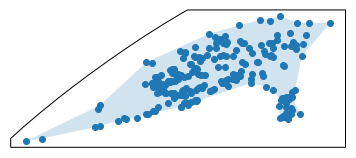
Robinson Projection
python
import matplotlib.pyplot as plt
ax = plt.axes(projection=ccrs.Robinson())
ax.scatter([p.x for p in gdf_proj['geometry']],
           [p.y for p in gdf_proj['geometry']],
           transform=ccrs.AlbersEqualArea())
ax.add_geometries(
    alpha_shape['geometry'],
    crs=ccrs.AlbersEqualArea(), alpha=.2)
plt.show()
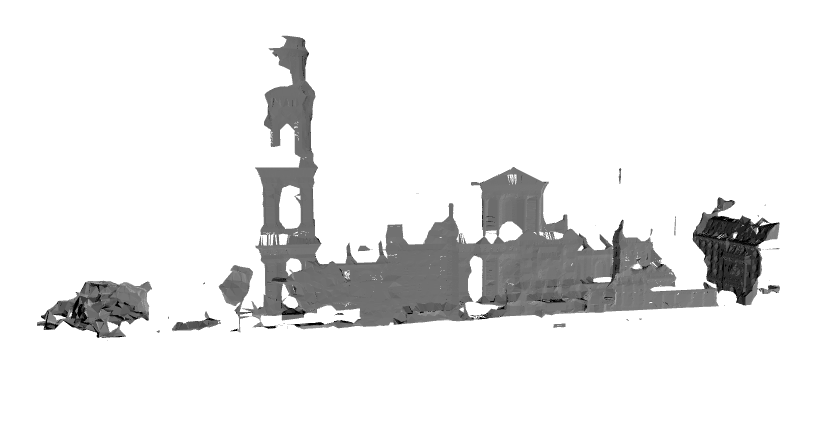
St. Sulpice Point Cloud Data
The following data can be obtained from the Lib E57 example data set found at the link below. To reduce the amount of data included in the alphashape toolbox repository, only a subset of point data was converted to a shapefile format and all data except point locations were dropped.
http://www.libe57.org/data.html

python
import os
import geopandas
data = os.path.join(os.getcwd(), 'data', 'Trimble_StSulpice-Cloud-50mm.shp')
gdf = geopandas.read_file(data)
python
from alphashape import alphashape
alphashape([point.coords[0] for point in gdf['geometry'][0]], 0.7).show()
Credits
This package was created with Cookiecutter and the audreyr/cookiecutter-pypackage project template.
Owner
- Name: Robert Sachunsky
- Login: bertsky
- Kind: user
- Repositories: 114
- Profile: https://github.com/bertsky