https://github.com/bgctw/diffeqr
Solving differential equations in R using DifferentialEquations.jl and the SciML Scientific Machine Learning ecosystem
Science Score: 10.0%
This score indicates how likely this project is to be science-related based on various indicators:
-
○CITATION.cff file
-
○codemeta.json file
-
○.zenodo.json file
-
○DOI references
-
✓Academic publication links
Links to: arxiv.org -
○Academic email domains
-
○Institutional organization owner
-
○JOSS paper metadata
-
○Scientific vocabulary similarity
Low similarity (14.8%) to scientific vocabulary
Last synced: 9 months ago
·
JSON representation
Repository
Solving differential equations in R using DifferentialEquations.jl and the SciML Scientific Machine Learning ecosystem
Statistics
- Stars: 0
- Watchers: 1
- Forks: 0
- Open Issues: 0
- Releases: 0
Fork of SciML/diffeqr
Created over 5 years ago
· Last pushed over 5 years ago
https://github.com/bgctw/diffeqr/blob/master/
# diffeqr
[](https://gitter.im/JuliaDiffEq/Lobby?utm_source=badge&utm_medium=badge&utm_campaign=pr-badge&utm_content=badge)
[](https://github.com/SciML/diffeqr/actions)
diffeqr is a package for solving differential equations in R. It utilizes
[DifferentialEquations.jl](https://diffeq.sciml.ai/dev/) for its core routines
to give high performance solving of ordinary differential equations (ODEs),
stochastic differential equations (SDEs), delay differential equations (DDEs), and
differential-algebraic equations (DAEs) directly in R.
If you have any questions, or just want to chat about solvers/using the package,
please feel free to chat in the [Gitter channel](https://gitter.im/JuliaDiffEq/Lobby?utm_source=badge&utm_medium=badge&utm_campaign=pr-badge&utm_content=badge). For bug reports, feature requests, etc., please submit an issue.
## Installation
[diffeqr is registered into CRAN](https://CRAN.R-project.org/package=diffeqr). Thus to add the package, use:
```R
install.packages("diffeqr")
```
To install the master branch of the package (for developers), use:
```R
devtools::install_github('SciML/diffeqr', build_vignettes=T)
```
Note that the first invocation of
`diffeqr::diffeq_setup()` will install both Julia
and the required packages if they are missing.
If you wish to have it use an existing Julia binary,
make sure that `julia` is found in the path. For more
information see the `julia_setup()` function from
[JuliaCall](https://github.com/Non-Contradiction/JuliaCall).
## Usage
diffeqr provides a direct wrapper over [DifferentialEquations.jl](https://diffeq.sciml.ai).
The namespace is setup so that the standard syntax of Julia translates directly
over to the R environment. There are two things to keep in mind:
1. All DifferentialEquations.jl commands are prefaced by `de$`
2. All commands with a `!` are replaced with `_bang`, for example `solve!` becomes `solve_bang`.
## Ordinary Differential Equation (ODE) Examples
### 1D Linear ODEs
Let's solve the linear ODE `u'=1.01u`. First setup the package:
```R
de <- diffeqr::diffeq_setup()
```
Define the derivative function `f(u,p,t)`.
```R
f <- function(u,p,t) {
return(1.01*u)
}
```
Then we give it an initial condition and a time span to solve over:
```R
u0 <- 1/2
tspan <- c(0., 1.)
```
With those pieces we define the `ODEProblem` and `solve` the ODE:
```R
prob = de$ODEProblem(f, u0, tspan)
sol = de$solve(prob)
```
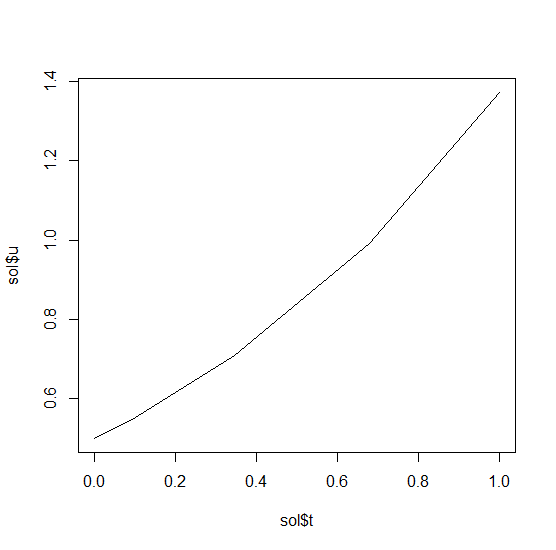
This gives back a solution object for which `sol$t` are the time points
and `sol$u` are the values. We can treat the solution as a continuous object
in time via
```R
sol$.(0.2)
```
and a high order interpolation will compute the value at `t=0.2`. We can check
the solution by plotting it:
```R
plot(sol$t,sol$u,"l")
```
### Systems of ODEs
Now let's solve the Lorenz equations. In this case, our initial condition is a vector and our derivative functions
takes in the vector to return a vector (note: arbitrary dimensional arrays are allowed). We would define this as:
```R
f <- function(u,p,t) {
du1 = p[1]*(u[2]-u[1])
du2 = u[1]*(p[2]-u[3]) - u[2]
du3 = u[1]*u[2] - p[3]*u[3]
return(c(du1,du2,du3))
}
```
Here we utilized the parameter array `p`. Thus we use `diffeqr::ode.solve` like before, but also pass in parameters this time:
```R
u0 <- c(1.0,0.0,0.0)
tspan <- c(0.0,100.0)
p <- c(10.0,28.0,8/3)
prob <- de$ODEProblem(f, u0, tspan, p)
sol <- de$solve(prob)
```
The returned solution is like before except now `sol$u` is an array of arrays,
where `sol$u[i]` is the full system at time `sol$t[i]`. It can be convenient to
turn this into an R matrix through `sapply`:
```R
mat <- sapply(sol$u,identity)
```
This has each row as a time series. `t(mat)` makes each column a time series.
It is sometimes convenient to turn the output into a `data.frame` which is done
via:
```R
udf <- as.data.frame(t(mat))
```
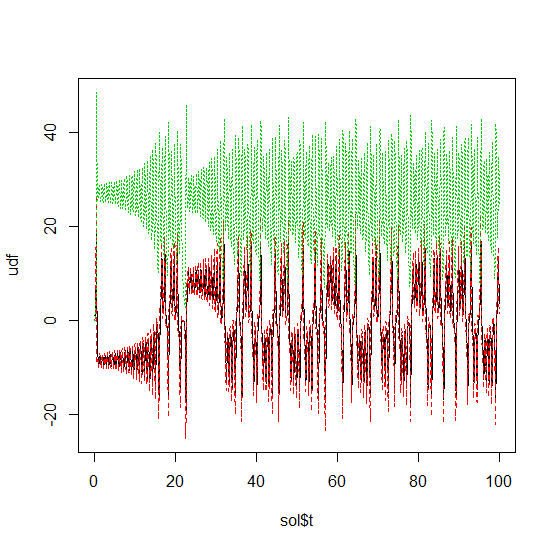
Now we can use `matplot` to plot the timeseries together:
```R
matplot(sol$t,udf,"l",col=1:3)
```
Now we can use the Plotly package to draw a phase plot:
```R
plotly::plot_ly(udf, x = ~V1, y = ~V2, z = ~V3, type = 'scatter3d', mode = 'lines')
```
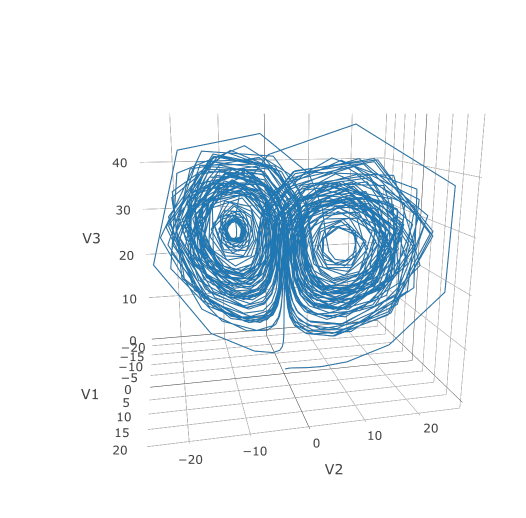
Plotly is much prettier!
### Option Handling
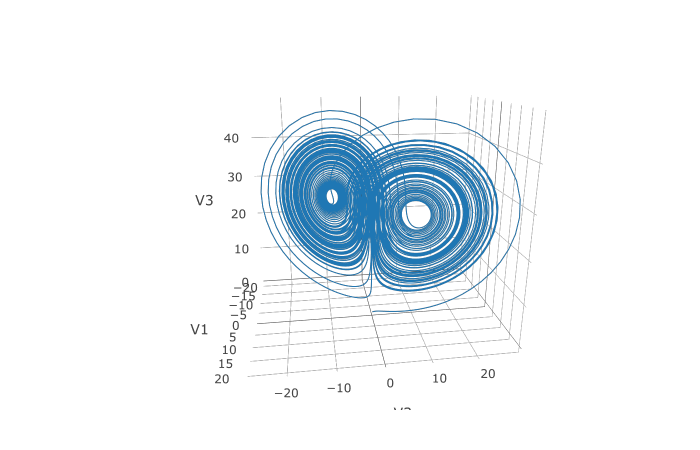
If we want to have a more accurate solution, we can send `abstol` and `reltol`. Defaults are `1e-6` and `1e-3` respectively.
Generally you can think of the digits of accuracy as related to 1 plus the exponent of the relative tolerance, so the default is
two digits of accuracy. Absolute tolernace is the accuracy near 0.
In addition, we may want to choose to save at more time points. We do this by giving an array of values to save at as `saveat`.
Together, this looks like:
```R
abstol <- 1e-8
reltol <- 1e-8
saveat <- 0:10000/100
sol <- de$solve(prob,abstol=abstol,reltol=reltol,saveat=saveat)
udf <- as.data.frame(t(sapply(sol$u,identity)))
plotly::plot_ly(udf, x = ~V1, y = ~V2, z = ~V3, type = 'scatter3d', mode = 'lines')
```
We can also choose to use a different algorithm. The choice is done using a string that matches the Julia syntax. See
[the ODE tutorial for details](https://diffeq.sciml.ai/dev/tutorials/ode_example/#Choosing-a-Solver-Algorithm-1).
The list of choices for ODEs can be found at the [ODE Solvers page](https://diffeq.sciml.ai/dev/solvers/ode_solve/).
For example, let's use a 9th order method due to Verner:
```R
sol <- de$solve(prob,de$Vern9(),abstol=abstol,reltol=reltol,saveat=saveat)
```
Note that each algorithm choice will cause a JIT compilation.
## Performance Enhancements
One way to enhance the performance of your code is to define the function in Julia
so that way it is JIT compiled. diffeqr is built using
[the JuliaCall package](https://github.com/Non-Contradiction/JuliaCall), and so
you can utilize the Julia JIT compiler. We expose this automatically over ODE
functions via `jitoptimize_ode`, like in the following example:
```R
f <- function(u,p,t) {
du1 = p[1]*(u[2]-u[1])
du2 = u[1]*(p[2]-u[3]) - u[2]
du3 = u[1]*u[2] - p[3]*u[3]
return(c(du1,du2,du3))
}
u0 <- c(1.0,0.0,0.0)
tspan <- c(0.0,100.0)
p <- c(10.0,28.0,8/3)
prob <- de$ODEProblem(f, u0, tspan, p)
fastprob <- diffeqr::jitoptimize_ode(de,prob)
sol <- de$solve(fastprob,de$Tsit5())
```
Note that the first evaluation of the function will have an ~2 second lag since
the compiler will run, and all subsequent runs will be orders of magnitude faster
than the pure R function. This means it's great for expensive functions (ex. large
PDEs) or functions called repeatedly, like during optimization of parameters.
We can also use the JuliaCall functions to directly define the function in Julia
to eliminate the R interpreter overhead and get full JIT compilation:
```R
julf <- JuliaCall::julia_eval("
function julf(du,u,p,t)
du[1] = 10.0*(u[2]-u[1])
du[2] = u[1]*(28.0-u[3]) - u[2]
du[3] = u[1]*u[2] - (8/3)*u[3]
end")
JuliaCall::julia_assign("u0", u0)
JuliaCall::julia_assign("p", p)
JuliaCall::julia_assign("tspan", tspan)
prob3 = JuliaCall::julia_eval("ODEProblem(julf, u0, tspan, p)")
sol = de$solve(prob3,de$Tsit5())
```
To demonstrate the performance advantage, let's time them all:
```R
> system.time({ for (i in 1:100){ de$solve(prob ,de$Tsit5()) }})
user system elapsed
6.69 0.06 6.78
> system.time({ for (i in 1:100){ de$solve(fastprob,de$Tsit5()) }})
user system elapsed
0.11 0.03 0.14
> system.time({ for (i in 1:100){ de$solve(prob3 ,de$Tsit5()) }})
user system elapsed
0.14 0.02 0.15
```
This is about a 50x improvement!
#### Limitations of the JIT Compilation
Using Julia's [ModelingToolkit](https://github.com/SciML/ModelingToolkit.jl)
for tracing to JIT compile via Julia has a few known limitations:
- It requires that all of the function calls are tracable. Scalar functions
like `cos` and `sin` all fall into this category. Notably, matrix multiplication
is not supported.
- It will have a compilation lag on the first call.
## Stochastic Differential Equation (SDE) Examples
### 1D SDEs
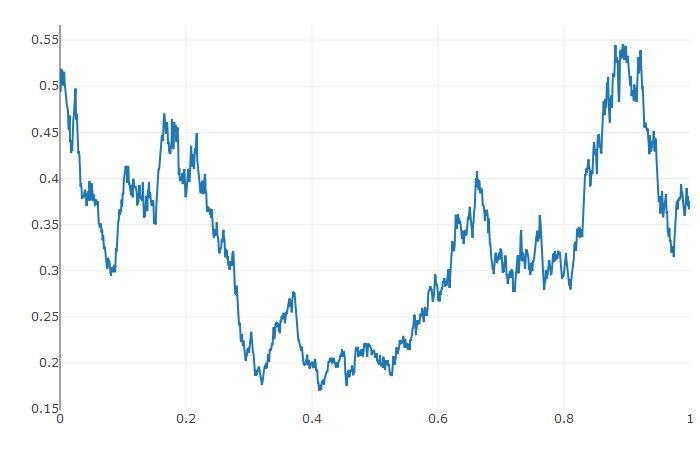
Solving stochastic differential equations (SDEs) is the similar to ODEs. To solve an SDE, you use `diffeqr::sde.solve` and give
two functions: `f` and `g`, where `du = f(u,t)dt + g(u,t)dW_t`
```r
de <- diffeqr::diffeq_setup()
f <- function(u,p,t) {
return(1.01*u)
}
g <- function(u,p,t) {
return(0.87*u)
}
u0 <- 1/2
tspan <- c(0.0,1.0)
prob <- de$SDEProblem(f,g,u0,tspan)
sol <- de$solve(prob)
udf <- as.data.frame(t(sapply(sol$u,identity)))
plotly::plot_ly(udf, x = sol$t, y = sol$u, type = 'scatter', mode = 'lines')
```
### Systems of Diagonal Noise SDEs
Let's add diagonal multiplicative noise to the Lorenz attractor. diffeqr defaults to diagonal noise when a system of
equations is given. This is a unique noise term per system variable. Thus we generalize our previous functions as
follows:
```R
f <- function(u,p,t) {
du1 = p[1]*(u[2]-u[1])
du2 = u[1]*(p[2]-u[3]) - u[2]
du3 = u[1]*u[2] - p[3]*u[3]
return(c(du1,du2,du3))
}
g <- function(u,p,t) {
return(c(0.3*u[1],0.3*u[2],0.3*u[3]))
}
u0 <- c(1.0,0.0,0.0)
tspan <- c(0.0,1.0)
p <- c(10.0,28.0,8/3)
prob <- de$SDEProblem(f,g,u0,tspan,p)
sol <- de$solve(prob,saveat=0.005)
udf <- as.data.frame(t(sapply(sol$u,identity)))
plotly::plot_ly(udf, x = ~V1, y = ~V2, z = ~V3, type = 'scatter3d', mode = 'lines')
```
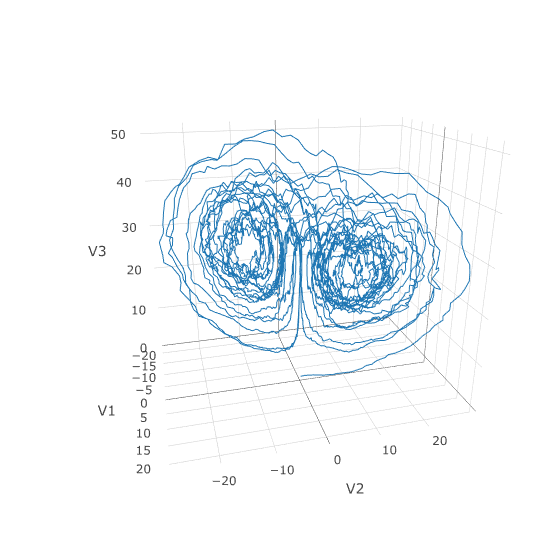
Using a JIT compiled function for the drift and diffusion functions can greatly enhance the speed here.
With the speed increase we can comfortably solve over long time spans:
```R
tspan <- c(0.0,100.0)
prob <- de$SDEProblem(f,g,u0,tspan,p)
fastprob <- diffeqr::jitoptimize_sde(de,prob)
sol <- de$solve(fastprob,saveat=0.005)
udf <- as.data.frame(t(sapply(sol$u,identity)))
plotly::plot_ly(udf, x = ~V1, y = ~V2, z = ~V3, type = 'scatter3d', mode = 'lines')
```
Let's see how much faster the JIT-compiled version was:
```R
> system.time({ for (i in 1:5){ de$solve(prob ) }})
user system elapsed
146.40 0.75 147.22
> system.time({ for (i in 1:5){ de$solve(fastprob) }})
user system elapsed
1.07 0.10 1.17
```
Holy Monster's Inc. that's about 145x faster.
### Systems of SDEs with Non-Diagonal Noise
In many cases you may want to share noise terms across the system. This is known as non-diagonal noise. The
[DifferentialEquations.jl SDE Tutorial](https://diffeq.sciml.ai/dev/tutorials/sde_example/#Example-4:-Systems-of-SDEs-with-Non-Diagonal-Noise-1)
explains how the matrix form of the diffusion term corresponds to the summation style of multiple Wiener processes. Essentially,
the row corresponds to which system the term is applied to, and the column is which noise term. So `du[i,j]` is the amount of
noise due to the `j`th Wiener process that's applied to `u[i]`. We solve the Lorenz system with correlated noise as follows:
```R
f <- JuliaCall::julia_eval("
function f(du,u,p,t)
du[1] = 10.0*(u[2]-u[1])
du[2] = u[1]*(28.0-u[3]) - u[2]
du[3] = u[1]*u[2] - (8/3)*u[3]
end")
g <- JuliaCall::julia_eval("
function g(du,u,p,t)
du[1,1] = 0.3u[1]
du[2,1] = 0.6u[1]
du[3,1] = 0.2u[1]
du[1,2] = 1.2u[2]
du[2,2] = 0.2u[2]
du[3,2] = 0.3u[2]
end")
u0 <- c(1.0,0.0,0.0)
tspan <- c(0.0,100.0)
noise_rate_prototype <- matrix(c(0.0,0.0,0.0,0.0,0.0,0.0), nrow = 3, ncol = 2)
JuliaCall::julia_assign("u0", u0)
JuliaCall::julia_assign("tspan", tspan)
JuliaCall::julia_assign("noise_rate_prototype", noise_rate_prototype)
prob <- JuliaCall::julia_eval("SDEProblem(f, g, u0, tspan, p, noise_rate_prototype=noise_rate_prototype)")
sol <- de$solve(prob)
udf <- as.data.frame(t(sapply(sol$u,identity)))
plotly::plot_ly(udf, x = ~V1, y = ~V2, z = ~V3, type = 'scatter3d', mode = 'lines')
```
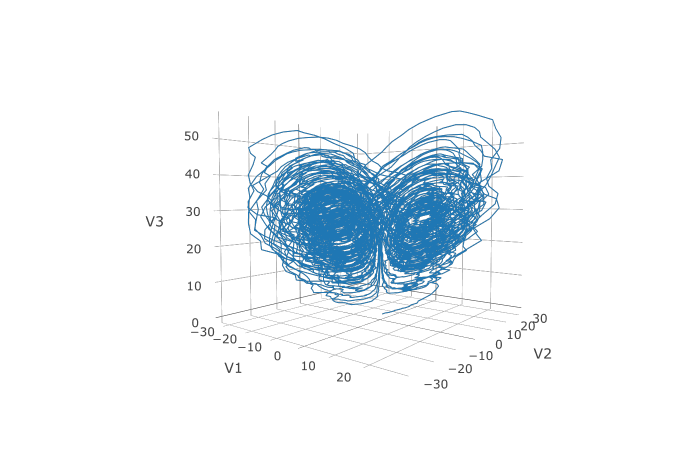
Here you can see that the warping effect of the noise correlations is quite visible!
Note that we applied JIT compilation since it's quite necessary for any difficult
stochastic example.
## Differential-Algebraic Equation (DAE) Examples
A differential-algebraic equation is defined by an implicit function `f(du,u,p,t)=0`. All of the controls are the
same as the other examples, except here you define a function which returns the residuals for each part of the equation
to define the DAE. The initial value `u0` and the initial derivative `du0` are required, though they do not necessarily
have to satisfy `f` (known as inconsistent initial conditions). The methods will automatically find consistent initial
conditions. In order for this to occur, `differential_vars` must be set. This vector states which of the variables are
differential (have a derivative term), with `false` meaning that the variable is purely algebraic.
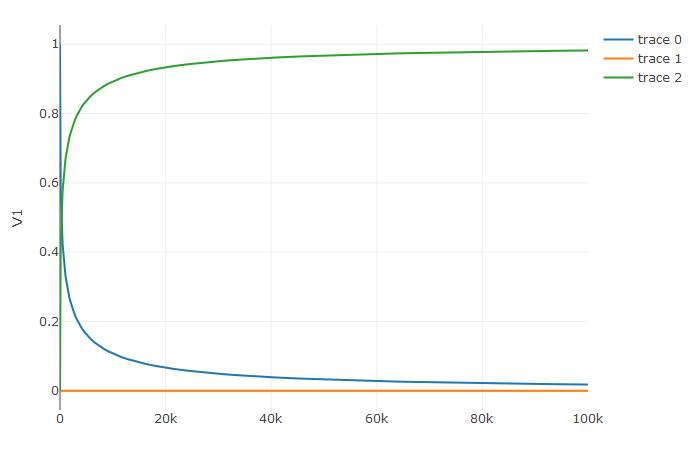
This example shows how to solve the Robertson equation:
```R
f <- function (du,u,p,t) {
resid1 = - 0.04*u[1] + 1e4*u[2]*u[3] - du[1]
resid2 = + 0.04*u[1] - 3e7*u[2]^2 - 1e4*u[2]*u[3] - du[2]
resid3 = u[1] + u[2] + u[3] - 1.0
c(resid1,resid2,resid3)
}
u0 <- c(1.0, 0, 0)
du0 <- c(-0.04, 0.04, 0.0)
tspan <- c(0.0,100000.0)
differential_vars <- c(TRUE,TRUE,FALSE)
prob <- de$DAEProblem(f,du0,u0,tspan,differential_vars=differential_vars)
sol <- de$solve(prob)
udf <- as.data.frame(t(sapply(sol$u,identity)))
plotly::plot_ly(udf, x = sol$t, y = ~V1, type = 'scatter', mode = 'lines') %>%
plotly::add_trace(y = ~V2) %>%
plotly::add_trace(y = ~V3)
```
Additionally, an in-place JIT compiled form for `f` can be used to enhance the speed:
```R
f = JuliaCall::julia_eval("function f(out,du,u,p,t)
out[1] = - 0.04u[1] + 1e4*u[2]*u[3] - du[1]
out[2] = + 0.04u[1] - 3e7*u[2]^2 - 1e4*u[2]*u[3] - du[2]
out[3] = u[1] + u[2] + u[3] - 1.0
end")
u0 <- c(1.0, 0, 0)
du0 <- c(-0.04, 0.04, 0.0)
tspan <- c(0.0,100000.0)
differential_vars <- c(TRUE,TRUE,FALSE)
JuliaCall::julia_assign("du0", du0)
JuliaCall::julia_assign("u0", u0)
JuliaCall::julia_assign("p", p)
JuliaCall::julia_assign("tspan", tspan)
JuliaCall::julia_assign("differential_vars", differential_vars)
prob = JuliaCall::julia_eval("DAEProblem(f, du0, u0, tspan, p, differential_vars=differential_vars)")
sol = de$solve(prob)
```
## Delay Differential Equation (DDE) Examples
A delay differential equation is an ODE which allows the use of previous values. In this case, the function
needs to be a JIT compiled Julia function. It looks just like the ODE, except in this case there is a function
`h(p,t)` which allows you to interpolate and grab previous values.
We must provide a history function `h(p,t)` that gives values for `u` before
`t0`. Here we assume that the solution was constant before the initial time point. Additionally, we pass
`constant_lags = c(20.0)` to tell the solver that only constant-time lags were used and what the lag length
was. This helps improve the solver accuracy by accurately stepping at the points of discontinuity. Together
this is:
```R
f <- JuliaCall::julia_eval("function f(du, u, h, p, t)
du[1] = 1.1/(1 + sqrt(10)*(h(p, t-20)[1])^(5/4)) - 10*u[1]/(1 + 40*u[2])
du[2] = 100*u[1]/(1 + 40*u[2]) - 2.43*u[2]
end")
h <- JuliaCall::julia_eval("function h(p, t)
[1.05767027/3, 1.030713491/3]
end")
u0 <- c(1.05767027/3, 1.030713491/3)
tspan <- c(0.0, 100.0)
constant_lags <- c(20.0)
JuliaCall::julia_assign("u0", u0)
JuliaCall::julia_assign("tspan", tspan)
JuliaCall::julia_assign("constant_lags", tspan)
prob <- JuliaCall::julia_eval("DDEProblem(f, u0, h, tspan, constant_lags = constant_lags)")
sol <- de$solve(prob,de$MethodOfSteps(de$Tsit5()))
udf <- as.data.frame(t(sapply(sol$u,identity)))
plotly::plot_ly(udf, x = sol$t, y = ~V1, type = 'scatter', mode = 'lines') %>% plotly::add_trace(y = ~V2)
```
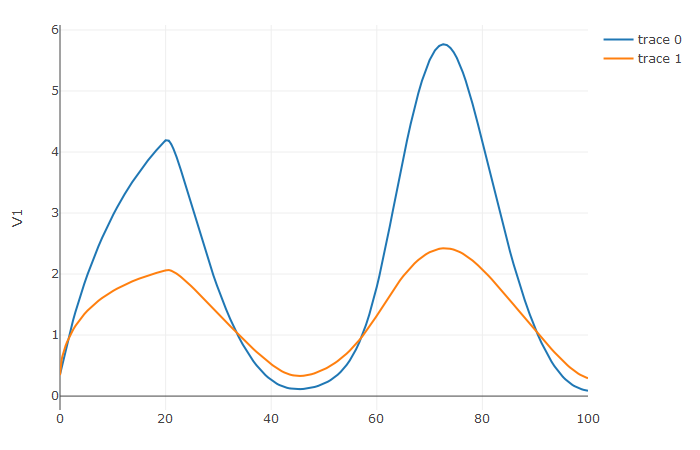
Notice that the solver accurately is able to simulate the kink (discontinuity) at `t=20` due to the discontinuity
of the derivative at the initial time point! This is why declaring discontinuities can enhance the solver accuracy.
## GPU-Accelerated ODE Solving of Ensembles
In many cases one is interested in solving the same ODE many times over many
different initial conditions and parameters. In diffeqr parlance this is called
an ensemble solve. diffeqr inherits the parallelism tools of the
[SciML ecosystem](https://sciml.ai/) that are used for things like
[automated equation discovery and acceleration](https://arxiv.org/abs/2001.04385).
Here we will demonstrate using these parallel tools to accelerate the solving
of an ensemble.
First, let's define the JIT-accelerated Lorenz equation like before:
```R
de <- diffeqr::diffeq_setup()
lorenz <- function (u,p,t){
du1 = p[1]*(u[2]-u[1])
du2 = u[1]*(p[2]-u[3]) - u[2]
du3 = u[1]*u[2] - p[3]*u[3]
c(du1,du2,du3)
}
u0 <- c(1.0,1.0,1.0)
tspan <- c(0.0,100.0)
p <- c(10.0,28.0,8/3)
prob <- de$ODEProblem(lorenz,u0,tspan,p)
fastprob <- diffeqr::jitoptimize_ode(de,prob)
```
Now we use the `EnsembleProblem` as defined on the
[ensemble parallelism page of the documentation](https://diffeq.sciml.ai/stable/features/ensemble/):
Let's build an ensemble by utilizing uniform random numbers to randomize the
initial conditions and parameters:
```R
prob_func <- function (prob,i,rep){
de$remake(prob,u0=runif(3)*u0,p=runif(3)*p)
}
ensembleprob = de$EnsembleProblem(fastprob, prob_func = prob_func, safetycopy=FALSE)
```
Now we solve the ensemble in serial:
```R
sol = de$solve(ensembleprob,de$Tsit5(),de$EnsembleSerial(),trajectories=10000,saveat=0.01)
```
To add GPUs to the mix, we need to bring in [DiffEqGPU](https://github.com/SciML/DiffEqGPU.jl).
The `diffeqr::diffeqgpu_setup()` helper function will install CUDA for you and
bring all of the bindings into the returned object:
```R
degpu <- diffeqr::diffeqgpu_setup()
```
Now we simply use `EnsembleGPUArray()` to solve 10,000 ODEs on the GPU in parallel:
```R
sol <- de$solve(ensembleprob,de$Tsit5(),degpu$EnsembleGPUArray(),trajectories=10000,saveat=0.01)
```
### Benchmark
To see how much of an effect the parallelism has, let's test this against R's
deSolve package. This is exactly the same problem as the documentation example
for deSolve, so let's copy that verbatim and then add a function to do the
ensemble generation:
```R
library(deSolve)
Lorenz <- function(t, state, parameters) {
with(as.list(c(state, parameters)), {
dX <- a * X + Y * Z
dY <- b * (Y - Z)
dZ <- -X * Y + c * Y - Z
list(c(dX, dY, dZ))
})
}
parameters <- c(a = -8/3, b = -10, c = 28)
state <- c(X = 1, Y = 1, Z = 1)
times <- seq(0, 100, by = 0.01)
out <- ode(y = state, times = times, func = Lorenz, parms = parameters)
lorenz_solve <- function (i){
state <- c(X = runif(1), Y = runif(1), Z = runif(1))
parameters <- c(a = -8/3 * runif(1), b = -10 * runif(1), c = 28 * runif(1))
out <- ode(y = state, times = times, func = Lorenz, parms = parameters)
}
```
Using `lapply` to generate the ensemble we get:
```
> system.time({ lapply(1:1000,lorenz_solve) })
user system elapsed
225.81 0.46 226.63
```
Now let's see how the JIT-accelerated serial Julia version stacks up against that:
```
> system.time({ de$solve(ensembleprob,de$Tsit5(),de$EnsembleSerial(),trajectories=1000,saveat=0.01) })
user system elapsed
2.75 0.30 3.08
```
Julia is already about 73x faster than the pure R solvers here! Now let's add
GPU-acceleration to the mix:
```
> system.time({ de$solve(ensembleprob,de$Tsit5(),degpu$EnsembleGPUArray(),trajectories=1000,saveat=0.01) })
user system elapsed
1.33 1.57 2.93
```
That's only around 2x faster. But the GPU acceleartion is made for massively
parallel problems, so let's up the trajectories a bit. We will not use more
trajectories from R because that would take too much computing power, so let's
see what happens to the Julia serial and GPU at 10,000 trajectories:
```
> system.time({ de$solve(ensembleprob,de$Tsit5(),de$EnsembleSerial(),trajectories=10000,saveat=0.01) })
user system elapsed
35.02 4.19 39.25
```
```
> system.time({ de$solve(ensembleprob,de$Tsit5(),degpu$EnsembleGPUArray(),trajectories=10000,saveat=0.01) })
user system elapsed
12.03 3.57 15.60
```
To compare this to the pure Julia code:
```julia
using OrdinaryDiffEq, DiffEqGPU
function lorenz(du,u,p,t)
@inbounds begin
du[1] = p[1]*(u[2]-u[1])
du[2] = u[1]*(p[2]-u[3]) - u[2]
du[3] = u[1]*u[2] - p[3]*u[3]
end
nothing
end
u0 = Float32[1.0;1.0;1.0]
tspan = (0.0f0,100.0f0)
p = [10.0f0,28.0f0,8/3f0]
prob = ODEProblem(lorenz,u0,tspan,p)
prob_func = (prob,i,repeat) -> remake(prob,u0=rand(Float32,3).*u0,p=rand(Float32,3).*p)
monteprob = EnsembleProblem(prob, prob_func = prob_func, safetycopy=false)
@time sol = solve(monteprob,Tsit5(),EnsembleGPUArray(),trajectories=10_000,saveat=0.01f0)
# 9.444439 seconds (22.96 M allocations: 6.464 GiB, 44.53% gc time)
```
which is more than an order of magnitude faster for computing 10,000 trajectories,
note that the major factors are that we cannot define 32-bit floating point values
from R and the `prob_func` for generating the initial conditions and parameters
is a major bottleneck since this function is written in R.
To see how this scales in Julia, let's take it to insane heights. First, let's
reduce the amount we're saving:
```julia
@time sol = solve(monteprob,Tsit5(),EnsembleGPUArray(),trajectories=10_000,saveat=1.0f0)
# 0.801215 seconds (1.66 M allocations: 133.846 MiB)
```
This highlights that controlling memory pressure is key with GPU usage: you will
get much better performance when requiring less saved points on the GPU.
```julia
@time sol = solve(monteprob,Tsit5(),EnsembleGPUArray(),trajectories=100_000,saveat=1.0f0)
# 1.871536 seconds (6.66 M allocations: 919.521 MiB, 2.48% gc time)
```
compared to serial:
```julia
@time sol = solve(monteprob,Tsit5(),EnsembleSerial(),trajectories=100_000,saveat=1.0f0)
# 22.136743 seconds (16.40 M allocations: 1.628 GiB, 42.98% gc time)
```
And now we start to see that scaling power! Let's solve 1 million trajectories:
```julia
@time sol = solve(monteprob,Tsit5(),EnsembleGPUArray(),trajectories=1_000_000,saveat=1.0f0)
# 25.234710 seconds (56.53 M allocations: 8.579 GiB, 51.61% gc time)
```
For reference, let's look at deSolve with the change to only save that much:
```R
times <- seq(0, 100, by = 1.0)
lorenz_solve <- function (i){
state <- c(X = runif(1), Y = runif(1), Z = runif(1))
parameters <- c(a = -8/3 * runif(1), b = -10 * runif(1), c = 28 * runif(1))
out <- ode(y = state, times = times, func = Lorenz, parms = parameters)
}
system.time({ lapply(1:1000,lorenz_solve) })
```
The GPU version is solving 1000x as many trajectories, 2x as fast! So conclusion,
if you need the most speed, you may want to move to the Julia version to get the
most out of your GPU due to Float32's, and when using GPUs make sure it's a problem
with a relatively average or low memory pressure, and these methods will give
orders of magnitude acceleration compared to what you might be used to.
Owner
- Name: Thomas Wutzler
- Login: bgctw
- Kind: user
- Repositories: 54
- Profile: https://github.com/bgctw