https://github.com/bit-bots/depth-estimation
Science Score: 10.0%
This score indicates how likely this project is to be science-related based on various indicators:
-
○CITATION.cff file
-
○codemeta.json file
-
○.zenodo.json file
-
○DOI references
-
✓Academic publication links
Links to: arxiv.org -
○Academic email domains
-
○Institutional organization owner
-
○JOSS paper metadata
-
○Scientific vocabulary similarity
Low similarity (8.4%) to scientific vocabulary
Last synced: 10 months ago
·
JSON representation
Repository
Basic Info
- Host: GitHub
- Owner: bit-bots
- License: gpl-3.0
- Language: Python
- Default Branch: master
- Size: 90.8 KB
Statistics
- Stars: 1
- Watchers: 15
- Forks: 0
- Open Issues: 0
- Releases: 0
Created over 4 years ago
· Last pushed about 4 years ago
https://github.com/bit-bots/depth-estimation/blob/master/
# Supervised Depth Estimation with PyTorch
Original Repo: https://github.com/milesial/Pytorch-UNet
## Description
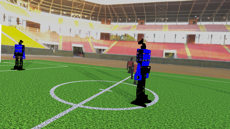
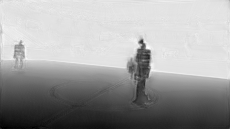
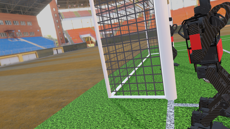
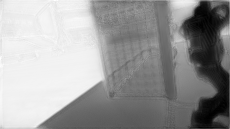
This model was trained from scratch with the simulation part of the [TORSO-21 Dataset](https://github.com/bit-bots/TORSO_21_dataset) and predicts dense absolute depth estimations.
## Usage
### Training
```console
> python train.py -h
usage: train.py [-h] [--epochs E] [--batch-size B] [--learning-rate LR]
[--load LOAD] [--scale SCALE] [--validation VAL] [--amp]
Train the UNet on images and target masks
optional arguments:
-h, --help show this help message and exit
--epochs E, -e E Number of epochs
--batch-size B, -b B Batch size
--learning-rate LR, -l LR
Learning rate
--load LOAD, -f LOAD Load model from a .pth file
--scale SCALE, -s SCALE
Downscaling factor of the images
--validation VAL, -v VAL
Percent of the data that is used as validation (0-100)
--amp Use mixed precision
```
By default, the `scale` is 0.5, so if you wish to obtain better results (but use more memory), set it to 1.
Automatic mixed precision is also available with the `--amp` flag. [Mixed precision](https://arxiv.org/abs/1710.03740) allows the model to use less memory and to be faster on recent GPUs by using FP16 arithmetic. Enabling AMP is recommended.
### Prediction
After training your model and saving it to `MODEL.pth`, you can easily test the output masks on your images via the CLI.
To predict a single image and save it:
`python predict.py -i image.jpg -o output.jpg`
To predict a multiple images and show them without saving them:
`python predict.py -i image1.jpg image2.jpg --viz --no-save`
```console
> python predict.py -h
usage: predict.py [-h] [--model FILE] --input INPUT [INPUT ...]
[--output INPUT [INPUT ...]] [--viz] [--no-save]
[--mask-threshold MASK_THRESHOLD] [--scale SCALE]
Predict masks from input images
optional arguments:
-h, --help show this help message and exit
--model FILE, -m FILE
Specify the file in which the model is stored
--input INPUT [INPUT ...], -i INPUT [INPUT ...]
Filenames of input images
--output INPUT [INPUT ...], -o INPUT [INPUT ...]
Filenames of output images
--viz, -v Visualize the images as they are processed
--no-save, -n Do not save the output masks
--mask-threshold MASK_THRESHOLD, -t MASK_THRESHOLD
Minimum probability value to consider a mask pixel white
--scale SCALE, -s SCALE
Scale factor for the input images
```
You can specify which model file to use with `--model MODEL.pth`.
## Weights & Biases
The training progress can be visualized in real-time using [Weights & Biases](https://wandb.ai/). Loss curves, validation curves, weights and gradient histograms, as well as predicted masks are logged to the platform.
When launching a training, a link will be printed in the console. Click on it to go to your dashboard. If you have an existing W&B account, you can link it
by setting the `WANDB_API_KEY` environment variable.
---
Original U-Net paper by Olaf Ronneberger, Philipp Fischer, Thomas Brox:
[U-Net: Convolutional Networks for Biomedical Image Segmentation](https://arxiv.org/abs/1505.04597)

Owner
- Name: Hamburg Bit-Bots
- Login: bit-bots
- Kind: organization
- Location: Hamburg
- Website: https://www.bit-bots.de
- Repositories: 85
- Profile: https://github.com/bit-bots
Official Github account of Hamburg Bit-Bots
GitHub Events
Total
Last Year
Dependencies
Dockerfile
docker
- nvcr.io/nvidia/pytorch 21.06-py3 build
requirements.txt
pypi
- Pillow *
- albumentations *
- kornia *
- matplotlib *
- numpy *
- opencv-python *
- optuna *
- torch *
- torchvision *
- tqdm *
- wandb *