https://github.com/bjoernellens1/ros2_code
Science Score: 26.0%
This score indicates how likely this project is to be science-related based on various indicators:
-
○CITATION.cff file
-
✓codemeta.json file
Found codemeta.json file -
✓.zenodo.json file
Found .zenodo.json file -
○DOI references
-
○Academic publication links
-
○Committers with academic emails
-
○Institutional organization owner
-
○JOSS paper metadata
-
○Scientific vocabulary similarity
Low similarity (12.3%) to scientific vocabulary
Repository
Basic Info
- Host: GitHub
- Owner: bjoernellens1
- License: apache-2.0
- Language: Dockerfile
- Default Branch: humble
- Size: 12.7 KB
Statistics
- Stars: 0
- Watchers: 1
- Forks: 0
- Open Issues: 3
- Releases: 0
Metadata Files
README.md
VSCode ROS2 Workspace Template
This template will get you set up using ROS2 with VSCode as your IDE.
See how I develop with vscode and ros2 for a more in-depth look on how to use this workspace.
Features
Style
ROS2-approved formatters are included in the IDE.
- c++ uncrustify; config from
ament_uncrustify - python autopep8; vscode settings consistent with the style guide
Tasks
There are many pre-defined tasks, see .vscode/tasks.json for a complete listing. Feel free to adjust them to suit your needs.
Take a look at how I develop using tasks for an idea on how I use tasks in my development.
Debugging
This template sets up debugging for python files, gdb for cpp programs and ROS launch files. See .vscode/launch.json for configuration details.
Continuous Integration
The template also comes with basic continuous integration set up. See .github/workflows/ros.yaml.
To remove a linter just delete it's name from this line:
yaml
      matrix:
          linter: [cppcheck, cpplint, uncrustify, lint_cmake, xmllint, flake8, pep257]
How to use this template
Prerequisites
You should already have Docker and VSCode with the remote containers plugin installed on your system.
Get the template
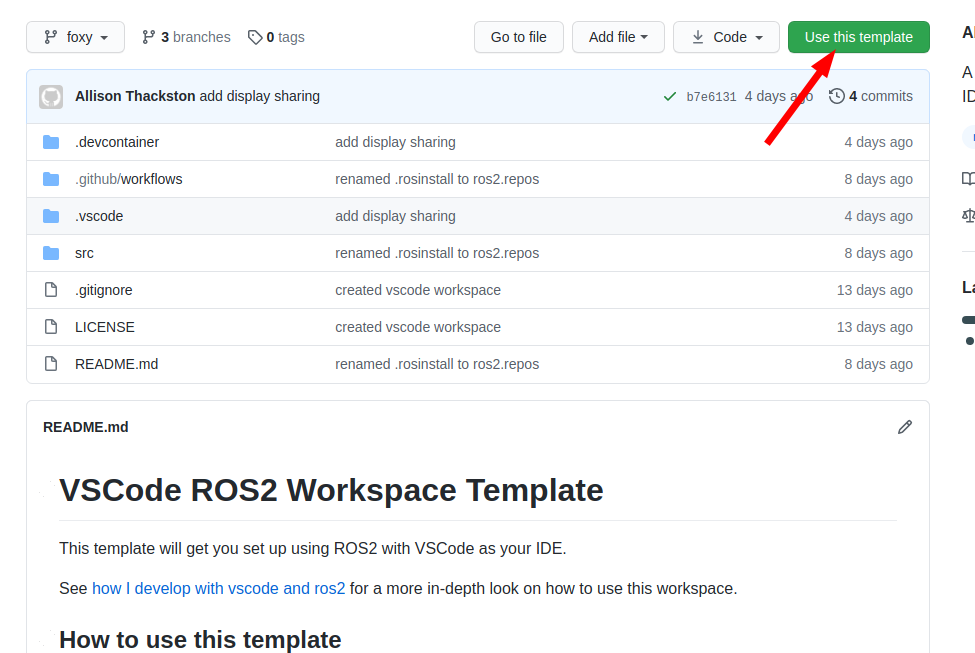
Click on "use this template"
Create your repository
On the next dialog, name the repository you would like to start and decide if you want all of the branches, or just the latest LTS: humble.
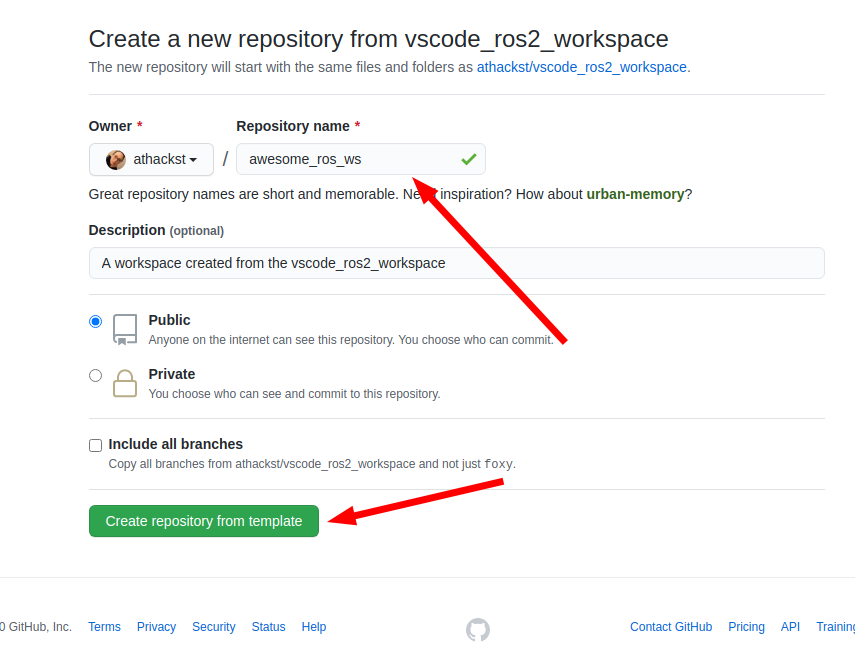
Github will then create a new repository with the contents of this one in your account. It grabs the latest changes as "initial commit".
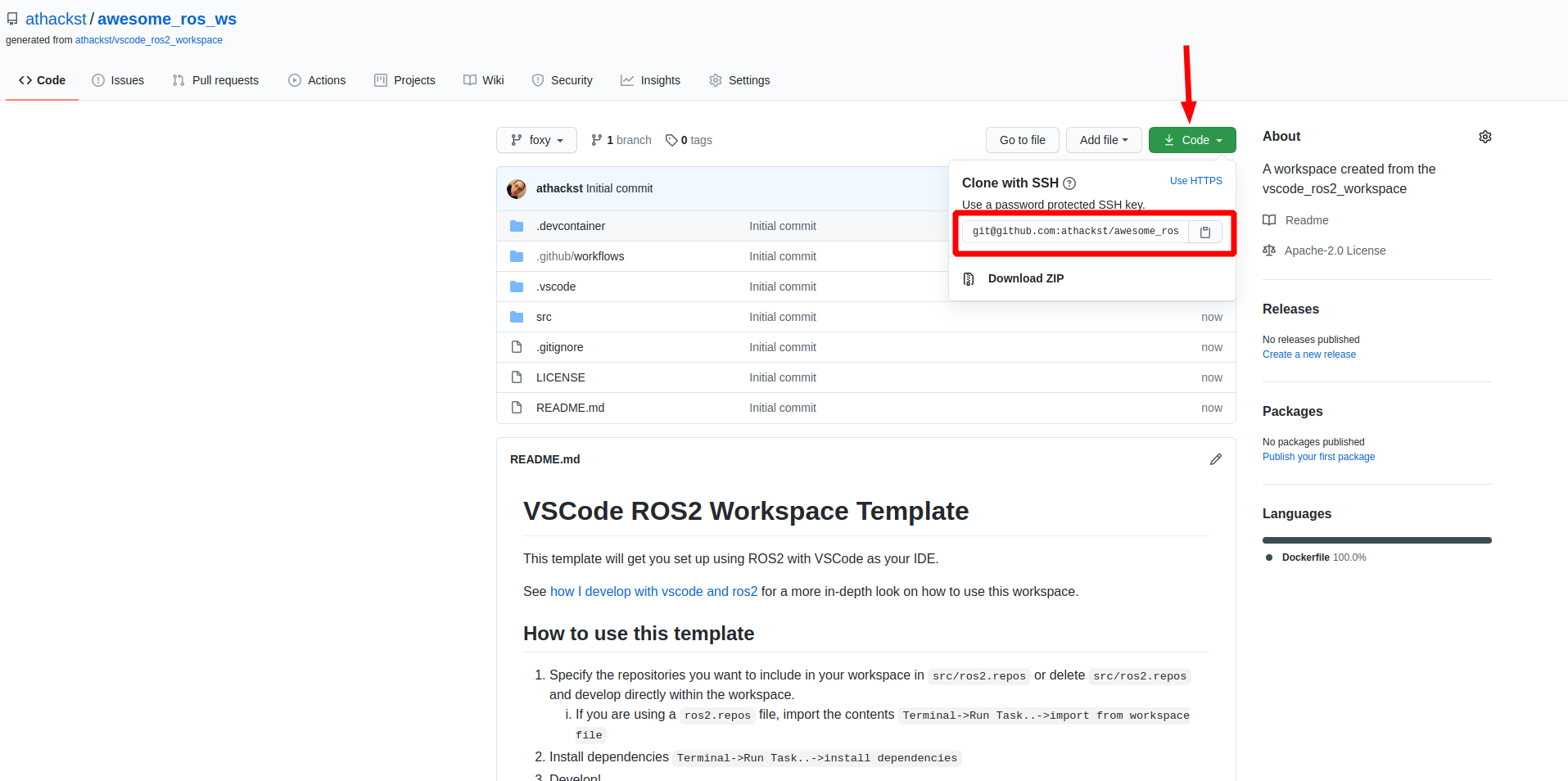
Clone your repo
Now you can clone your repo as normal
Open it in vscode
Now that you've cloned your repo onto your computer, you can open it in VSCode (File->Open Folder).
When you open it for the first time, you should see a little popup that asks you if you would like to open it in a container. Say yes!
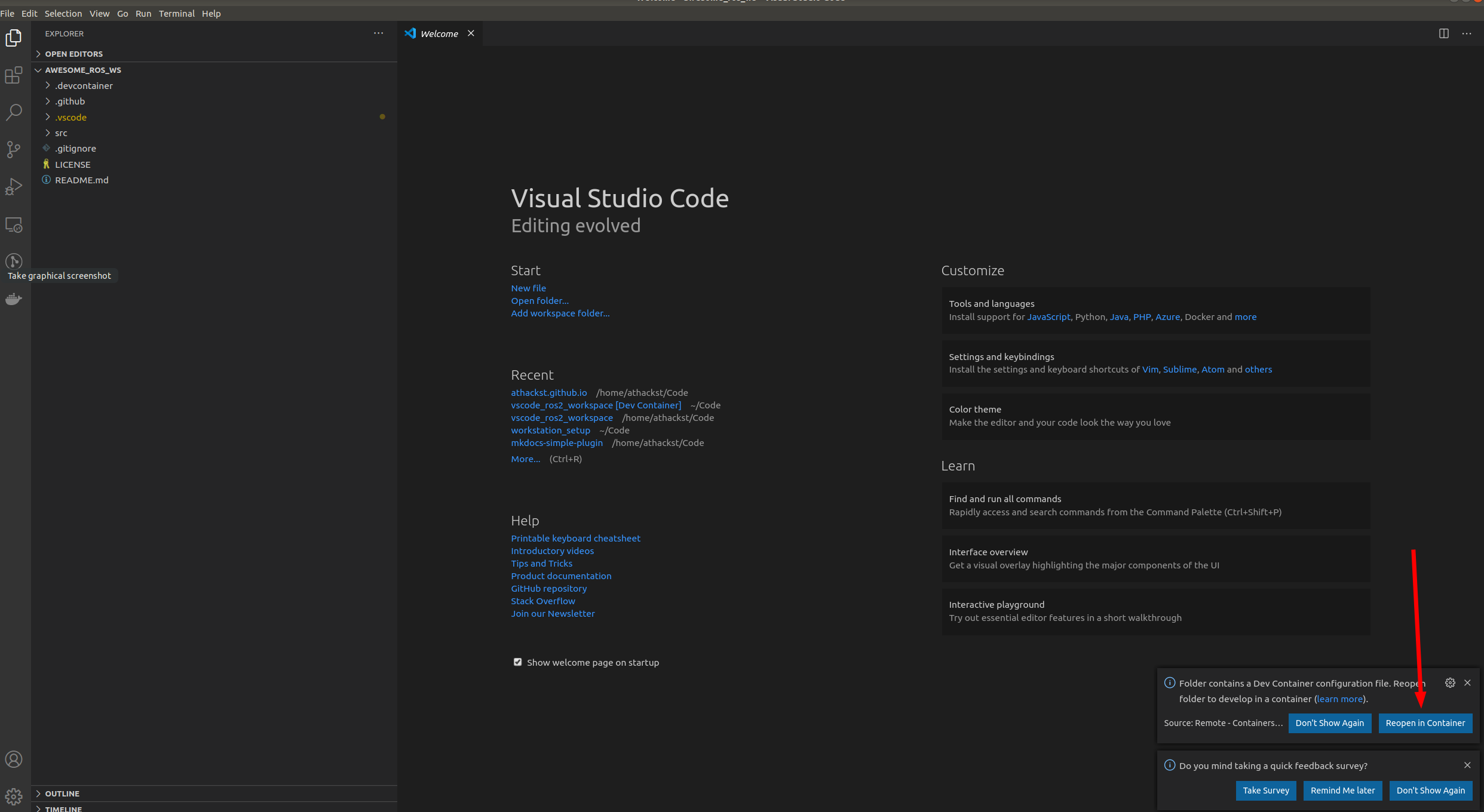
If you don't see the pop-up, click on the little green square in the bottom left corner, which should bring up the container dialog
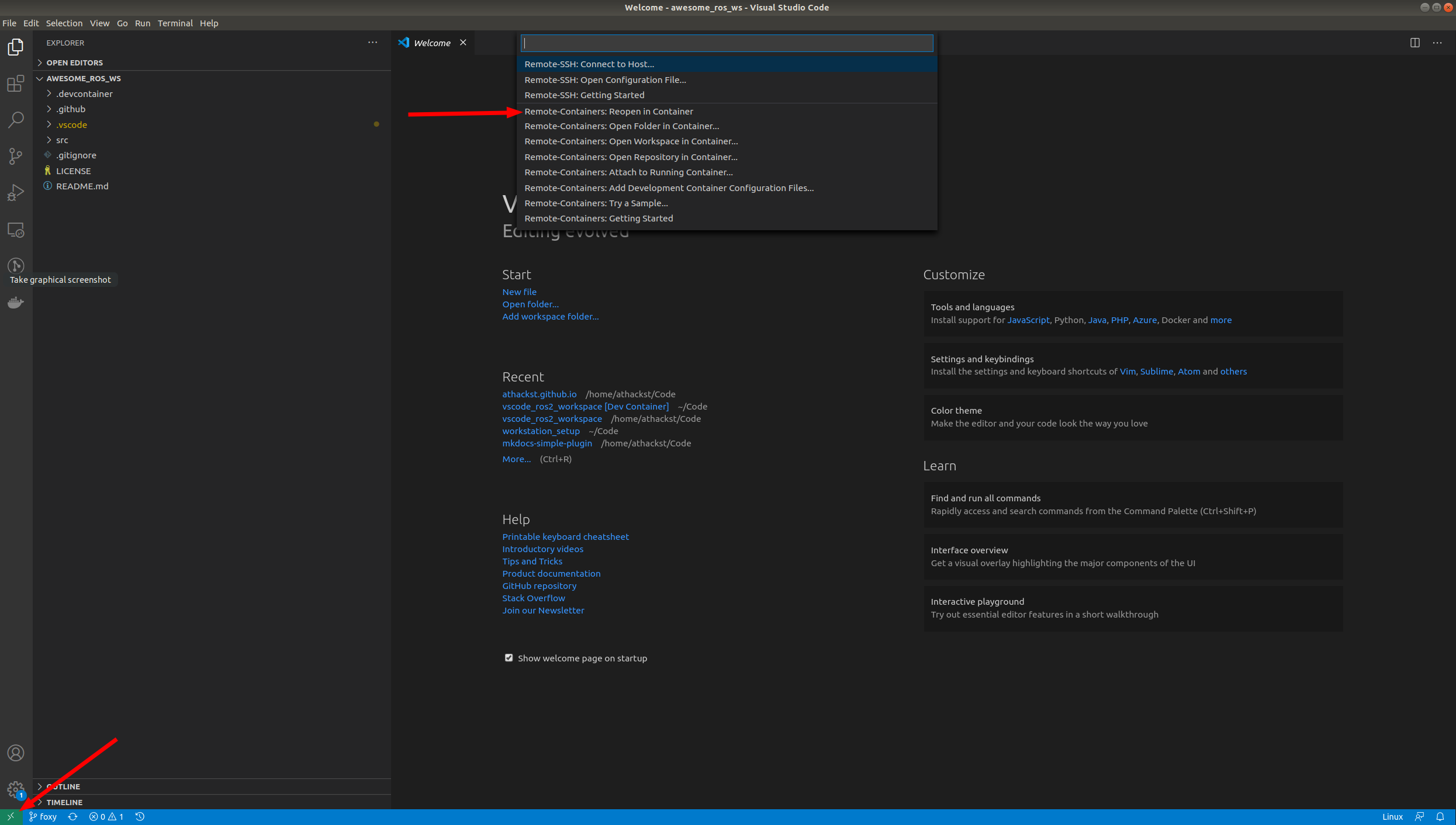
In the dialog, select "Remote Containers: Reopen in container"
VSCode will build the dockerfile inside of .devcontainer for you. If you open a terminal inside VSCode (Terminal->New Terminal), you should see that your username has been changed to ros, and the bottom left green corner should say "Dev Container"
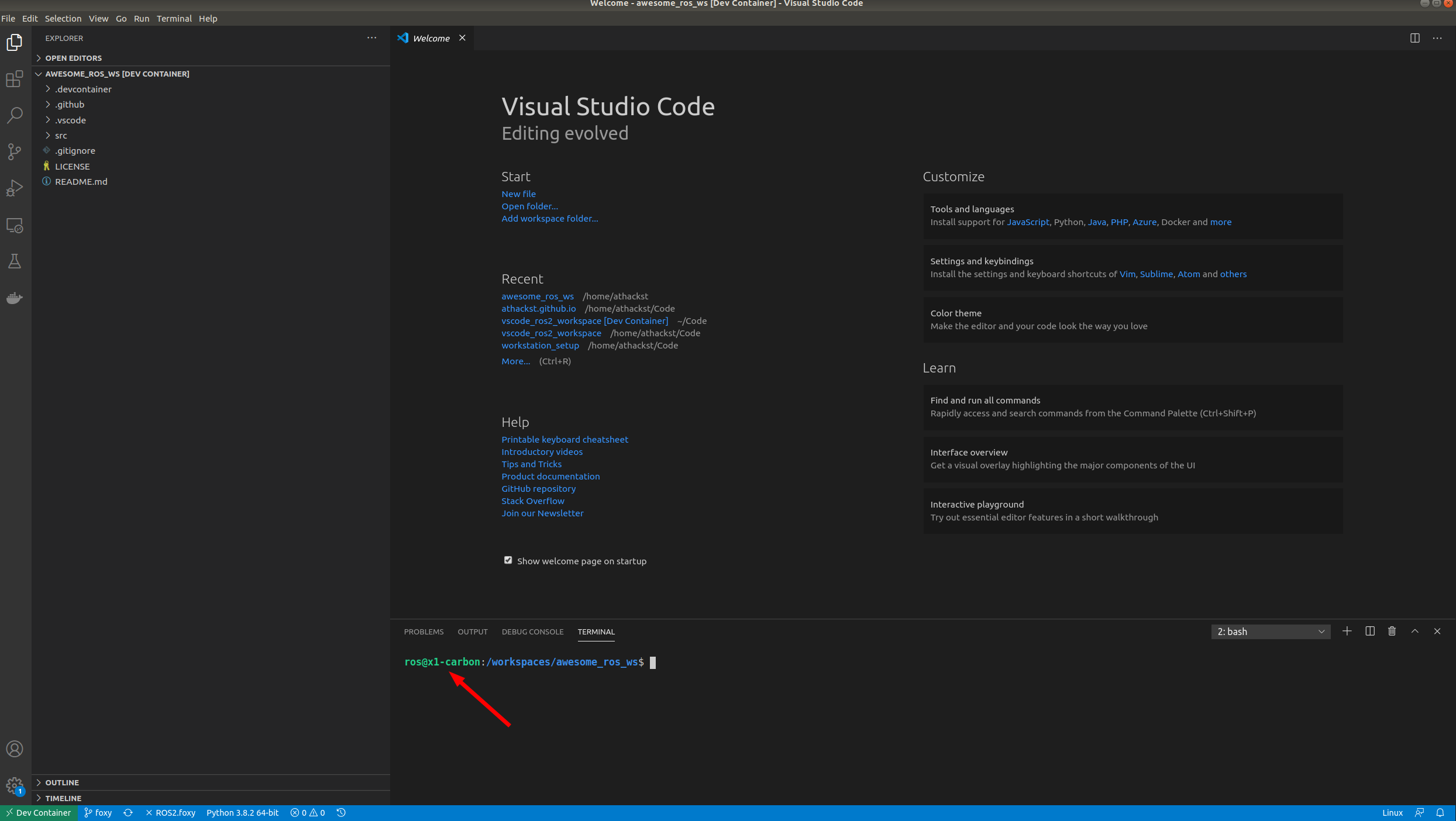
Update the template with your code
- Specify the repositories you want to include in your workspace in
src/ros2.reposor deletesrc/ros2.reposand develop directly within the workspace. - If you are using a
ros2.reposfile, import the contentsTerminal->Run Task..->import from workspace file - Install dependencies
Terminal->Run Task..->install dependencies - (optional) Adjust scripts to your liking. These scripts are used both within tasks and CI.
setup.shThe setup commands for your code. Default to import workspace and install dependencies.build.shThe build commands for your code. Default to--merge-installand--symlink-installtest.shThe test commands for your code.
- Develop!
FAQ
WSL2
The gui doesn't show up
This is likely because the DISPLAY environment variable is not getting set properly.
Find out what your DISPLAY variable should be
In your WSL2 Ubuntu instance
echo $DISPLAYCopy that value into the
.devcontainer/devcontainer.jsonfilejsonc "containerEnv": { "DISPLAY": ":0", }
I want to use vGPU
If you want to access the vGPU through WSL2, you'll need to add additional components to the .devcontainer/devcontainer.json file in accordance to these directions
jsonc
    "runArgs": [
        "--network=host",
        "--cap-add=SYS_PTRACE",
        "--security-opt=seccomp:unconfined",
        "--security-opt=apparmor:unconfined",
        "--volume=/tmp/.X11-unix:/tmp/.X11-unix",
        "--volume=/mnt/wslg:/mnt/wslg",
        "--volume=/usr/lib/wsl:/usr/lib/wsl",
        "--device=/dev/dxg",
            "--gpus=all"
    ],
    "containerEnv": {
        "DISPLAY": "${localEnv:DISPLAY}", // Needed for GUI try ":0" for windows
        "WAYLAND_DISPLAY": "${localEnv:WAYLAND_DISPLAY}",
        "XDG_RUNTIME_DIR": "${localEnv:XDG_RUNTIME_DIR}",
        "PULSE_SERVER": "${localEnv:PULSE_SERVER}",
        "LD_LIBRARY_PATH": "/usr/lib/wsl/lib",
        "LIBGL_ALWAYS_SOFTWARE": "1" // Needed for software rendering of opengl
    },
Owner
- Login: bjoernellens1
- Kind: user
- Repositories: 2
- Profile: https://github.com/bjoernellens1
GitHub Events
Total
- Delete event: 1
- Pull request event: 2
Last Year
- Delete event: 1
- Pull request event: 2
Issues and Pull Requests
Last synced: 11 months ago
All Time
- Total issues: 0
- Total pull requests: 2
- Average time to close issues: N/A
- Average time to close pull requests: N/A
- Total issue authors: 0
- Total pull request authors: 2
- Average comments per issue: 0
- Average comments per pull request: 0.0
- Merged pull requests: 0
- Bot issues: 0
- Bot pull requests: 2
Past Year
- Issues: 0
- Pull requests: 2
- Average time to close issues: N/A
- Average time to close pull requests: N/A
- Issue authors: 0
- Pull request authors: 2
- Average comments per issue: 0
- Average comments per pull request: 0.0
- Merged pull requests: 0
- Bot issues: 0
- Bot pull requests: 2
Top Authors
Issue Authors
Pull Request Authors
- dependabot[bot] (1)
- renovate[bot] (1)