https://github.com/blaylockbk/vscode-met-syntax
Syntax highlighting for Model Evaluation Tools (MET) config files in VS Code
Science Score: 26.0%
This score indicates how likely this project is to be science-related based on various indicators:
-
○CITATION.cff file
-
✓codemeta.json file
Found codemeta.json file -
✓.zenodo.json file
Found .zenodo.json file -
○DOI references
-
○Academic publication links
-
○Academic email domains
-
○Institutional organization owner
-
○JOSS paper metadata
-
○Scientific vocabulary similarity
Low similarity (10.5%) to scientific vocabulary
Keywords
Repository
Syntax highlighting for Model Evaluation Tools (MET) config files in VS Code
Basic Info
- Host: GitHub
- Owner: blaylockbk
- License: mit
- Default Branch: main
- Homepage: https://marketplace.visualstudio.com/items?itemName=brian-blaylock.met-syntax
- Size: 5.45 MB
Statistics
- Stars: 3
- Watchers: 1
- Forks: 1
- Open Issues: 1
- Releases: 2
Topics
Metadata Files
README.md





My first ever VS Code extension 😁 inspired by vscode-cylc, mplstyle, and magic-python.
This is not an extension developed by DTC. I'm just a MET user.
About
MET syntax is a VS Code extension for basic syntax highlighting of Model Evaluation Tools (MET) configuration files.
Syntax highlighting can help you visually understand MET configuration file structure and help you catch errors. The following are highlighted:
- comments
- strings
- environment variables (i.e.,
${ENV_VAR}) - numbers
- keywords (TRUE, FALSE, NONE, UNION, NA, SQUARE, etc.).
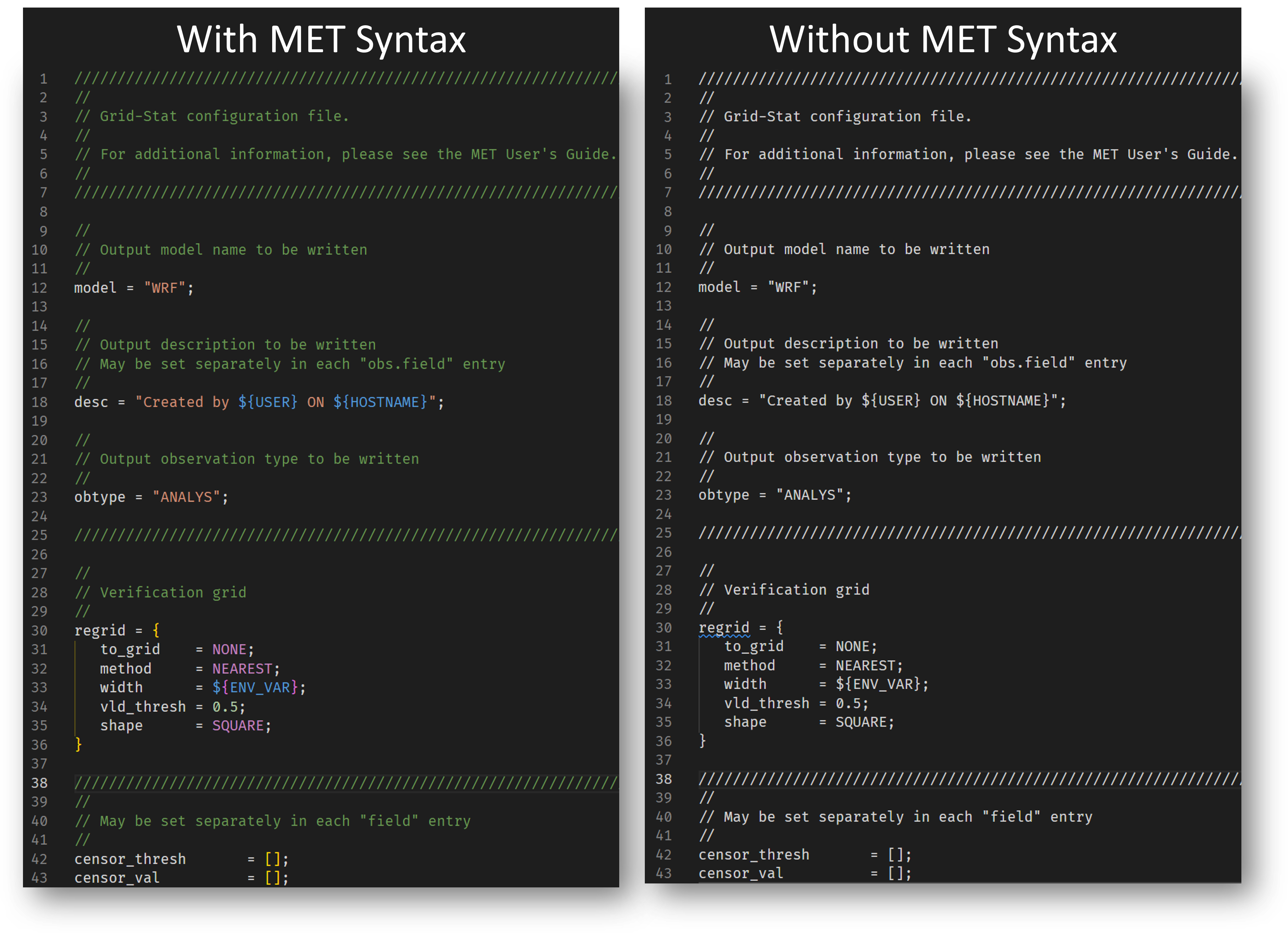
Highlighting is applied to files with the extension .metconfig and to files with the following filename patterns:
*PointStatConfig**GridStatConfig**EnsembleStatConfig**MODEAnalysisConfig**PB2NCConfig**STATAnalysisConfig**WaveletStatConfig*
For any other files, you should manually set the file association in your settings. For example,
json
"files.associations": {
    "myMETConfigFile": "metconfig",
}
Install
Install from the VS Code Marketplace.
Or, you can clone this repository into your ~/.vscode/extensions/ folder.
Potential Improvements
This is my first VS Code extension. I threw this together quickly after watching a tutorial, but there is potential with this extension to do so much more! If you want to make improvements, your pull requests are welcomed.
- snippets
- code validation
- code completion
- highlighting for METplus wrapper files
Enjoy!
- Brian Blaylock
Owner
- Name: Brian Blaylock
- Login: blaylockbk
- Kind: user
- Location: Monterey, CA
- Website: http://home.chpc.utah.edu/~u0553130/Brian_Blaylock/home.html
- Twitter: blaylockbk
- Repositories: 45
- Profile: https://github.com/blaylockbk
Meteorologist
GitHub Events
Total
Last Year
Issues and Pull Requests
Last synced: over 1 year ago
All Time
- Total issues: 4
- Total pull requests: 1
- Average time to close issues: 17 days
- Average time to close pull requests: less than a minute
- Total issue authors: 1
- Total pull request authors: 1
- Average comments per issue: 1.0
- Average comments per pull request: 0.0
- Merged pull requests: 1
- Bot issues: 0
- Bot pull requests: 0
Past Year
- Issues: 0
- Pull requests: 0
- Average time to close issues: N/A
- Average time to close pull requests: N/A
- Issue authors: 0
- Pull request authors: 0
- Average comments per issue: 0
- Average comments per pull request: 0
- Merged pull requests: 0
- Bot issues: 0
- Bot pull requests: 0
Top Authors
Issue Authors
- blaylockbk (4)
Pull Request Authors
- blaylockbk (1)