https://github.com/bluegreen-labs/lucas_landscape_elements
Machine learning LUCAS landscape elements (demo project)
Science Score: 36.0%
This score indicates how likely this project is to be science-related based on various indicators:
-
○CITATION.cff file
-
✓codemeta.json file
Found codemeta.json file -
○.zenodo.json file
-
✓DOI references
Found 3 DOI reference(s) in README -
✓Academic publication links
Links to: zenodo.org -
○Academic email domains
-
○Institutional organization owner
-
○JOSS paper metadata
-
○Scientific vocabulary similarity
Low similarity (15.2%) to scientific vocabulary
Repository
Machine learning LUCAS landscape elements (demo project)
Basic Info
Statistics
- Stars: 1
- Watchers: 2
- Forks: 1
- Open Issues: 0
- Releases: 1
Metadata Files
README.md

A minimal worked example using LUCAS data
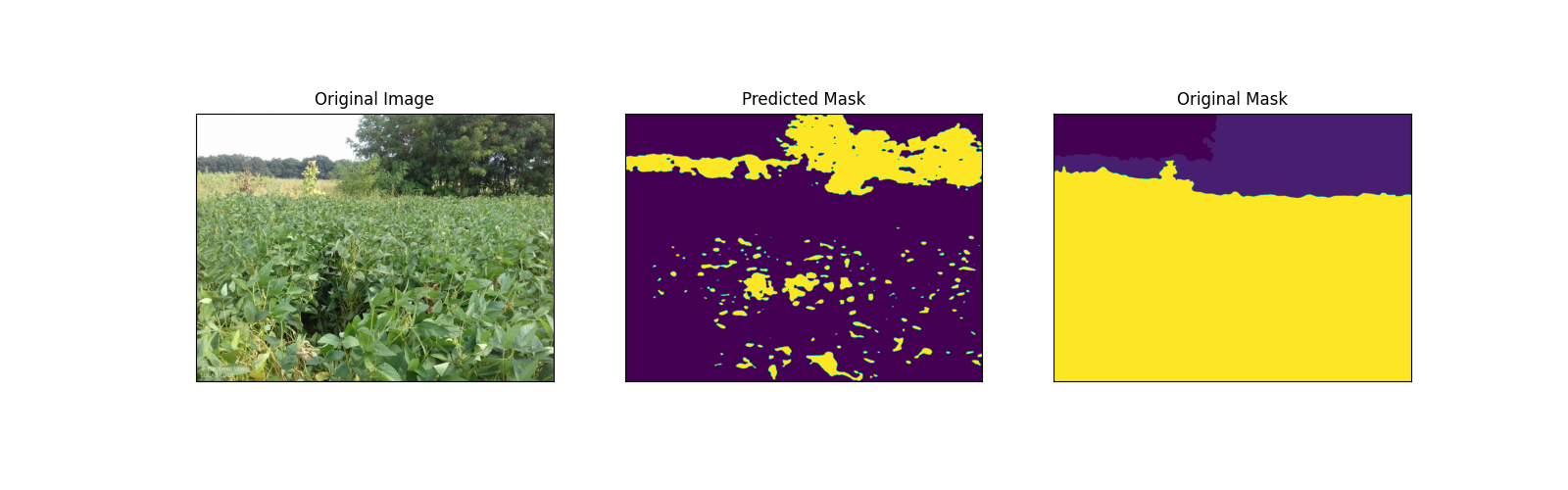
This is worked example using data sourced from the Land Use and Coverage Area frame Survey (LUCAS) data set, following a strict sampling and acquisition protocol. Landscape objects and elements were fully delineated on the street (eye) level landscape images and can provide critical context for land-use and land-cover assessments and comparison to satellite remote sensing data.
This worked example provides a single class segmentation example framework which should be easily expanded to multiclass problems. The code relies on pytorch and the Lightning modelling framework. Environment and Docker files are provided to ease code deployment.
Setting up your python environment
Run the following code from the terminal to set up your repository and conda environment. Make sure that miniconda and python are installed prior.
bash
conda env create -f environment.yml --name mlenv
conda activate mlenv
Docker
An isolated, self-contained environment can be created using the provided Dockerfile.
```
In the main project directory run
docker build -f Dockerfile -t mlenv . ```
Data will be mounted in the docker virtual machine at /workspace and is fully accessible (writing and reading of files on your local file system), using the following command.
docker run -it --rm -v "${PWD}":/workspace/ mlenv
Loading the required data
Download the data in the main project directory in the data/ directory.
The data used in this project can be downladed in:
- Raw data : (https://data.jrc.ec.europa.eu/dataset/adace32a-465f-412b-bc11-be1bc06322d3)
- Raw data, ML data :(https://beta.source.coop/repositories/jrc-lucas/jrc-lucas-ml/description/)
We recommend to use the second link and copy the contents of ml_data to the data folder.
The structure of the data should be:
├── data
│   ├── ml_data        <- name of the folder with the images and masks
│   │   ├── images     <- images folder
│   │   └── masks      <- mask folder
Using the data/prepare_data.py script divide the data in a train, validation and test datasets. This split will be written as a data.json file in the directory containing the list of this split, the original data will not be moved. the script requires to set the path to the images and masks and the csv containing the labels of the masks.
bash
./prepare_data.py -i ./ml_data/ -l ./classes_dataset.csv
Training and testing the model
Use the src/train.py script to train the model. The script requires a number of parameters, the path to the data.json file, the location where to store the model and a trigger to set it to train, i.e. "train".
bash
./train.py -d ../data/ml_data/ -m ./models/deeplab_config.json -o ../models/ --train
The data can be tested using the "test" trigger.
bash
./train.py -d ../data/ml_data/ -m ./models/deeplab_config.json -o ../models/ --test
Inference an image
Use the src/inference.py script to inference.
bash
./inference.py -i ../data/ml_data/path_image.jpg -m ./models/deeplab_config.json -c ../models.lst.ckpt  -o ../plots/
Owner
- Name: BlueGreen Labs
- Login: bluegreen-labs
- Kind: organization
- Email: info@bluegreenlabs.org
- Location: Melsele, Belgium
- Website: http://bluegreenlabs.org
- Repositories: 17
- Profile: https://github.com/bluegreen-labs
BlueGreen open science labs & consulting, providing environmental research infrastructure and editorial solutions.
GitHub Events
Total
Last Year
Issues and Pull Requests
Last synced: over 1 year ago
All Time
- Total issues: 0
- Total pull requests: 4
- Average time to close issues: N/A
- Average time to close pull requests: about 11 hours
- Total issue authors: 0
- Total pull request authors: 1
- Average comments per issue: 0
- Average comments per pull request: 0.5
- Merged pull requests: 3
- Bot issues: 0
- Bot pull requests: 0
Past Year
- Issues: 0
- Pull requests: 0
- Average time to close issues: N/A
- Average time to close pull requests: N/A
- Issue authors: 0
- Pull request authors: 0
- Average comments per issue: 0
- Average comments per pull request: 0
- Merged pull requests: 0
- Bot issues: 0
- Bot pull requests: 0
Top Authors
Issue Authors
Pull Request Authors
- MartinezLaura (7)