https://github.com/braindatalab/roiconnect
ROI connectivity analysis in EEG
Science Score: 13.0%
This score indicates how likely this project is to be science-related based on various indicators:
-
○CITATION.cff file
-
○codemeta.json file
-
○.zenodo.json file
-
✓DOI references
Found 14 DOI reference(s) in README -
○Academic publication links
-
○Academic email domains
-
○Institutional organization owner
-
○JOSS paper metadata
-
○Scientific vocabulary similarity
Low similarity (11.7%) to scientific vocabulary
Last synced: 10 months ago
·
JSON representation
Repository
ROI connectivity analysis in EEG
Basic Info
- Host: GitHub
- Owner: braindatalab
- Language: HTML
- Default Branch: master
- Size: 53.2 MB
Statistics
- Stars: 2
- Watchers: 2
- Forks: 0
- Open Issues: 0
- Releases: 0
Fork of sccn/roiconnect
Created over 5 years ago
· Last pushed over 2 years ago
https://github.com/braindatalab/roiconnect/blob/master/
[](https://github.com/arnodelorme/roiconnect/issues) [](https://github.com/arnodelorme/roiconnect/issues) [](https://github.com/arnodelorme/roiconnect/pulls) [](https://github.com/arnodelorme/roiconnect/forks) [](https://github.com/arnodelorme/roiconnect/contributors) # What is ROIconnect? ROIconnect is a freely available open-source plugin to [EEGLAB](https://github.com/sccn/eeglab) for EEG data analysis. It allows you to perform functional connectivity analysis between regions of interest (ROIs) on source level. The results can be visualized in 2-D and 3-D. ROIs are defined based on popular fMRI atlases, and source localization can be performed through LCMV beamforming or eLORETA. Connectivity analysis can be performed between all pairs of brain regions using Granger Causality, Time-reversed Granger Causality, Multivariate Interaction Measure, Maximized Imaginary Coherency, and other methods. This plugin is compatible with Fieldtrip, Brainstorm and NFT head models. Check out the following papers to learn about recommended methods and pipelines for connectivity experiments: > Pellegrini, F., Delorme, A., Nikulin, V., & Haufe, S. (2023). Identifying good practices for detecting inter-regional linear functional connectivity from EEG. NeuroImage, 120218. [doi: 10.1016/j.neuroimage.2023.120218](https://doi.org/10.1016/j.neuroimage.2023.120218) > > Pellegrini, F., Nguyen, T. D., Herrera, T., Nikulin, V., Nolte, G., & Haufe, S. (2023). Distinguishing between- from within-site phase-amplitude coupling using antisymmetrized bispectra. bioRxiv 2023.10.26.564193. [https://doi.org/10.1101/2023.10.26.564193](https://doi.org/10.1101/2023.10.26.564193) Disclaimer: This plugin implements the best-practice pipeline that we identified for our studied setting. We believe it can be used in such environments without hesitation. Additional code to reproduce our experiments entirely is provided in a [separate repository](https://github.com/fpellegrini/FCsim). In the medium term, we intend to extend this plugin for other use cases, which will be backed up by respective validation studies. You can choose to access the core functions from the EEGLAB GUI. Experienced users can access additional utilities from the command line. If you do decide to run a function from the command line, please refer to the respective documentation provided in the code. Code developed by Tien Dung Nguyen, Franziska Pellegrini, and Stefan Haufe, with EEGLAB interface, coregistration, 3-D vizualisation and Fieldtrip integration performed by Arnaud Delorme. # Installation First of all, please make sure to have [EEGLAB](https://github.com/sccn/eeglab#installingcloning) installed. Your project layout should look as follows ``` eeglab/ functions/ plugins/ sample_data/ sample_locs/ tutorial_scripts/ /.../ ``` The ROIconnect plugin should be installed in the `plugins` folder. The easiest way to do so is to simply clone our repository. Navigate to the `plugins` folder by typing ``` cd/eeglab/plugins ``` Next, clone the repository ``` git clone https://github.com/sccn/roiconnect.git ``` That's it! If you want to run the plugin, please start [EEGLAB](https://github.com/sccn/eeglab#to-use-eeglab) first. You may need to add EEGLAB to the [MATLAB path](https://de.mathworks.com/help/matlab/ref/addpath.html). Why is this EEGLAB plugin not in the EEGLAB plugin manager? The plugin is beta. Once it is completed, it will be added to the EEGLAB plugin manager. `test_pipes/` includes some test pipelines which can be used to get started. # Key features The features of the toolbox are implemented in the following three main functions: `pop_roi_activity`, `pop_roi_connect` and `pop_roi_connectplot`. ## Source reconstruction `pop_roi_activity` asks for the following inputs: an EEG struct containing EEG sensor activitiy, a pointer to the headmodel and a source model, the atlas name and the number of PCs for the dimensionality reduction. In addition, this function also supports [FOOOF analysis](https://fooof-tools.github.io/fooof/). Here is a command line example including FOOOF: ```matlab EEG = pop_roi_activity(EEG, 'leadfield',EEG.dipfit.sourcemodel,'model','LCMV','modelparams',{0.05},'atlas','LORETA-Talairach-BAs','nPCA',3, 'fooof', 'on', 'fooof_frange', [1 30]); ``` The function performs source reconstruction by calculating a source projection filter and applying it to the sensor data. Power is calculated with the Welch method on the voxel time series and then summed across voxels within regions. To enable region-wise FC computation, the function applies PCA to the time series of every region. It then selects the *n* strongest PCs for every region. The resulting time series is stored in `EEG.roi.source_roi_data`, and power is stored in `EEG.roi.source_roi_power`. Note that the function require the data to be about 100 Hz, so it queries the user for resampling data. It also extract data segment of 2 seconds I have change the automatic epoch (segment) extraction for continuous data and also added a parameter for the number of epochs. Connectivity values vary with the length of the data so we always want to have the same number of epochs. Say we set the number of epochs to 60 (2 second epochs). When you provide continuous data, then non-overlapping epochs are extracted. If there are more than 60, then the function selects 60 randomly. If there are less than 60, then the function increases the epoch overlap and try to extract data epochs again. If you provide data epochs as input (single trial ERPs), and there are not enough of them, they are bootstraped to reach the desired number. ## Connectivity analysis `pop_roi_connect` accepts the following inputs: the EEG struct computed by `pop_roi_activity` and the names of the FC metrics. To avoid biases due to data length, we recommend keeping data length for all conditions constant. Thus, you can tell the function to estimate FC on time snippets of 60 s length (default) which can be averaged (default) or used as input for later statistical analyses. The following command line example asks the function to perform FC analysis on snippets using default values (explicitely passed as input parameters in this example). ```matlab EEG = pop_roi_connect(EEG, 'methods', { 'MIM', 'TRGC'}, 'snippet', 'on', 'snip_length', 60, 'fcsave_format', 'mean_snips'); ``` The function computes all FC metrics in a frequency-resolved way, i.e., the output contains FC scores for every frequency-region-region combination. The output of this function is stored in `EEG.roi. `. > **Note**
> Snippet analysis IS NOT equivalent to epoching. We discovered that the data length imposes a bias on the connectivity estimate. We therefore recommend keeping the data length (i.e. snippet length, default 60 s) constant across all experimental conditions that should be compared. This is most relevant for iCOH and MIM/MIC. By default, the snippet analysis is turned off (default: `'snippet', 'off'`). For more details, click [here](https://github.com/arnodelorme/roiconnect/pull/14#issuecomment-1263531505). ## Visualization You can visualize power and FC in different modes by calling `pop_roi_connectplot`. Below, we show results of a single subject from the real data example in [[1]](#1). You can find the MATLAB code and corresponding analyses [here](https://github.com/fpellegrini/MotorImag). The plots show power or FC in left motor imagery condition. Due to the nature of the task, we show results in the 8 to 13 Hz frequency band but you are free to choose any frequency or frequency band you want. :pushpin: If any of the images are too small for you, simply click on them, they will open in full size in another tab.
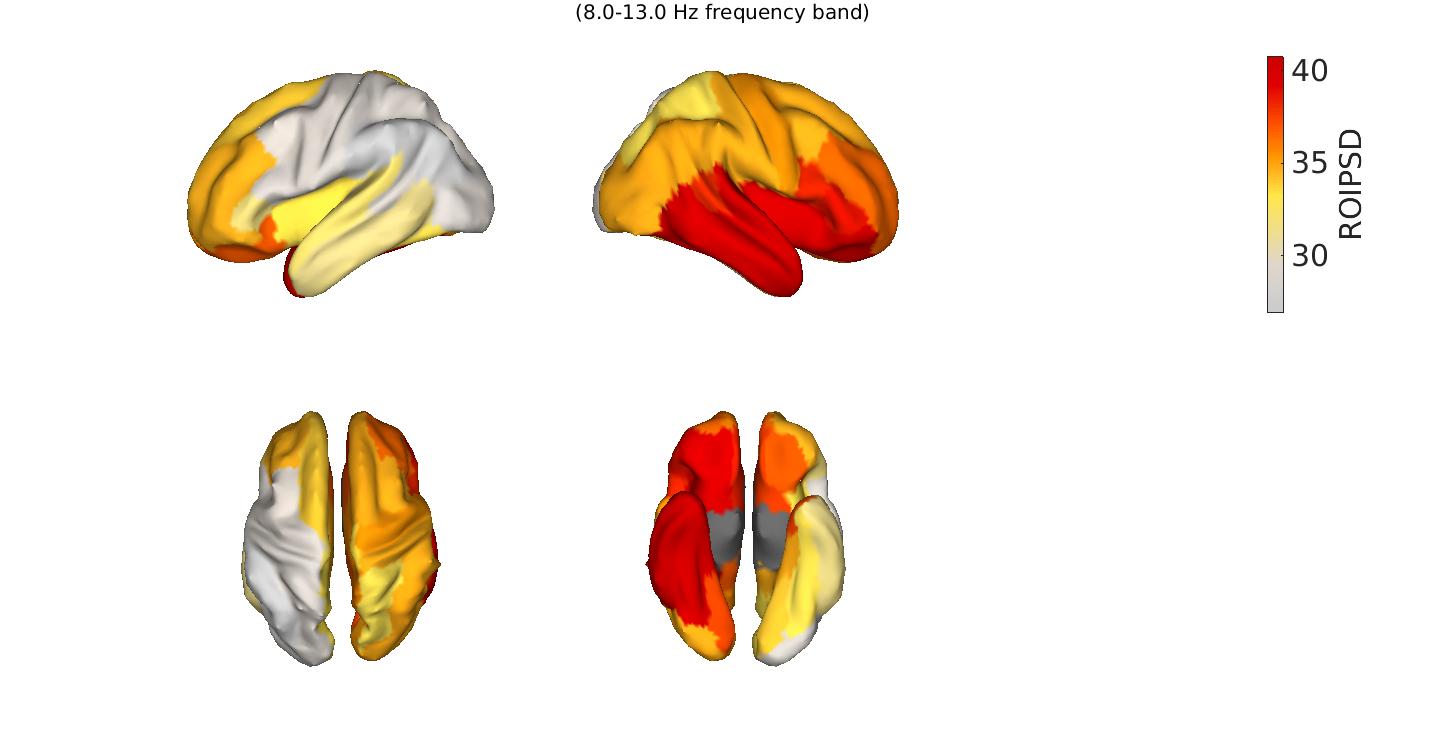
:round_pushpin: Plotting is particularly optimized for PSD, MIM/MIC and GC/TRGC. ### Power as a region-wise bar plot If you wish to visualize power as a barplot only, please make sure to explicitely turn `plotcortex` off because it is turned on by default. ```matlab EEG = pop_roi_connectplot(EEG, 'measure', 'roipsd', 'plotcortex', 'off', 'plotbarplot', 'on', 'freqrange', [8 13]) % alpha band; ```### Power as a source-level cortical surface topography ```matlab EEG = pop_roi_connectplot(EEG, 'measure', 'roipsd', 'plotcortex', 'on', 'freqrange', [8 13]); ```

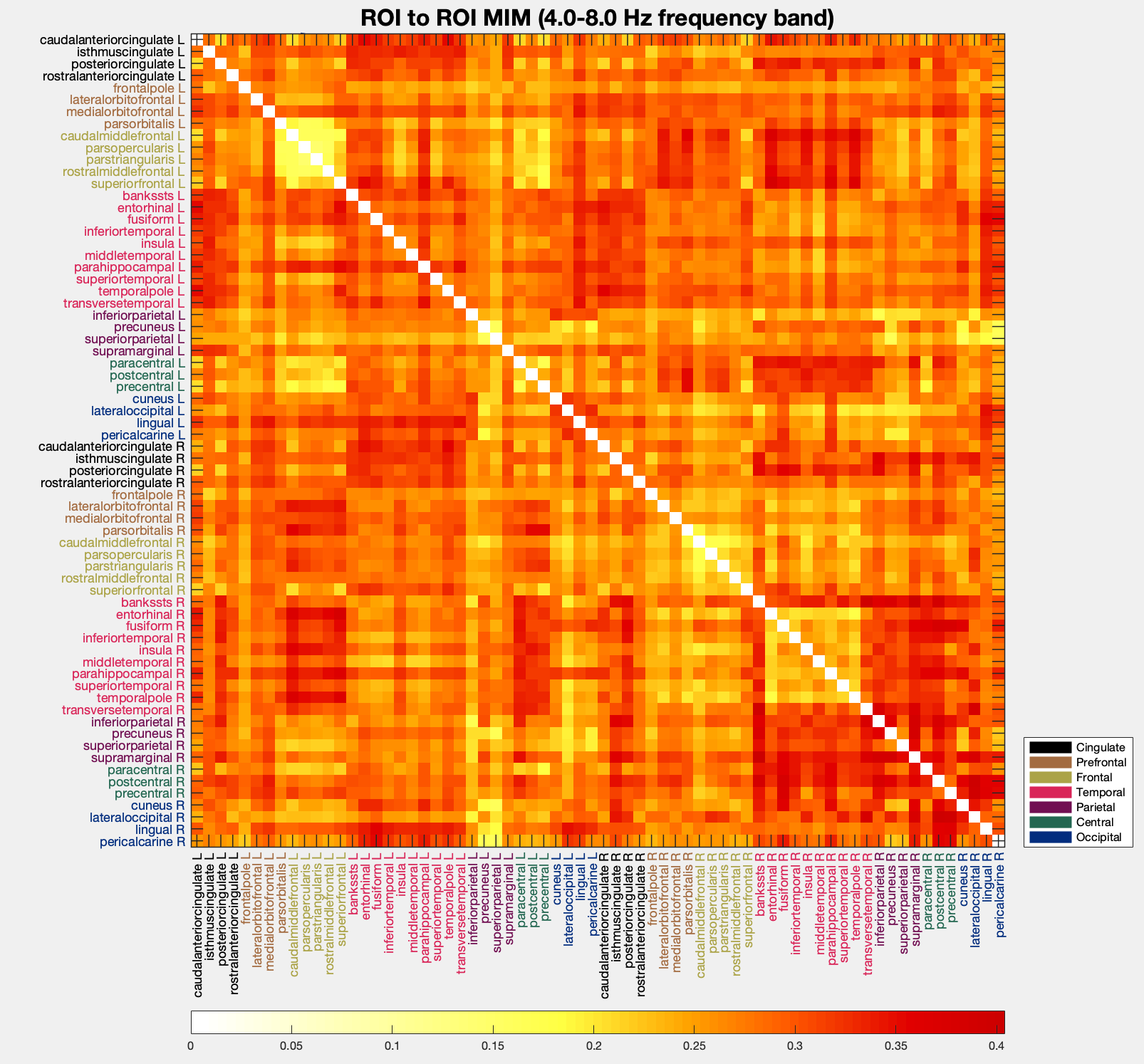
### FC as region-to-region matrix Again, if you do not wish to see the cortex plot, you should explicitely turn `plotcortex` off. Please click on the figure if you want to see it in full size. ```matlab EEG = pop_roi_connectplot(EEG, 'measure', 'mim', 'plotcortex', 'off', 'plotmatrix', 'on', 'freqrange', [8 13]); ```
If you wish to group the matrix by hemispheres, you can do so by running the code below. ```matlab pop_roi_connectplot(EEG, 'measure', 'mim', 'plotcortex', 'off', 'plotmatrix', 'on', 'freqrange', [8 13], 'grouphemispheres', 'on'); ```

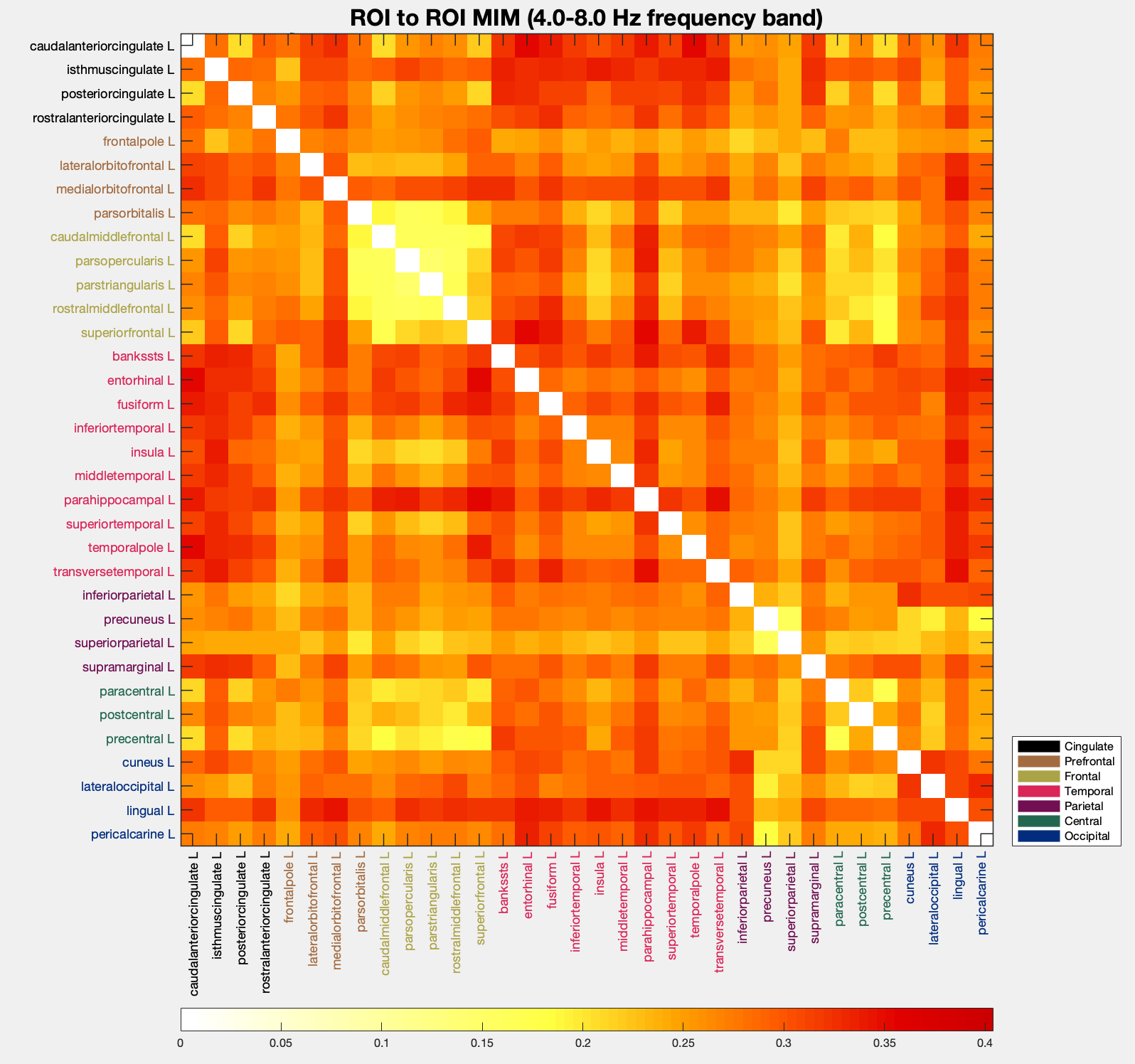
You can additionally filter by hemispheres and regions belonging to specific brain lobes. As an example, let us see how FC of the left hemisphere looks like. ```matlab pop_roi_connectplot(EEG, 'measure', 'mim', 'plotcortex', 'off', 'plotmatrix', 'on', 'freqrange', [8 13], 'hemisphere', 'left'); ```
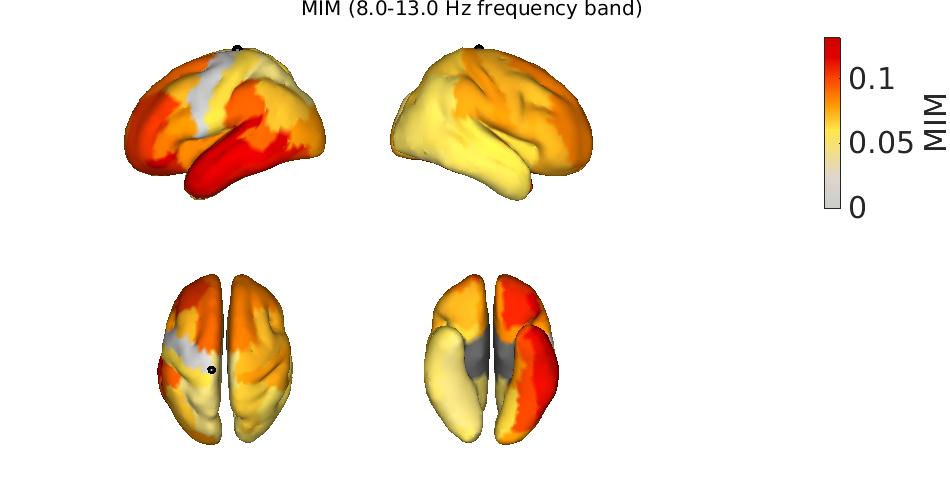
### Net FC as a cortical surface topography Here, the mean FC from all regions to all regions is visualized. ```matlab pop_roi_connectplot(EEG, 'measure', 'mim', 'plotcortex', 'on', 'freqrange', [8 13]); ```
### Seed FC as a cortical surface topography Here, the FC of a seed region to all other regions is visualized. ```matlab pop_roi_connectplot(EEG, 'measure', 'mim', 'plotcortex', 'on', 'freqrange', [8 13], 'plotcortexseedregion', 49); ```

# References [1] Pellegrini, F., Delorme, A., Nikulin, V., & Haufe, S. (2023). Identifying good practices for detecting inter-regional linear functional connectivity from EEG. NeuroImage, 120218. [doi: 10.1016/j.neuroimage.2023.120218](https://doi.org/10.1016/j.neuroimage.2023.120218) [2] Pellegrini, F., Nguyen, T. D., Herrera, T., Nikulin, V., Nolte, G., & Haufe, S. (2023). Distinguishing between- from within-site phase-amplitude coupling using antisymmetrized bispectra. bioRxiv 2023.10.26.564193. [https://doi.org/10.1101/2023.10.26.564193](https://doi.org/10.1101/2023.10.26.564193) [3] https://github.com/fpellegrini/FCsim [4] https://github.com/fpellegrini/MotorImag
Owner
- Name: QAI Labs
- Login: braindatalab
- Kind: organization
- Location: Berlin, Germany
- Website: tu.berlin/uniml
- Twitter: QAILabs
- Repositories: 13
- Profile: https://github.com/braindatalab
Quality in Artificial Intelligence Labs Berlin