tensorboard-reducer
Reduce multiple PyTorch TensorBoard runs to new event (or CSV) files.
Science Score: 54.0%
This score indicates how likely this project is to be science-related based on various indicators:
-
✓CITATION.cff file
Found CITATION.cff file -
✓codemeta.json file
Found codemeta.json file -
✓.zenodo.json file
Found .zenodo.json file -
○DOI references
-
✓Academic publication links
Links to: zenodo.org -
○Committers with academic emails
-
○Institutional organization owner
-
○JOSS paper metadata
-
○Scientific vocabulary similarity
Low similarity (10.1%) to scientific vocabulary
Keywords
Repository
Reduce multiple PyTorch TensorBoard runs to new event (or CSV) files.
Basic Info
- Host: GitHub
- Owner: janosh
- License: mit
- Language: Python
- Default Branch: main
- Homepage: https://pypi.org/project/tensorboard-reducer
- Size: 1.09 MB
Statistics
- Stars: 74
- Watchers: 2
- Forks: 4
- Open Issues: 2
- Releases: 7
Topics
Metadata Files
readme.md







This project can ingest both PyTorch and TensorFlow event files but was mostly tested with PyTorch. For a TF-only project, see
tensorboard-aggregator.
Compute statistics (mean, std, min, max, median or any other numpy operation) of multiple TensorBoard run directories. This can be used e.g. when training model ensembles to reduce noise in loss/accuracy/error curves and establish statistical significance of performance improvements or get a better idea of epistemic uncertainty. Results can be saved to disk either as new TensorBoard runs or CSV/JSON/Excel. More file formats are easy to add, PRs welcome.
Example notebooks
| | | |
| ---------------------------------------------------------------------------------------------------------------------------- | ---------------------------------------------------------------------------------------------------------------------------------------------------------------------------------------------------------------------------------------------------------------------------------------------------------------------- | ------------------------------------------------------------------------------------------------------------------------------------------------------------------------------------------------- |
| Basic Python API Demo | 

 | Demonstrates how to work with local TensorBoard event files. |
| Functorch MLP Ensemble | | Shows how to aggregate run metrics with TensorBoard Reducer
| Demonstrates how to work with local TensorBoard event files. |
| Functorch MLP Ensemble | | Shows how to aggregate run metrics with TensorBoard Reducer
when training model ensembles using functorch. |
| Weights & Biases Integration | | Trains PyTorch CNN ensemble on MNIST, logs results to WandB, downloads metrics from multiple WandB runs, aggregates using tb-reducer, then re-uploads to WandB as new runs. |
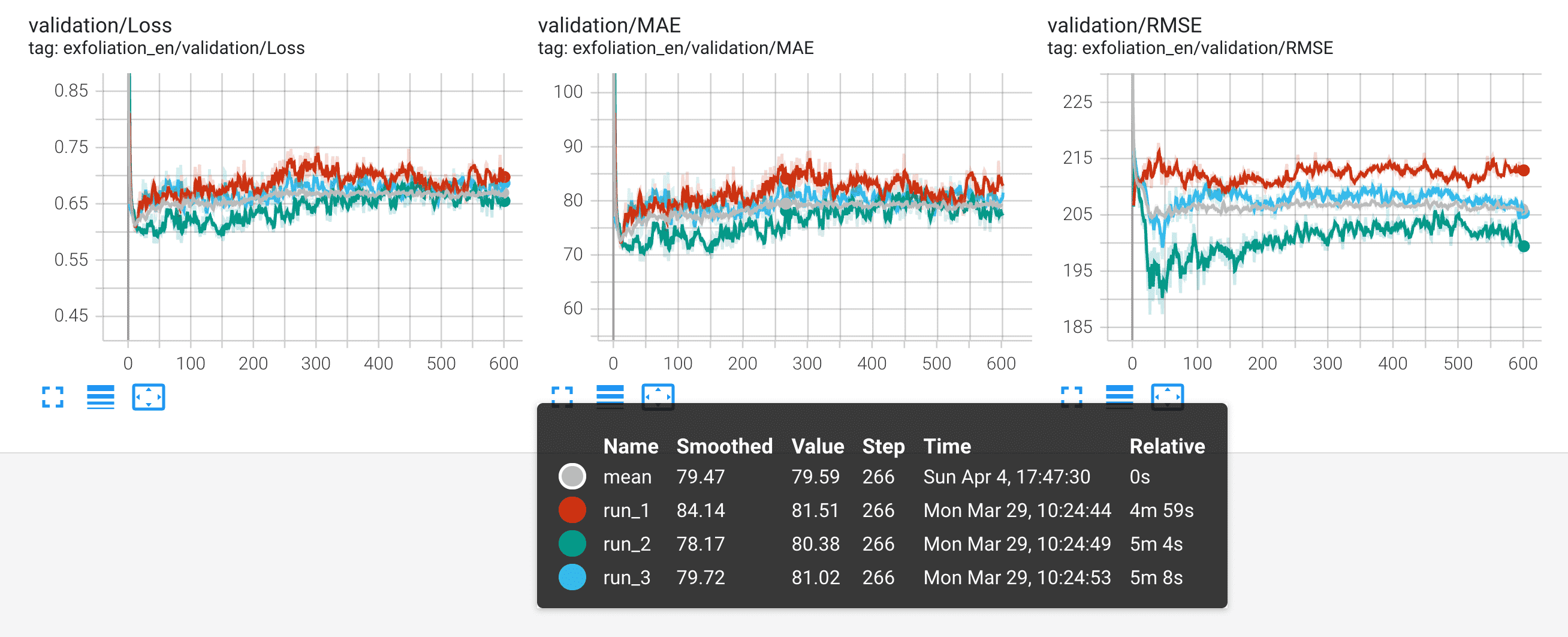
The mean of 3 runs shown in pink here is less noisy and better suited for comparisons between models or different training techniques than individual runs.
Installation
sh
pip install tensorboard-reducer
Excel support requires installing extra dependencies:
sh
pip install 'tensorboard-reducer[excel]'
Usage
CLI
sh
tb-reducer runs/of-your-model* -o output-dir -r mean,std,min,max
All positional CLI arguments are interpreted as input directories and expected to contain TensorBoard event files. These can be specified individually or with wildcards using shell expansion. You can check you're getting the right input directories by running echo runs/of-your-model* before passing them to tb-reducer.
Note: By default, TensorBoard Reducer expects event files to contain identical tags and equal number of steps for all scalars. If you trained one model for 300 epochs and another for 400 and/or recorded different sets of metrics (tags in TensorBoard lingo) for each of them, see CLI flags --lax-steps and --lax-tags to disable this safeguard. The corresponding kwargs in the Python API are strict_tags = True and strict_steps = True on load_tb_events().
In addition, tb-reducer has the following flags:
-o/--outpath(required): File path or directory where to write output to disk. If--outpathis a directory, output will be saved as TensorBoard runs, one new directory created for each reduction suffixed by thenumpyoperation, e.g.'out/path-mean','out/path-max', etc. If--outpathis a file path, it must have'.csv'/'.json'or'.xlsx'(supports compression by using e.g..csv.gz,json.bz2) in which case a single file will be created. CSVs will have a two-level header containing one column for each combination of tag (loss,accuracy, ...) and reduce operation (mean,std, ...). Tag names will be in top-level header, reduce ops in second level. Hint: When saving data as CSV or Excel, usepandas.read_csv("path/to/file.csv", header=[0, 1], index_col=0)andpandas.read_excel("path/to/file.xlsx", header=[0, 1], index_col=0)to load reduction results into a multi-index dataframe.-r/--reduce-ops(optional, default:mean): Comma-separated names of numpy reduction ops (mean,std,min,max, ...). Each reduction is written to a separateoutpathsuffixed by its op name. E.g. ifoutpath='reduced-run', the mean reduction will be written to'reduced-run-mean'.-f/--overwrite(optional, default:False): Whether to overwrite existing output directories/data files (CSV, JSON, Excel). For safety, the overwrite operation will abort with an error if the file/directory to overwrite is not a known data file and does not look like a TensorBoard run directory (i.e. does not start with'events.out').--lax-tags(optional, default:False): Allow different runs have to different sets of tags. In this mode, each tag reduction will run over as many runs as are available for a given tag, even if that's just one. Proceed with caution as not all tags will have the same statistics in downstream analysis.--lax-steps(optional, default:False): Allow tags across different runs to have unequal numbers of steps. In this mode, each reduction will only use as many steps as are available in the shortest run (same behavior aszip(short_list, long_list)which stops whenshort_listis exhausted).--handle-dup-steps(optional, default:None): How to handle duplicate values recorded for the same tag and step in a single run. One of'keep-first','keep-last','mean'.'keep-first/last'will keep the first/last occurrence of duplicate steps while 'mean' computes their mean. Default behavior is to raiseValueErroron duplicate steps.--min-runs-per-step(optional, default:None): Minimum number of runs across which a given step must be recorded to be kept. Steps present across less runs are dropped. Only plays a role iflax_stepsis true. Warning: Be aware that with this setting, you'll be reducing variable number of runs, however many recorded a value for a given step as long as there are at least--min-runs-per-step. In other words, the statistics of a reduction will change mid-run. Say you're plotting the mean of an error curve, the sample size of that mean will drop from, say, 10 down to 4 mid-plot if 4 of your models trained for longer than the rest. Be sure to remember when using this.-v/--version(optional): Get the current version.
Python API
You can also import tensorboard_reducer into a Python script or Jupyter notebook for more complex operations. Here's a simple example that uses all of the main functions load_tb_events, reduce_events, write_data_file and write_tb_events to get you started:
```py from glob import glob
import tensorboard_reducer as tbr
inputeventdirs = sorted(glob("globpattern/oftbdirectoriesto_reduce*"))
where to write reduced TB events, each reduce operation will be in a separate subdirectory
tbeventsoutputdir = "path/to/outputdir" csvoutpath = "path/to/write/reduced-data-as.csv"
whether to abort or overwrite when csvoutpath already exists
reduce_ops = ("mean", "min", "max", "median", "std", "var")
eventsdict = tbr.loadtbevents(inputevent_dirs)
number of recorded tags. e.g. would be 3 if you recorded loss, MAE and R^2
nscalars = len(eventsdict) nsteps, nevents = list(events_dict.values())[0].shape
print( f"Loaded {nevents} TensorBoard runs with {nscalars} scalars and {nsteps} steps each" ) print(", ".join(eventsdict))
reducedevents = tbr.reduceevents(eventsdict, reduceops)
for op in reduceops: print(f"Writing '{op}' reduction to '{tbeventsoutputdir}-{op}'")
tbr.writetbevents(reducedevents, tbeventsoutputdir, overwrite=False)
print(f"Writing results to '{csvoutpath}'")
tbr.writedatafile(reducedevents, csvout_path, overwrite=False)
print("Reduction complete") ```
Owner
- Name: Janosh Riebesell
- Login: janosh
- Kind: user
- Location: GitHub
- Website: https://janosh.dev
- Repositories: 62
- Profile: https://github.com/janosh
Working on computational chemistry with pre-trained ML force fields
Citation (citation.cff)
cff-version: 1.2.0
title: TensorBoard Reducer
message: If you use this software, please cite it as below.
authors:
  - family-names: Riebesell
    given-names: Janosh
    affiliation: University of Cambridge
    email: janosh@lbl.gov
    orcid: https://orcid.org/0000-0001-5233-3462
license: MIT
license-url: https://github.com/janosh/tensorboard-reducer/blob/main/license
repository-code: https://github.com/janosh/tensorboard-reducer
type: software
url: https://github.com/janosh/tensorboard-reducer
doi: 10.5281/zenodo.7048809
version: 0.2.10 # replace with whatever version you use
date-released: 2022-09-04
GitHub Events
Total
- Watch event: 7
- Delete event: 2
- Push event: 19
- Pull request event: 8
- Create event: 3
Last Year
- Watch event: 7
- Delete event: 2
- Push event: 19
- Pull request event: 8
- Create event: 3
Committers
Last synced: about 1 year ago
Top Committers
| Name | Commits | |
|---|---|---|
| Janosh Riebesell | j****l@g****m | 83 |
| pre-commit-ci[bot] | 6****] | 17 |
| HeinrichAD | H****D | 1 |
Issues and Pull Requests
Last synced: 10 months ago
All Time
- Total issues: 10
- Total pull requests: 39
- Average time to close issues: 6 days
- Average time to close pull requests: 6 days
- Total issue authors: 7
- Total pull request authors: 4
- Average comments per issue: 4.8
- Average comments per pull request: 0.03
- Merged pull requests: 34
- Bot issues: 0
- Bot pull requests: 23
Past Year
- Issues: 1
- Pull requests: 7
- Average time to close issues: 25 minutes
- Average time to close pull requests: 2 days
- Issue authors: 1
- Pull request authors: 2
- Average comments per issue: 1.0
- Average comments per pull request: 0.0
- Merged pull requests: 6
- Bot issues: 0
- Bot pull requests: 5
Top Authors
Issue Authors
- shadowbourne (4)
- jarho001 (1)
- Seraphli (1)
- jveitchmichaelis (1)
- janosh (1)
- alex2awesome (1)
- Ademord (1)
Pull Request Authors
- pre-commit-ci[bot] (26)
- janosh (14)
- HeinrichAD (1)
- p-enel (1)
Top Labels
Issue Labels
Pull Request Labels
Packages
- Total packages: 1
-
Total downloads:
- pypi 883 last-month
- Total dependent packages: 0
- Total dependent repositories: 2
- Total versions: 20
- Total maintainers: 1
pypi.org: tensorboard-reducer
Reduce multiple TensorBoard runs to new event (or CSV) files
- Homepage: https://github.com/janosh/tensorboard-reducer
- Documentation: https://tensorboard-reducer.readthedocs.io/
- License: MIT License Copyright (c) 2021 Janosh Riebesell Permission is hereby granted, free of charge, to any person obtaining a copy of this software and associated documentation files (the "Software"), to deal in the Software without restriction, including without limitation the rights to use, copy, modify, merge, publish, distribute, sublicense, and/or sell copies of the Software, and to permit persons to whom the Software is furnished to do so, subject to the following conditions: The above copyright notice and this permission notice shall be included in all copies or substantial portions of the Software. The software is provided "as is", without warranty of any kind, express or implied, including but not limited to the warranties of merchantability, fitness for a particular purpose and noninfringement. In no event shall the authors or copyright holders be liable for any claim, damages or other liability, whether in an action of contract, tort or otherwise, arising from, out of or in connection with the software or the use or other dealings in the software.
-
Latest release: 0.4.0
published about 1 year ago
Rankings
Maintainers (1)
Dependencies
- actions/checkout v3 composite
- gaurav-nelson/github-action-markdown-link-check v1 composite
- actions/checkout v2 composite
- actions/upload-artifact v1 composite
- openjournals/openjournals-draft-action master composite
- actions/checkout v3 composite
- actions/setup-python v4 composite