https://github.com/chapzq77/dped
Software and pre-trained models for automatic photo quality enhancement using Deep Convolutional Networks
Science Score: 10.0%
This score indicates how likely this project is to be science-related based on various indicators:
-
○CITATION.cff file
-
○codemeta.json file
-
○.zenodo.json file
-
○DOI references
-
✓Academic publication links
Links to: arxiv.org -
○Academic email domains
-
○Institutional organization owner
-
○JOSS paper metadata
-
○Scientific vocabulary similarity
Low similarity (10.5%) to scientific vocabulary
Last synced: 10 months ago
·
JSON representation
Repository
Software and pre-trained models for automatic photo quality enhancement using Deep Convolutional Networks
Basic Info
Statistics
- Stars: 0
- Watchers: 1
- Forks: 0
- Open Issues: 0
- Releases: 0
Fork of aiff22/DPED
Created over 7 years ago
· Last pushed almost 9 years ago
https://github.com/chapzq77/DPED/blob/master/
## DSLR-Quality Photos on Mobile Devices with Deep Convolutional Networks
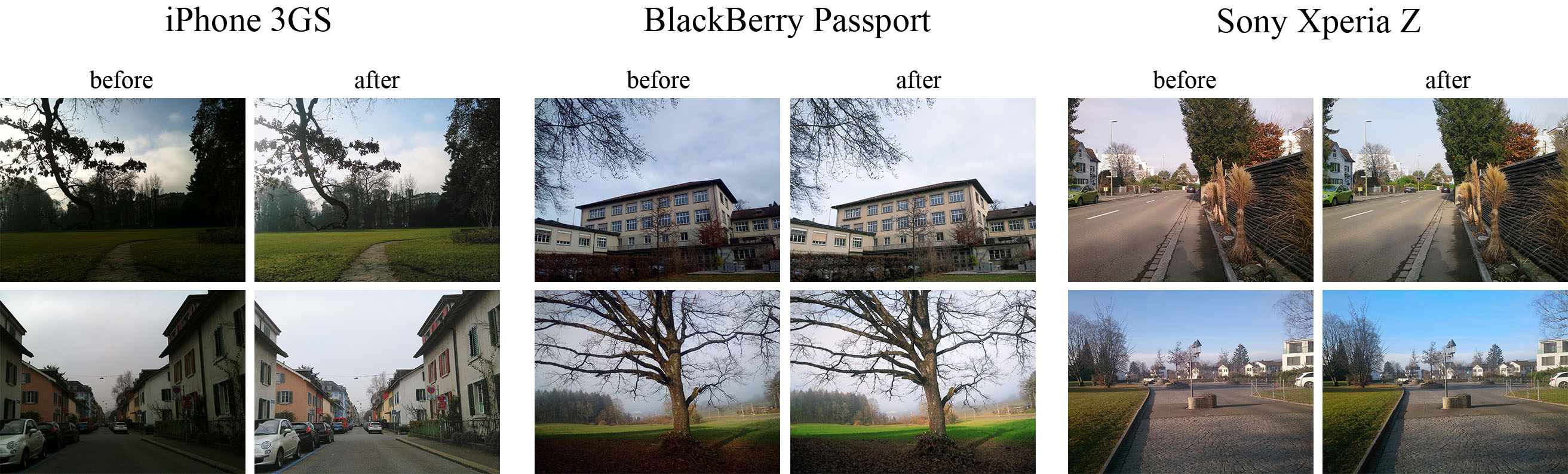
#### 1. Overview [[paper]](https://arxiv.org/pdf/1704.02470.pdf) [[project webpage]](http://dped-photos.vision.ee.ethz.ch) The provided code implements the paper that presents an end-to-end deep learning approach for translating ordinary photos from smartphones into DSLR-quality images. The learned model can be applied to photos of arbitrary resolution, while the methodology itself is generalized to any type of digital camera. More visual results can be found [here](http://people.ee.ethz.ch/~ihnatova/#demo). #### 2. Prerequisites - Python + scipy, numpy packages - [TensorFlow (>=1.0.1)](https://www.tensorflow.org/install/) + [CUDA CuDNN](https://developer.nvidia.com/cudnn) - Nvidia GPU #### 3. First steps - Download the pre-trained [VGG-19 model](https://drive.google.com/file/d/0BwOLOmqkYj-jMGRwaUR2UjhSNDQ/view?usp=sharing) and put it into `vgg_pretrained/` folder - Download [DPED dataset](http://people.ee.ethz.ch/~ihnatova/#dataset) (patches for CNN training) and extract it into `dped/` folder. This folder should contain three subolders: `sony/`, `iphone/` and `blackberry/`
#### 4. Train the model ```bash python train_model.py model=``` Obligatory parameters: >```model```: **```iphone```**, **```blackberry```** or **```sony```** Optional parameters and their default values: >```batch_size```: **```50```** - batch size [smaller values can lead to unstable training]
>```train_size```: **```30000```** - the number of training patches randomly loaded each ```eval_step``` iterations
>```eval_step```: **```1000```** - each ```eval_step``` iterations the model is saved and the training data is reloaded
>```num_train_iters```: **```20000```** - the number of training iterations
>```learning_rate```: **```5e-4```** - learning rate
>```w_content```: **```10```** - the weight of the content loss
>```w_color```: **```0.5```** - the weight of the color loss
>```w_texture```: **```1```** - the weight of the texture [adversarial] loss
>```w_tv```: **```2000```** - the weight of the total variation loss
>```dped_dir```: **```dped/```** - path to the folder with DPED dataset
>```vgg_dir```: **```vgg_pretrained/imagenet-vgg-verydeep-19.mat```** - path to the pre-trained VGG-19 network
Example: ```bash python train_model.py model=iphone batch_size=50 dped_dir=dped/ w_color=0.7 ```
#### 5. Test the provided pre-trained models ```bash python test_model.py model=``` Obligatory parameters: >```model```: **```iphone_orig```**, **```blackberry_orig```** or **```sony_orig```** Optional parameters: >```test_subset```: **```full```**,**```small```** - all 29 or only 5 test images will be processed
>```resolution```: **```orig```**,**```high```**,**```medium```**,**```small```**,**```tiny```** - the resolution of the test images [**```orig```** means original resolution]
>```use_gpu```: **```true```**,**```false```** - run models on GPU or CPU
Example: ```bash python test_model.py model=iphone_orig test_subset=full resolution=orig use_gpu=true ```
#### 6. Test the obtained models ```bash python test_model.py model=``` Obligatory parameters: >```model```: **```iphone```**, **```blackberry```** or **```sony```** Optional parameters: >```test_subset```: **```full```**,**```small```** - all 29 or only 5 test images will be processed
>```iteration```: **```all```** or **``````** - get visual results for all iterations or for the specific iteration, > **``` ```** must be a multiple of ```eval_step```
>```resolution```: **```orig```**,**```high```**,**```medium```**,**```small```**,**```tiny```** - the resolution of the test images [**```orig```** means original resolution]
>```use_gpu```: **```true```**,**```false```** - run models on GPU or CPU
Example: ```bash python test_model.py model=iphone iteration=13000 test_subset=full resolution=orig use_gpu=true ```
#### 7. Folder structure >```dped/``` - the folder with the DPED dataset
>```models/``` - logs and models that are saved during the training process
>```models_orig/``` - the provided pre-trained models for **```iphone```**, **```sony```** and **```blackberry```**
>```results/``` - visual results for small image patches that are saved while training
>```vgg-pretrained/``` - the folder with the pre-trained VGG-19 network
>```visual_results/``` - processed [enhanced] test images
>```load_dataset.py``` - python script that loads training data
>```models.py``` - architecture of the image enhancement [resnet] and adversarial networks
>```ssim.py``` - implementation of the ssim score
>```train_model.py``` - implementation of the training procedure
>```test_model.py``` - applying the pre-trained models to test images
>```utils.py``` - auxiliary functions
>```vgg.py``` - loading the pre-trained vgg-19 network
#### 8. Problems and errors ``` What if I get an error: "OOM when allocating tensor with shape [...]"? ``` Your GPU does not have enough memory. If this happens during the training process: - Decrease the size of the training batch [```batch_size```]. Note however that smaller values can lead to unstable training. If this happens while testing the models: - Run the model on CPU (set the parameter ```use_gpu``` to **```false```**). Note that this can take up to 5 minutes per image.
- Use cropped images, set the parameter ```resolution``` to: > **```high```** - center crop of size ```1680x1260``` pixels
> **```medium```** - center crop of size ```1366x1024``` pixels
> **```small```** - center crop of size ```1024x768``` pixels
> **```tiny```** - center crop of size ```800x600``` pixels
The less resolution is - the smaller part of the image will be processed
#### 9. Citation ``` @inproceedings{ignatov2017dslr, title={DSLR-Quality Photos on Mobile Devices with Deep Convolutional Networks}, author={Ignatov, Andrey and Kobyshev, Nikolay and Timofte, Radu and Vanhoey, Kenneth and Van Gool, Luc}, booktitle={Proceedings of the IEEE international conference on computer vision}, year={2017} } ``` #### 10. Any further questions? ``` Please contact Andrey Ignatov (andrey.ignatoff@gmail.com) for more information ```
Owner
- Name: 周奇
- Login: chapzq77
- Kind: user
- Repositories: 3
- Profile: https://github.com/chapzq77