effortless-language-servers
Framework for Effortless Language Servers with Language Servers for SOM, SOMns, and SimpleLanguage
Science Score: 44.0%
This score indicates how likely this project is to be science-related based on various indicators:
-
✓CITATION.cff file
Found CITATION.cff file -
✓codemeta.json file
Found codemeta.json file -
✓.zenodo.json file
Found .zenodo.json file -
○DOI references
-
○Academic publication links
-
○Academic email domains
-
○Institutional organization owner
-
○JOSS paper metadata
-
○Scientific vocabulary similarity
Low similarity (12.7%) to scientific vocabulary
Keywords
Repository
Framework for Effortless Language Servers with Language Servers for SOM, SOMns, and SimpleLanguage
Basic Info
Statistics
- Stars: 19
- Watchers: 4
- Forks: 3
- Open Issues: 2
- Releases: 7
Topics
Metadata Files
README.md
Effortless Language Servers
The goal of the Effortless Language Servers project is to enable the creation of language servers for dynamic languages based on a shared language-agnostic infrastructure.
Building a language server with standard features should not take more than a few hundred lines of code.
Currently, we support the following features:
- semantic highlighting (Som, Newspeak, Simple Language)
- file and workspace symbols
- goto definition
- code completion
- references and highlights
- signature help
- hover information
- parse errors
- basic linting
- CodeLens for running unit tests
Supported Languages and IDEs
We are building on top of the Language Server Protocol, but provide currently only a VS code extension.
The following languages are supported:
- SOM, the Simple Object Machine, a language for research and teaching
- SOMns, a Newspeak for concurrency research language
- SimpleLanguage, a language to document Oracle's Truffle framework
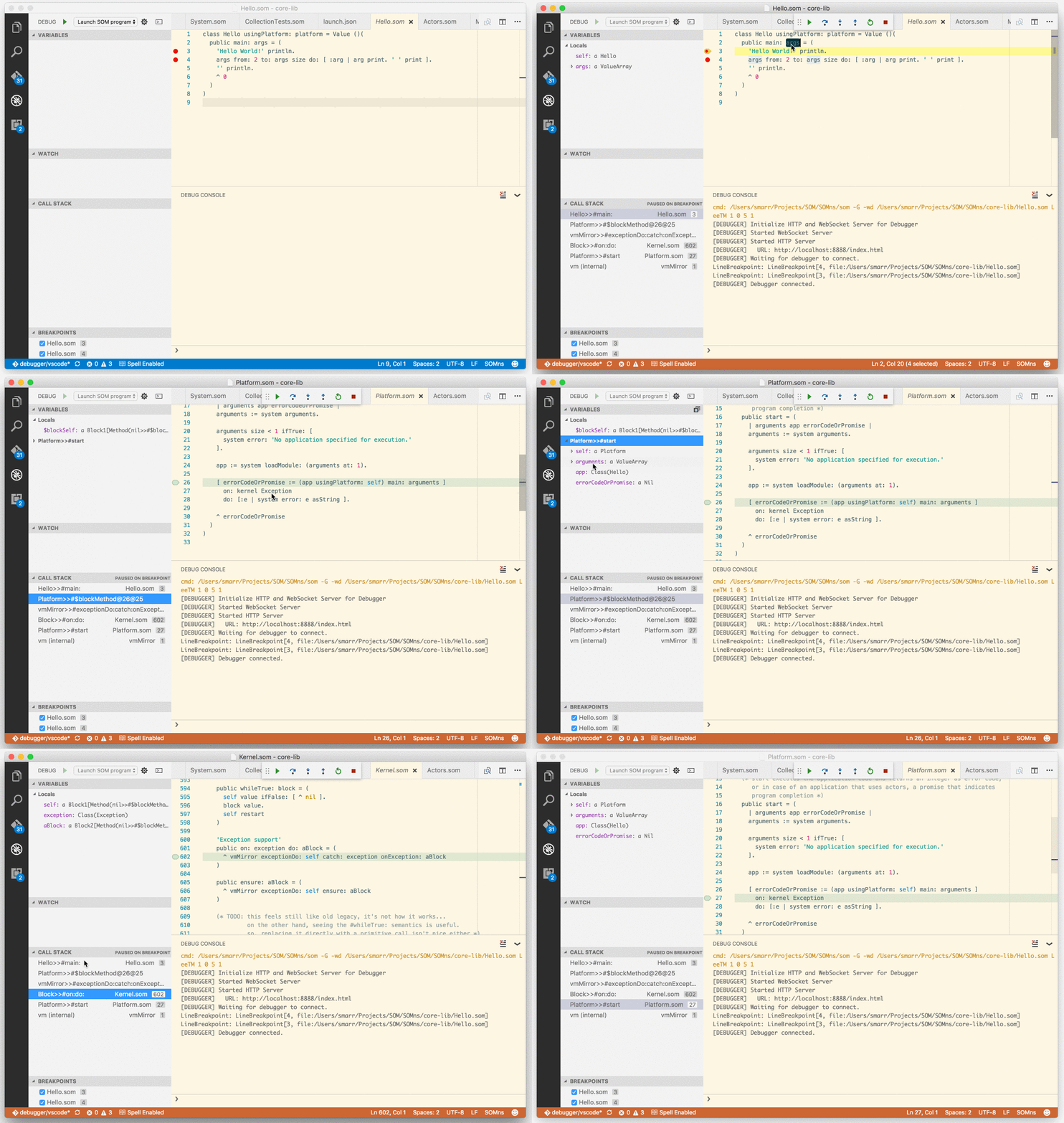
Additionally, we also provide support for the Debug Adapter Protocol for SOMns programs.
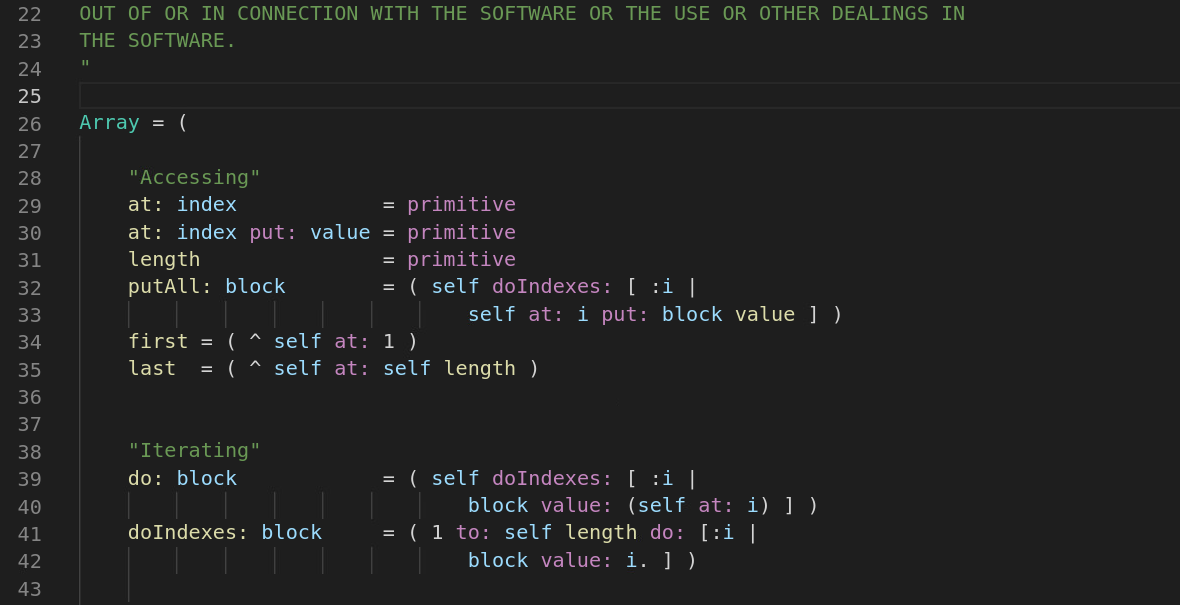
Screenshot of SOMns Semantic Highlighting
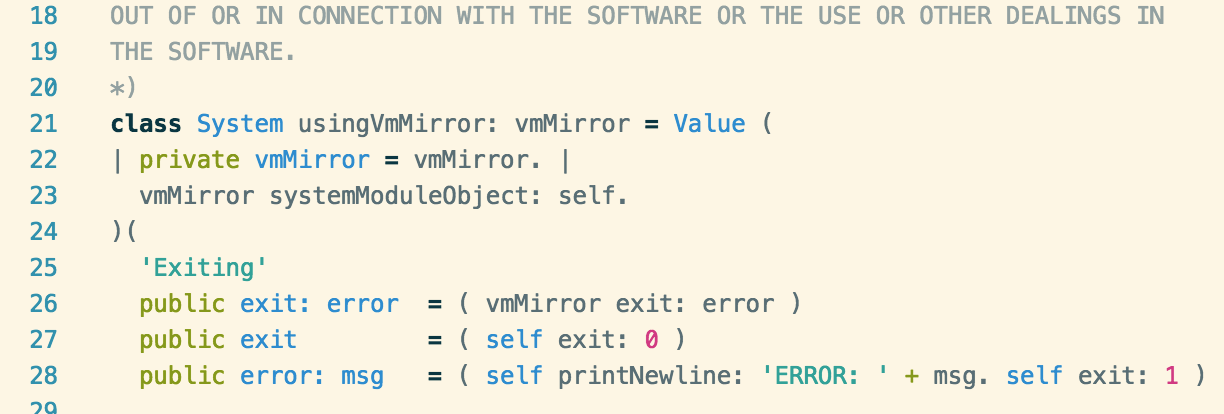
Screenshot of SOMns Syntax Highlighting
Screencast of debugging a SOMns Program
Development Setup
To work on the extension, you can build it with the following commands:
bash
npm install .
npm run compile
When working on the extension, it is better to not install it via the
Marketplace, but link the code repo directly into the VS Code extension
directory. Please replace $pathToCheckout in the following example with the actual
path to your checkout:
bash
cd ~/.vscode/extensions
ln -s /$pathToCheckout/effortless-language-servers effortless-language-servers
To debug the extension, open the main folder in VS code and select "Launch Extension" in the debug menu.
Because of current restrictions in VS Code, the same project cannot be opened twice, and it is not possible to debug the debugger and the language server at the same time. As a work around, one can use a separate folder with symlinks:
.
..
.vscode -> ../SOMns-vscode/.vscode
out -> ../SOMns-vscode/out
package.json -> ../SOMns-vscode/package.json
src -> ../SOMns-vscode/src
syntaxes -> ../SOMns-vscode/syntaxes
tsconfig.json -> ../SOMns-vscode/tsconfig.json
typings -> ../SOMns-vscode/typings
typings.json -> ../SOMns-vscode/typings.json
Debugging the Language Server in Java
When working on the Language Server, which provides the IDE services, it is best to start it for instance from Eclipse.
To instruct VS code to use an already running instance of the language server, add the following to your VS Code User Settings:
JavaScript
"els.debugMode" : true
The server can also be started from the command line:
bash
npm run create-server-shell-script
out/server/start.sh
This will run the server exactly as VScode would run it.
In this mode it will accept communication from stdin.
To configure it for use with TCP, see the create-server-shell-script
script in package.json. It currently configure the generated script
to disable the debugging mode and TCP, which can be enable individually
by changing the corresponding false in the script.
Debugging the Debugger Adapter
To debug the Debugger Adapter, load the code in VS code, and select "Run Debugger as server" in the debugger menu.
In the configuration of the VS Code instance with the SOM code, add a
configuration that executes a SOM program, and add the debugServer port
as part of the configuration. This needs to be inside the config, i.e., for
instance next to the "program" setting.
"debugServer": 4711,
Owner
- Name: Stefan Marr
- Login: smarr
- Kind: user
- Location: Canterbury, UK
- Company: University of Kent
- Website: https://www.stefan-marr.de/
- Twitter: smarr
- Repositories: 140
- Profile: https://github.com/smarr
Investigating concurrency, language implementation, and VM technology.
Citation (CITATION.cff)
cff-version: 1.2.0
title: Effortless Language Servers Framework
message: >-
  If you use or build on this framework, please cite
  it using the metadata from this file.
type: software
authors:
  - given-names: Stefan
    family-names: Marr
    affiliation: University of Kent
    orcid: 'https://orcid.org/0000-0001-9059-5180'
    email: s.marr@kent.ac.uk
  - given-names: Humphrey
    family-names: Burchell
    email: h.burchell@kent.ac.uk
    affiliation: University of Kent
    orcid: 'https://orcid.org/0000-0003-4728-5819'
repository-code: >-
  https://github.com/smarr/effortless-language-servers
url: >-
  https://stefan-marr.de/papers/dls-marr-et-al-execution-vs-parse-based-language-servers/
license: MIT
date-released: '2022-11-03'
GitHub Events
Total
- Watch event: 6
Last Year
- Watch event: 6
Issues and Pull Requests
Last synced: over 1 year ago
All Time
- Total issues: 6
- Total pull requests: 21
- Average time to close issues: 10 days
- Average time to close pull requests: 7 days
- Total issue authors: 1
- Total pull request authors: 4
- Average comments per issue: 0.5
- Average comments per pull request: 0.71
- Merged pull requests: 19
- Bot issues: 0
- Bot pull requests: 0
Past Year
- Issues: 0
- Pull requests: 1
- Average time to close issues: N/A
- Average time to close pull requests: 13 minutes
- Issue authors: 0
- Pull request authors: 1
- Average comments per issue: 0
- Average comments per pull request: 0.0
- Merged pull requests: 1
- Bot issues: 0
- Bot pull requests: 0
Top Authors
Issue Authors
- smarr (6)
Pull Request Authors
- smarr (17)
- owenoclee (1)
- Marmat21 (1)
- HumphreyHCB (1)
Top Labels
Issue Labels
Pull Request Labels
Dependencies
- @types/chai 4.3.1 development
- @types/mocha 9.1.1 development
- @types/node 17.0.26 development
- @types/vscode 1.66.0 development
- @vscode/test-electron 2.1.3 development
- chai 4.3.6 development
- mocha 9.2.2 development
- typescript 4.6.3 development
- vscode-test 1.6.1 development
- @vscode/debugadapter 1.55.1
- @vscode/debugprotocol 1.55.1
- vscode-languageclient 7.0.0
- vscode-languageserver-protocol 3.16.0
- ws 8.8.1
- actions/checkout v2 composite
- actions/setup-java v3 composite
- 156 dependencies