pygalmesh
:spider_web: A Python interface to CGAL's meshing tools
Science Score: 77.0%
This score indicates how likely this project is to be science-related based on various indicators:
-
✓CITATION.cff file
Found CITATION.cff file -
✓codemeta.json file
Found codemeta.json file -
✓.zenodo.json file
Found .zenodo.json file -
✓DOI references
Found 3 DOI reference(s) in README -
✓Academic publication links
Links to: zenodo.org -
✓Committers with academic emails
1 of 10 committers (10.0%) from academic institutions -
○Institutional organization owner
-
○JOSS paper metadata
-
○Scientific vocabulary similarity
Low similarity (11.9%) to scientific vocabulary
Keywords
Keywords from Contributors
Repository
:spider_web: A Python interface to CGAL's meshing tools
Basic Info
Statistics
- Stars: 644
- Watchers: 21
- Forks: 62
- Open Issues: 31
- Releases: 33
Topics
Metadata Files
README.md

Create high-quality meshes with ease.





<!--
 -->
-->





pygalmesh is a Python frontend to CGAL's 2D and 3D mesh generation capabilities. pygalmesh makes it easy to create high-quality 2D, 3D volume meshes, periodic volume meshes, and surface meshes.
Examples
2D meshes
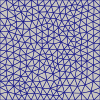
CGAL generates 2D meshes from linear constraints.
```python import numpy as np import pygalmesh
points = np.array([[0.0, 0.0], [1.0, 0.0], [1.0, 1.0], [0.0, 1.0]]) constraints = [[0, 1], [1, 2], [2, 3], [3, 0]]
mesh = pygalmesh.generate2d( points, constraints, maxedgesize=1.0e-1, numlloyd_steps=10, )
mesh.points, mesh.cells
```
The quality of the mesh isn't very good, but can be improved with optimesh.
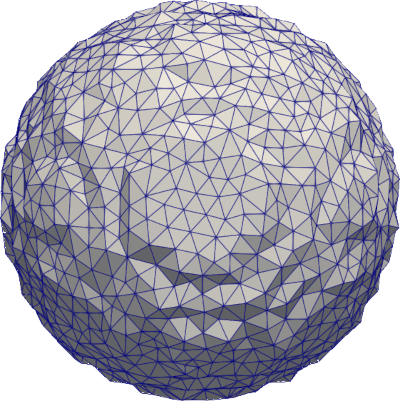
A simple ball
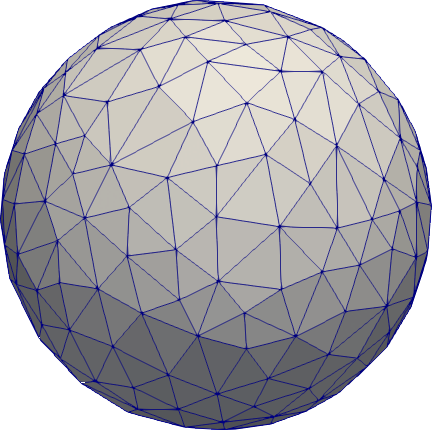
```python import pygalmesh
s = pygalmesh.Ball([0, 0, 0], 1.0) mesh = pygalmesh.generatemesh(s, maxcell_circumradius=0.2)
mesh.points, mesh.cells, ...
```
You can write the mesh with
python
mesh.write("out.vtk")
You can use any format supported by meshio.
The mesh generation comes with many more options, described here. Try, for example,
python
mesh = pygalmesh.generate_mesh(
    s, max_cell_circumradius=0.2, odt=True, lloyd=True, verbose=False
)
Other primitive shapes
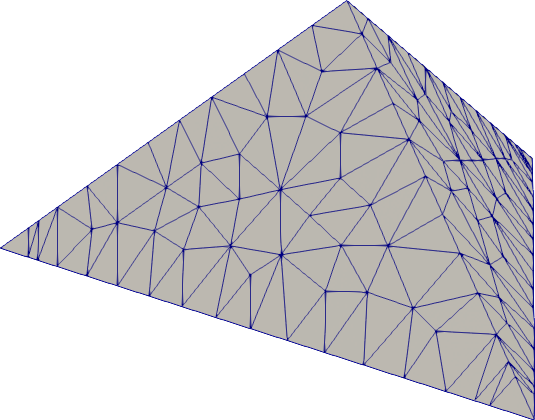
pygalmesh provides out-of-the-box support for balls, cuboids, ellipsoids, tori, cones, cylinders, and tetrahedra. Try for example
```python import pygalmesh
s0 = pygalmesh.Tetrahedron( [0.0, 0.0, 0.0], [1.0, 0.0, 0.0], [0.0, 1.0, 0.0], [0.0, 0.0, 1.0] ) mesh = pygalmesh.generatemesh( s0, maxcellcircumradius=0.1, maxedgesizeatfeatureedges=0.1, ) ```
Domain combinations
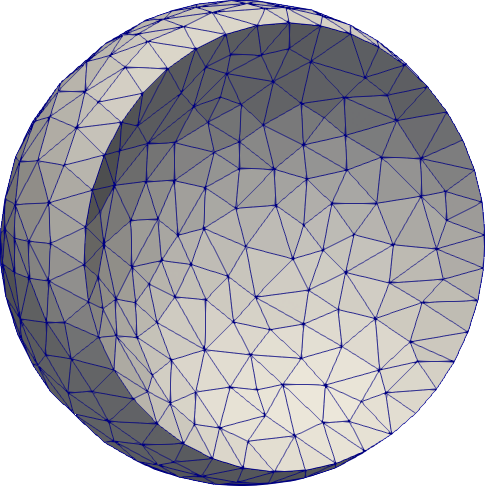
Supported are unions, intersections, and differences of all domains. As mentioned above, however, the sharp intersections between two domains are not automatically handled. Try for example
```python import pygalmesh
radius = 1.0 displacement = 0.5 s0 = pygalmesh.Ball([displacement, 0, 0], radius) s1 = pygalmesh.Ball([-displacement, 0, 0], radius) u = pygalmesh.Difference(s0, s1) ```
To sharpen the intersection circle, add it as a feature edge polygon line, e.g.,
```python import numpy as np import pygalmesh
radius = 1.0 displacement = 0.5 s0 = pygalmesh.Ball([displacement, 0, 0], radius) s1 = pygalmesh.Ball([-displacement, 0, 0], radius) u = pygalmesh.Difference(s0, s1)
add circle
a = np.sqrt(radius2 - displacement2) maxedgesizeatfeatureedges = 0.15 n = int(2 * np.pi * a / maxedgesizeatfeatureedges) alpha = np.linspace(0.0, 2 * np.pi, n + 1) alpha[-1] = alpha[0] circ = a * np.column_stack([np.zeros(n + 1), np.cos(alpha), np.sin(alpha)])
mesh = pygalmesh.generatemesh( u, extrafeatureedges=[circ], maxcellcircumradius=0.15, maxedgesizeatfeatureedges=maxedgesizeatfeatureedges, minfacetangle=25, maxradiussurfacedelaunayball=0.15, maxcircumradiusedgeratio=2.0, ) ```
Note that the length of the polygon legs are kept in sync with
max_edge_size_at_feature_edges of the mesh generation. This makes sure that it fits in
nicely with the rest of the mesh.
Domain deformations
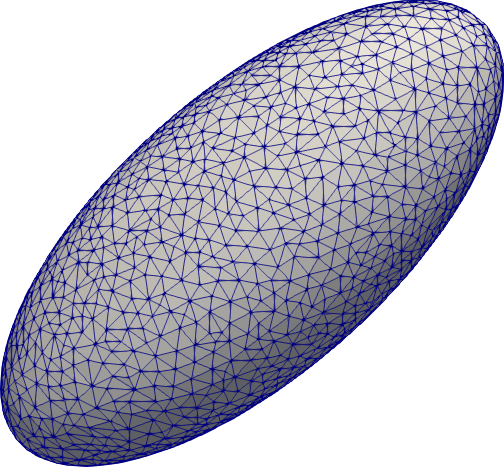
You can of course translate, rotate, scale, and stretch any domain. Try, for example,
```python import pygalmesh
s = pygalmesh.Stretch(pygalmesh.Ball([0, 0, 0], 1.0), [1.0, 2.0, 0.0])
mesh = pygalmesh.generatemesh(s, maxcell_circumradius=0.1) ```
Extrusion of 2D polygons
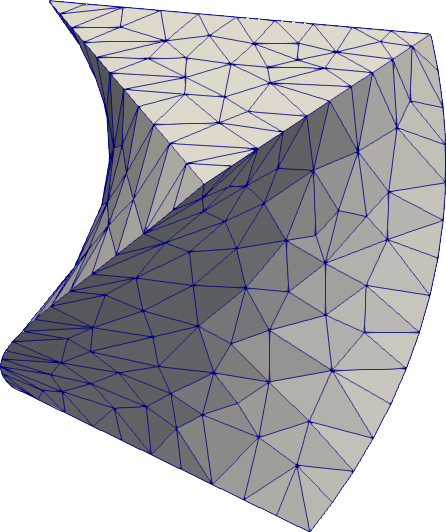
pygalmesh lets you extrude any polygon into a 3D body. It even supports rotation alongside!
```python import pygalmesh
p = pygalmesh.Polygon2D([[-0.5, -0.3], [0.5, -0.3], [0.0, 0.5]]) maxedgesizeatfeatureedges = 0.1 domain = pygalmesh.Extrude( p, [0.0, 0.0, 1.0], 0.5 * 3.14159265359, maxedgesizeatfeatureedges, ) mesh = pygalmesh.generatemesh( domain, maxcellcircumradius=0.1, maxedgesizeatfeatureedges=maxedgesizeatfeature_edges, verbose=False, ) ```
Feature edges are automatically preserved here, which is why an edge length needs to be
given to pygalmesh.Extrude.
Rotation bodies
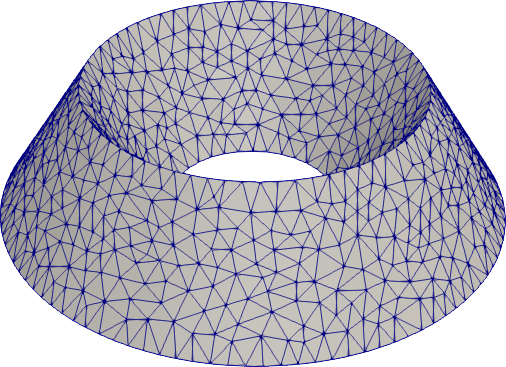
Polygons in the x-z-plane can also be rotated around the z-axis to yield a rotation body.
```python import pygalmesh
p = pygalmesh.Polygon2D([[0.5, -0.3], [1.5, -0.3], [1.0, 0.5]]) maxedgesizeatfeatureedges = 0.1 domain = pygalmesh.RingExtrude(p, maxedgesizeatfeatureedges) mesh = pygalmesh.generatemesh( domain, maxcellcircumradius=0.1, maxedgesizeatfeatureedges=maxedgesizeatfeature_edges, verbose=False, ) ```
Your own custom level set function
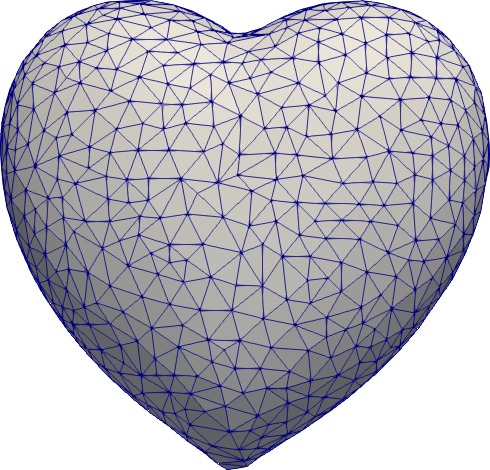
If all of the variety is not enough for you, you can define your own custom level set
function. You simply need to subclass pygalmesh.DomainBase and specify a function,
e.g.,
```python import pygalmesh
class Heart(pygalmesh.DomainBase): def init(self): super().init()
def eval(self, x):
    return (
        (x[0] ** 2 + 9.0 / 4.0 * x[1] ** 2 + x[2] ** 2 - 1) ** 3
        - x[0] ** 2 * x[2] ** 3
        - 9.0 / 80.0 * x[1] ** 2 * x[2] ** 3
    )

def get_bounding_sphere_squared_radius(self):
    return 10.0
d = Heart() mesh = pygalmesh.generatemesh(d, maxcell_circumradius=0.1) ```
Note that you need to specify the square of a bounding sphere radius, used as an input to CGAL's mesh generator.
Local refinement
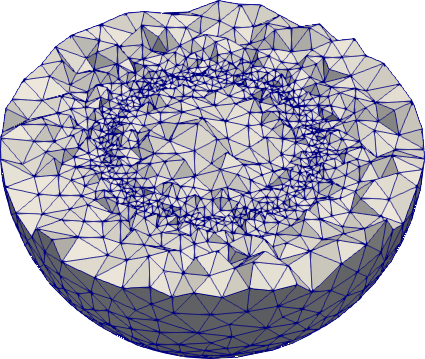
Use generate_mesh with a function (regular or lambda) as max_cell_circumradius. The
same goes for max_edge_size_at_feature_edges, max_radius_surface_delaunay_ball, and
max_facet_distance.
```python import numpy as np import pygalmesh
mesh = pygalmesh.generatemesh( pygalmesh.Ball([0.0, 0.0, 0.0], 1.0), minfacetangle=30.0, maxradiussurfacedelaunayball=0.1, maxfacetdistance=0.025, maxcircumradiusedgeratio=2.0, maxcellcircumradius=lambda x: abs(np.sqrt(np.dot(x, x)) - 0.5) / 5 + 0.025, ) ```
Surface meshes
If you're only after the surface of a body, pygalmesh has generate_surface_mesh for
you. It offers fewer options (obviously, max_cell_circumradius is gone), but otherwise
works the same way:
```python import pygalmesh
s = pygalmesh.Ball([0, 0, 0], 1.0) mesh = pygalmesh.generatesurfacemesh( s, minfacetangle=30.0, maxradiussurfacedelaunayball=0.1, maxfacetdistance=0.1, ) ```
Refer to CGAL's documentation for the options.
Periodic volume meshes
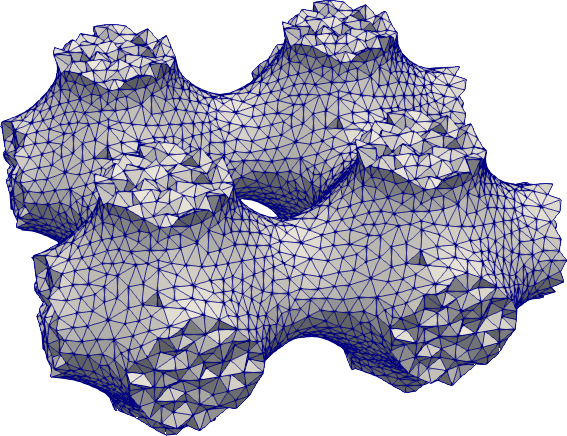
pygalmesh also interfaces CGAL's 3D periodic mesh generation. Besides a domain, one needs to specify a bounding box, and optionally the number of copies in the output (1, 2, 4, or 8). Example:
```python import numpy as np import pygalmesh
class Schwarz(pygalmesh.DomainBase): def init(self): super().init()
def eval(self, x):
    x2 = np.cos(x[0] * 2 * np.pi)
    y2 = np.cos(x[1] * 2 * np.pi)
    z2 = np.cos(x[2] * 2 * np.pi)
    return x2 + y2 + z2
mesh = pygalmesh.generateperiodicmesh( Schwarz(), [0, 0, 0, 1, 1, 1], maxcellcircumradius=0.05, minfacetangle=30, maxradiussurfacedelaunayball=0.05, maxfacetdistance=0.025, maxcircumradiusedgeratio=2.0, numberofcopiesin_output=4, # odt=True, # lloyd=True, verbose=False, ) ```
Volume meshes from surface meshes
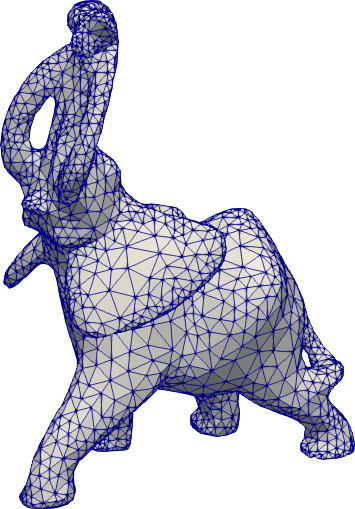
If you have a surface mesh at hand (like elephant.vtu), pygalmesh generates a volume mesh on the command line via
pygalmesh volume-from-surface elephant.vtu out.vtk --cell-size 1.0 --odt
(See pygalmesh volume-from-surface -h for all options.)
In Python, do
```python import pygalmesh
mesh = pygalmesh.generatevolumemeshfromsurfacemesh( "elephant.vtu", minfacetangle=25.0, maxradiussurfacedelaunayball=0.15, maxfacetdistance=0.008, maxcircumradiusedgeratio=3.0, verbose=False, ) ```
Meshes from INR voxel files
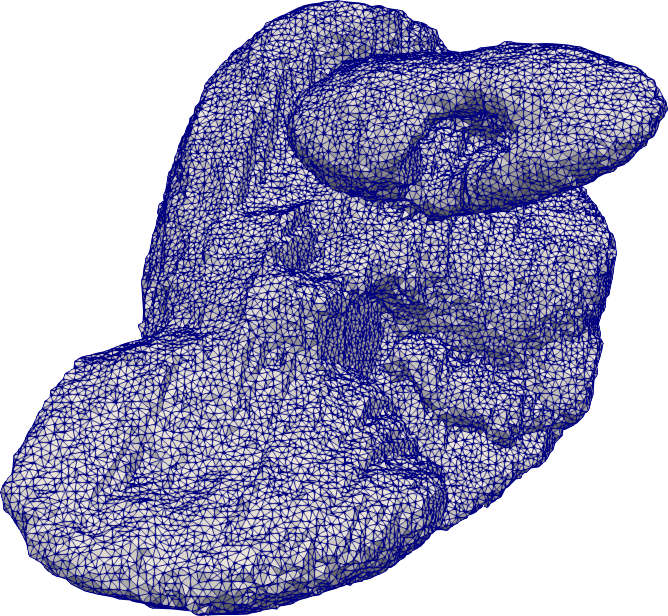
It is also possible to generate meshes from INR voxel files, e.g., here either on the command line
pygalmesh from-inr skull_2.9.inr out.vtu --cell-size 5.0 --odt
(see pygalmesh from-inr -h for all options) or from Python
```python import pygalmesh
mesh = pygalmesh.generatefrominr( "skull2.9.inr", maxcell_circumradius=5.0, verbose=False, ) ```
Meshes from numpy arrays representing 3D images
|  |
|  |
| :------------------------------------------------------------------------: | :---------------------------------------------------------------------: |
|
| :------------------------------------------------------------------------: | :---------------------------------------------------------------------: |
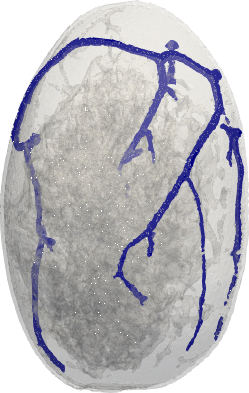
pygalmesh can help generating unstructed meshes from 3D numpy int arrays specifying the
subdomains. Subdomains with key 0 are not meshed.
```python import pygalmesh import numpy as np
x_ = np.linspace(-1.0, 1.0, 50) y_ = np.linspace(-1.0, 1.0, 50) z_ = np.linspace(-1.0, 1.0, 50) x, y, z = np.meshgrid(x, y, z_)
vol = np.empty((50, 50, 50), dtype=np.uint8) idx = x2 + y2 + z2 < 0.52 vol[idx] = 1 vol[~idx] = 0
voxel_size = (0.1, 0.1, 0.1)
mesh = pygalmesh.generatefromarray( vol, voxelsize, maxfacetdistance=0.2, maxcell_circumradius=0.1 ) mesh.write("ball.vtk") ```
The code below creates a mesh from the 3D breast phantom from Lou et al available here. The phantom comprises four tissue types (background, fat, fibrograndular, skin, vascular tissues). The generated mesh conforms to tissues interfaces.
```python import pygalmesh import meshio
with open("MergedPhantom.DAT", "rb") as fid: vol = np.fromfile(fid, dtype=np.uint8)
vol = vol.reshape((722, 411, 284)) voxel_size = (0.2, 0.2, 0.2)
mesh = pygalmesh.generatefromarray( vol, voxelsize, maxfacetdistance=0.2, maxcell_circumradius=1.0 ) mesh.write("breast.vtk") ```
In addition, we can specify different mesh sizes for each tissue type. The code below
sets the mesh size to 1 mm for the skin tissue (label 4), 0.5 mm for the vascular
tissue (label 5), and 2 mm for all other tissues (default).
python
mesh = pygalmesh.generate_from_array(
    vol,
    voxel_size,
    max_facet_distance=0.2,
    max_cell_circumradius={"default": 2.0, 4: 1.0, 5: 0.5},
)
mesh.write("breast_adapted.vtk")
Surface remeshing
|  |
|  |
| :-------------------------------------------------------------------------: | :-------------------------------------------------------------------------: |
|
| :-------------------------------------------------------------------------: | :-------------------------------------------------------------------------: |
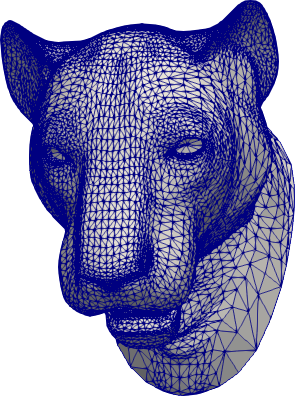
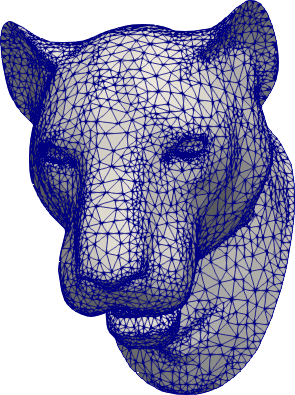
pygalmesh can help remeshing an existing surface mesh, e.g.,
lion-head.off. On
the command line, use
pygalmesh remesh-surface lion-head.off out.vtu -e 0.025 -a 25 -s 0.1 -d 0.001
(see pygalmesh remesh-surface -h for all options) or from Python
```python import pygalmesh
mesh = pygalmesh.remeshsurface( "lion-head.off", maxedgesizeatfeatureedges=0.025, minfacetangle=25, maxradiussurfacedelaunayball=0.1, maxfacetdistance=0.001, verbose=False, ) ```
Installation
For installation, pygalmesh needs CGAL and Eigen installed on your system. They are typically available on your Linux distribution, e.g., on Ubuntu
sudo apt install libcgal-dev libeigen3-dev
On MacOS with homebrew,
brew install cgal eigen
After that, pygalmesh can be installed from the Python Package Index, so with
pip install -U pygalmesh
you can install/upgrade.
Troubleshooting
If pygalmesh fails to build due to fatal error: 'Eigen/Dense' file not found
you will need to create a symbolic link for Eigen to be detected, e.g.
cd /usr/local/include
sudo ln -sf eigen3/Eigen Eigen
It's possible that eigen3 could be in /usr/include instead of
/usr/local/install.
Manual installation
For manual installation (if you're a developer or just really keen on getting the bleeding edge version of pygalmesh), there are two possibilities:
- Get the sources, type
python3 setup.py install. This does the trick most the time. - As a fallback, there's a CMake-based installation. Simply go
cmake /path/to/sources/andmake.
Testing
To run the pygalmesh unit tests, check out this repository and type
pytest
Background
CGAL offers two different approaches for mesh generation:
- Meshes defined implicitly by level sets of functions.
- Meshes defined by a set of bounding planes.
pygalmesh provides a front-end to the first approach, which has the following advantages and disadvantages:
- All boundary points are guaranteed to be in the level set within any specified residual. This results in smooth curved surfaces.
- Sharp intersections of subdomains (e.g., in unions or differences of sets) need to be specified manually (via feature edges, see below), which can be tedious.
On the other hand, the bounding-plane approach (realized by mshr), has the following properties:
- Smooth, curved domains are approximated by a set of bounding planes, resulting in more of less visible edges.
- Intersections of domains can be computed automatically, so domain unions etc. have sharp edges where they belong.
See here for other mesh generation tools.
License
This software is available under the GPLv3 license as well as a commercial license. If you'd like to use this software commercially, please contact the author.
Owner
- Name: MeshPro
- Login: meshpro
- Kind: organization
- Location: Germany
- Repositories: 8
- Profile: https://github.com/meshpro
Mesh tools for professionals.
Citation (CITATION.cff)
cff-version: 1.2.0
message: "If you use this software, please cite it as below."
authors:
- family-names: "Schlömer"
  given-names: "Nico"
  orcid: "https://orcid.org/0000-0001-5228-0946"
title: "pygalmesh: Python interface for CGAL's meshing tools"
doi: 10.5281/zenodo.5564818
url: https://github.com/nschloe/pygalmesh
license: GPL-3.0
GitHub Events
Total
- Issues event: 2
- Watch event: 51
- Issue comment event: 9
- Fork event: 6
Last Year
- Issues event: 2
- Watch event: 51
- Issue comment event: 9
- Fork event: 6
Committers
Last synced: over 2 years ago
Top Committers
| Name | Commits | |
|---|---|---|
| Nico Schlömer | n****r@g****m | 527 |
| Umberto Villa | u****a@w****u | 6 |
| Umberto Villa | u****a@g****m | 5 |
| Nijso Beishuizen | n****o@k****m | 4 |
| Graham Inggs | g****s@d****g | 1 |
| ES-Alexander | s****r@g****m | 1 |
| Martin | m****d@g****m | 1 |
| Sebastian Kehl | s****l@g****e | 1 |
| Adam Dobrawy | a****m | 1 |
| Nehal J Wani | n****1@g****m | 1 |
Committer Domains (Top 20 + Academic)
Issues and Pull Requests
Last synced: 12 months ago
All Time
- Total issues: 59
- Total pull requests: 47
- Average time to close issues: about 1 month
- Average time to close pull requests: 6 days
- Total issue authors: 47
- Total pull request authors: 8
- Average comments per issue: 2.58
- Average comments per pull request: 0.55
- Merged pull requests: 38
- Bot issues: 0
- Bot pull requests: 0
Past Year
- Issues: 1
- Pull requests: 1
- Average time to close issues: N/A
- Average time to close pull requests: N/A
- Issue authors: 1
- Pull request authors: 1
- Average comments per issue: 2.0
- Average comments per pull request: 1.0
- Merged pull requests: 0
- Bot issues: 0
- Bot pull requests: 0
Top Authors
Issue Authors
- lucascbarbosa (5)
- lahwaacz (4)
- krober10nd (2)
- IgnacioEG (2)
- thoth291 (2)
- drew-parsons (2)
- AnthoineResea (2)
- truenicoco (1)
- ksebaz (1)
- TalPe (1)
- jpmorr (1)
- MHenrich1990 (1)
- Dee718 (1)
- mark-dostalik (1)
- SalvishGoomanee (1)
Pull Request Authors
- nschloe (39)
- ES-Alexander (2)
- jmetancelin (2)
- sloriot (2)
- jacobmerson (1)
- sugatoray (1)
- ksebaz (1)
- uvilla (1)
Top Labels
Issue Labels
Pull Request Labels
Packages
- Total packages: 1
- Total downloads: unknown
- Total dependent packages: 0
- Total dependent repositories: 0
- Total versions: 49
proxy.golang.org: github.com/meshpro/pygalmesh
- Documentation: https://pkg.go.dev/github.com/meshpro/pygalmesh#section-documentation
- License: gpl-3.0
-
Latest release: v0.10.6
published over 4 years ago
Rankings
Dependencies
- actions/checkout v2 composite
- actions/setup-python v2 composite
- codecov/codecov-action v1 composite
- nschloe/action-cached-lfs-checkout v1 composite
- pre-commit/action v2.0.3 composite