https://github.com/choosehappy/patchsorter
A tool for rapidly labeling objects using deep learning feature embedding
Science Score: 36.0%
This score indicates how likely this project is to be science-related based on various indicators:
-
○CITATION.cff file
-
✓codemeta.json file
Found codemeta.json file -
○.zenodo.json file
-
✓DOI references
Found 2 DOI reference(s) in README -
✓Academic publication links
Links to: nature.com -
○Academic email domains
-
○Institutional organization owner
-
○JOSS paper metadata
-
○Scientific vocabulary similarity
Low similarity (17.5%) to scientific vocabulary
Repository
A tool for rapidly labeling objects using deep learning feature embedding
Basic Info
- Host: GitHub
- Owner: choosehappy
- License: bsd-3-clause-clear
- Language: JavaScript
- Default Branch: main
- Size: 4.55 MB
Statistics
- Stars: 17
- Watchers: 1
- Forks: 8
- Open Issues: 8
- Releases: 0
Metadata Files
README.md
PatchSorter
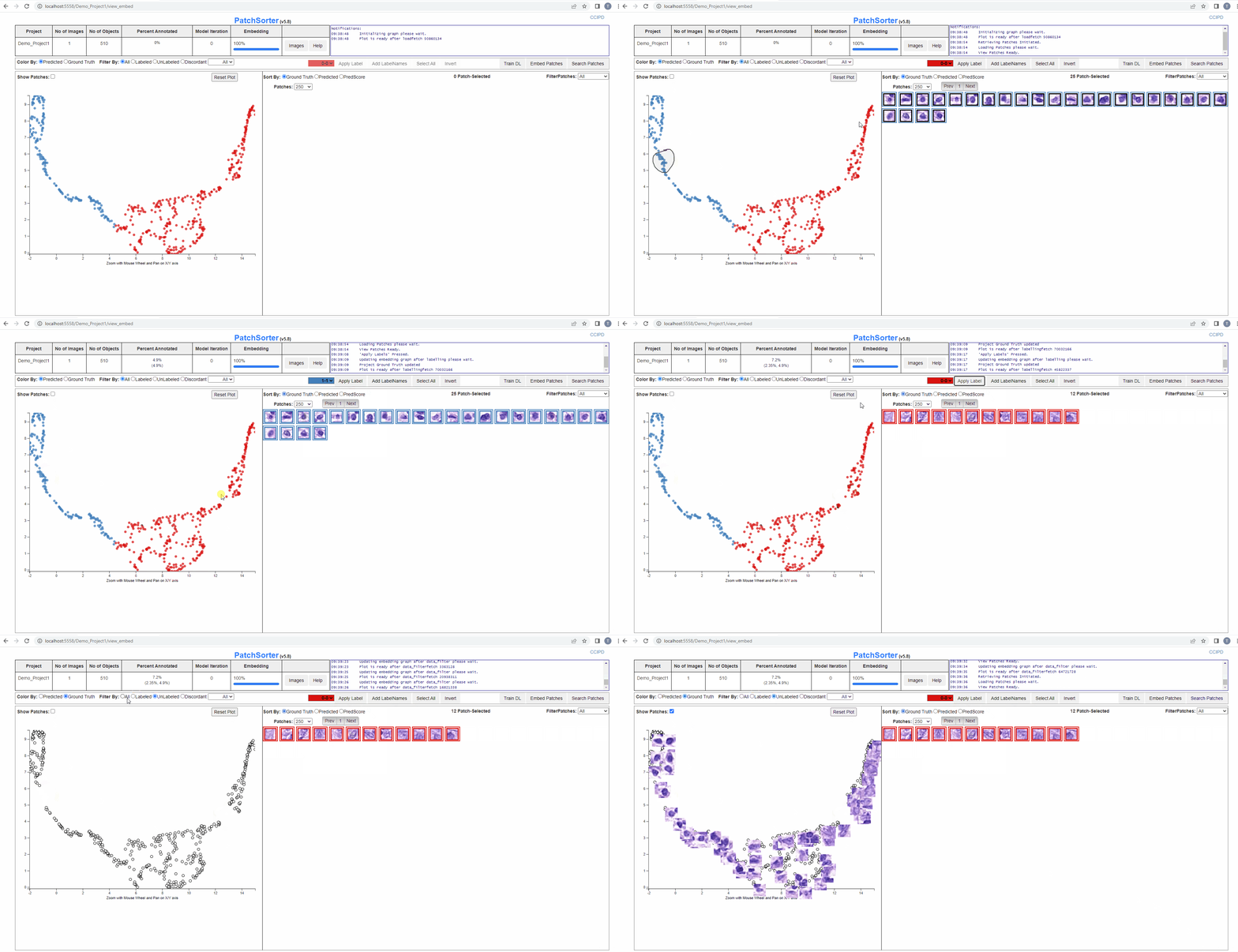
PatchSorter is an open-source digital pathology tool for histologic object labeling.
Requirements
Tested with Python 3.8 and Chrome
Requires: 1. Python 2. pip
And the following additional python package: 1. FlaskSQLAlchemy 2. scikitimage 3. scikitlearn 4. opencvpythonheadless 5. scipy 6. requests 7. SQLAlchemy 8. torch 9. torchvision 10.FlaskRestless 11. numpy 12. Flask 13. umap_learn 14. Pillow 15. tensorboardX 16. ttach 17. albumentations 18. config 19. dill 20. Shapely 21. tables 22. tqdm
You can likely install the python requirements using something like (note python 3+ requirement):
pip3 install -r requirements.txt
The library versions have been pegged to the current validated ones. Later versions are likely to work but may not allow for cross-site/version reproducibility
We received some feedback that users could installed torch. Here, we provide a detailed guide to install Torch
Torch's Installation
The general guides for installing Pytorch can be summarized as following: 1. Check your NVIDIA GPU Compute Capability @ https://developer.nvidia.com/cuda-gpus 2. Download CUDA Toolkit @ https://developer.nvidia.com/cuda-downloads 3. Install PyTorch command can be found @ https://pytorch.org/get-started/locally/
Run
E:\<<folder_path>>\PatchSorter>python3 -m patchsorter
By default, it will start up on localhost:5555
Warning: virtualenv will not work with paths that have spaces in them, so make sure the entire path to env/ is free of spaces.
Config Sections
There are many modular functions in QA whose behaviors could be adjusted by hyper-parameters. These hyper-parameters can be set in the config.ini file
- [common]
- [flask]
- [sqlalchemy]
- [pooling]
- [make_patches]
- [frontend]
- [train_tl]
- [embed]
Naming Conventions
- image name eg : train_1.png
- mask image name eg : train1mask.png
- csv file name eg: train_1.csv
Docker requirements
Docker is a set of platform as a service products that use OS-level virtualization to deliver software in packages called containers. Containers are isolated from one another and bundle their own software, libraries and configuration files.
In order to use Docker version of QA, user needs: 1. Nvidia driver supporting cuda. See documentation, here. 2. Docker Engine. See documentation, here 3. Nvidia-docker https://github.com/NVIDIA/nvidia-docker
Depending on your cuda version, we provide Dockerfiles for cuda_10 and cuda_11.
To start the server, run either:
docker build -t patchsorter -f cuda_10/Dockerfile .
or
docker build -t patchsorter -f cuda_11/Dockerfile .
from the PatchSorter folder.
When the docker image is done building, it can be run by typing:
docker run --gpus all -v /data/$CaseID/PatchSorter:/opt/PatchSorter -v /data/$CaseID/<location_of_images>/:/opt/imagedata -p 5555:5555 --shm-size=8G patchsorter
In the above command, -v /data/$CaseID/PatchSorter:/opt/PatchSorter mounts the PS on host file system to the PS inside the container.
/data/$CaseID/PatchSorter should be the PS path on your host file system, /opt/PatchSorter is the PS path inside the container, which is specified in the Dockerfile.
If image files will be uploaded using the upload folder option image directory needs to be mounted as well.
/data/$CaseID/<location_of_images>/ would be the path for images on your host file system, /opt/imagedata will be the path for the images inside the container.
Note: This command will forward port 5555 from the computer to port 5555 of the container, where our flask server is running as specified in the [config.ini]. The port number should match the config of running PS on host file system.
Usage Documentation
See
wiki
User Manual
FAQ
Citation
Please use below to cite PatchSorter if you find this repository useful or if you use the software shared here in your research.
Walker, C., Talawalla, T., Toth, R. et al. PatchSorter: a high throughput deep learning digital pathology tool for object labeling. npj Digit. Med. 7, 164 (2024). https://doi.org/10.1038/s41746-024-01150-4.
Paper available at Nature Digital Medicine.
Owner
- Login: choosehappy
- Kind: user
- Repositories: 8
- Profile: https://github.com/choosehappy
GitHub Events
Total
- Issues event: 6
- Watch event: 6
- Issue comment event: 8
- Pull request event: 2
- Fork event: 1
- Create event: 1
Last Year
- Issues event: 6
- Watch event: 6
- Issue comment event: 8
- Pull request event: 2
- Fork event: 1
- Create event: 1
Issues and Pull Requests
Last synced: 10 months ago
All Time
- Total issues: 13
- Total pull requests: 12
- Average time to close issues: 2 days
- Average time to close pull requests: 18 days
- Total issue authors: 9
- Total pull request authors: 6
- Average comments per issue: 1.77
- Average comments per pull request: 0.33
- Merged pull requests: 10
- Bot issues: 0
- Bot pull requests: 0
Past Year
- Issues: 4
- Pull requests: 1
- Average time to close issues: 1 day
- Average time to close pull requests: N/A
- Issue authors: 3
- Pull request authors: 1
- Average comments per issue: 1.25
- Average comments per pull request: 0.0
- Merged pull requests: 0
- Bot issues: 0
- Bot pull requests: 0
Top Authors
Issue Authors
- choosehappy (3)
- Calvin-Pang (2)
- cwlkr (1)
- jeginderof (1)
- aa647 (1)
- VolodymyrChapman (1)
- abreto42 (1)
- mina0107 (1)
- jacksonjacobs1 (1)
- usrsbn (1)
- abhijitramesh (1)
- AdroitR (1)
Pull Request Authors
- abhijitramesh (3)
- cwlkr (3)
- nanli-emory (3)
- AdroitR (2)
- Geeks-Sid (2)
- tasvora (1)
Top Labels
Issue Labels
Pull Request Labels
Dependencies
- Flask ==1.0.3
- Flask-Admin ==1.5.8
- Flask-Caching ==1.10.1
- Flask-Restless ==0.17.0
- Flask-SQLAlchemy ==2.4.0
- Pillow ==8.1.2
- SQLAlchemy ==1.3.5
- Shapely ==1.7.1
- albumentations ==0.4.3
- config ==0.4.2
- dill ==0.3.3
- flask-restx ==0.3.0
- llvmlite ==0.31.0
- matplotlib ==3.3.4
- numba ==0.47.0
- numpy ==1.16.4
- opencv-python-headless ==4.1.1.26
- requests ==2.22.0
- scikit-image ==0.15.0
- scikit-learn ==0.24.0
- scipy ==1.3.0
- tables ==3.6.1
- tensorboard ==2.4.1
- thefuzz ==0.19.0
- torch ==1.8.1
- torchaudio ===0.8.1
- torchinfo ==1.6.6
- torchsummary ==1.5.1
- torchvision ==0.9.1
- tqdm ==4.59.0
- ttach ==0.0.2
- umap-learn ==0.3.10
- waitress ==2.0.0
- Flask ==1.1.2
- Flask-Admin ==1.5.8
- Flask-Caching ==1.10.1
- Flask-Restless ==0.17.0
- Flask-SQLAlchemy ==2.4.4
- Jinja2 ==3.0.3
- Pillow ==8.1.2
- SQLAlchemy ==1.3.22
- Shapely ==1.7.1
- Werkzeug ==2.0.3
- albumentations ==0.4.3
- config ==0.4.2
- dill ==0.3.3
- flask-restx ==0.3.0
- itsdangerous ==1.1.0
- llvmlite ==0.37.0
- matplotlib ==3.3.4
- numba ==0.54.0
- numpy ==1.20.3
- opencv-python-headless ==4.5.3.56
- requests ==2.25.1
- scikit-image ==0.18.1
- scikit-learn ==0.24.0
- scipy ==1.6.0
- tables ==3.6.1
- tensorboard ==2.4.1
- thefuzz ==0.19.0
- torch ==1.8.1
- torchaudio ==0.8.1
- torchinfo ==1.6.6
- torchsummary ==1.5.1
- torchvision ==0.9.1
- tqdm ==4.59.0
- ttach ==0.0.2
- umap-learn ==0.5.1
- waitress ==2.0.0
- Flask ==1.1.2
- Flask-Admin ==1.5.8
- Flask-Caching ==1.10.1
- Flask-Restless ==0.17.0
- Flask-SQLAlchemy ==2.4.4
- Jinja2 ==3.0.3
- Pillow ==8.1.2
- SQLAlchemy ==1.3.22
- Shapely ==1.7.1
- Werkzeug ==2.0.3
- albumentations ==0.4.3
- config ==0.4.2
- dill ==0.3.3
- flask-restx ==0.3.0
- itsdangerous ==1.1.0
- llvmlite ==0.37.0
- matplotlib ==3.3.4
- numba ==0.54.0
- numpy ==1.20.3
- opencv-python-headless ==4.5.3.56
- protobuf ==3.20.0
- requests ==2.25.1
- scikit-image ==0.18.1
- scikit-learn ==0.24.0
- scipy ==1.6.0
- tables ==3.6.1
- tensorboard ==2.4.1
- thefuzz ==0.19.0
- torch ==1.8.1
- torchaudio ==0.8.1
- torchinfo ==1.6.6
- torchsummary ==1.5.1
- torchvision ==0.9.1
- tqdm ==4.59.0
- ttach ==0.0.2
- umap-learn ==0.5.1
- waitress ==2.0.0
- nvidia/cuda 10.1-cudnn7-devel-ubuntu18.04 build
- nvidia/cuda 11.0.3-cudnn8-devel-ubuntu20.04 build