https://github.com/chuhousen/ecmwfr
Interface to the public ECMWF API Web Services
Science Score: 23.0%
This score indicates how likely this project is to be science-related based on various indicators:
-
○CITATION.cff file
-
○codemeta.json file
-
○.zenodo.json file
-
✓DOI references
Found 6 DOI reference(s) in README -
✓Academic publication links
Links to: zenodo.org -
○Academic email domains
-
○Institutional organization owner
-
○JOSS paper metadata
-
○Scientific vocabulary similarity
Low similarity (19.4%) to scientific vocabulary
Last synced: 10 months ago
·
JSON representation
Repository
Interface to the public ECMWF API Web Services
Basic Info
- Host: GitHub
- Owner: chuhousen
- License: other
- Default Branch: master
- Homepage: https://bluegreen-labs.github.io/ecmwfr/
- Size: 6.33 MB
Statistics
- Stars: 0
- Watchers: 0
- Forks: 0
- Open Issues: 0
- Releases: 0
Fork of bluegreen-labs/ecmwfr
Created over 4 years ago
· Last pushed over 4 years ago
https://github.com/chuhousen/ecmwfr/blob/master/
# ecmwfr[](https://github.com/bluegreen-labs/ecmwfr/actions) [](https://codecov.io/gh/bluegreen-labs/ecmwfr) [](https://cran.r-project.org/package=ecmwfr) [](https://www.repostatus.org/#active) [](https://cran.r-project.org/package=ecmwfr) [](https://zenodo.org/badge/latestdoi/156325084) Programmatic interface to the two [European Centre for Medium-Range Weather Forecasts](https://www.ecmwf.int/) API services. The package provides easy access to the ['ECMWF' web API services](https://confluence.ecmwf.int/display/WEBAPI/ECMWF+Web+API+Home) and Copernicus [Climate Data Store](https://cds.climate.copernicus.eu) or 'CDS' from within R, matching and expanding upon the ECMWF python tools. ## How to cite this package in your article You can cite this package like this "we obtained data from the European Centre for Medium-Range Weather Forecasts API using the ecmwf R package (Hufkens, Stauffer, and Campitelli 2019)". Here is the full bibliographic reference to include in your reference list (don't forget to update the 'last accessed' date): > Hufkens, K., R. Stauffer, & E. Campitelli. (2019). ecmwfr: Programmatic interface to the two European Centre for Medium-Range Weather Forecasts API services. (Version v1.2.0). Zenodo. http://doi.org/10.5281/zenodo.2647541. Last accessed 15 May 2020 ## Installation ### stable release To install the current stable release use a CRAN repository: ``` r install.packages("ecmwfr") library("ecmwfr") ``` > As of version 1.2.3 there are breaking changes to the submitted requests to the Climate Data Store API. If you have code which relies on pre-formatted CDS request please updated the `dataset` field to `dataset_short_name`. ### development release To install the development releases of the package run the following commands: ``` r if(!require(devtools)){install.packages("devtools")} devtools::install_github("bluegreen-labs/ecmwfr") library("ecmwfr") ``` Vignettes are not rendered by default, if you want to include additional documentation please use: ``` r if(!require(devtools)){install.packages("devtools")} devtools::install_github("bluegreen-labs/ecmwfr", build_vignettes = TRUE) library("ecmwfr") ``` ## Use: ECMWF services Create a ECMWF account by [self registering](https://apps.ecmwf.int/registration/) and retrieving your key at https://api.ecmwf.int/v1/key/ after you log in. The key is a long series of numbers and characters (X in the example below). ```json { "url" : "https://api.ecmwf.int/v1", "key" : "XXXXXXXXXXXXXXXXXXXXXX", "email" : "john.smith@example.com" } ``` ### Setup Before starting save the provided key to your local keychain. The package does not allow you to use your key inline in scripts to limit security issues when sharing scripts on github or otherwise. ```R # set a key to the keychain wf_set_key(user = "john.smith@example.com", key = "XXXXXXXXXXXXXXXXXXXXXX", service = "webapi") # you can retrieve the key using wf_get_key(user = "john.smith@example.com") # the output should be the key you provided # "XXXXXXXXXXXXXXXXXXXXXX" # Alternatively you can input your login info with an interactive request wf_set_key(service = "webapi") # you will get a command line request to provide the required details ``` Before you can download any data you have to make sure to accept the terms and conditions here: [https://apps.ecmwf.int/datasets/licences/general/](https://apps.ecmwf.int/datasets/licences/general/). ### Data Requests To download data use the wf_request() function, together with your email and a request string syntax [as documented](https://confluence.ecmwf.int/display/WEBAPI/Brief+request+syntax#Briefrequestsyntax-Syntax). Instead of `json` formatting the function uses a simple `R` list for all the arguments. Be sure to specify which service to use, in this case `webapi` is the correct service to request data from. The conversion from a MARS or python based query to the list format can be automated if you use the RStudio based Addin. By selecting and using Addin -> Mars to list (or 'Python to list') you dynamically convert queries copied from either ECMWF or CDS/ADS based services. 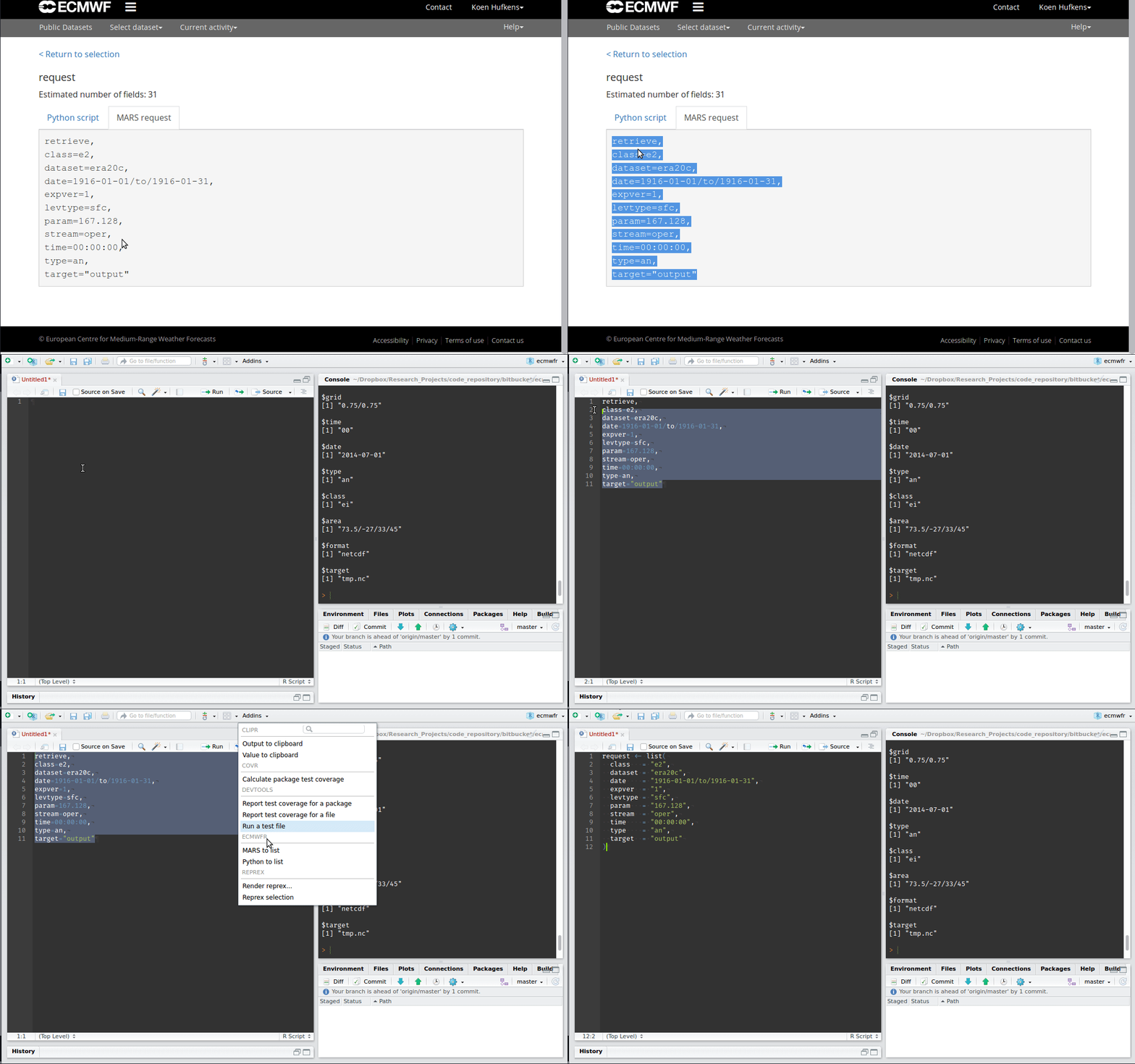 ```R # this is an example of a request my_request <- list(stream = "oper", levtype = "sfc", param = "165.128/166.128/167.128", dataset = "interim", step = "0", grid = "0.75/0.75", time = "00/06/12/18", date = "2014-07-01/to/2014-07-31", type = "an", class = "ei", area = "73.5/-27/33/45", format = "netcdf", target = "tmp.nc") # an example download using fw_request() # using the above request list() # # data will be transferred to disk # and saved in your home directory (~) # set by the path argument wf_request( user = "khrdev@outlook.com", request = my_request, transfer = TRUE, path = "~") ``` This operation might take a while. A progress indicator will keep you informed on the status of your request. Keep in mind that all data downloaded will be buffered in memory limiting the downloads to ~6GB on low end systems. You can track ongoing jobs at in the joblist at: [https://apps.ecmwf.int/webmars/joblist/](https://apps.ecmwf.int/webmars/joblist/). ## Use: Copernicus Climate Data Store (CDS) Create a free CDS user account by [self registering](https://cds.climate.copernicus.eu/user/register). Once your user account has been verified you can get your personal _user ID_ and _key_ by visiting the [user profile](https://cds.climate.copernicus.eu/user). This information is required to be able to retrieve data via the `ecmwfr` package. Use the `ecmwf` [`wf_set_key`](references/wf_set_key.html) function to store your login information in the system keyring (see below). Be aware, that unlike the API key for the ECMWF API your `user` does not correspond to the email address you use for the CDS login. ```json UID: 1234 API key: abcd1234-foo-bar-98765431-XXXXXXXXXX ``` ### Setup If you prefer to use your local keychain (rather than using the `.cdsapirc` file) you have to save your login information first. The package does not allow you to use your key inline in scripts to limit security issues when sharing scripts on github or otherwise. ```R # set a key to the keychain wf_set_key(user = "1234", key = "abcd1234-foo-bar-98765431-XXXXXXXXXX", service = "cds") # you can retrieve the key using wf_get_key(user = "1234") # the output should be the key you provided # "abcd1234-foo-bar-98765431-XXXXXXXXXX" # Alternatively you can input your login info with an interactive request wf_set_key(service = "cds") # you will get a command line request to provide the required details ``` Before you can download any data you have to make sure to accept the terms and conditions here: Before downloading and processing data from CDS please make sure you accept the terms and conditions which can be found here: [Copernicus Climate Data Store Disclaimer/Privacy](https://cds.climate.copernicus.eu/disclaimer-privacy). ### Data Requests To download data use the [`wf_request`](references/wf_request.html) function, together with your _user ID_ and a request string syntax [as documented](https://confluence.ecmwf.int/display/WEBAPI/Brief+request+syntax#Briefrequestsyntax-Syntax). Instead of `json` formatting the function uses a simple `R` list for all the arguments. Be sure to specify the service you want to use in your query in this case `cds`. **Note**: the simplest way to get the requests is to go to the CDS website which offers an interactive interface to create these requests. E.g., for ERA-5 reanalysis: * [pressure level data](https://cds.climate.copernicus.eu/cdsapp#!/dataset/reanalysis-era5-pressure-levels?tab=form) * [surface data](https://cds.climate.copernicus.eu/cdsapp#!/dataset/reanalysis-era5-single-levels?tab=form) * ... ```R # This is an example of a request for # downloading 'ERA-5' reanalysis data for # 2000-04-04 00:00 UTC, temperature on # 850 hectopascal for an area covering # northern Europe. # File will be stored as "era5-demo.nc" (netcdf format). request <- list("dataset_short_name" = "reanalysis-era5-pressure-levels", "product_type" = "reanalysis", "variable" = "temperature", "pressure_level" = "850", "year" = "2000", "month" = "04", "day" = "04", "time" = "00:00", "area" = "70/-20/00/60", "format" = "netcdf", "target" = "era5-demo.nc") # If you have stored your user login information # in the keyring by calling cds_set_key you can # call: file <- wf_request(user = "1234", # user ID (for authentification) request = request, # the request transfer = TRUE, # download the file path = ".") # store data in current working directory ``` The CDS services are quite fast, however, if you request a lot of variables, multiple levels, and data over several years these requests might take quite a while! **Note**: If you need to download larger amounts of data it is suggested to split the downloads, e.g., download the data in junks (e.g., month-by-month, or year-by-year). A progress indicator will keep you informed on the status of your request. Keep in mind that all data downloaded will be buffered in memory limiting the downloads to ~6GB on low end systems. ## Use: Copernicus Atmosphere Data Store (ADS) Create a free ADS user account by [self registering](https://ads.atmosphere.copernicus.eu/user/register). Once your user account has been verified you can get your personal _user ID_ and _key_ by visiting the [user profile](https://ads.atmosphere.copernicus.eu/user/). This information is required to be able to retrieve data via the `ecmwfr` package. Use the `ecmwf` [`wf_set_key`](references/wf_set_key.html) function to store your login information in the system keyring (see below). Be aware, that unlike the API key for the ECMWF API your `user` does not correspond to the email address you use for the ADS login. ```json UID: 2345 API key: asfed1234-foo-bar-98765431-XXXXXXXXXX ``` ### Setup If you prefer to use your local keychain (rather than using the `.cdsapirc` file) you have to save your login information first. The package does not allow you to use your key inline in scripts to limit security issues when sharing scripts on github or otherwise. ```R # set a key to the keychain wf_set_key(user = "2345", key = "asfed1234-foo-bar-98765431-XXXXXXXXXX", service = "cds") # you can retrieve the key using wf_get_key(user = "2345") # the output should be the key you provided # "asfed1234-foo-bar-98765431-XXXXXXXXXX" # Alternatively you can input your login info with an interactive request wf_set_key(service = "ads") # you will get a command line request to provide the required details ``` Before you can download any data you have to make sure to accept the terms and conditions here: Before downloading and processing data from CDS please make sure you accept the terms and conditions which can be found here: [Copernicus Atmosphere Data Store Disclaimer/Privacy](https://ads.atmosphere.copernicus.eu/disclaimer-privacy). ### Data Requests To download data use the [`wf_request`](references/wf_request.html) function, together with your _user ID_ and a request string syntax. Instead of `json` formatting the function uses a simple `R` list for all the arguments. Be sure to specify the service you want to use in your query in this case `ads`. Note that the `cds` and `ads` services are identical in use except for their login credentials **Note**: the simplest way to get the requests is to go to the ADS website which offers an interactive interface to create these requests. E.g., for air quality data: * [European air quality data](https://ads.atmosphere.copernicus.eu/cdsapp#!/dataset/cams-europe-air-quality-forecasts?tab=form) * ... ```R # This is an example of a request for global # particulate matter data, data will be stored # in your present working directory with filename # particulate_matter.nc request <- list( date = "2003-01-01/2003-01-01", format = "netcdf", variable = "particulate_matter_2.5um", time = "00:00", dataset_short_name = "cams-global-reanalysis-eac4", target = "particulate_matter.nc" ) # If you have stored your user login information # in the keyring by calling cds_set_key you can # call: file <- wf_request(user = "2345", # user ID (for authentification) request = request, # the request transfer = TRUE, # download the file path = ".") # store data in current working directory ``` The same file restrictions and notes as for the CDS apply to the ADS. ## File based keychains On linux you can opt to use a file based keyring, instead of a GUI based keyring manager. This is helpful for headless setups such as servers. For this option to work linux users must set an environmental option. ```R options(keyring_backend="file") ``` You will be asked to provide a password to encrypt the keyring with. Upon the start of each session you will be asked to provide this password, unlocking all `ecmwfr` credentials for this session. Should you ever forget the password just delete the file at: `~/.config/r-keyring/ecmwfr.keyring` and re-enter all your credentials. ## Citation Koen Hufkens, Reto Stauffer, & Elio Campitelli. (2019, April 19). bluegreen-labs/ecmwfr: ecmwfr (Version v1.2.0). Zenodo. [http://doi.org/10.5281/zenodo.2647541](http://doi.org/10.5281/zenodo.2647541). ## Acknowledgements This project was in part supported by the Belgian Science Policy office COBECORE project (BELSPO; grant BR/175/A3/COBECORE), a "Fonds voor Wetenschappelijk Onderzoek" travel grant (FWO; V438318N) and the Marie Skodowska-Curie Action (H2020 grant 797668). Logo design elements are taken from the FontAwesome library according to [these terms](https://fontawesome.com/license), where the globe element was inverted and intersected.
Owner
- Name: Housen Chu
- Login: chuhousen
- Kind: user
- Website: https://sites.google.com/site/chuhousen/home
- Twitter: chuhousen
- Repositories: 2
- Profile: https://github.com/chuhousen
environmental scientist, studying plant-ecosystem-atmosphere interactions in natural and managed ecosystems