https://github.com/cicirello/bibliometrics
Summarize your Google Scholar bibliometrics in an SVG
Science Score: 49.0%
This score indicates how likely this project is to be science-related based on various indicators:
-
○CITATION.cff file
-
✓codemeta.json file
Found codemeta.json file -
✓.zenodo.json file
Found .zenodo.json file -
✓DOI references
Found 30 DOI reference(s) in README -
✓Academic publication links
Links to: arxiv.org -
○Committers with academic emails
-
○Institutional organization owner
-
○JOSS paper metadata
-
○Scientific vocabulary similarity
Low similarity (7.8%) to scientific vocabulary
Keywords
Keywords from Contributors
Repository
Summarize your Google Scholar bibliometrics in an SVG
Basic Info
Statistics
- Stars: 2
- Watchers: 1
- Forks: 0
- Open Issues: 0
- Releases: 12
Topics
Metadata Files
README.md
bibliometrics
| Packages and Releases | 




 |
| Security |
|
| Security |  |
| Other Info |
|
| Other Info | 




This command line utility does the following: * retrieves the first page of your Google Scholar profile; * parses from that page your total citations, your five-year citation count, your h-index, your i10-index, and the number of citations of your most-cited paper; * computes your o-index (https://arxiv.org/abs/1511.01545); * computes your g-index provided if it is less than 100 (reason for limitation later); * computes your i100-index, i1000-index, and i10000-index (doi:10.1007/s11192-020-03831-9), hiding any that are 0, and provided they are less than 100 (reason for limitation later); * computes your w-index (doi:10.1002/asi.21276), hiding if equal to 0, and provided it is less than 100 (reason for limitation later); * computes your e-index (doi:10.1371/journal.pone.0005429), your r-index (doi:10.1007/s11434-007-0145-9), and your a-index provided that your h-index is at most 100 (reason for limitation later); * computes your h-median provided that your h-index is less than 200 (reason for limitation later); * computes your m-quotient, if you configure the year of your first publication in the configuration file; * generates a JSON file summarizing these bibliometrics; * generates one or more SVG images summarizing these bibliometrics; and * includes all bibliometrics that are non-zero by default, but enables user-configurable list of bibliometrics.
The intention of this utility is as a tool for a researcher to generate an SVG of their own bibliometrics only. For example, I am using it to generate and update such an SVG for my own profile twice monthly. It is not intended for analyzing multiple researchers' bibliometrics, and requests for such functionality will be rejected (there are other tools for that).
Blog Post: Your Citation Metrics in an SVG for Your Website (Posted on DEV.to on July 22, 2022)
Table of Contents
This README is organized as follows: * Supported Bibliometrics: list of the bibliometrics with brief descriptions of what they are. * Samples: provides examples of the output of this utility. * Configuration: explains how to configure the utility, such as colors for the SVG, file locations, etc. * Configuring the Scholar ID: explains the two ways of providing your Google Scholar ID to the utility. * Usage: how to install and run. * Respect Google Scholar's robots.txt: explains the relevant portions of Google Scholar's robots.txt as it relates to this, or any tool, designed to gather information from Scholar. Note that most other tools that provide more functionality (e.g., all of the ones I looked at before implementing this) do not respect that robots.txt. If you wish to submit an issue or pull request requesting additional functionality, please know that any such request must be possible to implement without violating Scholar's robots.txt. Otherwise, the issue or pull request will be closed. * Support the Project: different ways that you can support the project. * Contribute: contribution guidelines. * License.
Supported Bibliometrics
The bibliometrics utility computes the following bibliometrics: * Total citations: total number of citations to the researcher's publications. * Five-year citations: total citations within past 5 years. * Most-cited paper: number of citations to the researcher's most-cited paper. * h-index: the maximum h such that the researcher's h most-cited papers have been cited at least h times each. * m-quotient: h-index / n, the number of years since first publication, which was introduced in the same article as the h-index itself as a way of adjusting for length of publication history. * g-index: the maximum g such that the researcher's g most-cited papers have been cited an average of g times each. * i10-index: number of papers cited at least 10 times each. * i100-index: number of papers cited at least 100 times each. * i1000-index: number of papers cited at least 1000 times each. * i10000-index: number of papers cited at least 10000 times each. * w-index: number of papers cited at least 10w times each. * o-index: the geometric mean of the researcher's h-index and number of citations to the most-cited paper. * Various bibliometrics intended to complement the h-index, providing additional information about the researcher's h-core, where the h-core refers to the h most-cited papers. These complementary bibliometrics include the following: * h-median: the median citations of the papers in the researcher's h-core. * e-index: the square root of the excess citations to the papers in the h-core, where excess citations is defined as the total citations to the papers in the h-core minus $h^2$. * r-index: the square root of the total citations to the papers in the researcher's h-core. * a-index: the average number of citations to the papers in the researcher's h-core.
Samples
Here are a couple sample SVGs.
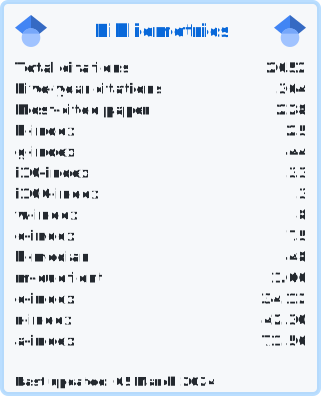
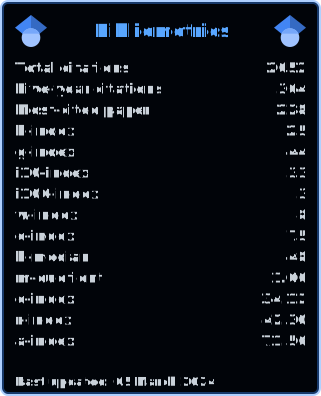
Here is a sample of the JSON summary also generated by the utility:
JSON
{
    "a-index": 71.56,
    "e-index": 34.12,
    "five-year-cites": 364,
    "g-index": 44,
    "h-index": 25,
    "h-median": 48,
    "i10-index": 33,
    "i100-index": 3,
    "m-quotient": 1.0,
    "most-cited": 228,
    "o-index": 75,
    "r-index": 42.3,
    "total-cites": 2052,
    "w-index": 8
}
The keys in this JSON are all lowercased, and correspond to the keys expected if you customize the order in your configuration file. However, in your configuration file they are case-insensitive. See the next section for how to configure.
The above sample is also found in this repository: bibliometrics.json, and the sample SVGs are found in the images directory.
Configuration
The utility looks for a configuration file .bibliometrics.config.json in your current
working directory (please note the . at the start of the filename). A sample is found
at the root of this repository: .bibliometrics.config.json.
To generate the JSON summary of your bibliometrics, specify the filename (optionally with path)
via the "jsonOutputFile" field. If this field is not present, then no JSON file will be generated.
To compute the m-quotient, you must provide the year of your first publication in the "firstPubYear"
field. The bibliometrics utility does not attempt to scrape this from your Scholar profile.
To change the order that the bibliometrics appear in the SVG, or to explicitly exclude one or more
bibliometrics, you can use the "include" field. This field is an array of keys associated with the
various bibliometrics. If this field is not present, then the following default order is
used: [ "total-cites", "five-year-cites", "most-cited", "h-index", "g-index", "i10-index", "i100-index", "i1000-index", "i10000-index", "w-index", "o-index", "h-median", "m-quotient", "e-index", "r-index", "a-index" ]. There is no
reason to use this field if the only thing you want to do is to exclude bibliometrics that have the
value 0. Such bibliometrics will be excluded by default. The list of keys for the bibliometrics to
include is case-insensitive.
The "svgConfig" field is an array of JSON objects, such that each object configures one SVG. Each
of the JSON objects in this array includes the following fields:
* "filename" is the filename (optionally with path) to the target SVG file.
* "background" is the background color.
* "border" is the border color.
* "title" is the title color.
* "text" is the color of the rest of the text.
* "include" is similar to the top-level field of the same name, but applies only to one SVG, whereas the top-level field applies to all. If both the top-level "include" field and the more specific field by the same name are used, then the top-level "include" overrides the default, and the individual SVG's "include" in turn overrides the top-level "include".
The colors can be defined in any format that is valid within an SVG. For example, you can specify
RGB, two hex digits for each color channel, with #010409; or RGB with one hex digit for each color
channel, #123. You can also use SVG named colors, such as white, as well as RGBA such as
rgba(56,139,253,0.4). If it is valid as a color in SVG, then it should work. The utility simply inserts
it for the relevant color within the SVG without validation.
Here is a sample .bibliometrics.config.json (using the default order of the bibliometrics,
and providing the year of first publication):
JSON
{
    "jsonOutputFile": "bibliometrics.json",
    "firstPubYear": 1999,
    "svgConfig": [
        {
            "background": "#010409",
            "border": "rgba(56,139,253,0.4)",
            "filename": "images/bibliometrics2.svg",
            "text": "#c9d1d9",
            "title": "#58a6ff"
        },
        {
            "background": "#f6f8fa",
            "border": "rgba(84,174,255,0.4)",
            "filename": "images/bibliometrics.svg",
            "text": "#24292f",
            "title": "#0969da"
        }
    ]
}
Here is another sample that generates three SVGs, overriding the default order at the top-level to exclude the i10-index (and related indexes), and then overriding it again for one of the three SVGs to additionally exclude the g-index, w-index, o-index, h-median, e-index, r-index, and a-index. This example also does not specify "firstPubYear", which means that the m-quotient won't be calculated:
JSON
{
    "jsonOutputFile": "bibliometrics.json",
    "include": [
        "total-cites",
        "five-year-cites",
        "most-cited",
        "h-index",
        "g-index",
        "w-index",
        "o-index",
        "h-median",
        "e-index",
        "r-index",
        "a-index"
    ],
    "svgConfig": [
        {
            "background": "#010409",
            "border": "rgba(56,139,253,0.4)",
            "filename": "images/bibliometrics3.svg",
            "text": "#c9d1d9",
            "title": "#58a6ff"
        },
        {
            "background": "#010409",
            "border": "rgba(56,139,253,0.4)",
            "filename": "images/bibliometrics2.svg",
            "text": "#c9d1d9",
            "title": "#58a6ff",
            "include": ["total-cites", "five-year-cites", "most-cited", "h-index"]
        },
        {
            "background": "#f6f8fa",
            "border": "rgba(84,174,255,0.4)",
            "filename": "images/bibliometrics.svg",
            "text": "#24292f",
            "title": "#0969da"
        }
    ]
}
You also have the option to configure the user-agent string for the request
that downloads your Scholar profile. To do so, use the userAgent field, such
as in the example below.
JSON
{
    "jsonOutputFile": "bibliometrics.json",
    "firstPubYear": 1999,
    "userAgent": "Mozilla/5.0",
    "svgConfig": [
        {
            "background": "#010409",
            "border": "rgba(56,139,253,0.4)",
            "filename": "images/bibliometrics2.svg",
            "text": "#c9d1d9",
            "title": "#58a6ff"
        },
        {
            "background": "#f6f8fa",
            "border": "rgba(84,174,255,0.4)",
            "filename": "images/bibliometrics.svg",
            "text": "#24292f",
            "title": "#0969da"
        }
    ]
}
Configuring the Scholar ID
There are two ways to provide your Google Scholar ID to the utility:
* in the configuration file (see above section) via a field "scholarID" (not shown in the example in the
repository); or
* via an environment variable SCHOLAR_ID.
Usage
Installing
To install from PyPi (Unix and MacOS):
Shell
python3 -m pip install bibliometrics
To install from PyPI (Windows):
Shell
py -m pip install bibliometrics
To upgrade to latest version from PyPi (Unix and MacOS):
Shell
python3 -m pip install --upgrade bibliometrics
To upgrade to latest version from PyPI (Windows):
Shell
py -m pip install --upgrade bibliometrics
Running
To use this utility, first ensure that you configure it as specified above. Then execute the following (Unix and MacOS):
Shell
python3 -m bibliometrics
Or on Windows:
Shell
py -m bibliometrics
Respect Google Scholar's robots.txt
If you use this utility, please respect Google Scholar's robots.txt. The reason that the g-index (as well as i100-index, i1000-index, i10000-index, w-index) is only computed by this utility if it is less than 100 derives from Scholar's robots.txt. Likewise, the reason that the e-index, r-index, and a-index are only computed if your h-index is at most 100 relates to this as well. In the case of the h-median, we can compute it as long as your h-index is less than 200. Here is the relevant excerpt:
robots.txt
Allow: /citations?user=
Disallow: /citations?*cstart=
The first line above allows getting a user's profile page. But the second line above disallows querying a specific starting reference. This means if you are respecting Google Scholar's robots.txt then you are limited to the first page of the profile, which can include up to 100 publications. Therefore, we can compute g-index as long as it is not greater than 100. However, if we compute 100, we cannot be certain if it is correct or if it is actually higher, so this utility excludes a g-index of 100 as well. The same is true for i100-index, i1000-index, and i10000-index. There is a similar issue for e-index, r-index, and a-index. In those cases, to compute the relevant bibliometric, we need the number of citations of your h most-cited articles. Therefore, we only compute these if your h-index is at most 100.
Support the Project
You can support the project in a number of ways: * Starring: If you find this utility useful, consider starring the GitHub repository. * Sharing with Others: Consider sharing it with others who you feel might find it useful. * Reporting Issues: If you find a bug or have a suggestion for a new feature, please report it via the Issue tracker. Please note, however, that feature requests will be evaluated for whether they can be implemented while respecting Google Scholar's robots.txt, which means limited to what can be computed from the first page of your Google Scholar profile. * Contributing Code: If there is an open issue that you think you can help with, submit a pull request. * Sponsoring: You can also consider sponsoring via one of the following:
|  |
|  |
| :---: | :---: |
|
|
| :---: | :---: |
|  | |
| |
Contribute
If you would like to contribute start by reading the contribution guidelines. This project has adopted the Contributor Covenant Code of Conduct.
The intention of this utility is as a tool for a researcher to generate an SVG of their own bibliometrics, so issues requesting, or pull requests implementing, support for multiple scholar profiles will be rejected.
License
The code in this repository is released under the MIT License.
Owner
- Name: Vincent A. Cicirello
- Login: cicirello
- Kind: user
- Location: Galloway, NJ
- Company: Stockton University
- Website: https://www.cicirello.org/
- Repositories: 53
- Profile: https://github.com/cicirello
Vincent A. Cicirello is a researcher in AI, evolutionary computation, and swarm intelligence.
GitHub Events
Total
- Create event: 3
- Release event: 1
- Issues event: 2
- Watch event: 2
- Delete event: 3
- Push event: 4
- Pull request review event: 1
- Pull request event: 4
Last Year
- Create event: 3
- Release event: 1
- Issues event: 2
- Watch event: 2
- Delete event: 3
- Push event: 4
- Pull request review event: 1
- Pull request event: 4
Committers
Last synced: 12 months ago
Top Committers
| Name | Commits | |
|---|---|---|
| Vincent A. Cicirello | c****o | 165 |
| dependabot[bot] | 4****] | 17 |
Issues and Pull Requests
Last synced: 10 months ago
All Time
- Total issues: 19
- Total pull requests: 61
- Average time to close issues: 7 days
- Average time to close pull requests: about 2 hours
- Total issue authors: 1
- Total pull request authors: 2
- Average comments per issue: 0.0
- Average comments per pull request: 0.0
- Merged pull requests: 59
- Bot issues: 0
- Bot pull requests: 18
Past Year
- Issues: 1
- Pull requests: 3
- Average time to close issues: 3 minutes
- Average time to close pull requests: 1 minute
- Issue authors: 1
- Pull request authors: 2
- Average comments per issue: 0.0
- Average comments per pull request: 0.0
- Merged pull requests: 2
- Bot issues: 0
- Bot pull requests: 1
Top Authors
Issue Authors
- cicirello (19)
Pull Request Authors
- cicirello (43)
- dependabot[bot] (18)
Top Labels
Issue Labels
Pull Request Labels
Dependencies
- actions/checkout v3 composite
- actions/setup-python v4 composite
- actions/checkout v3 composite
- github/codeql-action/analyze v2 composite
- github/codeql-action/autobuild v2 composite
- github/codeql-action/init v2 composite
- actions/checkout v3 composite
- actions/setup-python v4 composite
- pypa/gh-action-pypi-publish v1.6.4 composite