https://github.com/clean-423/trading-bot
Science Score: 26.0%
This score indicates how likely this project is to be science-related based on various indicators:
-
○CITATION.cff file
-
✓codemeta.json file
Found codemeta.json file -
✓.zenodo.json file
Found .zenodo.json file -
○DOI references
-
○Academic publication links
-
○Committers with academic emails
-
○Institutional organization owner
-
○JOSS paper metadata
-
○Scientific vocabulary similarity
Low similarity (13.2%) to scientific vocabulary
Repository
Basic Info
- Host: GitHub
- Owner: clean-423
- Language: Python
- Default Branch: main
- Size: 25.4 KB
Statistics
- Stars: 0
- Watchers: 1
- Forks: 0
- Open Issues: 0
- Releases: 0
Metadata Files
README.md
Limit Sniper
A mempool sniping bot for Ethereum, Binance Smart Chain, Matic, & Fantom that is able to scan for new liquidity adds on token launches, so as to be able to buy a token as soon as liquidity is added --> in the same block
This bot was built as a learning project for me to learn how to use Web.py, Erc20, & improve my coding skills please use at your own risk!
Grab the Latest Release:
https://github.com/CryptoGnome/Limit-Sniper/releases
HOW TO INSTALL Sniper Bot
There are 3 ways to install Sniper Bot :
1. Run The Python Code Locally [this is most ideal and can work on any OS]
Here is a tutorial step-by-step:
- [x] Download last Sniper Bot code on the "Code" page https://github.com/CryptoGnome/Limit-Sniper by clicking on Code > Download Zip:

- [x] Unzip file
- [x] Install Python on your computer : https://www.python.org/downloads/
PLEASE ADD IT TO PATH BY CHECKING THIS OPTION:

- [x] Install Visual Studio : https://visualstudio.microsoft.com/fr/thank-you-downloading-visual-studio/?sku=Community&rel=17
Please install the default package and all those options :
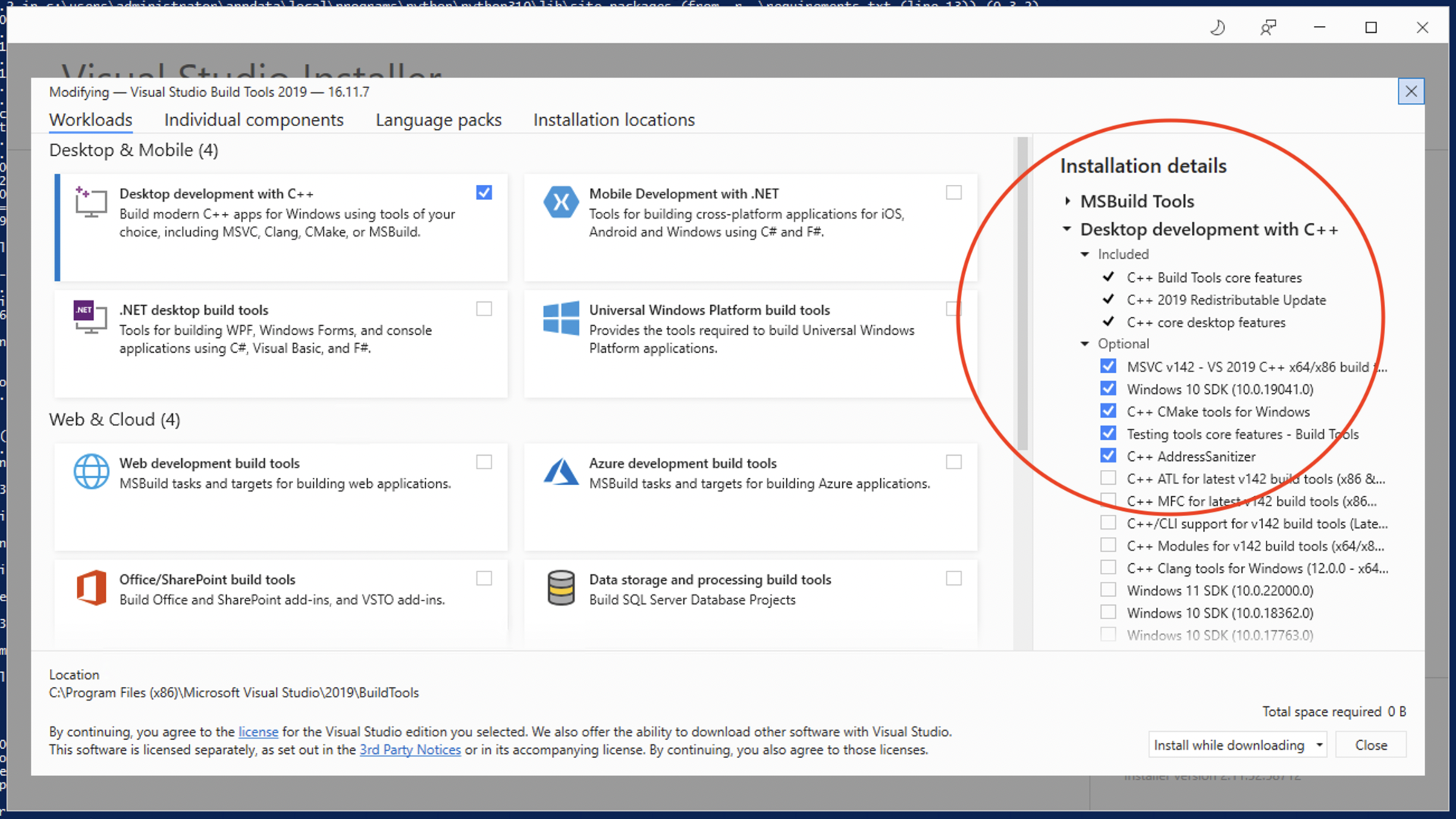
[x] Open Windows Powershell (or Mac Terminal on MacOs)
[X] Run this command to locate Sniper folder :
Get-ChildItem -Filter sniper.py -Recurse -ErrorAction SilentlyContinue -Force
- [x] It should look like this:

- [X] Copy the Directory
(example : C:\Users\Administrator\Desktop\Limit-Sniper-main)
- [X] Paste the Directory after the "cd" command to navigate through the bot folder
(example : cd C:\Users\Administrator\Desktop\Limit-Sniper-main)

- [x] Run command:
pip install -r requirements.txt--> this will install all the packages needed to run LimitSwap
✅ ✅ ✅ And it's done! ✅ ✅ ✅
- [x] Simply double-click on "sniper.py" and it will run, since you've installed Python 👍👍
Pros and cons
🟢 : you are sure of the code that is running on your computer
🔴 : little bit complicated
2. Download the pre-compiled package [This can lag behind current version]
That we provide on the Release page : it's a .exe file that you can run on your computer. https://github.com/CryptoGnome/Limit-Sniper/releases
Pros and cons
🟢 : very easy to setup
🔴 : it's pre-compiled, so you cannot check the Source Code
3. With Docker
Requirements
MacOS and Windows users require Docker for Desktop https://www.docker.com/products/docker-desktop
Ubuntu Linux require Docker installed sudo apt-get install docker.io
Usage
Navigate into the bot directory and build the Docker image by executing the following command:
docker build -t limit_sniper .
(For MacOS and Linux) Still within the main directory you can run Docker via:
docker run --rm --name limit-sniper -it -v $(pwd)/settings.json:/app/settings.json -v $(pwd)/tokens.json:/app/tokens.json limit_sniper
(For Windows with Powershell)
docker run --rm --name limit-sniper -it -v $PWD/settings.json:/app/settings.json -v $PWD/tokens.json:/app/tokens.json limit_sniper
If you wish to run the container in the background please include -d for detached.
The streaming container logs can be visualised with docker logs -f limit_sniper
To stop the bot docker stop limit_sniper
Pros and cons
🟢 : easy to setup if you know Docker
🔴 : needs Docker

Developers 🔧
Want to help contribute to LimitSwap, reach out on telegram all you need to do is make changes or fix bugs and we will pay developer bounties in $LIMIT for helping make the bot batter!
Links & Socials:
WiKi
https://limitswapv3.gitbook.io/limitswap/
Website:
https://www.limitswap.com/
Twitter:
https://twitter.com/LimitSwap
Telegram:
https://t.me/LimitSwap
Owner
- Login: clean-423
- Kind: user
- Repositories: 1
- Profile: https://github.com/clean-423
GitHub Events
Total
- Push event: 7
- Pull request event: 9
- Create event: 2
Last Year
- Push event: 7
- Pull request event: 9
- Create event: 2
Committers
Last synced: about 1 year ago
Top Committers
| Name | Commits | |
|---|---|---|
| clean-423 | d****0@g****m | 6 |
Issues and Pull Requests
Last synced: about 1 year ago
All Time
- Total issues: 0
- Total pull requests: 4
- Average time to close issues: N/A
- Average time to close pull requests: less than a minute
- Total issue authors: 0
- Total pull request authors: 1
- Average comments per issue: 0
- Average comments per pull request: 0.0
- Merged pull requests: 4
- Bot issues: 0
- Bot pull requests: 0
Past Year
- Issues: 0
- Pull requests: 4
- Average time to close issues: N/A
- Average time to close pull requests: less than a minute
- Issue authors: 0
- Pull request authors: 1
- Average comments per issue: 0
- Average comments per pull request: 0.0
- Merged pull requests: 4
- Bot issues: 0
- Bot pull requests: 0
Top Authors
Issue Authors
Pull Request Authors
- clean-423 (7)
Top Labels
Issue Labels
Pull Request Labels
Dependencies
- aiohttp ==3.8.1
- aiosignal ==1.2.0
- async-timeout ==4.0.1
- attrs ==21.2.0
- base58 ==2.1.1
- bitarray ==1.2.2
- certifi ==2021.10.8
- charset-normalizer ==2.0.7
- cryptocode ==0.1
- cytoolz ==0.11.2
- eth-abi ==2.1.1
- eth-account ==0.5.6
- eth-hash ==0.3.2
- eth-keyfile ==0.5.1
- eth-keys ==0.3.3
- eth-rlp ==0.2.1
- eth-typing ==2.2.2
- eth-utils ==1.10.0
- frozenlist ==1.2.0
- hexbytes ==0.2.2
- idna ==3.3
- ipfshttpclient ==0.8.0a2
- jsonschema ==3.2.0
- lru-dict ==1.1.7
- multiaddr ==0.0.9
- multidict ==5.2.0
- netaddr ==0.8.0
- parsimonious ==0.8.1
- protobuf ==3.19.1
- pwinput ==1.0.2
- pycryptodome ==3.11.0
- pyrsistent ==0.18.0
- pywin32 ==302
- requests ==2.26.0
- rlp ==2.0.1
- six ==1.16.0
- toolz ==0.11.2
- typing-extensions ==4.0.0
- urllib3 ==1.26.7
- varint ==1.0.2
- web3 ==5.24.0
- websockets ==9.1
- yarl ==1.7.2