pmdarima-python-3.13.1
Update pmdarima compatible with Python 3.13.1
Science Score: 44.0%
This score indicates how likely this project is to be science-related based on various indicators:
-
✓CITATION.cff file
Found CITATION.cff file -
✓codemeta.json file
Found codemeta.json file -
✓.zenodo.json file
Found .zenodo.json file -
○DOI references
-
○Academic publication links
-
○Academic email domains
-
○Institutional organization owner
-
○JOSS paper metadata
-
○Scientific vocabulary similarity
Low similarity (15.6%) to scientific vocabulary
Repository
Update pmdarima compatible with Python 3.13.1
Basic Info
- Host: GitHub
- Owner: JonasVeronez
- License: mit
- Language: Python
- Default Branch: master
- Size: 1.37 MB
Statistics
- Stars: 1
- Watchers: 0
- Forks: 0
- Open Issues: 0
- Releases: 0
Metadata Files
README.md
pmdarima







Pmdarima (originally pyramid-arima, for the anagram of 'py' + 'arima') is a statistical
library designed to fill the void in Python's time series analysis capabilities. This includes:
- The equivalent of R's
auto.arimafunctionality - A collection of statistical tests of stationarity and seasonality
- Time series utilities, such as differencing and inverse differencing
- Numerous endogenous and exogenous transformers and featurizers, including Box-Cox and Fourier transformations
- Seasonal time series decompositions
- Cross-validation utilities
- A rich collection of built-in time series datasets for prototyping and examples
- Scikit-learn-esque pipelines to consolidate your estimators and promote productionization
Pmdarima wraps statsmodels under the hood, but is designed with an interface that's familiar to users coming from a scikit-learn background.
Installation
pip
Pmdarima has binary and source distributions for Windows, Mac and Linux (manylinux) on pypi
under the package name pmdarima and can be downloaded via pip:
bash
pip install pmdarima
conda
Pmdarima also has Mac and Linux builds available via conda and can be installed like so:
bash
conda config --add channels conda-forge
conda config --set channel_priority strict
conda install pmdarima
Note: We do not maintain our own Conda binaries, they are maintained at https://github.com/conda-forge/pmdarima-feedstock. See that repo for further documentation on working with Pmdarima on Conda.
Quickstart Examples
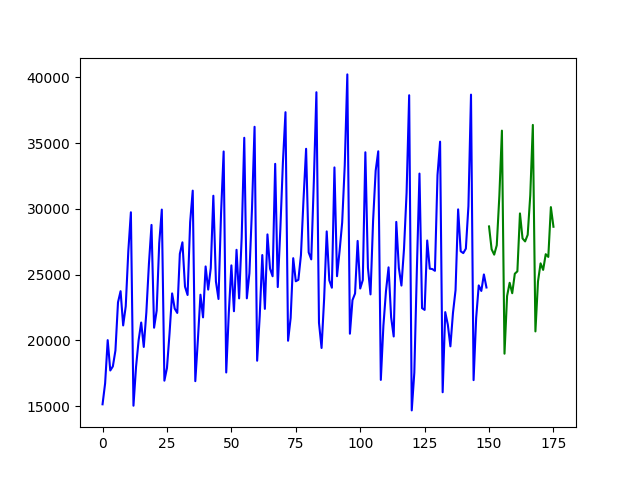
Fitting a simple auto-ARIMA on the wineind dataset:
```python import pmdarima as pm from pmdarima.modelselection import traintest_split import numpy as np import matplotlib.pyplot as plt
Load/split your data
y = pm.datasets.loadwineind() train, test = traintestsplit(y, trainsize=150)
Fit your model
model = pm.auto_arima(train, seasonal=True, m=12)
make your forecasts
forecasts = model.predict(test.shape[0]) # predict N steps into the future
Visualize the forecasts (blue=train, green=forecasts)
x = np.arange(y.shape[0]) plt.plot(x[:150], train, c='blue') plt.plot(x[150:], forecasts, c='green') plt.show() ```
Fitting a more complex pipeline on the sunspots dataset,
serializing it, and then loading it from disk to make predictions:
```python import pmdarima as pm from pmdarima.modelselection import traintest_split from pmdarima.pipeline import Pipeline from pmdarima.preprocessing import BoxCoxEndogTransformer import pickle
Load/split your data
y = pm.datasets.loadsunspots() train, test = traintestsplit(y, trainsize=2700)
Define and fit your pipeline
pipeline = Pipeline([ ('boxcox', BoxCoxEndogTransformer(lmbda2=1e-6)), # lmbda2 avoids negative values ('arima', pm.AutoARIMA(seasonal=True, m=12, suppress_warnings=True, trace=True)) ])
pipeline.fit(train)
Serialize your model just like you would in scikit:
with open('model.pkl', 'wb') as pkl: pickle.dump(pipeline, pkl)
Load it and make predictions seamlessly:
with open('model.pkl', 'rb') as pkl: mod = pickle.load(pkl) print(mod.predict(15))
[25.20580375 25.05573898 24.4263037 23.56766793 22.67463049 21.82231043
21.04061069 20.33693017 19.70906027 19.1509862 18.6555793 18.21577243
17.8250318 17.47750614 17.16803394]
```
Availability
pmdarima is available on PyPi in pre-built Wheel files for Python 3.9+ for the following platforms:
- Mac (64-bit)
- Linux (64-bit manylinux)
- Windows (64-bit)
- 32-bit wheels are available for pmdarima versions below 2.0.0 and Python versions below 3.10
If a wheel doesn't exist for your platform, you can still pip install and it
will build from the source distribution tarball, however you'll need cython>=0.29
and gcc (Mac/Linux) or MinGW (Windows) in order to build the package from source.
Note that legacy versions (<1.0.0) are available under the name
"pyramid-arima" and can be pip installed via:
```bash
Legacy warning:
$ pip install pyramid-arima
python -c 'import pyramid;'
```
However, this is not recommended.
Documentation
All of your questions and more (including examples and guides) can be answered by
the pmdarima documentation. If not, always
feel free to file an issue.
Owner
- Login: JonasVeronez
- Kind: user
- Repositories: 2
- Profile: https://github.com/JonasVeronez
Citation (CITATION.cff)
cff-version: 1.2.0
message: "If you would like to include pmdarima in your published work, please cite it as follows"
authors:
- family-names: "Smith"
  given-names: "Taylor G."
keywords:
  - python
  - "machine learning"
  - "time series"
  - econometrics
  - forecasting
  - arima
  - "forecasting models"
  - sarimax
title: "pmdarima"
version: 2.0.4
date-released: 2023-10-23
license: MIT
repository-artifact: https://pypi.org/project/pmdarima
repository-code: https://github.com/alkaline-ml/pmdarima
GitHub Events
Total
- Watch event: 2
- Public event: 2
- Push event: 3
- Create event: 2
Last Year
- Watch event: 2
- Public event: 2
- Push event: 3
- Create event: 2