https://github.com/compomics/ols-dialog
Java front end to the ontology lookup service (OLS)
Science Score: 10.0%
This score indicates how likely this project is to be science-related based on various indicators:
-
○CITATION.cff file
-
○codemeta.json file
-
○.zenodo.json file
-
○DOI references
-
✓Academic publication links
Links to: ncbi.nlm.nih.gov -
○Academic email domains
-
○Institutional organization owner
-
○JOSS paper metadata
-
○Scientific vocabulary similarity
Low similarity (11.8%) to scientific vocabulary
Repository
Java front end to the ontology lookup service (OLS)
Basic Info
- Host: GitHub
- Owner: CompOmics
- Language: Java
- Default Branch: master
- Homepage: http://compomics.github.io/projects/ols-dialog.html
- Size: 1.24 MB
Statistics
- Stars: 0
- Watchers: 15
- Forks: 1
- Open Issues: 0
- Releases: 0
Metadata Files
README.md
The OLS Dialog project is now maintained at https://github.com/PRIDE-Toolsuite/ols-dialog.
The version at this page is deprecated and will not work with the updated version of the OLS.
OLS Dialog
- What is OLS Dialog?
- Search Options
- Using OLS Dialog
- Troubleshooting
- Support
- Maven Dependency
- Screenshots
OLS Dialog Publications: * Barsnes et al: BMC Bioinformatics 2010 Jan 17;11:34. * Perez-Riverol et al: Molecular & Cellular Proteomics 15.1 (2016): 305-317. * If you use OLS Dialog as part of a paper, please include the references above.
What is OLS Dialog?
OLS Dialog is a Java front end to the Ontology Lookup Service allowing easy access to an extensive list of biomedical ontologies (see supported ontologies for a complete list).
OLS Dialog is a part of the PRIDE Toolsuite including major projects like PRIDE Converter 2, PRIDE Inspector. and PX Submission Tool Making OLS Dialog a standalone project is done to make it more easily available for other projects.
Five ways of searching the OLS Dialog is supported. See Search Options.
Search Options
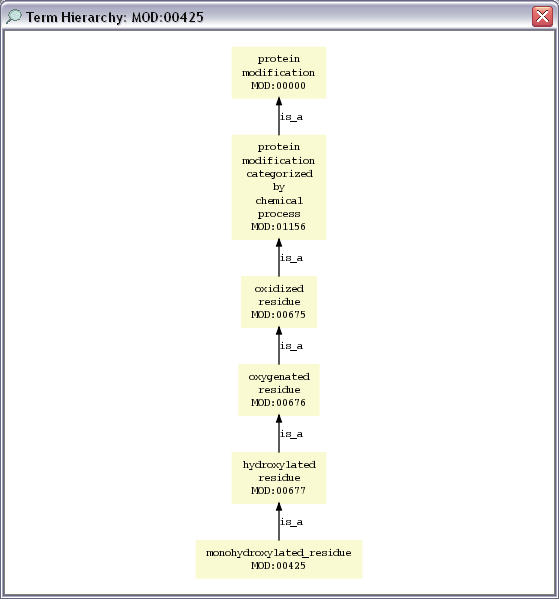
Five ways of searching the OLS Dialog is supported: * Term Name Search * Term ID Search * PSI MOD Mass Search * Browse Ontology * Term Hierarchy Graph
Term Name Search
Term Name Search simply finds all terms having term names that (partially) match the insert search term. Insert the first letters of the name of the term to locate in the search field. Note that the search is in "real time". Meaning that a new search is started (and the result list updated) for every character typed. The number behind the search field is the number of currently matching terms.
Note that in some cases a complete search is not performed until at least four characters have been inserted. If the wanted term is not found, make sure that at least four characters have been inserted.
The search results are listed in the table in the middle, and clicking a term displays additional information about the selected term in the "Term Details" section below.
When the wanted term has been found, select the term in the table and click the "Use Selected Term" button at the bottom of the frame. (Or you can double click on the selected term.)
For an example see the Screenshots section.
Term ID Search
Term ID Search allows you the locate a given term and its details by inserting the term id, e.g., MOD:00425 or GO:0000269.
The results are displayed and selected in the same way as for results from a Term Name Search.
For an example see the Screenshots section.
PSI MOD Mass Search
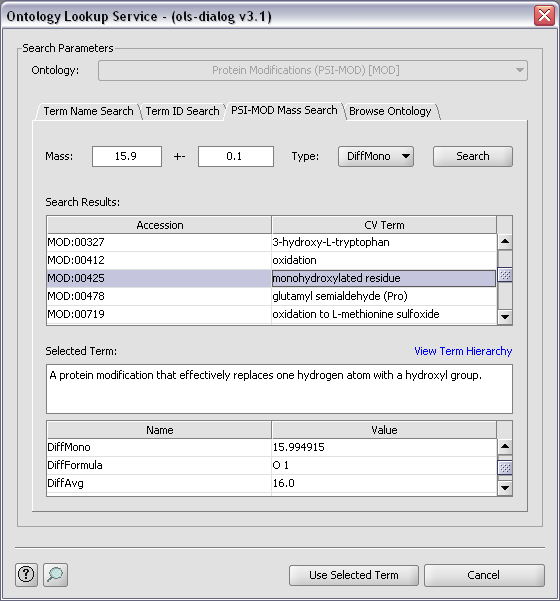
PSI MOD Mass Search allows you to search the PSI-MOD ontology for specific modifications using the mass of the modification. There are four different mass types: DiffAvg and DiffMono corresponding to the average and mono mass of the mass change the modifications results in, and MassAvg and MassMono corresponding to the mass of the modified residue.
Insert the mass, the mass accuracy and the mass type and click on "Search" to perform the search. The results are displayed and selected in the same way as for results from a Term Name Search.
For an example see the Screenshots section.
Browse Ontology
Browse Ontology makes it possible to find the wanted term by browsing the selected ontology. The ontology is displayed using a tree structure where the relationships between the terms are highlighted. When selecting a term in the tree, details about the selected term is displayed in the "Term Details" section.
The results are selected and used in the same way as for results from a Term Name Search.
For an example see the Screenshots section.
Using OLS Dialog
Running the Jar File
Running the jar file (either by double clicking it, or running it from the command line) starts a small example showing how OLS Dialog can be used. The code for the example can be found in the SVN archive (in the package named no.uib.olsdialog.example).
In Other Projects
To use OLS Dialog in your project include OLS Dialog and the required libraries as dependencies, and make all classes that are going to access the OLS implement the OLSInputable interface (found in the package named no.uib.olsdialog). See the source code for details.
Troubleshooting
Internet Connection - If you have problems connecting to the Ontology Lookup Service, first make sure that you are connected to the internet. Then check your firewall (and proxy) settings to see if they prevent OLS Dialog from accessing the internet. If you are using a proxy server you need to set the proxy settings.
Proxy Settings - If you are using OLS Dialog via PRIDE Converter this is done by updating the
JavaOptions.txtfile in the PRIDE ConverterPropertiesfolder. Add: "-Dhttp.proxyHost=my.proxy.domain.com" and "-Dhttp.proxyPort=3128" to the end of this file (on two separate lines). Replace the name of the proxy host (and the proxy port if necessary), save theJavaOptions.txtfile and start PRIDE Converter again. If this does not solve your problem, or you are not using a proxy server, you (or your IT department) has to allow HTTP POST connections to the following URL: http://www.ebi.ac.uk/ontology-lookup/services/OntologyQuery.Proxy Settings - If you are using OLS Dialog outside of PRIDE Converter you can use the same approach as above but the proxy settings now has to be set on the command line, e.g.
java -Dhttp.proxyHost=my.proxy.domain.com -Dhttp.proxyPort=3128 -jar ols-dialog.jar. Replaceols-dialog.jarwith the name of your project.General Error Diagnosis - If using OLS Dialog via PRIDE Converter check the PRIDE Converter's Properties folder for a file called ErrorLog.txt. This file contains transcripts of any errors that the application has encountered, and can be very useful in diagnosing your problem. When OLS Dialog is used outside of PRIDE Converter all error messages are sent to the default output stream.
Problem Not Solved? Or Problem Not In List Above? - See Support.
Support
For questions or additional help, please contact the authors or, if appropriate, e-mail a support request to the PRIDE team at the EBI: pride-support at ebi.ac.uk (replace at with @).
Maven Dependency
OLS Dialog is available for use in Maven projects:
<dependency>
    <groupId>uk.ac.ebi.pride.toolsuite</groupId>
    <artifactId>ols-dialog</artifactId>
    <version>X.Y.Z</version>
</dependency>
<repository>
        <id>nexus-ebi-repo</id>
        <name>The EBI internal repository</name>
        <url>http://www.ebi.ac.uk/intact/maven/nexus/content/repositories/ebi-repo/</url>
        <releases>
        </releases>
        <snapshots>
            <enabled>false</enabled>
        </snapshots>
</repository>
Update the version number to latest released version.
Screenshots
| | | | | |
|:--:|:--:|:--:|:--:|:--:|
|  |
|  |
|  |
|  |
|  |
|
Owner
- Name: Computational Omics and Systems Biology Group
- Login: CompOmics
- Kind: organization
- Email: compomics.list@gmail.com
- Website: https://www.compomics.com/
- Twitter: CompOmics
- Repositories: 93
- Profile: https://github.com/CompOmics
The CompOmics group, headed by Prof. Dr. Lennart Martens, specializes in the management, analysis and integration of high-throughput Omics data.
GitHub Events
Total
Last Year
Dependencies
- org.swinglabs:swing-layout 1.0.3 compile
- com.jgoodies:looks 2.2.0
- net.jcip:jcip-annotations 1.0
- org.apache.axis:axis-saaj 1.4
- uk.ac.ebi.pride.utilities:ols-client 2.11