Science Score: 54.0%
This score indicates how likely this project is to be science-related based on various indicators:
-
✓CITATION.cff file
Found CITATION.cff file -
✓codemeta.json file
Found codemeta.json file -
✓.zenodo.json file
Found .zenodo.json file -
○DOI references
-
✓Academic publication links
Links to: zenodo.org -
○Academic email domains
-
○Institutional organization owner
-
○JOSS paper metadata
-
○Scientific vocabulary similarity
Low similarity (10.9%) to scientific vocabulary
Keywords
control
inverted-pendulum
terminal-based
Last synced: 10 months ago
·
JSON representation
·
Repository
Inverted pendulum simulation on the terminal using c
Statistics
- Stars: 12
- Watchers: 1
- Forks: 0
- Open Issues: 1
- Releases: 3
Topics
control
inverted-pendulum
terminal-based
Created over 5 years ago
· Last pushed over 1 year ago
Metadata Files
Readme
Citation
Readme.org
#+TITLE: Pendulum
#+OPTIONS: toc:nil
#+PROPERTY: header-args :comments yes
#+latex_header: \usepackage{fontspec}
#+latex_header:\setmonofont{DejaVu Sans Mono}
#+latex_header:\definecolor{nord0}{HTML}{2E3440} \definecolor{nord1}{HTML}{3B4252} \definecolor{nord2}{HTML}{434C5E} \definecolor{nord3}{HTML}{4C566A} \definecolor{nord4}{HTML}{D8DEE9} \definecolor{nord5}{HTML}{E5E9F0} \definecolor{nord6}{HTML}{ECEFF4} \definecolor{nord7}{HTML}{8FBCBB} \definecolor{nord8}{HTML}{88C0D0} \definecolor{nord9}{HTML}{81A1C1} \definecolor{nord10}{HTML}{5E81AC} \definecolor{nord11}{HTML}{BF616A} \definecolor{nord12}{HTML}{D08770} \definecolor{nord13}{HTML}{EBCB8B} \definecolor{nord14}{HTML}{A3BE8C} \definecolor{nord15}{HTML}{B48EAD}
#+latex_header: \lstset{basicstyle=\ttfamily\color{nord4},backgroundcolor=\color{nord1},keywordstyle=\color{nord10},identifierstyle=\color{nord7},commentstyle=\color{nord3!0.2!gray},flexiblecolumns=true,stringstyle=\color{nord14},breaklines=true,linewidth=\linewidth,xleftmargin=-1cm,showstringspaces=false,keepspaces=true,showtabs=true,tabsize=2}
#+HTML: 
Implementation using curses
- example of controlled ::
#+HTML: 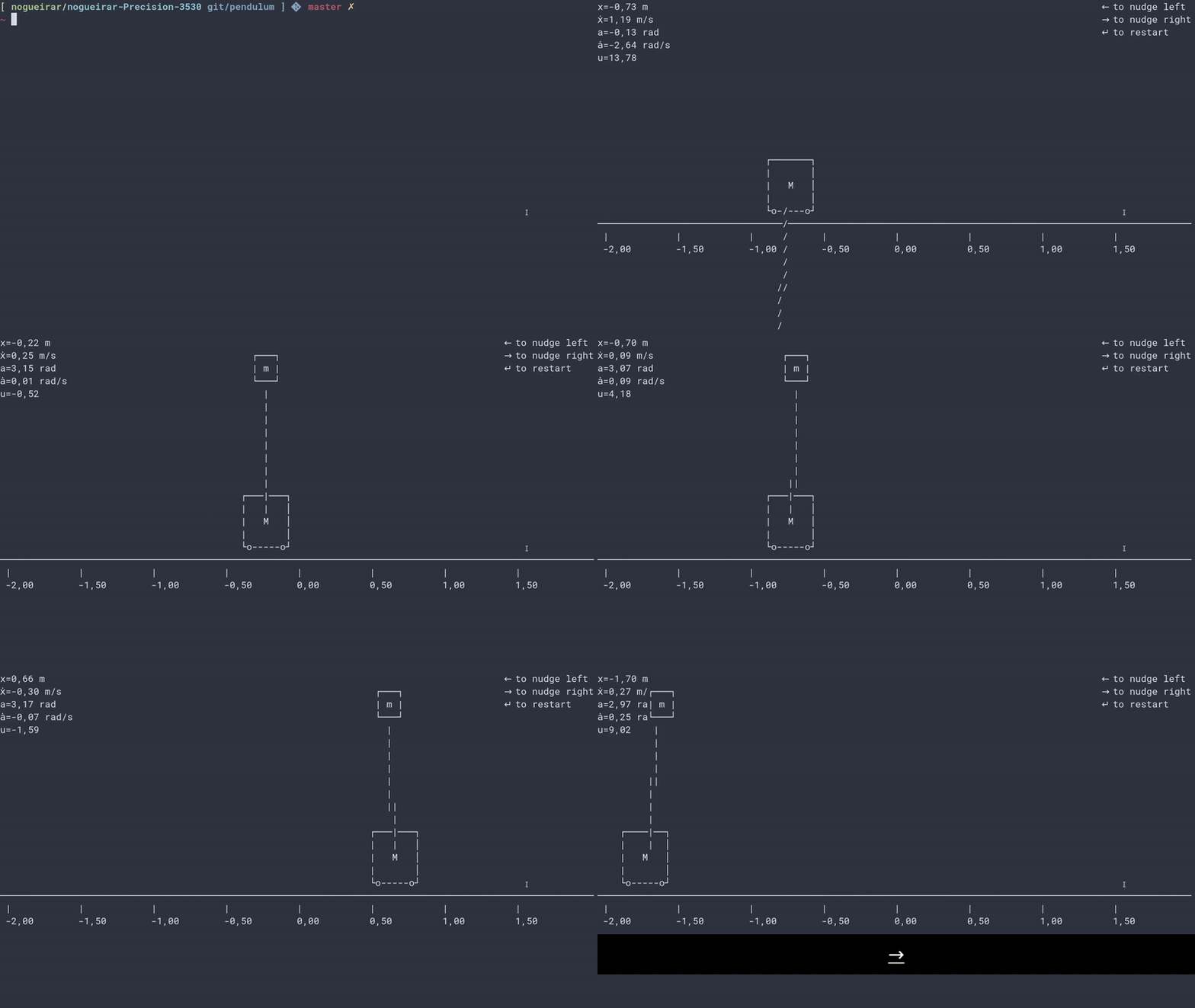
- example changing control without recompiling ::
#+HTML: 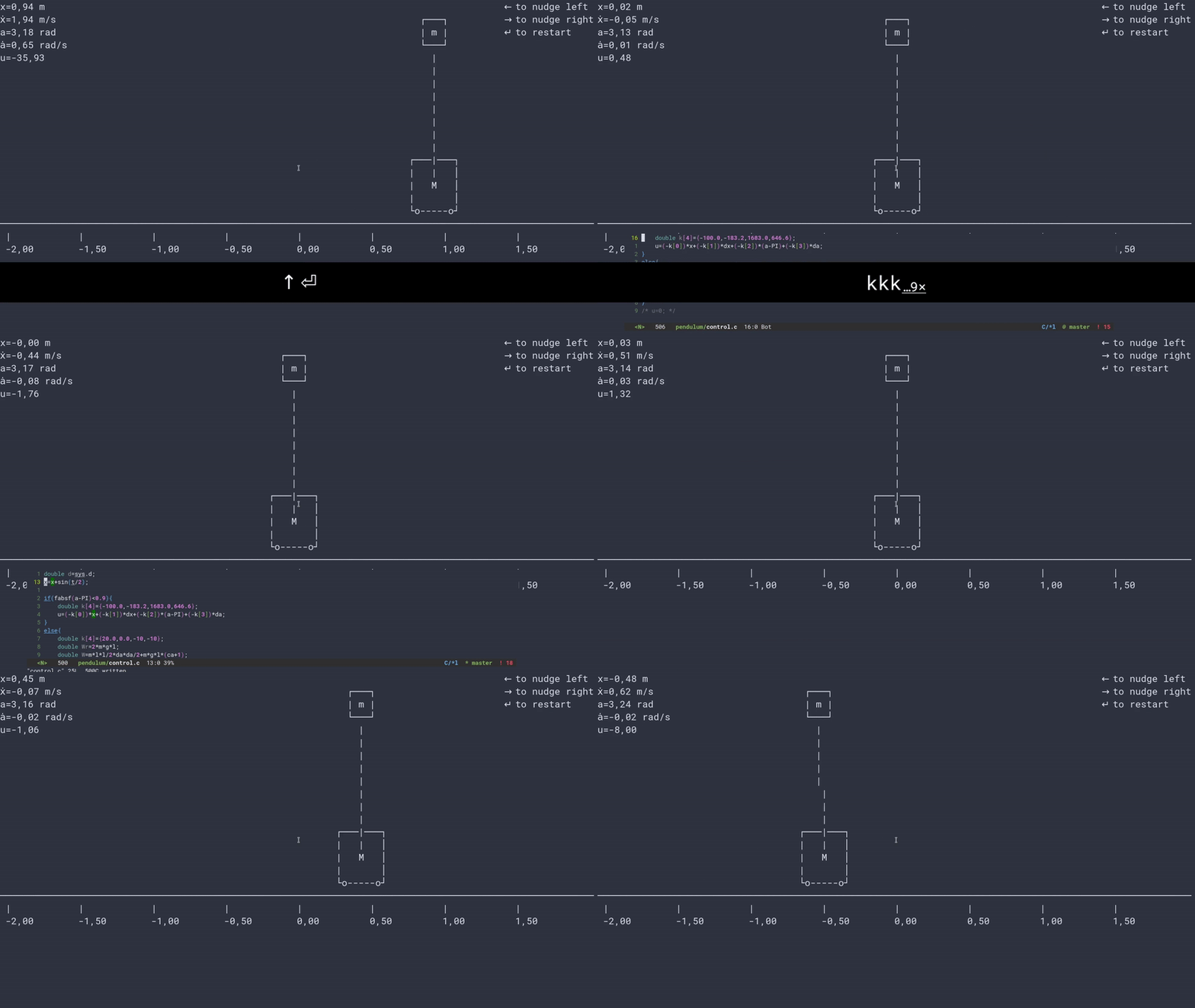
* Dependencies
- ncursesw
- libtcc (from https://repo.or.cz/tinycc.git)
** installation
*** Ubuntu
#+begin_src bash
sudo apt install libncursesw5-dev
#+end_src
#+begin_src bash
git clone https://repo.or.cz/tinycc.git
cd tinycc
./configure
make
sudo make install
#+end_src
* Testing
To test our code we need to build it, so we use a simple =makefile=
#+begin_src makefile :tangle makefile :results none
# Pendulum
all: pendulum
pendulum: src/pendulum.c
@gcc $< -Os -lncursesw -lm -ltcc -lpthread -ldl -o $@
run:
@./pendulum
clean:
@rm -f pendulum
@echo "Cleaned"
# end
#+end_src
** Run
To test the code we can run «make run».
#+begin_src bash :eval no-export
$TERMINAL -e make run
#+end_src
#+RESULTS:
* The Code
First we include some headers we need
#+begin_src C :tangle src/pendulum.c :main no
#include
#include
#include
#include
#include
#include
#include
#include
#include
#include
#+end_src
Then we define some physics/math constants such as gravity and $\pi$
#+begin_src C :tangle src/pendulum.c :main no
#define g -9.8
#define PI 3.14
#define deg(x) x/180.*PI
#+end_src
As we want to watch a file we use inotify events, so we define the sizes of such events and the length of the buffer we are going to use
#+begin_src C :tangle src/pendulum.c :main no
#define EVENT_SIZE ( sizeof (struct inotify_event) )
#define BUF_LEN ( 1024 *( EVENT_SIZE + 16 ) )
#+end_src
We create a preamble of the control file, so the user don't have to create a function or add math libraries
#+begin_src C :tangle src/pendulum.c :main no
char preamble[] = "#include \n"
"#include \n"
"#define PI 3.14\n"
"#define g -9.8\n"
"typedef struct{\n"
" double l,M,m,d;\n"
"} Sys;\n"
"typedef struct{\n"
"double x, dx, a, da;\n"
"} State;\n"
"double control(State state,Sys sys,double u,double t)\n"
"{\n"
;
#+end_src
We also add a postamble to close the control function and we include a return, just in case the user forgot to write it.
#+begin_src C :tangle src/pendulum.c :main no
char postamble[] = "return u;\n"
"}";
#+end_src
We define the information of the system, such as the length of the rod ($l$), the mass of the cart ($M$), the mass of the rod ($m$) and the damping of the cart ($d$).
#+begin_src C :tangle src/pendulum.c :main no
typedef struct{
double l,M,m,d;
} Sys;
#+end_src
We also define the states of the system: cart position ($x$), cart velocity ($\dot{x}$), rod angle ($\alpha$) and rod angular velocity ($\dot{\alpha}$)
#+begin_src C :tangle src/pendulum.c :main no
typedef struct{
double x, dx, a, da;
} State;
#+end_src
We create a function to update the time.
#+begin_src C :tangle src/pendulum.c :main no
double tim(struct timeval * t){
struct timeval n;
gettimeofday(&n,0);
int r=(n.tv_sec-t->tv_sec)*1.e6+n.tv_usec-t->tv_usec;
*t = n;
return r / 1.e6;
}
#+end_src
** Drawing
To draw the pendulum, we use ncurses.
#+begin_src C :tangle src/pendulum.c :main no
draw(State state,Sys sys,double u){
#+end_src
We get the maximum values of the terminal
#+begin_src C :tangle src/pendulum.c :main no
int mx, my;
getmaxyx(stdscr,my,mx);
#+end_src
Then we position the scene using these dimensions
#+begin_src C :tangle src/pendulum.c :main no
double x=mx/4*state.x+mx/2;
double y=my/2+2;
#+end_src
We scale the length of the rod so we can see it on the screen.
#+begin_src C :tangle src/pendulum.c :main no
double l=sys.l*my/4;
#+end_src
We then get the cosine and sine of the angle of the rod, as we use it a lot.
#+begin_src C :tangle src/pendulum.c :main no
double ca=cos(state.a);
double sa=sin(state.a);
#+end_src
Then we clear the screen so we can begin to draw.
#+begin_src C :tangle src/pendulum.c :main no
erase();
#+end_src
We print some state and control information
#+begin_src C :tangle src/pendulum.c :main no
mvprintw(0,0,"x=%3.2f m",state.x);
mvprintw(1,0,"ẋ=%3.2f m/s",state.dx);
mvprintw(2,0,"a=%3.2f rad",state.a);
mvprintw(3,0,"ȧ=%3.2f rad/s",state.da);
mvprintw(4,0,"u=%3.2f ",u);
#+end_src
and some controls
#+begin_src C :tangle src/pendulum.c :main no
mvprintw(0,mx-16,"← to nudge left");
mvprintw(1,mx-16,"→ to nudge right");
mvprintw(2,mx-16,"↵ to restart");
#+end_src
We draw the ground
#+begin_src C :tangle src/pendulum.c :main no
move((int) y+2,0);
hline(ACS_HLINE, mx);
for(double i=-2;i<2;i+=0.5){
mvprintw(y+3,mx/4*i+mx/2,"|",i);
mvprintw(y+4,mx/4*i+mx/2,"%.2f",i);
}
#+end_src
We draw the cart
#+begin_src C :tangle src/pendulum.c :main no
mvprintw(y-3,x-4,"┌───────┐");
mvprintw(y-2,x-4,"| │");
mvprintw(y-1,x-4,"| M │");
mvprintw(y,x-4 ,"| │");
mvprintw(y+1,x-4,"└o-----o┘");
#+end_src
We draw the rod
#+begin_src C :tangle src/pendulum.c :main no
for(double i = 0.1;i<1;i+=0.01){
double absfa=fabsf(state.a);
mvprintw(floor(y+i*l*ca),floor(x+i*l*sa),"|");
if(sa<0&&ca>0.5) mvprintw(floor(y+i*l*ca),floor(x+i*l*sa),"/");
if(sa>0&&ca>0.5) mvprintw(floor(y+i*l*ca),floor(x+i*l*sa),"\\");
if(fabsf(ca)<0.1) mvprintw(floor(y+i*l*ca),floor(x+i*l*sa),"-");
}
#+end_src
We draw the mass of the rod
#+begin_src C :tangle src/pendulum.c :main no
y = floor(y+l*ca);
x = floor(x+l*sa);
mvprintw(y-2,x-2,"");
mvprintw(y-1,x-2,"┌───┐");
mvprintw(y,x-2 ,"| m |");
mvprintw(y+1,x-2,"└───┘");
mvprintw(y+2,x-2,"");
#+end_src
Put all the drawings on the screen.
#+begin_src C :tangle src/pendulum.c :main no
refresh();
}
#+end_src
** Physics Simulation
For the physics simulation we use equations derived from the Lagrangian formulation of the system
# TODO(accacio): add development of the Lagrangian .
#+begin_src C :tangle src/pendulum.c :main no
physics(State * state,Sys sys,double dt,double u) {
#+end_src
We create some variables to reduce the cumbersomeness of the equation
#+begin_src C :tangle src/pendulum.c :main no
double x=state->x;
double dx=state->dx;
double a=state->a;
double da=state->da;
double ca=cos(a);
double sa=sin(a);
double l=sys.l;
double M=sys.M;
double m=sys.m;
double D=m*l*l*(M+m*(1-ca*ca));
double d=sys.d;
double param = m*l*da*da*sa-d*dx;
#+end_src
Here we use a simple Forward Euler to simulate the system. Better integration methods could be used, one that conserves energy for example, but here we don't want to construct [[https://fr.wikipedia.org/wiki/Usine_%C3%A0_gaz][«une usine à gaz»]].
#+begin_src C :tangle src/pendulum.c :main no
double ddx=(1/D)*(-m*m*l*l*g*ca*sa+m*l*l*param)+m*l*l*(1/D)*u;
state->dx+=ddx*dt;
state->x+=state->dx*dt;
double dda = (1/D)*((m+M)*m*g*l*sa-m*l*ca*param)-m*l*ca*(1/D)*u;
state->da+=dda*dt;
state->a+=state->da*dt;
}
#+end_src
** Reading the file
#+begin_src C :tangle src/pendulum.c :main no
char* get_fileChars(char* source_file){
FILE *source;
int fileSize;
char *fileChars;
#+end_src
We open the file in read mode
#+begin_src C :tangle src/pendulum.c :main no
source=fopen(source_file, "r");
if(!source){
exit(EXIT_FAILURE) ;
}
#+end_src
We go till we find the end of the file just to find its size
#+begin_src C :tangle src/pendulum.c :main no
fseek(source,0,SEEK_END);
fileSize=ftell(source);
#+end_src
Then we allocate memory to read the file and use the preamble and postamble, and of course add the '\0' at the end of the string. Nota Bene: C strings are null terminated.
#+begin_src C :tangle src/pendulum.c :main no
int newSize=sizeof(char)*(sizeof(postamble)+sizeof(preamble)+fileSize)+1;
fileChars = (char*) malloc(newSize);
memset(fileChars, '\0', newSize);
#+end_src
Then we copy what we want to memory
#+begin_src C :tangle src/pendulum.c :main no
strncpy(fileChars, preamble,newSize-1);
fseek(source,0,SEEK_SET);
fread((char*) fileChars+sizeof(preamble)-1,fileSize,1,source);
strcat((char*)fileChars,postamble);
#+end_src
and close the file
#+begin_src C :tangle src/pendulum.c :main no
fclose(source);
return (char*) fileChars;
}
#+end_src
** Main Loop
For the main loop
#+begin_src C :tangle src/pendulum.c :main no
int main(int c, char **v){
#+end_src
We get the current locale, so we can recover. Developing this I bumped in a bug with tcc where if locale is altered, the points of floats are not read and floats are converted into strings, ignoring decimal part.
#+begin_src C :tangle src/pendulum.c :main no
/* get default locale */
char * locale = setlocale(LC_ALL, 0);
#+end_src
Change locale so we can use unicode characters
#+begin_src C :tangle src/pendulum.c :main no
setlocale(LC_ALL, "");
#+end_src
We create states for the tcc.
#+begin_src C :tangle src/pendulum.c :main no
TCCState *tccState;
TCCState *tempTccState;
#+end_src
We configure our inotify watcher
#+begin_src C :tangle src/pendulum.c :main no
int length, i = 0;
int fd;
char wdbuffer[BUF_LEN];
fd = inotify_init1(IN_NONBLOCK);
if ( fd <0)
{
fprintf(stderr,"inotify_init");
exit(EXIT_FAILURE);
}
char source_file[10] = "control.c";
/* Add watch */
int control_watch = inotify_add_watch( fd, source_file, IN_MODIFY);
if (control_watch==-1) {
fprintf(stderr,"Could not add watch");
exit(EXIT_FAILURE);
}
struct pollfd pfd = { fd, POLLIN, 0 };
char *fileChars;
#+end_src
We create a function pointer to our control function (not yet defined)
#+begin_src C :tangle src/pendulum.c :main no
double (*control)(State, Sys,double,double)= 0;
#+end_src
If not defined, we recover the locale, copy files to memory, create a compile context and compile the code.
#+begin_src C :tangle src/pendulum.c :main no
if(!control){
setlocale(LC_ALL, locale);
fileChars = get_fileChars(source_file);
tccState = tcc_new();
tcc_set_output_type(tccState, TCC_OUTPUT_MEMORY);
if(tcc_compile_string(tccState, fileChars)<0){
exit(EXIT_FAILURE);
};
free(fileChars);
tcc_relocate(tccState);
#+end_src
Then we get the definition of the symbol and bind with our function pointer.
#+begin_src C :tangle src/pendulum.c :main no
control = (double (*) (State,Sys,double,double)) tcc_get_symbol(tccState, "control");
#+end_src
Change the locale again (for unicode, it is worth it).
#+begin_src C :tangle src/pendulum.c :main no
setlocale(LC_ALL, "");
}
#+end_src
We initialize the system parameters
#+begin_src C :tangle src/pendulum.c :main no
Sys sys = {2,5,1,1}; // l M m d
double sInit[4] = {-1.5, 0.0, 30.0/180*PI, 0.0}; // x dx α dα
State state = {sInit[0],sInit[1],sInit[2],sInit[3]};
#+end_src
We initialize time
#+begin_src C :tangle src/pendulum.c :main no
struct timeval t;
gettimeofday(&t, 0);
#+end_src
And also ncurses
#+begin_src C :tangle src/pendulum.c :main no
initscr();
curs_set(0);
char ch;
char curch;
double u=0.0;
#+end_src
Set getch to nodelay, so if no key is pressed the system can continue.
#+begin_src C :tangle src/pendulum.c :main no
if (nodelay(stdscr,TRUE)==ERR){
return -1;
}
#+end_src
now we begin our main loop
#+begin_src C :tangle src/pendulum.c :main no
for(;;){
#+end_src
We verify if the control file was modified
#+begin_src C :tangle src/pendulum.c :main no
/* Verify if control was changed */
int ret = poll(&pfd,1,5);
if (ret > 0)
{
length = read(fd, wdbuffer, sizeof wdbuffer);
if (length>0)
{
struct inotify_event *watcher_event = ( struct inotify_event * ) &wdbuffer[ i ];
if ( watcher_event->mask & IN_MODIFY )
{
#+end_src
If it was, reread file and recompile
#+begin_src C :tangle src/pendulum.c :main no
if (watcher_event->wd==control_watch) {
setlocale(LC_ALL, locale);
fileChars = get_fileChars(source_file);
tempTccState = tcc_new();
tcc_set_output_type(tempTccState, TCC_OUTPUT_MEMORY);
if(tcc_compile_string(tempTccState, fileChars)<0){
tcc_delete(tempTccState);
control = (double (*) (State,Sys,double,double)) tcc_get_symbol(tccState, "control");
}
else
{
tcc_delete(tccState);
tcc_relocate(tempTccState);
control = (double (*) (State,Sys,double,double)) tcc_get_symbol(tempTccState, "control");
tccState = tempTccState;
}
setlocale(LC_ALL, "");
}
}
}
}
ch = getch();
#+end_src
If a key was pressed, do something
#+begin_src C :tangle src/pendulum.c :main no
if (ch!=ERR){
curch = ch;
switch (ch) {
case 68: // nudge left
state.da-=1;
break;
case 67: // nudge right
state.da+=1;
break;
case 65:
u=0;
sInit[0] =0;
sInit[1] =0;
sInit[2] =160./180*PI;
sInit[3] =0;
break;
case 'd':
sInit[0] =0.;
sInit[1] =0.;
sInit[2] =00.0/180*PI;
sInit[3] =0.;
break;
case 'u':
sInit[0] =0.;
sInit[1] =0.;
sInit[2] =180.0/180*PI;
sInit[3] =0.;
break;
case 66: //
sInit[0] =-1.5;
sInit[1] =0;
sInit[2] =30.0/180*PI;
sInit[3] =0;
break;
case 10: // Restart
case 'r':
u=0;
state.x =sInit[0];
state.dx =sInit[1];
state.a =sInit[2];
state.da =sInit[3];
break;
case 'q':
goto exit;
break;
default:
break;
}
}
#+end_src
Evaluate control function, apply control value to system and finally draw it.
#+begin_src C :tangle src/pendulum.c :main no
double time=t.tv_sec;
u=control(state,sys,u,time);
physics(&state,sys,tim(&t),u);
draw(state,sys,u);
/* mvprintw(10,3,"%d\n",curch); */
#+end_src
Sleep the the sleep of the just
#+begin_src C :tangle src/pendulum.c :main no
usleep(20000);
}
#+end_src
Clean the house.
#+begin_src C :tangle src/pendulum.c :main no
exit:
tcc_delete(tccState);
endwin();
return 0;
}
#+end_src
Owner
- Name: Rafael Accácio Nogueira
- Login: Accacio
- Kind: user
- Location: Toulouse, France
- Website: http://accacio.gitlab.io
- Twitter: oaccacio
- Repositories: 7
- Profile: https://github.com/Accacio
Ph.D. in Automatic Control
Citation (CITATION.cff)
cff-version: 1.2.0
message: "If you use this software, please cite it as below."
authors:
- family-names: "NOGUEIRA"
  given-names: "Rafael Accácio"
  orcid: "https://orcid.org/0000-0001-9341-1877"
title: "pendulum"
version: 1.0.0
doi: 10.5281/zenodo.5227166
date-released: 2021-08-20
url: "https://github.com/Accacio/pendulum"
GitHub Events
Total
- Issues event: 1
- Watch event: 2
- Issue comment event: 1
- Push event: 2
Last Year
- Issues event: 1
- Watch event: 2
- Issue comment event: 1
- Push event: 2