https://github.com/cryptoking-max/uproot5
ROOT I/O in pure Python and NumPy.
Science Score: 23.0%
This score indicates how likely this project is to be science-related based on various indicators:
-
○CITATION.cff file
-
○codemeta.json file
-
○.zenodo.json file
-
✓DOI references
Found 4 DOI reference(s) in README -
✓Academic publication links
Links to: zenodo.org -
○Academic email domains
-
○Institutional organization owner
-
○JOSS paper metadata
-
○Scientific vocabulary similarity
Low similarity (14.4%) to scientific vocabulary
Last synced: 10 months ago
·
JSON representation
Repository
ROOT I/O in pure Python and NumPy.
Basic Info
- Host: GitHub
- Owner: cryptoking-max
- License: bsd-3-clause
- Default Branch: main
- Homepage: https://uproot.readthedocs.io
- Size: 4.19 MB
Statistics
- Stars: 1
- Watchers: 0
- Forks: 0
- Open Issues: 0
- Releases: 0
Fork of scikit-hep/uproot5
Created about 1 year ago
· Last pushed about 1 year ago
https://github.com/cryptoking-max/uproot5/blob/main/
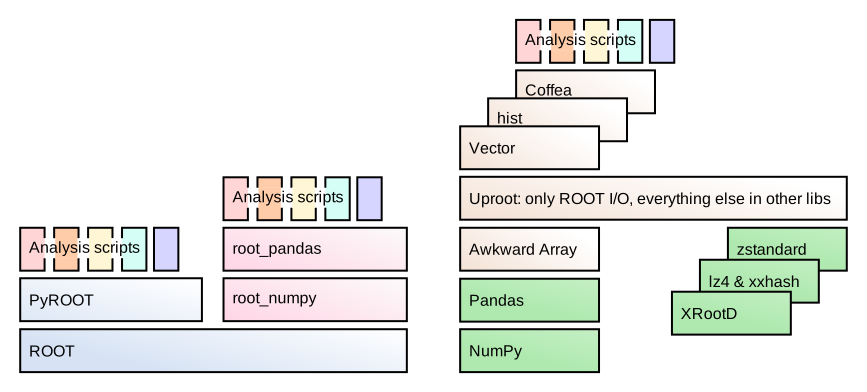
[](https://pypi.org/project/uproot) [](https://github.com/conda-forge/uproot-feedstock) [](https://www.python.org) [](https://opensource.org/licenses/BSD-3-Clause) [](https://github.com/scikit-hep/uproot5/actions) [](https://scikit-hep.org/) [](https://nsf.gov/awardsearch/showAward?AWD_ID=1836650) [](https://doi.org/10.5281/zenodo.4340632) [](https://uproot.readthedocs.io/) [](https://gitter.im/Scikit-HEP/uproot) Uproot is a library for reading and writing [ROOT files](https://root.cern/) in pure Python and NumPy. Unlike the standard C++ ROOT implementation, Uproot is only an I/O library, primarily intended to stream data into machine learning libraries in Python. Unlike PyROOT and root_numpy, Uproot does not depend on C++ ROOT. Instead, it uses Numpy to cast blocks of data from the ROOT file as Numpy arrays.
# Installation Uproot can be installed [from PyPI](https://pypi.org/project/uproot) using pip. ```bash pip install uproot ``` Uproot is also available using [conda](https://anaconda.org/conda-forge/uproot). ```bash conda install -c conda-forge uproot ``` If you have already added `conda-forge` as a channel, the `-c conda-forge` is unnecessary. Adding the channel is recommended because it ensures that all of your packages use compatible versions (see [conda-forge docs](https://conda-forge.org/docs/user/introduction.html#how-can-i-install-packages-from-conda-forge)): ```bash conda config --add channels conda-forge conda update --all ``` ## Getting help **Start with the [tutorials and reference documentation](https://uproot.readthedocs.io/).** * Report bugs, request features, and ask for additional documentation on [GitHub Issues](https://github.com/scikit-hep/uproot5/issues). * If you have a "How do I...?" question, start a [GitHub Discussion](https://github.com/scikit-hep/uproot5/discussions) with category "Q&A". * Alternatively, ask about it on [StackOverflow with the [uproot] tag](https://stackoverflow.com/questions/tagged/uproot). Be sure to include tags for any other libraries that you use, such as Pandas or PyTorch. * To ask questions in real time, try the Gitter [Scikit-HEP/uproot](https://gitter.im/Scikit-HEP/uproot) chat room. ## Installation for developers Uproot is an ordinary Python library; you can get a copy of the code with ```bash git clone https://github.com/scikit-hep/uproot5.git ``` and install it locally by calling `pip install -e .` in the repository directory. If you need to develop Awkward Array as well, see its [installation for developers](https://github.com/scikit-hep/awkward-1.0#installation-for-developers). # Dependencies **Uproot's only strict dependencies are NumPy and packaging.** Strict dependencies are automatically installed by pip (or conda). **[Awkward Array](https://anaconda.org/conda-forge/awkward) is highly recommended** and is automatically installed by pip (or conda), though it is _possible_ to use Uproot without it. If you need a minimal installation, pass `--no-deps` to pip and pass `library="np"` to every array-fetching function, or globally set `uproot.default_library` to get NumPy arrays instead of Awkward Arrays. * `awkward`: Uproot 5.x requires Awkward 2.x. The following libraries are also useful in conjunction with Uproot, but are not necessary. If you call a function that needs one, you'll be prompted to install it. (Conda installs most of these automatically.) **For ROOT files, compressed different ways:** * `lz4` and `xxhash`: if reading ROOT files that have been LZ4-compressed. * `zstandard`: if reading ROOT files that have been ZSTD-compressed. * ZLIB and LZMA are built in (Python standard library). **For accessing remote files:** * `minio`: if reading files with `s3://` URIs. * `xrootd`: if reading files with `root://` URIs. * HTTP/S access is built in (Python standard library). **For distributed computing with [Dask](https://www.dask.org/):** * `dask`: see [uproot.dask](https://uproot.readthedocs.io/en/latest/uproot._dask.dask.html). * `dask-awkward`: for data with irregular structure ("jagged" arrays), see [dask-awkward](https://github.com/dask-contrib/dask-awkward). **For exporting TTrees to [Pandas](https://pandas.pydata.org/):** * `pandas`: if `library="pd"`. * `awkward-pandas`: if `library="pd"` and the data have irregular structure ("jagged" arrays), see [awkward-pandas](https://github.com/intake/awkward-pandas). **For exporting histograms:** * `boost-histogram`: if converting histograms to [boost-histogram](https://github.com/scikit-hep/boost-histogram) with `histogram.to_boost()`. * `hist`: if converting histograms to [hist](https://github.com/scikit-hep/hist) with `histogram.to_hist()`. # Acknowledgements Support for this work was provided by NSF cooperative agreements [OAC-1836650](https://www.nsf.gov/awardsearch/showAward?AWD_ID=1836650) and [PHY-2323298](https://www.nsf.gov/awardsearch/showAward?AWD_ID=2323298) (IRIS-HEP), grant [OAC-1450377](https://nsf.gov/awardsearch/showAward?AWD_ID=1450377) (DIANA/HEP), and [PHY-2121686](https://www.nsf.gov/awardsearch/showAward?AWD_ID=2121686) (US-CMS LHC Ops). Thanks especially to the gracious help of Uproot contributors (including the [original repository](https://github.com/scikit-hep/uproot)).


Owner
- Name: Solana sniper copy trading bot
- Login: cryptoking-max
- Kind: user
- Location: solana trading bot
- Company: solana trading bot
- Website: solana trading bot
- Repositories: 1
- Profile: https://github.com/cryptoking-max
#Solana #sniper #copy #trading #bot