https://github.com/crytic/slither-action
Science Score: 13.0%
This score indicates how likely this project is to be science-related based on various indicators:
-
○CITATION.cff file
-
✓codemeta.json file
Found codemeta.json file -
○.zenodo.json file
-
○DOI references
-
○Academic publication links
-
○Committers with academic emails
-
○Institutional organization owner
-
○JOSS paper metadata
-
○Scientific vocabulary similarity
Low similarity (14.1%) to scientific vocabulary
Keywords from Contributors
Repository
Basic Info
- Host: GitHub
- Owner: crytic
- License: agpl-3.0
- Language: Shell
- Default Branch: main
- Size: 253 KB
Statistics
- Stars: 137
- Watchers: 2
- Forks: 22
- Open Issues: 9
- Releases: 8
Metadata Files
README.md
Slither Action
This action allows you to run the Slither static analyzer against your project, from within a GitHub Actions workflow.
To learn more about Slither itself, visit its GitHub repository and wiki pages.
How to use
Create .github/workflows/slither.yml:
yaml
name: Slither Analysis
on: [push]
jobs:
  analyze:
    runs-on: ubuntu-latest
    steps:
      - uses: actions/checkout@v4
      - uses: crytic/slither-action@v0.4.1
Options
| Key | Description
|------------------|------------
| ignore-compile | If set to true, the Slither action will not attempt to compile the project. False by default. See Advanced compilation.
| fail-on | Cause the action to fail if Slither finds any issue of this severity or higher. See action fail behavior.
| node-version | The version of node to use. If this field is not set, the latest version will be used.
| sarif | If provided, the path of the SARIF file to produce, relative to the repo root (see Github Code Scanning integration).
| slither-args | Extra arguments to pass to Slither.
| slither-config | The path to the Slither configuration file. By default, ./slither.config.json is used if present. See Configuration file.
| slither-version| The version of slither-analyzer to use. By default, the latest release in PyPI is used.
| slither-plugins| A requirements.txt file to install with pip alongside Slither. Useful to install custom plugins.
| solc-version | The version of solc to use. If this field is not set, the version will be guessed from project metadata. This only has an effect if you are not using a compilation framework for your project -- i.e., if target is a standalone .sol file.
| target | The path to the root of the project to be analyzed by Slither. It can be a directory or a file, and it defaults to the repo root.
Advanced compilation
If the project requires advanced compilation settings or steps, set
ignore-compile to true and follow the compilation steps before running
Slither. You can find an example workflow that uses this option in the
examples section.
Action fail behavior
The Slither action supports a fail-on option, based on the --fail-* flags
added in Slither 0.8.4. To maintain the current action behavior, this option
defaults to all. The following table summarizes the action behavior across
different Slither versions. You may adjust this option as needed for your
workflows. If you are setting these options on your config file, set fail-on:
config to prevent the action from overriding your settings.
| fail-on | Slither <= 0.8.3 | Slither > 0.8.3
|--------------------|---------------------------|----------------
| all / pedantic | Fail on any finding | Fail on any finding
| low | Fail on any finding | Fail on any finding >= low
| medium | Fail on any finding | Fail on any finding >= medium
| high | Fail on any finding | Fail on any finding >= high
| none | Do not fail on findings † | Do not fail on findings
| config | Determined by config file | Determined by config file
† Note that if you use fail-on: none with Slither 0.8.3 or earlier, certain
functionality may not work as expected. In particular, Slither will not produce
a SARIF file in this case. If you require fail-on: none behavior with the
SARIF integration, consider adding continue-on-error:
true
instead to the action step.
Using a different Slither version
If the latest Slither release has a bug that does not let you analyze your
project, you may want to use a different Slither version. The action lets you
use an older version (or, if a fix is available, an unreleased Slither version)
to analyze your code. You can use the slither-version option to specify a
custom Slither release. This option can take different values:
- a
slither-analyzerPyPI release version number (e.g."0.8.3"). Slither will be installed from PyPI in this case. - a Git ref from crytic/slither such as a
branch, tag, or full commit hash (e.g.
"dev","refs/heads/dev","refs/tags/0.8.3"or"f962d6c4eefcd4d5038a781875b826948f222b31"). Slither will be installed from source in this case.
Triaging results
Add // slither-disable-next-line DETECTOR_NAME before the finding, or use the
Github Code Scanning integration.
Staying up to date
We suggest enabling Dependabot version updates for
actions
to get notified of new action releases. You can do so by creating
.github/dependabot.yml in your repository with the following content:
yaml
version: 2
updates:
  - package-ecosystem: "github-actions"
    directory: "/"
    schedule:
      interval: "daily"
Github Code Scanning integration
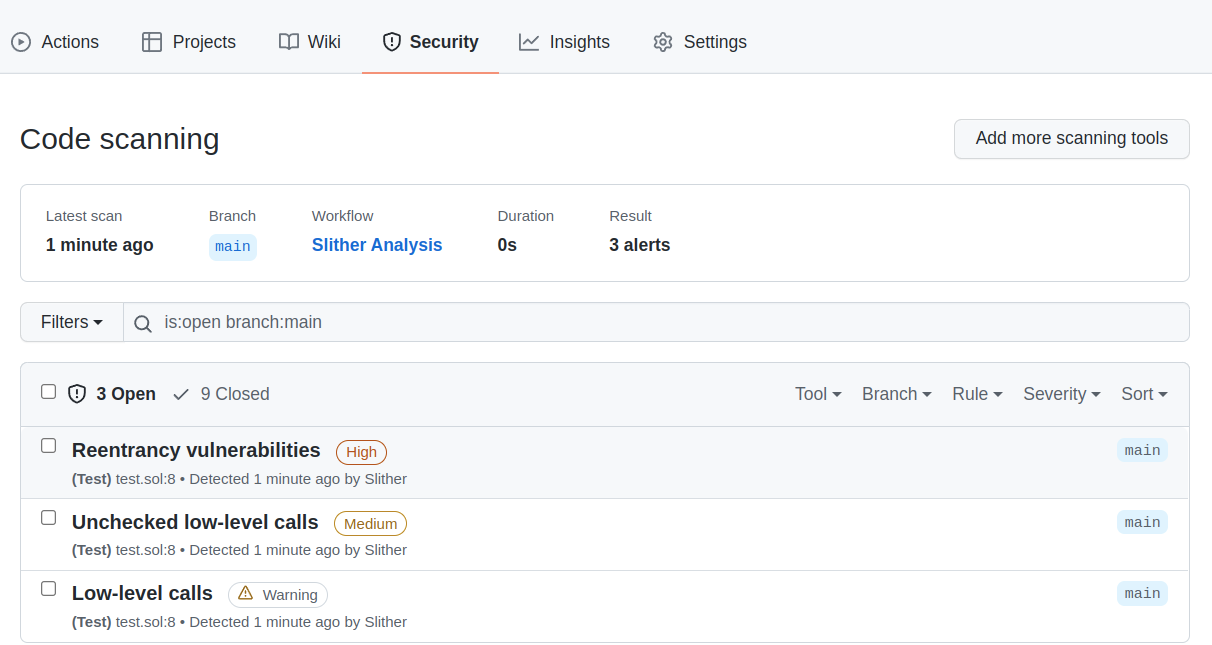
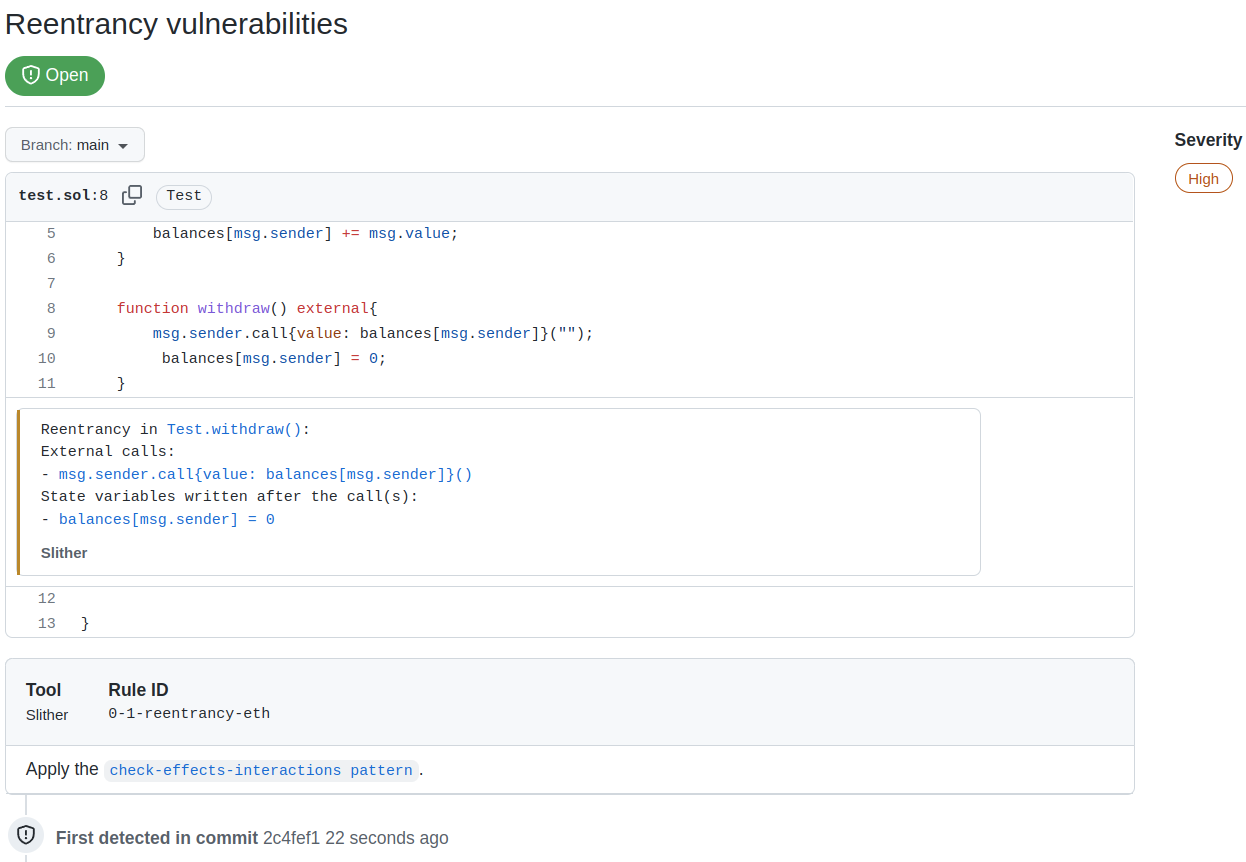
The action supports the Github Code Scanning integration, which will push Slither's alerts to the Security tab of the Github project (see About code scanning). This integration eases the triaging of findings and improves the continuous integration.
Code Scanning preview
Findings Summary
Findings Details
How to use
To enable the integration, use the sarif option, and upload the Sarif file to codeql-action:
```yaml name: Slither Analysis on: [push] jobs: analyze: runs-on: ubuntu-latest steps: - uses: actions/checkout@v4
  - name: Run Slither
    uses: crytic/slither-action@v0.4.1
    id: slither
    with:
      sarif: results.sarif
      fail-on: none

  - name: Upload SARIF file
    uses: github/codeql-action/upload-sarif@v3
    with:
      sarif_file: ${{ steps.slither.outputs.sarif }}
```
Here:
fail-on: noneis required to let the SARIF upload step run if Slither finds issuesid: slitheris the name used to reference the step later on (e.g., insteps.slither.outputs.sarif)
Examples
Example workflow: simple action
The following is a complete GitHub Actions workflow example. It will trigger on
pushes to the repository, and leverage the Node.js integration in the Slither
action to install the latest node version, install dependencies, and build the
project that lives in src/. Once that is complete, Slither will run its
analysis. The workflow will fail if findings are found.
yaml
name: Slither Analysis
on: [push]
jobs:
  analyze:
    runs-on: ubuntu-latest
    steps:
      - uses: actions/checkout@v4
      - uses: crytic/slither-action@v0.4.1
        with:
          target: 'src/'
Example workflow: Hardhat and SARIF
The following is a complete GitHub Actions workflow example. It will trigger
with commits on main as well as any pull request opened against the main
branch. It leverages the NodeJS integration in the Slither action to set up
NodeJS 16.x and install project dependencies before running Slither on the
project. Slither will output findings in SARIF format, and those will get
uploaded to GitHub.
We include fail-on: none on the Slither action to avoid failing the run if
findings are found.
```yaml name: Slither Analysis
on: push: branches: [ main ] pull_request: branches: [ main ]
jobs: analyze: runs-on: ubuntu-latest permissions: contents: read security-events: write steps: - name: Checkout repository uses: actions/checkout@v4
- name: Run Slither
  uses: crytic/slither-action@v0.4.1
  id: slither
  with:
    node-version: 16
    sarif: results.sarif
    fail-on: none

- name: Upload SARIF file
  uses: github/codeql-action/upload-sarif@v3
  with:
    sarif_file: ${{ steps.slither.outputs.sarif }}
```
Example workflow: Brownie and SARIF
The following is a complete GitHub Actions workflow example. It will trigger
with commits on main as well as any pull request opened against the main
branch. It leverages the Python integration in the Slither action to set up a
virtual environment and install project dependencies before running Slither on
the project. Slither will output findings in SARIF format, and those will get
uploaded to GitHub.
We also include fail-on: none on the Slither action to avoid failing the run
if findings are found.
```yaml name: Slither Analysis
on: push: branches: [ main ] pull_request: branches: [ main ]
jobs: analyze: runs-on: ubuntu-latest permissions: contents: read security-events: write steps: - name: Checkout repository uses: actions/checkout@v4
- name: Run Slither
  uses: crytic/slither-action@v0.4.1
  id: slither
  with:
    sarif: results.sarif
    fail-on: none

- name: Upload SARIF file
  uses: github/codeql-action/upload-sarif@v3
  with:
    sarif_file: ${{ steps.slither.outputs.sarif }}
```
Example workflow: Dapp
The following is a complete GitHub Actions workflow example meant to illustrate
the usage of the Slither action when the compilation framework is not based on
Node or Python. It will trigger with commits on main as well as any pull
request opened against the main branch. To be able to build the project, it
will configure Node and Nix on the runner and install project dependencies. Once
the environment is ready, it will build the project (using make build via
nix-shell) and finally run Slither on the project using the GitHub action.
In this example, we leverage ignore-compile to avoid building the project as
part of the Slither action execution. Slither will expect the project to be
pre-built when this option is set. This allows us to use compilation frameworks
that are not Node or Python-based, such as Dapp, together with the Slither
action.
```yaml name: Slither Analysis
on: push: branches: [ main ] pull_request: branches: [ main ]
jobs: analyze: runs-on: ubuntu-latest steps: - name: Checkout repository uses: actions/checkout@v4 with: submodules: recursive
- name: Set up Node
  uses: actions/setup-node@v4

- name: Install Yarn
  run: npm install --global yarn

- name: Install Nix
  uses: cachix/install-nix-action@v26

- name: Configure Cachix
  uses: cachix/cachix-action@v14
  with:
    name: dapp

- name: Install dependencies
  run: nix-shell --run 'make'

- name: Build the contracts
  run: nix-shell --run 'make build'

- name: Run Slither
  uses: crytic/slither-action@v0.4.1
  with:
    ignore-compile: true
```
Example workflow: Markdown report
The following GitHub Actions workflow example will create/update pull requests with the contents of Slither's Markdown report. Useful for when GitHub Advanced Security (required for the SARIF feature) is unavailable.
```yaml name: Slither Analysis
on: push: branches: [ master ] pull_request:
jobs: analyze: runs-on: ubuntu-latest steps: - name: Checkout repository uses: actions/checkout@v4
- name: Run Slither
  uses: crytic/slither-action@v0.4.1
  id: slither
  with:
    node-version: 16
    fail-on: none
    slither-args: --checklist --markdown-root ${{ github.server_url }}/${{ github.repository }}/blob/${{ github.sha }}/

- name: Create/update checklist as PR comment
  uses: actions/github-script@v7
  if: github.event_name == 'pull_request'
  env:
    REPORT: ${{ steps.slither.outputs.stdout }}
  with:
    script: |
      const script = require('.github/scripts/comment')
      const header = '# Slither report'
      const body = process.env.REPORT
      await script({ github, context, header, body })
```
.github/scripts/comment.js:
```js module.exports = async ({ github, context, header, body }) => { const comment = [header, body].join("\n");
const { data: comments } = await github.rest.issues.listComments({ owner: context.repo.owner, repo: context.repo.repo, issue_number: context.payload.number, });
const botComment = comments.find( (comment) => // github-actions bot user comment.user.id === 41898282 && comment.body.startsWith(header) );
const commentFn = botComment ? "updateComment" : "createComment";
await github.rest.issuescommentFn; }; ```
Example workflow: external plugins
The following is a modification of the "simple action" example from earlier.
This example uses the slither-plugins property to point to a pip
requirements
file that gets installed alongside Slither. In this example, the requirements
file installs the example plugin provided in the Slither repository, but this
can be modified to install extra third-party or in-house detectors.
yaml
name: Slither Analysis
on: [push]
jobs:
  analyze:
    runs-on: ubuntu-latest
    steps:
      - uses: actions/checkout@v4
      - uses: crytic/slither-action@v0.4.1
        with:
          target: 'src/'
          slither-plugins: requirements-plugins.txt
requirements-plugins.txt:
text
slither_my_plugin @ git+https://github.com/crytic/slither#egg=slither_my_plugin&subdirectory=plugin_example
Owner
- Name: Crytic
- Login: crytic
- Kind: organization
- Email: opensource@trailofbits.com
- Location: New York, NY
- Website: https://www.trailofbits.com/
- Repositories: 66
- Profile: https://github.com/crytic
Blockchain Security, by @trailofbits
GitHub Events
Total
- Create event: 3
- Release event: 1
- Issues event: 8
- Watch event: 10
- Delete event: 1
- Issue comment event: 3
- Push event: 3
- Pull request review event: 8
- Pull request review comment event: 7
- Pull request event: 5
- Fork event: 2
Last Year
- Create event: 3
- Release event: 1
- Issues event: 8
- Watch event: 10
- Delete event: 1
- Issue comment event: 3
- Push event: 3
- Pull request review event: 8
- Pull request review comment event: 7
- Pull request event: 5
- Fork event: 2
Committers
Last synced: about 1 year ago
Top Committers
| Name | Commits | |
|---|---|---|
| Emilio López | e****z@t****m | 43 |
| Feist Josselin | j****n@t****m | 7 |
| Tom Vincent | g****t@t****m | 2 |
| Hans Bergren | h****n@g****m | 2 |
| OliverNChalk | o****5@g****m | 1 |
| Jarek Porzucek | 1****k | 1 |
| Gustavo Grieco | 3****b | 1 |
| Alexey Lapitsky | a****y@a****v | 1 |
Committer Domains (Top 20 + Academic)
Issues and Pull Requests
Last synced: 11 months ago
All Time
- Total issues: 55
- Total pull requests: 40
- Average time to close issues: 4 months
- Average time to close pull requests: about 2 months
- Total issue authors: 38
- Total pull request authors: 12
- Average comments per issue: 3.67
- Average comments per pull request: 1.3
- Merged pull requests: 31
- Bot issues: 0
- Bot pull requests: 0
Past Year
- Issues: 1
- Pull requests: 6
- Average time to close issues: 2 months
- Average time to close pull requests: about 1 month
- Issue authors: 1
- Pull request authors: 2
- Average comments per issue: 1.0
- Average comments per pull request: 0.5
- Merged pull requests: 4
- Bot issues: 0
- Bot pull requests: 0
Top Authors
Issue Authors
- elopez (7)
- 0xmichalis (3)
- xxeonge (2)
- 0xCLARITY (2)
- 0xalpharush (2)
- eugenPtr (2)
- mds1 (2)
- RatanRSur (2)
- nelly45er (2)
- montyly (2)
- oscarsernarosero (1)
- Uhan19 (1)
- nathandem (1)
- DanielLee49 (1)
- rspadinger (1)
Pull Request Authors
- elopez (35)
- Amxx (2)
- vzctl (2)
- sambacha (2)
- ggrieco-tob (1)
- dgusakov (1)
- ian (1)
- jporzucek (1)
- 0xCLARITY (1)
- mds1 (1)
- tlvince (1)
- OliverNChalk (1)
Top Labels
Issue Labels
Pull Request Labels
Packages
- Total packages: 1
- Total downloads: unknown
- Total docker downloads: 1,146
- Total dependent packages: 0
- Total dependent repositories: 445
- Total versions: 7
github actions: crytic/slither-action
Runs Slither, the Solidity static analyzer.
- License: agpl-3.0
-
Latest release: v0.4.0
published over 2 years ago
Rankings
Dependencies
- Dockerfile * docker
- python 3.9 build