https://github.com/cumbof/galaxy-scraper-extension
Chrome extension that automatically scrape and send data from a webpage to the current history of a Galaxy instance.
Science Score: 26.0%
This score indicates how likely this project is to be science-related based on various indicators:
-
○CITATION.cff file
-
✓codemeta.json file
Found codemeta.json file -
✓.zenodo.json file
Found .zenodo.json file -
○DOI references
-
○Academic publication links
-
○Academic email domains
-
○Institutional organization owner
-
○JOSS paper metadata
-
○Scientific vocabulary similarity
Low similarity (11.6%) to scientific vocabulary
Keywords
Repository
Chrome extension that automatically scrape and send data from a webpage to the current history of a Galaxy instance.
Basic Info
Statistics
- Stars: 4
- Watchers: 1
- Forks: 1
- Open Issues: 0
- Releases: 0
Topics
Metadata Files
README.md
Galaxy Scraper Extension
Chrome extension that exploits the Galaxy APIs to automatically send data to the current history of your Galaxy instance.
Use Case
Scenario
If you want to import in your galaxy history a set of public available data, you can do it in two different ways: 1. download these data on your local computer and then upload all of them on your Galaxy instance; 2. copy the links to your data (one by one) and let Galaxy retrieve them for you.
Problem
The solution number 2 is definitely better than the number 1 because you do not have to download any data, but if you want to import a lot of data in your Galaxy history, it could take a lot of time to be achieved.
Solution
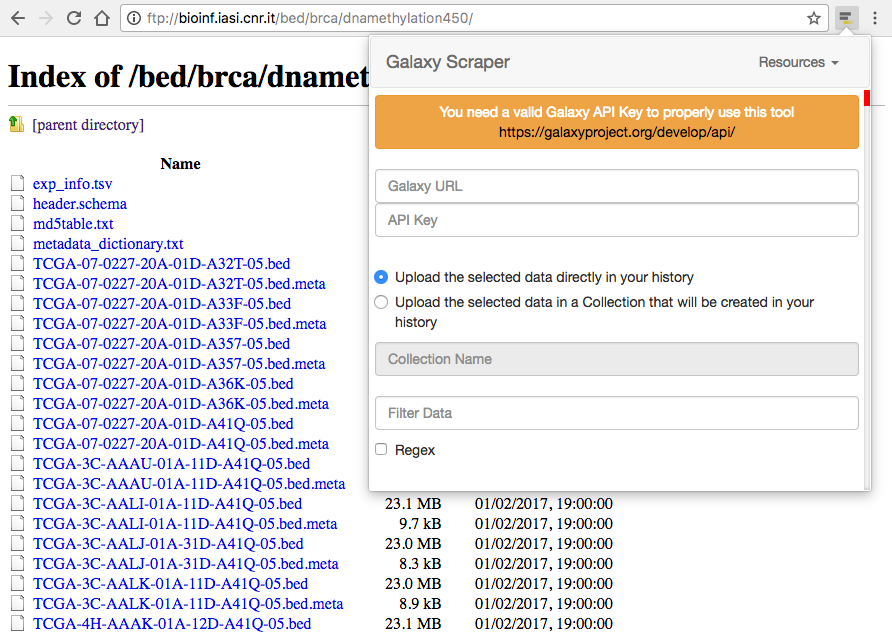
This Chrome extension makes you able to search for every kind of links on the current web page, filter them (also using regular expressions), and send them to Galaxy by specifying the address in which Galaxy is running, and the API Key associated to your account, as shown on the following figure.
Features
The Galaxy Scraper tool has a couple of powerful features that help to easily identify the data inside a web page and to organize them in collections on the Galaxy side:
1. filtering data: the extension automatically search for every kind of links in the current web page. This means that not every extracted links will be related to some data. For this reason the filter operation will help you to select only the links that contains a specific string. Referring to the example shown in the figure above, you can extract the META files by specifying the string meta in the filter field (it is worth noting that the string meta could appear in any position of the link, so it is not guaranteed that every extracted links will refer to META files. In this case the use of regular expressions is strongly recommended);
2. organizing data: by default, the selected data will be sent to your current Galaxy history. Otherwise, you can specify the name of a Collection that will be automatically created on your history for a better data organization.
NOTES: it is worth noting that you must have an account on the specified Galaxy instance, and a valid API Key. As reported on the official Galaxy API Documentation:
To use the API, you must first generate an API Key for the account you want to access Galaxy from. Please note that this key acts as an alternate means to access your account, and should be treated with the same care as your login password. You can do so in the UI under user preferences (while logged in).
Owner
- Name: Fabio Cumbo
- Login: cumbof
- Kind: user
- Location: Cleveland, OH, USA
- Company: Genomic Medicine Institute, Lerner Research Institute, Cleveland Clinic
- Website: https://cumbof.github.io/
- Twitter: cumbofabio
- Repositories: 14
- Profile: https://github.com/cumbof
Ph.D. in Computer Science and Automation Engineering, Postdoctoral Research Fellow @BlankenbergLab, GMI, LRI, Cleveland Clinic, USA
GitHub Events
Total
Last Year
Issues and Pull Requests
Last synced: over 1 year ago
All Time
- Total issues: 0
- Total pull requests: 0
- Average time to close issues: N/A
- Average time to close pull requests: N/A
- Total issue authors: 0
- Total pull request authors: 0
- Average comments per issue: 0
- Average comments per pull request: 0
- Merged pull requests: 0
- Bot issues: 0
- Bot pull requests: 0
Past Year
- Issues: 0
- Pull requests: 0
- Average time to close issues: N/A
- Average time to close pull requests: N/A
- Issue authors: 0
- Pull request authors: 0
- Average comments per issue: 0
- Average comments per pull request: 0
- Merged pull requests: 0
- Bot issues: 0
- Bot pull requests: 0