Science Score: 26.0%
This score indicates how likely this project is to be science-related based on various indicators:
-
○CITATION.cff file
-
✓codemeta.json file
Found codemeta.json file -
✓.zenodo.json file
Found .zenodo.json file -
○DOI references
-
○Academic publication links
-
○Committers with academic emails
-
○Institutional organization owner
-
○JOSS paper metadata
-
○Scientific vocabulary similarity
Low similarity (11.7%) to scientific vocabulary
Keywords from Contributors
Repository
Tool to support backtests
Basic Info
- Host: GitHub
- Owner: cvxgrp
- License: other
- Language: Python
- Default Branch: main
- Homepage: http://www.cvxgrp.org/simulator
- Size: 46.2 MB
Statistics
- Stars: 46
- Watchers: 4
- Forks: 5
- Open Issues: 11
- Releases: 111
Metadata Files
README.md
🔄 cvxsimulator






A simple yet powerful simulator for investment strategies and portfolio backtesting.
Given a universe of $m$ assets we are given prices for each of them at time $t1, t2, \ldots t_n$, e.g. we operate using an $n \times m$ matrix where each column corresponds to a particular asset.
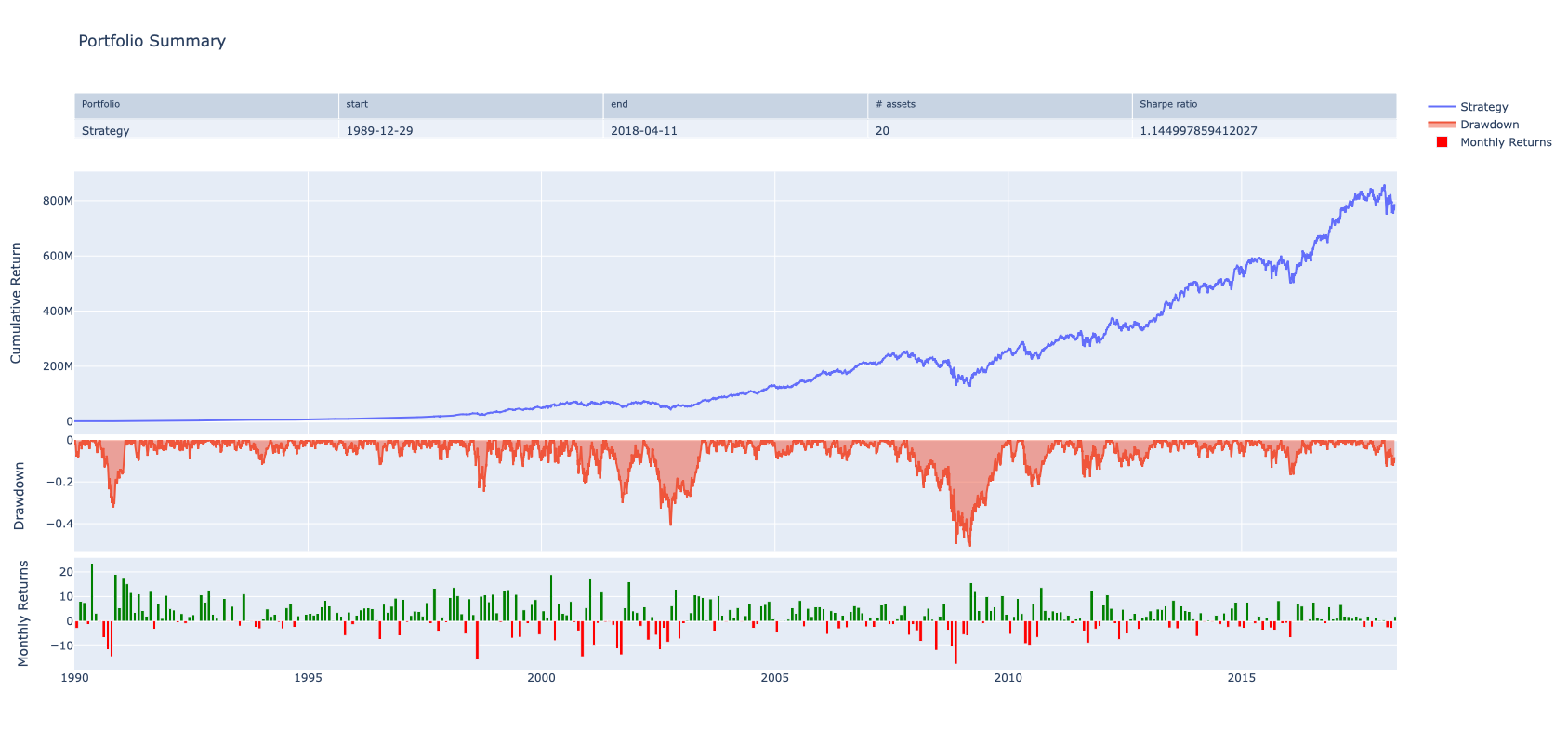
In a backtest we iterate in time (e.g. row by row) through the matrix and allocate positions to all or some of the assets. This tool helps to simplify the accounting. It keeps track of the available cash, the profits achieved, etc.
📥 Installation
Install cvxsimulator via pip:
bash
pip install cvxsimulator
📊 Creating Portfolios
The simulator is completely agnostic to the trading policy/strategy. Our approach follows a rather common pattern:
We demonstrate these steps with simple example policies. They are never good strategies, but are always valid ones.
Create the builder object
The user defines a builder object by loading prices and initializing the amount of cash used in an experiment:
```python
import pandas as pd from cvxsimulator import Builder
# For doctest, we'll create a small DataFrame instead of reading from a file dates = pd.daterange('2020-01-01', periods=5) prices = pd.DataFrame({ ... 'A': [100, 102, 104, 103, 105], ... 'B': [50, 51, 52, 51, 53], ... 'C': [200, 202, 198, 205, 210], ... 'D': [75, 76, 77, 78, 79] ...}, index = dates) b = Builder(prices=prices, initialaum=1e6)
```
Prices have to be valid, there may be NaNs only at the beginning and the end of each column in the frame. There can be no NaNs hiding in the middle of any time series.
It is also possible to specify a model for trading costs. The builder helps to fill up the frame of positions. Only once done we construct the actual portfolio.
Loop through time
We have overloaded the __iter__ and __setitem__ methods to create a custom loop.
Let's start with a first strategy. Each day we choose two names from the
universe at random.
Buy one (say 0.1 of your portfolio wealth) and short one the same amount.
```python
import pandas as pd import numpy as np from cvxsimulator import Builder
dates = pd.daterange('2020-01-01', periods=5) prices = pd.DataFrame({ ... 'A': [100, 102, 104, 103, 105], ... 'B': [50, 51, 52, 51, 53], ... 'C': [200, 202, 198, 205, 210], ... 'D': [75, 76, 77, 78, 79] ...}, index = dates) b = Builder(prices=prices, initialaum=1e6) np.random.seed(42) # Set seed for reproducibility
for t, state in b: ... # pick two assets deterministically for doctest ... pair = ['A', 'B'] # Use first two assets instead of random choice ... # compute the pair ... units = pd.Series(index=state.assets, data=0.0) ... units[pair] = [state.nav, -state.nav] / state.prices[pair].values ... # update the position ... b.position = 0.1 * units ... # Do not apply trading costs ... b.aum = state.aum
# Check the final positions b.units.iloc[-1][['A', 'B']] A 951.409346 B - 1884.867573 Name: 2020 - 01 - 05 00: 00:00, dtype: float64
```
Here t is the growing list of timestamps, e.g. in the first iteration t is $t1$, in the second iteration it will be $t1, t2$ etc.
A lot of magic is hidden in the state variable. The state gives access to the currently available cash, the current prices and the current valuation of all holdings.
Here's a slightly more realistic loop. Given a set of $4$ assets we want to implement the popular $1/n$ strategy.
```python
import pandas as pd from cvxsimulator import Builder
dates = pd.date_range('2020-01-01', periods=5) prices = pd.DataFrame({ ... 'A': [100, 102, 104, 103, 105], ... 'B': [50, 51, 52, 51, 53], ... 'C': [200, 202, 198, 205, 210], ... 'D': [75, 76, 77, 78, 79] ...}, index = dates)
b2 = Builder(prices=prices, initial_aum=1e6)
for t, state in b2: ... # each day we invest a quarter of the capital in the assets ... b2.position = 0.25 * state.nav / state.prices ... b2.aum = state.aum
# Check the final positions b2.units.iloc[-1] A 2508.939034 B 4970.539596 C 1254.469517 D 3334.665805 Name: 2020 - 01 - 05 00: 00:00, dtype: float64
```
Note that we update the position at the last element in the t list using a series of actual units rather than weights or cashpositions. The builder class also exposes setters for such alternative conventions.
```python
# Setup code for this example import pandas as pd import numpy as np from cvxsimulator import Builder
dates = pd.date_range('2020-01-01', periods=5) prices = pd.DataFrame({ ... 'A': [100, 102, 104, 103, 105], ... 'B': [50, 51, 52, 51, 53], ... 'C': [200, 202, 198, 205, 210], ... 'D': [75, 76, 77, 78, 79] ...}, index = dates)
b3 = Builder(prices=prices, initial_aum=1e6)
for t, state in b3: ... # each day we invest a quarter of the capital in the assets ... b3.weights = np.ones(4) * 0.25 ... b3.aum = state.aum
# Check the final positions b3.units.iloc[-1] A 2508.939034 B 4970.539596 C 1254.469517 D 3334.665805 Name: 2020 - 01 - 05 00: 00:00, dtype: float64
```
Build the portfolio
Once finished it is possible to build the portfolio object:
```python
import pandas as pd import numpy as np from cvxsimulator import Builder
dates = pd.date_range('2020-01-01', periods=5) prices = pd.DataFrame({ ... 'A': [100, 102, 104, 103, 105], ... 'B': [50, 51, 52, 51, 53], ... 'C': [200, 202, 198, 205, 210], ... 'D': [75, 76, 77, 78, 79] ...}, index = dates)
b3 = Builder(prices=prices, initial_aum=1e6)
for t, state in b3: ... b3.weights = np.ones(4) * 0.25 ... b3.aum = state.aum
# Build the portfolio from one of our builders portfolio = b3.build()
# Verify the portfolio was created successfully type(portfolio).name 'Portfolio'
```
📈 Analytics
The portfolio object supports further analysis and exposes a number of properties, e.g.:
```python
# Setup code for this example import pandas as pd import numpy as np from cvxsimulator import Builder
dates = pd.date_range('2020-01-01', periods=5) prices = pd.DataFrame({ ... 'A': [100, 102, 104, 103, 105], ... 'B': [50, 51, 52, 51, 53], ... 'C': [200, 202, 198, 205, 210], ... 'D': [75, 76, 77, 78, 79] ...}, index = dates)
b3 = Builder(prices=prices, initial_aum=1e6)
for t, state in b3: ... b3.weights = np.ones(4) * 0.25 ... b3.aum = state.aum portfolio = b3.build()
# Access portfolio properties len(portfolio.nav) # Length of the NAV series 5 portfolio.nav.name # Name of the NAV series 'NAV'
# Check the equity (positions in cash terms) portfolio.equity.shape (5, 4)
```
It is possible to generate a snapshot of the portfolio:
```python
# Setup code for this example import pandas as pd import numpy as np from cvxsimulator import Builder
dates = pd.date_range('2020-01-01', periods=5) prices = pd.DataFrame({ ... 'A': [100, 102, 104, 103, 105], ... 'B': [50, 51, 52, 51, 53], ... 'C': [200, 202, 198, 205, 210], ... 'D': [75, 76, 77, 78, 79] ...}, index = dates)
b3 = Builder(prices=prices, initial_aum=1e6)
for t, state in b3: ... b3.weights = np.ones(4) * 0.25 ... b3.aum = state.aum portfolio = b3.build()
# Generate a snapshot (returns a plotly figure) fig = portfolio.snapshot()
# For doctest, we'll just check the type of the returned object isinstance(fig, object) True
```
🛠️ Development
UV Package Manager
Start with:
bash
make install
This will install uv and create the virtual environment defined in pyproject.toml and locked in uv.lock.
Marimo Notebooks
We install marimo on the fly within the aforementioned virtual environment. Execute:
bash
make marimo
This will install and start marimo for interactive notebook development.
📚 Documentation
- Full documentation is available at cvxgrp.org/simulator/book
- API reference can be found in the documentation
- Example notebooks are included in the repository under the
bookdirectory
🤝 Contributing
Contributions are welcome! Here's how you can contribute:
- Fork the repository
- Create a feature branch:
git checkout -b feature-name - Commit your changes:
git commit -m 'Add some feature' - Push to the branch:
git push origin feature-name - Open a pull request
Please make sure to update tests as appropriate and follow the code style of the project.
📄 License
This project is licensed under the Apache License 2.0 - see the LICENSE file for details.
Copyright 2023 Stanford University Convex Optimization Group
Owner
- Name: Stanford University Convex Optimization Group
- Login: cvxgrp
- Kind: organization
- Location: Stanford, CA
- Website: www.stanford.edu/~boyd
- Repositories: 102
- Profile: https://github.com/cvxgrp
GitHub Events
Total
- Create event: 160
- Release event: 22
- Issues event: 37
- Watch event: 10
- Delete event: 122
- Push event: 659
- Pull request review comment event: 1
- Pull request review event: 10
- Pull request event: 285
Last Year
- Create event: 160
- Release event: 22
- Issues event: 37
- Watch event: 10
- Delete event: 122
- Push event: 659
- Pull request review comment event: 1
- Pull request review event: 10
- Pull request event: 285
Committers
Last synced: 10 months ago
Top Committers
| Name | Commits | |
|---|---|---|
| Thomas Schmelzer | t****r@g****m | 384 |
| Thomas Schmelzer | t****r@a****e | 233 |
| renovate[bot] | 2****]@u****m | 91 |
| dependabot[bot] | 4****]@u****m | 87 |
| pre-commit-ci[bot] | 6****]@u****m | 3 |
| tschm | 2****m@u****m | 3 |
| kasperjo | 7****o@u****m | 2 |
| Zé Vinícius | j****a@g****m | 1 |
Committer Domains (Top 20 + Academic)
Issues and Pull Requests
Last synced: 10 months ago
All Time
- Total issues: 159
- Total pull requests: 610
- Average time to close issues: 2 days
- Average time to close pull requests: about 7 hours
- Total issue authors: 4
- Total pull request authors: 5
- Average comments per issue: 0.02
- Average comments per pull request: 0.03
- Merged pull requests: 564
- Bot issues: 2
- Bot pull requests: 251
Past Year
- Issues: 27
- Pull requests: 292
- Average time to close issues: about 12 hours
- Average time to close pull requests: about 5 hours
- Issue authors: 2
- Pull request authors: 4
- Average comments per issue: 0.0
- Average comments per pull request: 0.01
- Merged pull requests: 264
- Bot issues: 1
- Bot pull requests: 142
Top Authors
Issue Authors
- tschm (155)
- kasperjo (2)
- dependabot[bot] (1)
- renovate[bot] (1)
Pull Request Authors
- tschm (356)
- dependabot[bot] (141)
- renovate[bot] (104)
- pre-commit-ci[bot] (6)
- kasperjo (3)
Top Labels
Issue Labels
Pull Request Labels
Packages
- Total packages: 1
-
Total downloads:
- pypi 5,026 last-month
- Total dependent packages: 0
- Total dependent repositories: 2
- Total versions: 98
- Total maintainers: 1
pypi.org: cvxsimulator
Simple simulator for investors
- Documentation: https://cvxsimulator.readthedocs.io/
- License: other
-
Latest release: 1.4.4
published 12 months ago