https://github.com/cy-suite/agentscope
Science Score: 36.0%
This score indicates how likely this project is to be science-related based on various indicators:
-
○CITATION.cff file
-
✓codemeta.json file
Found codemeta.json file -
✓.zenodo.json file
Found .zenodo.json file -
○DOI references
-
✓Academic publication links
Links to: arxiv.org -
○Academic email domains
-
○Institutional organization owner
-
○JOSS paper metadata
-
○Scientific vocabulary similarity
Low similarity (10.6%) to scientific vocabulary
Repository
Basic Info
- Host: GitHub
- Owner: cy-suite
- License: apache-2.0
- Language: Python
- Default Branch: main
- Size: 1.18 GB
Statistics
- Stars: 0
- Watchers: 0
- Forks: 0
- Open Issues: 0
- Releases: 0
Metadata Files
README.md
中文主页 | 日本語のホームページ | Tutorial | Roadmap | FAQ
AgentScope: Agent-Oriented Programming for Building LLM Applications






✨ Why AgentScope?
Easy for beginners, powerful for experts.
- Transparent to Developers: Transparent is our FIRST principle. Prompt engineering, API invocation, agent building, workflow orchestration, all are visible and controllable for developers. No deep encapsulation or implicit magic.
- Model Agnostic: Programming once, run with all models. More than 17+ LLM API providers are supported.
- LEGO-style Agent Building: All components are modular and independent. Use them or not, your choice.
- Multi-Agent Oriented: Designed for multi-agent, explicit message passing and workflow orchestration, NO deep encapsulation.
- Native Distribution/Parallelization: Centralized programming for distributed application, and automatic parallelization.
- Highly Customizable: Tools, prompt, agent, workflow, third-party libs & visualization, customization is encouraged everywhere.
- Developer-friendly: Low-code development, visual tracing & monitoring. From developing to deployment, all in one place.
📢 News
- [2025-07-01] A new version AgentScope is under development. In this new version, AgentScope will be more powerful and flexible, with a new architecture and more features. Refer to our Roadmap for more details!
- [2025-04-27] A new 💻 AgentScope Studio is online now. Refer here for more details.
- [2025-03-21] AgentScope supports hooks functions now. Refer to our tutorial for more details.
- [2025-03-19] AgentScope supports 🔧 tools API now. Refer to our tutorial.
- [2025-03-20] Agentscope now supports MCP Server! You can learn how to use it by following this tutorial.
- [2025-03-05] Our 🎓 AgentScope Copilot, a multi-source RAG application is open-source now!
- [2025-02-24] 🇨🇳 Chinese version tutorial is online now!
- [2025-02-13] We have released the 📁 technical report of our solution in SWE-Bench(Verified)!
- [2025-02-07] 🎉🎉 AgentScope has achieved a 63.4% resolve rate in SWE-Bench(Verified).
- [2025-01-04] AgentScope supports Anthropic API now.
👉👉 Older News
💬 Contact
Welcome to join our community on
| Discord | DingTalk |
|----------------------------------------------------------------------------------------------------------------------------------|-----------------------------------------------------------------------------------------------------------------------------------|
|  |
|  |
|
📑 Table of Contents
🚀 Quickstart
💻 Installation
AgentScope requires Python 3.9 or higher.
🛠️ From source
```bash
Pull the source code from GitHub
git clone https://github.com/modelscope/agentscope.git
Install the package in editable mode
cd agentscope pip install -e . ```
📦 From PyPi
bash
pip install agentscope
📝 Example
👋 Hello AgentScope


Creating a basic conversation explicitly between a user and an assistant with AgentScope:
```python from agentscope.agents import DialogAgent, UserAgent import agentscope
Load model configs
agentscope.init( modelconfigs=[ { "configname": "myconfig", "modeltype": "dashscopechat", "modelname": "qwen-max", } ] )
Create a dialog agent and a user agent
dialogagent = DialogAgent( name="Friday", modelconfigname="myconfig", sysprompt="You're a helpful assistant named Friday" ) useragent = UserAgent(name="user")
Build the workflow/conversation explicitly
x = None while x is None or x.content != "exit": x = dialogagent(x) x = useragent(x) ```
🧑🤝🧑 Multi-Agent Conversation
AgentScope is designed for multi-agent applications, offering flexible control over information flow and communication between agents.

```python from agentscope.agents import DialogAgent from agentscope.message import Msg from agentscope.pipelines import sequential_pipeline from agentscope import msghub import agentscope
Load model configs
agentscope.init( modelconfigs=[ { "configname": "myconfig", "modeltype": "dashscopechat", "modelname": "qwen-max", } ] )
Create three agents
friday = DialogAgent( name="Friday", modelconfigname="myconfig", sysprompt="You're a helpful assistant named Friday" )
saturday = DialogAgent( name="Saturday", modelconfigname="myconfig", sysprompt="You're a helpful assistant named Saturday" )
sunday = DialogAgent( name="Sunday", modelconfigname="myconfig", sysprompt="You're a helpful assistant named Sunday" )
Create a chatroom by msghub, where agents' messages are broadcast to all participants
with msghub( participants=[friday, saturday, sunday], announcement=Msg("user", "Counting from 1 and report one number each time without other things", "user"), # A greeting message ) as hub: # Speak in sequence sequential_pipeline([friday, saturday, sunday], x=None) ```
💡 Reasoning with Tools & MCP
Creating a reasoning agent with built-in tools and MCP servers!
```python from agentscope.agents import ReActAgentV2, UserAgent from agentscope.service import ServiceToolkit, executepythoncode import agentscope
agentscope.init( modelconfigs={ "configname": "myconfig", "modeltype": "dashscopechat", "modelname": "qwen-max", } )
Add tools
toolkit = ServiceToolkit() toolkit.add(executepythoncode)
Connect to Gaode MCP server
toolkit.addmcpservers( { "mcpServers": { "amap-amap-sse": { "url": "https://mcp.amap.com/sse?key={YOURGAODEAPI_KEY}" } } } )
Create a reasoning-acting agent
agent = ReActAgentV2( name="Friday", modelconfigname="myconfig", servicetoolkit=toolkit, sysprompt="You're a helpful assistant named Friday." ) useragent = UserAgent(name="user")
Build the workflow/conversation explicitly
x = None while x is None or x.content != "exit": x = agent(x) x = user_agent(x) ```
🔠 Structured Output

Specifying structured output with a Pydantic base model.
```python from agentscope.agents import ReActAgentV2 from agentscope.service import ServiceToolkit from agentscope.message import Msg from pydantic import BaseModel, Field from typing import Literal import agentscope
agentscope.init( modelconfigs={ "configname": "myconfig", "modeltype": "dashscopechat", "modelname": "qwen-max", } )
Create a reasoning-acting agent
agent = ReActAgentV2( name="Friday", modelconfigname="myconfig", servicetoolkit=ServiceToolkit(), max_iters=20 )
class CvModel(BaseModel): name: str = Field(maxlength=50, description="The name") description: str = Field(maxlength=200, description="The brief description") aget: int = Field(gt=0, le=120, description="The age of the person")
class ChoiceModel(BaseModel): choice: Literal["apple", "banana"]
Specify structured output using structured_model
resmsg = agent( Msg("user", "Introduce Einstein", "user"), structuredmodel=CvModel ) print(res_msg.metadata)
Switch to different structured model
resmsg = agent( Msg("user", "Choice a fruit", "user"), structuredmodel=ChoiceModel ) print(res_msg.metadata) ```
✏️ Workflow Orchestration
Routing, parallelization, orchestrator-workers, or evaluator-optimizer. Build your own workflow with AgentScope easily! Taking routing as an example:
```python from agentscope.agents import ReActAgentV2 from agentscope.service import ServiceToolkit from agentscope.message import Msg from pydantic import BaseModel, Field from typing import Literal, Union import agentscope
agentscope.init( modelconfigs={ "configname": "myconfig", "modeltype": "dashscopechat", "modelname": "qwen-max", } )
Workflow: Routing
routingagent = ReActAgentV2( name="Routing", modelconfigname="myconfig", sysprompt="You're a routing agent. Your target is to route the user query to the right follow-up task", servicetoolkit=ServiceToolkit() )
Use structured output to specify the routing task
class RoutingChoice(BaseModel):
yourchoice: Literal[
'Content Generation',
'Programming',
'Information Retrieval',
None
] = Field(description="Choice the right follow-up task, and choice None if the task is too simple or no suitable task")
taskdescription: Union[str, None] = Field(description="The task description", default=None)
resmsg = routingagent( Msg("user", "Help me to write a poem", "user"), structured_model=RoutingChoice )
Execute the follow-up task
if resmsg.metadata["yourchoice"] == "Content Generation": ... elif resmsg.metadata["yourchoice"] == "Programming": ... elif resmsg.metadata["yourchoice"] == "Information Retrieval": ... else: ... ```
⚡️ Distribution and Parallelization


Using to_dist function to run the agent in distributed mode!
```python from agentscope.agents import DialogAgent from agentscope.message import Msg import agentscope
Load model configs
agentscope.init( modelconfigs=[ { "configname": "myconfig", "modeltype": "dashscopechat", "modelname": "qwen-max", } ] )
Using to_dist() to run the agent in distributed mode
agent1 = DialogAgent( name="Saturday", modelconfigname="myconfig" ).todist()
agent2 = DialogAgent( name="Sunday", modelconfigname="myconfig" ).todist()
The two agent will run in parallel
agent1(Msg("user", "Execute task1 ...", "user")) agent2(Msg("user", "Execute task2 ...", "user")) ```
👀 Tracing & Monitoring


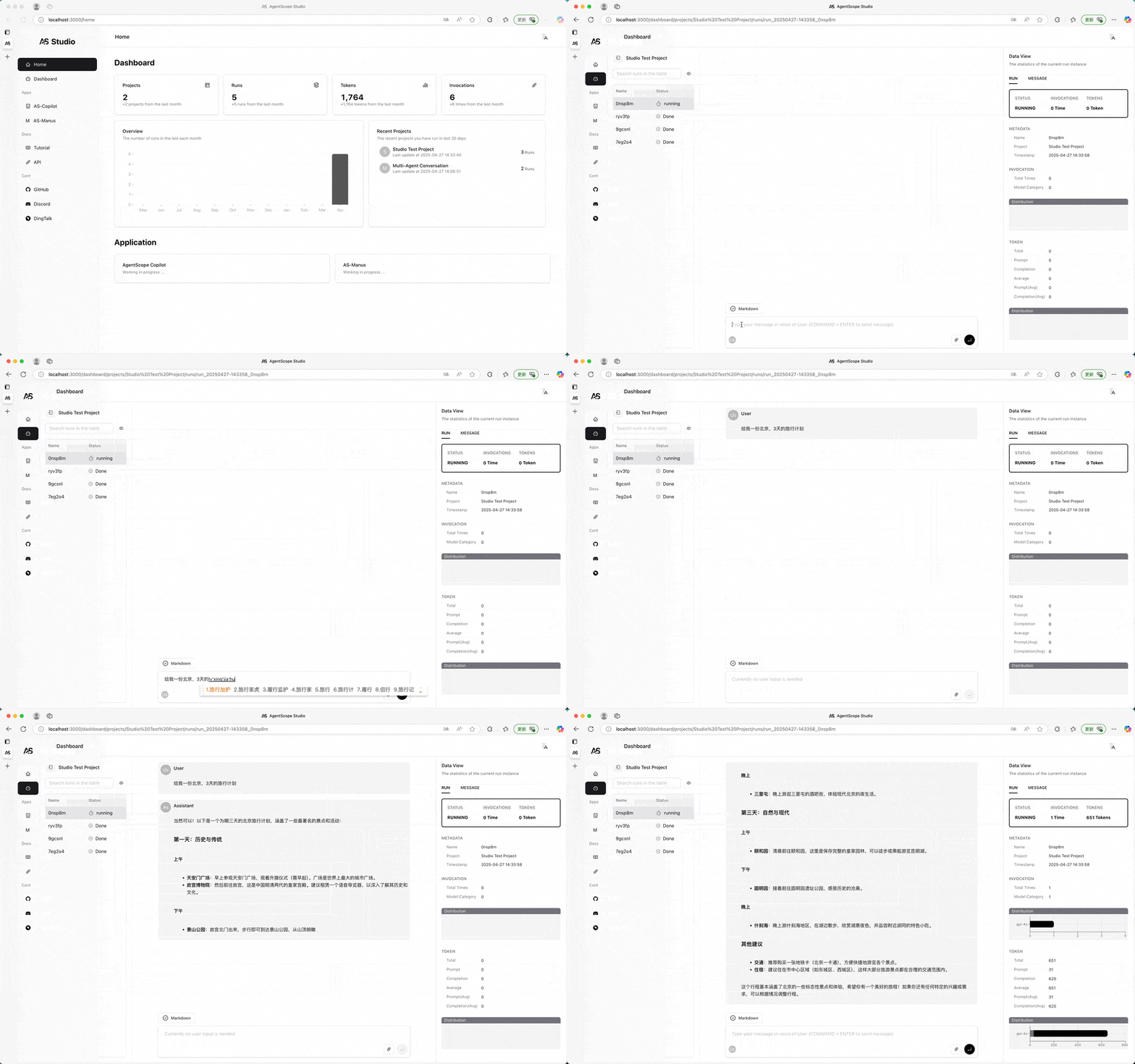
AgentScope provides a local visualization and monitoring tool, AgentScope Studio.
```bash
Install AgentScope Studio
npm install -g @agentscope/studio
Run AgentScope Studio
as_studio ```
```python import agentscope
Connect application to AgentScope Studio
agentscope.init( modelconfigs = { "configname": "myconfig", "modeltype": "dashscopechat", "modelname": "qwenmax", }, studiourl="http://localhost:3000", # The URL of AgentScope Studio )
...
```
⚖️ License
AgentScope is released under Apache License 2.0.
📚 Publications
If you find our work helpful for your research or application, please cite our papers.
AgentScope: A Flexible yet Robust Multi-Agent Platform
@article{agentscope,
    author  = {Dawei Gao and
               Zitao Li and
               Xuchen Pan and
               Weirui Kuang and
               Zhijian Ma and
               Bingchen Qian and
               Fei Wei and
               Wenhao Zhang and
               Yuexiang Xie and
               Daoyuan Chen and
               Liuyi Yao and
               Hongyi Peng and
               Ze Yu Zhang and
               Lin Zhu and
               Chen Cheng and
               Hongzhu Shi and
               Yaliang Li and
               Bolin Ding and
               Jingren Zhou}
    title   = {AgentScope: A Flexible yet Robust Multi-Agent Platform},
    journal = {CoRR},
    volume  = {abs/2402.14034},
    year    = {2024},
}
✨ Contributors
All thanks to our contributors:
Owner
- Name: cy-suite
- Login: cy-suite
- Kind: organization
- Repositories: 1
- Profile: https://github.com/cy-suite
GitHub Events
Total
- Public event: 1
Last Year
- Public event: 1
Dependencies
- actions/checkout master composite
- actions/setup-python master composite
- actions/checkout master composite
- actions/setup-python master composite
- actions/upload-artifact v4 composite
- peaceiris/actions-gh-pages v3 composite
- actions/checkout master composite
- actions/setup-python master composite