https://github.com/czimm79/makie.jl
High level plotting on the GPU.
Science Score: 41.0%
This score indicates how likely this project is to be science-related based on various indicators:
-
✓CITATION.cff file
Found CITATION.cff file -
○codemeta.json file
-
○.zenodo.json file
-
✓DOI references
Found 6 DOI reference(s) in README -
✓Academic publication links
Links to: joss.theoj.org -
○Academic email domains
-
○Institutional organization owner
-
○JOSS paper metadata
-
○Scientific vocabulary similarity
Low similarity (17.8%) to scientific vocabulary
Repository
High level plotting on the GPU.
Basic Info
- Host: GitHub
- Owner: czimm79
- License: mit
- Language: Julia
- Default Branch: master
- Homepage: http://makie.juliaplots.org/stable
- Size: 1.06 GB
Statistics
- Stars: 0
- Watchers: 0
- Forks: 0
- Open Issues: 0
- Releases: 0
Metadata Files
README.md

From the japanese word Maki-e, which is a technique to sprinkle lacquer with gold and silver powder. Data is the gold and silver of our age, so let's spread it out beautifully on the screen!
Check out the documentation here!



Citing Makie
If you use Makie for a scientific publication, please cite our JOSS paper the following way:
Danisch & Krumbiegel, (2021). Makie.jl: Flexible high-performance data visualization for Julia. Journal of Open Source Software, 6(65), 3349, https://doi.org/10.21105/joss.03349
BibTeX entry:
bib
@article{DanischKrumbiegel2021,
  doi = {10.21105/joss.03349},
  url = {https://doi.org/10.21105/joss.03349},
  year = {2021},
  publisher = {The Open Journal},
  volume = {6},
  number = {65},
  pages = {3349},
  author = {Simon Danisch and Julius Krumbiegel},
  title = {Makie.jl: Flexible high-performance data visualization for Julia},
  journal = {Journal of Open Source Software}
}
Installation
Please consider using the backends directly. As explained in the documentation, they re-export all of Makie's functionality. So, instead of installing Makie, just install e.g. GLMakie directly:
julia
julia>]
pkg> add GLMakie
You may check the installed version with:
julia
]st GLMakie
Start using the package:
julia
using GLMakie
Developing Makie
Makie and its backends all live in the Makie monorepo. This makes it easier to change code across all packages. Therefore, dev'ing Makie almost works as with other Julia packages, just, that one needs to also dev the sub packages:
julia
]dev --local Makie # local will clone the repository at ./dev/Makie
]dev dev/Makie/MakieCore dev/Makie/GLMakie dev/Makie/CairoMakie dev/Makie/WGLMakie dev/Makie/RPRMakie
To run the tests, you also should add:
julia
]dev dev/Makie/ReferenceTests
For more info about ReferenceTests, check out its README
Quick start
The following examples are supposed to be self-explanatory. For further information check out the documentation!
A simple parabola
julia
x = 1:10
fig = lines(x, x.^2; label = "Parabola")
axislegend()
save("./assets/parabola.png", fig, resolution = (600, 400))
fig

A more complex plot with unicode characters and LaTeX strings:
Similar to the one on this link
julia
x = -2pi:0.1:2pi
approx = fill(0.0, length(x))
set_theme!(palette = (; patchcolor = cgrad(:Egypt, alpha=0.65)))
fig, axis, lineplot = lines(x, sin.(x); label = L"sin(x)", linewidth = 3, color = :black,
    axis = (; title = "Polynomial approximation of sin(x)",
        xgridstyle = :dash, ygridstyle = :dash,
        xticksize = 10, yticksize = 10, xtickalign = 1, ytickalign = 1,
        xticks = (-π:π/2:π, ["π", "-π/2", "0", "π/2", "π"])
    ))
translate!(lineplot, 0, 0, 2) # move line to foreground
band!(x, sin.(x), approx .+= x; label = L"n = 0")
band!(x, sin.(x), approx .+= -x .^ 3 / 6; label = L"n = 1")
band!(x, sin.(x), approx .+= x .^ 5 / 120; label = L"n = 2")
band!(x, sin.(x), approx .+= -x .^ 7 / 5040; label = L"n = 3")
limits!(-3.8, 3.8, -1.5, 1.5)
axislegend(; position = :ct, bgcolor = (:white, 0.75), framecolor = :orange)
save("./assets/approxsin.png", fig, resolution = (600, 400))
fig

Simple layout: Heatmap, contour and 3D surface plot
julia
x = y = -5:0.5:5
z = x .^ 2 .+ y' .^ 2
set_theme!(colormap = :Hiroshige)
fig = Figure()
ax3d = Axis3(fig[1, 1]; aspect = (1, 1, 1),
    perspectiveness = 0.5, azimuth = 2.19, elevation = 0.57)
ax2d = Axis(fig[1, 2]; aspect = 1)
pltobj = surface!(ax3d, x, y, z; transparency = true)
heatmap!(ax2d, x, y, z; colormap = (:Hiroshige, 0.5))
contour!(ax2d, x, y, z; linewidth = 2, levels = 12, color = :black)
contour3d!(ax3d, x, y, z; linewidth = 4, levels = 12,
    transparency = true)
Colorbar(fig[1, 3], pltobj)
colsize!(fig.layout, 1, Aspect(1, 1.0))
colsize!(fig.layout, 2, Aspect(1, 1.0))
resize_to_layout!(fig)
save("./assets/simpleLayout.png", fig)
fig

⚠️WARNING⚠️. Don't forget to reset to the default Makie settings by doing set_theme!().
Interactive example by AlexisRenchon:
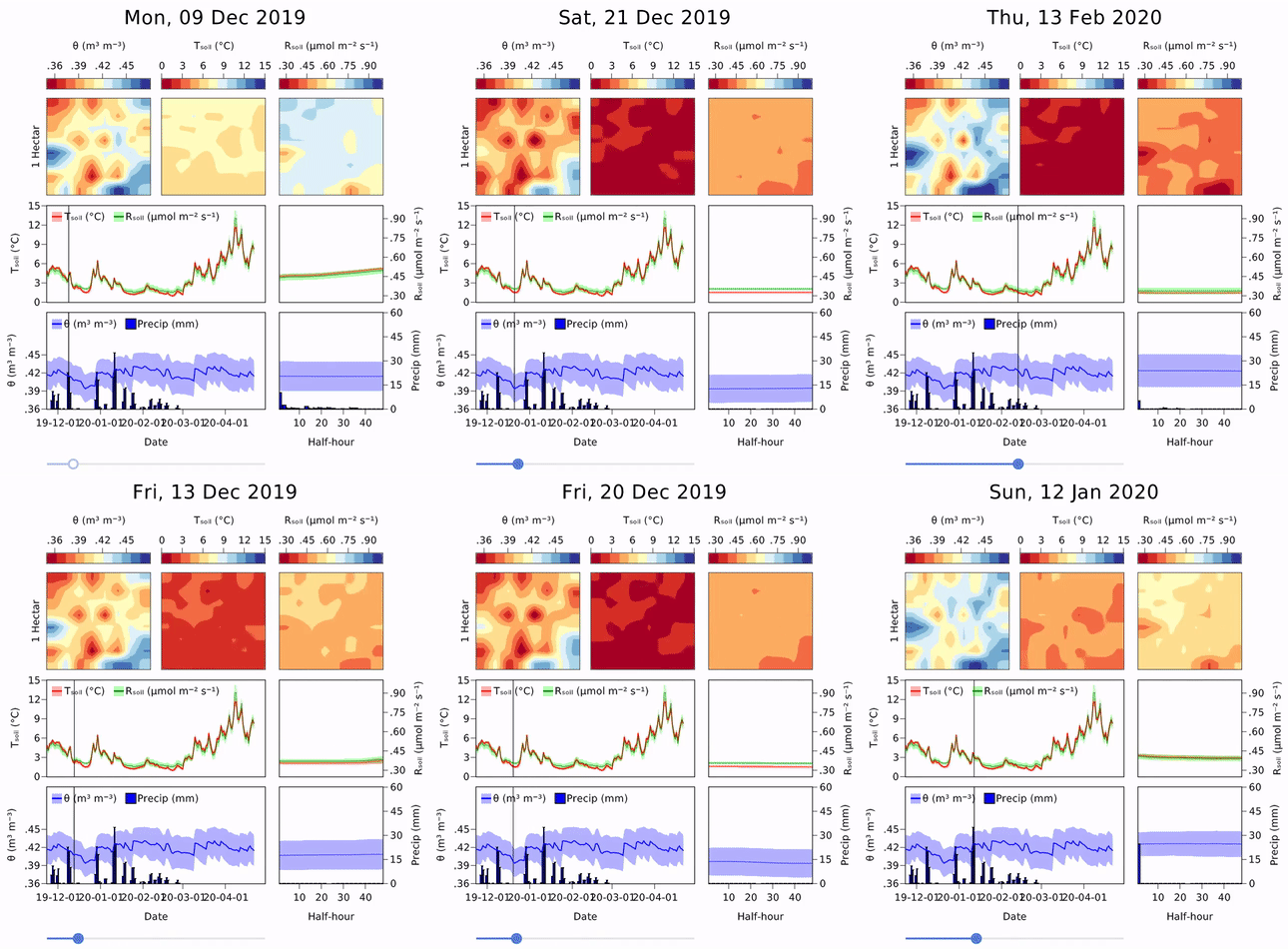
Example from InteractiveChaos.jl

You can follow Makie on twitter to get the latest, outstanding examples:

Sponsors
 Förderkennzeichen: 01IS10S27, 2020
Owner
- Name: Coy Zimmermann
- Login: czimm79
- Kind: user
- Location: Golden, CO
- Company: Colorado School of Mines
- Website: https://orcid.org/0000-0002-0863-0723
- Repositories: 3
- Profile: https://github.com/czimm79
👋 I am a PhD Chemical Engineer researching microbots for biomedical applications. I use Julia and Python for high-throughput data analysis and modeling.
Citation (CITATION.bib)
@article{DanischKrumbiegel2021,
  doi = {10.21105/joss.03349},
  url = {https://doi.org/10.21105/joss.03349},
  year = {2021},
  publisher = {The Open Journal},
  volume = {6},
  number = {65},
  pages = {3349},
  author = {Simon Danisch and Julius Krumbiegel},
  title = {Makie.jl: Flexible high-performance data visualization for Julia},
  journal = {Journal of Open Source Software}
}
GitHub Events
Total
Last Year
Dependencies
- julia-actions/setup-julia latest composite
- actions/checkout v2 composite
- actions/setup-python v2 composite
- actions/upload-artifact v2 composite
- julia-actions/setup-julia v1 composite
- julia-actions/RegisterAction latest composite
- JuliaRegistries/TagBot v1 composite
- actions/checkout v2 composite
- actions/upload-artifact v2 composite
- codecov/codecov-action v1 composite
- julia-actions/cache v1 composite
- julia-actions/julia-processcoverage v1 composite
- julia-actions/setup-julia v1 composite
- actions/checkout v2 composite
- codecov/codecov-action v1 composite
- julia-actions/cache v1 composite
- julia-actions/julia-processcoverage v1 composite
- julia-actions/setup-julia v1 composite
- actions/checkout v2 composite
- julia-actions/cache v1 composite
- julia-actions/setup-julia v1 composite
- actions/checkout v2 composite
- actions/upload-artifact v2 composite
- codecov/codecov-action v1 composite
- julia-actions/cache v1 composite
- julia-actions/julia-processcoverage v1 composite
- julia-actions/setup-julia v1 composite
- mshick/add-pr-comment v1 composite
- actions/checkout v2 composite
- actions/upload-artifact v2 composite
- codecov/codecov-action v1 composite
- julia-actions/cache v1 composite
- julia-actions/julia-processcoverage v1 composite
- julia-actions/setup-julia v1 composite
- actions/checkout v2 composite
- julia-actions/setup-julia v1 composite
- actions/checkout v2 composite
- actions/upload-artifact v2 composite
- codecov/codecov-action v1 composite
- julia-actions/cache v1 composite
- julia-actions/julia-processcoverage v1 composite
- julia-actions/setup-julia v1 composite