Science Score: 64.0%
This score indicates how likely this project is to be science-related based on various indicators:
-
✓CITATION.cff file
Found CITATION.cff file -
✓codemeta.json file
Found codemeta.json file -
✓.zenodo.json file
Found .zenodo.json file -
○DOI references
-
✓Academic publication links
Links to: zenodo.org -
✓Committers with academic emails
1 of 1 committers (100.0%) from academic institutions -
○Institutional organization owner
-
○JOSS paper metadata
-
○Scientific vocabulary similarity
Low similarity (11.7%) to scientific vocabulary
Keywords
Repository
research software engineering taxonomy and criteria
Basic Info
- Host: GitHub
- Owner: rseng
- License: mpl-2.0
- Language: Python
- Default Branch: master
- Homepage: https://rseng.github.io/rseng/
- Size: 31.5 MB
Statistics
- Stars: 11
- Watchers: 3
- Forks: 5
- Open Issues: 1
- Releases: 1
Topics
Metadata Files
README.md
Research Software Engineering




Criteria and taxonomy for research software engineering (rseng).
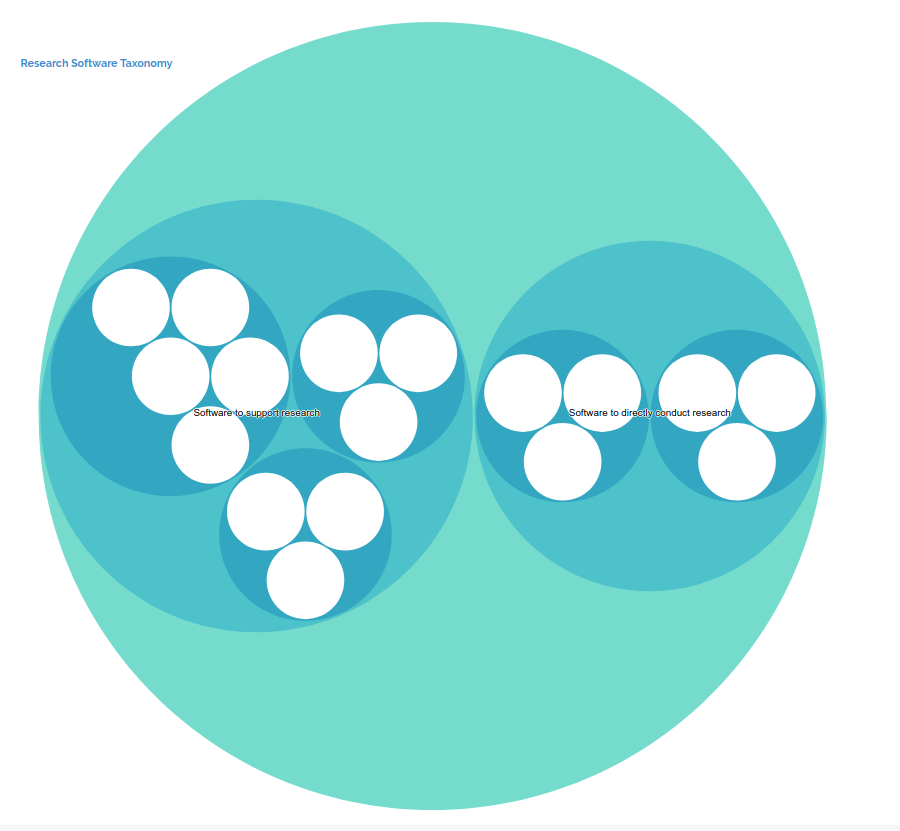
Overview
This repository serves a taxonomy and criteria for research software, intended to be used with the research software encyclopedia. The two are maintained separately for development, and because it might be the case that the criteria and taxonomy would want to be used separately from the encyclopedia.
How do I contribute?
You can edit taxonomy or criteria items by way of opening a pull request against the master branch. When it is merged, an automated task will update the interface served at https://rseng.github.io/rseng. You can also interact with the rseng software for your own needs, shown below.
Usage
Usage of the library includes programmatic (within Python or command line) interaction with criteria or taxonomy, and generation of output files.
Criteria
For usage within Python, you will first want to instantiate a CriteriaSet. If you
don't provide a default file, the library default will be used.
```python from rseng.main.criteria import CriteriaSet cset = CriteriaSet()
[CriteriaSet:6]
```
You can then see questions loaded. Each has a unique id that gives a sense of what is being asked:
python
cset.criteria
{'RSE-research-intention': <rseng.main.criteria.base.Criteria at 0x7f3d2e85d410>,
 'RSE-domain-intention': <rseng.main.criteria.base.Criteria at 0x7f3d2dab8490>,
 'RSE-question-intention': <rseng.main.criteria.base.Criteria at 0x7f3d2dab8910>,
 'RSE-citation': <rseng.main.criteria.base.Criteria at 0x7f3d2db34810>,
 'RSE-usage': <rseng.main.criteria.base.Criteria at 0x7f3d2db340d0>,
 'RSE-absence': <rseng.main.criteria.base.Criteria at 0x7f3d2db34850>}
You can inspect any particular criteria:
```python
cset.criteria['RSE-usage']
cset.criteria['RSE-usage'].uid
'RSE-usage'
cset.criteria['RSE-usage'].question
'Has the software been used by researchers?'
cset.criteria['RSE-usage'].options
['yes', 'no']
```
And further interact with the CriteriaSet, for example export to a tabular file:
python
print(cset.export()) # You can also define a "filename" and/or "sep" here.
RSE-research-intention  Is the software intended for research?  yes,no
RSE-domain-intention    Is the software intended for a particular domain?   yes,no
RSE-question-intention  Was the software created with intention to solve a research question?   yes,no
RSE-citation    Has the software been cited?    yes,no
RSE-usage   Has the software been used by researchers?  yes,no
RSE-absence Would taking away the software be a detriment to research?  yes,no
or iterate through the criteria, or get a list of all of them.
```python
list(cset) [[Criteria:RSE-research-intention,Is the software intended for research?], [Criteria:RSE-domain-intention,Is the software intended for a particular domain?], [Criteria:RSE-question-intention,Was the software created with intention to solve a research question?], [Criteria:RSE-citation,Has the software been cited?], [Criteria:RSE-usage,Has the software been used by researchers?], [Criteria:RSE-absence,Would taking away the software be a detriment to research?]]
for criteria in cset: print(criteria)
[Criteria:RSE-research-intention,Is the software intended for research?] [Criteria:RSE-domain-intention,Is the software intended for a particular domain?] [Criteria:RSE-question-intention,Was the software created with intention to solve a research question?] [Criteria:RSE-citation,Has the software been cited?] [Criteria:RSE-usage,Has the software been used by researchers?] [Criteria:RSE-absence,Would taking away the software be a detriment to research?] ```
Taxonomy
The taxonomy is interacted with in a similar fashion.
python
from rseng.main.taxonomy import Taxonomy
tax = Taxonomy()
It will show you the total number of nodes (nested too):
```python from rseng.main.taxonomy import Taxonomy tax = Taxonomy()
[Taxonomy:24]
```
Validation happens as the default file is loaded. Akin to criteria, the files are located in rseng/main/taxonomy in yaml format, and are dated. You can quickly print an easily viewable, human understandable version of the tree:
python
for name in tax.flatten():
   ...:     print(name)
   ...:
Software to directly conduct research >> Domain-specific software >> Domain-specific hardware
Software to directly conduct research >> Domain-specific software >> Domain-specific optimized software
Software to directly conduct research >> Domain-specific software >> Domain-specific analysis software
Software to directly conduct research >> General software >> Numerical libraries
Software to directly conduct research >> General software >> Data collection
Software to directly conduct research >> General software >> Visualization
Software to support research >> Explicitly for research >> Workflow managers
Software to support research >> Explicitly for research >> Interactive development environments for research
Software to support research >> Explicitly for research >> Provenance and metadata collection tools
Software to support research >> Used for research but not explicitly for it >> Databases
Software to support research >> Used for research but not explicitly for it >> Application Programming Interfaces
Software to support research >> Used for research but not explicitly for it >> Frameworks
Software to support research >> Incidentally used for research >> Operating systems
Software to support research >> Incidentally used for research >> Personal scheduling and task management
Software to support research >> Incidentally used for research >> Version control
Software to support research >> Incidentally used for research >> Text editors and integrated development environments
Software to support research >> Incidentally used for research >> Communication tools or platforms
As of version 0.0.13 there are assigned colors for each taxonomy item to ensure
more consistency across interface generation. The colors to choose from
can be imported from rse.utils.colors.browser_palette, and include those
with "medium" or "dark" in the name. This one hasn't been used yet, and the
list should be consulted for others.
mediumvioletred
Generate
After you install rseng, the rseng executable should be in your path.
You can generate output files for the taxonomy or critiera to a folder
oath that doesn't exist yet. For example, to generate the markdown
files for the static documentation for each of the taxonomy and criteria
we do:
Markdown Jekyll Pages
```bash
rseng generate
$ rseng generate taxonomy docs/taxonomy docs/taxonomy/RSE-taxonomy-domain-hardware.md docs/taxonomy/RSE-taxonomy-optimized.md docs/taxonomy/RSE-taxonomy-analysis.md docs/taxonomy/RSE-taxonomy-numerical libraries.md docs/taxonomy/RSE-taxonomy-data-collection.md docs/taxonomy/RSE-taxonomy-visualization.md docs/taxonomy/RSE-taxonomy-workflow-managers.md docs/taxonomy/RSE-taxonomy-ide-research.md docs/taxonomy/RSE-taxonomy-provenance-metadata-tools.md docs/taxonomy/RSE-taxonomy-databases.md docs/taxonomy/RSE-taxonomy-application-programming-interfaces.md docs/taxonomy/RSE-taxonomy-frameworks.md docs/taxonomy/RSE-taxonomy-operating-systems.md docs/taxonomy/RSE-taxonomy-personal-scheduling-task-management.md docs/taxonomy/RSE-taxonomy-version-control.md docs/taxonomy/RSE-taxonomy-text-editors-ides.md docs/taxonomy/RSE-taxonomy-communication-tools.md ```
The default version generated for each is "latest" but you can add another version as the last argument to change that. Here is generation of the criteria, showing using latest:
```bash
rseng generate
$ rseng generate criteria docs/criteria docs/criteria/RSE-research-intention.md docs/criteria/RSE-domain-intention.md docs/criteria/RSE-question-intention.md docs/criteria/RSE-citation.md docs/criteria/RSE-usage.md docs/_criteria/RSE-absence.md ```
Intended for Visualization (json)
You can also generate a (non flat) version of the taxonomy, specifically a json file that plugs easily into the d3 hierarchy plots.
```
rseng generate taxonomy-json
$ rseng generate taxonomy-json taxonomy.json ```
GitHub Issue Templates
If you want an issue template that can work with a GitHub workflow (both in your software repository) to items via GitHub, both can be produced with updated criteria or taxonomy items via:
bash
$ rseng generate criteria-annotation-template
And the template will be generated (with default filename) in the present working directory:
```markdown
name: Annotate Criteria about: Select this template to annotate criteria for a software repository title: "[CRITERIA]" labels: ''
assignees: ''
Repository
Criteria
- [ ] criteria-RSE-research-intention
- [ ] criteria-RSE-domain-intention
- [ ] criteria-RSE-question-intention
- [ ] criteria-RSE-citation
- [ ] criteria-RSE-usage
- [ ] criteria-RSE-absence ```
You can do the same for a GitHub issues taxonomy annotation template:
bash
$ rseng generate taxonomy-annotation-template
```
name: Annotate Taxonomy about: Select this template to annotate software with taxonomy categories title: "[TAXONOMY]" labels: ''
assignees: ''
Repository
Taxonomy
[ ] RSE-taxonomy-domain-hardware Software to directly conduct research >> Domain-specific software >> Domain-specific hardware
[ ] RSE-taxonomy-optimized Software to directly conduct research >> Domain-specific software >> Domain-specific optimized software
[ ] RSE-taxonomy-analysis Software to directly conduct research >> Domain-specific software >> Domain-specific analysis software
[ ] RSE-taxonomy-numerical libraries Software to directly conduct research >> General software >> Numerical libraries
[ ] RSE-taxonomy-data-collection Software to directly conduct research >> General software >> Data collection
[ ] RSE-taxonomy-visualization Software to directly conduct research >> General software >> Visualization
[ ] RSE-taxonomy-workflow-managers Software to support research >> Explicitly for research >> Workflow managers
[ ] RSE-taxonomy-ide-research Software to support research >> Explicitly for research >> Interactive development environments for research
[ ] RSE-taxonomy-provenance-metadata-tools Software to support research >> Explicitly for research >> Provenance and metadata collection tools
[ ] RSE-taxonomy-databases Software to support research >> Used for research but not explicitly for it >> Databases
[ ] RSE-taxonomy-application-programming-interfaces Software to support research >> Used for research but not explicitly for it >> Application Programming Interfaces
[ ] RSE-taxonomy-frameworks Software to support research >> Used for research but not explicitly for it >> Frameworks
[ ] RSE-taxonomy-operating-systems Software to support research >> Incidentally used for research >> Operating systems
[ ] RSE-taxonomy-personal-scheduling-task-management Software to support research >> Incidentally used for research >> Personal scheduling and task management
[ ] RSE-taxonomy-version-control Software to support research >> Incidentally used for research >> Version control
[ ] RSE-taxonomy-text-editors-ides Software to support research >> Incidentally used for research >> Text editors and integrated development environments
[ ] RSE-taxonomy-communication-tools Software to support research >> Incidentally used for research >> Communication tools or platforms ```
Example in the wild include this one for criteria and this one for the taxonomy.
Note that you should add the templates along with creating labels, one for each
of taxonomy and criteria. A workflow to automatically update criteria/taxonomy items
is being written and will be added soon.
License
- Free software: MPL 2.0 License
Owner
- Name: Research Software Engineers
- Login: rseng
- Kind: organization
- Website: https://rseng.github.io/
- Repositories: 21
- Profile: https://github.com/rseng
An open community for research software engineers (rseng) to collaborate.
Citation (CITATION.cff)
cff-version: 1.1.0
message: "If you use this software, please cite it as below."
authors:
  - family-names: Vanessa
    given-names: Sochat
    orcid: https://orcid.org/0000-0002-4387-3819
title: rseng/rseng: Research Software Encyclopedia Criteria and Taxonomy v0.0.18
version: 0.0.18
date-released: 2021-10-07
GitHub Events
Total
Last Year
Committers
Last synced: over 2 years ago
Top Committers
| Name | Commits | |
|---|---|---|
| vsoch | v****t@s****u | 38 |
Committer Domains (Top 20 + Academic)
Issues and Pull Requests
Last synced: 11 months ago
All Time
- Total issues: 9
- Total pull requests: 21
- Average time to close issues: 9 days
- Average time to close pull requests: about 3 hours
- Total issue authors: 2
- Total pull request authors: 5
- Average comments per issue: 1.11
- Average comments per pull request: 0.43
- Merged pull requests: 20
- Bot issues: 0
- Bot pull requests: 0
Past Year
- Issues: 0
- Pull requests: 0
- Average time to close issues: N/A
- Average time to close pull requests: N/A
- Issue authors: 0
- Pull request authors: 0
- Average comments per issue: 0
- Average comments per pull request: 0
- Merged pull requests: 0
- Bot issues: 0
- Bot pull requests: 0
Top Authors
Issue Authors
- vsoch (8)
- sadielbartholomew (1)
Pull Request Authors
- vsoch (13)
- tabakg (5)
- adrienbernede (1)
- sadielbartholomew (1)
- dpshelio (1)
Top Labels
Issue Labels
Pull Request Labels
Packages
- Total packages: 1
-
Total downloads:
- pypi 17 last-month
- Total dependent packages: 0
- Total dependent repositories: 1
- Total versions: 9
- Total maintainers: 1
pypi.org: rseng
criteria and taxonomy for research software engineering
- Homepage: https://github.com/rseng/rseng
- Documentation: https://rseng.readthedocs.io/
- License: LICENSE
-
Latest release: 0.0.18
published over 5 years ago
Rankings
Maintainers (1)
Dependencies
- actions/checkout v2 composite
- actions/checkout v2 composite