https://github.com/dataobservatory-eu/dataset-template
Serverless RDF publishing scaffold for small datasets
Science Score: 26.0%
This score indicates how likely this project is to be science-related based on various indicators:
-
○CITATION.cff file
-
✓codemeta.json file
Found codemeta.json file -
✓.zenodo.json file
Found .zenodo.json file -
○DOI references
-
○Academic publication links
-
○Academic email domains
-
○Institutional organization owner
-
○JOSS paper metadata
-
○Scientific vocabulary similarity
Low similarity (9.6%) to scientific vocabulary
Repository
Serverless RDF publishing scaffold for small datasets
Basic Info
- Host: GitHub
- Owner: dataobservatory-eu
- License: cc0-1.0
- Language: HTML
- Default Branch: main
- Size: 19.5 KB
Statistics
- Stars: 0
- Watchers: 0
- Forks: 0
- Open Issues: 0
- Releases: 0
Metadata Files
README.md
Dataset Template

Serverless RDF publishing scaffold for small datasets
This repository is a minimal template for publishing small FAIR/Linked Data datasets on the web using only static files (HTML + RDF).\ No server configuration, no database, no triple store — just GitHub Pages, like here: https://dataobservatory-eu.github.io/dataset-template#
What’s inside
-
data.csv— tabular form of the dataset (easy to inspect and edit) -
dataset.ttl— RDF in Turtle (human-friendly, hand-editable) -
dataset.nt— RDF in N-Triples (line-oriented, machine-friendly) -
index.html— human-readable landing page with links and metadata -
README.md— these instructions
The HTML page includes <link rel="alternate"> tags so RDF-aware clients
can automatically discover the Turtle, N-Triples, and JSON-LD files.
How to use
1. Fork this repository
Click the green “Use this template” button on GitHub and create your own copy.
2. Replace the example data
- Edit
data.csvwith your own tabular data. - Regenerate or replace
dataset.ttl,dataset.nt, anddataset.jsonld.
👉 If you use R, you can install the latest released version of
dataset from CRAN with:
install.packages("dataset")
To install the development version from GitHub with pak or remotes:
```
install.packages("pak")
pak::pak("dataobservatory-eu/dataset")
install.packages("remotes")
remotes::install_github("dataobservatory-eu/dataset") ```
The From R to RDF
vignette will show you how to convert an R data.frame or tibble into an RDF
dataset.
👉 If you don’t use R:
- Replace
dataset.ttlwith your own RDF. - You can hand-edit TTL safely; it’s designed to be human-friendly.
- Validate your file using the IDLab Turtle Validator.
Example of hand editing:
```
@base https://dataobservatory-eu.github.io/dataset-template# .
@prefix xsd: http://www.w3.org/2001/XMLSchema# .
@prefix sdmx-dimension: http://purl.org/linked-data/sdmx/2009/dimension# .
@prefix sdmx-attribute: http://purl.org/linked-data/sdmx/2009/attribute# .
@prefix sdmx-code: http://purl.org/linked-data/sdmx/2009/code# .
For hand-editing, some basic Turtle knowledge:
The prefix contains vocabulary definitions, for example, as country (geopolitical entity) names. If you want to change Andorra to Iceland, you need to change https://www.geonames.org/countries/AD/ to https://www.geonames.org/countries/IS/. Because sdmx-dimension is defined (as you see in the prefix) as the geographical reference area, this will read as
observation 1has the reference area ofAndorra(orIceland).For the correct import/export of numbers, dates, characters, the XML definitions is used, if you have a string saying
"music"^^<xsd:string>, you can replace it with another string like"lyrics"^^<xsd:string>.
3. Enable GitHub Pages
This page is now available at https://dataobservatory-eu.github.io/dataset-template/. You would like to see your dataset on your GitHub Page, and you need to do the following.
- Go to Settings → Pages.
- Choose main branch, / (root) folder.
- Save
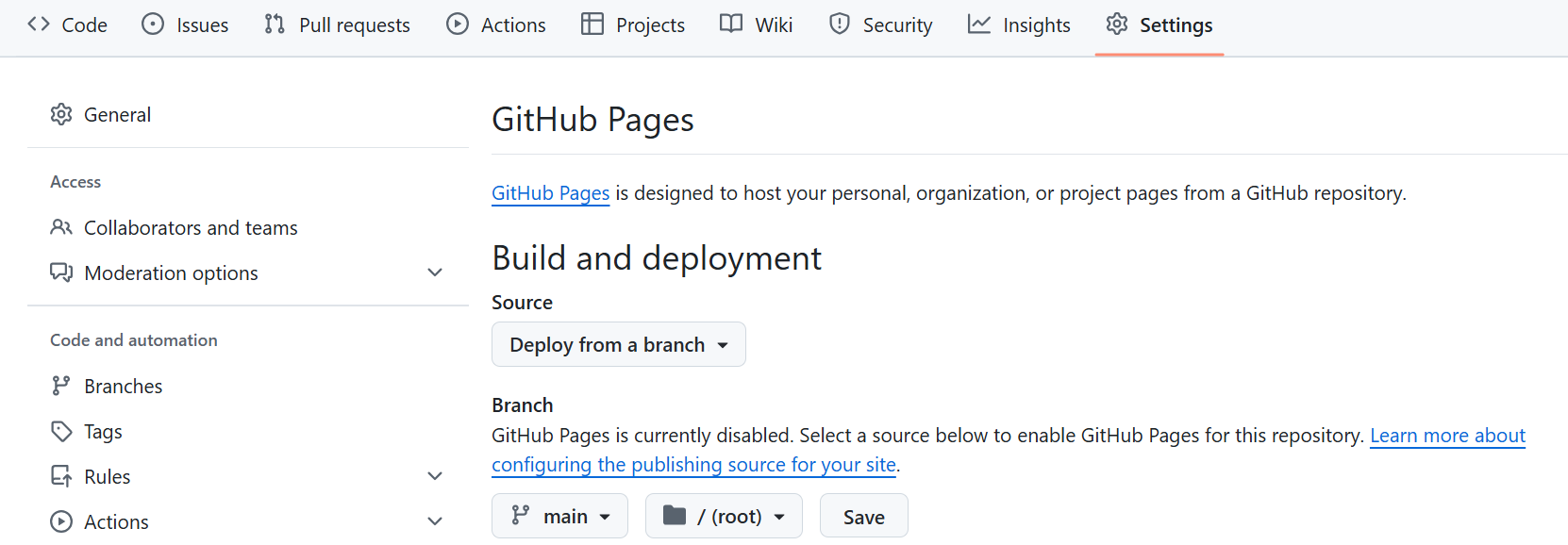
Your dataset will now be available at: https://USERNAME.github.io/REPO-NAME/
with a base namespace
https://USERNAME.github.io/REPO-NAME#
Do not forget to https://dataobservatory-eu.github.io/dataset-template# with your own
repo’s URL when adapting the template in the RDF files, like in the Turtle
example above.
4. Change the HTML file
You can edit a HTML file even with a word processor like Word or LibreOffice. If you want to use our template, and you do not want to create a new page, you can open the file
``` <!DOCTYPE html>
Your Dataset Title
This page provides a human-readable landing page for the example dataset
used in the dataset R package.
Each observation has a persistent identifier such as:
https://dataobservatory-eu.github.io/dataset-template#obs1
For example, obs1 corresponds to the first row in data.csv and is also available in RDF serialisations:
```Developed by Reprex as part of the dataobservatory
ecosystem.
We hope this lowers the barrier for researchers to publish semantically enriched, FAIR datasets — even without specialised infrastructure.
Owner
- Name: dataobservatory.eu
- Login: dataobservatory-eu
- Kind: organization
- Website: https://github.com/dataobservatory-eu/new-contributors
- Repositories: 101
- Profile: https://github.com/dataobservatory-eu
GitHub Events
Total
- Push event: 7
Last Year
- Push event: 7